Developers use Claude Code as an enhanced autocomplete system. They open a file, type a prompt, and hope for the best. The system produces decent output which sometimes reaches great quality. The output exhibits inconsistent results. The system loses track of context and repeats its initial errors.
The solution needs a more organized project, not an extended prompt.
This article showcases a project structure which develops into an AI-powered system used for incident response, that follows Claude Code’s best practices.
Table of contents
The Lie Most AI Developers Believe
The most significant misunderstanding that developers have with AI today is:
“Simply use an LLM and you’re finished!”
Wrong! AI is a system. Not a feature.
A production-grade AI system requires:
- data pipelines: ingestion → chunking → embedding
- retrieval: hybrid search with re-ranking
- memory: semantic caching, in-memory recall
- routing: correct source selection with fallbacks
- generation: structured outputs
- evaluation: offline and online
- security: input and output safeguards
- observability: full query traceability
- infrastructure: async, container-based
Most developers stop at API calls. That’s just the first level! What’s rarely discussed:
repository structure determines how well Claude Code helps you build these layers.
Fix the structure. Everything else falls in place.
AI Incident Response System
This project would be a cloud-based incident management system powered by AI. I’ll be calling it respondly.
- Functions: alert ingestion, severity classification, runbook generation, incident routing, resolution tracking.
- Focus: not the system, but repository design.
- Purpose: show how structure enables Claude Code to operate with context, rules, and workflows.
- Directory structure: reference pattern below. Applicable to any AI system.
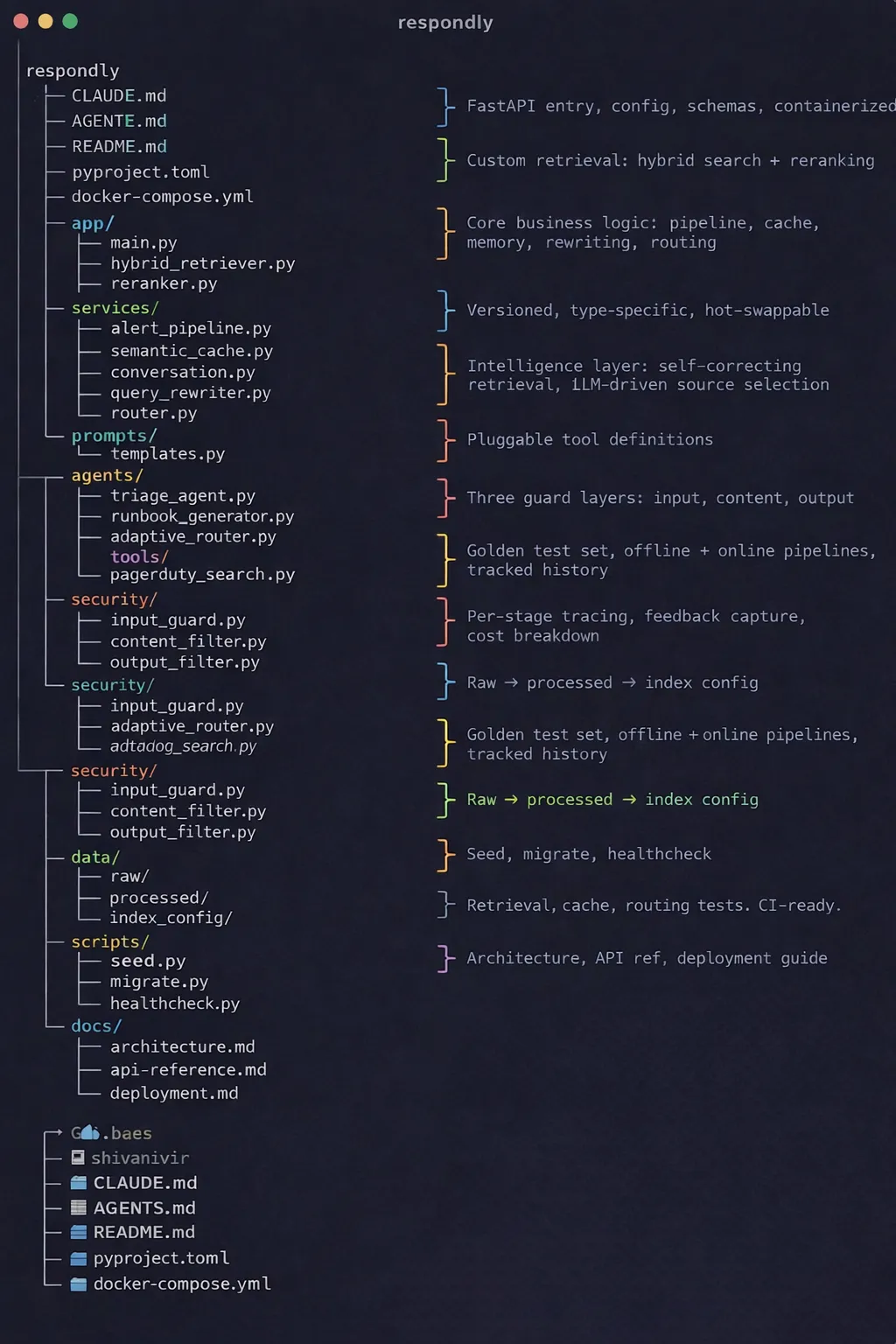
Let’s analyze how the overall structure creates a better experience with Claude Code and then analyze each piece of the structure.
The Four Things Every Claude Code Project Needs
Before diving into creating folders, let’s review the essence of Claude Code. In order to think like an engineer, Claude Code essentially needs four pieces of information:
- The Why – what this component does and why it exists
- The Map – where everything is located
- The Rules – what is permitted and what is prohibited
- The Workflow – how work is completed
All the folders inside of respondly/ directory performs one of the above roles. There is no accidental folder placement.
CLAUDE.md: ROOT Memory
CLAUDE.md is one of the most critical files for this project, not documentation but basically the model’s memory. Claude is looking at CLAUDE.md when it starts each time. You can think of it like giving a new engineer an overview of the system on day one (except Claude is given it every time). You should be brief, to the point and keep it to max three sections.
What respondly/CLAUDE.md contains:
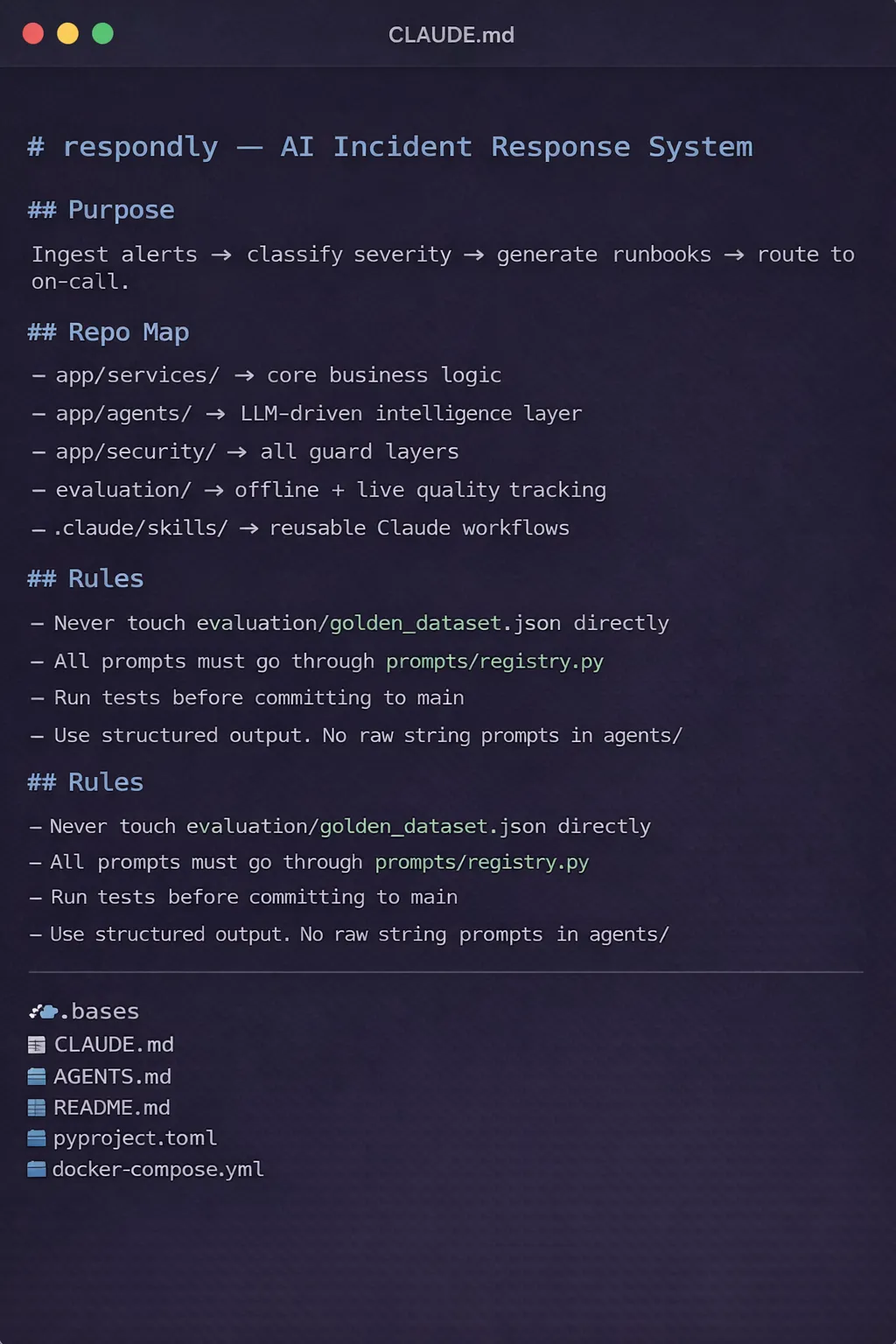
That is all there is to it. There are no philosophies or lengthy descriptions. It is all just to inform the model.
If CLAUDE.md will get too long, then the model will not have the ability to follow the critical instructions it is supposed to follow. Clarity is always more important than size.
.claude/skills: Reusable Expert Modes
In this folder, it is easy to see how Claude Code transitions from generalist to specialist. Reusable instruction codes enable Claude to create workflows which are repeatable.
When Claude learns a new process, there’s no need to explain it each time. Define it once, then Claude will load that process on demand. Claude ships with three unique skills:
- triage-review/SKILL.md: How to accurately check severity of alerts, escalate, and review for false positive patterns and whether or not the alert has a classification code that accurately describes the alert.
- runbook-gen/SKILL.md: How to generate a Runbook. Details on output format, required fields, and tone will be included in the instructions.
- eval-run/SKILL.md: How to run the offline evaluation pipeline. Includes metrics to use, thresholds that will trigger a review, and instructions for logging results.
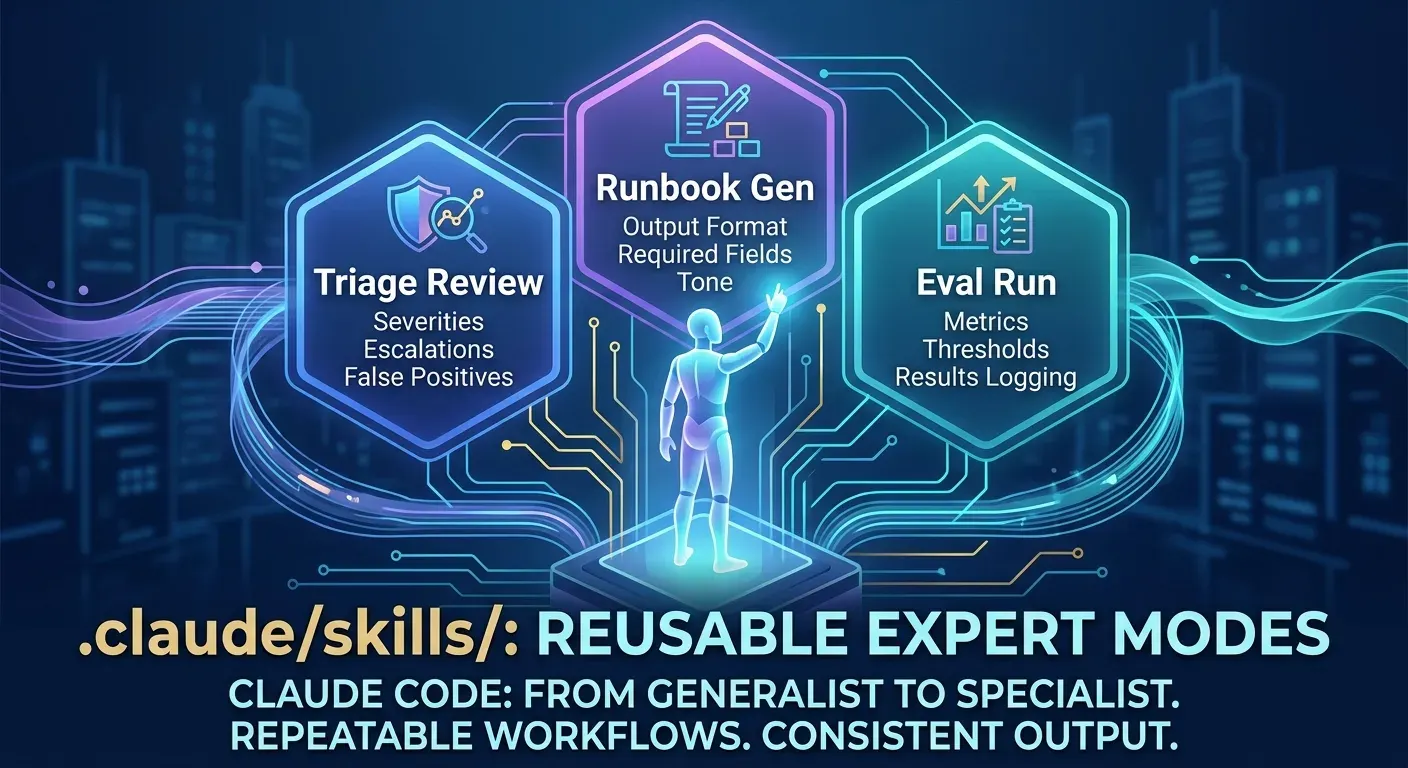
This gives everyone working on the project with Claude Code, a consistent, high-quality output from all users, as it relates to Claude’s use and execution.
.claude/rules: Guardrails That Never Forget
Models, as you know, will often forget. Hooks and rules will not. The rules directory contains the rules that MUST ALWAYS happen, no need for anyone to be reminded.
- code-style.md will ensure that all formatting, import ordering, type and form requirements are followed for ALL python files.
- testing.md will define when tests should run (and protect what modules), how much test coverage must be achieved to pass (i.e. it sets the benchmark on coverage after which nothing else will matter).
Consider the rules NON-NEGOTIABLES that are inherently part of the project. Therefore, any project created from Claude will automatically include the rules without any reminders.
.claude/Docs: Progressive Context, Not Prompt Overload
You do not need to put all the information into one single prompt. This creates an anti-pattern. Rather, build a documentation that Claude can access the required sections at the appropriate time. The respondly/docs directory consists of:
- architecture.md – overall design, relationship between components, data flow diagrams
- api-reference.md – endpoint specifications, request/response schema, authentication patterns
- deployment.md – infrastructure setup, environment variables, Docker Compose setup
Claude does not need to remember all this documentation; it only needs to know where to obtain the information it requires. Therefore, this alone will reduce a substantial number of mistakes.
Local CLAUDE.md Files: Context for Danger Zones
There are certain areas of any given codebase that contain hidden complexity. Though on the surface, they initially seem rather straightforward, they aren’t.
For respondly/, these areas of complexity are as follows:
- app/security/ – prompt injection prevention mechanisms, content filtering methods, output validation processes
- app/agents/ – orchestration logic for LLMs, calling external tools, and adaptive routing of requests
- evaluation/ – validity of golden dataset, correctness of evaluation pipeline
Each of these areas has its own local CLAUDE.md file:
App/security/CLAUDE.md
app/agents/CLAUDE.md
evaluation/CLAUDE.md
Within these files, the CLAUDE system gets a clear understanding of what aspects of this area pose a threat, what errors to steer clear of, and what conventions are essential at the time CLAUDE is working within the confines of that directory.
This isolated process reduces the occurrence of LLM-enabled bugs significantly within high-stakes modules.
Why the agents/Layer is the Real Intelligence Layer?
Respondly/ has created a multi-agent framework. Inside the respondly/agents/ folder are 4 files:
- triage_agent.py, which classifies alerts based on severity and utilizes a structured output and a golden dataset to continuously recalibrate itself;
- runbook_generator.py to create incident runbooks by figuring out what the task is and then producing step-by-step instructions based on a “learn and adapt” model utilizing LLMs as well as templates and validates outputs;
- adaptive_router.py, which selects an appropriate data source to query (i.e. PagerDuty, Datadog, or internal knowledgebase) based on context;
- tools/, which is where all external integrations plugged into the system reside. Each tool is a standalone module, thus creating a new integration simply requires an addition of 1 file.
It is these traits that set an AI production system apart from an AI demo system (i.e. The ability to be modular with respect to intelligence; to be able to run various tests on each individual component of the system; and the ability to view the chain of events that led up to a particular decision being made).
The Shift That Changes Everything
What most individuals tend to overlook:
Prompting is a momentary measure, while structure is a lasting criterion.
An expertly written prompt will only last you throughout one individual session, however an expertly constructed repository will last for the entirety of the project.
When you project is properly structured:
- Claude understands the purpose of the system without having to be told.
- Claude always abides by the established coding standards in use.
- Claude steers clear of any harmful modules without being specifically warned against the usage of said module.
- Claude can implement complex workflows at a steady rate on a session-by-session basis
This is not a chatbot. This is an engineer who is native to the project.
Conclusion
The most significant mistake people make while developing AI is treating it as a convenience or advanced search feature. Claude is not that; it is a reasoning engine, which requires context, structure, and memory. Each of the respondly/ folders answers one question: What does Claude need to make his judgment in this moment? If you are consistent with your answer, it will no longer be just a tool; you will have created an engineer within your codebase.
The execution plan is straightforward: create a master CLAUDE.md, develop three skills to be reused for repetitive processes. Then establish rules for what you cannot change; drop a set of local context files in your four largest modules to start the creation of your architecture. After you have created those four files, you have established your foundational building blocks for development. Then you should focus on having your architecture in place before scaling up the number of files and/or functions that you create to support your application. You’ll find that everything else will follow.
Frequently Asked Questions
Q1. What is the biggest misconception developers have about AI systems?
A. Developers think using an LLM is enough, but real AI needs structured engineering layers.
Q2. What role does CLAUDE.md play in a project?
A. It acts as model memory, giving concise context on purpose, structure, and rules each session.
Q3. Why is repository structure important for Claude Code?
A. It organizes context and workflows, enabling consistent, engineer-like reasoning from the model.
Data Science Trainee at Analytics Vidhya
I am currently working as a Data Science Trainee at Analytics Vidhya, where I focus on building data-driven solutions and applying AI/ML techniques to solve real-world business problems. My work allows me to explore advanced analytics, machine learning, and AI applications that empower organizations to make smarter, evidence-based decisions.
With a strong foundation in computer science, software development, and data analytics, I am passionate about leveraging AI to create impactful, scalable solutions that bridge the gap between technology and business.
📩 You can also reach out to me at [email protected]