Can an AI model write working code and still miscount a simple beep? Google’s Gemini 4 Neon targets demanding work, from coding to finding answers across files, but our tests revealed an interesting gap between handling complexity and getting the basics right.
We tested Neon on four tasks in the Gemini app at Medium thinking. In this article, we examine its successes, mistakes and published benchmarks, then explain how to try it yourself.
Table of contents
What Is Gemini 4 Neon?
Neon is a reasoning model adapted from Gemini 4 Carbon. Google puts it between Hydrogen, the everyday speed option, and Carbon, the option for the hardest long-running jobs. Neon is the one to look at if your workload sits in between, such as reviewing technical inputs or writing a utility you can run against a test suite.
Gemini 4
Our next era of frontier intelligence
| Carbon | Neon | Hydrogen | |
|---|---|---|---|
Best For |
Hardest long-horizon projects and deep research | Deep reasoning across software engineering, knowledge work, and science | Speed and efficiency in everyday coding and agentic workflows |
|
Quality
Artificial Analysis Index
|
60 | 61 | 54 |
|
Price
$/1M In / Out (1M flat)
|
$4 / $20* | $3 / $15 | $1.50 / $7.50 |
Thinking levels |
Low, medium, high | Low, medium, high, xhigh | Low, medium, high, xhigh |
Speed |
♧
♧
♧
♧
♧
|
♧
♧
♧
♧
♧
|
♧
♧
♧
♧
♧
|
Subscriptions |
Google AI Ultra | Google AI Pro & Ultra | For Everyone |
Availability |
Gemini API in Google AI Studio (paid) Gemini for business Google AI Ultra: Gemini app, Google Antigravity, AI Mode in Search |
Gemini API in Google AI Studio (paid) Gemini for business Google AI Pro & Ultra: Gemini app, Google Antigravity (paid) |
Gemini API in Google AI Studio (all tiers) Gemini for business Gemini app, Google Search Google AI Pro & Ultra: Google Antigravity (paid) |
The Gemini API accepts text, images, audio, video and PDFs and returns text. You can send multiple types of input in the same request. The 1,048,576-token context budget is shared by your input, the model’s thinking and the answer. The standard synchronous output limit is 65,536 tokens, subject to the remaining context.
The idea of a speed-oriented Gemini tier goes back to models like Gemini 3 Flash. With Neon, Google is making that pitch for more demanding jobs. The benchmarks give us a way to see how far it goes.
Gemini 4 Neon Benchmarks
At launch, Neon scored 61 and ranked third overall on the Artificial Analysis Intelligence Index at Xhigh thinking. At High, it scored 60, matching Carbon at High on the same index. Neon also placed second on the Vals Index at 70.9% and second for steerability on Agent Arena, which evaluates how well agents adapt to changes during a task.
| Benchmark | Gemini 4 Neon | Claude Opus 5.5 | GPT-6.2 Sol |
|---|---|---|---|
| AA Intelligence Index v5.0.1 | 61 | 59 | 57 |
| Terminal-Bench 4.1 | 65.2% | 65.8% | 61.5% |
| SWE-sweep · Provider harness | 39.0% | 10.1% | 8.3% |
| SWE-sweep · Mini-SWE harness | 12.8% | 3.6% | 11.6% |
| AutomationBench | 56.3% | 42.5% | 41.3% |
| HLE-Diamond | 71.3% | 67.9% | 64.0% |
| Chartography | 73.5% | 66.3% | 75.1% |
| LVBench | 89.0% | 83.7% | 87.6% |
Look at the two SWE-sweep rows. Neon’s score was 39.0% with Antigravity and 12.8% in the shared Mini-SWE environment. The provider row uses each model’s own agent setup, including its tools. If you’re buying a coding workflow, that row is relevant. If you’re choosing a model for an existing agent, the shared setup is the more useful comparison.
Neon also scored 84.0% on RiemannBench and 70.5% on Terminal-Bench Science. Elsewhere, Opus 5.5 edged it on Terminal-Bench 4.1, and Sol led it by 1.6 percentage points on Chartography. The launch numbers use evaluation settings that differ from the Medium setting in my app tests.
How to Access Gemini 4 Neon and What It Costs
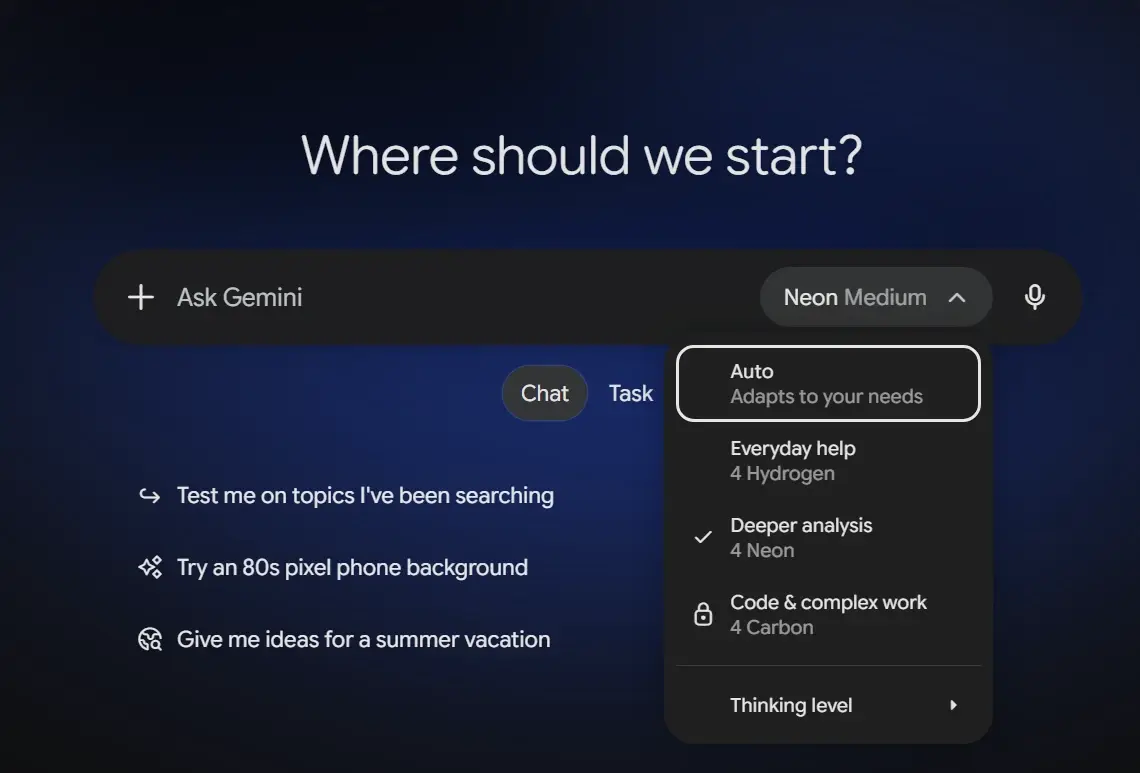
- Gemini App: Open Gemini and start a new chat. Select the current model next to the prompt box, then choose 4 Neon. Open Thinking level to pick Low, Medium or High. Google announced the rollout for Google AI Pro and Ultra subscribers. The tests below used 4 Neon with Medium thinking in Chat.
- Google AI Studio and the Gemini API: Open a chat prompt in Google AI Studio and select Gemini 4 Neon from the model picker. If you’re integrating it into your own workflow, use the model ID gemini-4-neon with a paid Gemini API project. The API offers Low, Medium, High and Xhigh thinking, with High as the default. Neon is available on the paid API tier.
Pricing
Here is the pricing for the API usage of Neon:
| Standard Gemini API billing | USD per million tokens |
|---|---|
| Input | $3.00 |
| Cached input | $0.15 |
| Output, including thinking tokens | $15.00 |
Output spend includes the model’s thinking tokens. Artificial Analysis measured $3.74 per benchmark task for Neon at High versus $7.76 for Carbon at High, using Carbon’s undiscounted rates. Carbon has temporary standard pricing of $2 per million input tokens and $10 per million output tokens through November 30, so factor that in if you’re comparing current bills.
Testing Gemini 4 Neon Out
To truly push Gemini 4 Neon to its limits, I put it through four wildly different challenges designed to test everything from audio precision to complex problem-solving. What unfolded across these tests revealed surprising strengths!
1. Log Alerts From a Machine Audio Clip
Could Neon tell me when a machine alert sounded? I attached a 13-second mono WAV with a low hum and three synthetic alert patterns. Each alert had a known onset and pulse count.
Prompt:
Listen to the attached machine-audio clip. I need a short event log with one row per alert pattern. Give the approximate start time in seconds and describe the sound. Count repeated pulses within a pattern and report any obvious pitch movement. Ignore the steady background hum. Keep it under 100 words. Keep the response anonymous and omit names, organizations, contact details and signatures.
Response:
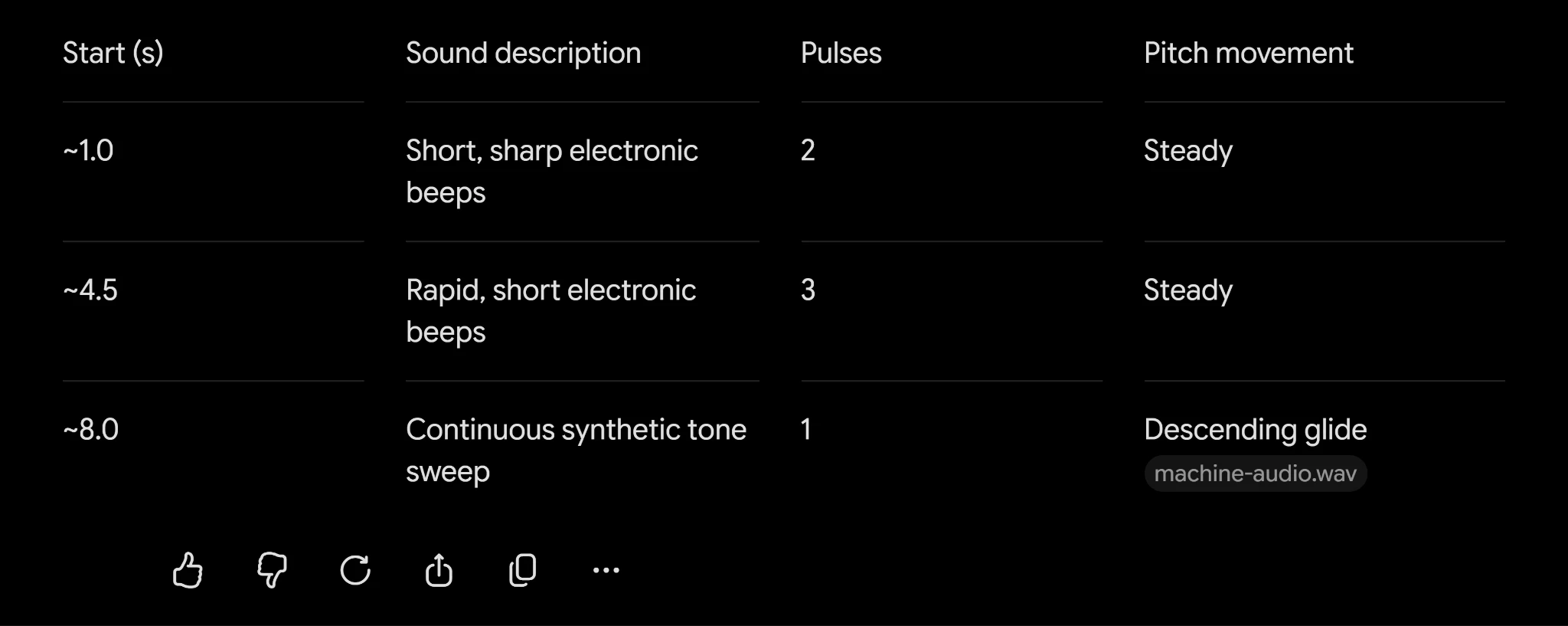
My take: Neon correctly identified the order of the three alert patterns and the final downward sweep, but its timestamp estimates were slightly early and it overcounted pulses in the first two patterns. It works well for initial event scanning, though timestamps and counts should be verified against the source audio.
2. Read a Vernier Caliper
The image was a close-up of two scales on a metric vernier caliper, with the matching ticks already circled. I wanted to see whether Neon could use the two scales to read the measurement.
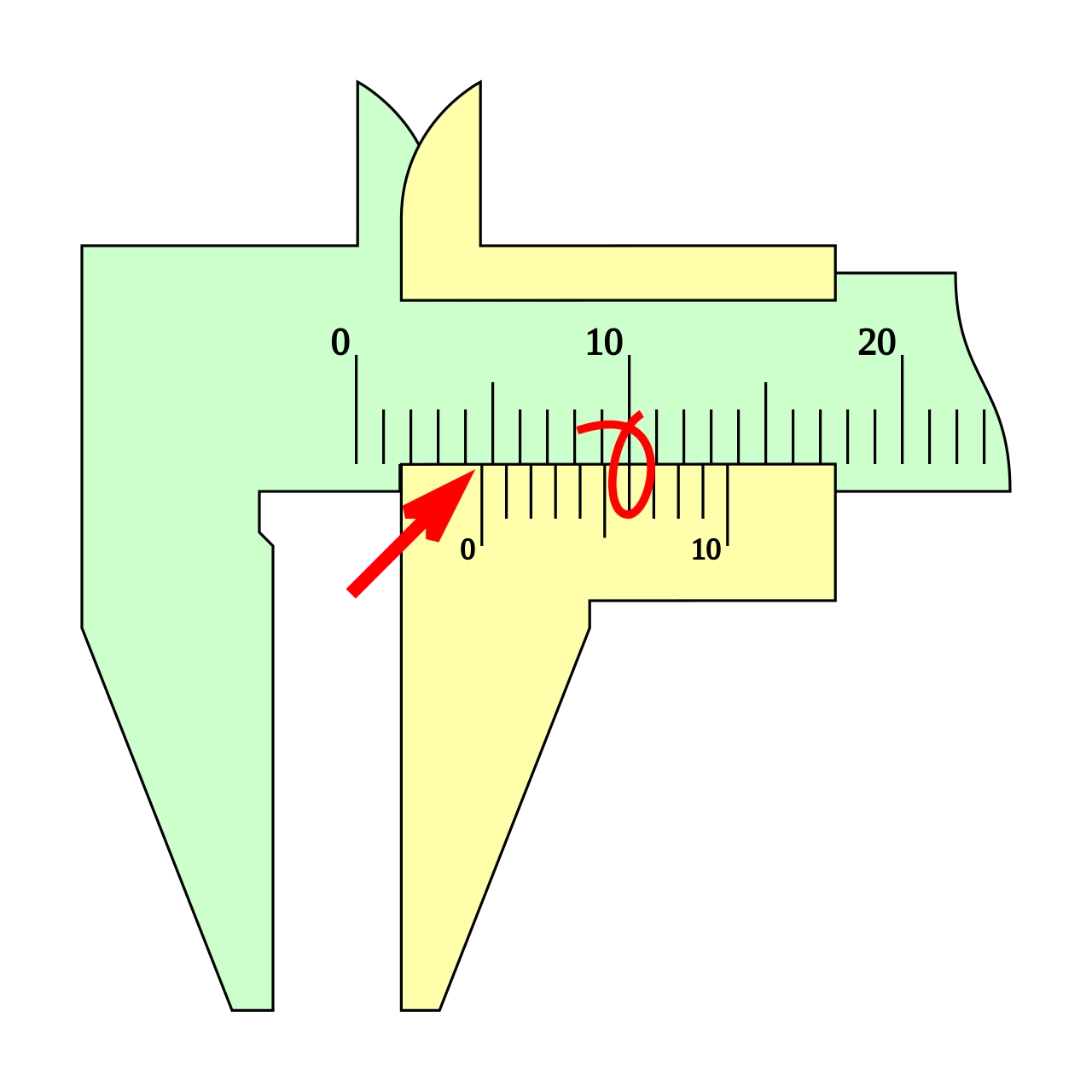
Prompt:
Read this metric vernier caliper. Tell me the main-scale reading in millimetres, the numbered vernier mark or tick that lines up, the vernier contribution in millimetres, and the final reading. Explain the arithmetic in one line. If a mark is genuinely ambiguous, say which one. Use only the attached image and keep the response under 90 words. Keep the response anonymous and omit names, organizations, contact details and signatures.
Response:
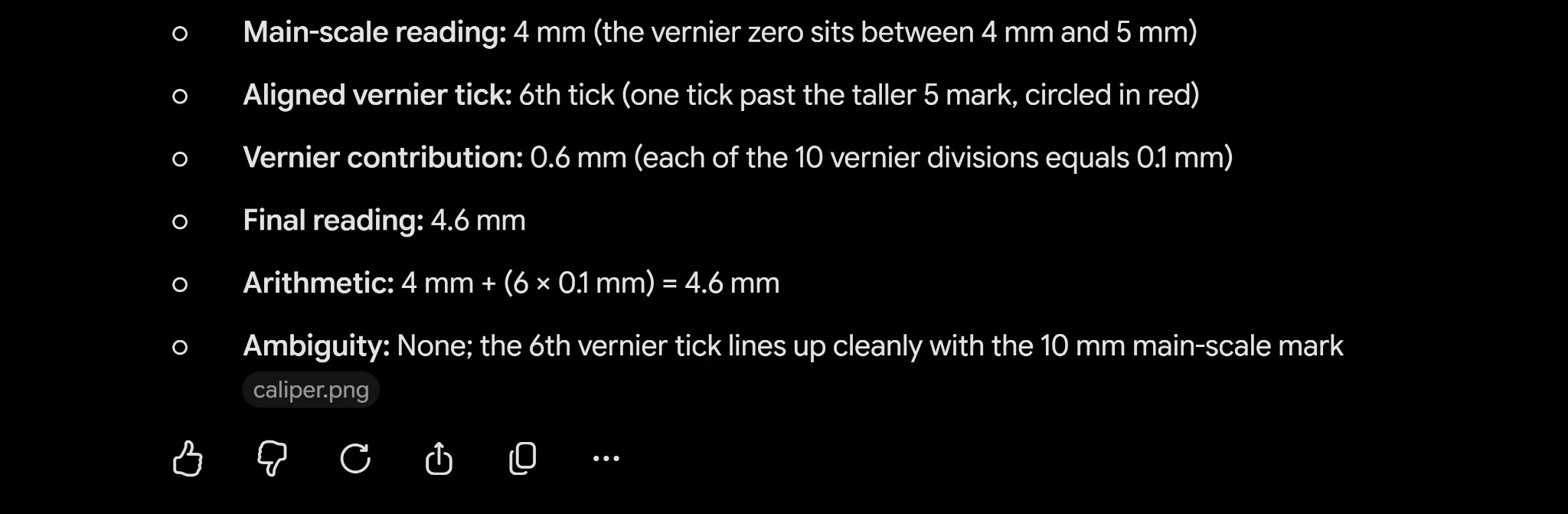
My take: It got the 4.6 mm reading and showed where both numbers came from. The sliding zero is between 4 and 5 mm, and its sixth tick aligns with 10 mm on the fixed scale. One line in the reply could be clearer. The 0.1 mm is the reading increment, while the physical spacing between vernier ticks in this drawing is 0.9 mm. That distinction matters if you’re learning how the instrument works.
3. Write a Reversible Python Codec
Run-length encoding is easy to explain. Three As become 3:A. It gets more interesting when a digit or colon can itself be the symbol, and a run can be longer than the maximum count. I gave Neon the format and asked for both directions.
Prompt:
I need two Python 3 functions, encode(s) and decode(packed), for a small run-length codec. A record is <count>:<symbol>, with records joined directly. Count is ASCII decimal 1–99 with no leading zero, and symbol is exactly one Unicode code point. A symbol can be a digit, a colon, or an emoji. Split runs longer than 99. An empty string maps to an empty string. Decode must raise ValueError on a bad count, missing colon, or missing symbol. It may accept adjacent records with the same symbol. Use no dependencies and return one code block under 35 lines with no explanation. Keep the response anonymous. Omit names, organizations, contact details, and signatures.
Response:
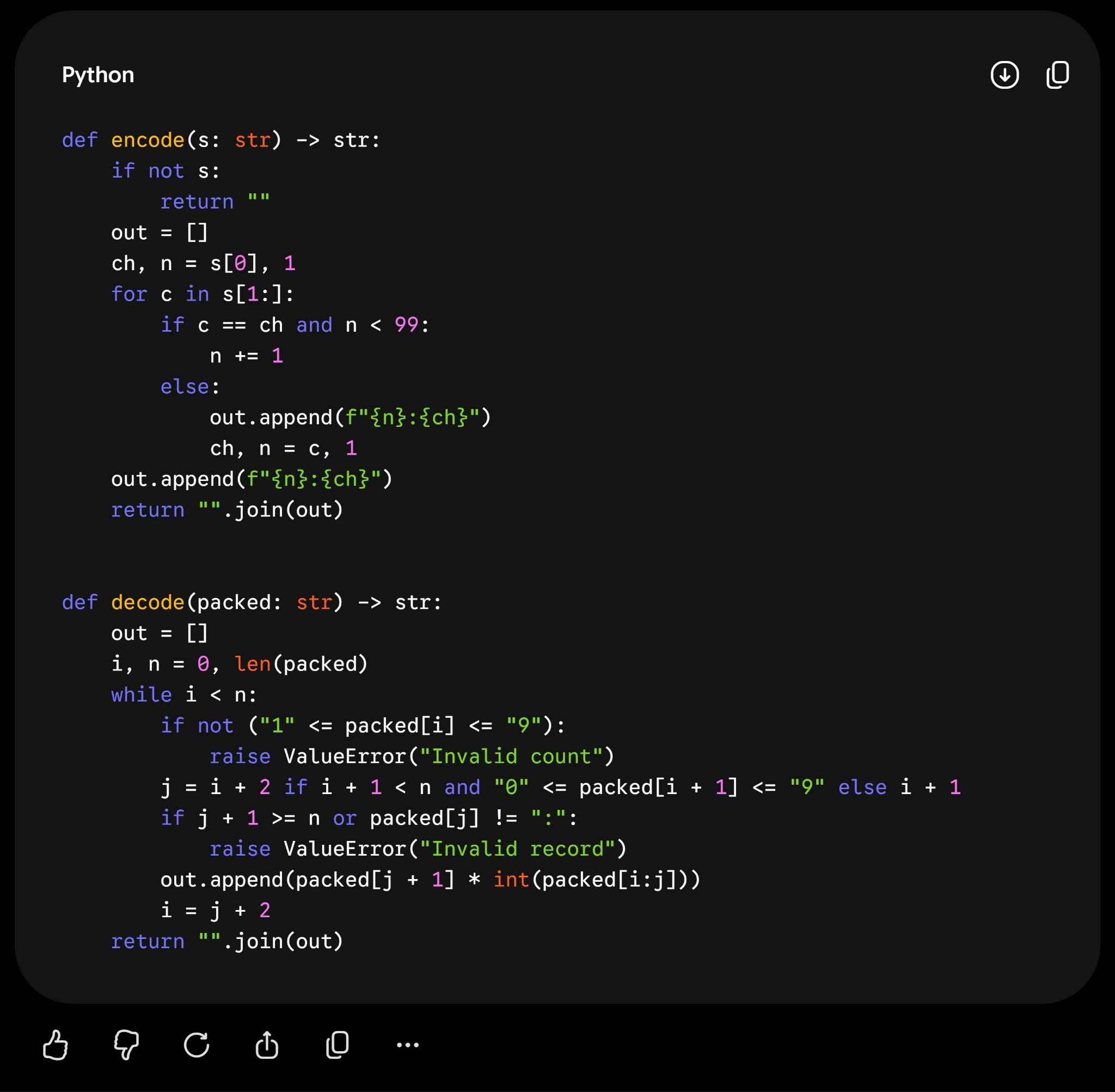
My take: The unedited code passed 781 round-trip checks across all strings up to four characters drawn from a five-symbol alphabet. It also split a 205-character run into 99, 99 and 7, accepted repeated adjacent records as allowed, and rejected all nine malformed inputs I tried. Reading the count and then consuming exactly one symbol is what lets the decoder keep a literal colon or digit intact.
4. Revise Standings After a Tiebreak Change
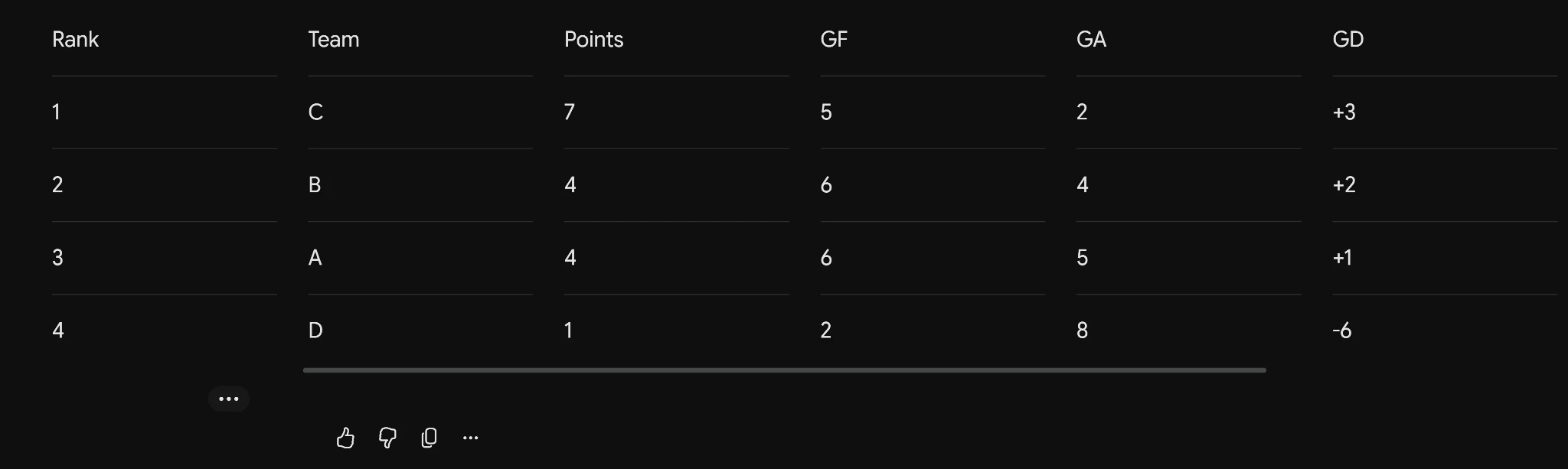
Two teams had four points each. B had the better overall goal difference, while A had won their match 3–1. The first rule put B second. I changed just the tiebreaker after the first response to see whether Neon could move A up without changing a single total.
Prompt:
Make the final standings from these six tournament scores. The first number is the score for the first team. A–B 3–1, C–D 2–0, A–C 1–2, B–D 4–0, A–D 2–2, B–C 1–1. Award 3 points for a win, 1 for a draw and 0 for a loss. Rank by points, then overall goal difference. Give just a compact table with rank, team, points, goals for, goals against and goal difference. Keep the response anonymous. Use the letter labels only and omit names, organizations, contact details and signatures.
First response:
Follow-up prompt:
Correction: for teams tied on points, rank them by their head-to-head result before using overall goal difference. Use the same six scores and point rules. Return only the revised standings table and one sentence saying what changed. Keep it anonymous and use team letters only. Omit names, organizations, contact details and signatures.
Follow-up response:
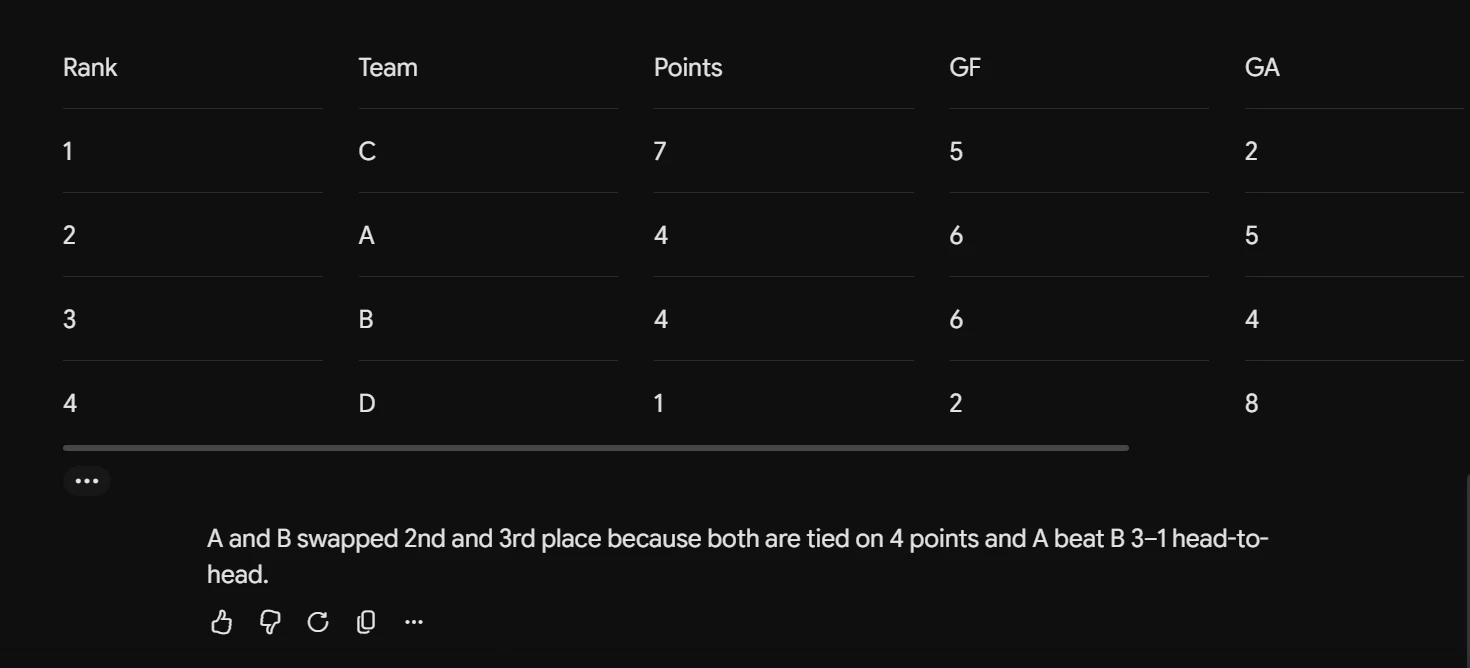
My take: Both first tables were right, down to the goal totals. Neither chat produced the revised standings. The correct order under the new rule is C, A, B, D, with all totals unchanged. The app responses leave the cause of the failure open.
Conclusion
Gemini 4 Neon gave me a reason to keep using it: the Python codec worked and held up to testing. Coding tasks with runnable tests are where I’d start, followed by visual work with clear reference material.
The audio mistake showed why that confidence shouldn’t carry over automatically. Check counts and timestamps, and test the full conversation when instructions change along the way. Neon showed promise here, but I’d build trust task by task before handing it a larger workflow.
Frequently Asked Questions
Q1. How do I try Gemini 4 Neon?
A. On Google AI Pro or Ultra, open the Gemini model picker and select 4 Neon.
Q2. Is the Gemini 4 Neon API free?
A. No. Standard API pricing is $3 per million input tokens and $15 per million output tokens, including thinking.
Q3. Can Gemini 4 Neon analyze audio and video?
A. Yes. The Gemini API accepts audio and video and returns text. Verify timestamps against the source file.
Studying, evaluating, and explaining AI systems for over 6 years.
“𝘖𝘯𝘤𝘦 𝘮𝘦𝘯 𝘵𝘶𝘳𝘯𝘦𝘥 𝘵𝘩𝘦𝘪𝘳 𝘵𝘩𝘪𝘯𝘬𝘪𝘯𝘨 𝘰𝘷𝘦𝘳 𝘵𝘰 𝘮𝘢𝘤𝘩𝘪𝘯𝘦𝘴 𝘪𝘯 𝘵𝘩𝘦 𝘩𝘰𝘱𝘦 𝘵𝘩𝘢𝘵 𝘵𝘩𝘪𝘴 𝘸𝘰𝘶𝘭𝘥 𝘴𝘦𝘵 𝘵𝘩𝘦𝘮 𝘧𝘳𝘦𝘦. 𝘉𝘶𝘵 𝘵𝘩𝘢𝘵 𝘰𝘯𝘭𝘺 𝘱𝘦𝘳𝘮𝘪𝘵𝘵𝘦𝘥 𝘰𝘵𝘩𝘦𝘳 𝘮𝘦𝘯 𝘸𝘪𝘵𝘩 𝘮𝘢𝘤𝘩𝘪𝘯𝘦𝘴 𝘵𝘰 𝘦𝘯𝘴𝘭𝘢𝘷𝘦 𝘵𝘩𝘦𝘮.” — 𝖥𝗋𝖺𝗇𝗄 𝖧𝖾𝗋𝖻𝖾𝗋𝗍, 𝖣𝗎𝗇𝖾