If you’ve worked with DeepSeek OCR, you already know it was efficient at extracting text and compressing documents. Where it often fell short was reading order and layout-heavy pages, multi-column PDFs, dense tables, and mixed content still needed cleanup. DeepSeek OCR 2 is DeepSeek’s answer to that gap. Instead of focusing only on compression, this update shifts attention to how documents are actually read. Early results show cleaner structure, better sequencing, and far fewer layout-related errors, especially on real-world business and technical documents. Let’s explore all the new features of DeepSekk OCR 2!
Table of contents
Key Features and Improvements of DeepSeek OCR 2
- DeepEncoder V2 architecture for logical reading order instead of rigid top-to-bottom scanning
- Improved layout understanding on complex pages with multi-column text and dense tables
- Lightweight model with 3 billion parameters, outperforming larger models on structured documents
- Upgraded vision encoder, replacing the older architecture with a language-model–driven design
- Higher benchmark performance, scoring 91.09 on OmniDocBench v1.5, a 3.73 percentage point improvement over the previous version
- Broad format support, including images, PDFs, tables, and mathematical content
- Open-source and fine-tunable, enabling customization for domain-specific use cases across industries
The DeepEncoder V2 Architecture
Traditional OCR systems process images using fixed grid-based scanning, which often limits reading order and layout understanding. DeepSeek OCR 2 adopts a different approach based on visual causal flow. The encoder first captures a global view of the page and then processes content in a structured sequence using learnable queries. This allows flexible handling of complex layouts and improves reading order consistency.
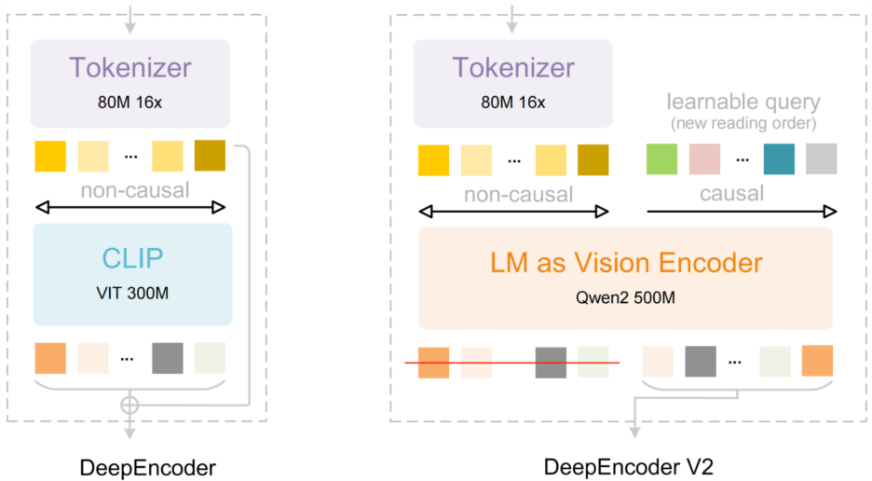
Key architectural elements include:
- Dual-attention design separating layout perception from reading order
- Visual tokens encoding full-page context and spatial structure
- Causal query tokens controlling sequential content interpretation
- Language-model–driven vision encoder providing order awareness and spatial reference
- Reasoning-oriented encoder functioning beyond basic feature extraction
- Decoder stage converting encoded representations into final text output
The architectural flow differs from the earlier version, which relied on a fixed, non-causal vision encoder. DeepEncoder V2 replaces this with a language-model–based encoder and learnable causal queries, enabling global perception followed by structured, sequential interpretation.
Performance Benchmarks
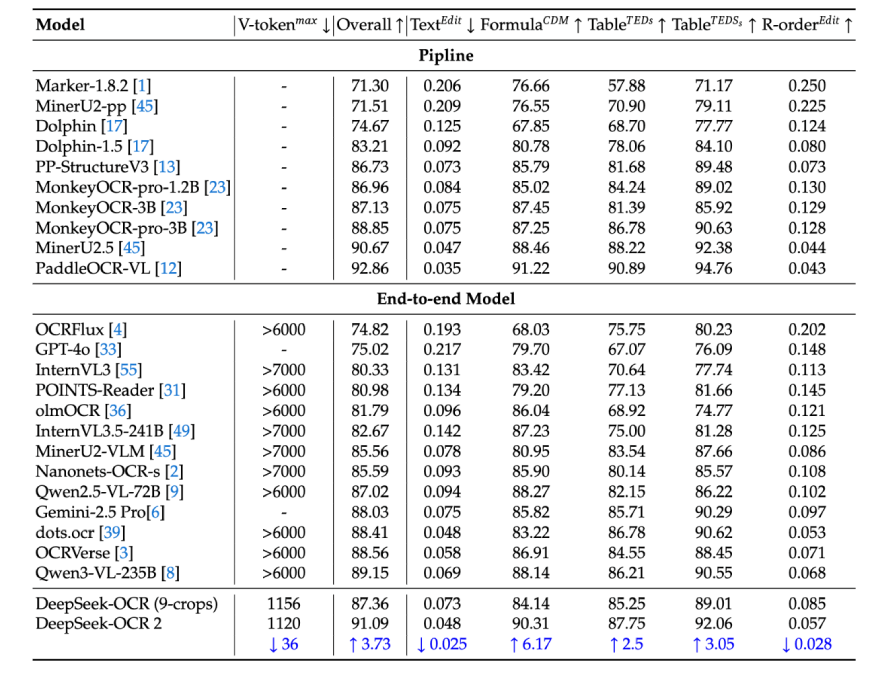
DeepSeek OCR 2 demonstrates strong benchmark performance. On OmniDocBench v1.5, it achieves a score of 91.09, establishing a new state of the art in structured document understanding. The most significant gains appear in reading order accuracy, reflecting the effectiveness of the updated architecture.
Compared to other vision-language models, DeepSeek OCR 2 preserves document structure more reliably than generic solutions such as GPT-4 Vision. Its accuracy is comparable to specialized commercial OCR systems, positioning it as a strong open-source alternative. Reported fine-tuning results indicate up to an 86% reduction in character error rate for specific tasks. Early evaluations also show improved handling of rotated text and complex tables, supporting its suitability for challenging OCR workloads.
Also Read: DeepSeek OCR vs Qwen-3 VL vs Mistral OCR: Which is the Best?
How to Access and Use DeepSeek OCR 2?
You can use DeepSeek OCR 2 with a few lines of code. The model is available on the Hugging Face Hub. You will need a Python environment and a GPU with about 16 GB of VRAM.
But there is a demo available at HuggingFace Spaces for DeepSeek OCR 2 – Find it here.
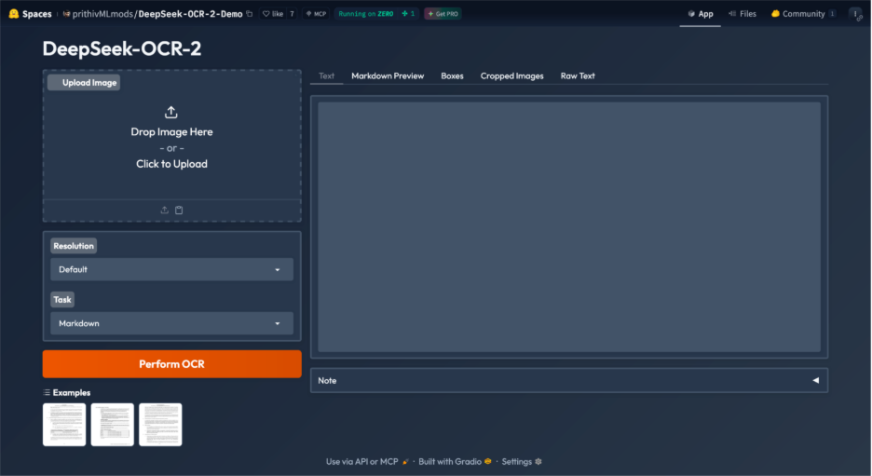
Let’s test the OCR 2.
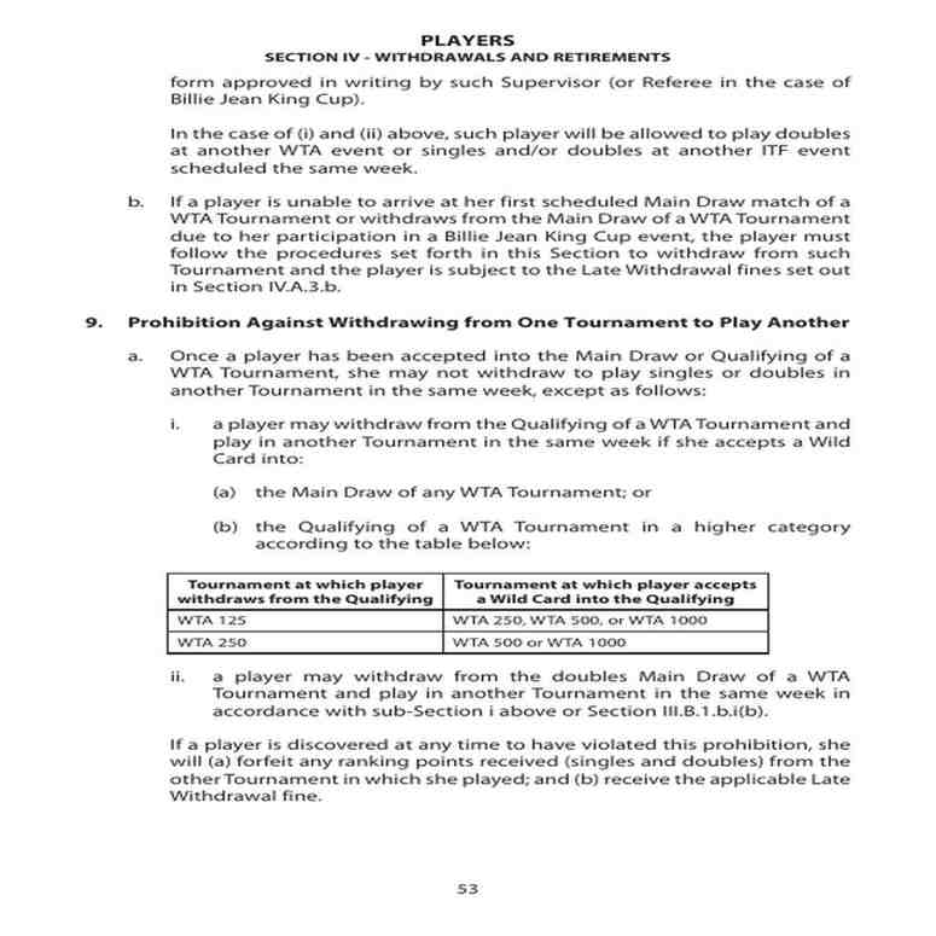
Task 1: Dense Text and Table-Heavy Documents
Result:
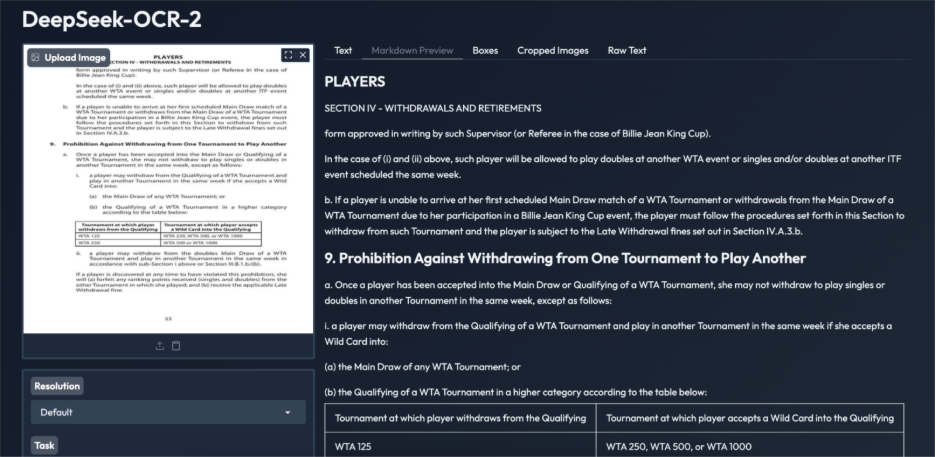
DeepSeek OCR 2 performs well on text-heavy scanned documents. The extracted text is accurate, readable, and follows the correct reading order, even across dense paragraphs and numbered sections. Tables are converted into structured HTML with consistent ordering, a common failure point for traditional OCR systems. While minor formatting redundancies are present, overall content and layout remain intact. This example demonstrates the model’s reliability on complex policy and legal documents, supporting document-level understanding beyond basic text extraction.
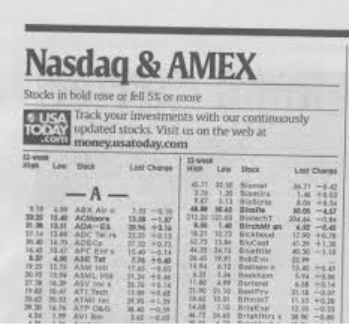
Task 2: Noisy, Low-Resolution Images
Result:
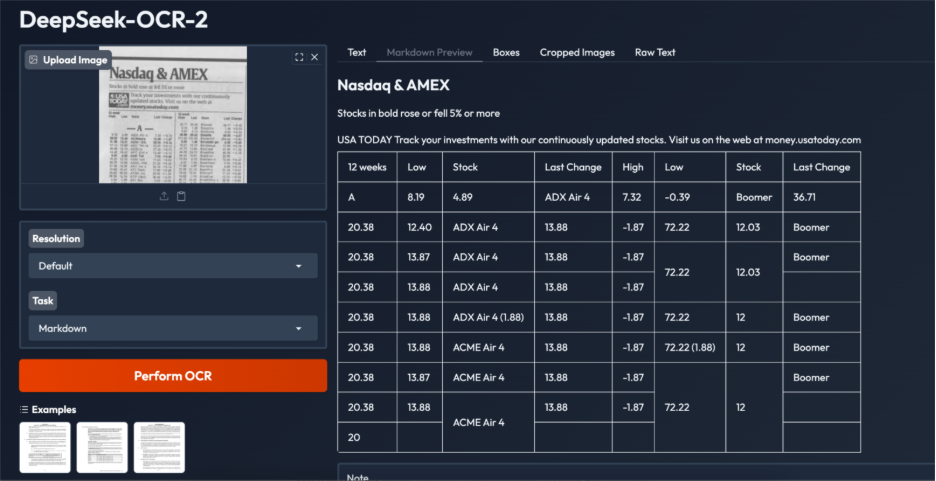
This example highlights both the strengths and limitations of DeepSeek OCR 2 on extremely noisy, low-resolution financial tabular data. The model correctly identifies key headings and source text and recognizes the content as tabular, producing a table-based output rather than plain text. However, structural issues remain, including duplicated rows, irregular cell alignment, and occasional incorrect cell merging, likely due to dense layouts, small font sizes, and low image quality.
While most numerical values and labels are captured accurately, post-processing is required for production use. Overall, the results indicate strong layout intent recognition, with heavily cluttered financial tables remaining a challenging edge case.
When to Use DeepSeek OCR 2?
- Processing complex documents such as academic papers, technical documentation, and newspapers
- Converting scanned and digital documents into structured formats, including Markdown
- Extracting structured information from business documents such as invoices, contracts, and financial statements
- Handling layout-intensive content where structure preservation is critical
- Domain-specific document processing through fine-tuning for medical, legal, or specialized terminology
- Privacy-sensitive workflows enabled by local, on-premise deployment
- Secure document processing for government agencies and enterprises without cloud data transfer
- Integration into modern AI and document processing pipelines across industries
Also Read: Top 8 OCR Libraries in Python to Extract Text from Image
Conclusion
DeepSeek OCR 2 represents a clear step forward in document AI. The DeepEncoder V2 architecture improves layout handling and reading order, addressing limitations seen in earlier OCR systems. The model achieves high accuracy while remaining lightweight and cost-efficient. As a fully open-source system, it enables developers to build document understanding workflows without reliance on proprietary APIs. This release reflects a broader shift in OCR from character-level extraction toward document-level interpretation, combining vision and language for more structured and reliable processing of complex documents.
Frequently Asked Questions
Q1. What is DeepSeek OCR 2?
A. It is a vision-language model that is open-source. It is an optical character recognition and document understanding company.
Q2. How is it different from other OCR tools?
A. It works with a special architecture through which it reads the documents in the human-like and logical sequence. This enhances precision in overlaying complex plans.
Q3. Is DeepSeek OCR 2 free to use?
A. Yes, it is an open-source model. You can download and run it on your own hardware for free.
Q4. What kind of hardware do I need to run it?
A. You need a computer with a modern GPU. At least 16 GB of VRAM is recommended for good performance.
Q5.5. Can it read handwritten text?
A. It is primarily made to accommodate printed or electronic text. Other special models may be more effective in writing complex handwriting.
Harsh Mishra is an AI/ML Engineer who spends more time talking to Large Language Models than actual humans. Passionate about GenAI, NLP, and making machines smarter (so they don’t replace him just yet). When not optimizing models, he’s probably optimizing his coffee intake. 🚀☕