
Yesterday DeepSeek community launched its latest and most advanced text-2-visual modal known as: Deepseek-OCR and it is changing the way we used to extract text from images. Till now we are dependent on the traditional OCR models that struggle with accuracy and layout understanding while extracting text from PDF’s, images or messy hand written notes.
But, DeepSeek-OCR completely changes the story.
It expertly reads, understands and converts visual text to digital text with extraordinary precision. DeepSeek-OCR isn’t just another OCR tool, it is an intelligent visual text system built on the top of DeepSeek‑VL2 Vision-Language Model(VLM) known for its speed and accuracy. It can easily identify visual text, in multiple languages, through its advanced vision algorithms even in handwritten format. In this article, we’re going to look at DeepSeek-OCR’s architecture, and try its capabilities on a few images of the text.
Table of contents
What is DeepSeek OCR?
DeepSeek-OCR is a multimodal system that compresses text by translating it to a visual representation. It also works on the encoder and decoder style architecture. First, it encodes whole documents in image form and utilizes a vision-language model to recover the text. In practice, this means a page of text usually with thousands of tokens ends up represented by only a few hundred vision tokens. And DeepSeek calls this approach context optical compression.
Context Optical Compression
Here after extracting the text out of the image via the encoder. DeepSeek does not send all the words into the model but simply shows the text as an image. For example, for a page the image might only need 200-400 tokens while for the page full of text might need 2000-5000 text tokens.
Vision tokens can capture all of the essential information such as layout, spacing, word shapes much more densely. The vision encoder learns to compress the image so that the decoder may reconstruct the original text, which means: each visual token can encode information equal to many text tokens.
Vision-Language OCR Model
As, the vision token easily captures the layout and word shapes therefore, together, they form an end-to-end image-to-text pipeline for vision-language models similar to vision transformers in general. However, because the vision tokens capture information more densely, we are able to reduce the tokens needed overall and maximize the model’s attention to the visual structure of the text.
DeepSeek OCR Architecture
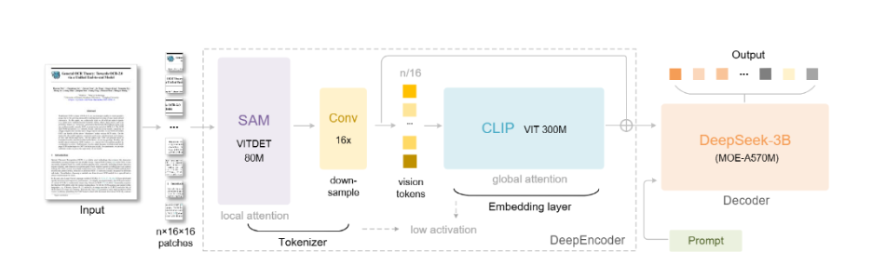
DeepSeek-OCR follows a two-stage encoder-decoder architecture that works as follows: the DeepEncoder (≈380M parameters) encodes the image to produce vision tokens, and the DeepSeek-3B-MoE (≈570M active parameters) expands the tokens back out to text.
DeepEncoder (Vision Encoder)
The DeepEncoder consists of two vision transformers connected in series. The first is a SAM-base block which has 80M params, and uses windowed attention to encode local detail. The second is a CLIP-large block with 300M params, and uses global attention to encode the overall layout.
In between the two vision transformers, there is a convolutions block that reduces the number of vision tokens from 16× by a factor of 16. For example, a 1024×1024 image is parsed into 4096 patches, and then reduced to only 256 tokens.
- SAM-base (80M): Uses windowed self-attention to scan fine image details.
- CLIP-large (300M): Applies dense attention to encode global context.
- 16× convolution: Reduces the count of vision tokens from the initial patch count (e.g. 4096→256 for 1024²).
DeepSeek-3B-MoE Decoder
The decoder module is a language transformer with a Mixture-of-Experts architecture. The model has 64 experts, although only 6 are active per token(on average), and is used to expand vision tokens back to text. The small decoder was trained on rich document data as an OCR-style task like text, math equations, charts, chemical diagrams, and mixed-languages. So it might expand a general range of material in each token.
- Mixture-of-Experts: 64 total experts, six active experts each step
- Vision-to-text training: trained on OCR-style data from general documents,preserving the layout setting from a diverse range of textual sources.
Multi-Resolution Input Modes
DeepSeek-OCR is designed with support for multiple input resolutions, allowing the user to choose a balance of details versus compression. It offers four native modes, along with a special Gundam (tiling) mode:
| Mode | Resolution | Approx. Vision Tokens | Description |
| Tiny | 512×512 | ~64 | Ultra-lightweight mode for quick scans and simple documents |
| Small | 640×640 | ~100 | Balanced mode with good speed-accuracy tradeoff; default mode |
| Base | 1024×1024 | ~256 | High-quality OCR for detailed document analysis |
| Large | 1280×1280 | ~400 | High-precision mode for complex documents with dense layouts |
| Gundam (Dynamic) | Multiple tiles: n×640×640 + 1×1024×1024 | Variable, typically n×100 + 256 tokens | Dynamic resolution that splits very high-res pages into multiple tiles for extremely complex documents |
This flexibility allows DeepSeek to compress in a separate manner, depending on the complexity of the page.
How to Access DeepSeek OCR?
Installing the necessary libraries
!pip install torch==2.6.0 torchvision==0.21.0 torchaudio==2.6.0 --index-url https://download.pytorch.org/whl/cu118
!pip install flash-attn
!pip install transformers==4.46.3
!pip install accelerate==1.1.1
!pip install safetensors==0.4.5
!pip install addict
After installing these, move to step 2.
Loading the model
from transformers import AutoModel, AutoTokenizer
import torch

model_name = "deepseek-ai/DeepSeek-OCR"
tokenizer = AutoTokenizer.from_pretrained(model_name, trust_remote_code=True)
model = AutoModel.from_pretrained(model_name, trust_remote_code=True, use_safetensors=True)
model = model.eval().cuda().to(torch.bfloat16)
Let’s Try DeepSeek OCR
Now that we know how to access DeepSeek OCR, we will be testing it out for 2 examples:
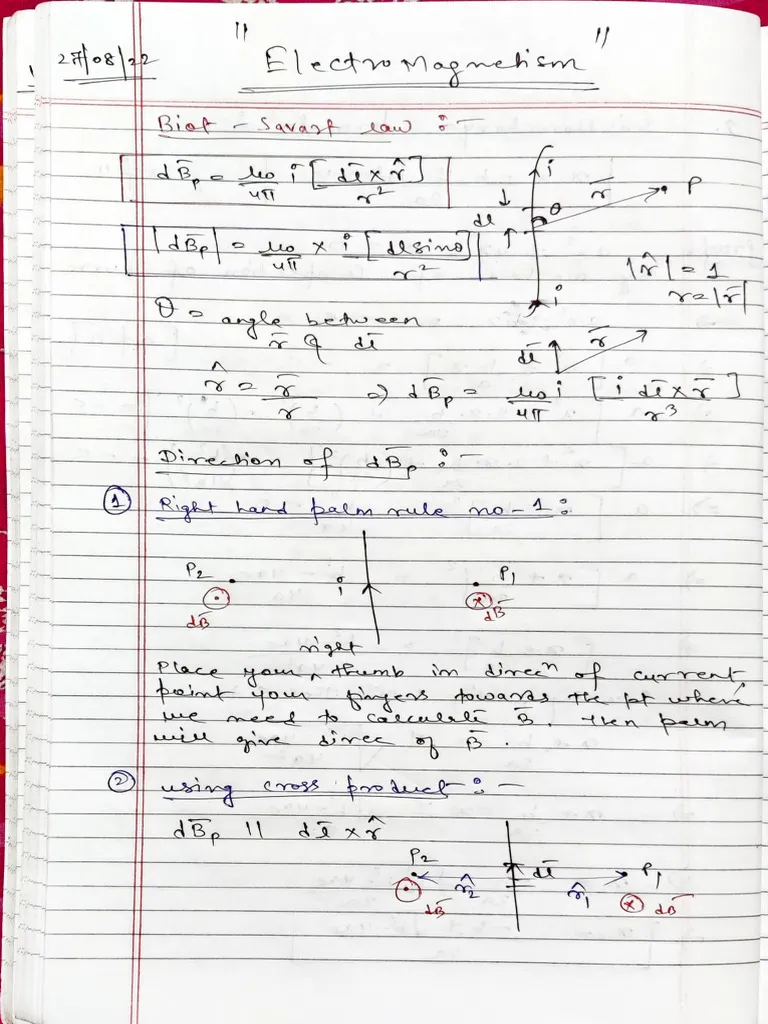
Basic Document Conversion
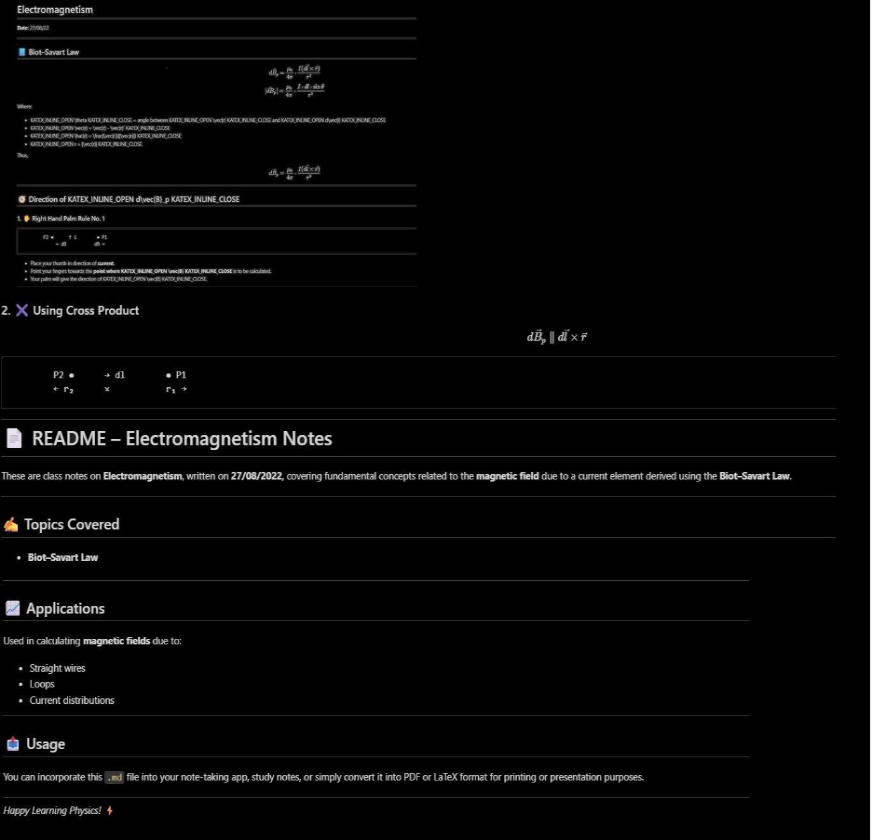
This example processes a PNG document image, extracts all text content using DeepSeek’s vision tokens, and converts it into clean markdown format while testing the compression capabilities of the model.
prompt = "<image>\n<|grounding|>Convert the document to markdown. "
image_file = '/content/img_1.png'
output_path = '/content/out_1'

res = model.infer(tokenizer, prompt=prompt, image_file=image_file,
                 output_path=output_path, base_size=1024, image_size=640,
                 crop_mode=True, save_results=True, test_compress=True)
This will load the DeepSeek-OCR on the GPU. In the provided example prompt, it is instructed to convert the document to Markdown. In output_path, we will save the recognized text after running infer().
Input image:
Response from DeepSeek OCR:
Complex Document Processing
This demonstrates processing a more complex JPG document, maintaining formatting and layout structure while converting to markdown, showcasing the model’s ability to handle challenging visual text scenarios.
prompt = "<image>\n<|grounding|>Convert the document to markdown. "
image_file = '/content/img_2.jpg'
output_path = '/content/out_2'

res = model.infer(tokenizer, prompt=prompt, image_file=image_file,
                 output_path=output_path, base_size=1024, image_size=640,
                 crop_mode=True, save_results=True, test_compress=True)
Input Image:
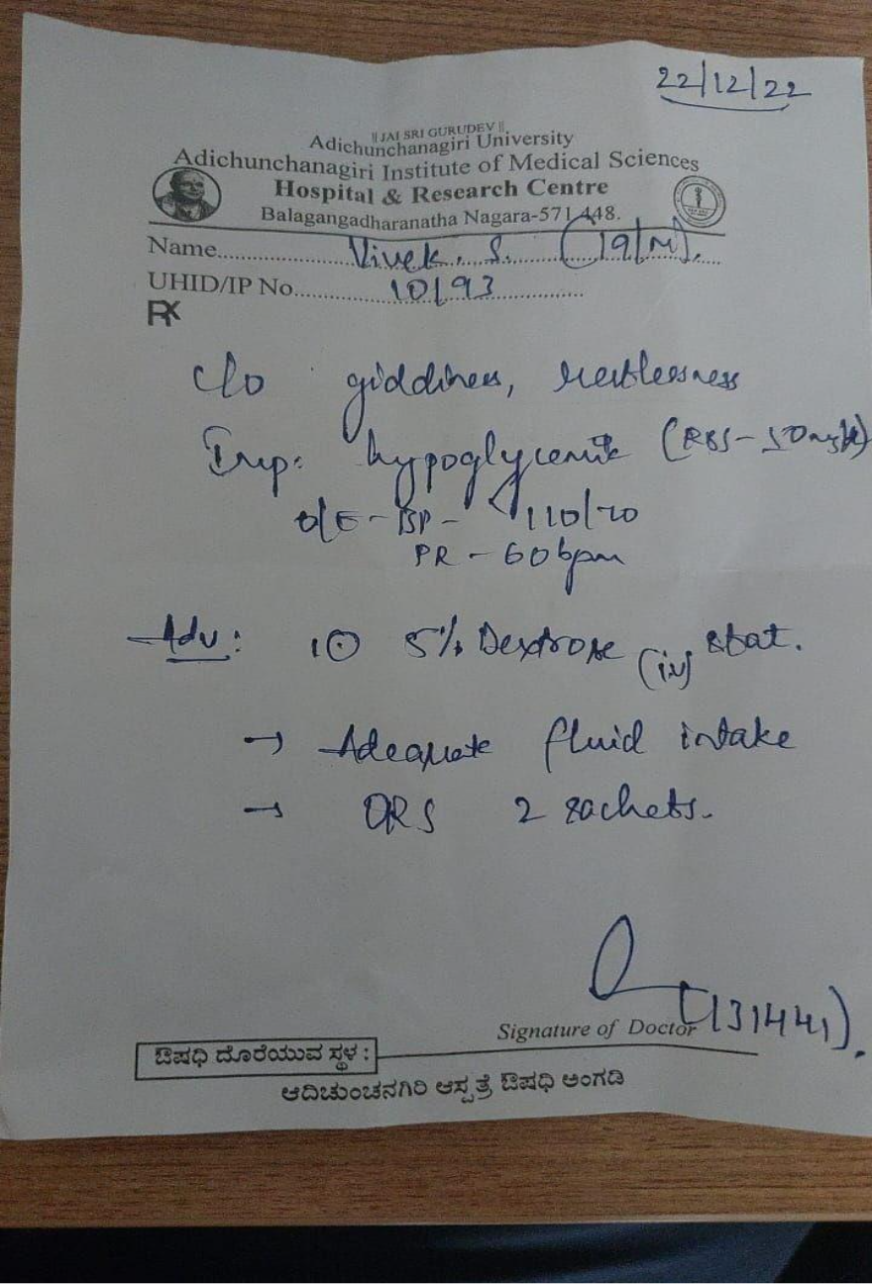
Response from DeepSeek OCR:

We can use small/medium/large base_size/image_size to produce Tiny, Small, Base, or Large modes for different performance outputs.
Refreshing the Cache
Now once all the libraries has been installed and you have run the above code blocks and encountered any error then run the below command and restart the kernel if you are using a jupyter notebook or collab. This command will delete all the data and the pre-existing variables in the cache.
!rm -rf ~/.cache/huggingface/modules/transformers_modules/deepseek-ai/DeepSeek-OCR/ Note: Hardware Setup Requirements: CUDA GPU with ~16–30GB VRAM (e.g. A100) for large images. For the complete code, visit here.
Performance and Benchmarks
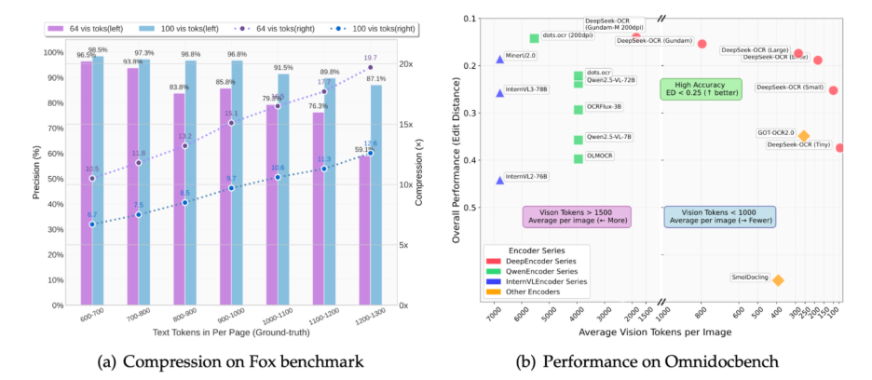
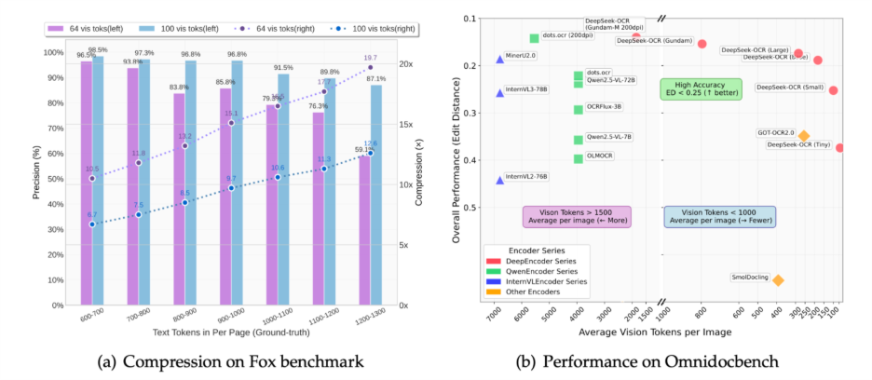
DeepSeek-OCR achieves outstanding rates of compression and OCR accuracy, as illustrated in the figure below. The comparisons captured in the benchmarks reflect the extent to which the model encodes visual tokens without losing accuracy.
Compression on Fox Benchmark
DeepSeek-OCR demonstrates good text retention, even at increased levels of compression. It achieves > 96% accuracy at 10× compression with only 64–100 vision tokens per page, and it sustains ~ 85–87% further at 15–20× compression. This shows the model’s ability to encode a great deal of text efficiency, which offers large language models opportunities to process longer documents with limited token usage.
| Vision Tokens | Precision (%) | Compression (×) |
| 64 Tokens | 96.5% | 10× |
| 64 Tokens | 85.8% | 15× |
| 100 Tokens | 97.3% | 10× |
| 100 Tokens | 87.1% | 20× |
Performance on OmniDocBench
On the OmniDocBench, the performance of DeepSeek-OCR surpasses the leading OCR models and vision language models, achieving Edit Distance (ED) < 0.25, or almost human level accuracy. DeepSeek-OCR achieved these impressive results even though it uses proportionally fewer than 1000 vision tokens per image, while other models like Qwen2.5-VL, InternVL3, or GOT-OCR2.0 all exceed 1500 vision tokens to achieve comparable levels of accuracy.
| Model | Avg. Vision Tokens/Image | Edit Distance (better) | Accuracy Region | Remark |
| DeepSeek-OCR (Gundam-M 200dpi) | <1000 | <0.25 | High Accuracy | Best balance of precision & efficiency |
| DeepSeek-OCR (Base/Large) | <1000 | <0.25 | High Accuracy | Consistently top-performing |
| GOT-OCR2.0 | >1500 | >0.35 | Moderate | Requires more tokens |
| Qwen2.5-VL / InternVL3 | >1500 | >0.30 | Moderate | Less efficient |
| SmolDocling | <500 | >0.45 | Low Accuracy | Compact but weak OCR quality |
Also Read: How to Use Mistral OCR for Your Next RAG Model
Conclusion
Deepseek-OCR sets a new and innovative approach to reading text. It significantly reduces the token usage of text (often 7-20X lower) by using vision as a compression layer while still retaining most of the information. The model is open-source and available for any developers to play with it.
This could be big for AI which is the ability to represent text in a compact, efficient manner. As most of the OCR’s fail while dealing with hand written text specially on a medical receipt. But the DeepSeek-OCR excels at that as well. Its message goes beyond OCR and points to new possibilities in AI memory and context management.
So follow the above steps and give it a try!
Hello! I'm Vipin, a passionate data science and machine learning enthusiast with a strong foundation in data analysis, machine learning algorithms, and programming. I have hands-on experience in building models, managing messy data, and solving real-world problems. My goal is to apply data-driven insights to create practical solutions that drive results. I'm eager to contribute my skills in a collaborative environment while continuing to learn and grow in the fields of Data Science, Machine Learning, and NLP.





