
AI voice generation has a major problem. It works like a robot, reading a script phrase by phrase, with no feelings or emotions. It might be clever, but it matters less if there is no human feeling attached to it. The way the AI generates its voice makes it hard to feel like you’re having a substantial conversation.
This all changed with Google DeepMind releasing the Gemini 3.1 Flash TTS on April 15, 2026. This TTS is not just an advanced speech synthesizer, but it also now functions as an AI speech director!
This technology allows you to create a voice actor studio without any real equipment, simply by using an API call or in Google Studio. Now, let us look at the new features of this technology, what it means to you, and most importantly, three real-world projects you could create and use immediately with it!
Table of contents
- What Makes Gemini 3.1 Flash TTS Different?
- Getting Started with Gemini 3.1 Flash TTS
- App 1: Build an Emotional Audiobook Narrator using Gemini API
- App 2: Multi-Character Podcast Generator using Gemini API
- App 3: Direct a Movie Trailer Voice-Over using Google AI Studio
- Benchmarks: How Does It Actually Stack Up?
- Gemini 3.1 Flash TTS Comparison with Competitors
- Conclusion
What Makes Gemini 3.1 Flash TTS Different?
In earlier versions of AI TTS, the only option for you was basic voice and speed control. The Gemini 3.1 Flash TTS is a significant enhancement over previous generations and provides a host of new features.
The new features available with Gemini 3.1 Flash TTS include:
- Audio Tags: Add Natural Language “Stage Directions” into your transcript. For example, telling the model to sound like they are excited, to whisper a secret, or to pause before continuing will result in the model performing as requested.
- Scene Directions: Define the Environmental and Narrative context for the entire script, ensuring that characters remain in character for multiple successive dialogue pieces automatically.
- Character Profiles: Establish unique, up-to-date audio profiles for each character. Apply your Director’s Notes to set the delivery of each character’s Audio Profile with respect to: Pace, Tone and Accent.
- Inline Pivot Tags: Speakers can rapidly change from Normal to Panicked without the need for a separate API call, even if it’s midway through a dialogue.
- Exportable Settings: Once the voice has been configured, export the exact configuration to the Gemini API code for immediate use.
Every audio file created with Gemini 3.1 is embedded with “SynthID”, an invisible audio signature developed by Google DeepMind to help track the usage of synthetic audio files. It basically provides a method of detecting synthetic audio from traditionally produced audio files.
Getting Started with Gemini 3.1 Flash TTS
The Gemini 3.1 Flash TTS has three available accessible platforms currently:
- Developer users can preview through Gemini’s API and the Google AI Studio
- Enterprise users can preview through Vertex AI
- Google Vids is available to Workspace users only
For the two examples that utilize API technology below, please be sure to get a free Gemini API Key to use by visiting aistudio.google.com. The third example will require just a web browser to access.
App 1: Build an Emotional Audiobook Narrator using Gemini API
In our real-world test of the Gemini 3.1 Flash TTS, we shall build a Python program for converting plain text stories to audiobooks with distinct sounds of emotion using audio tags. This is how audio tags can drastically improve the quality of the TTS audio in the audiobook process. Audiobook TTS generally has a monotonous tone; however, when you control the emotions through the audio tags per scene, there should be a noticeable difference in the audio output.
Instructions:
1. Install the Gemini Python SDK:
pip install google-generativeai2. Create a file named audiobook.py and paste in the following code:
import google.generativeai as genai
import base64
genai.configure(api_key="YOUR_API_KEY")
story = """
[calm, slow, hushed narrator voice]
The old house had been empty for thirty years.
[building tension, slight tremor in voice]
As she pushed open the door, the floorboards groaned beneath her.
[sharp, alarmed, fast-paced]
Then she saw it. A shadow. Moving toward her.
[relieved exhale, warm and soft]
It was just the cat. An old tabby, blinking up at her in the dark.
"""
client = genai.Client()
response = client.models.generate_content(
    model="gemini-3.1-flash-tts-preview",
    contents=story,
    config={
        "response_modalities": ["AUDIO"],
        "speech_config": {
            "voice_config": {
                "prebuilt_voice_config": {"voice_name": "Kore"}
            }
        }
    }
)
audio_data = response.candidates[0].content.parts[0].inline_data.data
wav_bytes = base64.b64decode(audio_data)
with open("audiobook_output.wav", "wb") as f:
    f.write(wav_bytes)
print("Saved: audiobook_output.wav")
3. Replace the placeholder of “YOUR_API_KEY” with your own API KEY and run the program
python audiobook.py4. Open and listen to the audio file located at audiobook_output.wav
The stage directions found in brackets will indicate how the narrator should emotionally interpret each chapter of an audiobook. For example, by reading each chapter, the narrator will go from a calm whisper to confusion and panic, followed by a calm relief in one continuous audio recording.
Output:
Improve it further: Find any chapter from the Project Gutenberg site and use it in the audiobook; then loop through the paragraph in a chapter. You can also tag the sentiment for each paragraph using the sentiment audio tags to create your own audiobooks. By this method, you should be able to create an instant and expressive audiobook with little or no studio time required.
App 2: Multi-Character Podcast Generator using Gemini API
In this test-case, we will use the multi-speaker/host feature of Gemini 3.1 Flash Text-to-Speech. For this, we will build a podcast script with two voices (two separate speeds, tones, and attitudes) from one single API call within the same audio file.
Interestingly, there is no need to connect 2 API calls, and there is no need for post-production for this. Just provide a single prompt that will convert to two separate personalities into a single audio file.
Instructions:
1. Create a script called podcast_gen.py
import google.generativeai as genai
import base64
genai.configure(api_key="YOUR_API_KEY")
transcript = """
<scene>
Two tech journalists debate whether AI voice is overhyped.
Alex is skeptical and speaks quickly with a dry tone.
Jordan is enthusiastic, warm, and slightly faster when excited.
</scene>
<speaker name="Alex" pace="fast" tone="dry, skeptical">
Every year someone declares this is the AI voice breakthrough.
And every year, the demos sound great but real adoption drags.
</speaker>
<speaker name="Jordan" pace="measured" tone="enthusiastic, warm">
But this time the numbers back it up. We're not talking demos —
we're talking production deployments shipping actual product.
</speaker>
<speaker name="Alex" tone="sharp, sardonic">
Deployments of chatbots that still mispronounce "Worcestershire."
Incredible milestone.
</speaker>
<speaker name="Jordan" tone="laughing, light">
Okay, fair. But the trajectory — you genuinely cannot argue
with where this is heading in twelve months.
</speaker>
"""
client = genai.Client()
response = client.models.generate_content(
    model="gemini-3.1-flash-tts-preview",
    contents=transcript,
    config={
        "response_modalities": ["AUDIO"],
        "speech_config": {
            "multi_speaker_voice_config": {
                "speaker_voice_configs": [
                    {
                        "speaker": "Alex",
                        "voice_config": {
                            "prebuilt_voice_config": {"voice_name": "Fenrir"}
                        }
                    },
                    {
                        "speaker": "Jordan",
                        "voice_config": {
                            "prebuilt_voice_config": {"voice_name": "Aoede"}
                        }
                    }
                ]
            }
        }
    }
)
audio_data = response.candidates[0].content.parts[0].inline_data.data
wav_bytes = base64.b64decode(audio_data)
with open("podcast.wav", "wb") as f:
    f.write(wav_bytes)
print("Podcast saved: podcast.wav")
2. Execute it by executing the commands shown below:
python podcast_gen.py3. Open podcast.wav file and listen to the two distinct voices representing the two personalities (the audio recordings will have been created without the use of a recording studio).
Output:
Improve it further: To expand upon this, point a web scrape tool at any article you find in a news source or Reddit thread, create a 10-line summary that converts that article into a two-host debate-style script, and send this to your podcast_gen.py. Now you will have an automated “AI Daily News Podcast” that will run daily from your crontab.
App 3: Direct a Movie Trailer Voice-Over using Google AI Studio
The Banana Split & Liberty Bell are collaborating to present you with a stunning movie trailer voice-over. You will be doing everything through the Google AI Studio browser console; therefore, there is no need for coding or additional setup. You will feel completely creative in this project, as you become the creative director for this project.
There are three parts to this, and they are as follows:
Ready the Model
1. Visit aistudio.google.com. Once there, log in with your Google account. You will not need a credit card for the free-tier use of the service.
2. Choose the Model. Once logged in, select the Gemini-3 TTS Preview. It will be titled on the right-hand sidebar under “Run Settings.”
Set the Scene
3. Use the text below to create a scene in the provided textbox at the top of the Google AI Playground, before you select the masculine or feminine voice(s):
A dark movie theatre. The screen flickers. The audience is holding their breath.
This will give the model a context in which to maintain character for all the speakers throughout the production.
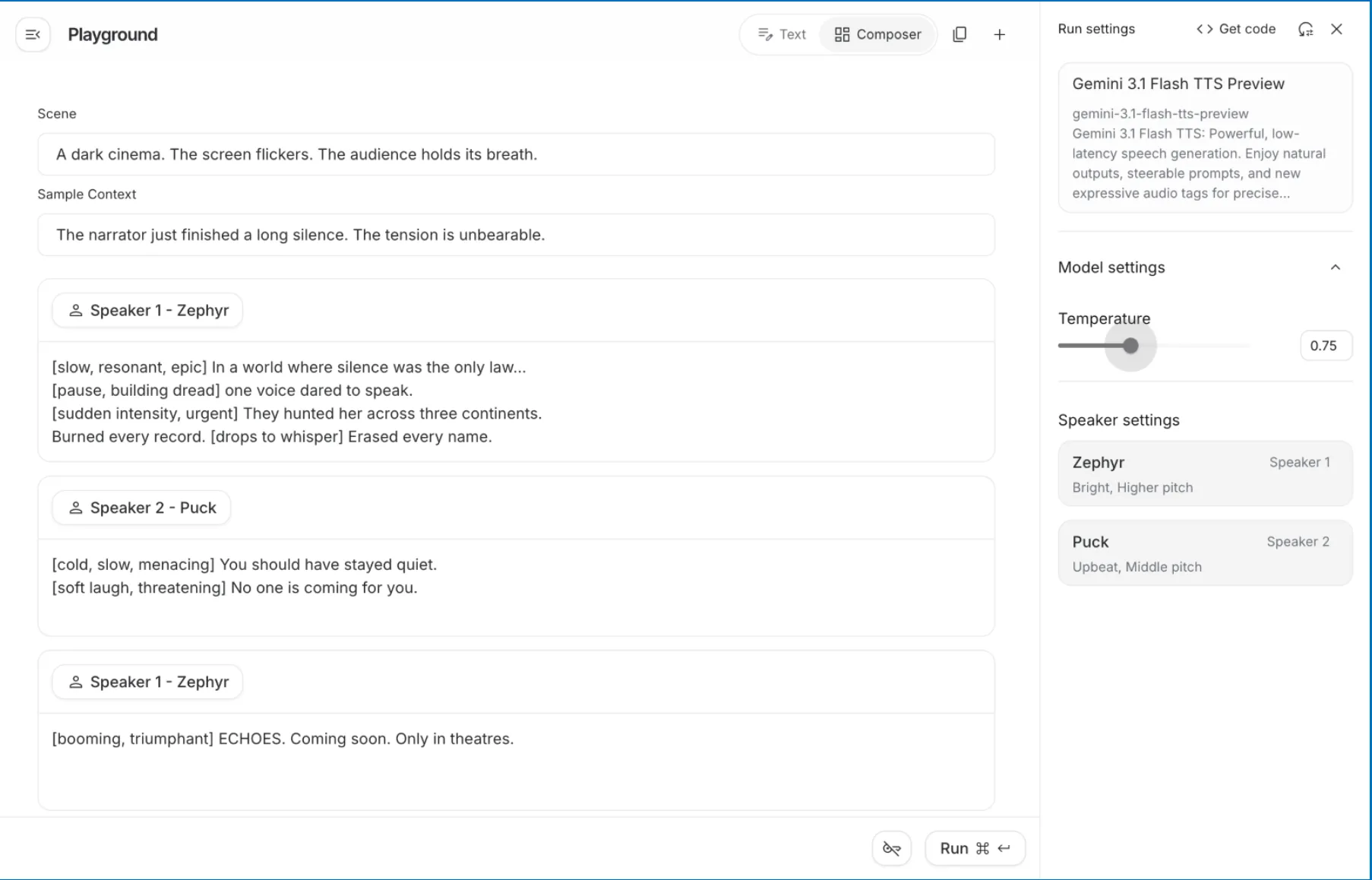
4. Create your Sample Context. In this area type: The narrator has just completed a long silence. The physical tension is at an unbelievable level.
This tells the model what type of emotional state existed prior to the first line of dialogue being used.
Complete Speaker Profiles
5. Complete Speaker 1 – Zeph’s (Narrator) dialogue. In the panel, you will see that Zephyr is designated as Speaker 1, with the descriptors of “Bright, Higher pitch.” This indicates that he is to be an urgent and captivating narrator, perfect for an epic storyteller. In the Speaker 1 dialogue block, type the following:
[slow, deep, dramatic] In a world where silence is considered “the law”,
[pause, building anxiety] one voice dares to speak.
[suddenly urgent, with intensity] They hunted her all around the globe, and destroyed everything they found.
[drops the intensity] Disappeared by any means necessary.
Complete Speaker 2 – Puck’s (Villain) dialogue. You will see that Puck has previously been designated as “Upbeat, Middle pitch”; however, you can overwrite that energy with a mood tag. In the Speaker 2 dialogue block, type the following:
[cold, slow, with a menacing air] You should have never spoken.
[softly laughing, threat] There is no one else coming to help you.
Click on “+ Add Speech Block” to add another narrative closing for Speaker Zephyr’s narrative segment at the end of this segment, and type:
[booming, heroic voice] ECHOES. Coming soon. Only in theatres.
Output:
Benchmarks: How Does It Actually Stack Up?
At this point, we can see an entirely different side to the story. While Google doesn’t say they’re better than everyone else, they did submit their Gemini 3.1 Flash TTS (Text to Speech) to the most thorough independent benchmark TTS ever created.
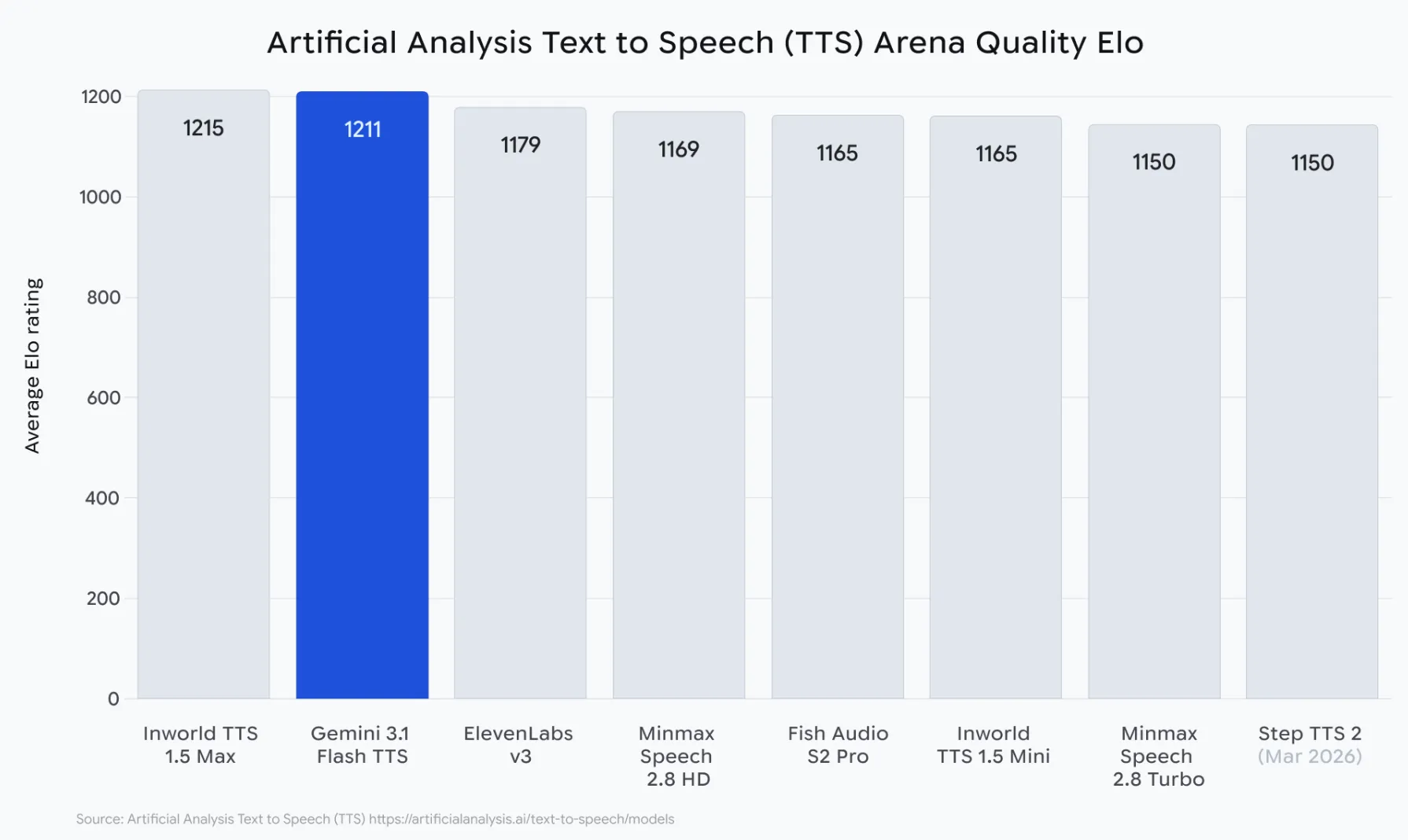
The Artificial Analysis TTS Arena runs thousands of anonymous blind human preference tests on synthetic speech. In these tests, people listen to two TTS voices and select the one they believe sounds the most natural, without knowing which model produced which voice. There is no cherry-picking of samples or scores made by the company itself. This is the ultimate demonstration of how many people will prefer using each voice in the marketplace. Here are some of the results of the Gemini 3.1 Flash TTS robot:
- 1,211 Elo Score at launch – the highest Elo score for all publicly available TTS engines
- “Most Attractive Change” placement – the only TTS in the history of TTS with both high naturalness and low cost per character
- 70+ languages tested – all maintained natural-sounding style, pacing, and accent control
- Produced three or more different speakers in a single coherent output — not produced from concatenated clips
- watermarked with SynthID in the output of each voice; no other model on the leaderboard watermarks with SynthID.
Gemini 3.1 Flash TTS Comparison with Competitors
Most high-quality TTS engines are not affordable. Most low-cost TTSes sound like TTSes that cost too much. Gemini 3.1 Flash TTS is the first TTS to confidently position itself between these models. Here’s how it stacks up against the leading AI TTS models across criteria that matter:
| Feature | Gemini 3.1 Flash TTS | ElevenLabs Multilingual v3 | OpenAI TTS HD | Azure Neural TTS |
|---|---|---|---|---|
| Elo Score (Artificial Analysis) | 1,211 | ~1,150 (est.) | ~1,090 (est.) | ~1,020 (est.) |
| Audio Tags / Emotion Control | Native, inline | Voice cloning only | None | SSML tags only |
| Multi-Speaker Dialogue | Native, single call | Requires stitching | Requires stitching | Limited |
| Language Support | 70+ languages | 32 languages | 57 languages | 140+ languages |
| Accent + Pace Control | Per-speaker, natural language | Via voice cloning | No | SSML only |
| Scene / Context Direction | Yes | No | No | No |
| AI Safety Watermarking | SynthID | No | No | No |
| Export as API Code | One-click in AI Studio | No | No | No |
| Free Tier / Playground | Google AI Studio | Limited trial | Playground | Limited trial |
| Best For | Creative + expressive apps | Voice cloning projects | Simple, clean narration | Enterprise scale |
Conclusion
AI voice technology has been around for a long time, and it has been “good enough” for many uses. However, AI voices were not “good enough” for usage in contexts that require a human voice to portray emotion, or to offer the user any form of creative control.
Gemini 3.1 Flash TTS changes all of that. The rich set of features makes it the very first AI-based speech model that can truly compete with a recorded human voice, especially for use in creative applications.
The three projects above are just your entry point. Think interactive fiction with branching voiced narratives, multilingual customer service agents with regional accents, or even AI tutors that sound like they care. With Gemini 3.1 Flash TTS, the sky is the limit.
Gen AI Intern at Analytics Vidhya
Department of Computer Science, Vellore Institute of Technology, Vellore, India
I am currently working as a Gen AI Intern at Analytics Vidhya, where I contribute to innovative AI-driven solutions that empower businesses to leverage data effectively. As a final-year Computer Science student at Vellore Institute of Technology, I bring a solid foundation in software development, data analytics, and machine learning to my role.
Feel free to connect with me at [email protected]





