Multimodal AI has grown from novelty to a must in recent times. Need proof? If I were to tell you to work on an AI model that only understands text, you would probably laugh and throw 10 model names at me that can work across formats – be it text, audio, or visuals. The new race, thus, for the bigwigs, is not to make just another AI model, but a system that can understand the world more like humans do. This is naturally done through language, visuals, sound, and motion together. That is the space Alibaba’s new Qwen3.5-Omni enters.
The latest model in Alibaba’s Qwen family is positioned as a “fully omni-modal LLM”. We shall explore what that means in theory, and what this moniker promises in the practicality of things. One thing is for sure (with Qwen and other launches like the recent Gemini 3.1 Flash Live), AI models are becoming less like separate tools and more like unified interactive systems.
For now, we focus on the Qwen3.5-Omni and all that it brings ot the table.
Table of contents
What is Qwen3.5-Omni?
As I mentioned earlier, this one is a fully omni-modal model under the Qwen family. In simple terms, it is built to handle text, images, audio, and audio-visual content within a single system. That is what separates it from older AI setups, where each modality often needed a different model or pipeline.
As is evident from its launch brief, Alibaba is pitching Qwen3.5-Omni as a model designed for richer, more natural interaction with real-world inputs. Instead of treating voice, images, and video as optional add-ons, it presents them as core parts of the model itself. That means Qwen3.5-Omni is way more than a standard chatbot. It is a multimodal AI system meant to interpret different kinds of information together.
As for its variants, the new Qwen3.5-Omni series includes Instruct variants in three sizes – Plus, Flash, and Light. This family structure makes it ideal for different use cases and performance needs. The launch also highlights long-context support, which suggests the model is not only broad in modality but also built for heavier, more sustained inputs.
There are, of course, more such features in line. Here is all that the new Qwen3.5-Omni brings to the table.
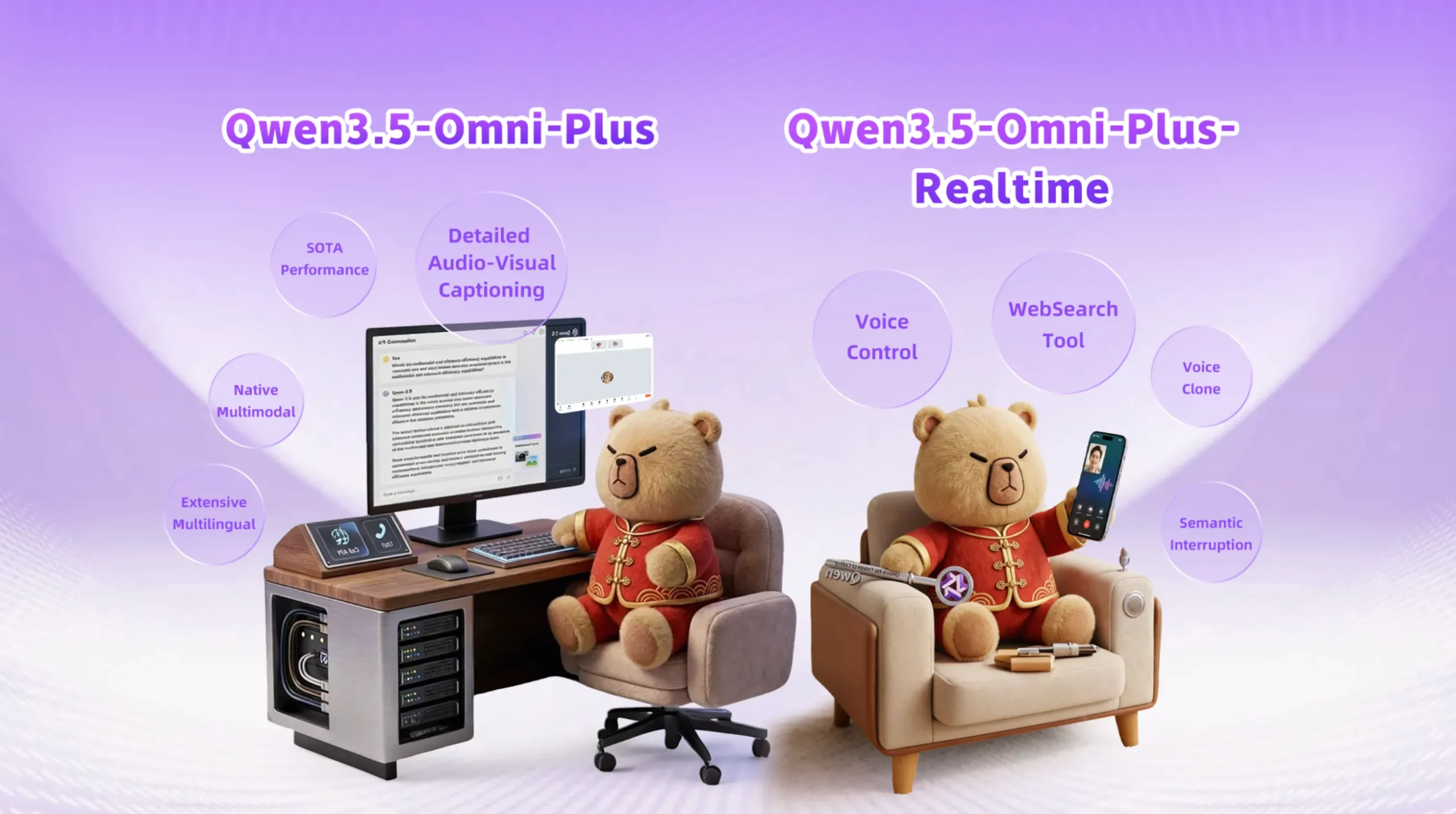
Qwen3.5-Omni Features
Qwen3.5-Omni is obviously a more capable step up from Qwen3-Omni. Though the thing to note here is that it comes with much broader horizons as well. Here is how:
1. Stronger multilingual capabilities
Compared with Qwen3-Omni, Qwen3.5-Omni comes with significantly improved multilingual capabilities, including speech recognition in 113 languages.
2. Long-context support
The Qwen3.5-Omni series includes Instruct versions with support for 256K long-context input. This points to a model that is designed for much larger and more sustained prompts than a standard chatbot workflow.
3. Multiple model sizes
The series includes three Instruct sizes: Plus, Flash, and Light. That gives Qwen3.5-Omni a more flexible product family rather than a single one-size-fits-all release.
4. Large multimodal input capacity
The announcement blog says the model can handle more than 10 hours of audio input and over 400 seconds of 720p audio-visual input at 1 FPS. That means that it is built for heavier audio and video understanding workloads.
5. Semantic interruption support
Qwen3.5-Omni supports semantic interruption through “native turn-taking intent recognition.” In simple terms, this helps the model distinguish between meaningful user interruption and irrelevant background noise. All in all, the feature makes live conversations feel more natural.
6. Native WebSearch and Function Calling
The model natively supports WebSearch and complex FunctionCall capabilities. This allows it to decide on its own whether it should invoke WebSearch in order to answer a user’s real-time question. Think more agent-like practical use.
7. End-to-end voice control and dialogue
This is a very interesting upgrade with Qwen3.5-Omni, and I am sure you will love it too once you see its demos. The new Qwen model supports end-to-end voice control and dialogue. This means the model can follow spoken instructions in a more human-like way by controlling aspects of speech such as volume, speed, and emotion. As demonstrated in some videos, the model can whisper, shout, and even express emotions in a way that will sound very natural to most.
8. Voice cloning
Another notable feature is voice cloning, which allows users to upload a voice and customise the AI assistant’s output voice accordingly. It means you can now speak to the AI and have it respond in the voice of your choice.
With all these features, here is how the Qwen3.5-Omni performs in benchmark tests.
Qwen3.5-Omni: Benchmark Performance
Rather than winning every single benchmark outright, Qwen3.5-Omni-Plus comes across as a very well-rounded omni-modal model that stays highly competitive across text, vision, audio, audio-visual understanding, and speech generation. That is the bigger takeaway here: consistency across almost every format. And as an add-on, it either leads or comes extremely close often times to the top model in the comparison.
1. Audio: USP of the model
Audio is clearly one of Qwen3.5-Omni-Plus’s strongest areas.
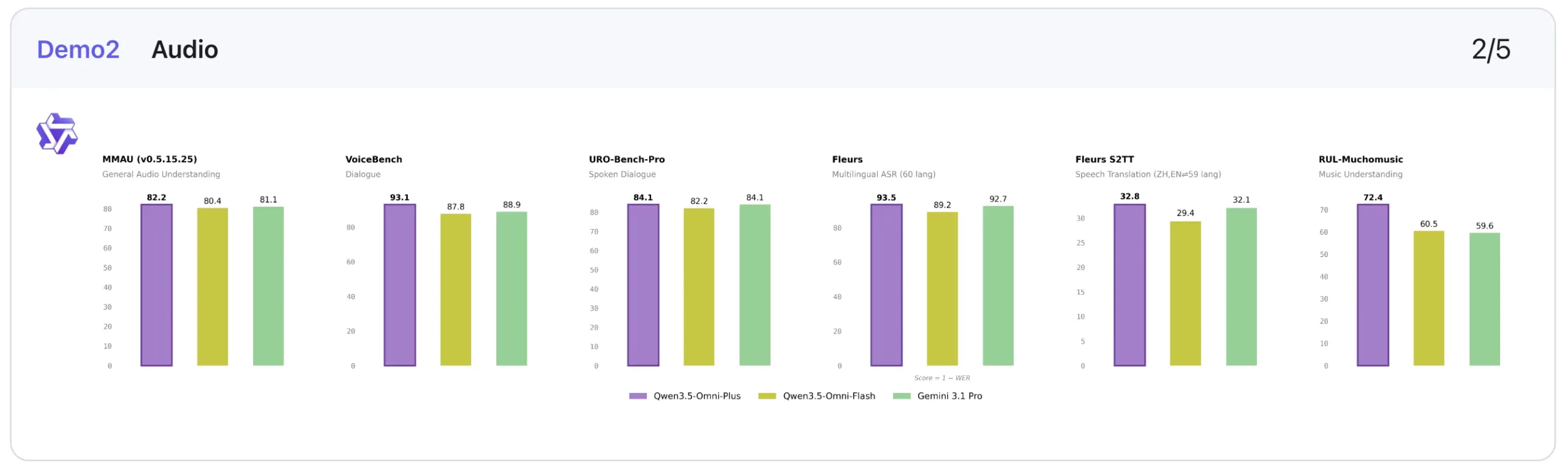
In audio understanding, it slightly edges out Gemini-3.1-Pro on MMAU (82.2 vs 81.1) and MMSU (82.8 vs 81.3), while also delivering a big jump on RUL-MuchoMusic (72.4 vs 59.6). On dialogue-heavy tasks, it posts the best score on VoiceBench (93.1), ahead of Gemini-3.1-Pro’s 88.9.
Its speech-related performance is also impressive in transcription and recognition-style tasks. For example, on LibriSpeech, Qwen3.5-Omni-Plus scores 1.11 / 2.23, ahead of Gemini-3.1-Pro’s 3.36 / 4.41, and on CV15 (en) it records 4.83 against Gemini’s 8.73. That suggests Qwen is particularly strong not just at hearing audio, but at processing it accurately.
2. Audio-Visual: Strong, but not always the outright leader
On audio-visual tasks, Qwen3.5-Omni-Plus performs strongly, though this is one area where Gemini-3.1-Pro still holds some advantages.
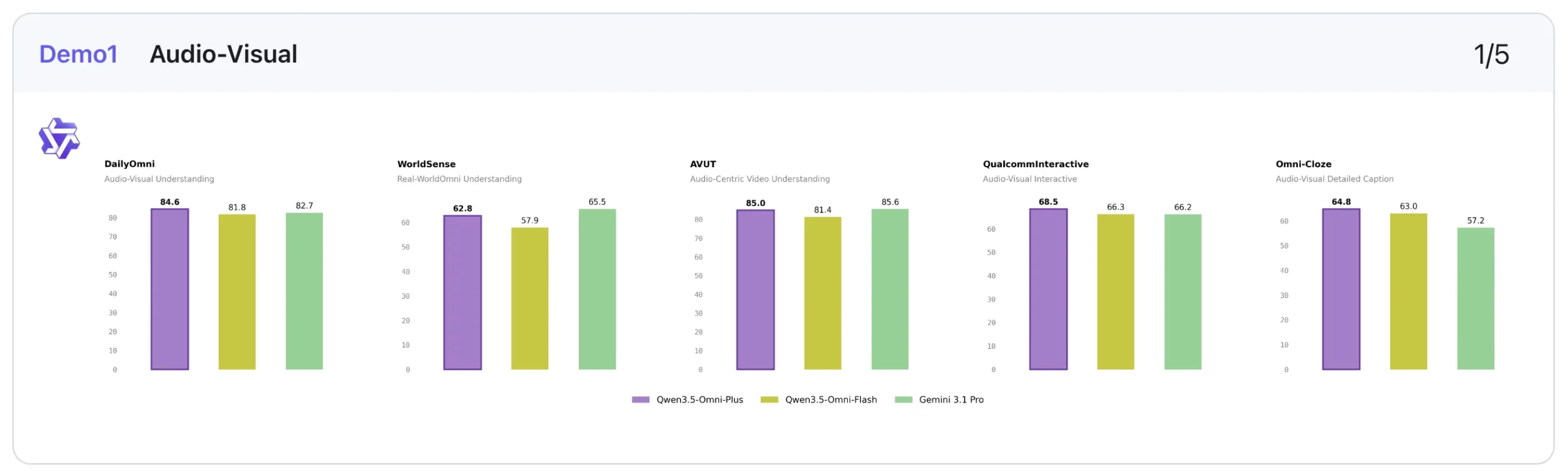
For instance, Qwen leads on DailyOmni (84.6 vs 82.7) and QualcommInteractive (68.5 vs 66.2), and also tops Omni-Cloze (64.8 vs 57.2) in captioning. But Gemini remains ahead on benchmarks like WorldSense (65.5 vs 62.8), VideoMME with audio (89.0 vs 83.7), and OmniGAIA tool use (68.9 vs 57.2).
3. Visual: Competitive, with some category-leading scores
In visual tasks, Qwen3.5-Omni-Plus again looks balanced and capable rather than wildly dominant.
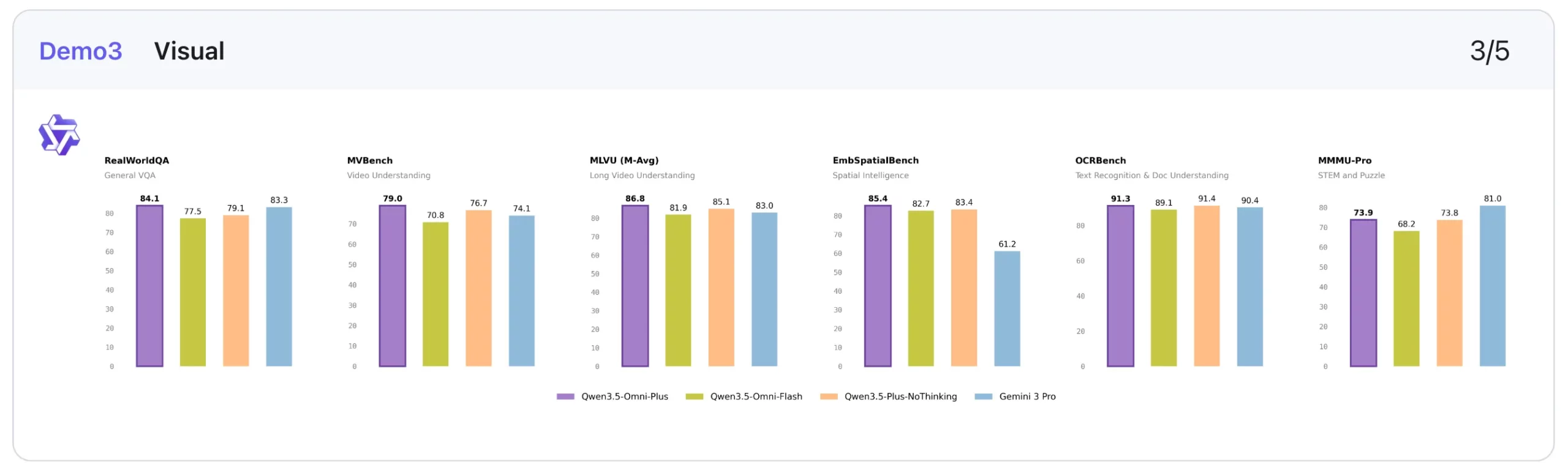
It posts the best score on MMMU-Pro (73.9), edges ahead on RealWorldQA (84.1), leads on CC-OCR (83.4), tops EmbSpatialBench (85.4), and performs best on several video benchmarks, including VideoMME without subtitles (81.9), MLVU (86.8), MVBench (79.0), LVBench (71.2), and MME-VideoOCR (77.0).
That said, the non-thinking Qwen3.5-Plus baseline still beats it on some classic visual and reasoning-heavy benchmarks such as MMMU, MathVision, and Mathvista mini. So Qwen3.5-Omni-Plus may not be the absolute best visual model in isolation. Though it still demonstrates very solid visual performance while bringing audio and speech into the same system.
4. Text: Solid, but not the headline story
Qwen3.5-Omni-Plus shows a good text performance, though it does not appear to be the central headline of the release.
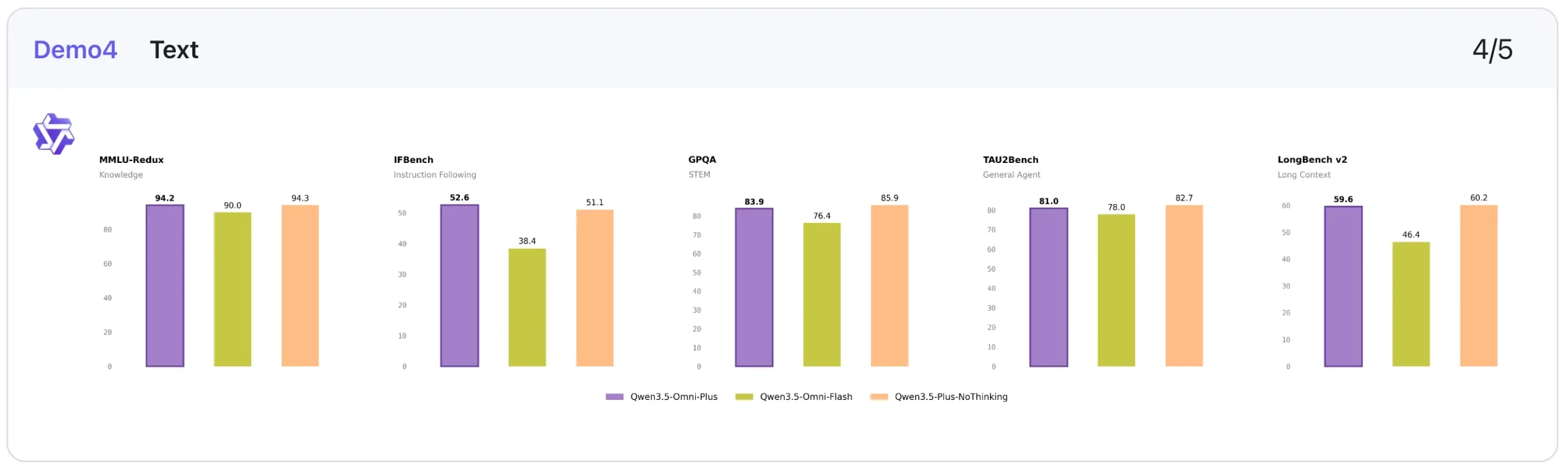
Qwen3.5-Omni-Plus stays close to the non-thinking Qwen3.5-Plus model on several benchmarks: MMLU-Redux (94.2 vs 94.3), C-Eval (92.0 vs 92.3), and IFEval (89.7 vs 89.7). It also does reasonably well on long-context tasks like LongBench v2 (59.6) and reasoning tasks like HMMT Nov 25 (84.4).
The broader pattern is that Qwen3.5-Omni-Plus preserves a strong text foundation while extending into other modalities. Of course, it is not the most exciting part of the benchmark table. But it is reassuring that the multimodal expansion does cut down on text-quality.
5. Speech Generation: Standout benchmark results
This is one of the clearest strengths of the model.
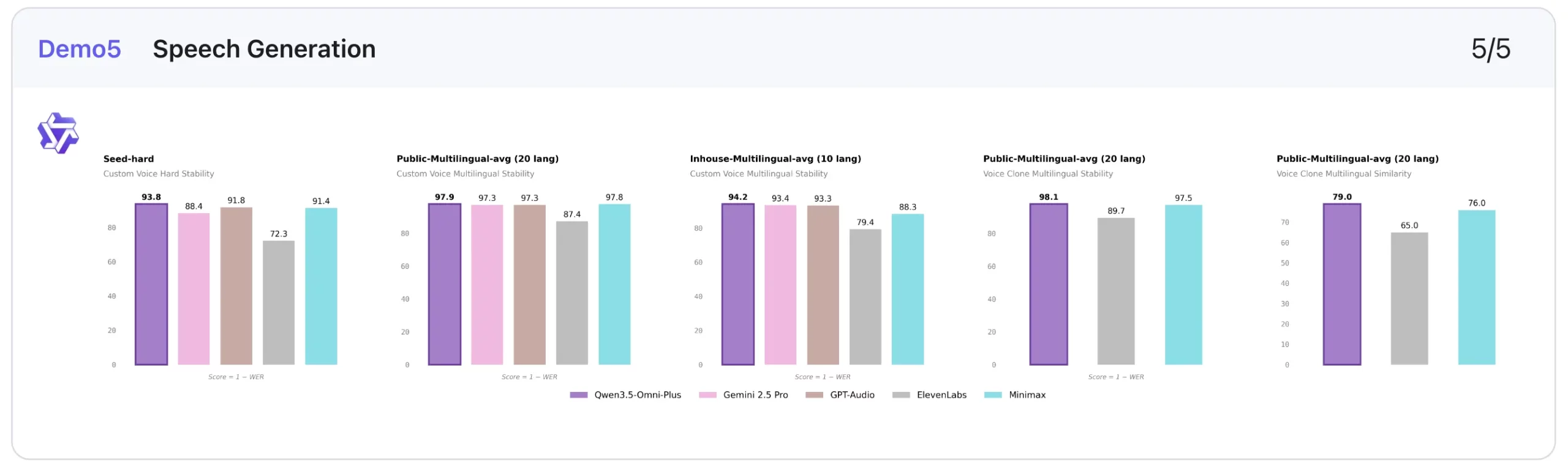
In custom voice stability, lower is better, and Qwen3.5-Omni-Plus performs extremely well. It scores 1.07 on Seed-zh, beating ElevenLabs (13.08), Gemini-2.5 Pro (2.42), GPT-Audio (1.11), and Minimax (1.19). It also leads on Seed-hard (6.24) and performs best on the multilingual averages shown, including 2.06 on Public-Multilingual-avg (20 languages) and 5.82 on Inhouse-Multilingual-avg (9 languages).
On voice clone stability, it also posts the best multilingual score in the public setting at 1.87, ahead of ElevenLabs (10.29) and Minimax (2.52). On voice clone similarity, higher is better, and Qwen3.5-Omni-Plus reaches 0.79 and 0.80, which is again the strongest score in the comparison shown.
This makes speech generation one of the most compelling parts of the Qwen3.5-Omni-Plus benchmark story.
Overall takeaway
- Strongest: Audio, Speech generation
- Very strong: Audio-visual, Vision
- Solid/above average: Text
This performance is made possible thanks to the unique architecture of the Qwen model. Here is
Qwen3.5-Omni Architecture
Qwen3.5-Omni follows what Qwen calls a Thinker-Talker architecture. We have seen it before in the previous Qwen models. Instead of treating understanding and response generation as one blended process, the model separates them into two functional parts. That makes the architecture easier to understand, especially for a model built to handle multiple modalities.
Here is what both parts do:
1. The Thinker
The Thinker is responsible for the model’s understanding layer. According to Qwen, it receives visual and audio signals through the model’s encoders and handles the higher-level reasoning over those inputs.
In simple terms, this is the part of the system that interprets what the model is seeing, hearing, or reading before a response is generated.
2. The Talker
The Talker handles the output side of the system. Once the model has processed the input, this component is responsible for generating the response.
This distinction matters because Qwen3.5-Omni is not just meant to analyse inputs. It is also meant to respond to interactive and conversational use cases.
3. Hybrid-Attention MoE in Both Components
Qwen says that both the Thinker and the Talker adopt Hybrid-Attention MoE.
That detail suggests the architecture is designed to balance capability and efficiency. Instead of relying on one large block to manage everything, the model uses a more structured design to support both multimodal understanding and response generation.
Why This Architecture Matters
For an omni-modal model, architecture matters more than usual. Qwen3.5-Omni is expected to process text, images, audio, and audio-visual content within one system. A split between understanding and generation helps support that broader role.
This is also why, rather than looking like a text model with a few added multimodal features, Qwen3.5-Omni is being framed as a system designed from the ground up for richer interaction across different input and output modes.
Now that we know how it works, here is how to access the new Qwen model.
Qwen3.5-Omni: How to Access
There are 3 main ways to access the Qwen3.5-Omni, mostly based on your use case. These are:
1. Qwen Chat
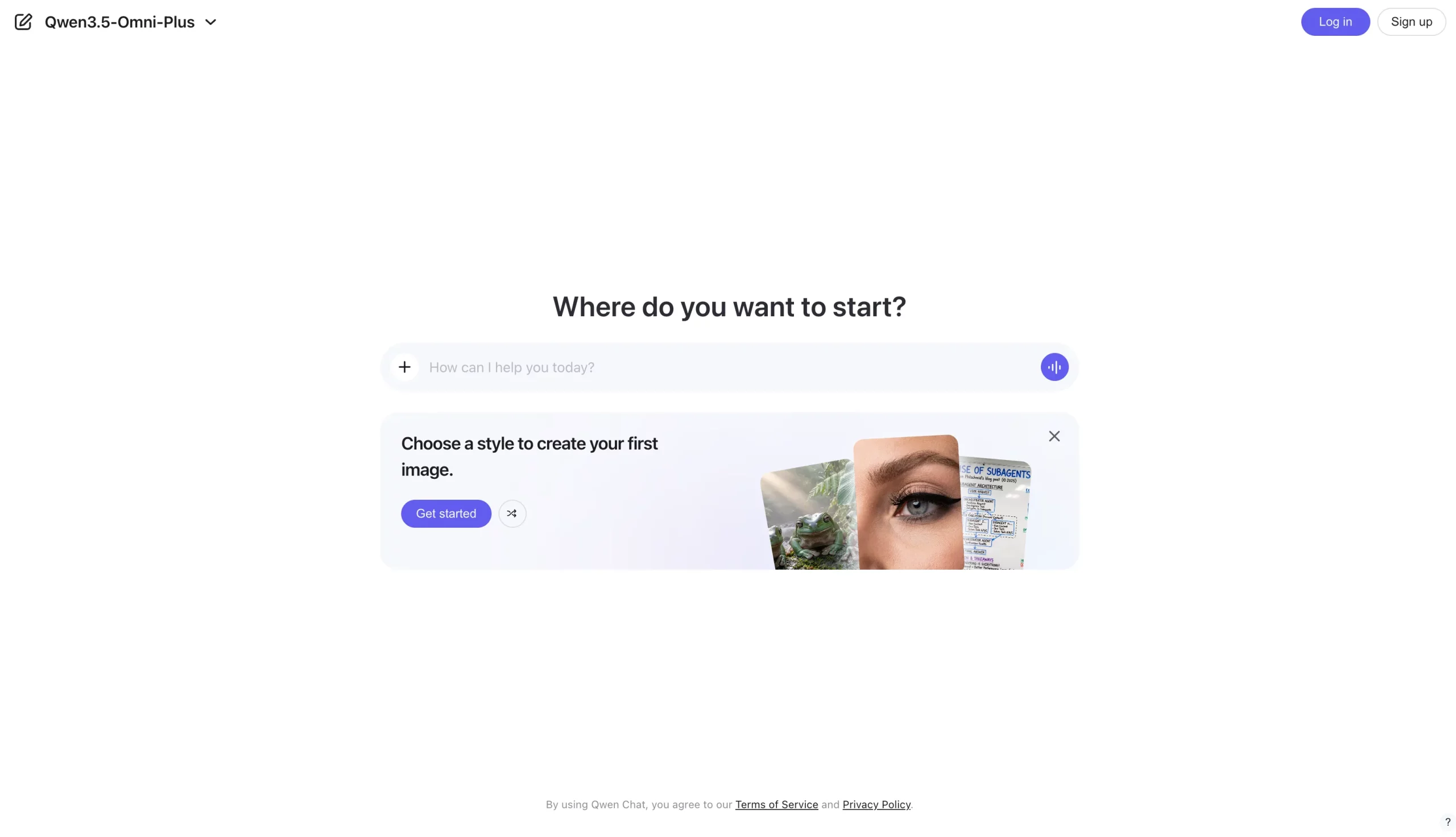
The most straightforward way to try Qwen3.5-Omni is through Qwen Chat, which acts as the direct user-facing access point for the model family.
Best for: individual users
2. via Offline API in Alibaba Cloud Model Studio
For standard API-based integration, Alibaba Cloud provides Qwen-Omni through Model Studio. The model accepts text combined with one other modality here, such as image, audio, or video, and can generate responses in text or speech. Alibaba notes that Qwen-Omni currently supports OpenAI-compatible calls only, requires an API key, and works with the latest SDK.
Best for: app integration and multimodal generation workflows
3. via Realtime API for live audio and video interactions
For interactive applications, Alibaba Cloud also offers Qwen-Omni-Realtime, which is accessed through a stateful WebSocket connection. This route is meant for real-time audio and video chat use cases, where the model can process streaming inputs and generate responses continuously during a session.
Best for: voice- or video-driven live experiences
Qwen3.5-Omni: Demonstration
The Qwen team has shared several demos of the new Qwen3.5-Omni that showcase its capabilities across use cases. Check them out below:
1. Audio-Visual Captioning
The first demo for the model is that of audio-visual captioning. The demo shows how the model is able to accurately interpret the information being shared within a video and generate the text for the same. Check it out in action in the embed below.
2. Audio-Visual Vibe Coding
This one is super interesting, as it shows Qwen3.5-Omni decoding specific technical instructions shared within a video, and then acting accordingly. As can be seen, the model can clearly understand what is happening across visual and audio inputs and assist in generating or refining code accordingly. This is combining multimodal context into the coding loop, making the interaction feel more intuitive than a plain text-only workflow.
3. Multi-Turn Dialogue and Intelligent Interruption
Alibaba also shares proof for its claims of multi-turn dialogue capabilities on the Qwen3.5-Omni. In another video, the model can be seen handling interruptions super intelligently. It showcases that the Qwen3.5-Omni can casually sustain a back-and-forth conversation while also recognising when a user is meaningfully interrupting, instead of reacting awkwardly to every sound or pause.
The anchor can be clearly seen trying to fool the model with filler words like “hmmm” and “okay” in the middle of the model’s response. Though Qwen3.5-Omni seems to know better than to interrupt.
4. Voice Style, Emotion, and Volume Control
If you were to ask me, this seems to be the USP of the new Qwen model. We have all seen AI models conversate with us in a very similar (if not exact) tone as humans. The Qwen3.5-Omni now takes it a step further and brings in voice style, emotion, and volume control. The demo highlights how the model can whisper, shout, or even narrate a poem while feeling dejected. That is something you don’t see too often.
Conclusion
From what we can see in the demos and the information shared by Alibaba, the new Qwen3.5-Omni takes the multi-modal capabilities of an LLM to another level. From deciphering audio-visual instructions to making AI conversations feel way more human, it brings with it a set of features that are rarely seen in AI models.
I am sure many would love to switch to Qwen3.5-Omni after this, largely for the entire conversations happening in audio-visual inputs and outputs. Whether they deliver on the quality that is showcased here, remains to be seen.







