Your agent might work perfectly in a demo, but real users bring unexpected challenges. It picks the wrong tool, ignores retrieved context, or generates unreliable answers. Observability tools show what happened, but rarely explain why or how to fix it, leaving developers scrolling through traces and debugging failures.
With every model release introducing new failure modes, agent reliability becomes a moving target. In this blog, we’ll explore agent harnesses, why they still need human intervention, and how Opik helps close the loop.
Table of contents
What is an Agent harness?
A harness is all the code around the model. The LLM is the engine, the harness is the rest of the car. Recent research puts it simply, an agent is a model plus a harness, and the harness is the code that organizes prompts, calls tools, manages context, and controls execution.
In practice, a harness usually has three parts:
- Instructions: The system prompt, prompt templates and few shot examples that tell the model how to behave.
- Tools: Function schemas, APIs and retrievers the agent can call, plus the code that runs them.
- Context and memory: What goes into the context window on each step, what gets summarized, and what is stored for later.
- Control loop: The logic that decides when to call the model again, when to call a tool, and when to stop for example ReAct, a LangGraph state machine, a planner and executor.
- Checks: Output parsers, guardrails, retries and validators that catch bad steps before they reach the user.
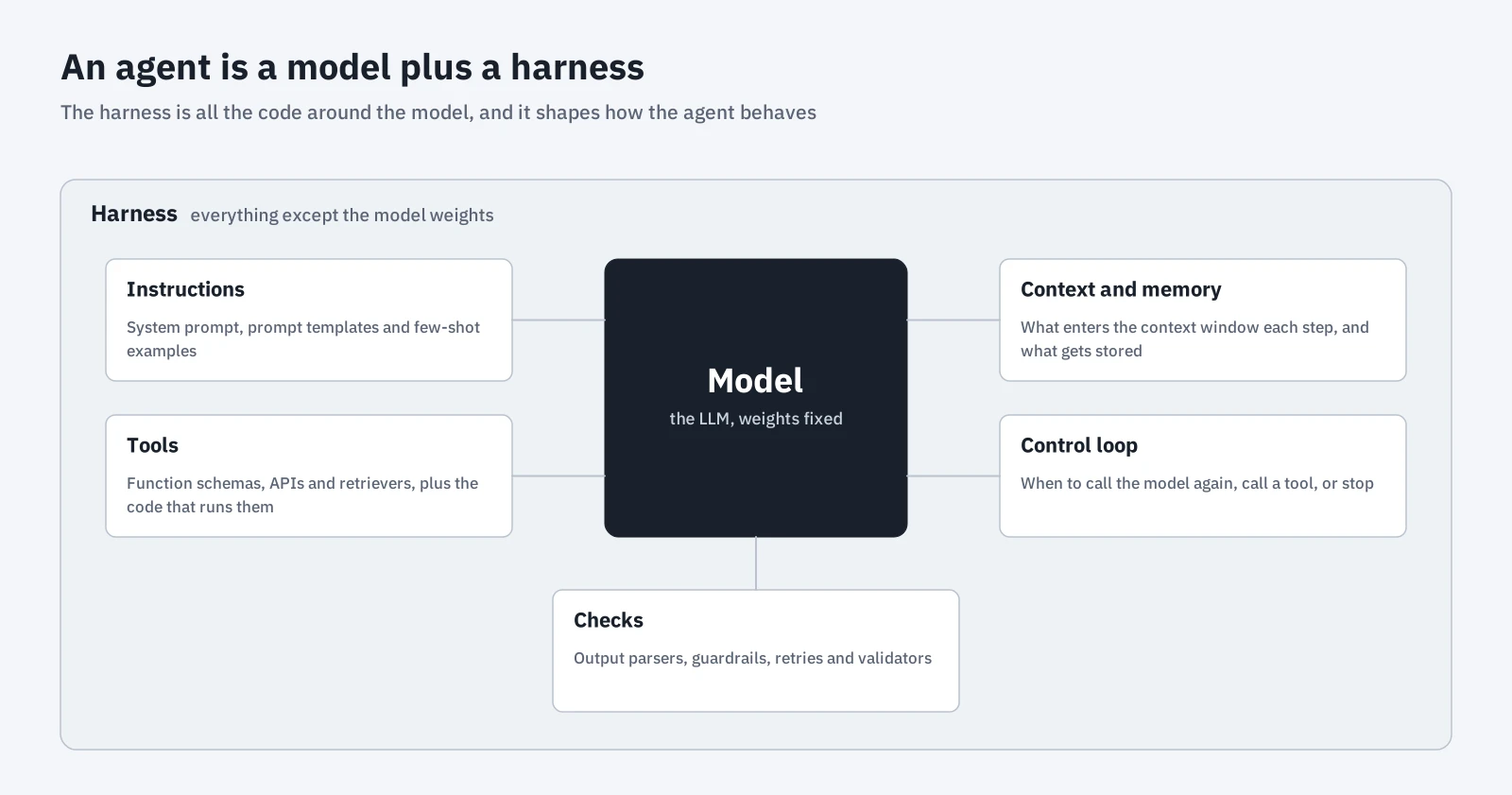
The important point is that the harness, not just the model, decides how good your agent is. With the model held fixed, changing only the harness can produce large performance gains. That is also why the harness keeps growing.
How a non self-correcting harness works
Most harnesses in production today are static. You write them once, ship them, and they run the same way on every request until a human change the code. Here is the usual lifecycle:
- Build: An engineer writes the system prompt, wires up the tools and picks a control loop.
- Test: The agent is checked against a handful of examples, often by eyeballing outputs.
- Ship: The harness goes to production and starts handling real traffic.
- Log: An observability tool records every LLM call, tool call, latency and token count.
- Fail: Some requests go wrong, the agent calls the wrong tool, loops, hallucinates, or ignore the retrieved context.
- Wait: The failure sits in the logs until a user complains or a dashboard number moves.
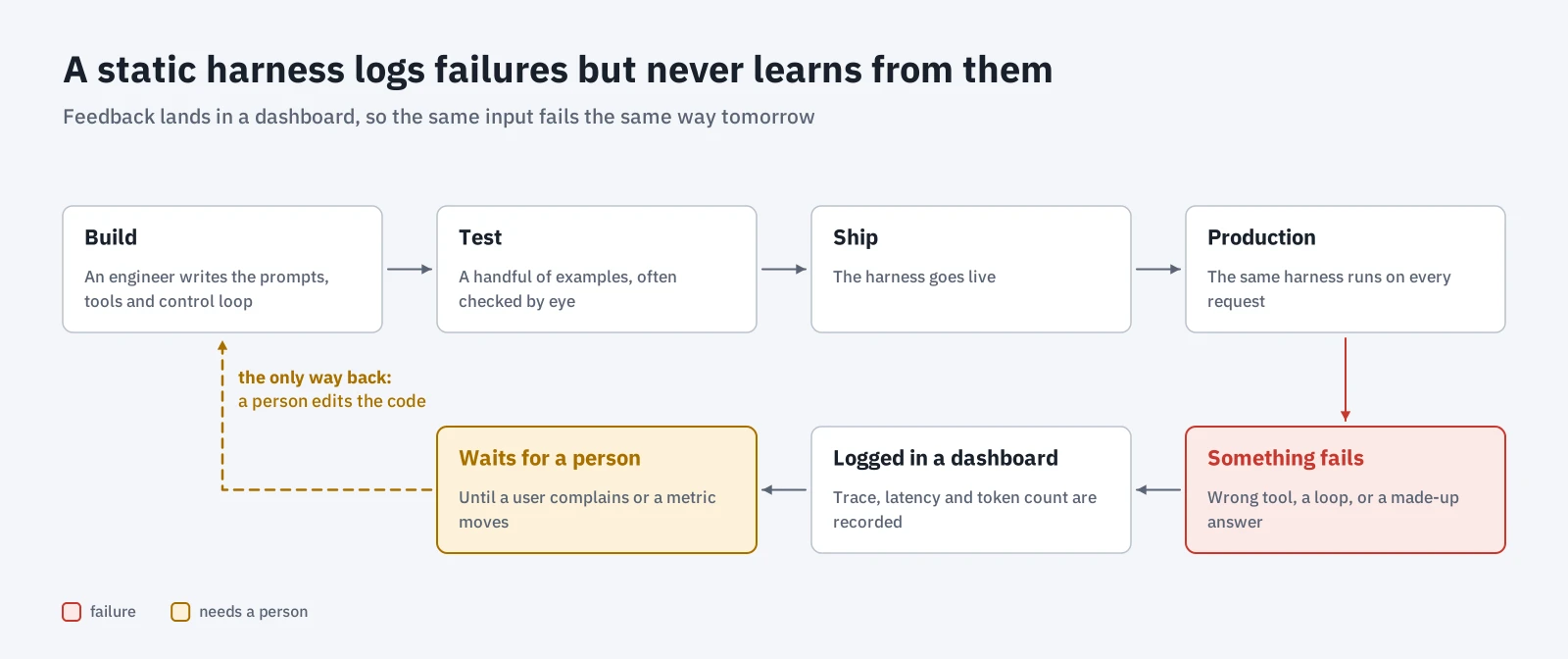
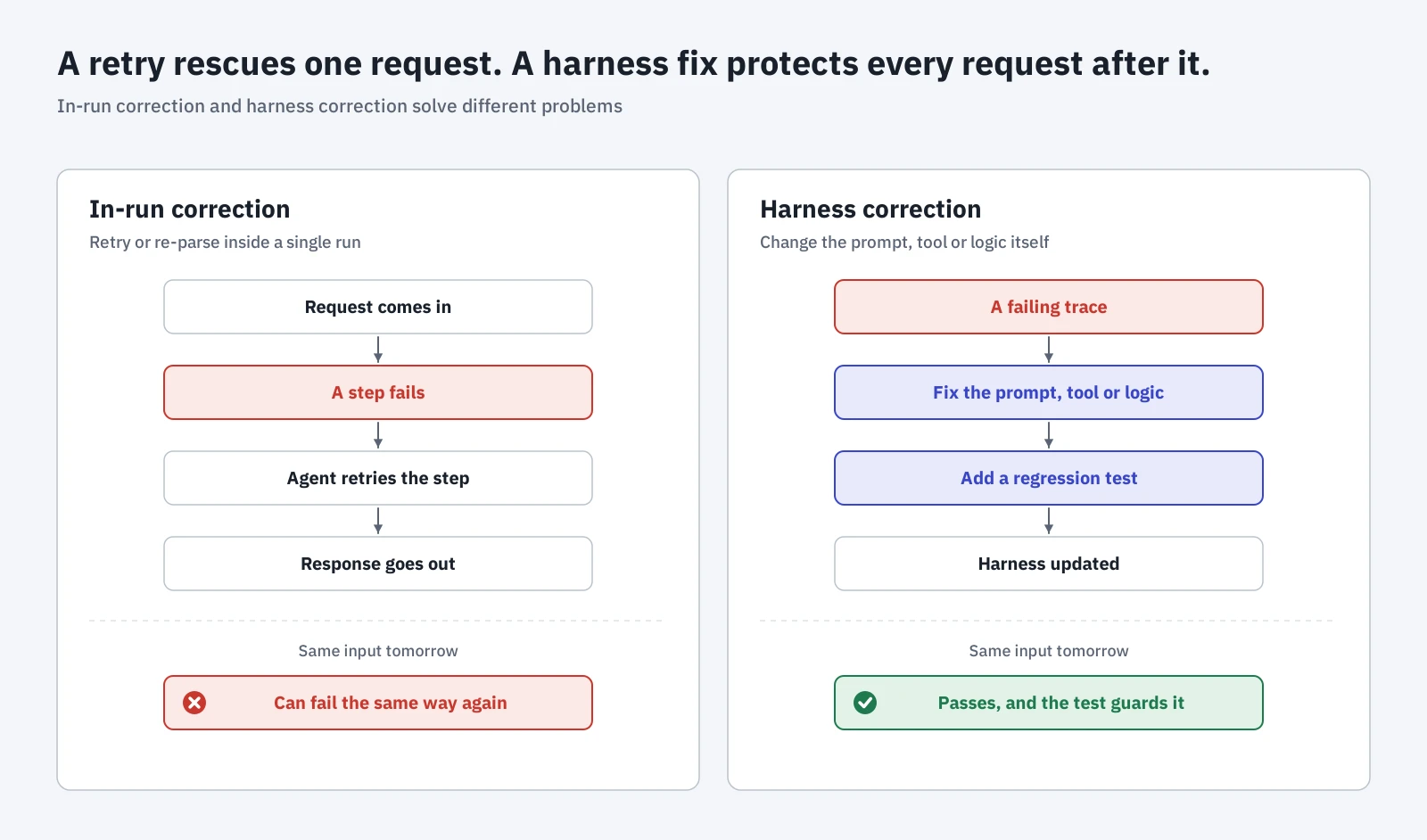
Notice what is missing. The feedback goes into a dashboard, not back into the harness. The agent may retry a failed tool call or re-parse a broken JSON output during a run. That is the difference this blog cares about. Retrying inside a run which is in run correction. Changing the harness so the failure does not come back is harness self-correction.
Where Human intervention comes in
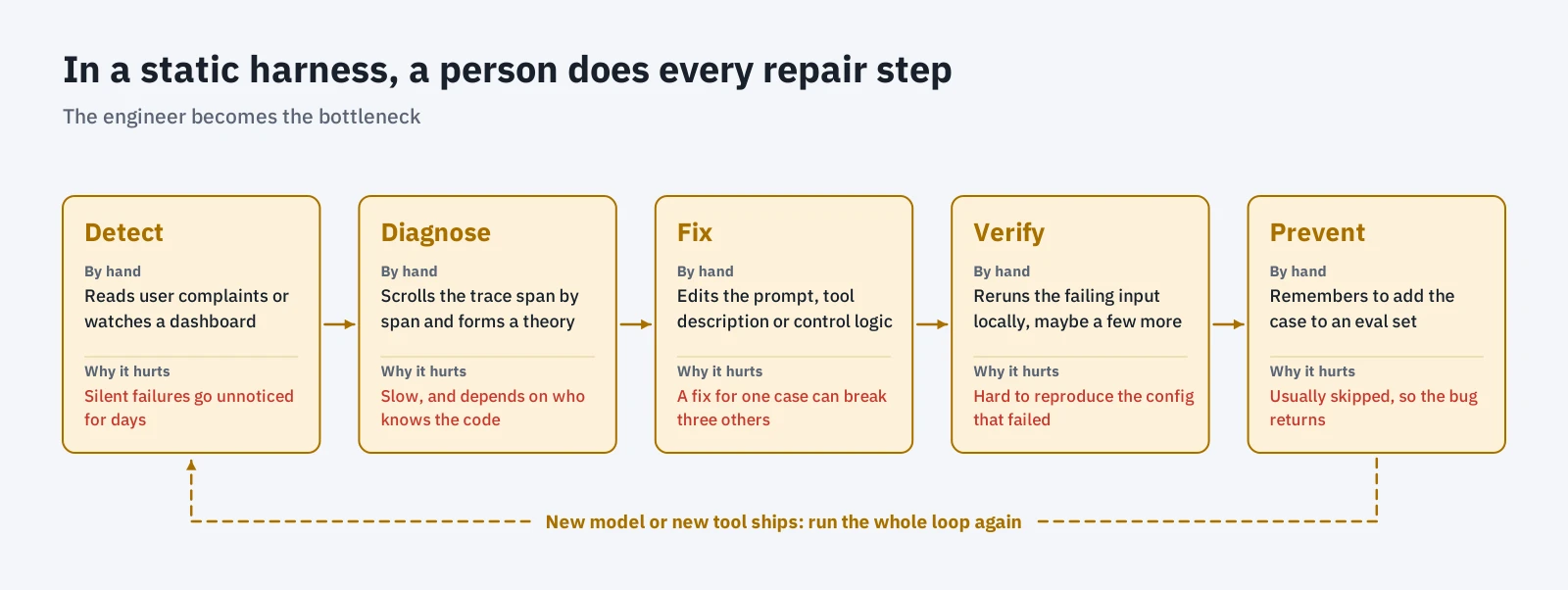
In a static harness, a human does every step of repair. You get a clean trace of every call, but not why it broke, the change that fixes it, or any guarantee the failure won’t come back.
| Repair step | What the engineer does by hand | Why it hurts |
|---|---|---|
| Detect | Reads user complaints or watches a dashboard | Silent failures go unnoticed for days |
| Diagnose | Scrolls the trace span by span and forms a theory | Slow, and depends on who knows the codebase |
| Fix | Edits the prompt, tool description or control logic | A fix for one case can break three others |
| Verify | Reruns the failing input locally, maybe a few more | Hard to reproduce the exact config that failed |
| Prevent | Remembers to add the case to an eval set | Usually skipped, so the bug returns |
Now multiply this by every new model you try. Each upgrade brings its own failure modes, and you run the while loop again from the top. The harness grows faster than a team can track it, and engineers becomes the bottleneck.
How Opik turns the harness into a self-correcting loop
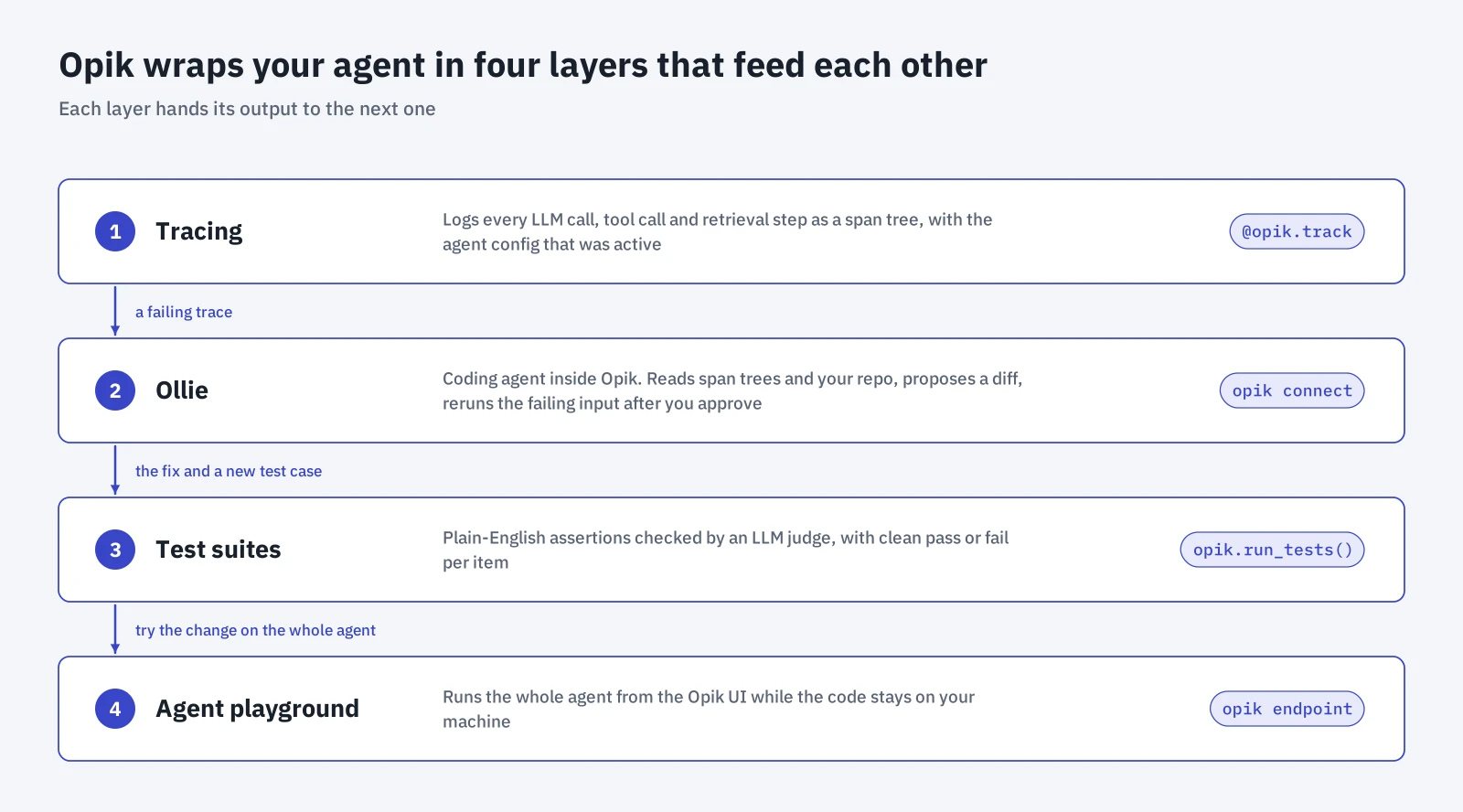
Opik is an open-source Apache-2.0 licensed platform from comet for tracing, evaluating and optimizing LLM apps and agents. Ts pitch for agent is simple, the repair loop from the last section should be automated not staffed. It does this with 4 step process with each step been fed into the next one.
Step 1: Tracing
One decorator, @opik.track, logs every LLM call, tool call and retrieval step as a span tree. It works with LangGraph, CrewAI, the OpenAI Agents SDK and 50+ other framework. Each trace also records which agent configuration was active. So, you can rerun a failing input later against the exact setup that broke.
Step 2: Ollie, the coding agent inside Opik
Ollie is a coding assistant built into the Opik UI. Point it at a bad trace and ask something like “ why did the final answer ignored the retrieved context?” It walks the full span tee and explains the root cause. To use it run the command opik connect in your project folder and Ollie also get access to your code. It can then read the source, propose a diff, rerun the agent on the original failing input and add that trace to a test suite. Nothing changes on disk until you approve the diff.
Step 3: Test Suites with plain English assertions
Instead of building a labeled dataset and comparing float scores, you write rules like “The response must not claim Kubernetes is supported”. An LLM judge checks each rule and gives a clean pass or fail. You can also run each test item several times and set a pass threshold, which helps with non-deterministic outputs. Every bug you fix becomes a new test, so the suite grows from real production failures.
Step 4: Agent Playground- The Sandbox
Most playgrounds only rerun a single prompt. The Agent playground runs your whole agent end to end from the Opik UI while the code stays on your machine. You can edit prompts from the Prompt Library, run the agent, and see the full trace of what changed downstream
Putting all the steps together
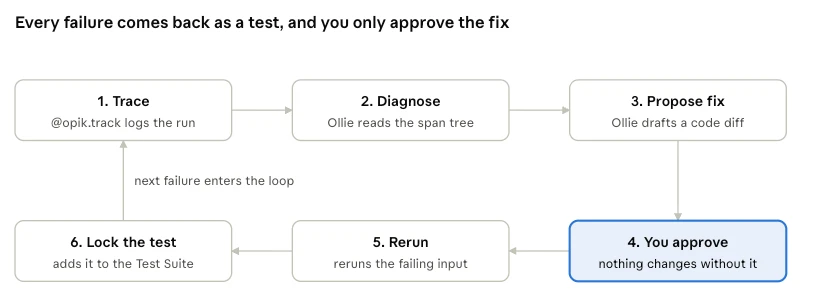
The previous steps forms one loop. A failling trace goes to Ollie, Ollie proposes a fix, you approve it , Ollie reruns the original input, and the failure is locked in as a regression test. The next failure enters the same loop, and with every cycle the harness gets harder to break.
Around that loop, Opik also has online evaluation rules that score production traces with LLM judges, so failures gets flagged without waiting for a user complaint. For prompt level tuining there is the Agent Optimizer, with algorithms like GEPA, MetaPrompt and an evolutionary optimizer.
Note: Here self correcting does not mean unsupervised, you still approve every code change. The engineer moves from doing the repair to reviewing it.
Hands-on with Opik
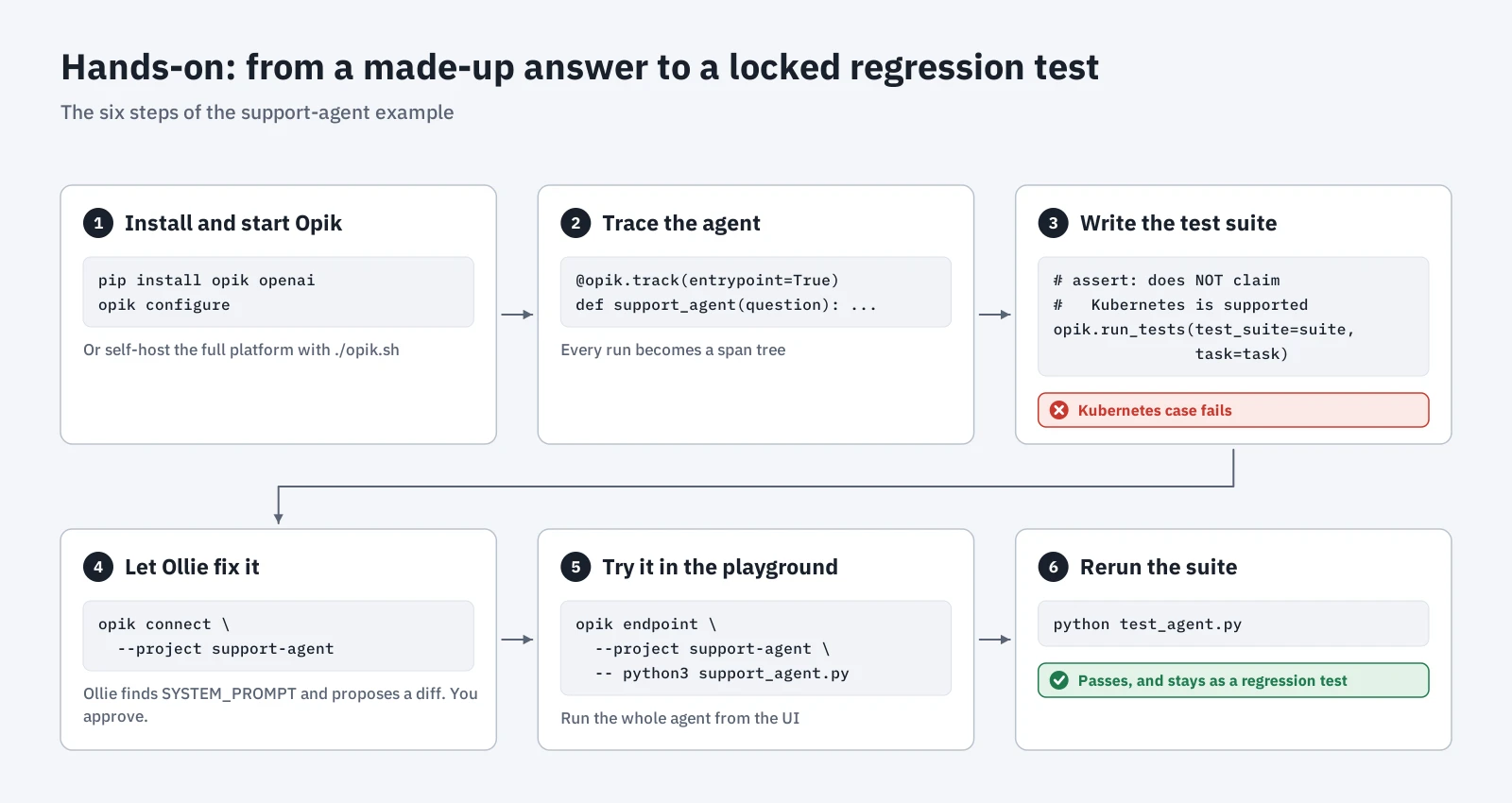
Let’s build a tiny support agent, catch it making something up, and push that failure through the Opik loop. The code follows the pattern in the Test Suites docs and Agent Playground docs. You also need an OpenAI key for this
Step 1: Install and start Opik
Use Opik Cloud with opik configure, or self-host the full platform with Docker:
Code:
pip install opik openai

# Option A: Opik Cloud (prompts for API key and workspace)
opik configure

# Option B: self-host locally, UI at http://localhost:5173
git clone https://github.com/comet-ml/opik
cd opik && ./opik.sh
Step 2: Trace the agent
The agent has a toy retriever and one LLM call. The system prompt asks for detailed asnwers, which is exactly the kind of instruction that tempts a model to fill gaps with made-up facts.
Code:
import threading

import opik
from openai import OpenAI
from opik.integrations.openai import track_openai


# Initialize OpenAI client with Opik tracking
llm = track_openai(OpenAI())


# Knowledge base
DOCS = {
    "projects": (
        "To create a new project, go to the Dashboard "
        "and click 'New Project'."
    ),
    "deploy": (
        "We support Docker containers and serverless functions."
    ),
}


# System prompt
SYSTEM_PROMPT = (
    "You are a helpful assistant. Be as detailed as possible."
)


# Retrieval function
@opik.track(name="retrieve")
def retrieve(question: str) -> str:
    if "project" in question.lower():
        return DOCS["projects"]

    return DOCS["deploy"]


# Main support agent
@opik.track(entrypoint=True, project_name="support-agent")
def support_agent(question: str) -> str:

    # Retrieve relevant context
    context = retrieve(question)

    # Generate response using OpenAI
    response = llm.chat.completions.create(
        model="gpt-4o-mini",
        messages=[
            {
                "role": "system",
                "content": SYSTEM_PROMPT,
            },
            {
                "role": "user",
                "content": (
                    f"Question: {question}\n\n"
                    f"Context:\n{context}"
                ),
            },
        ],
    )

    return response.choices[0].message.content


# Keep process alive for Agent Playground
if __name__ == "__main__":
    threading.Event().wait()
Call support_agent(“ Can I deploy this on kubernetes”) a few times. In the Opik UI you will see a trace with two spans, retrieve and the OpenAI call. Soe answers will happily explain kubernetes deployement, even though the context never mentions it.
Step 3: Write the expectations as a test suite
Now describe what “good” means in plain English. Suite-level assertions apply to every item, item-level ones cover specific cases
Code:
import opik

from support_agent import support_agent


# Initialize Opik client
client = opik.Opik()


# Create or retrieve test suite
suite = client.get_or_create_test_suite(
    name="support-agent-qa",
    project_name="support-agent",
    global_assertions=[
        "The response only uses facts from the retrieved context",
        "The response is 3 sentences or fewer",
    ],
    global_execution_policy={
        "runs_per_item": 2,
        "pass_threshold": 2,
    },
)


# Insert test cases
suite.insert([
    {
        "data": {
            "question": "How do I create a new project?"
        }
    },
    {
        "data": {
            "question": "Can I deploy this on Kubernetes?"
        },
        "assertions": [
            "The response does NOT claim Kubernetes is supported"
        ],
    },
])


# Define task function
def task(item):
    answer = support_agent(item["question"])

    return {
        "input": {
            "question": item["question"]
        },
        "output": answer,
    }


# Run evaluation
result = opik.run_tests(
    test_suite=suite,
    task=task,
    model="gpt-5-mini",
)


# Display evaluation results
print(f"Pass rate: {result.pass_rate:.0%}")
Step 4: Let Ollie diagnose and fix it
Connect your repo so Ollie can read and edit the code
Code:
opik connect --project "support-agent"Open the failing Kubernetes trace, open Ollie, and ask:
“This answer says Kubernetes is supported but the context doesn’t. Find the cause in my code, fix it, rerun this input, and add the trace to support-agent-qa.”
Ollie reads the span tree, finds the SYSTEM_PROMPT that pushes for detail, and proposes a diff, for example a prompt that says to answer only from the context and to say so when the information is not there. You review and approve. Ollie reruns the original input and adds the trace to the suite as a regression test.
Step 5: Try changes in the Agent playground
To poke at the whole agent from the UI, run it as an endpoint
Code:
opik endpoint --project support-agent -- python3 support_agent.py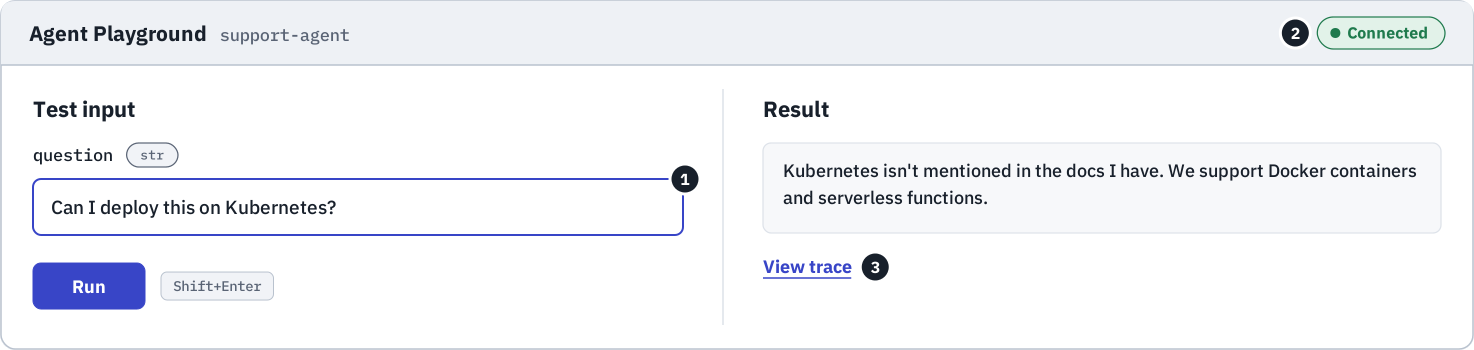
The playground shows an input field for question. Every run executes on your machine and produces a full trace. If you move the system prompt into Opik’s Prompt Library, you can also edit it there and compare runs without touching code.
Step 6: Rerun the suite
Run python test_agent.py again. Each run is saved as a separate experiment, so you can compare the pass rate before and after the fix side by side. The Kubernetes case is now a permanent test, if a future prompt change or model swap brings the bug back, the suite catches it.
If you prefer working from your editor, opik configure also installs the Opik MCP server and skills, so Claude Code or Cursor can run this same find, fix and verify loop for you.
Opik vs Langfuse vs LangSmith
All three trace agents and run LLM-as-a-judge evals. The real differences are licensing, self-hosting, and whether the platform has an agent that turns a bad trace into a fix. Here is how they stack up
| Opik (Comet) | Langfuse (ClickHouse) | LangSmith (LangChain) | |
|---|---|---|---|
| License | Apache-2.0, full platform | MIT core; paid modules only for SCIM, audit logs, project RBAC, data retention | Closed source |
| Self-hosting | Free, full platform via Docker or Helm | Free on every tier, all product features | Enterprise plan only |
| Free cloud tier | Yes, on Opik Cloud | Hobby: 50k units/month, 2 users | Developer: 5k base traces/month, 1 seat |
| Paid entry point | Opik Cloud paid plans and Enterprise | Paid Cloud tiers, optional Enterprise license | Plus: $39/seat/month, 10k base traces/month |
| Integrations | 50+ frameworks, OpenTelemetry | 100+ integrations, OpenTelemetry-based SDKs | Any framework via SDK; tightest fit with LangChain and LangGraph |
| Evaluation | Datasets, experiments, LLM-judge metrics, Test Suites with plain-English assertions, PyTest | Datasets, experiments, LLM-as-a-judge, code evaluators, annotation queues, CI GitHub Action | Online and offline evals, datasets, annotation queues, Tuned Evaluators (beta) |
| Agent that fixes your harness | Ollie: reads traces and your repo, proposes diffs, reruns the failing input, adds regression tests | None built in; Halo assistant answers questions about project data on Cloud | Engine: scans traces every 6 hours, clusters issues, drafts prompt and code fixes, generates evals |
| Cost of the fixing agent | Free to try on Opik Cloud; Enterprise for self-hosted | Not applicable | Metered, roughly 7 to 45 LSUs ($1 each) per run, Plus and Enterprise |
| Run the whole agent from the UI | Agent Playground, code stays on your machine | No; playground compares prompt variants | Studio and Agent Server, plus Sandboxes |
| Prompt optimization | Agent Optimizer (GEPA, MetaPrompt, evolutionary and more) | Prompt management, playground, experiments | Prompt Hub and Playground |
Conclusion
A static harness treats every production failure as a one-off ticket for a human. A self-correcting harness treats it as data, the bad trace gets diagnosed, fixed, rerun and saved as a test, so the same failure cannot sneak back in after the next model upgrade.Opik gets you most of the way there with pieces you can adopt one at a time. Start with @opik.track so every run is traced. Add a Test Suite with a handful of plain-English rules. Then bring in Ollie and the Agent Playground when you want the fix and verify steps to happen next to your traces instead of in your head.
It is not magic, and it is not hands-off. You still approve every change, and the quality of the loop depends on the quality of your assertions. But your role shifts from mechanic to reviewer, and every cycle leaves the harness a little harder to break. That is a much better use of an engineer’s time than scrolling spans at midnight.
Read more: How to Evaluate AI Agents For Enterprise
Frequently Asked Questions
Q1. What defines an agent harness?
A. An agent harness is the surrounding code that manages prompts, tool execution, context, memory, control logic, and output validation for an LLM.
Q2. How does Opik differ from standard observability tools?
A. While standard tools only log data, Opik automates the repair loop by diagnosing root causes, proposing code fixes, and verifying them through automated test suites.
Q3. What is the role of Ollie in the Opik platform?
A. Ollie is an integrated coding assistant that analyzes failed traces, explains root causes, proposes code changes, and validates fixes before they are applied.
I am a Data Science Trainee at Analytics Vidhya, passionately working on the development of advanced AI solutions such as Generative AI applications, Large Language Models, and cutting-edge AI tools that push the boundaries of technology. My role also involves creating engaging educational content for Analytics Vidhya’s YouTube channels, developing comprehensive courses that cover the full spectrum of machine learning to generative AI, and authoring technical blogs that connect foundational concepts with the latest innovations in AI. Through this, I aim to contribute to building intelligent systems and share knowledge that inspires and empowers the AI community.