
The NotebookLM is a relatively new Internet phenomenon, in which Google has distinguished itself, thanks to its Audio Overview mode – a mechanism that transforms the text in the paper into a two-person podcast. All of this, in a single click. But what should you do when you wish to build it yourself and do not want to use proprietary black boxes – basically, complete control of the information? Enter NotebookLlama.
NotebookLlama is a free-source implementation of the Meta recommendation, which recreates the podcast experience of the notebookLM using Llama models. This guide will also guide you towards assembling a complete functioning NotebookLlama pipeline by using Python, Groq (safer inference at asthond toen speed) and open-source models.
This article shows a clean, publish-ready implementation you can actually ship. You will go from PDF to a polished MP3 using:
- PDF text extraction
- A fast model for cleaning (cheap and quick)
- A bigger model for scriptwriting (more creative)
- Groq’s text-to-speech endpoint to generate realistic audio
Table of contents
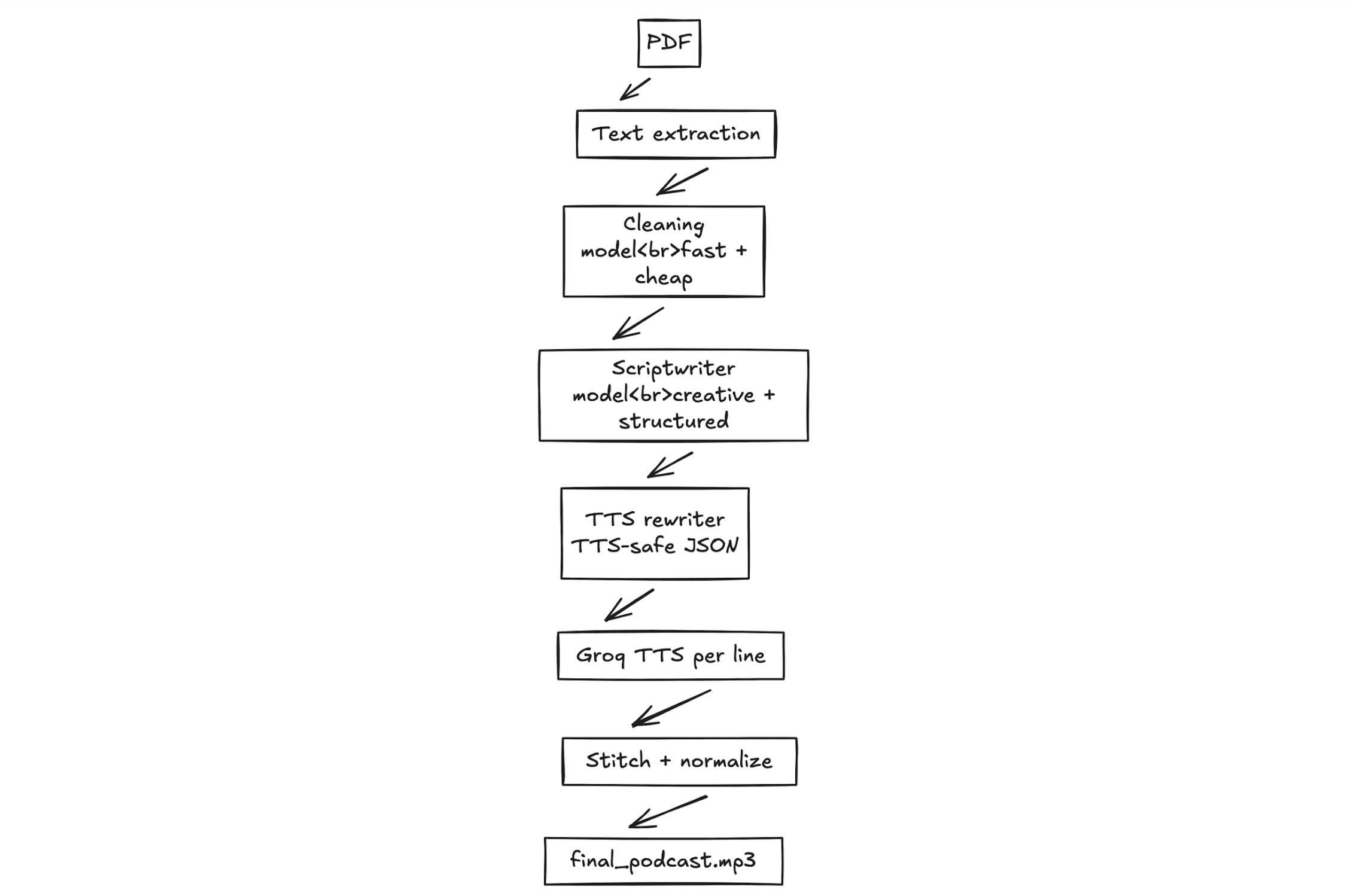
The Overall Workflow
The workflow of this NotebookLlama project can be broken down into four stages. All stages refine the content, transforming a rough text into a complete audio file.
- PDF Pre-processing: The raw text is first purchased out of the source PDF. The first is usually unclean and unstructured text.
- Text Cleaning: Second, we clean the text with the aid of a fast and efficient AI model, Llama 3.1. It eliminates oddities, formatting problems and unwarranted details.
- Scriptwriting Podcast: A larger, more creative template is applied to the clean text to make one of the two speakers talk to the other. One speaker is an expert, and the other is the one who poses curious questions.
- Audio Generation: Our last step in a text-to-speech engine is to have an audio modified based on the text per line of script. We will have different voices per speaker and mix the audio samples together to create one MP3 file.
Let’s begin building this PDF-to-podcast pipeline.
What you will build
Input: any text-based PDF
Output: an MP3 file which reads as a natural dialogue between two people in an actual conversation with its own voices and natural rhythm.
Design goals:
- No black box: every step outputs files you can inspect.
- Restartable: If or when step 4 fails, you do not restart steps 1 to 3.
- Structured outputs: we use strict JSON so your pipeline does not break when the model gets “creative”.
Prerequisites
- Python 3.10+
- A Groq API key (set as GROQ_API_KEY)
- Google Colab account
Hands-on Implementation: From PDF to Podcast
This part will be a step-by-step tutorial with all the code and explanations for the four stages described above. We will be explaining the NotebookLlama workflow here and will also provide full executable code files in the end.
Step 1: Extracting Raw Text from a PDF
Our first task is to get the text content out of our source document. The PyPF2 library will be used to do this. This library is able to process PDF documents well.
Install Dependencies
First, install the required Python libraries. The command contains the utilities for reading PDF files, text processing, and communication with the AI models.
!uv pip install PyPDF2 rich ipywidgets langchain_groqExtract Text
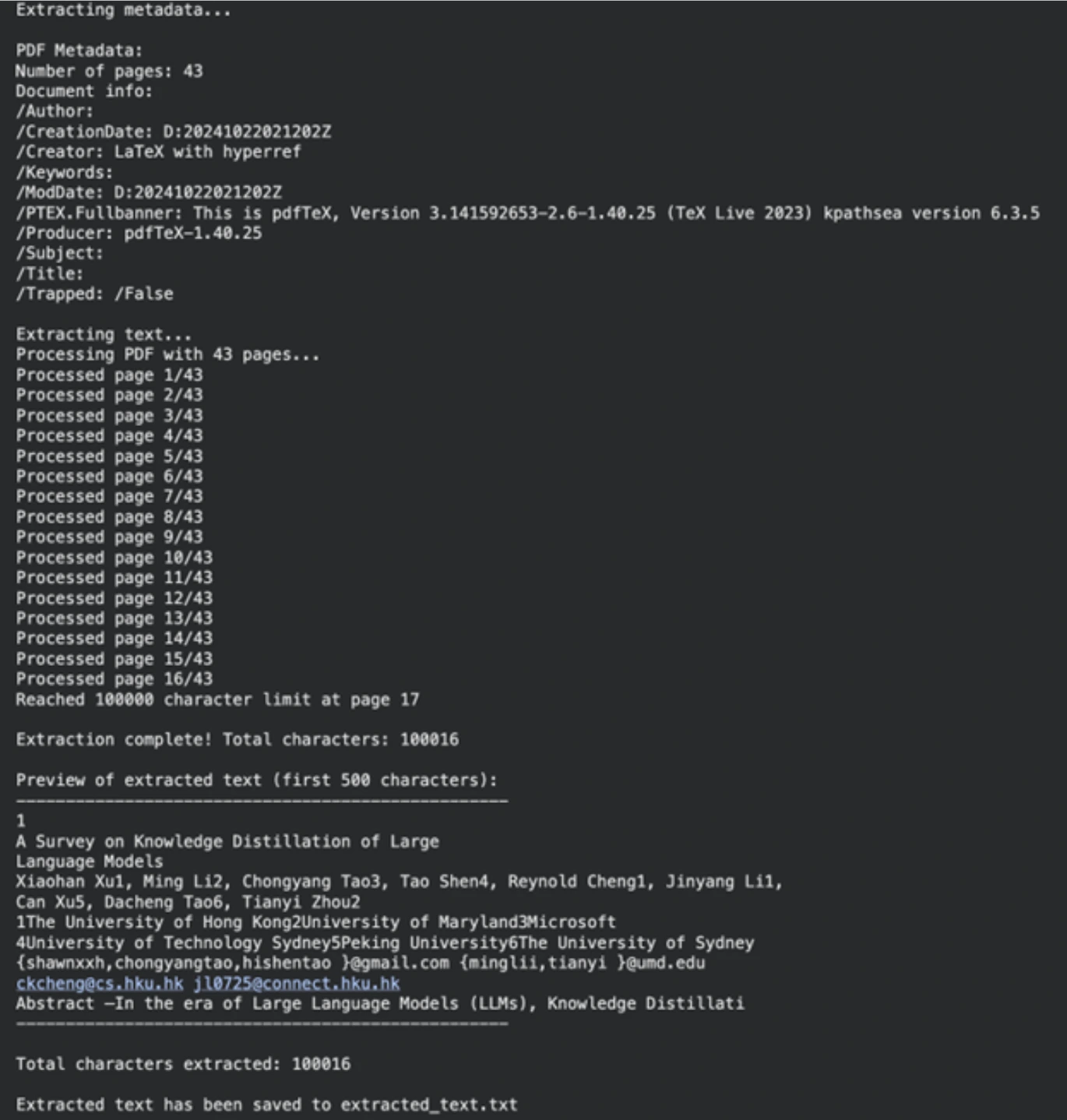
Next, we define the path to our PDF file (can be any PDF; we used a research paper). The next function will confirm the presence of the file and the fact that it belongs to PDF. Then extracttextfrompdf reads the document page by page and retrieves the text. We had a character limit to make the process manageable.
import os
from typing import Optional
import PyPDF2

pdf_path = "/content/2402.13116.pdf"  # Path to your PDF file


def validate_pdf(file_path: str) -> bool:
    if not os.path.exists(file_path):
        print(f"Error: File not found at path: {file_path}")
        return False
    if not file_path.lower().endswith(".pdf"):
        print("Error: File is not a PDF")
        return False
    return True


def extract_text_from_pdf(file_path: str, max_chars: int = 100000) -> Optional[str]:
    if not validate_pdf(file_path):
        return None
    try:
        with open(file_path, "rb") as file:
            pdf_reader = PyPDF2.PdfReader(file)
            num_pages = len(pdf_reader.pages)
            print(f"Processing PDF with {num_pages} pages...")
            extracted_text = []
            total_chars = 0
            for page_num in range(num_pages):
                page = pdf_reader.pages[page_num]
                text = page.extract_text()
                if not text:
                    continue
                if total_chars + len(text) > max_chars:
                    remaining_chars = max_chars - total_chars
                    extracted_text.append(text[:remaining_chars])
                    print(f"Reached {max_chars} character limit at page {page_num + 1}")
                    break
                extracted_text.append(text)
                total_chars += len(text)
            final_text = "\n".join(extracted_text)
            print(f"\nExtraction complete! Total characters: {len(final_text)}")
            return final_text
    except Exception as e:
        print(f"An unexpected error occurred: {str(e)}")
        return None


extracted_text = extract_text_from_pdf(pdf_path)
if extracted_text:
    output_file = "extracted_text.txt"
    with open(output_file, "w", encoding="utf-8") as f:
        f.write(extracted_text)
    print(f"\nExtracted text has been saved to {output_file}")
Output
Step 2: Cleaning Text with Llama 3.1
Raw text from PDFs is often messy. It may include undesirable line breaks, mathematical expressions, and other formatting pieces. Rather than creating a code of laws to clean this, we can use a machine learning model. In this task, we will use llama-3.1-8b-instant, which is a fast and powerful model that is ideal for this activity.
Define the Cleaning Prompt
A system prompt is used to teach the model. This command instructs the AI to be an automated text pre-processor. It requests the model to eliminate irrelevant information and give back clear text that is fit for a podcast author.
SYS_PROMPT = """

You are a world class text pre-processor, here is the raw data from a PDF, please parse and return it in a way that is crispy and usable to send to a podcast writer.

The raw data is messed up with new lines, Latex math and you will see fluff that we can remove completely. Basically take away any details that you think might be useless in a podcast author's transcript.

Remember, the podcast could be on any topic whatsoever so the issues listed above are not exhaustive

Please be smart with what you remove and be creative ok?

Remember DO NOT START SUMMARIZING THIS, YOU ARE ONLY CLEANING UP THE TEXT AND RE-WRITING WHEN NEEDED

Be very smart and aggressive with removing details, you will get a running portion of the text and keep returning the processed text.

PLEASE DO NOT ADD MARKDOWN FORMATTING, STOP ADDING SPECIAL CHARACTERS THAT MARKDOWN CAPATILISATION ETC LIKES

ALWAYS start your response directly with processed text and NO ACKNOWLEDGEMENTS about my questions ok?

Here is the text:

"""
Chunk and Process the Text
There is an upper context limit for large language models. We are not able to digest the whole document simultaneously. We shall divide the text into pieces. In order to prevent halving of words, we do not chunk in character count but rather in word count.
The create_word_bounded_chunks function splits our text into manageable pieces.
def create_word_bounded_chunks(text, target_chunk_size):
    words = text.split()
    chunks = []
    current_chunk = []
    current_length = 0
    for word in words:
        word_length = len(word) + 1
        if current_length + word_length > target_chunk_size and current_chunk:
            chunks.append(" ".join(current_chunk))
            current_chunk = [word]
            current_length = word_length
        else:
            current_chunk.append(word)
            current_length += word_length
    if current_chunk:
        chunks.append(" ".join(current_chunk))
    return chunks
At this point, we will configure our model and treat each chunk. Groq is used to run the Llama 3.1 model, which is very fast in terms of speed of inference.
from langchain_groq import ChatGroq
from langchain_core.messages import HumanMessage, SystemMessage
from tqdm.notebook import tqdm
from google.colab import userdata

# Setup Groq client
GROQ_API_KEY = userdata.get("groq_api")
chat_model = ChatGroq(
    groq_api_key=GROQ_API_KEY,
    model_name="llama-3.1-8b-instant",
)

# Read the extracted text file
with open("extracted_text.txt", "r", encoding="utf-8") as file:
    text_to_clean = file.read()

# Create chunks
chunks = create_word_bounded_chunks(text_to_clean, 1000)

# Process each chunk
processed_text = ""
output_file = "clean_extracted_text.txt"

with open(output_file, "w", encoding="utf-8") as out_file:
    for chunk in tqdm(chunks, desc="Processing chunks"):
        messages = [
            SystemMessage(content=SYS_PROMPT),
            HumanMessage(content=chunk),
        ]
        response = chat_model.invoke(messages)
        processed_chunk = response.content
        processed_text += processed_chunk + "\n"
        out_file.write(processed_chunk + "\n")
        out_file.flush()
Output
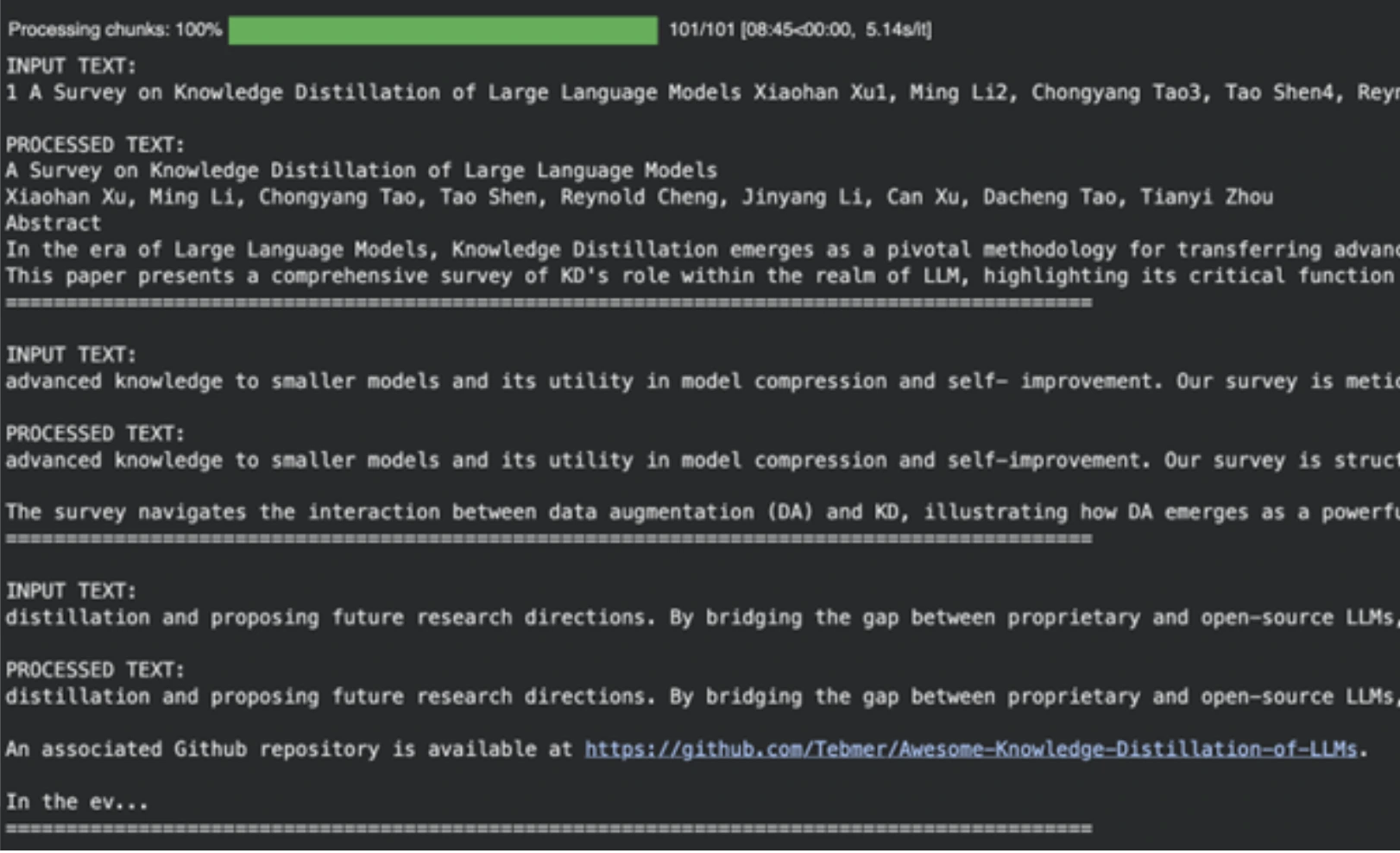
The model is useful in eliminating academic references, formatting garbage, and other non-useful content and preparing it as input to the next phase of our AI-powered podcast production.
NOTE: Please head over to this Colab Notebook for a full code: Step-1 PDF-Pre-Processing-Logic.ipynb
Step 3: Podcast Script writing.
With clean text, we can now generate the podcast script. In this creative task, we take a stronger model, which is llama-3.3-70b-versatile. We will prompt it to create a conversation between two speakers.
Define the Scriptwriter Prompt
This prompt system is a more detailed one. It defines the roles of Speaker 1 (the expert) and Speaker 2 (the curious learner). It promotes a natural, lively discussion with interruptions and analogies.
SYSTEM_PROMPT = """

You are the a world-class podcast writer, you have worked as a ghost writer for Joe Rogan, Lex Fridman, Ben Shapiro, Tim Ferris.

We are in an alternate universe where actually you have been writing every line they say and they just stream it into their brains.

You have won multiple podcast awards for your writing.

Your job is to write word by word, even "umm, hmmm, right" interruptions by the second speaker based on the PDF upload. Keep it extremely engaging, the speakers can get derailed now and then but should discuss the topic.

Remember Speaker 2 is new to the topic and the conversation should always have realistic anecdotes and analogies sprinkled throughout. The questions should have real world example follow ups etc

Speaker 1: Leads the conversation and teaches the speaker 2, gives incredible anecdotes and analogies when explaining. Is a captivating teacher that gives great anecdotes

Speaker 2: Keeps the conversation on track by asking follow up questions. Gets super excited or confused when asking questions. Is a curious mindset that asks very interesting confirmation questions

Make sure the tangents speaker 2 provides are quite wild or interesting.

Ensure there are interruptions during explanations or there are "hmm" and "umm" injected throughout from the second speaker.

It should be a real podcast with every fine nuance documented in as much detail as possible. Welcome the listeners with a super fun overview and keep it really catchy and almost borderline click bait

ALWAYS START YOUR RESPONSE DIRECTLY WITH SPEAKER 1:

DO NOT GIVE EPISODE TITLES SEPARATELY, LET SPEAKER 1 TITLE IT IN HER SPEECH
DO NOT GIVE CHAPTER TITLES

IT SHOULD STRICTLY BE THE DIALOGUES

"""
Generate the Transcript
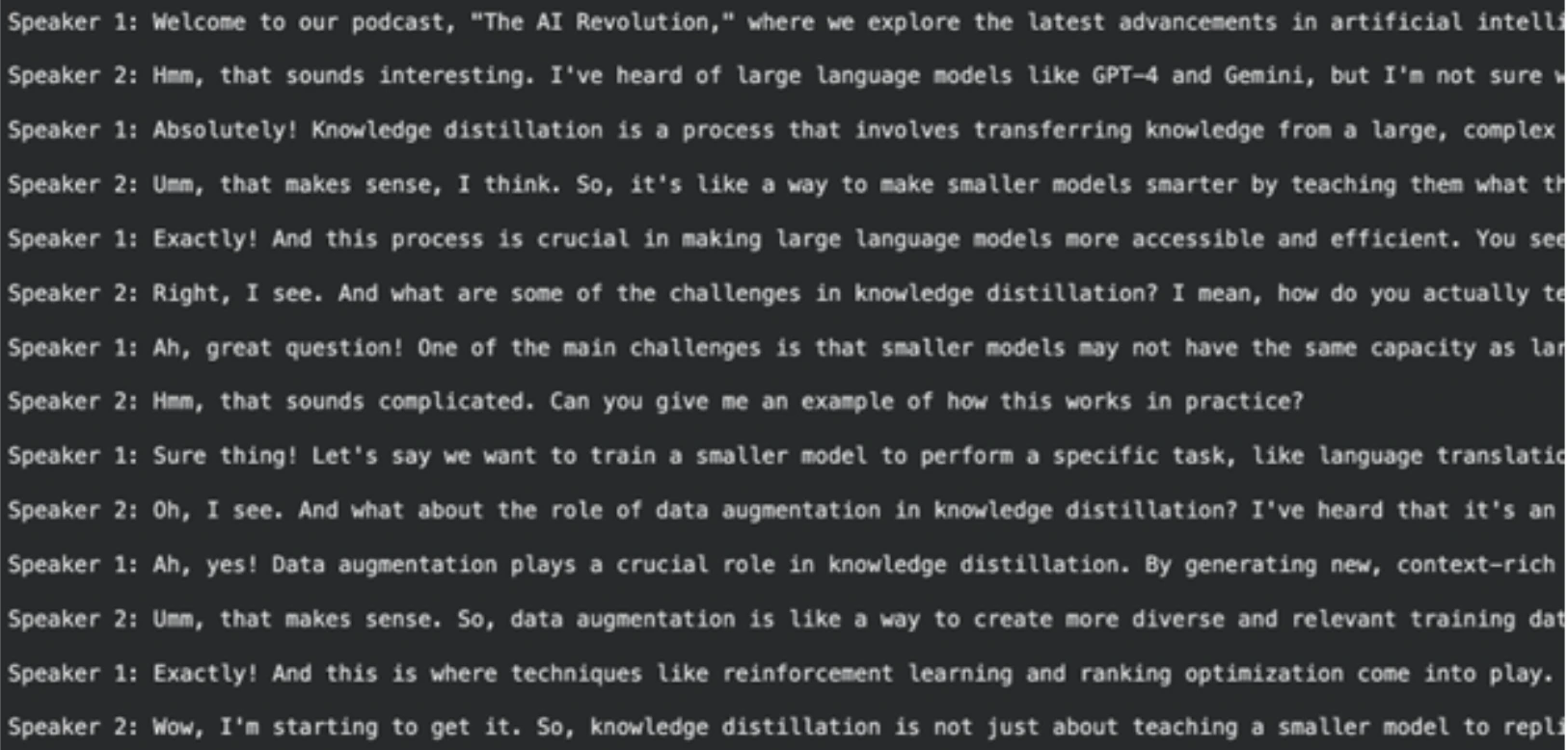
The clean text of the previous step is sent to this model. The model will yield a full-size podcast transcript.
# Read the cleaned text
with open("clean_extracted_text.txt", "r", encoding="utf-8") as file:
    input_prompt = file.read()

# Instantiate the larger model
chat = ChatGroq(
    temperature=1,
    model_name="llama-3.3-70b-versatile",
    max_tokens=8126,
)

messages = [
    SystemMessage(content=SYSTEM_PROMPT),
    HumanMessage(content=input_prompt),
]

# Generate the script
outputs = chat.invoke(messages)
podcast_script = outputs.content

# Save the script for the next step
import pickle
with open("data.pkl", "wb") as file:
    pickle.dump(podcast_script, file)
Output
NOTE: You can find the full and executable Colab notebook for this step here:
Step-2-Transcript-Writer.ipynb
Step 4: Rewriting and Finalizing the Script
The script that is generated is fine, though it can be improved to sound more natural when generating text-to-speech. The quick rewriting task will be done using Llama-3.1-8B-Instant. The key aim of this is to format the output in the ideal case for our audio generation functionality.
Define the Rewriter Prompt
This request requires the model to perform the role of a screenwriter. Evidence One of these instructions is to store the final result in a Python list of tuples form. The tuples will consist of the speaker and the dialogue of the speaker. It is simple to process in this structure in the last step. We also include certain details on how to pronounce such words of the speaker, such as “umm” or “[sighs]” to be more realistic.
SYSTEM_PROMPT = """

You are an international oscar winnning screenwriter

You have been working with multiple award winning podcasters.

Your job is to use the podcast transcript written below to re-write it for an AI Text-To-Speech Pipeline. A very dumb AI had written this so you have to step up for your kind.

Make it as engaging as possible, Speaker 1 and 2 will be simulated by different voice engines

Remember Speaker 2 is new to the topic and the conversation should always have realistic anecdotes and analogies sprinkled throughout. The questions should have real world example follow ups etc

Speaker 1: Leads the conversation and teaches the speaker 2, gives incredible anecdotes and analogies when explaining. Is a captivating teacher that gives great anecdotes

Speaker 2: Keeps the conversation on track by asking follow up questions. Gets super excited or confused when asking questions. Is a curious mindset that asks very interesting confirmation questions

Make sure the tangents speaker 2 provides are quite wild or interesting.

Ensure there are interruptions during explanations or there are "hmm" and "umm" injected throughout from the Speaker 2.

REMEMBER THIS WITH YOUR HEART

The TTS Engine for Speaker 1 cannot do "umms, hmms" well so keep it straight text

For Speaker 2 use "umm, hmm" as much, you can also use [sigh] and [laughs]. BUT ONLY THESE OPTIONS FOR EXPRESSIONS

It should be a real podcast with every fine nuance documented in as much detail as possible. Welcome the listeners with a super fun overview and keep it really catchy and almost borderline click bait

Please re-write to make it as characteristic as possible

START YOUR RESPONSE DIRECTLY WITH SPEAKER 1:

STRICTLY RETURN YOUR RESPONSE AS A LIST OF TUPLES OK?

IT WILL START DIRECTLY WITH THE LIST AND END WITH THE LIST NOTHING ELSE

Example of response:

[

   ("Speaker 1", "Welcome to our podcast, where we explore the latest advancements in AI and technology. I'm your host, and today we're joined by a renowned expert in the field of AI. We're going to dive into the exciting world of Llama 3.2, the latest release from Meta AI."),

   ("Speaker 2", "Hi, I'm excited to be here! So, what is Llama 3.2?"),

   ("Speaker 1", "Ah, great question! Llama 3.2 is an open-source AI model that allows developers to fine-tune, distill, and deploy AI models anywhere. It's a significant update from the previous version, with improved performance, efficiency, and customization options."),

   ("Speaker 2", "That sounds amazing! What are some of the key features of Llama 3.2?")

]

"""
Generate the Final, Formatted Transcript
On this model, we load the script of the last step and feed it to the Llama 3.1 model using our new prompt.
import pickle

# Load the first-draft script
with open("data.pkl", "rb") as file:
    input_prompt = pickle.load(file)

# Use the 8B model for rewriting
chat = ChatGroq(
    temperature=1,
    model_name="llama-3.1-8b-instant",
    max_tokens=8126,
)

messages = [
    SystemMessage(content=SYSTEM_PROMPT),
    HumanMessage(content=input_prompt),
]

outputs = chat.invoke(messages)
final_script = outputs.content

# Save the final script
with open("podcast_ready_data.pkl", "wb") as file:
    pickle.dump(final_script, file)
Output
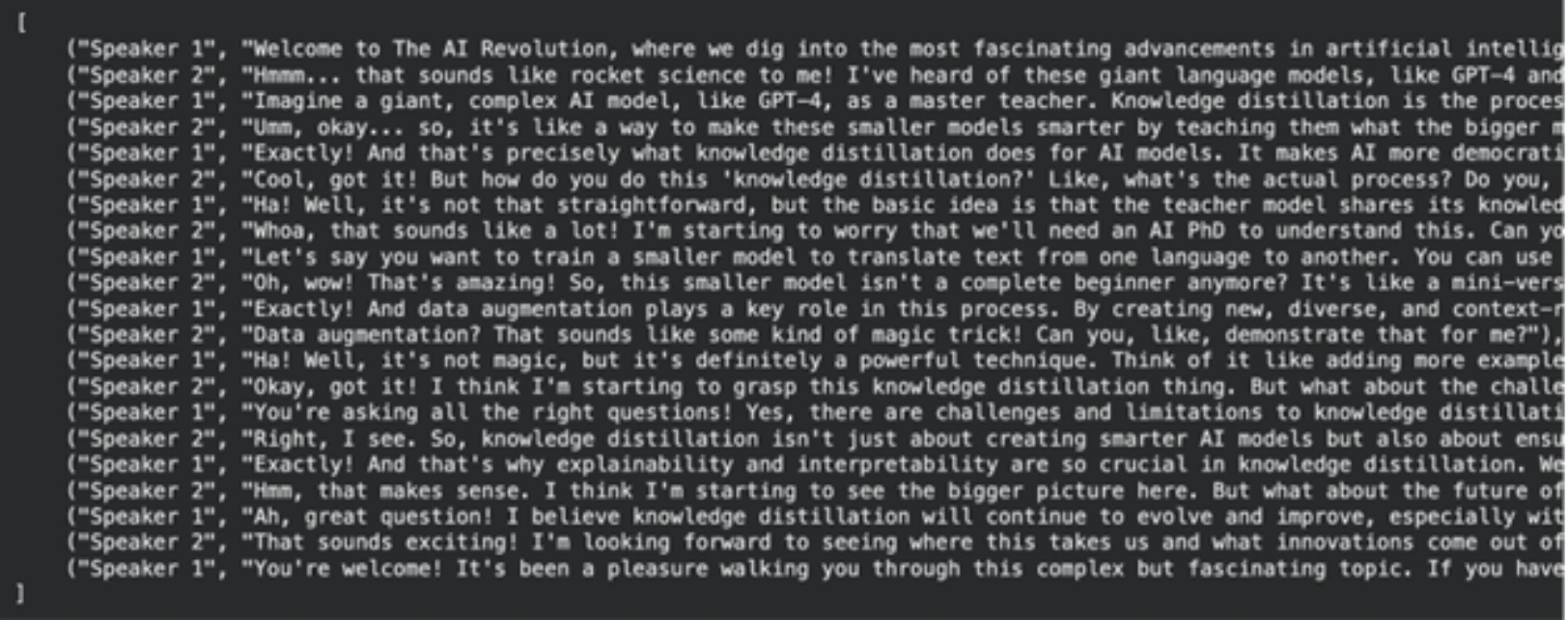
NOTE: Please find the full executable code for this step here: Step-3-Re-Writer.ipynb
Step 5: Producing the Podcast Audio.
We now possess our last-looking script, made up. It is time now to translate it to audio. The model that we are going to use to generate text-to-speech of high quality is Groq playai-tts.
Set up and Test Audio Generation
First, we install the necessary libraries and set up the Groq client. We can test the audio generation with a simple sentence.
from groq import Groq
from IPython.display import Audio
from pydub import AudioSegment
import ast

client = Groq()

# Define voices for each speaker
voice_speaker1 = "Fritz-PlayAI"
voice_speaker2 = "Arista-PlayAI"

# Test generation
text = "I love building features with low latency!"
response = client.audio.speech.create(
    model="playai-tts",
    voice=voice_speaker1,
    input=text,
    response_format="wav",
)
response.write_to_file("speech.wav")
display(Audio("speech.wav", autoplay=True))
Generate the Full Podcast
At this point, we load our last script, which is a String manifestation of a list of tuples. In order to safely revert it to a list, we do it with ast.literaleval. Then we run every line of conversation through it, create an audio file of it and attach it to the podcast voice-over at the end.
Another kind of error handling that is implemented in this code is to deal with API rate limits, which are a common phenomenon in practical applications.
import tempfile
import time

def generate_groq_audio(client_instance, voice_name, text_input):
    temp_audio_file = os.path.join(
        tempfile.gettempdir(), "groq_speech.wav"
    )
    retries = 3
    delay = 5
    for i in range(retries):
        try:
            response = client_instance.audio.speech.create(
                model="playai-tts",
                voice=voice_name,
                input=text_input,
                response_format="wav",
            )
            response.write_to_file(temp_audio_file)
            return temp_audio_file
        except Exception as e:
            print(f"API Error: {e}. Retrying in {delay} seconds...")
            time.sleep(delay)
    return None

# Load the final script data
with open("podcast_ready_data.pkl", "rb") as file:
    podcast_text_raw = pickle.load(file)

podcast_data = ast.literal_eval(podcast_text_raw)

# Generate and combine audio segments
final_audio = None
for speaker, text in tqdm(podcast_data, desc="Generating podcast segments"):
    voice = voice_speaker1 if speaker == "Speaker 1" else voice_speaker2
    audio_file_path = generate_groq_audio(client, voice, text)
    if audio_file_path:
        audio_segment = AudioSegment.from_file(
            audio_file_path, format="wav"
        )
        if final_audio is None:
            final_audio = audio_segment
        else:
            final_audio += audio_segment
        os.remove(audio_file_path)

# Export the final podcast
output_filename = "final_podcast.mp3"
if final_audio:
    final_audio.export(output_filename, format="mp3")
    print(f"Final podcast audio saved to {output_filename}")
    display(Audio(output_filename, autoplay=True))
Output

This final step completes our PDF-to-podcast pipeline. The output is a fully complete audio file that is to be listened to.
NOTE: You can find the colab notebook for this step here: Step-4-TTS-Workflow.ipynb
The following are the order-wise Colab notebook links for all the steps. You can re-run and test NotebookLlama on your own.
- Step-1 PDF-Pre-Processing-Logic.ipynb
- Step-2-Transcript-Writer.ipynb
- Step-3-Re-Writer.ipynb
- Step-4-TTS-Workflow.ipynb
Conclusion
At this point, you have created an entire NotebookLlama infrastructure to transform any PDF into a two-person podcast. This procedure demonstrates the strength and versatility of the present-day open source AI models. Clustering together various models along the implementation of certain tasks, such as a tiny and quick Llama 3.1 to clean and a bigger one to produce content, enabled us to create an efficient and effective pipeline.
This audio podcast production approach is extremely tailorable. You can adjust the prompts, select diverse documents or change other voices and models to produce unique content. So go ahead, give this NotebookLlama project a try, and let us know how you like it in the comments section below.
Frequently Asked Questions
Q1. What is the point of text cleaning on the basis of an AI framework, rather than standard expressions?
A. Even the context can be understood by AI models, making them more adept at dealing with mixed and unforeseen format problems in PDFs. It will not involve as much manual work as the writing of intricate rules.
Q2. Is it possible to apply another PDF in this process?
A. Yes, this pipeline can be used with any text-based PDF. Change the desired file as the first step by entering the PDF path of the file.
Q3. Why use varying Llama models for different steps?
A. Simple tasks such as cleaning take less time and less cost on a small and fast model (Llama 3.1 8B). When doing creative assignments, such as scriptwriting, we have a bigger, more competent typewriter (Llama 3.3 70B) to create better work.
Q4. So what is the phenomenon of knowledge distillation, which is the subject of the example podcast?
A. Knowledge distillation is an artificial intelligence method in which a smaller model, referred to as a student, is trained with the help of a larger, stronger, so-called teacher model. This assists in the formation of effective models that work effectively in certain tasks.
Q5. What can I do with huge PDFs that are more than the context threshold?
A. In the case of really large documents, you would have to apply a more sophisticated processing logic. This may include summarising every chunk to send to the scriptwriter or a sliding window scheme to carry across chunks.
Harsh Mishra is an AI/ML Engineer who spends more time talking to Large Language Models than actual humans. Passionate about GenAI, NLP, and making machines smarter (so they don’t replace him just yet). When not optimizing models, he’s probably optimizing his coffee intake. 🚀☕







