Google just changed how developers do research. On April 21, 2026, they launched Deep Research Max. It runs on Gemini 3.1 Pro and is not just another chatbot upgrade. This is an autonomous AI research agent. It plans, searches, reads, reasons, and writes, all from a single API call. By the end, you get a fully cited report back.
If you build AI apps, this guide is for you. You’ll understand how it works, set it up, and run your first research task today.
Table of contents
- What is Deep Research Max?
- What is the difference between Deep Research and Deep Research Max?
- How does Deep Research Max work?
- Getting Started with Deep Research Max
- Task 1: Your First Research Task
- Task 2: Generating Native Visualizations
- Production Best Practices
- Is Deep Research Max worth using?
- Frequently Asked Questions
What is Deep Research Max?
Deep Research Max operates as a research analyst that functions through an application programming interface. When you present a difficult inquiry, the system creates a research strategy that it uses to conduct online research and analyze your documents before producing a referenced document.
Google introduced Deep Research in December 2025 with basic summarization and limited capabilities, lacking visuals, external integrations, and access to private data. The April 2026 version marks a major upgrade.
Deep Research Max runs on Gemini 3.1 Pro, scoring 77.1% on ARC-AGI-2, over twice Gemini 3 Pro’s performance, and adds autonomous research to its reasoning abilities.
What is the difference between Deep Research and Deep Research Max?
Google shipped two agents with Deep Research, not one. Your workflow needs an assessment because it requires the selection of the appropriate agent.
- The standard Deep Research agent (
deep-research-preview-04-2026) is built for speed. The model achieves faster results by searching fewer queries and processing fewer tokens. The system operates when users sit at the remote viewing location. Interactive dashboards, chat interfaces, and quick lookups demonstrate its usage. - Deep Research Max (
deep-research-max-preview-04-2026) is built for depth. The system operates continuously through test-time computation until it produces an exhaustive report. Use it for background jobs. The system handles work that requires evaluation during the night and analysis of competitive market conditions and literature research.
Here is the comparison that matters:
| Feature | Deep Research | Deep Research Max |
|---|---|---|
| Optimized for | Speed and low latency | Maximum depth and comprehensiveness |
| Best use case | Interactive UIs, dashboards | Overnight batch jobs, due diligence |
| Search queries/task | ~80 | ~160 |
| Input tokens/task | ~250K | ~900K |
| Cost per task | $1 – $3 | $3 – $5 |
| Typical completion | 5 – 10 min | 10 – 20 min |
Key Features of Deep Research Max
- MCP Offered Specialized Solutions: To link proprietary data from FactSet, S&P, PitchBook, or company-sourced material. It can enhance or replace externally sourced internet information with native charts and infographics produced.
- Collaborative Planning: Now you can have better control of how your research plan will be executed through research plan review & approval prior to execution.
- Extended Tooling: Using multiple tools together, such as search tools, MCP, file storage, code, URL, etc., enhances research and promotes compliance.
- Multi-Modal Grounding: Analyse formats such as PDF(s), CSV(s), image, audio, and video side by side with web information.
- Real Time Streaming: Display all current progress, intermediate products, and resultant products simultaneously on a real-time basis.
How does Deep Research Max work?
Deep Research Max does not operate from the traditional generate_content endpoint. Instead, it is intended to run solely via the Interactions API, which is a relatively new, stateful API designed for executing long-running background work.
When you submit a prompt, the following things occur:
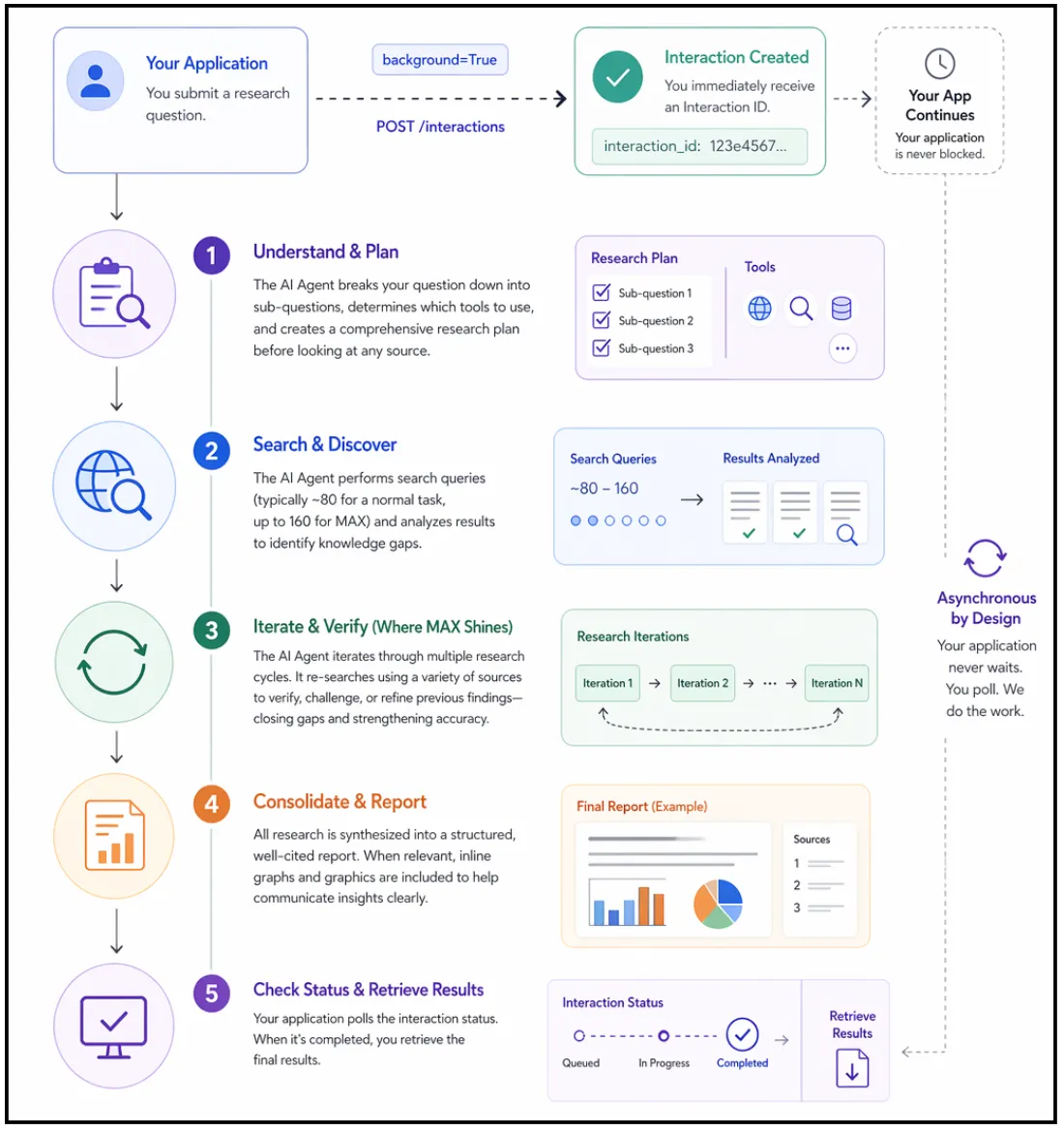
- You submit your research question to the API with the
background=Trueoption, and immediately receive an interaction ID. Your application can then proceed with whatever work it was doing prior to that. - The AI Agent will take your question and break it down into sub-questions, determine which tools will be employed, and create a complete research plan before looking at any source.
- The AI Agent will perform the search queries (typically around 80 for a normal task, up to 160 for MAX). It will analyze the results of the queries thoroughly to identify knowledge gaps.
- This is where MAX shines; the AI Agent will iterate through the research multiple times. It does not perform research once and stop. It will continue to research again, using a variety of sources to conduct each research phase and verify or contradict the previous research findings.
- Finally, the AI Agent will consolidate all research into a structured report that is cited. If the data warrants, there will also be inline graphs & graphics as part of the report.
- At that point, you will poll the status of the interaction. When an interaction indicates that it has completed, you will get your results. The entire process is asynchronous, meaning your application will not block.
Getting Started with Deep Research Max
You need three items to start your research code work: a Gemini API key, the Python SDK, and an environment variable. This process requires approximately five minutes to complete.
1. The first step requires you to acquire your Gemini API key.
2. The second step requires you to install the Python SDK. Once you have Python installed you can install the official Google GenAI client library by executing this command:
pip install google-genai The system installation process requires users to wait until the installation operation finishes.
3. The third step requires you to establish your environment variable. Your SDK will automatically fetch your API key from an environment variable. Set it in your terminal session like this:
export GEMINI_API_KEY="your-api-key-here"You must replace your-api-key-here with the actual key you copied from Google AI Studio. Users should use the set command in Windows instead of export.
4. The fourth step requires you to check all system components for proper operation. Create a new file called verify.py in your project folder. Add this code:
from google import genai

client = genai.Client()

print("Client initialized successfully.")
print("You are ready to use Deep Research.")
5. Run the command through your terminal:
python verify.pyYour environment is fully prepared when you succeed with both success messages.

6. There might be a case of API key authentication failure, which occurs because your API key authentication setup is wrong. You need to confirm that your API key authentication setup is correct. Deep Research is not available on the free tier.
Task 1: Your First Research Task
Here, you will create your first autonomous research task. This task teaches you the three core patterns associated with submitting a prompt, polling for status, and retrieving the final result.
Step 1: Create the script
You will create a new file named “first_research.py” that asks your agent to conduct research about Artificial Intelligence Regulation in Europe; however, feel free to change the topic of your research.
import time
from google import genai

client = genai.Client()

interaction = client.interactions.create(
    input="Research the current state of AI regulation in the European Union.",
    agent="deep-research-preview-04-2026",
    background=True
)
print(f"Research started. Interaction ID: {interaction.id}")
Please take note of the two important values. agent represents the AI agent that the API will use to perform research. We are going with the standard Deep Research agent, as it will pull data faster. The background=True parameter must be supplied because if it is not available, then the request will fail. Research always takes place asynchronously via Deep Research.
Step 2: Build the polling loop
The API will quickly return your interaction ID. Your job is to check back periodically until the research has been completed. Add your polling code below your creation code.
while True:
    interaction = client.interactions.get(interaction.id)
    if interaction.status == "completed":
        print("\n--- Research Complete ---\n")
        print(interaction.outputs[-1].text)
        break
    elif interaction.status == "failed":
        print(f"Research failed: {interaction.error}")
        break
    print("Still researching...", flush=True)
    time.sleep(10)
It checks its status every 10 seconds and prints the entire report after completion. If something fails, it will print “Error”.
Step 3: Run Script
python first_research.pyYou should see the phrase “Still researching…” multiple times in your Terminal window. Most jobs finish between 5 and 15 minutes, so when all jobs are finished, you will receive a fully assembled research report that is fully cited.
Step 4: Review the Output
Spend time looking through the report and note how the Agent organised the research based on logical sections. After each claim, you will see a citation to the source used by the agent to complete that section of the report. You just accomplished what would have taken tens of hours for a human to read and write.
Task 2: Generating Native Visualizations
Using Deep Research Max, you can produce visualizations (charts) directly from your data, without the need to use third-party libraries, using the agent to obtain visual reports automatically.
Step 1: Generate all charts in the report:
import time
from google import genai

client = genai.Client()

prompt = """
Research the top 10 programming languages by job demand in 2026.
Include in your report:
- A bar chart comparing job postings across languages
- A trend line showing growth over the past 3 years
- A comparison table with salary ranges
Generate all charts natively inline.
"""

interaction = client.interactions.create(
    input=prompt,
    agent="deep-research-max-preview-04-2026",
    background=True
)

print(f"Visual research started. ID: {interaction.id}")
Create visual_research.py with a prompt to request charts – the prompt should contain the phrase “generate all charts natively inline” to request that the agent create an HTML or Nano banana visualization that is embedded directly in the report.
Step 2: Poll for results and save as an HTML file
while True:
    interaction = client.interactions.get(interaction.id)

    if interaction.status == "completed":
        with open("visual_report.html", "w") as f:
            f.write(interaction.outputs[-1].text)

        print("Saved to visual_report.html")
        break

    elif interaction.status == "failed":
        print(f"Failed: {interaction.error}")
        break

    time.sleep(10)
Step 3: Open visual_report.html in a web browser
The agent created the charts directly on the page: no Matplotlib, no Plotly, no JavaScript charting libraries, the agent created all of these as part of the report output.
This is extremely beneficial for automated report pipelines. The report can be shared immediately without any additional post-processing.
Production Best Practices
When transitioning from lab scripts to production code, a few changes are necessary:
- Instead of polling your main server using a while-loop, use a job queue architecture. Accept the request through Cloud Run, then store the interaction ID in a database and check the results using Cloud Scheduler or a cron job. This way, you keep your server responsive when experiencing high traffic.
- Persist interaction IDs and event IDs. Lost connections are common with 20-minute research tasks. Always persist the
interaction_idandlast_event_idfrom streaming. By reconnecting withclient.interactions.get()using the persisted ids, you will be able to resume where you left off. - Write specific prompts to control costs. General prompts lead to a broad search, which will require more tokens and time than using a specific and well-defined prompt.
- Cache whenever possible. A Deep Research Max report can cost anywhere from $3-$5, so if there are a lot of similar questions amongst users, cache those results. You would be spending very little in terms of operating costs to serve from the cache.
- Always verify citations. The agent provides its citations, but it is a reading of the open web. For critical business decisions, it is advisable to spot-check the most important claims with original sources; therefore, “trust but verify.”
Is Deep Research Max worth using?
Deep Research Max is not like the standard AI chatbots that we are accustomed to. With Deep Research Max, you provide the machine with a task, leave it alone, then check back later for a complete report (as you would do with an individual). No longer do you need to provide multiple prompts to the AI to receive the correct answer.
Having everything in one place is also beneficial. Deep Research Max can look things up for you; use your data (if available) and create charts without any additional effort on your part. I would encourage you to have Deep Research Max do something small for you, so you will see how well it works before increasing the amount of work you use it for.
Frequently Asked Questions
Q1. What is Deep Research Max?
A. It is an autonomous AI agent that plans, searches, analyzes, and generates fully cited reports.
Q2. When should you use Deep Research Max instead of standard Deep Research?
A. Use it for deeper, longer, and more comprehensive research tasks.
Q3. Can Deep Research Max generate charts automatically?
A. Yes, it creates native inline charts and visual reports without external libraries.
Data Science Trainee at Analytics Vidhya
I am currently working as a Data Science Trainee at Analytics Vidhya, where I focus on building data-driven solutions and applying AI/ML techniques to solve real-world business problems. My work allows me to explore advanced analytics, machine learning, and AI applications that empower organizations to make smarter, evidence-based decisions.
With a strong foundation in computer science, software development, and data analytics, I am passionate about leveraging AI to create impactful, scalable solutions that bridge the gap between technology and business.
📩 You can also reach out to me at [email protected]