
Large language models are powerful, but on their own they have limitations. They cannot access live data, retain long-term context from previous conversations, or perform actions such as calling APIs or querying databases. LangChain is a framework designed to address these gaps and help developers build real-world applications using language models.
LangChain is an open-source framework that provides structured building blocks for working with LLMs. It offers standardized components such as prompts, models, chains, and tools, reducing the need to write custom glue code around model APIs. This makes applications easier to build, maintain, and extend over time.
Table of contents
- What Is LangChain and Why It Exists?
- Installation and Setup of LangChain
- Core Concepts of LangChain
- Agents in LangChain and Dynamic Decision Making
- Creating Your First LangChain Agent
- Memory and Conversational Context
- Retrieval and External Knowledge
- Output Parsing and Structured Responses
- Production Considerations
- Common Use Cases
- Conclusion
- Frequently Asked Questions
What Is LangChain and Why It Exists?
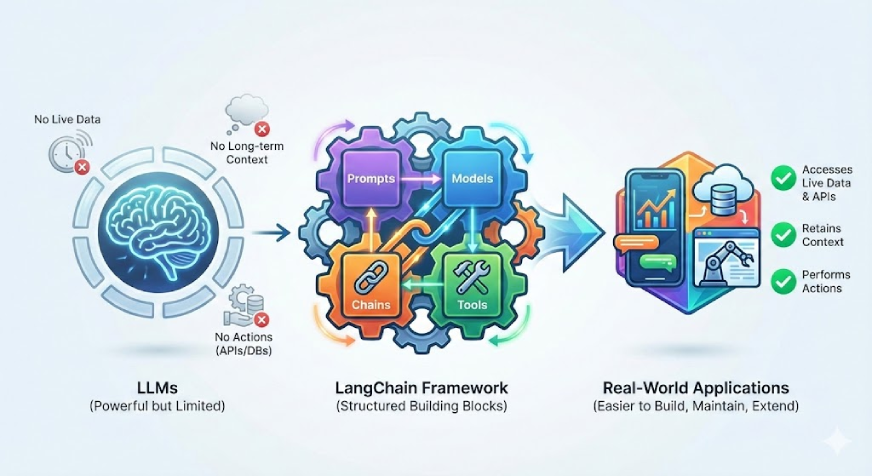
In practice, applications rarely rely on just a single prompt and a single response. They often involve multiple steps, conditional logic, and access to external data sources. While it is possible to handle all of this directly using raw LLM APIs, doing so quickly becomes complex and error-prone.
LangChain helps address these challenges by adding structure. It allows developers to define reusable prompts, abstract model providers, organize workflows, and safely integrate external systems. LangChain does not replace language models. Instead, it sits on top of them and provides coordination and consistency.
Installation and Setup of LangChain
All you need to use LangChain is to install the core library and any provider specific integrations that you intend to use.
Step 1: Install the LangChain Core Package
pip install -U langchain In case you intend on using OpenAI models, install the OpenAI integration also:
pip install -U langchain-openai openai Python 3.10 or above is required in LangChain.
Step 2: Setting API Keys
If you are using OpenAI models, set your API key as an environment variable:
export OPENAI_API_KEY="your-openai-key" Or inside Python:
import os
os.environ["OPENAI_API_KEY"] = "your-openai-key"
LangChain automatically reads this key when creating model instances.
Core Concepts of LangChain
LangChain applications rely on a small set of core components. Each component serves a specific purpose, and developers can combine them to build more complex systems.
The core building blocks are:
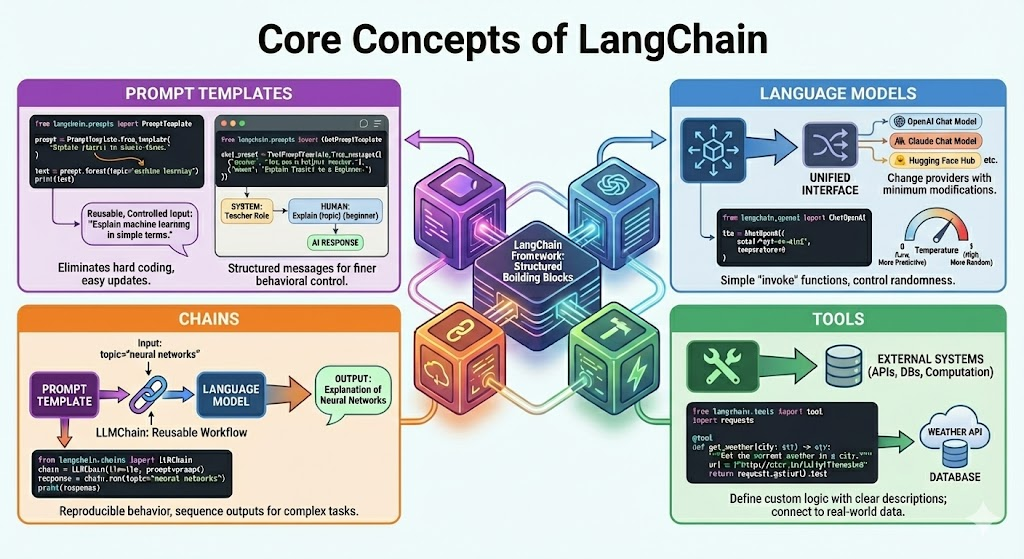
It is more significant than memorizing certain APIs to understand these concepts.
Working with Prompt Templates in LangChain
A prompt can be described as the input that is fed to a language model. In practical use, prompt can contain variables, examples, formatting rules and constraints. Timely templates ensure that these prompts are reusable and easier to control.
Example:
from langchain.prompts import PromptTemplate
prompt = PromptTemplate.from_template(
"Explain {topic} in simple terms."
)

text = prompt.format(topic="machine learning")
print(text)
Prompt templates eliminate hard coding of strings and minimize the number of bugs created by manual code formatting of strings. It is also easy to update prompts as your application grows.
Chat Prompt Templates
Chat-based models work with structured messages rather than a single block of text. These messages typically include system, human, and AI roles. LangChain uses chat prompt templates to define this structure clearly.
Example:
from langchain.prompts import ChatPromptTemplate

chat_prompt = ChatPromptTemplate.from_messages([
("system", "You are a helpful teacher."),
("human", "Explain {topic} to a beginner.")
])
This structure gives you finer control over model behavior and instruction priority.
Using Language Models with LangChain
LangChain is an interface that offers language model APIs in a unified format. This enables you to change models or providers with minimum modifications.
Using an OpenAI chat model:
from langchain_openai import ChatOpenAI

llm = ChatOpenAI(
model="gpt-4o-mini",
temperature=0
)
The temperature parameter controls randomness in model outputs. Lower values produce more predictable results, which works well for tutorials and production systems. LangChain model objects also provide simple methods, such as invoke, instead of requiring low-level API calls.
Chains in LangChain Explained
The easiest execution unit of LangChain is chains. A chain is a connection of the inputs to the outputs in one or more steps. The LLMChain is the most popular chain. It integrates a prompt template and a language model into a workflow reusable.
Example:
from langchain.chains import LLMChain

chain = LLMChain(
llm=llm,
prompt=prompt
)

response = chain.run(topic="neural networks")
print(response)
You use chains when you want reproducible behavior with a known sequence of steps. You can combine multiple chains so that one chain’s output feeds directly into the next as the application grows.
Tools in LangChain and API Integration
Language models do not act on their own. Tools provide them the freedom to communicate with external systems like APIs, databases or computation services. Any Python function can be a tool provided it has a well defined input and output.
Example of a simple weather tool:
from langchain.tools import tool
import requests

@tool
def get_weather(city: str) -> str:
"""Get the current weather in a city."""
url = f"http://wttr.in/{city}?format=3"
return requests.get(url).text
The description and name of the tool are essential. The model interprets them to comprehend when the tool is to be utilized and what it does. There are also a number of built in tools in LangChain, although custom tools are prevalent, since they are often application specific logic.
Agents in LangChain and Dynamic Decision Making
Chains work well when you know and can predict the order of tasks. Many real-world problems, however, remain open-ended. In these cases, the system must decide the next action based on the user’s question, intermediate results, or the available tools. This is where agents become useful.
An agent uses a language model as its reasoning engine. Instead of following a fixed path, the agent decides which action to take at each step. Actions can include calling a tool, gathering more information, or producing a final answer.
Agents follow a reasoning cycle often called Reason and Act. The model reasons about the problem, takes an action, observes the outcome, and then reasons again until it reaches a final response.
To know more you can checkout:
- Blog on Building Smart AI Agents with LangChain
- Free Course on LangChain Fundamentals
Creating Your First LangChain Agent
LangChain offers high level implementation of agents without writing out the reasoning loop.
Example:
from langchain_openai import ChatOpenAI
from langchain.agents import create_agent

model = ChatOpenAI(
    model="gpt-4o-mini",
    temperature=0
)

agent = create_agent(
    model=model,
    tools=[get_weather],
    system_prompt="You are a helpful assistant that can use tools when needed."
)

# Using the agent
response = agent.invoke(
    {
        "input": "What is the weather in London right now?"
    }
)

print(response)
The agent examines the question, recognizes that it needs real time data, chooses the weather tool, retrieves the result, and then produces a natural language response. All of this happens automatically through LangChain’s agent framework.
Memory and Conversational Context
Language models are by default stateless. They forget about the past contacts. Memory enables LangChain applications to provide context in more than one turn. Chatbots, assistants, and any other system where users provide follow up questions require memory.
A basic memory implementation is a conversation buffer, which is a memory storage of past messages.
Example:
from langchain.memory import ConversationBufferMemory
from langchain.chains import LLMChain

memory = ConversationBufferMemory(
memory_key="chat_history",
return_messages=True
)

chat_chain = LLMChain(
llm=llm,
prompt=chat_prompt,
memory=memory
)
Whenever you run a chain, LangChain injects the stored conversation history into the prompt and updates the memory with the latest response.
LangChain offers several memory strategies, including sliding windows to limit context size, summarized memory for long conversations, and long-term memory with vector-based recall. You should choose the appropriate strategy based on context length limits and cost constraints.
Retrieval and External Knowledge
Language models train on general data rather than domain-specific information. Retrieval Augmented Generation solves this problem by injecting relevant external data into the prompt at runtime.
LangChain supports the entire retrieval pipeline.
- Loading documents from PDFs, web pages, and databases
- Splitting documents into manageable chunks
- Creating embeddings for each chunk
- Storing embeddings in a vector database
- Retrieving the most relevant chunks for a query
An average retrieval process will appear as follows:
- Load and preprocess documents
- Split them into chunks
- Embed and store them
- Retrieve relevant chunks based on the user query
- Pass retrieved content to the model as context
Also Read: Mastering Prompt Engineering for LLM Applications with LangChain
Output Parsing and Structured Responses
Language models provide text, yet applications typically require structured text like lists, dictionaries, or validated JSON. Output parsers assist in the transformation of free form text into dependable data structures.
Basic example based on a comma separated list parser:
from langchain.output_parsers import CommaSeparatedListOutputParser
parser = CommaSeparatedListOutputParser()
More challenging use cases can be enforced with typed models with structured output parsers. These parsers command the model to reply in a predefined format of JSON and apply a check on the response prior to it falling downstream.
Structured output parsing is particularly advantageous when the model outputs get consumed by other systems or put in databases.
Production Considerations
When you move from experimentation to production, you need to think beyond core chain or agent logic.
LangChain provides production-ready tooling to support this transition. With LangServe, you can expose chains and agents as stable APIs and integrate them easily with web, mobile, or backend services. This approach lets your application scale without tightly coupling business logic to model code.
LangSmith supports logging, tracing, evaluation, and monitoring in production environments. It gives visibility into execution flow, tool usage, latency, and failures. This visibility makes it easier to debug issues, track performance over time, and ensure consistent model behavior as inputs and traffic change.
Together, these tools help reduce deployment risk by improving observability, reliability, and maintainability, and by bridging the gap between prototyping and production use.
Common Use Cases
- Chatbots and conversational assistants which need reminiscence, tools or multi-step logic.
- Answering of questions on document using retrieval and external data.
- Knowledge bases and internal systems are supported by the automation of customer support.
- Information collection and summarization researches and analysis agents.
- Combination of workflows between various tools, APIs, and services.
- Automated or aided business processes through internal enterprise tools.
It is flexible, hence applicable in simple prototypes and complex production systems.
Conclusion
LangChain provides a convenient and simplified framework to build real world apps with large language models. It utilizes more trustworthy than raw LLM, offering abstractions on prompts, model, chain, tools, agent, memory and retrieval. Novices can use simple chains, but advanced users can build dynamic agents and production systems. The gap between experimentation and implementation is bridged by LangChain with an in-built observability, deployment, and scaling. As the utilization of LLM grows, LangChain is a good infrastructure with which to build long-term, flexible, and reliable AI-driven systems.
Frequently Asked Questions
Q1. What is LangChain used for?
A. Developers use LangChain to build AI applications that go beyond single prompts. It helps combine prompts, models, tools, memory, agents, and external data so language models can reason, take actions, and power real-world workflows.
Q2. What is the difference between LLM and LangChain?
A. An LLM generates text based on input, while LangChain provides the structure around it. LangChain connects models with prompts, tools, memory, retrieval systems, and workflows, enabling complex, multi-step applications instead of isolated responses.
Q3. Why are developers quitting LangChain?
A. Some developers leave LangChain due to rapid API changes, increasing abstraction, or a preference for lighter, custom-built solutions. Others move to alternatives when they need simpler setups, tighter control, or lower overhead for production systems.
Q4. Is LangChain free to use?
LangChain is free and open source under the MIT license. You can use it without cost, but you still pay for external services such as model providers, vector databases, or APIs that your LangChain application integrates with.
Hi, I am Janvi, a passionate data science enthusiast currently working at Analytics Vidhya. My journey into the world of data began with a deep curiosity about how we can extract meaningful insights from complex datasets.






