
Imagine an AI application that processes your voice, analyzes the camera feed, and engages in real-time human-like conversations. Until recently, to create such a tech-intensive multimodal application, engineers struggled with the complexities of asynchronous operations, juggling multiple API calls, and piecing together code that later proved to be difficult to maintain or debug. Steps in – GenAI Processors.
The revolutionary open-source Python library from Google DeepMind has forged new paths for developers interested in AI Applications. This library turns the chaotic landscape of AI development into a serene environment for developers. In this blog, we are going to learn how GenAI processors make complex AI workflows more accessible, which in turn will help us build a live AI Agent.
Table of contents
What are GenAI Processors?
GenAI Processors is a new open-source Python library developed by DeepMind to provide structure and simplicity to the development challenges. They act as an abstraction that defines a common processor interface from input handling, pre-processing, actual model calls, and even output processing.
Imagine GenAI Processors as the common language between AI workflows. Rather than having to write custom code from scratch for every component in your AI pipeline, you simply work with standardized “Processor” units that are easy to combine, test, and maintain. At its core, GenAI Processors views all input and output as an asynchronous stream of ProcessorParts (bidirectional streaming). Standardized data parts flow through the pipeline (e.g., audio chunks, text transcriptions, image frames) with accompanying metadata.
The Key concepts here in GenAI Processors are:
- Processors: Individual units of work that take input streams and produce output streams
- Processor Parts: Standardized data chunks with metadata
- Streaming: Real-time, bidirectional data flow through your pipeline
- Composition: Combining processors using simple operations like +
Key Features of GenAI Processors
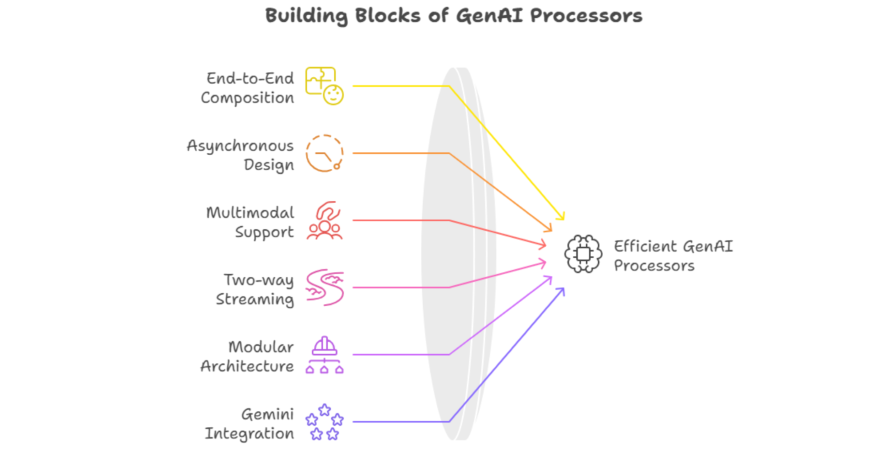
- End-to-End Composition: This is done by joining operations with an intuitive syntax
Live_agent = input_processor + live_processor + play_output - Asynchronous design: Designed with Python’s asynchio for efficient handling of I/O-bound and pure compute-bound tasks with manual threading.
- Multimodal Support: Handle text, audio, video, and image under a single unified interface via the ProcessorPart wrapper
- Two-way Streaming: Allow components to communicate two-way in real-time, thus favoring interactivity.
- Modular Architecture: Reusable and testable components that ease the maintenance of intricate pipelines to a great extent.
- Gemini Integration: Native support for Gemini Live API and common text-based LLM Operations.
How to Install GenAI Processors?
Getting started with GenAI Processors is pretty straightforward:
Prerequisites
- Python 3.8+
- Pip package manager
- Google Cloud account (For Gemini API access)
Installation Steps
1. Install the library:
pip install genai-processors2. Setting up for Authentication:
# For Google AI Studio

export GOOGLE_API_KEY="your-api-key"

# Or for Google Cloud

gcloud auth application-default login
3. Checking the Installation:
import genai_processors

print(genai_processors.__version__)
4. Development Setup (Optional)
# Clone for examples or contributions

git clone https://github.com/google-gemini/genai-processors.git

cd genai-processors

pip install -e
How GenAI Processors work?
GenAI Processors exist by means of a stream-based processing mode, whereby data flows along a pipeline of connected processors. Each processor:
- Receives a stream of ProcessorParts
- Processes the data (transformation, API calls, etc.)
- Outputs a stream of results
- Passes results to the next processor in the chain
Data Flow Example
Audio Input → Speech to Text → LLM Processing → Text to Speech → Audio Output
↓ ↓ ↓ ↓ ↓
ProcessorPart → ProcessorPart → ProcessorPart → ProcessorPart → ProcessorPart
Core Components
The core components of GenAI Processors are:
1. Input Processors
- VideoIn(): Processing of the camera stream
- PyAudioIn(): Microphone input
- FileInput(): File input
2. Processing Processors
- LiveProcessor(): Integration of Gemini Live API
- GenaiModel(): Standard LLM processing
- SpeechToText(): Transcription of audio
- TextToSpeech(): Voice synthesis
3. Output Processors
- PyAudioOut(): Audio playback
- FileOutput(): File writing
- StreamOutput(): Real-time streaming
Concurrency and Performance
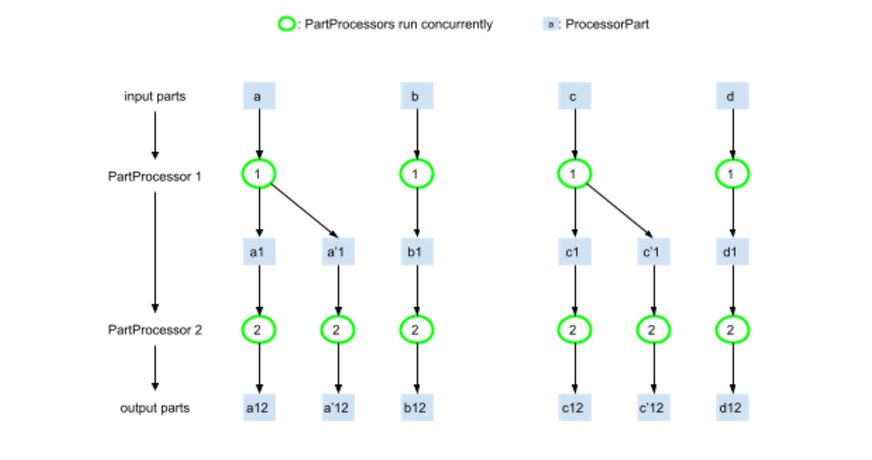
First of all, GenAI Processors have been designed to maximize concurrent execution of a Processor. Any part of this example execution flow may be run concurrently whenever all of its ancestors in the graph are computed. In other words, your application would essentially be processing multiple data streams concurrently, and accelerate response time and user experience.
Hands-On: Building a Live Agent using GenAI Processors
So, let’s build a complete live AI agent that joins the camera and audio streams, sends them to the Gemini Live API for processing, and finally gets back audio responses.
Note: If you wish to learn all about AI agents, join our complete AI Agentic Pioneer program here.
Project Structure
This is how our Project structure would look:
live_agent/
├── main.py
├── config.py
└── requirements.txt
Step 1: Configuration Step
import os

from genai_processors.core import audio_io

# API configuration

GOOGLE_API_KEY = os.getenv("GOOGLE_API_KEY")

if not GOOGLE_API_KEY:

raise ValueError("Please set GOOGLE_API_KEY environment variable")

# Audio configuration

AUDIO_CONFIG = audio_io.AudioConfig(

sample_rate=16000,

channels=1,

chunk_size=1024,

format="int16"

)

# Video configuration

VIDEO_CONFIG = {

"width": 640,

"height": 480,

"fps": 30

}
Step 2: Core Agent Implementation
import asyncio

from genai_processors.core import (

    audio_io,

    live_model,

    video,

    streams

)

from config import AUDIO_CONFIG, VIDEO_CONFIG, GOOGLE_API_KEY

class LiveAgent:

    def __init__(self):

        self.setup_processors()


    def setup_processors(self):

        """Initialize all processors for the live agent"""


        # Input processor: combines camera and microphone

        self.input_processor = (

            video.VideoIn(

                device_id=0,

                width=VIDEO_CONFIG["width"],

                height=VIDEO_CONFIG["height"],

                fps=VIDEO_CONFIG["fps"]

            ) +

            audio_io.PyAudioIn(

                config=AUDIO_CONFIG,

                device_index=None  # Use default microphone

            )

        )


        # Gemini Live API processor

        self.live_processor = live_model.LiveProcessor(

            api_key=GOOGLE_API_KEY,

            model_name="gemini-2.0-flash-exp",

            system_instruction="You are a helpful AI assistant. Respond naturally to user interactions."

        )


        # Output processor: handles audio playback with interruption support

        self.output_processor = audio_io.PyAudioOut(

            config=AUDIO_CONFIG,

            device_index=None,  # Use default speaker

            enable_interruption=True

        )


        # Complete agent pipeline

        self.agent = (

            self.input_processor +

            self.live_processor +

            self.output_processor

        )


    async def run(self):

        """Start the live agent"""

        print("🤖 Live Agent starting...")

        print("🎥 Camera and microphone active")

        print("🔊 Audio output ready")

        print("💬 Start speaking to interact!")

        print("Press Ctrl+C to stop")


        try:

            async for part in self.agent(streams.endless_stream()):

                # Process different types of output

                if part.part_type == "text":

                    print(f"🤖 AI: {part.text}")

                elif part.part_type == "audio":

                    print(f"🔊 Audio chunk: {len(part.audio_data)} bytes")

                elif part.part_type == "video":

                    print(f"🎥 Video frame: {part.width}x{part.height}")

                elif part.part_type == "metadata":

                    print(f"📊 Metadata: {part.metadata}")


        except KeyboardInterrupt:

            print("\n👋 Live Agent stopping...")

        except Exception as e:

            print(f"❌ Error: {e}")


# Advanced agent with custom processing

class CustomLiveAgent(LiveAgent):

    def __init__(self):

        super().__init__()

        self.conversation_history = []

        self.user_emotions = []


    def setup_processors(self):

        """Enhanced setup with custom processors"""

        from genai_processors.core import (

            speech_to_text,

            text_to_speech,

            genai_model,

            realtime

        )


        # Custom input processing with STT

        self.input_processor = (

            audio_io.PyAudioIn(config=AUDIO_CONFIG) +

            speech_to_text.SpeechToText(

                language="en-US",

                interim_results=True

            )

        )


        # Custom model with conversation memory

        self.genai_processor = genai_model.GenaiModel(

            api_key=GOOGLE_API_KEY,

            model_name="gemini-pro",

            system_instruction="""You are an empathetic AI assistant.

            Remember our conversation history and respond with emotional intelligence.

            If the user seems upset, be supportive. If they're excited, share their enthusiasm."""

        )


        # Custom TTS with emotion

        self.tts_processor = text_to_speech.TextToSpeech(

            voice_name="en-US-Neural2-J",

            speaking_rate=1.0,

            pitch=0.0

        )


        # Audio rate limiting for smooth playback

        self.rate_limiter = audio_io.RateLimitAudio(

            sample_rate=AUDIO_CONFIG.sample_rate

        )


        # Complete custom pipeline

        self.agent = (

            self.input_processor +

            realtime.LiveModelProcessor(

                turn_processor=self.genai_processor + self.tts_processor + self.rate_limiter

            ) +

            audio_io.PyAudioOut(config=AUDIO_CONFIG)

        )


if __name__ == "__main__":

    # Choose your agent type

    agent_type = input("Choose agent type (1: Simple, 2: Custom): ")


    if agent_type == "2":

        agent = CustomLiveAgent()

    else:

        agent = LiveAgent()


    # Run the agent

    asyncio.run(agent.run())
Step 3: Enhanced features
Let’s add emotion detection and response customization
class EmotionAwareLiveAgent(LiveAgent):

    def __init__(self):

        super().__init__()

        self.emotion_history = []


    async def process_with_emotion(self, text_input):

        """Process input with emotion awareness"""

        # Simple emotion detection (in practice, use more sophisticated methods)

        emotions = {

            "happy": ["great", "awesome", "fantastic", "wonderful"],

            "sad": ["sad", "disappointed", "down", "upset"],

            "excited": ["amazing", "incredible", "wow", "fantastic"],

            "confused": ["confused", "don't understand", "what", "how"]

        }


        detected_emotion = "neutral"

        for emotion, keywords in emotions.items():

            if any(keyword in text_input.lower() for keyword in keywords):

                detected_emotion = emotion

                break


        self.emotion_history.append(detected_emotion)

        return detected_emotion


    def get_emotional_response_style(self, emotion):

        """Customize response based on detected emotion"""

        styles = {

            "happy": "Respond with enthusiasm and positivity!",

            "sad": "Respond with empathy and support. Offer help.",

            "excited": "Match their excitement! Use energetic language.",

            "confused": "Be patient and explanatory. Break down complex ideas.",

            "neutral": "Respond naturally and helpfully."

        }

        return styles.get(emotion, styles["neutral"])
Step 4: Running the Agent
requirements.txt

genai-processors>=0.1.0

google-generativeai>=0.3.0

pyaudio>=0.2.11

opencv-python>=4.5.0

asyncio>=3.4.3
Commands to run the agent:
pip install -r requirements.txt

python main.py
Advantages of GenAI Processors
- Simplified Development Experience: GenAI Processors eliminates all of the complexities arising from managing multiple API calls and asynchronous operations. Developers can directly channel their attention into building features rather than infrastructure code; as such, this reduces not only development time but also potential bugs.
- Unified Multimodal Interface: The library offers a single, consistent interface for interacting with text, audio, video, and image data through ProcessorPart wrappers. This means you will not have to learn different APIs for different data types, and that will just simplify your life.
- Real-Time Performance: Natively built with Python’s asyncio, GenAI Processors shines when handling concurrent operations and streaming data. This architecture ensures minimal latency and smooth real-time interactions – the kind of execution needed for live applications such as voice assistants or interactive video processing.
- Modular and Reusable Architecture: Made modular, components will be much easier to test, debug, and maintain. You can swap processors at will or add new capabilities and change workflows without having to rewrite whole systems.
Limitations of GenAI Processors
- Google Ecosystem Dependency: Supported are different AI models; however, very much optimized for Google’s AI services. Developers relying upon other AI providers might not be able to enjoy such a seamless integration and would have to do some extra settings.
- Learning Curve for Complex Workflows: The basic concepts are straightforward; however, sophisticated multimodal apps require knowledge of asynchronous programming patterns and stream-processing concepts, which can be difficult for beginners.
- Limited Community and Documentation: As a relatively new open-source DeepMind project, community resources, tutorials, and third-party extensions are still evolving, making advanced troubleshooting and example finding more complicated.
- Resource Intensive: Computationally expensive is its requirement in real-time multimodal processing, especially so in video streams with audio and text. Such applications would consume substantial system resources and must be suitably optimized for production deployment.
Use Cases of GenAI Processors
- Interactive Customer Service Bots: Building really advanced customer service agents that can process voice calls, analyze customer emotions via video, and give contextual replies-in addition to allowing real-time natural conversations with hardly a bit of latency.
- Educators: AI Tutors-One may design personalized learning assistants that see student facial expressions, process spoken questions, and provide explanations via text, audio, and visual aids in real-time, adjusting to the learning style of each individual.
- Healthcare or medical monitoring: Monitor patients’ vital signs via video and their voice patterns for early disease detection; then integrate this with medical databases for full health-assessment.
- Content Creation and Media Production: Build for-the-moment video editing, automated podcast generation, or in-the-moment live streaming with AI responding to audience reactions, producing captions, and dynamically enhancing content.
Conclusion
GenAI Processors signifies a paradigm shift in developing AI applications, turning complex and disconnected workflows into elegant and maintainable solutions. Through a common interface with which to conduct multimodal AI processing, developers can innovate features instead of dealing with the infrastructure complications.
Hence, if streaming, multimodal, and responsive is the future for AI applications, then GenAI Processors can provide that today. If you want to build the next big customer service bots or educational assistants, or creative tools, GenAI Processors is your base for success.
Frequently Asked Questions
Q1. Are GenAI Processors free to use, and what are the associated costs?
GenAI Processors is completely open-source and free to use. However, you’ll incur costs for the underlying AI services you integrate with, such as Google’s Gemini API, speech-to-text services, or cloud computing resources. These costs depend on your usage volume and the specific services you choose to integrate into your processors.
Q2. Can I use GenAI Processors with AI models other than Google’s Gemini?
Yes, while GenAI Processors is optimized for Google’s AI ecosystem, its modular architecture allows integration with other AI providers. You can create custom processors that work with OpenAI, Anthropic, or any other AI service by implementing the processor interface, though you may need to handle additional configuration and API management yourself.
Q3. What are the minimum system requirements for running GenAI Processors applications?
You need Python 3.8+, sufficient RAM for your specific use case (minimum 4GB recommended for basic applications, 8GB+ for video processing), and a stable internet connection for API calls. For real-time video processing, a dedicated GPU can significantly improve performance, though it’s not strictly required for all use cases.
Q4. How do GenAI Processors handle data privacy and security?
GenAI Processors processes data according to your configuration – you control where data is sent and stored. When using cloud AI services, data privacy depends on your chosen provider’s policies. For sensitive applications, you can implement local processing or use on-premises AI models, though this may require additional setup and custom processor development.
Q5. Can I deploy GenAI Processors applications in production environments?
Absolutely! GenAI Processors is designed for production use with its asynchronous architecture and efficient resource management. However, you’ll need to consider factors like error handling, monitoring, scaling, and rate limiting based on your specific requirements. The library provides building blocks, but production deployment requires additional infrastructure considerations like load balancing and monitoring systems.
Data Science Trainee at Analytics Vidhya
I am currently working as a Data Science Trainee at Analytics Vidhya, where I focus on building data-driven solutions and applying AI/ML techniques to solve real-world business problems. My work allows me to explore advanced analytics, machine learning, and AI applications that empower organizations to make smarter, evidence-based decisions.
With a strong foundation in computer science, software development, and data analytics, I am passionate about leveraging AI to create impactful, scalable solutions that bridge the gap between technology and business.
📩 You can also reach out to me at [email protected]





