Ever wondered how few LLMs or some tools process and understand your PDFs that consist of multiple tables and images? They probably use a traditional OCR or a VLM (Vision Language Model) under the hood. Though it’s worth noting that traditional OCR suffers in recognizing handwritten text in images. It even has issues with uncommon fonts or characters, like complex formulae in research papers. VLMs do a good job in this regard, but they may struggle in understanding the ordering of tabular data. They may also fail to capture spatial relationships like images along with their captions.
So what is the solution here? Here, we explore a recent model that’s focused on tackling all these issues. The SmolDocling model that is publicly available on Hugging Face. So, without any further ado, let’s dive in.
Table of contents
Background
The SmolDocling is a tiny but mighty 256M vision-language model designed for document understanding. Unlike heavyweight models, it doesn’t need gigs and gigs of VRAM to run. It consists of a vision encoder and a compact decoder trained to produce DocTags, an XML-style language that encodes layout, structure, and content. Its authors trained it on millions of synthetic documents with formulas, tables, and code snippets. Also worth noting that this model is built on top of Hugging Face’s SmolVLM-256M. In the forthcoming sections, let’s dive a level deeper and look at its architecture and demo.
Model Architecture
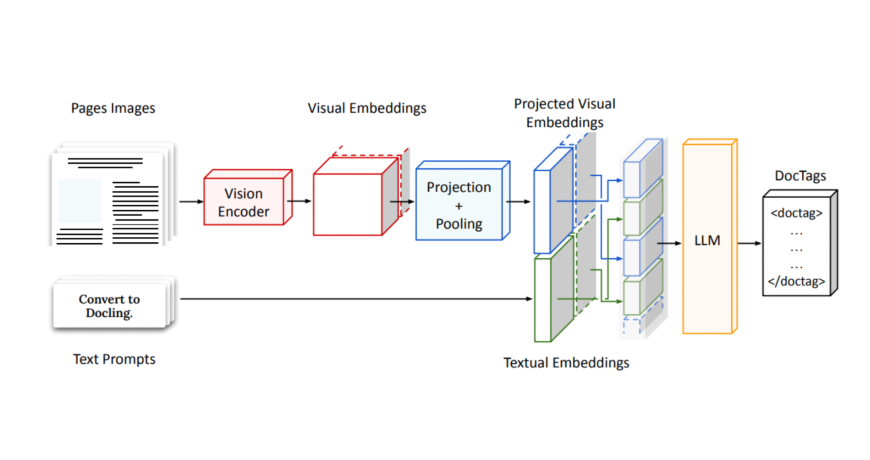
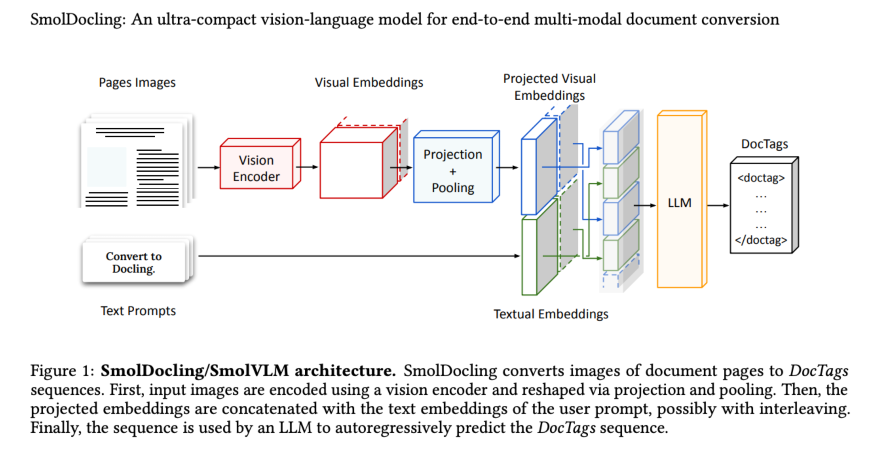
Technically, SmolDocling is also a VLM, yet it has a unique architecture. The SmolDocling takes in a full-page document image and encodes it using a vision encoder, producing dense visual embeddings. These are then projected and pooled into a fixed number of tokens to fit a small decoder’s input size. In parallel, a user prompt is embedded and concatenated with the visual features. This combined sequence then outputs a stream of structured <doctag> tokens. The result? A compact, layout-aware XML-style DocTags sequence that captures both content and structure. Now, let’s look at how this architecture translates to real use in the demonstration.
SmolDocling Demo
Prerequisite
Make sure to create your Hugging Face account and keep your access tokens handy, as we are going to do this using Hugging Face.
You can get your access tokens here.
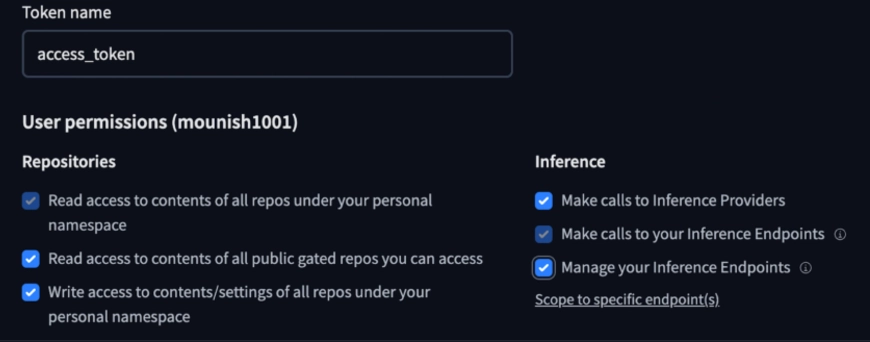
Note: Ensure you give the necessary permissions, like access to public repositories, and allow it to make inference calls.
Let’s use a pipeline to load the model (alternatively, you can also choose to load the model directly, which will be explored immediately after this one).
Note: This model, as mentioned earlier, processes one image of a document at once. You can choose to make use of this pipeline to use the model multiple times at once to process the whole document.
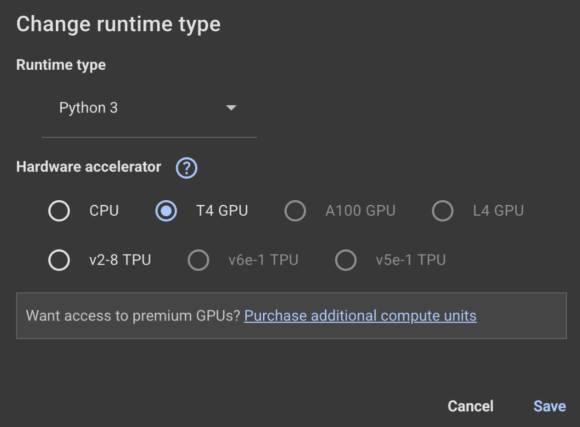
I’ll be using Google Colab (Read our complete guide on Google Colab here) here. Make sure to change the runtime to GPU:
from transformers import pipeline


pipe = pipeline("image-text-to-text", model="ds4sd/SmolDocling-256M-preview")
messages = [
   {
       "role": "user",
       "content": [
           {"type": "image", "url": "https://cdn.analyticsvidhya.com/wp-content/uploads/2024/05/Intro-1.jpg"},
           {"type": "text", "text": "Which year was this conference held?"}
       ]
   },
]
pipe(text=messages)
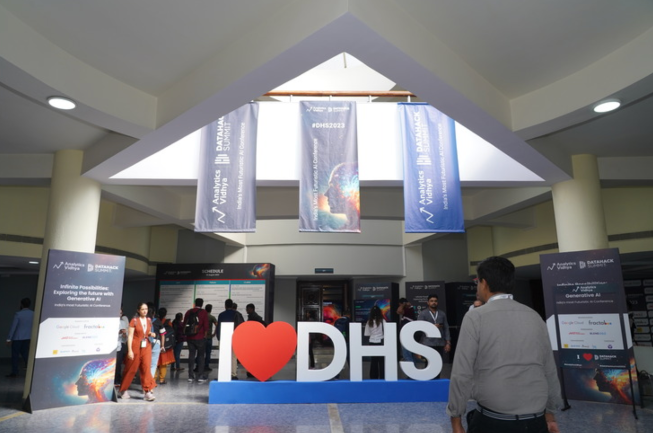
I provided this image of a previous Data Hack Summit and asked, “Which year was this conference held?”
SmolDocling Response
{'type': 'text', 'text': 'Which year was this conference held?'}]},
 {'role': 'assistant', 'content': ' This conference was held in 2023.'}]}]
Is this correct? If you zoom in and look closely, you will find that it is indeed DHS 2023. This 256M parameter, with the help of the visual encoder, seems to be doing well.
To see its full potential, you can pass a complete document with complex images and tables as an exercise.
Now let’s try to use another method to access the model, loading it directly using the transformers module:
Here we will pass an image snippet from the SmolDocling research paper and get the doctags as output from the model.
The image we’ll pass to the model:
Install the docking core module first before proceeding:
!pip install docling_core
Loading the model and giving the prompt:
from transformers import AutoProcessor, AutoModelForImageTextToText
from transformers.image_utils import load_image


image = load_image("/content/docling_screenshot.png")
processor = AutoProcessor.from_pretrained("ds4sd/SmolDocling-256M-preview")
model = AutoModelForImageTextToText.from_pretrained("ds4sd/SmolDocling-256M-preview")


messages = [
   {
       "role": "user",
       "content": [
           {"type": "image"},
           {"type": "text", "text": "Convert this page to docling."}
       ]
   }
]


prompt = processor.apply_chat_template(messages, add_generation_prompt=True)
inputs = processor(text=prompt, images=[image], return_tensors="pt")


generated_ids = model.generate(**inputs, max_new_tokens=8192)
prompt_length = inputs.input_ids.shape[1]
trimmed_generated_ids = generated_ids[:, prompt_length:]
doctags = processor.batch_decode(
   trimmed_generated_ids,
   skip_special_tokens=False,
)[0].lstrip()


print("DocTags output:\n", doctags)
Displaying the results:
from docling_core.types.doc.document import DocTagsDocument
from docling_core.types.doc import DoclingDocument

doctags_doc = DocTagsDocument.from_doctags_and_image_pairs([doctags], [image])
doc = DoclingDocument.load_from_doctags(doctags_doc, document_name="MyDoc")
md = doc.export_to_markdown()
print(md)
SmolDocling Output:
Figure 1: SmolDocling/SmolVLM architecture. SmolDocling converts images of document pages to DocTags sequences. First, input images are encoded using a vision encoder and reshaped via projection and pooling. Then, the projected embeddings are concatenated with the text embeddings of the user prompt, possibly with interleaving. Finally, the sequence is used by an LLM to autoregressively predict the DocTags sequence.
<!– image –>
Great to see SmolDocling talking about SmolDocling. The text also seems accurate. It is interesting to think of the potential uses of this model. Let’s see a few examples of the same.
Potential Use-cases of SmolDocling
As a vision language model, SmolDocling has ample potential use, like extracting data from structured documents e.g. Research Papers, Financial Reports, and Legal Contracts.
It can even be used for academic purposes, like digitizing handwritten notes and digitizing answer copies. One can also create pipelines with SmolDocling as a component in applications requiring OCR or document processing.
Conclusion
To sum it up, SmolDocling is a tiny yet useful 256M vision-language model designed for document understanding. Traditional OCR struggles with handwritten text and uncommon fonts, while VLMs often miss spatial or tabular context. This compact model does a good job and has multiple use cases where it can be used. If you still haven’t tried the model, go try it out and let me know if you face any issues in the process.
Frequently Asked Questions
What exactly are DocTags?
DocTags are special tags that describe the layout and content of a document. They help the model keep track of things like tables, headings, and images.
What does pooling mean in simple terms?
Pooling is a layer in neural networks that reduces the size of the input image. It helps with faster processing of data and faster training of the model.
What is OCR?
OCR (Optical Character Recognition) is a technology that turns images or scanned documents into editable text. It’s commonly used to digitize printed papers, books, or forms.
Passionate about technology and innovation, a graduate of Vellore Institute of Technology. Currently working as a Data Science Trainee, focusing on Data Science. Deeply interested in Deep Learning and Generative AI, eager to explore cutting-edge techniques to solve complex problems and create impactful solutions.