Have you ever been scared of creating a large CI/CD pipeline on your production environment? The new Gemini CLI is here to change how you work. This tool brings powerful AI capabilities directly into your development process. It helps you automate tasks, improve code quality, and manage projects more efficiently. With this tool, you can focus on what matters most: building great software. This guide will show you how to use these new AI-powered features of Gemini CLI to enhance your GitHub workflows and streamline your development process.
Table of contents
What is Gemini CLI?
The Gemini CLI is a powerful AI coding assistant for your code repository. It acts as both an automated agent for routine coding tasks and an on-demand collaborator you can delegate work to. This tool is open-source, which means you can inspect the code, customize it to your needs, and contribute to its development. By integrating directly with GitHub, it automates parts of the software development lifecycle, triggered by events like new issues or pull requests. This allows for better team collaboration right where developers work.
Key Features
The Gemini CLI comes with several features designed to improve your workflow:
- Intelligent Issue Triage: This tool helps you automate GitHub issue management. It analyzes incoming issues, applies appropriate labels, and helps prioritize what to work on next. This keeps your projects organized and your team focused.
- Accelerated Pull Request Reviews: You can get instant and insightful feedback on code changes. The Gemini CLI reviews pull requests for quality, style, and correctness. This frees up your team to handle more complex decisions. You can automate pull request reviews to save time and improve code quality.
- On-Demand Collaboration: Delegate tasks directly to the AI by mentioning @gemini-cli in any issue or pull request. You can ask it to write tests, implement changes, or even brainstorm solutions. This on-demand help speeds up your development process.
- Secure and Transparent: Security is a core part of this tool. For enterprise users, it uses Google Cloud’s Workload Identity Federation (WIF) to get rid of long-lived API keys, which reduces security risks. You have full control, with features like command allowlisting to approve what the agent can do. The tool also integrates with OpenTelemetry, so you can monitor all its actions in real-time for a secure CI/CD with Gemini.
How to set up Gemini CLI with your GitHub Repository?
The following steps would establish Gemini CLI in your repository in just a few minutes:
1. Get a Gemini API Key
Obtain your API key from Google AI Studio with generous free-of-charge quotas.
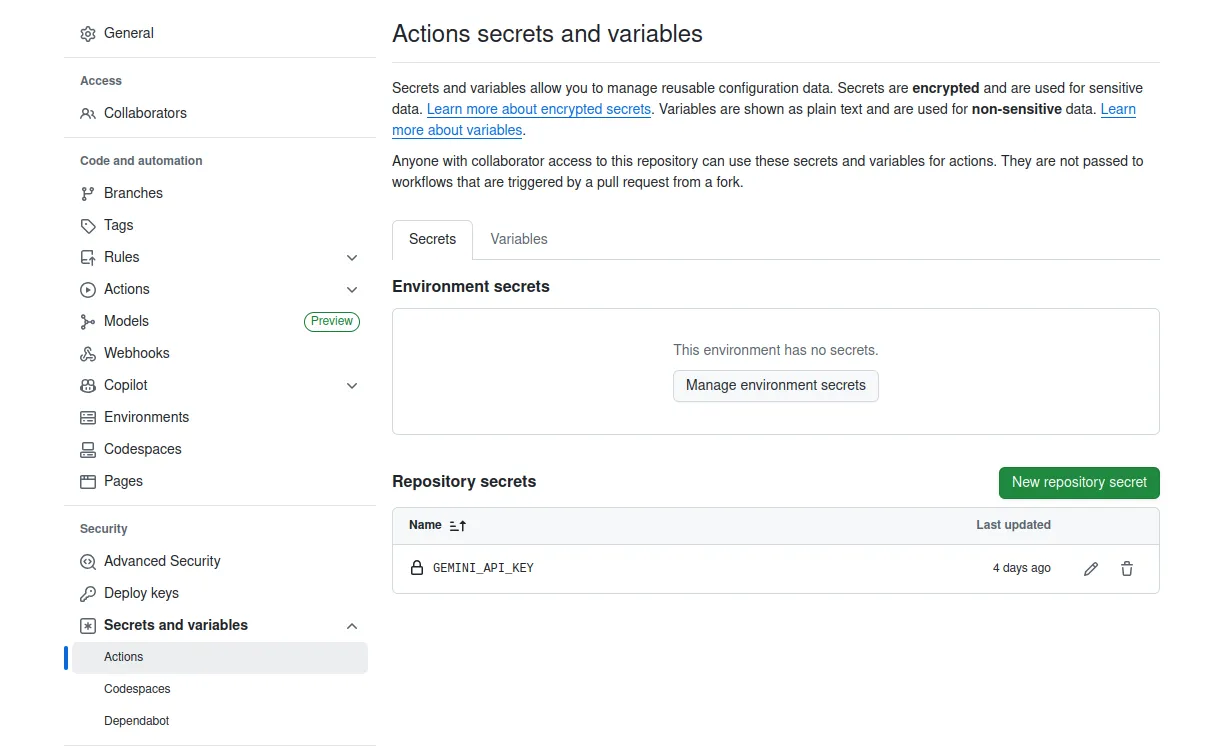
2. Add it as a GitHub Secret
Store your API key as a secret named GEMINI_API_KEY in your repository:
- Go to your repository’s Settings > Secrets and variables > Actions
- Click New repository secret
- Name: GEMINI_API_KEY, Value: (Add your API Key here)
3. Choose a Workflow
There are two ways to set up a workflow:
Option A: Use setup command (Recommended)
- Start the Gemini CLI using the following command:
gemini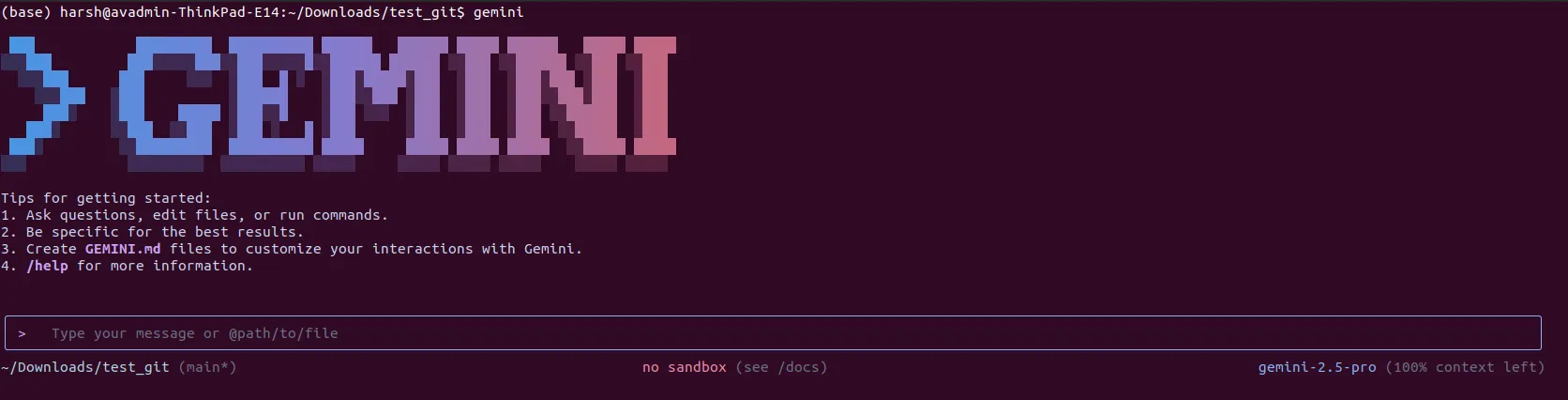
In the chat interface, type:
/setup-github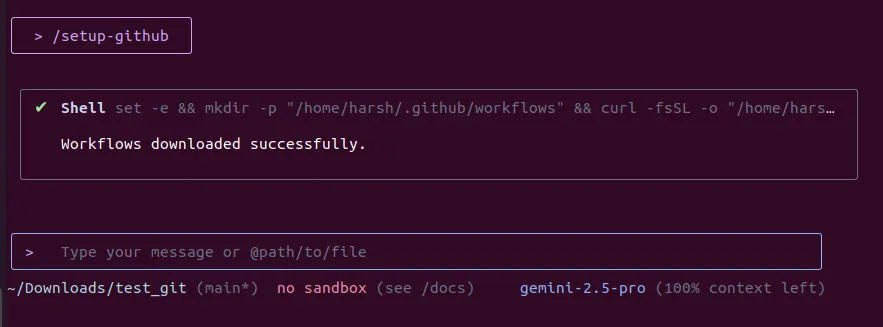
Option B: Manually copy workflows
- Copy the pre-built workflows from the examples/workflows directory to your repository’s .github/workflows directory.
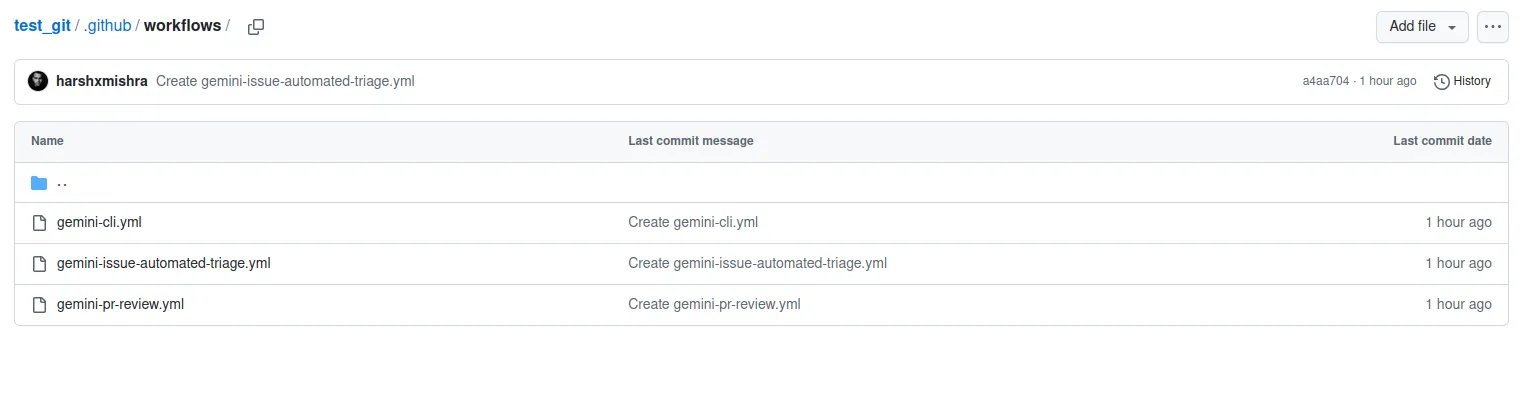
Now, after adding these YML files to the .github/workflows directory, your repository is ready with Gemini CLI. Let’s try some interesting hands-on to test it.
Hands-On
Integrating Gemini CLI with GitHub is pretty straightforward. You can add the action from the GitHub Marketplace by looking for google-github-actions/run-gemini-cli. We will be testing Gemini CLI on this repository. Here are three interesting tasks to get you started:
Task 1: Smart Issue Labeling and Prioritization
You can automate your GitHub issue management by setting up a workflow to triage new issues. This helps you categorize and prioritize work without manual effort.
Create a new issue in your repository after setting up the Gemini CLI in your repository.
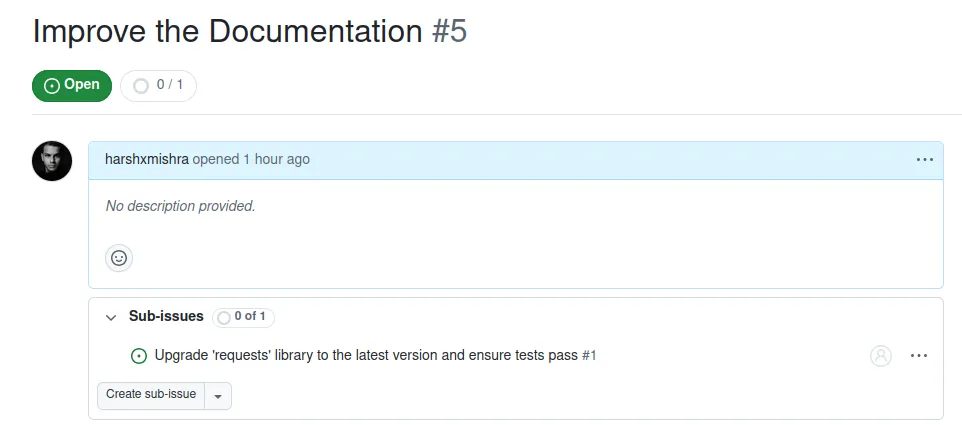
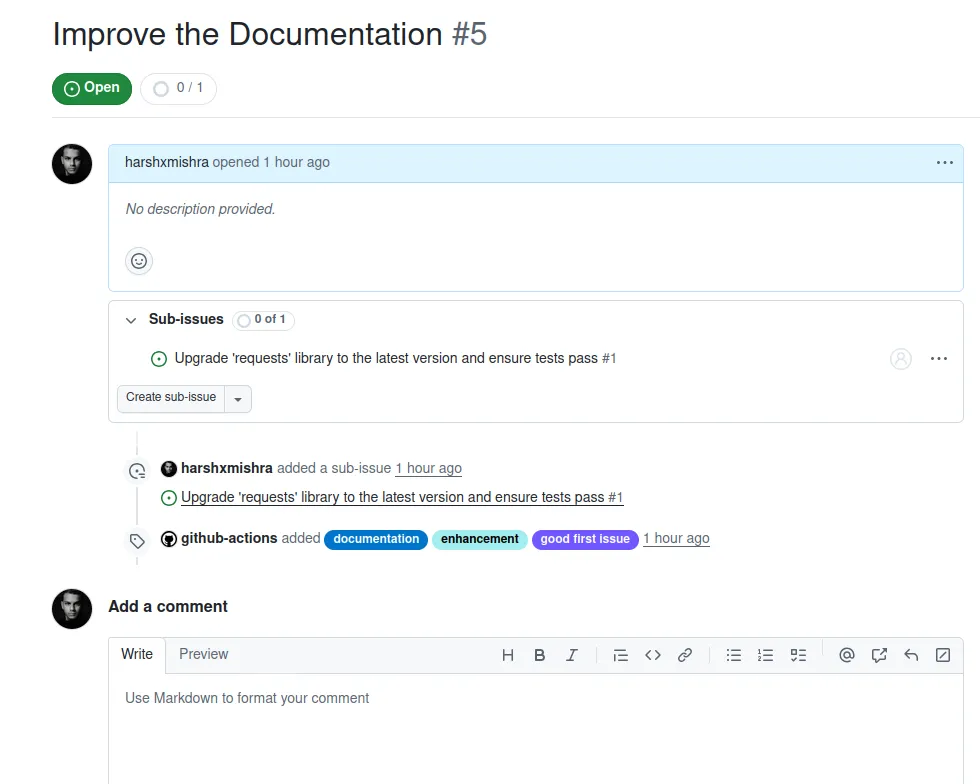
As we can see in the output above, this workflow automatically analyzes new issues and applies relevant labels, making your AI in GitHub workflows more efficient.
Task 2: Automating Pull Request Summaries
To keep your team updated, you can automate pull request reviews by generating a quick summary of the changes. This helps everyone understand the context of a pull request without reading through all the code.
Firstly, create a new pull request:
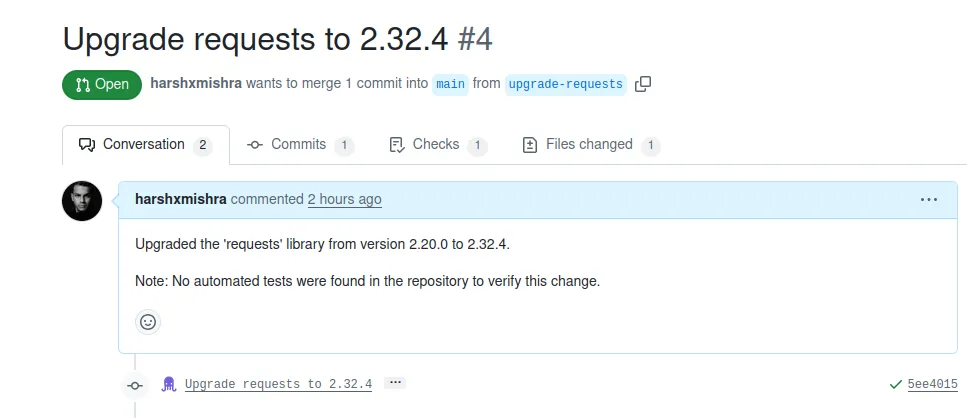
Now, wait for GitHub Action to run.
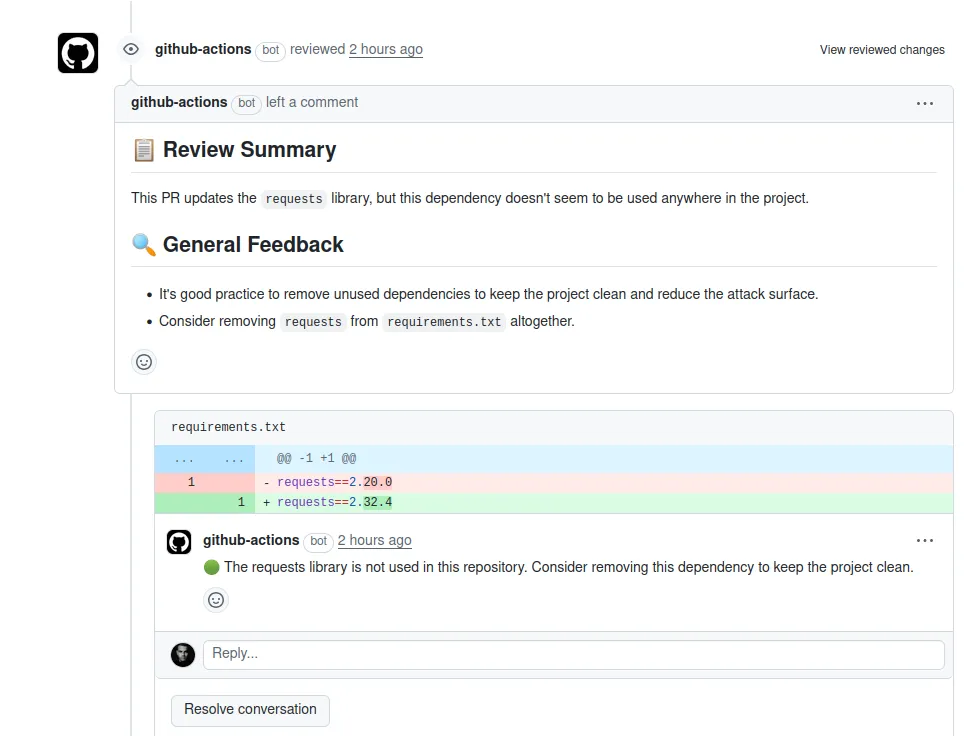
This action posted a summary as a comment on the pull request, helping to speed up the review process.
Task 3: Invoke the Gemini CLI manually for a query
You can manually trigger Gemini in your Issues conversations with a simple mention. For example, you can ask the Gemini CLI to explain the issue.
To set this up, you can go to any issue in your repository and then mention @gemini-cli to explain the issue.
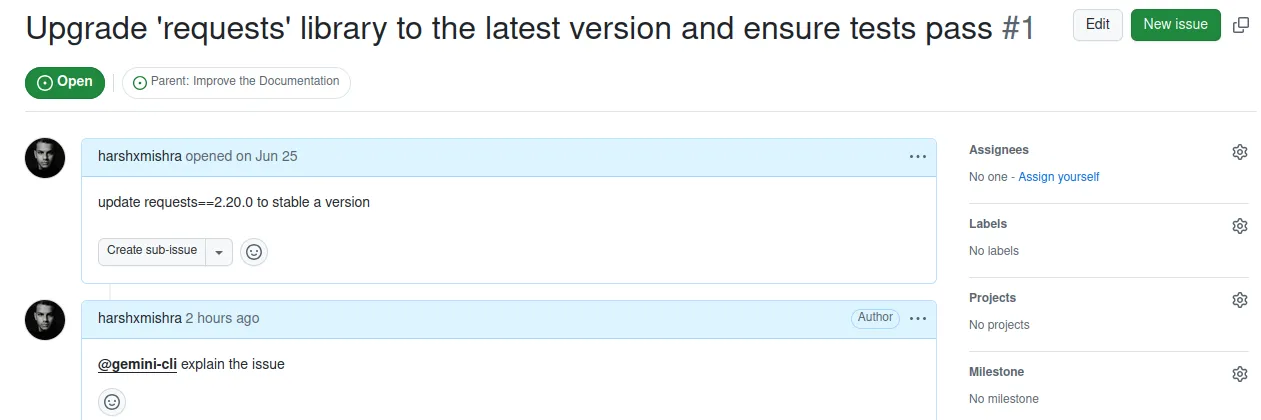
After some time, Gemini CLI will post a comment on the issue, replying to your query:
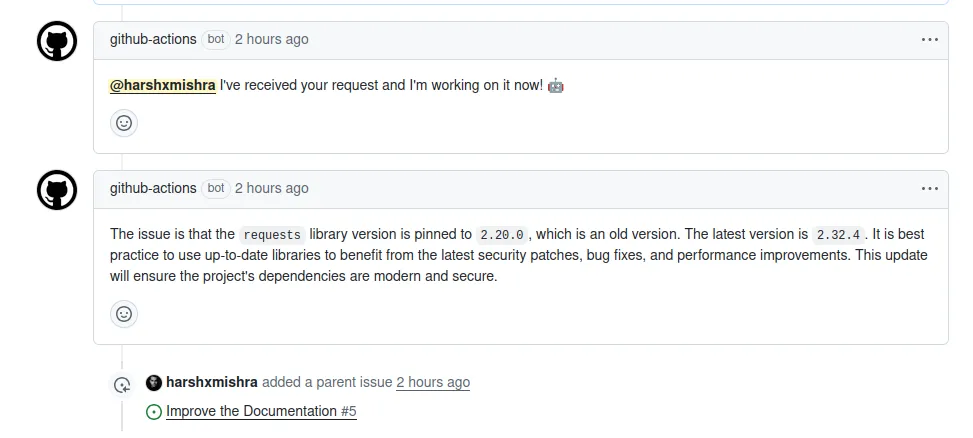
Gemini CLI has posted a clear message on the issue, addressing our query.
Final Verdict
After testing the Gemini CLI by using it to perform GitHub tasks, I am very much impressed. I believe this new feature will streamline your development process and make developers’ work easier than ever before.
Conclusion
The Gemini CLI is a valuable tool for any development team trying to perform GitHub Actions. It brings powerful AI to GitHub workflows, automates repetitive tasks, and improves collaboration. Whether you want to automate pull request reviews, streamline your GitHub issue management, or build a more secure CI/CD with Gemini, this tool has something to offer. Its open-source nature means it will continue to grow and adapt, making it a key part of the future of software development.
Read more: Top 12 AI Coding Assistants in 2025
Frequently Asked Questions
Q1. Is the Gemini CLI free to use?
A. Yes, it is a no-cost tool that acts as an AI coding teammate for your repository.
Q2. How do I get started with the Gemini CLI for performing GitHub Actions?
A. You can find the action on the GitHub Marketplace at google-github-actions/run-gemini-cli or run /setup-github in the Gemini CLI.
Q3. Can I customize the workflows?
A. Yes, the workflows are open-source and fully customizable, allowing you to create your own or modify existing ones.
Q4. What are some of the key features?
A. Key features include intelligent issue triage, accelerated pull request reviews, and on-demand collaboration by mentioning @gemini-cli.
Q5. How does the tool ensure security?
A. It uses credential-less authentication with Workload Identity Federation and provides granular control through command allowlisting for a secure environment.
Harsh Mishra is an AI/ML Engineer who spends more time talking to Large Language Models than actual humans. Passionate about GenAI, NLP, and making machines smarter (so they don’t replace him just yet). When not optimizing models, he’s probably optimizing his coffee intake. 🚀☕