Artificial intelligence is changing quickly from simple chatbots to more capable autonomous agents that exhibit reasoning, coordination, and execution of complex tasks. Microsoft has recently made Agent Framework publicly available in public preview as an open-source SDK and runtime to ease the orchestration of multi-agent systems, an important step forward for enterprises adopting agentic AI to alleviate fragmentation in tooling while now providing a bridge between experimenting and production.-grade deployment.
Table of contents
What is Microsoft Agent Framework?
The Microsoft Agent Framework solves a key developer dilemma: choosing between cutting-edge AI research and stable, production-ready tools. It unifies two frameworks:
- AutoGen: Brings advanced multi-agent orchestration, allowing AIs to work together in complex ways (e.g., group chats, debates).
- Semantic Kernel: Provides the enterprise backbone, including security, type safety, and telemetry.
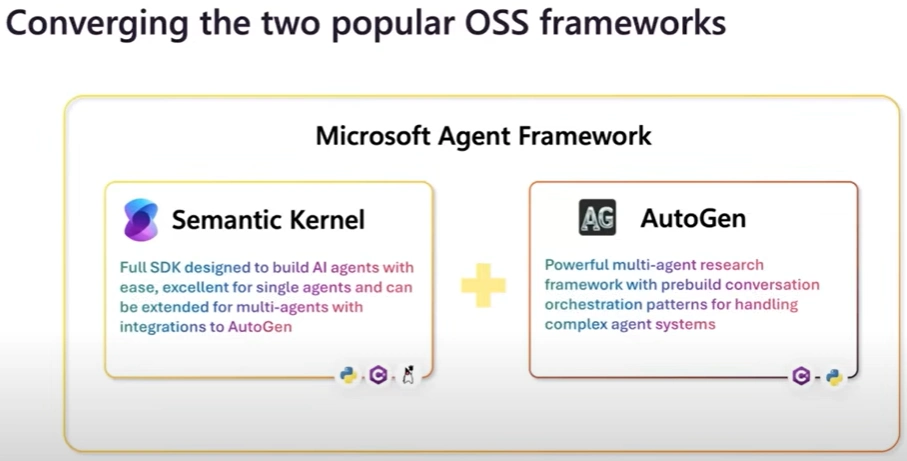
This merger creates a unique platform where you can build a working AI agent in under 20 lines of code without sacrificing the ability to create complex, multi-agent workflows for commercial use.
Microsoft Agent Framework Architecture
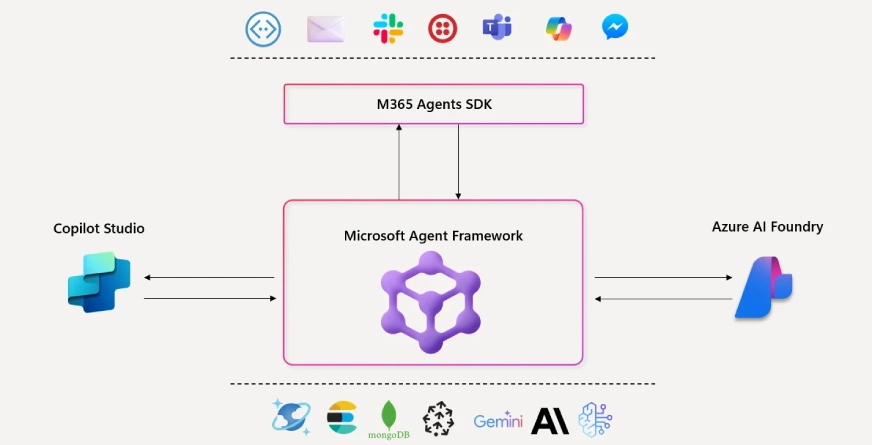
The core architecture of this framework is comprised of four foundational elements:
Open Standards and Interoperability
The Microsoft Agent Framework is built on a principle of open standards and interoperability, ensuring agents can communicate across different platforms and integrate seamlessly into existing enterprise systems. It supports emerging protocols to facilitate collaboration and easy tool integration.
Key Features
- Cross-Platform Communication: Agents can talk to each other across different runtimes using Agent-to-Agent (A2A) protocols.
- Open Standards: Supports MCP for real-time tool connections and OpenAPI for effortless REST API integration.
- Native Connectors: Includes built-in support for key services like Azure AI Foundry, Microsoft Graph, SharePoint, Elasticsearch, and Redis.
- Architecture Agnostic: Designed to work with Azure services, third-party APIs, and custom internal systems without vendor lock-in.
This approach allows developers to plug AI agents directly into their current technology stack, bridging the gap between innovative AI and established enterprise architecture.
Also Read: Integrate Azure Services for Data Management & Analysis
Research-to-Production Pipeline
The framework provides a powerful research-to-production pipeline, combining AutoGen’s advanced orchestration patterns with the reliability required for enterprise use. This enables developers to manage complex, multi-step business processes through a structured and stateful workflow layer, which is essential for lengthy operations.
This makes the framework ideal for transforming complex business processes into automated, multi-agent workflows.
Extensibility by Design
Microsoft Agent Framework offers a modular architecture that supports agent configuration by using both declarative and programmatic styles. Developers may define agents in YAML or JSON format so existing versioning and collaborative development workflows employ novel DevOps practices in defining agents. Declaring agent definitions allows teams to manage agent definitions in version control alongside application code within GitHub or Azure DevOps repositories.
Pluggable memory modules also allow a developer to store context and recall information through multiple back-end stores. Whether developers use in-memory storage for prototypes, Redis for scenarios with distributed agents, or some form of proprietary vector database for semantic search, the framework works to provide context regardless of architecture.
Production-Ready from Day One
The framework is engineered for enterprise adoption, integrating critical production-grade capabilities for observability, security, and lifecycle management directly into its core.
Key Production Features:
- Native Observability: Built-in OpenTelemetry integration provides full visibility into agent workflows, tool usage, and inter-agent collaboration, which is essential for debugging, performance optimization, and compliance auditing.
- Enterprise-Grade Security: Leverages Azure Entra ID for robust authentication and authorization, ensuring all agents operate within strict organizational security policies.
- Streamlined DevOps: Supports CI/CD pipelines through GitHub Actions and Azure DevOps, enabling teams to apply a standardized software development lifecycle to their AI agents.
This built-in focus on governance and operational excellence ensures that multi-agent systems can be trusted, managed, and scaled effectively within a real-world business environment.
Getting Started with Agent Framework
For Python developers, installation is straightforward:
pip install agent-framework --preFor .NET developers:
dotnet add package Microsoft.Agents.AIBuilding Your First Agent
Let’s examine how to create a functional agent that can interact with tools. Here’s a Python example that demonstrates the framework’s simplicity:
import asyncio
from agent_framework.azure import AzureOpenAIResponsesClient
from azure.identity import AzureCliCredential

# Define a custom tool function
def calculate_discount(price: float, discount_percent: float) -> float:
    """Calculate discounted price"""
    return price * (1 - discount_percent / 100)

async def main():
    # Initialize agent with Azure OpenAI
    agent = AzureOpenAIResponsesClient(
        credential=AzureCliCredential()
    ).create_agent(
        name="ShoppingAssistant",
        instructions="You help customers calculate prices and discounts.",
        tools=[calculate_discount]  # Register the tool
    )

    # Agent can now use the tool automatically
    response = await agent.run(
        "If a laptop costs $1200 and has a 15% discount, what's the final price?"
    )
    print(response)

asyncio.run(main())
The equivalent .NET implementation showcases similar elegance:
using Azure.AI.OpenAI;
using Azure.Identity;
using Microsoft.Agents.AI;

// Define a tool as a method
static double CalculateDiscount(double price, double discountPercent)
{
    return price * (1 - discountPercent / 100);
}

var agent = new AzureOpenAIClient(
    new Uri(Environment.GetEnvironmentVariable("AZURE_OPENAI_ENDPOINT")!),
    new AzureCliCredential())
    .GetOpenAIResponseClient("gpt-4")
    .CreateAIAgent(
        name: "ShoppingAssistant",
        instructions: "You help customers calculate prices and discounts.",
        tools: [CalculateDiscount]);

Console.WriteLine(await agent.RunAsync(
    "If a laptop costs $1200 and has a 15% discount, what's the final price?"));
Multi-Agent Workflow Example
For more complex scenarios, the framework supports orchestrating multiple specialized agents. Here’s a workflow that coordinates research and writing agents:
from agent_framework.workflows import Workflow, WorkflowStep
from agent_framework.azure import AzureOpenAIResponsesClient

# Create specialized agents
researcher = client.create_agent(
    name="Researcher",
    instructions="You research topics and provide factual information."
)

writer = client.create_agent(
    name="Writer",
    instructions="You write engaging articles based on research."
)

# Define workflow
workflow = Workflow(
    steps=[
        WorkflowStep(
            name="research",
            agent=researcher,
            output_variable="research_data"
        ),
        WorkflowStep(
            name="write",
            agent=writer,
            input_from="research_data",
            output_variable="article"
        )
    ]
)

# Execute workflow
result = await workflow.run(
    input_data={"topic": "Future of Quantum Computing"}
)
print(result["article"])
This workflow illustrates how the framework manages state among agents, passing the researcher’s output as context to the writer automatically. An inherent checkpoint system manages elapsed time to ensure the workflow can resume if anything fails without restarting and losing what was previously done.
Enterprise Adoption of Microsoft Agent Framework
Several leading organizations are already using the Microsoft Agent Framework in real-world scenarios. Here are a few examples:
- KPMG: Powering KPMG Clara AI, the framework connects specialized agents to enterprise data and tools with built-in safety safeguards. Open-source connectors enable access beyond Azure AI Foundry, supporting scalable multi-agent collaboration in globally regulated environments.
- Commerzbank: Exploring avatar-driven customer support to deliver natural, accessible, and regulation-compliant interactions.
- Citrix: Evaluating integration into virtual desktop infrastructure to enhance enterprise productivity.
- Sitecore: Developing agent capabilities for marketers to automate workflows across the content supply chain.
Voice Integration and Multi-Modal Capabilities
The Voice Live API is now generally available. It offers a unified, real-time speech-to-speech interface that combines:
- Speech-to-text
- Generative AI models
- Text-to-speech
- Avatars
- Conversation enhancers
This low-latency stream supports voice-initiated and voice-concluded multi-agent workflows, creating a more natural user experience.
Organizations using Voice Live API include:
- Capgemini: Customer service agents
- healow: Learning tutors
- Astra Tech: HR assistants
These examples highlight how the framework supports multi-modal agent experiences, extending beyond text-based interactions.
Addressing Enterprise Concerns
Governance and Responsible AI
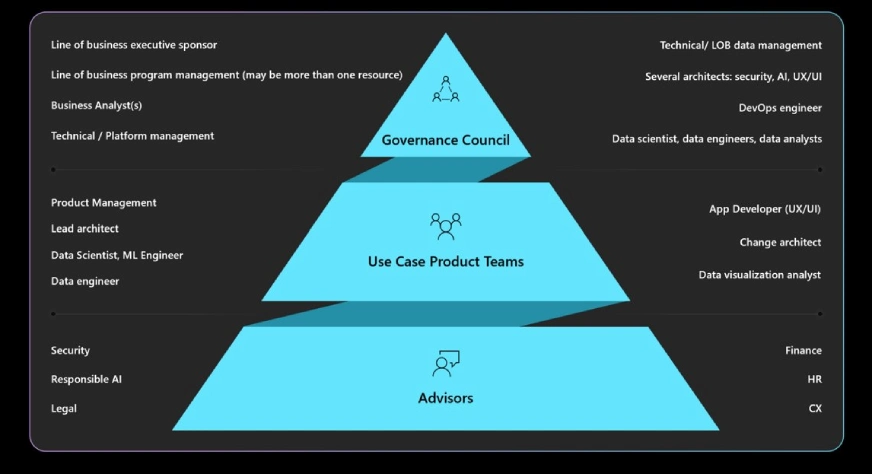
As AI adoption increases, enterprises are placing greater emphasis on responsible and compliant use of intelligent agents. According to McKinsey’s 2025 Global AI Trust Survey, the biggest barrier to AI adoption is the absence of effective governance and risk-management tools.
Key Capabilities
- Agents remain focused on their assigned objectives and avoid drifting into unintended tasks or behaviors. This ensures operational consistency and reliability.
- These tools protect against prompt injection attacks and flag uncontrolled or risky agent actions for organizational review. This improves security and oversight.
- Automatically detect when agents access Personally Identifiable Information (PII). This allows organizations to assess and refine their data handling policies based on access patterns.
- All governance features are built into Azure AI Foundry. This provides a ready-to-use compliance layer that aligns with organizational policies and regulatory standards.
- These capabilities are essential in sectors such as finance and healthcare, where responsible AI use must be embedded throughout the development and deployment lifecycle.
Developer Experience: Staying in Flow
An industry study shows that 50% of developers lose over ten hours per week due to fragmented tools and inefficient workflows. This productivity drain affects delivery timelines and developer morale. The Microsoft Agent Framework addresses this challenge by offering a unified development experience that minimizes context switching and streamlines agent creation, testing, and deployment.
Key Benefits:
- Developers no longer need to toggle between terminals, logs, and dashboards. DevUI centralizes these tasks, helping teams stay focused and productive.
- Developers can work locally using the AI Toolkit extension in Visual Studio Code, and then deploy to Azure AI Foundry with observability and compliance features enabled when needed.
- The framework supports both Python and .NET, allowing teams to work in their preferred language while maintaining portability and consistency across environments.
- With standardized APIs, developers can collaborate across teams and languages without needing to learn new interfaces, which improves efficiency and reduces onboarding time.
- The new DevUI provides an interactive interface that supports agent development, testing, and debugging. It complements code-first workflows and simplifies rapid prototyping and troubleshooting.
Also Read: How to Access GitHub Copilot CLI
Conclusion
The Microsoft Agent Framework is shaping the future of enterprise AI by merging innovation with governance, multi-modal capabilities, and developer-first tooling. It transforms experimentation into scalable, compliant solutions. As intelligent agents become central to business workflows, this framework offers a reliable foundation.
What are your thoughts on adopting agentic AI in your organization using this framework? Let me know in the comment section below!
Data Science Trainee at Analytics Vidhya
I am currently working as a Data Science Trainee at Analytics Vidhya, where I focus on building data-driven solutions and applying AI/ML techniques to solve real-world business problems. My work allows me to explore advanced analytics, machine learning, and AI applications that empower organizations to make smarter, evidence-based decisions.
With a strong foundation in computer science, software development, and data analytics, I am passionate about leveraging AI to create impactful, scalable solutions that bridge the gap between technology and business.
📩 You can also reach out to me at [email protected]