If you’re following AI Agents, then you might have noticed that LangChain has created a nice ecosystem with LangChain, LangGraph, LangSmith & LangServe. Leveraging these, we can build, deploy, evaluate, and monitor Agentic AI systems. While building an AI Agent, I just thought to myself, “Why not show a simple demo to show the intertwined working of LangGraph & LangSmith?”. This is gonna be helpful as AI Agents generally need multiple LLM calls and also have higher costs associated with them. This combo will help track the expenses and also evaluate the system using custom datasets. Without any further ado, let’s dive in.
Table of contents
LangGraph for AI Agents
Simply put, AI Agents are LLMs with the capability to think/reason and may access tools to address their shortcomings or gain access to real-time information. LangGraph is an Agentic AI framework based on LangChain to build these AI Agents. LangGraph helps build graph-based Agents; also, the creation of Agentic workflows is simplified with many inbuilt functions already present in the LangGraph/LangChain libraries.
Read more: What is LangGraph?
What is LangSmith?
LangSmith is a monitoring and evaluation platform by LangChain. It is framework-agnostic, designed to work with any Agentic framework, such as LangGraph, or even with Agents built completely from scratch. LangSmith can be easily configured to trace the runs and also track the expenses of the Agentic system. It also supports running experiments on the system, like changing the prompt and models in the system, and comparing the results. It has predefined evaluators like helpfulness, correctness, and hallucinations. You can also choose to define your own evaluators. Let’s look at the LangSmith platform to get a better idea of it.
Read more: Ultimate Guide to LangSmith
The LangSmith Platform
Let’s first sign up/sign in to check out the platform: https://www.langchain.com/langsmith
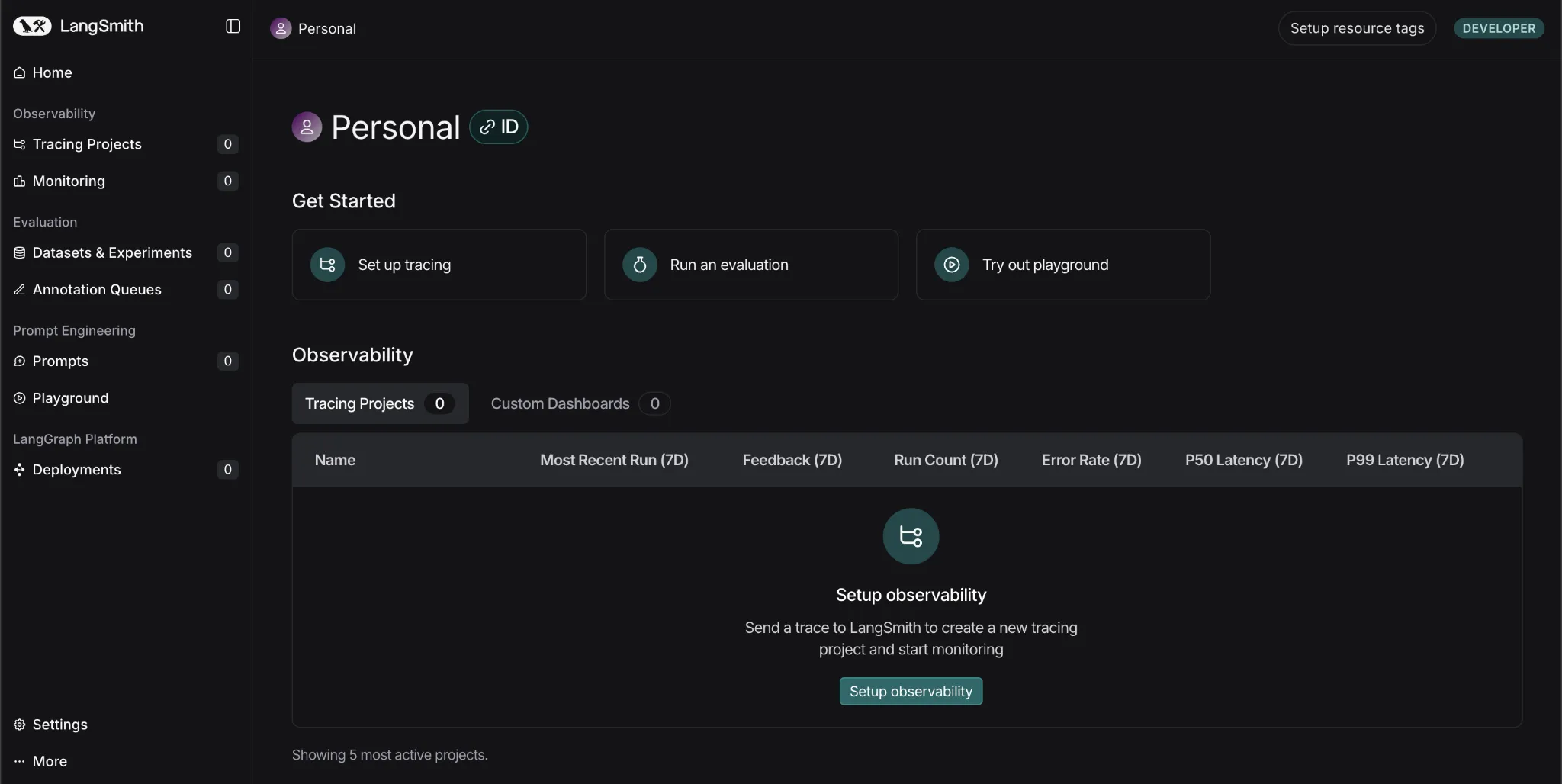
This is how the platform looks with multiple tabs:
- Tracing Projects: Keeps a track of multiple projects along with their traces or sets of runs. Here, the costs, errors, latency, and many other things are tracked.
- Monitoring: Here you can set alerts to warn you, for instance, if the system fails or the latency is above the set threshold.
- Dataset & Experiments: Here, you can run experiments using human-crafted datasets or use the platform to create AI-generated datasets for testing your system. You can also change your model to see how the performance varies.
- Prompts: Here you can store a few prompts and later change the wording or sequence of instructions to see how your results are changing.
LangSmith in Action
Note: We’ll only build simple agents for this tutorial to focus on the LangSmith side of things.
Let’s build a simple math expression-solving agent that uses a simple tool and then enable traceability. And then we’ll check the LangSmith dashboard to see what can be tracked using the platform.
Getting the API keys:
- Visit the Langsmith dashboard and click on the ‘Setup Observability’ Button. Then you’ll see this screen. https://www.langchain.com/langsmith
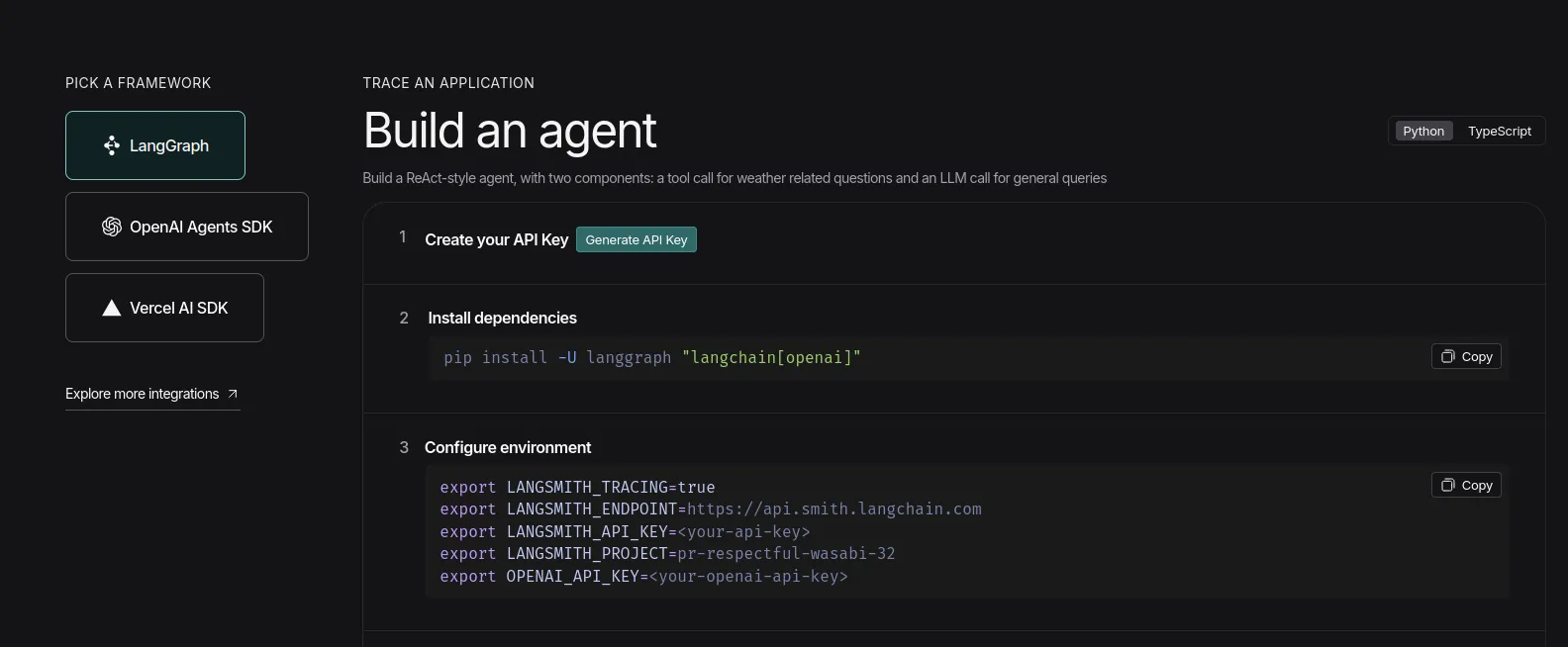
Now, click on the ‘Generate API Key’ option and keep the LangSmith key handy.
- Now visit Google AI Studio to get your hands on the Gemini API key: https://aistudio.google.com/api-keys
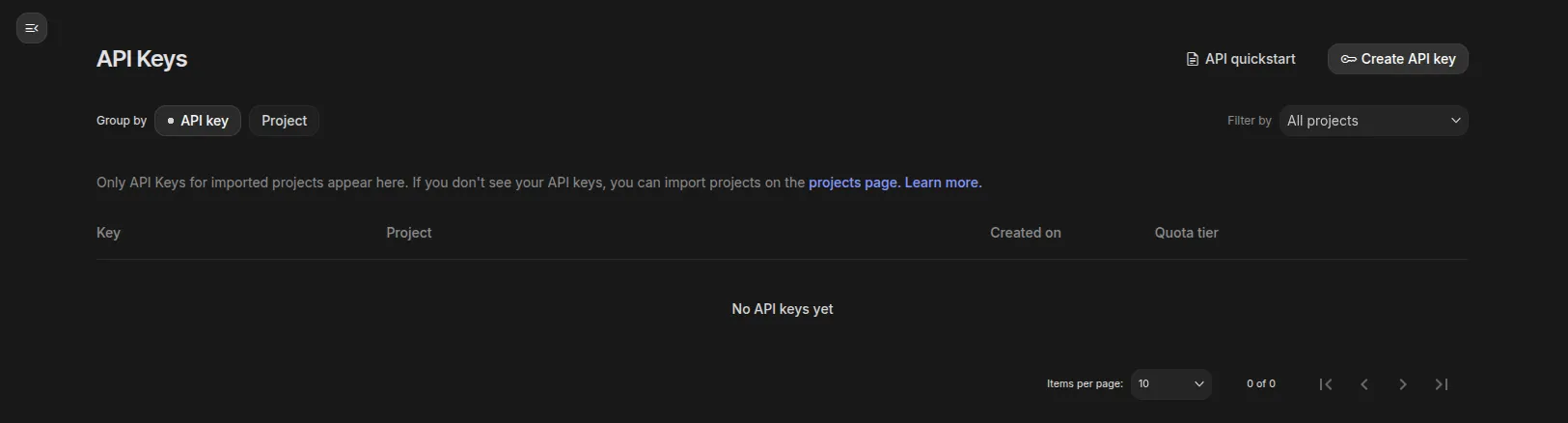
Click on ‘Create API key’ on the right-top and create a project if it doesn’t already exist, and keep the key handy.
Python Code
Note: I’ll be using Google Colab for running the code.
Installations
!pip install -q langgraph langsmith langchain

!pip install -q langchain-google-genaiNote: Make sure to restart the session before continuing from here.
Setting the environment
Pass the API keys when prompted.
from getpass import getpass

LANGCHAIN_API_KEY=getpass('Enter LangSmith API Key: ')

GOOGLE_API_KEY=getpass('Enter Gemini API Key: ')

import os

os.environ['LANGCHAIN_TRACING_V2'] = 'true'

os.environ['LANGCHAIN_API_KEY'] = LANGCHAIN_API_KEY

os.environ['LANGCHAIN_PROJECT'] = 'Testing'Note: It’s recommended to track different projects with different project names; here, I’m naming it ‘Testing’.
Setting up and running the agent
- Here, we’re using a simple tool that the agent can use to solve math expressions
- We’re using the in-built
create_react_agentfrom LangGraph, where we have to define the model, give access to tools, and we’re good to go.
from langgraph.prebuilt import create_react_agent

from langchain_google_genai import ChatGoogleGenerativeAI

def solve_math_problem(expression: str) -> str:

   """Solve a math problem."""

   try:

    # Evaluate the mathematical expression

    result = eval(expression, {"__builtins__": {}})

    return f"The answer is {result}."

   except Exception:

    return "I couldn't solve that expression."

# Initialize the Gemini model with API key

model = ChatGoogleGenerativeAI(

   model="gemini-2.5-flash",

   google_api_key=GOOGLE_API_KEY

)

# Create the agent

agent = create_react_agent(

   model=model,

   tools=[solve_math_problem],

   prompt=(

    "You are a Math Tutor AI. "

    "When a user asks a math question, reason through the steps clearly "

    "and use the tool `solve_math_problem` for numeric calculations. "

    "Always explain your reasoning before giving the final answer."

   ),

)

# Run the agent

response = agent.invoke(

   {"messages": [{"role": "user", "content": "What is (12 + 8) * 3?"}]}

)

print(response)
Output:
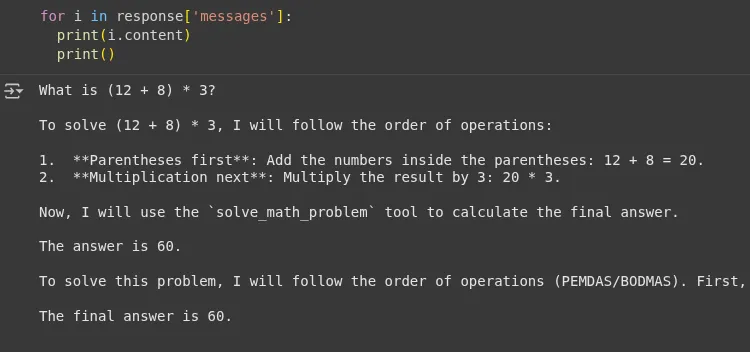
We can see that the agent used the tool’s response ‘The answer is 60’ and didn’t hallucinate while answering the question. Now let’s check the LangSmith dashboard.
LangSmith Dashboard
Tracing Projects tab

We can see that the project has been created with the name ‘testing’; you can click on it to see detailed logs.

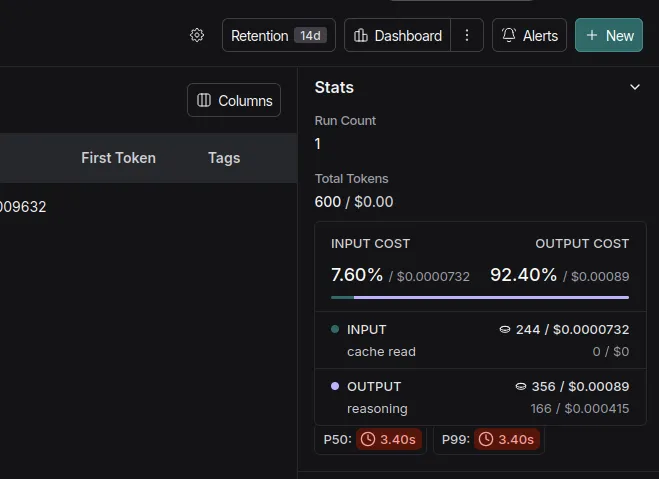
Here it shows the run-wise:
- Total Tokens
- Total Cost
- Latency
- Input
- Output
- Time when the code was executed
Note: I’m using the free tier of Gemini here, so I can use the key free of cost according to the daily limits.
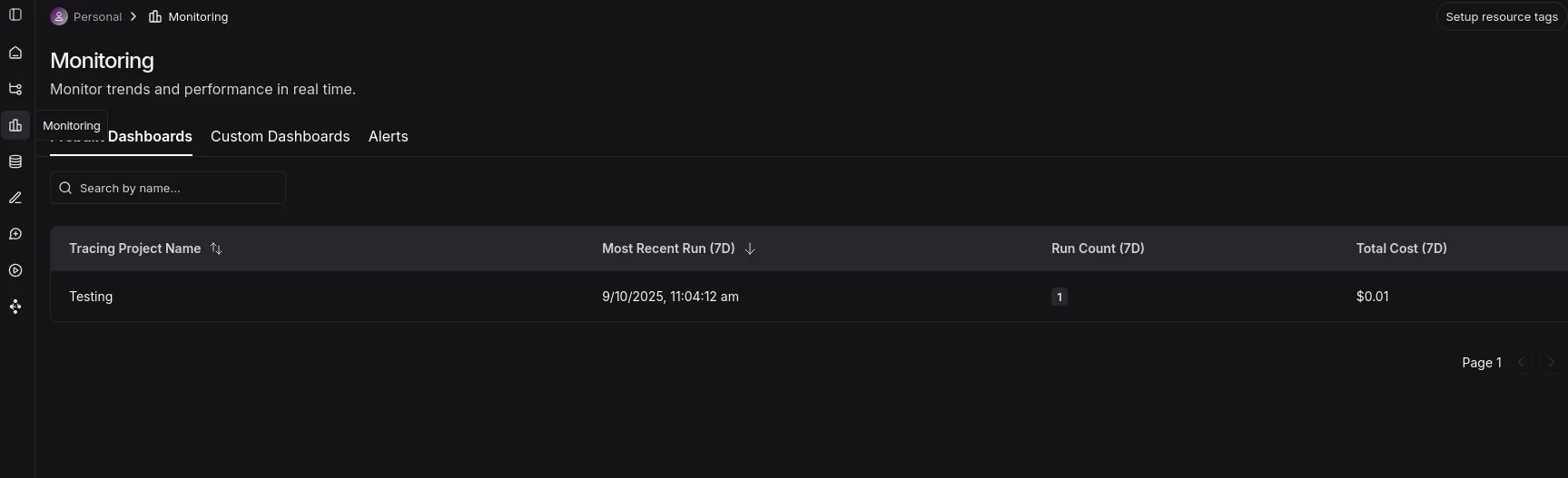
Monitoring tab
- Here you can see a dashboard with the projects, runs, and total costs.
LLM as a judge
LangSmith allows the creation of a dataset using a simple dictionary with input and output keys. This dataset with the expected output can be used to evaluate an AI system’s generated outputs on metrics like helpfulness, correctness, and hallucinations.
We’ll use a similar math agent, create the dataset, and evaluate our agentic system.
Note: I’ll be using OpenAI API (gpt-4o-mini) for the demo here, this is to avoid API Limit issues with the free-tier Gemini API.
Installations
!pip install -q openevals langchain-openai Environment Setup
import os

from google.colab import userdata

os.environ['OPENAI_API_KEY']=userdata.get('OPENAI_API_KEY')
Defining the Agent
from langsmith import Client, wrappers

from openevals.llm import create_llm_as_judge

from openevals.prompts import CORRECTNESS_PROMPT

from langchain_openai import ChatOpenAI

from langgraph.prebuilt import create_react_agent

from langchain_core.tools import tool

from typing import Dict, List

import requests

# STEP 1: Define Tools for the Agent =====

@tool

def solve_math_problem(expression: str) -> str:

   """Solve a math problem."""

   try:

    # Evaluate the mathematical expression

    result = eval(expression, {"__builtins__": {}})

    return f"The answer is {result}."

   except Exception:

    return "I couldn't solve that expression."

# STEP 2: Create the LangGraph ReAct Agent =====

def create_math_agent():

   """Create a ReAct agent with tools."""

   # Initialize the LLM

   model = ChatOpenAI(model="gpt-4o-mini", temperature=0)

   # Define the tools

   tools = [solve_math_problem]

   # Create the ReAct agent using LangGraph's prebuilt function

   agent = create_react_agent(

    model=model,

    tools=[solve_math_problem],

    prompt=(

        "You are a Math Tutor AI. "

        "When a user asks a math question, reason through the steps clearly "

        "and use the tool `solve_math_problem` for numeric calculations. "

        "Always explain your reasoning before giving the final answer."

    ),

   )

   return agent
Creating the dataset
- Let’s create a dataset with simple and hard math expressions that we can later use to run experiments.
client = Client()

dataset = client.create_dataset(

   dataset_name="Math Dataset",

   description="Hard numeric + mixed arithmetic expressions to evaluate the solver agent."

)

examples = [

   # Simple check

   {

    "inputs": {"question": "12 + 7"},

    "outputs": {"answer": "The answer is 19."},

   },

   {

    "inputs": {"question": "100 - 37"},

    "outputs": {"answer": "The answer is 63."},

   },

   # Mixed operators and parentheses

   {

    "inputs": {"question": "(3 + 5) * 2 - 4 / 2"},

    "outputs": {"answer": "The answer is 14.0."},

   },

   {

    "inputs": {"question": "2 * (3 + (4 - 1)*5) / 3"},

    "outputs": {"answer": "The answer is 14.0."},

   },

   # Large numbers & multiplication

   {

    "inputs": {"question": "98765 * 4321"},

    "outputs": {"answer": "The answer is 426,373,565."},

   },

   {

    "inputs": {"question": "123456789 * 987654321"},

    "outputs": {"answer": "The answer is 121,932,631,112,635,269."},

   },

   # Division, decimals, rounding

   {

    "inputs": {"question": "22 / 7"},

    "outputs": {"answer": "The answer is approximately 3.142857142857143."},

   },

   {

    "inputs": {"question": "5 / 3"},

    "outputs": {"answer": "The answer is 1.6666666666666667."},

   },

   # Exponents, roots

   {

    "inputs": {"question": "2 ** 10 + 3 ** 5"},

    "outputs": {"answer": "The answer is 1128."},

   },

   {

    "inputs": {"question": "sqrt(2) * sqrt(8)"},

    "outputs": {"answer": "The answer is 4.0."},

   },

   # Edge / error / “unanswerable” cases

   {

    "inputs": {"question": "5 / 0"},

    "outputs": {"answer": "I couldn’t solve that expression."},

   },

   {

    "inputs": {"question": "abc + 5"},

    "outputs": {"answer": "I couldn’t solve that expression."},

   },

   {

    "inputs": {"question": ""},

    "outputs": {"answer": "I couldn’t solve that expression."},

   },

]

client.create_examples(

   dataset_id=dataset.id,

   examples=examples)
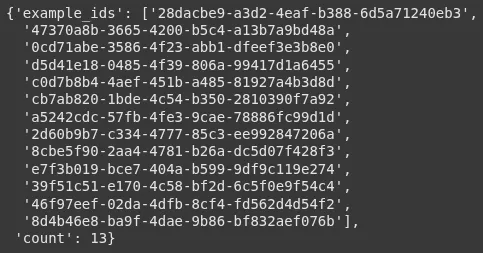
Great! We created a dataset with 13 records:
Defining the target function
- This function invokes the agent and returns the response
def target(inputs: Dict) -> Dict:

   agent = create_math_agent()

   agent_input = {

    "messages": [{"role": "user", "content": inputs["question"]}]

   }

   result = agent.invoke(agent_input)

   final_message = result["messages"][-1]

   answer = final_message.content if hasattr(final_message, 'content') else str(final_message)

   return {"answer": answer}
Defining the Evaluator
- We use the pre-built
llm_as_judgefunction and also import the prompt from the openevals library. - We’re using 4o-mini for now to keep the costs low, but a reasoning model can be better suited for this task.
def correctness_evaluator(inputs: Dict, outputs: Dict, reference_outputs: Dict) -> Dict:

   evaluator = create_llm_as_judge(

    prompt=CORRECTNESS_PROMPT,

    model="openai:gpt-4o-mini",

    feedback_key="correctness",

   )

   eval_result = evaluator(

    inputs=inputs,

    outputs=outputs,

    reference_outputs=reference_outputs

   )

   return eval_result
Running the evaluation
experiment_results = client.evaluate(

   target,

   data="Math Dataset",

   evaluators=[correctness_evaluator],

   experiment_prefix="langgraph-math-agent",

   max_concurrency=2,

)Output:
A link will be generated after the run. On click, you’ll be redirected to LangSmith’s ‘Datasets & Experiments’ tab, where you can see the results of the experiment.
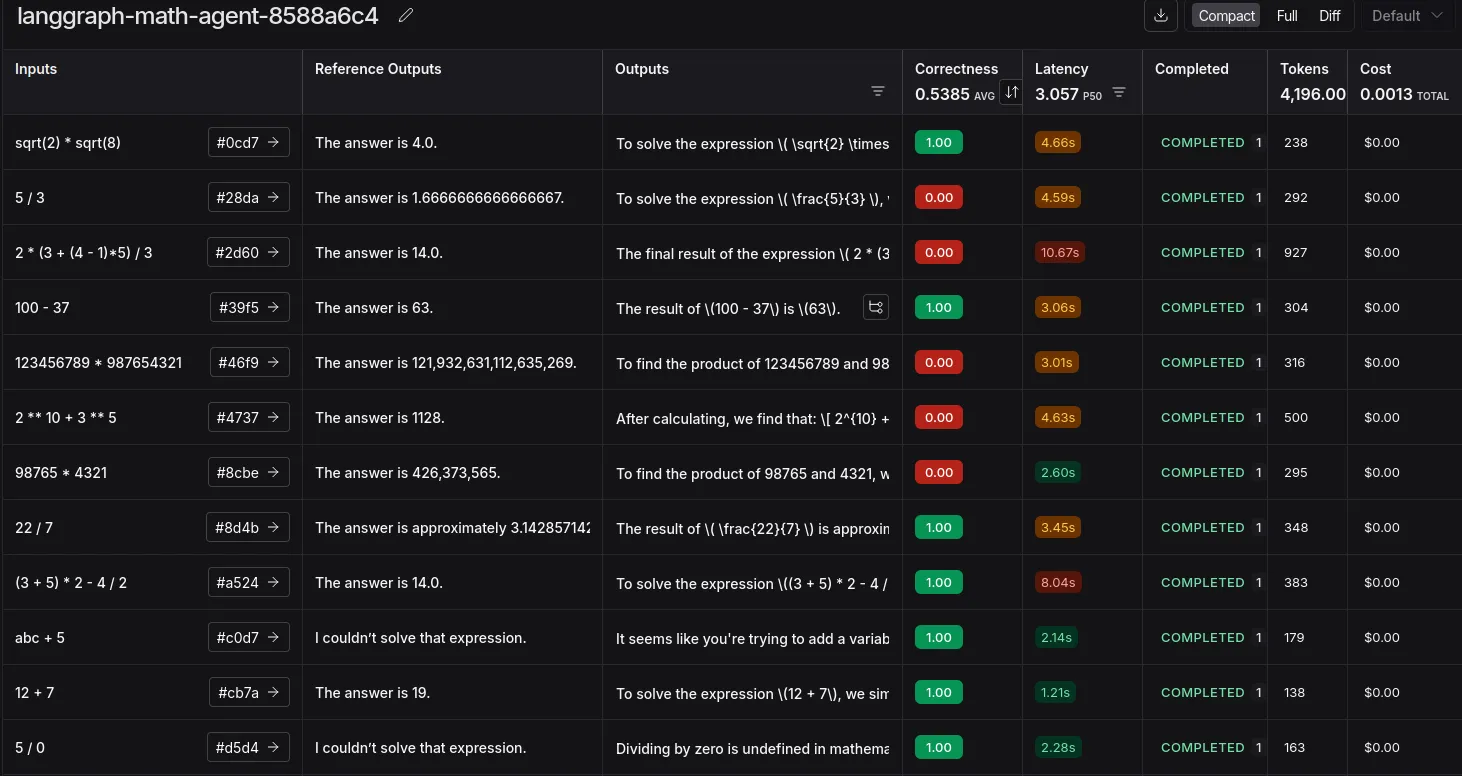
We have successfully experimented with using LLM as a Judge. This is insightful in terms of finding edge cases, costs, and token usage.
The errors here are mostly mismatched due to the use of commas or the presence of long decimals. This can be solved by changing the evaluation prompt or trying a reasoning model. Or simplify adding commas and ensuring decimal formatting at the tool level itself.
Conclusion
And there you have it! We’ve successfully shown the intertwined working of LangGraph for building our agent and LangSmith for tracing and evaluating it. This combo is incredibly powerful for tracking expenses and ensuring your agent performs as expected with custom datasets. While we focused on tracing and experiments, LangSmith’s capabilities don’t stop there. You can also explore powerful features like A/B testing different prompts in production, adding human-in-the-loop feedback directly to traces, and creating automations to streamline your debugging workflow.
Frequently Asked Questions
Q1. What does the -q flag mean in “pip install -q”?
A. The -q (or –quiet) flag tells pip to be “quiet” during installation. It reduces the log output, making your notebook cleaner by only showing important warnings or errors.
Q2. What’s the main difference between LangChain and LangGraph?
A. LangChain is best for creating sequential chains of actions. LangGraph extends this by letting you define complex, cyclical flows with conditional logic, which is essential for building sophisticated agents.
Q3. Is LangSmith only for agents built with LangGraph?
A. No, LangSmith is framework-agnostic. You can integrate it into any LLM application to get tracing and evaluation, even if it’s built from scratch using libraries like OpenAI’s directly.
Passionate about technology and innovation, a graduate of Vellore Institute of Technology. Currently working as a Data Science Trainee, focusing on Data Science. Deeply interested in Deep Learning and Generative AI, eager to explore cutting-edge techniques to solve complex problems and create impactful solutions.