OpenCode is open source and works with any model, but those are no longer its most interesting features. Model choice is table stakes. What sets OpenCode apart is its architecture, and the trade-offs that come with it, especially if you are coming from Claude Code.
In this article, we look at what OpenCode is, what makes its architecture different, what “free” really means once model costs enter the picture, and where its limits sit, focusing on the details that actually affect your decision.
Table of contents
What is OpenCode?
OpenCode is an MIT-licensed coding agent that connects a model you choose to your repository, your terminal, and your tools. Ask it to fix a bug and it can locate the files, draft a plan, edit the code, run the tests, and react to what the tests say.
The distinction that clarifies everything else: OpenCode is not a model. The model reads your prompt and produces the response. OpenCode supplies the file tools, shell access, session history, permission rules, and the interface around it.
Why that split matters: you can change the model without changing anything else. Provider prices move, access rules change, a better model ships. The agent stays where it is and you swap what sits behind it. That is the actual pitch, and it holds up better than the open-source framing does.
On popularity, since it comes up: the project sits somewhere around 190,000 GitHub stars as of mid-2026, with its own site claiming north of 195,000 alongside roughly 950 contributors. Stars measure attention rather than quality, so I would read them as evidence the project is not going to be abandoned next quarter, and nothing more than that.
The Architecture
OpenCode runs as a client and a local server. The terminal interface, the desktop app, the IDE extension, and the SDK are all clients talking to that server over HTTP. They are not separate implementations of the same idea. They are different front ends on one process.
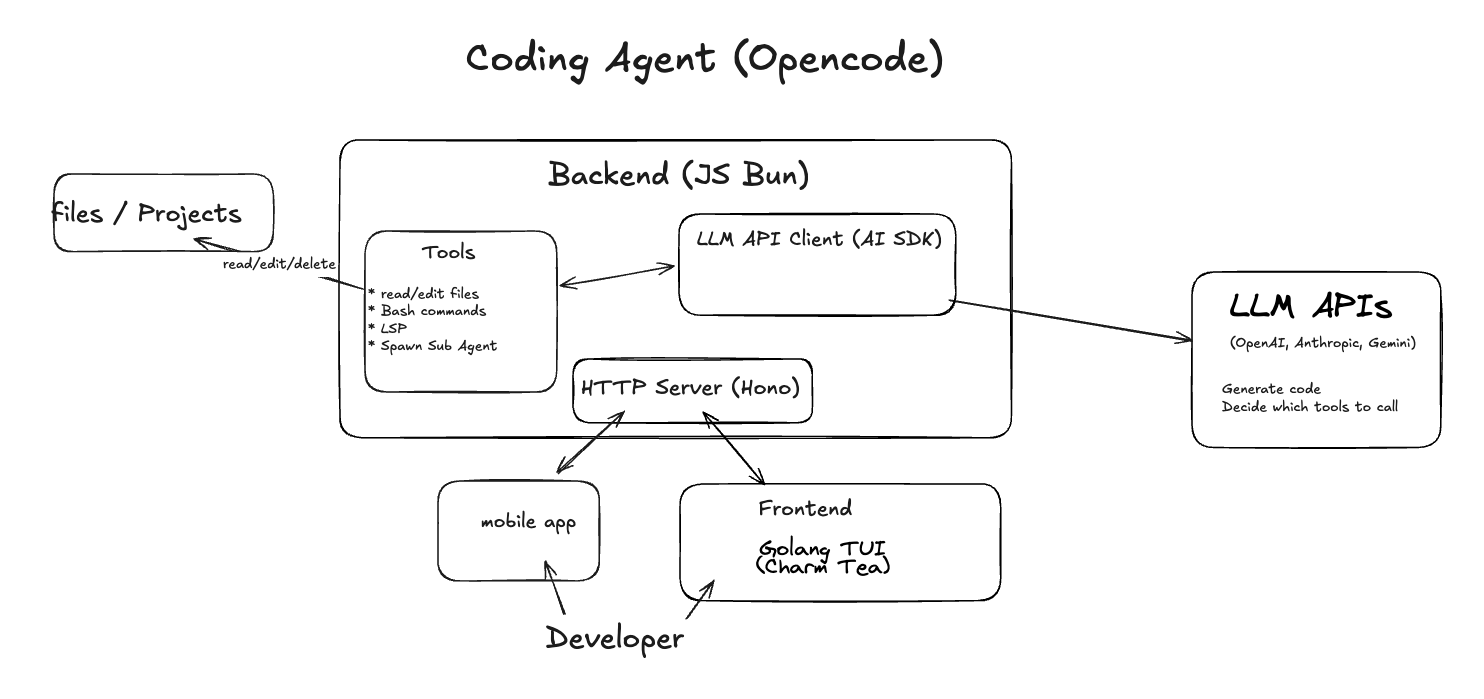
Which gives you three things Claude Code does not do in the same shape:
There is also a documented API. The server ships an OpenAPI 3.1 specification, which generates the official @opencode-ai/sdk package. The API covers sessions, messages, files, providers, tools, agents, and configuration, and it is the same server OpenCode’s own clients use.
That last detail is the one worth sitting with. A script can create a session and send a message through a supported API rather than trying to puppet a terminal UI. If you have ever tried to automate a CLI agent by faking keystrokes, you will understand why that is a meaningful difference.
If you only ever use the terminal interface, none of this changes your day. It matters when you want to run the agent somewhere other than the machine you are sitting at, or drive it from code.
What Free Costs Once You Add It Up
The software is free. That sentence is true and it is also where a lot of people stop reading.
The local path is the one people romanticise and it deserves a caveat. Smaller local models return invalid tool calls more often and miss connections between files. A local setup also needs enough memory for the model and enough context headroom for the files sent with each request. It works, and it is not a free lunch.
If cost control across providers is your actual reason for looking at OpenCode, the habits transfer from Claude Code. 23 Tips for Claude Code Token Saving covers the general principles, most of which are model agnostic.
Modes, Permissions, and What They Are Not
OpenCode has two modes, and the mental model is simpler than the naming suggests. It is a permission switch.
Underneath the modes sits a permission system that applies when a tool gets called. A project can allow a tool, deny it, or ask each time, and the rules can vary by command pattern. Allow the test command, ask before anything else touches the shell.
The important caveat, stated plainly in the docs: the permission system is a workflow safeguard, not a security sandbox. It is there to stop the agent surprising you, not to contain something actively hostile.
Two related security notes worth knowing before you get clever with server mode. Networked use should set OPENCODE_SERVER_PASSWORD and bind to localhost. An earlier unauthenticated exposure issue has been patched, and server mode still should not be reachable publicly without authentication.
Undo works properly
The /undo and /redo commands move through Git-based file snapshots. Combined with plan mode, that gives you the same try-something-risky-and-roll-it-back workflow that makes checkpoints useful in Claude Code. If the refactor was wrong, /undo restores the earlier snapshot.
Sessions are stored locally on disk, and long conversations get compacted automatically.
Project Context: AGENTS.md Instead of CLAUDE.md
Run /init and OpenCode writes an AGENTS.md file summarising your project’s structure and conventions. Commit it and every session on the team starts with the same instructions.
The file holds what you would expect: test commands, folder conventions, naming rules, project notes. There is a global AGENTS.md for instructions that apply everywhere and a project-level one for a single repository.
If you already maintain a CLAUDE.md, the same discipline applies and so do the same failure modes. A long file gets ignored because the real rules are buried. The test for every line stays the same: would removing this cause a mistake? If not, cut it.
The repository conventions that make these files worth having are the same across both tools. How to Structure a Claude Code Project covers that ground, and most of it transfers directly.
File references work through the @ symbol, which pulls a selected file into your prompt rather than making the agent hunt for it. Same habit, same payoff as anywhere else.
Subagents and MCP
Beyond Build and Plan, OpenCode ships subagents for multistep search, codebase scanning, and outside documentation lookups. Each runs in a child session, so its messages do not fill your main window. Custom agents can have their own model, prompt, and tool permissions, which means you can point a cheap model at a read-only research agent.
MCP servers are defined in opencode.json and the same permission checks apply to the tools they add. If you have not set up MCP before, our guide to connecting MCP servers covers the concepts, though the config file location differs from Claude Code’s.
Getting Started with OpenCode
First let’s start with the installation:
Install
# Official install script, most Unix-like systems
curl -fsSL https://opencode.ai/install | bash

# Or through a package manager
npm i -g opencode-ai@latest
brew install anomalyco/tap/opencode

# Windows
scoop install opencode
choco install opencode
On Windows, OpenCode’s own documentation recommends WSL, because some file-system and shell behaviour works better there. A desktop app exists for macOS, Windows, and Linux, in beta at the time of writing.
First run
cd your-project

opencode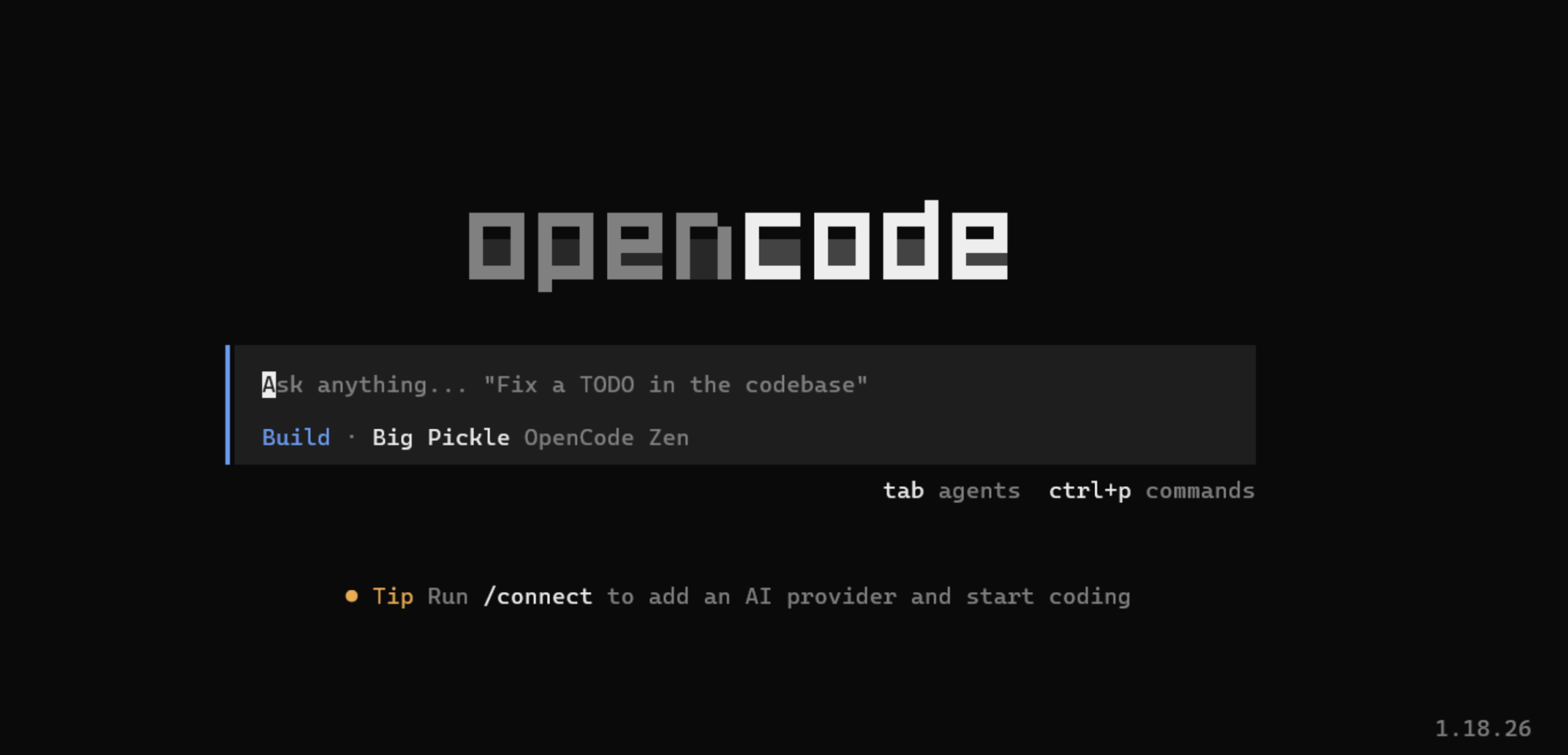
# then, inside the session:

/connect     # add a provider: API key, Copilot, ChatGPT, Zen, or Go

/init        # generate AGENTS.md from your project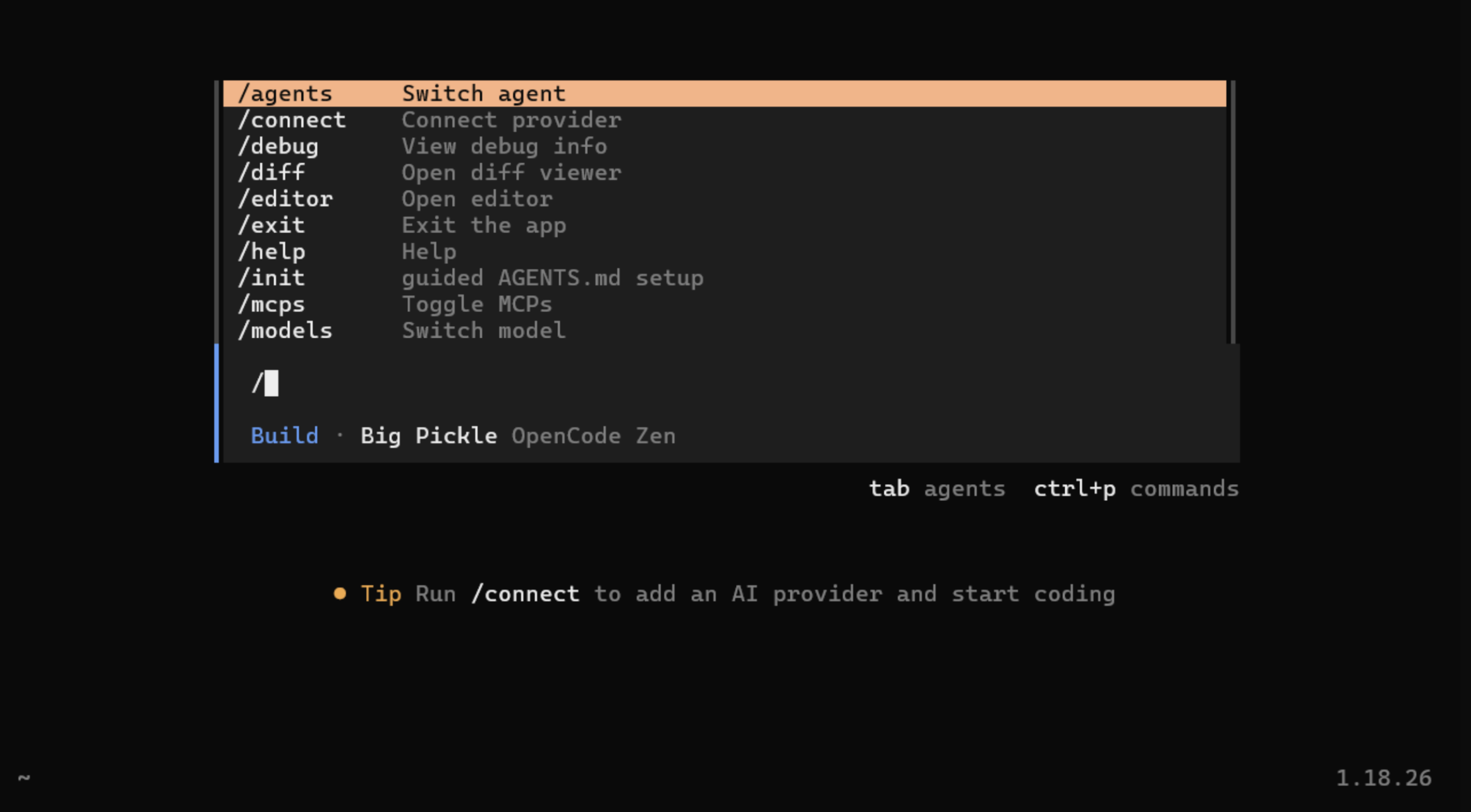
# Tab toggles Plan and Build

# @ pulls a file into your prompt
Installing does not get you model access. The first session still needs one of the billing paths above, which is the step people forget when they read that the tool is free.
# One-off task without entering the TUI

opencode run "Summarise this repo and propose next steps"
Try this now: install it, run /init in a repo you know well, and read the AGENTS.md it produces. Whether that file is accurate about your project tells you a lot about how well the agent understands your codebase, and it takes about two minutes. It is also the cheapest possible evaluation of a coding agent I know of.
Honest Limits
The /share command deserves a specific mention because it is easy to use without thinking. It uploads the session to a public link, and it stays public until you unshare it. Useful for showing a colleague what happened. Not something to reach for on a private codebase without a pause.
Who This Is For
My read: if you already pay for Claude Code and mainly want the fastest good result on one model, OpenCode is not an upgrade. If you want to run an agent somewhere other than your own laptop, script against a documented API, keep code on local infrastructure, or hedge against a provider changing its terms on you, it does things the proprietary options do not.
What I Take From It
The framing I would keep is the split between the agent and the model. Provider lists change, prices move, access rules shift, and in January a subscription path disappeared with no warning to the people relying on it. A tool that survives all of that while you change what sits behind it is a reasonable thing to want.
That separation is not free. Someone has to manage the setup, the permissions, and the billing, and that someone is you. The tools that make those decisions for you are faster to start and harder to leave.
The one thing I would not skip: if you are evaluating OpenCode as a Claude Code user, check the billing maths before the feature list. Your Claude subscription does not come with you, and metered API tokens on top of a subscription you already pay for is the actual comparison, not free versus paid.
For accurate current details, the official OpenCode documentation and the active repository are the sources to trust, and Models.dev is where the provider and pricing data comes from. Given the release pace, anything written about this tool more than a few months ago is worth re-checking, including this.
Frequently Asked Questions
Q1. Is OpenCode actually free?
A. The MIT-licensed software is free. Model usage is not. You pay through provider tokens, OpenCode Zen, OpenCode Go, or in hardware if you run models locally through Ollama. A free tool can still produce a monthly provider bill.
Q2. Can I use my Claude Pro or Max subscription in OpenCode?
A. No. Anthropic blocked third-party tools from using consumer Claude subscriptions through unofficial channels in January 2026. Claude models still work in OpenCode, but through a metered Anthropic API key billed at API rates. Copilot and ChatGPT logins are unaffected.
Q3. Does OpenCode work offline?
A. Yes, through Ollama or another OpenAI-compatible local endpoint. Expect more invalid tool calls and weaker reasoning across files than a large hosted model, and make sure the machine has memory for both the model and the context you send it.
Hi , I am Sree Vamsi a passionate Data Science enthusiast currently working at Analytics Vidhya. My journey into data science began with a curiosity for uncovering insights from complex data and has evolved into building end-to-end Generative AI applications, RAG pipelines, agentic AI workflows, and multi-agent systems that solve real-world business problems.