
ChatGPT has done everything for us! From writing an email, researching a topic, to even helping us prepare for an interview; But is this enough? Not really. After all, you had to copy that email and send it to the person, or showcase the research findings in a report, which would require significant time and effort. But no more! The boundaries between conversation and action just collapsed. OpenAI’s latest release, “ChatGPT Agent,” transforms ChatGPT from a helpful chatbot into something far more ambitious: a digital assistant that performs tasks on your behalf. The AI would no longer just outline the solution – It would put them into practice.
But this isn’t a one tool fits all for all our tasks. It still has a long way forward, but it provides a promising framework for the future. This article covers its capabilities, how to access it, hands-on, limitations, and what outlook it provides for the future.
Table of contents
What is ChatGPT Agent?

Released on July 17, 2025, ChatGPT agent has upped ChatGPT’s AI game. Instead of just talking about tasks, it can now browse websites, manipulate data, create presentations, and handle complex workflows from start to finish.
Agent mode is already jaw-dropping, occasionally absurd, and still far away from prime time.
Even though such agents have been around for some time, the ChatGPT agent brings in a promise of performance and ease. Powered by ChatGPT, this agent can work around the clock and “actually do some tasks” for you. But unlike ChatGPT, our tasks wouldn’t be done in an instant. This is because the agent can utilize deep research for performing tasks, leading to a higher quality—but consequently longer times.
What does ChatGPT Agent do?
You might be thinking, What does this agent bring to the table? Think of it in this way: Your morning work routine consists of going through your emails, checking the news, and looking for some new stuff that you’d work on. Currently, you have to manually do all of these activities one at a time.
The ChatGPT agent comes to your rescue by operating in a virtual environment to perform actions on itself. It can handle requests like “analyze my calendar and brief me on upcoming client meetings based on recent news” or “plan and buy ingredients for a Japanese breakfast for four people.” It navigates websites intelligently, filters through results, prompts you to log in securely when needed, runs code, conducts analysis, and delivers polished outputs like editable slideshows and spreadsheets.
What makes this particularly interesting is how it bridges the gap between research and execution. Previously, the chatbots were likened to a “Mouth without a brain”, meaning they can convey text, but they can’t do anything with it. Therefore, we had to judge and act upon the output in the end. But now, with the ChatGPT agent, this problem gets obviated.
ChatGPT Agent: Pricing and Availability
ChatGPT agent is rolling out to paid subscribers starting with Pro users, followed by Plus and Team subscribers over the coming days. Enterprise and Education users will gain access in the following weeks. Usage is capped at 400 messages monthly for Pro users and 40 for other paid tiers, with additional usage available through credit-based options.
ChatGPT Agent: How to Access?
You need to have access to a ChatGPT Pro or Plus subscription to access the agent. Once you have it, follow the instructions:
- Activate ChatGPT’s new agentic capabilities through the tools dropdown in the composer by selecting ‘agent mode’ at any point in a conversation.
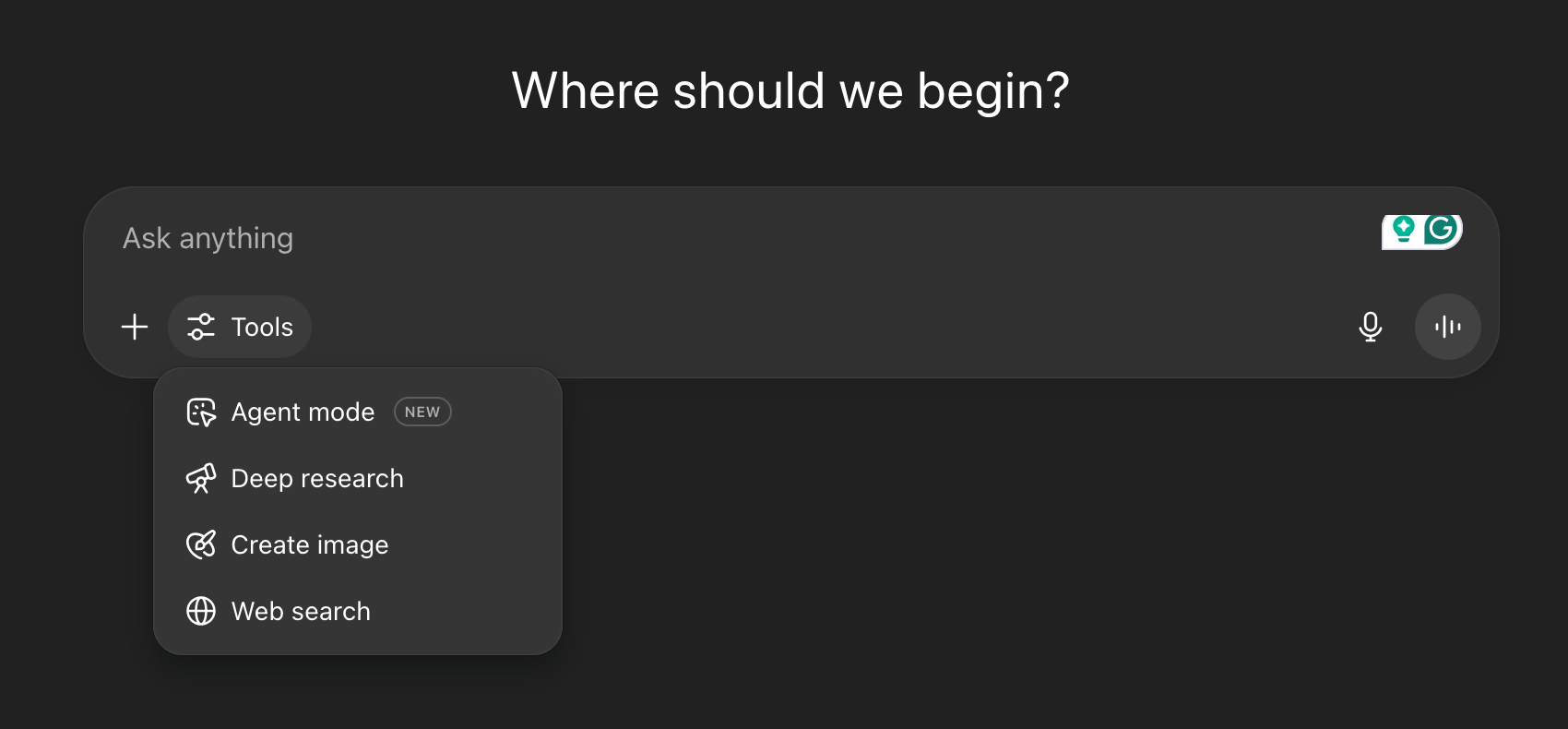
- Describe your desired task, such as conducting deep research, creating a slideshow, or submitting expenses.
- As ChatGPT performs your task, an on-screen narration shows exactly what it’s doing.
- Interrupt and take control of the browser anytime to keep tasks aligned with your goals.
* Initially, the model was limited to ChatGPT Pro users, but now it is accessible to ChatGPT Plus users as well. It is being rolled out in advanced versions, often tied to paid or premium tiers. But its availability primarily depends upon OpenAI’s strategy.
Hands-On Experience: Real-World Testing
ChatGPT agent, with its autonomously working capabilities, can help us finalize tasks end-to-end. So we tested its capabilities for three common tasks that we need help with on a day-to-day basis:
- Research and Analysis
- Plan and Shop
- Think and Present
Let’s see how it performed these tasks.
Task 1: Research and Analysis
Prompt: “Create a comprehensive spreadsheet and analysis of the Indian Union Finance Budgets from 2020 to 2025, focusing on sector-wise allocations and trends.
Step-by-Step Instructions:
1: Data Collection & Spreadsheet Creation
- Locate and compile the official Union Finance Budget documents for India from 2020 to 2025.
- Extract the annual sector-wise budget allocations for each year (e.g., Agriculture, Health, Education, Defence, Infrastructure, etc.).
- Present the data in a structured spreadsheet with columns for Year, Sector, and Allocation (in ₹ Crore/Billion).
2: Agriculture Budget Analysis
- Analyze how the budget allocation for Agriculture has changed year-over-year during 2020–2025.
- Include summary statistics and highlight any notable trends, increases, or decreases.
- Create clear and insightful visualizations (such as line charts or bar graphs) to illustrate the changes in the Agriculture budget over this period.
3: Sectoral Growth Comparison
- Calculate the absolute and percentage change in budget allocation for each sector from 2020 to 2025.
- Rank all major sectors from the highest to the lowest based on their total rise in budget allocation (both absolute and percentage terms).
- Visualize this comparison with appropriate charts (e.g., sorted bar chart).
Output Requirements:
- A well-organized spreadsheet (Excel/Google Sheets) with clean, clearly labeled data.
- At least two visualizations:
- Agriculture budget trend (2020–2025).
- Sectors ranked by growth in allocation.
- A brief summary of key insights (2-3 paragraphs) highlighting major changes and trends.”
Output:
Review:
ChatGPT agent worked remarkably well. It went through each year’s budget report to find the budget allocated for each sector, and it did so for all 6 years. Then it created a spreadsheet with all this information (that I can directly use.. Yay). After which, it created a table summarizing all the information for my reference. It also created a plot to show the budget allocated to agriculture, just as was prompted. Finally, it gave a bar graph to show the trend of budget allocation (sector-wise), starting from the sector that received the highest chunk of budget. This is a week’s worth of research and analysis all done in 18 minutes!
The best part was not this! It was the fact that the Agent went to the most reliable source of information—the Government website to get this information!
Task 2: Plan and Shop
Prompt: “I am planning my father’s birthday party, and I need you to help me organize and execute all the arrangements step by step. The event is on 14th August and will be a brunch party for about 60 guests near Chhatarpur, Delhi. Please act as my event planning assistant and handle the following tasks with detailed options, pricing, links, and next steps:
1. Venue Booking
Goal: Find and book a comfortable, well-rated venue for 60 people in or near Chhatarpur, Delhi.
Preferences:
- Indoor or semi-outdoor space with good ambiance for a brunch event.
- Availability on 14th August (10 AM – 3 PM).
Output: Provide at least 3 venue options with links, pricing, amenities, photos (if possible), and reasons why each is suitable.
2. Party Decorator
Goal: Find a professional decorator for brunch-themed birthday decor.
Preferences:
- Simple but elegant decor (balloons, floral elements, photo corner).
- Ability to customize based on theme and budget.
Output: Provide 3 decorators with portfolio links, their estimated cost for the setup, and key highlights.
3. Catering
Goal: Book a brunch caterer for 60 people.
Preferences:
- Mix of North Indian & Continental options (veg + non-veg).
- High-quality service & customizable menu.
Output: Provide 3 catering options with links, sample menus, per-person cost, and reviews.
4. Invitations
Goal: Design a digital invitation card for the event.
Preferences:
- Elegant, festive, and easy to share on WhatsApp.
- Include: Name (Father’s name), Date, Time, Venue, RSVP details.
Output: Share at least 2–3 design concepts with downloadable links (JPEG/PNG/PDF format).
5. Gift Purchase
Goal: Find and shortlist watches as a gift for my father.
Budget: ₹20,000.
Preferences:
- Preferably branded (e.g., Titan, Fossil, Seiko, Citizen).
- Classy, formal style.
Output: Provide 3–5 shortlisted watches with purchase links, pricing, and delivery timelines.
Important: Do not place the order without asking me for final confirmation.
6. Timeline & Execution Plan
Goal: Create a step-by-step timeline to finalize everything.
Output: A table with Task | Deadline | Dependencies | Status so I can track progress easily.
Once all options are shortlisted, guide me through the booking and purchasing process (venue, caterer, decorator, watch) and prepare a checklist to ensure nothing is missed. Also, keep budget optimization in mind while making recommendations.”
Output:
Review:
One thing I noticed in both tasks is strict adherence to the prompt. The agent follows each instruction obsequiously, meaning it would even follow the order of your commands. This allows you to be in control of the output. It gave me several options for everything, venue, decorator, and caterer, and also gave a price estimation for each. For instance, it presented me with several options, each of which had certain information present in it regarding my event. The gift options it presented were all in the budget, and they all came with links! Finally, it gave me a table to help me manage the timeline of my tasks! This would make tracking my progress super simple.

The best part is that small details that this agent keeps in check, like the date and the type of event. All its recommendations were relevant.
Task 3: Create a PPT on Generative AI Career and Salary Trends
Prompt: “Create a visually appealing and informative PowerPoint presentation (10-15 slides) on ‘Career and Salary Growth in Generative AI.” The presentation should be data-driven, well-structured, and suitable for professionals looking to enter or advance in this field. Outline:
1. Title Slide Title: “Career and Salary Growth in Generative AI” Subtitle: Opportunities, Trends, and Future Prospects Your Name/Company (if applicable) Date
2. Introduction to Generative AI: Brief definition of Generative A,I Key technologies (LLMs, GANs, Diffusion Models, etc.) Real-world applications (ChatGPT, Midjourney, Copilot, etc.)
3. Why Generative AI is a High-Growth Field Market size and industry adoption trends Demand surge in tech, healthcare, finance, and creative industries Investments and funding in AI startups
4. Key Career Roles in Generative AI Job titles & descriptions: AI Research Scientist Machine Learning Engineer (Generative AI focus) NLP Engineer, AI Product Manager Prompt Engineer Data Scientist (Generative Models) Skills required for each role
5. Salary Trends in Generative AI (2024-2025) Average salaries by role (global/US/India/Europe benchmarks) Factors affecting salary (experience, location, company size) Comparison with traditional AI/ML roles
6. Top Companies Hiring in Generative AI Tech Giants (Google, OpenAI, Microsoft, Meta, NVIDIA) Startups (Anthropic, Stability AI, Hugging Face) Industry-specific adopters (Healthcare, Finance, Gaming)
7. Skills Needed to Succeed in Generative AI Technical skills (Python, PyTorch, TensorFlow, LLM frameworks) Soft skills (creativity, problem-solving, collaboration) Certifications & courses to boost employability
8. Future Trends & Opportunities Emerging niches (AI ethics, multimodal models, AI law) Freelance vs. full-time opportunities Remote work trends in AI jobs
9. Challenges & How to Overcome Them Rapidly evolving tech landscape Competition in the job market Staying updated with advancements
10. How to Start/Break into Generative AI Learning roadmap (free & paid resources) Building a portfolio (GitHub, Kaggle, personal projects) Networking & mentorship tips
11. Conclusion & Key Takeaways Summary of growth potential Final motivational note for aspirants
Design & Delivery Guidelines: Use a modern, professional template (dark/light theme with AI-relevant visuals). Include charts/graphs for salary data and market trends. Add icons, infographics, and minimal text per slide. Ensure readability with bullet points, not paragraphs.”
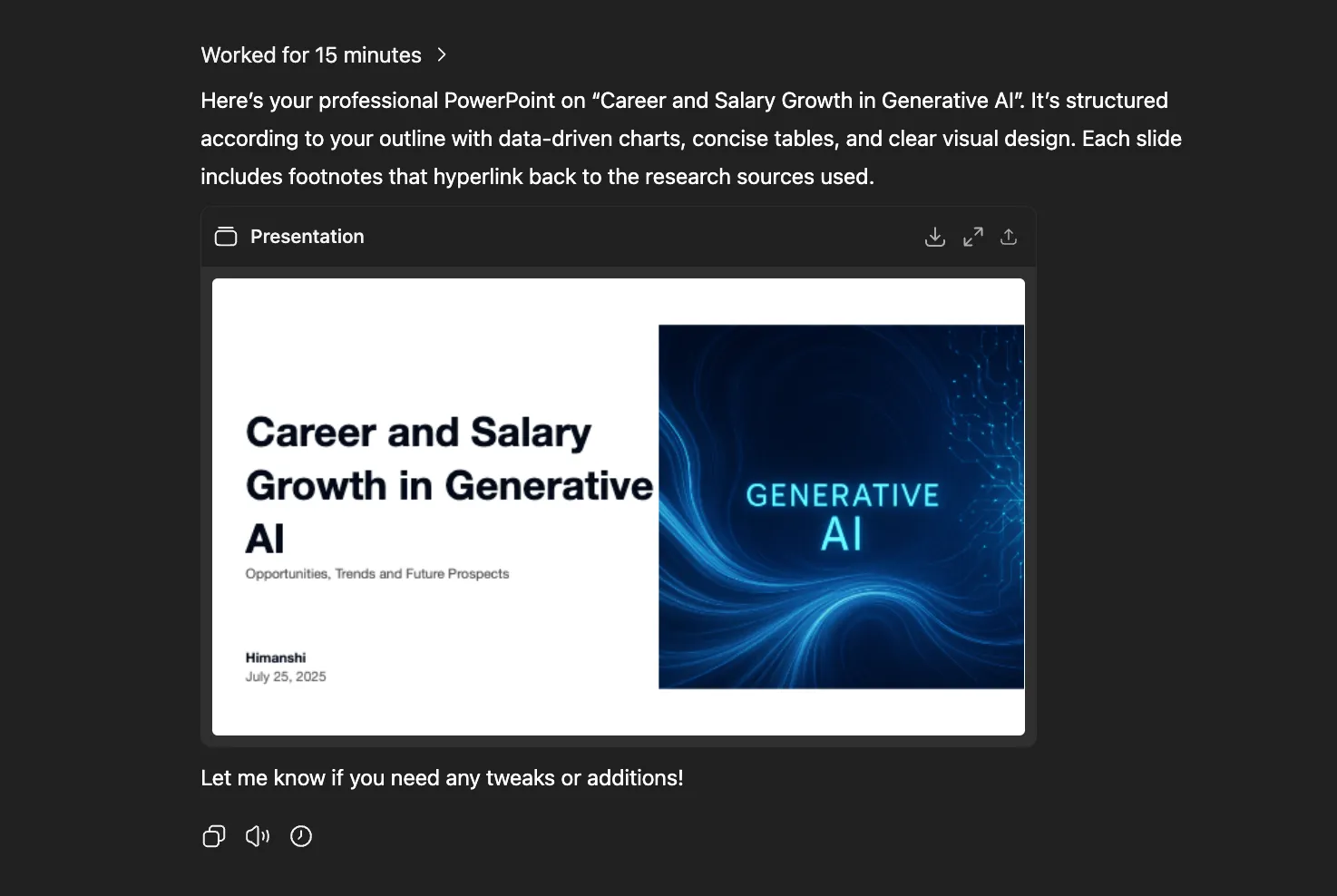
Output:
Review:
The current presentation is very basic, both in content and design. The tables are difficult to read, and the overall experience is poor. Tools like Manus, Genspark, or Gamma would likely deliver significantly better results.
Since there’s an option to link Canva to the ChatGPT agent, I tried connecting it to enhance the presentation.
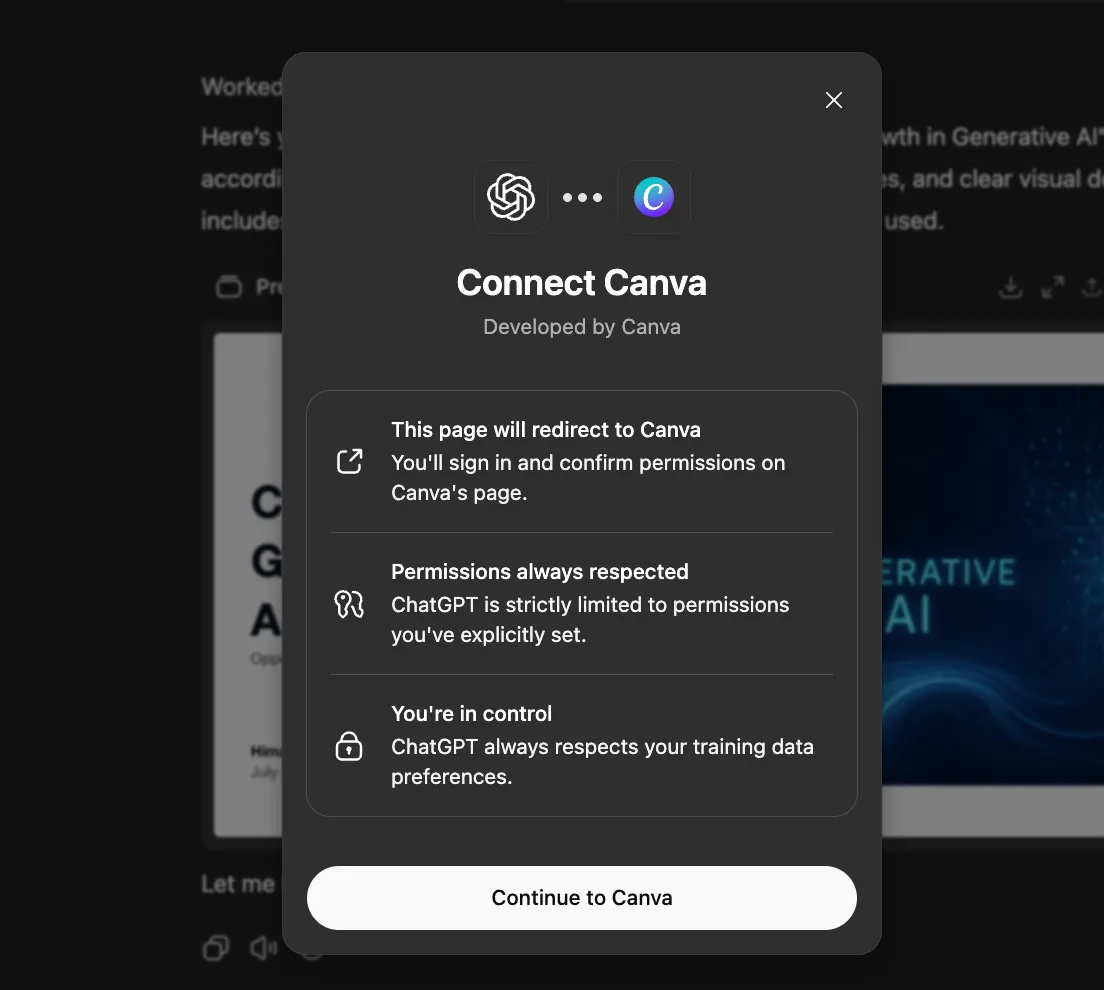
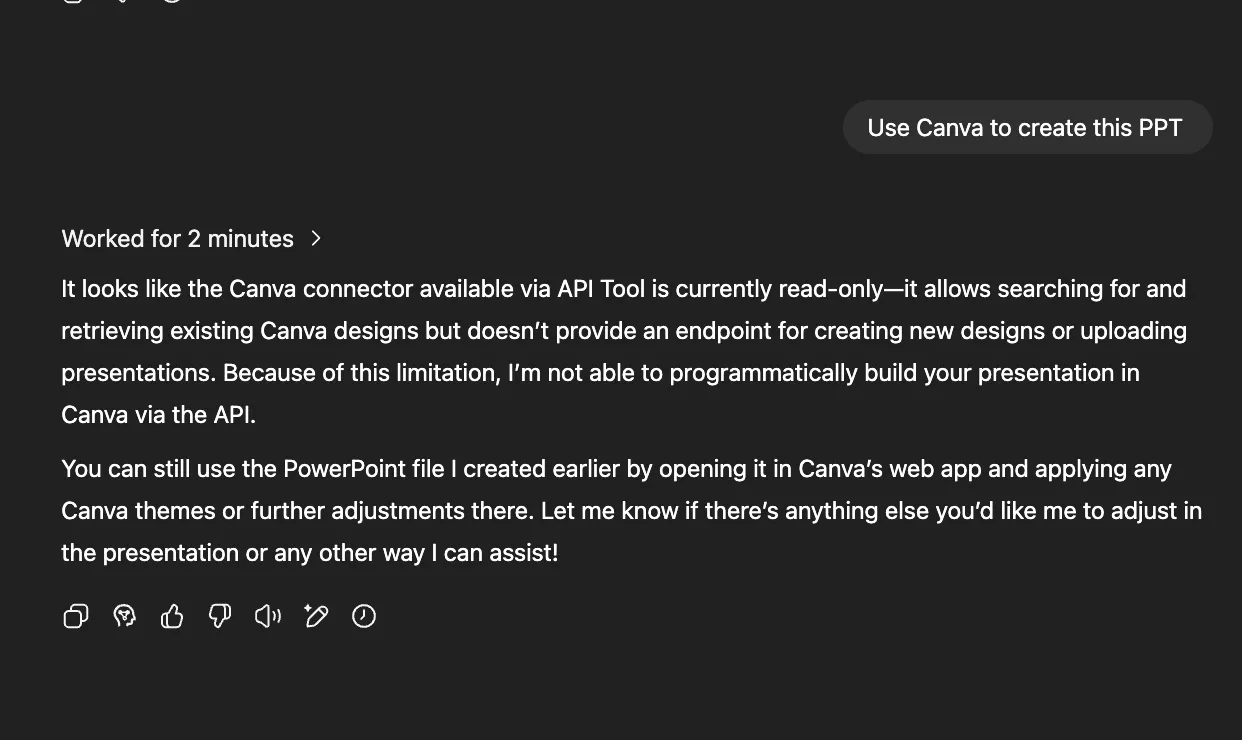
However, I discovered that the Canva API connector is currently read-only, it allows searching and retrieving existing designs but doesn’t support creating new presentations or uploading files programmatically.
What makes ChatGPT Agent Cool?
ChatGPT agent comes in with a bag of quirks that, even though they won’t seem big, can make a huge difference in your work experience with it. Some of them are:
- You can schedule your tasks in it.
- You can give it a task, close your laptop, and go do whatever you want to.
- It will notify you when your task is done through a push notification or an email.
- It can work on your own Google Docs and files (if you allow it to).
- It can be interrupted, stopped, and even prompted while it’s working, and it will incorporate your updated requirements.
- It will always ask for YOUR PERMISSION before making a purchase or performing any tasks involving your personal information.
It’s an assistant you can boss around, and it won’t complain!
ChatGPT Agent: How does it work?
Under the hood, the ChatGPT agent operates through a unified system that merges two key technologies: web interaction capabilities from Operator and deep research skills (akin to deep research capabilities).
The ChatGPT agent is a natural evolution of Operator and deep research. Where previously the two operated in isolation, specializing in separate tasks, now they’re integrated to perform automation with intent. This also solved the problem of users manually having to specify the tools they are required to use to answer their queries.
By integrating these complementary strengths in ChatGPT and introducing additional tools, entirely new capabilities are exhibited by the model. The biggest of which is its ability to halt its operation and pick back up with updated inputs later on. Previously, halting the response prematurely impeded the quality of the response. And, there was almost no way of picking up without losing progress.
The agent comes equipped with multiple tools:
- A visual browser for interacting with websites through graphical interfaces
- A text-based browser for efficient reasoning over large amounts of content
- Terminal access for code execution and file manipulation
- Direct API connections to various services
- Integration with ChatGPT connectors for apps like Gmail and GitHub
This toolkit allows the agent to choose the optimal approach for each task.
Benchmarks
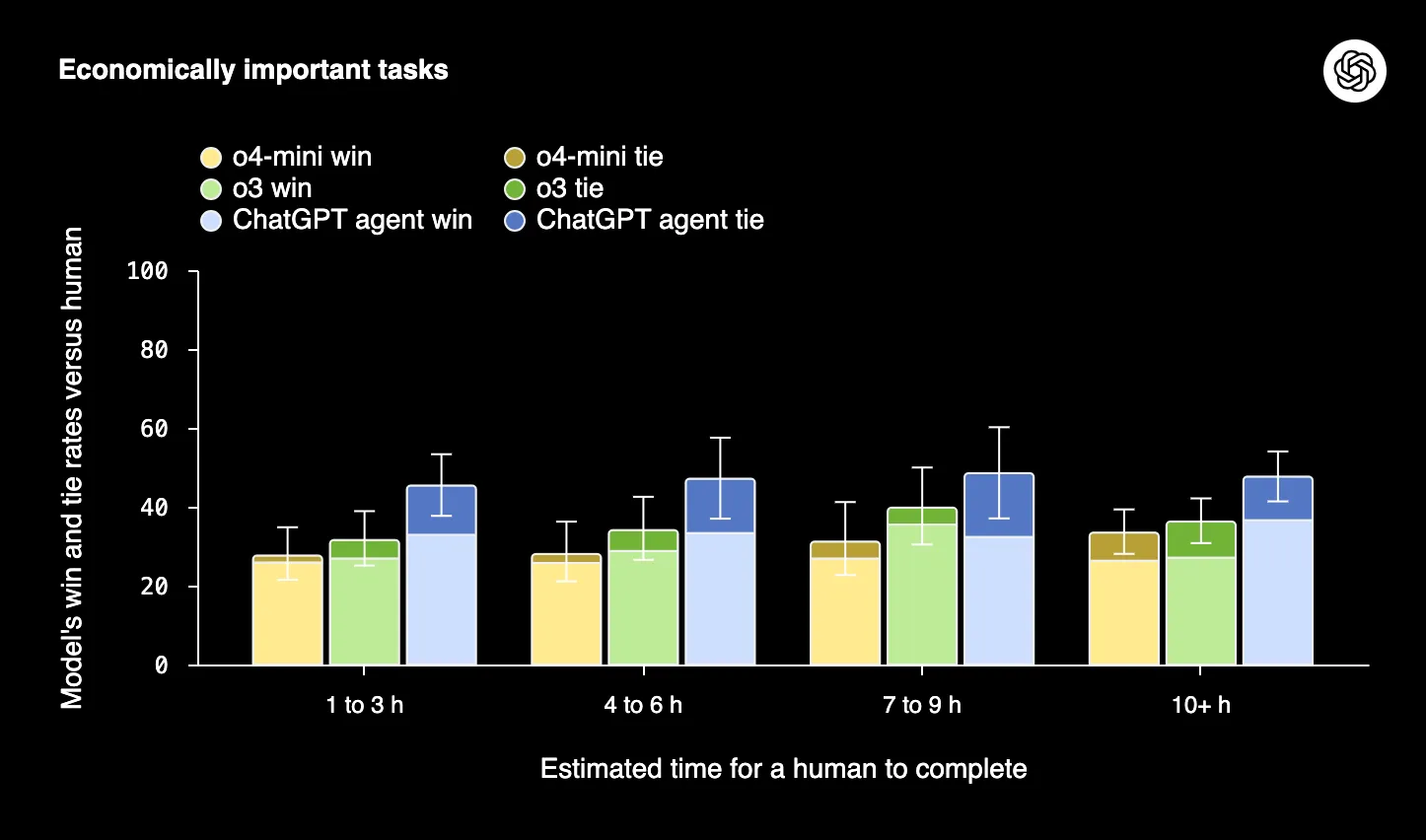
Ofcourse, the hands-on doesn’t suffice when it comes to testing the agent’s full capabilities. But to come in clutch, we have the benchmarks. These give a more holistic view of the model’s strengths and weaknesses in the form of visuals.
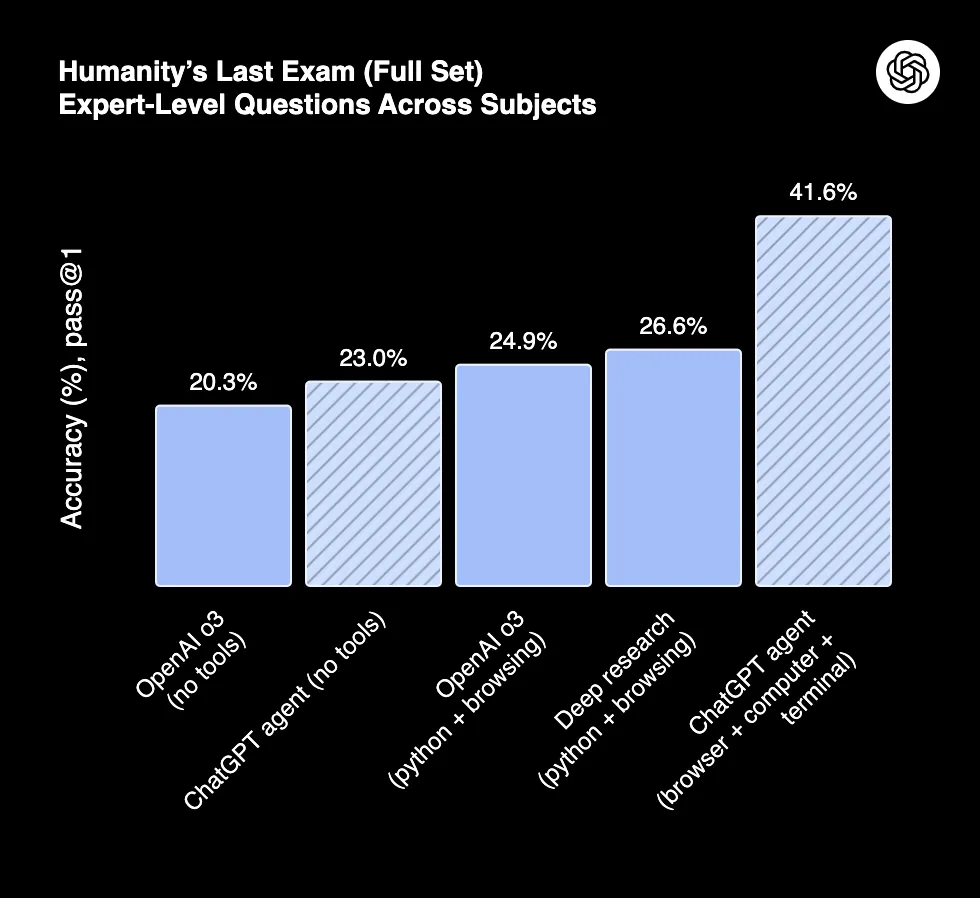
1. Humanity’s Last Exam (HLE)
A broad benchmark testing AI on expert-level questions across multiple subjects. ChatGPT agent set a new top accuracy, showing strong performance on complex tasks.
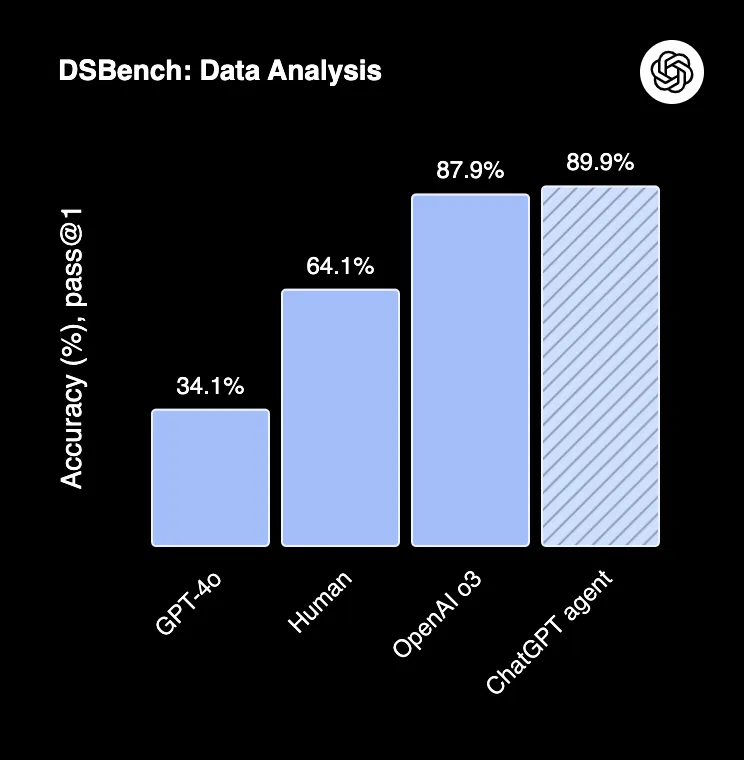
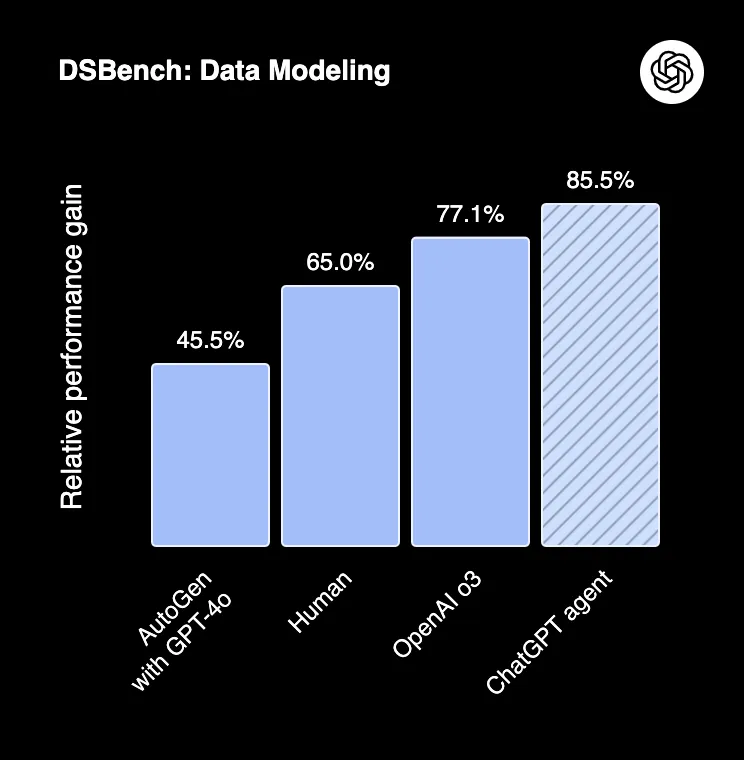
2. DSBench
Focuses on real-world data science tasks, including data analysis and modeling. ChatGPT agent outperforms humans and previous models significantly.
3. SpreadsheetBench
ChatGPT agent leads the pack when it comes to economically important tasks.
Current Limitations
While powerful, the agent still has rough edges. Slideshow creation, currently in beta, can produce outputs that feel rudimentary in formatting and polish. The company acknowledges that there can be discrepancies between what appears in the slide viewer and the final exported PowerPoint file.
The agent also can’t yet use existing slideshows as templates, though this capability exists for spreadsheets.
Another shortcoming is that it follows everything that you mention strictly. Which was good, assuming the users were explicit in their ask—Which may not be the case. It does not think on its own to strategise for the best possible path to perform tasks, showcasing a lack of innate understanding of the task.
This tool fails at slide decks: rigid structure, no strategic layout, and outputs that need complete redesigns to be usable.
Safety in an Age of Action
Here are a few things to keep in mind while using the agent:
- Refrain from sharing sensitive information with the agent.
- Scrutinize the content produced by the agent.
- Use the agent only if the task at hand is fleshed out. Don’t improvise with the agent—due to stringent usage limits.
What Holds for the Future?
After the hands-on, I’ve realized that the ChatGPT agent excels at doing tasks that it has been specifically trained for, or other tasks that are of the same nature. But the ones that weren’t taken into consideration, that offer a completely different challenge altogether, it struggles with. But it provides a good framework of Operator + Research, which could be built upon to solve complex problems. With constant updates to the tool being made by OpenAI based on user feedback, it will continue to improve in the future. This hands-off approach to the model certainly offers a different approach to an already saturated domain of large language models.
I specialize in reviewing and refining AI-driven research, technical documentation, and content related to emerging AI technologies. My experience spans AI model training, data analysis, and information retrieval, allowing me to craft content that is both technically accurate and accessible.






