
Multi-Tool Orchestration with Retrieval-Augmented Generation (RAG) is about creating intelligent workflows that employ large language models (LLMs) with tools, including web search engines or vector databases, to respond to queries. By doing so, the LLM will automatically and dynamically select which tool to use for each query. For example, the web search tool will open the domain of current updated information, and the vector database, like Pinecone, for the context-specific information.
In practice, RAG often entails defining function-call tools, such as web search or database lookup, and orchestrating these via an API, e.g., the Responses API or OpenAI. This use initiates a sequence of retrieval and generation steps for each user query. As a result, aspects of the model’s ability are intertwined with current information.
Table of contents
What are RAGs?
RAG is a process where a language model uses retrieved relevant external information and incorporates it into its outputs. So, instead of being a “closed-book” model that solely relies on the internal training data, a RAG model performs an explicit retrieval step. It looks through a set of documents like a vector database or search index and uses those retrieved documents to augment the prompt to the LLM.
In order to extract knowledge that the LLM draws upon to provide accurate responses to queries. In this way, we can view the process as real-time “augmented” generation. When the LLM is able to provide contextually relevant, accurate answers to queries by utilizing the generation capabilities and augmented information through retrieval at the time of the question. By doing so, it enables the LLM to answer questions with accurate, current, domain-specific, or proprietary knowledge it would not have known at training time.
Key advantages of RAG:
- Up-to-date and domain-specific knowledge: RAG allows the model to access new and non-static training data, e.g., current news, internal documents, to answer queries.
- Lower hallucination rate: RAG will minimize hallucinations as the model is answering based on actual retrieved facts.
- Verifiability: The answer can cite or display the sources of the retrieved content, adding more transparency and trustworthiness to the answer.
RAG allows LLMs to bundle generative ability with knowledge retrieval. In the RAG method, the model retrieves relevant snippets of information from external corpora before making an answer, and then produces a more accurate and informed response using that context.
Learn more about what is RAG in our previous article.

Why Use Tools in RAGs?
Tools like web search and vector-index queries are crucial for RAG because they provide the retrieval component that LLM does not provide on its own. When these tools are added, RAG can eliminate the issues with relying on LLM services only. For instance, LLMs have knowledge cutoffs and can confidently produce incorrect or outdated information. A search tool allows the system to automatically fetch on-demand facts that are up to date. Similarly, a vector database such as Pinecone stores domain-specific and proprietary data physician records, company policies, etc., that the model otherwise could not know.
Every tool has its strengths, and using a combination of tools is multi-tool orchestration. For instance, the general web-search tool can answer high-level questions. A tool like PineconeSearchDocuments can find the right relevant entries in an internal vector store that contains knowledge from a proprietary set of information. Together, they ensure that whatever the model’s answer is, it can be found in the source or wherever it is best quality. The general questions can be handled by fully functional-built-in tools such as web search. “Very specific” questions or medical questions that utilize knowledge internal to the system are addressed via the retrieval of context from a vector database. Overall, the use of multi-tools in RAG pipelines provides improved validity, correct-to-be data, as well as accuracy and contemporaneous context.
Creating Multi-Tool Orchestration with RAG
Now, we’ll go through a real-world example of creating a multi-tool RAG system using a medical Q&A dataset. The process is, we will embed a question-answer dataset into Pinecone and set up a system. The model has a web-search tool and a pinecone-based search tool. Here are some steps and code samples from this process.

Loading Dependencies and Datasets
First, we’ll install, then import the necessary libraries, and lastly download the dataset. It will require a basic understanding of data handling, embeddings, and the Pinecone SDK. For example:
import os, time, random, string

import pandas as pd

from tqdm.auto import tqdm

from sentence_transformers import SentenceTransformer

from pinecone import Pinecone, ServerlessSpec

import openai

from openai import OpenAI

import kagglehub
Next, we will download and load a dataset of medical questions and answer relationships. In the code, we used the Kagglehub utility to access a medically focused QA dataset:
path = kagglehub.dataset_download("thedevastator/comprehensive-medical-q-a-dataset")

DATASET_PATH = path  # local path to downloaded files

df = pd.read_csv(f"{DATASET_PATH}/train.csv")
For this example version, we can take a subset, i.e., the first 2500 rows. Next, we will prefix the columns with “Question:” and “Answer:” and merge them into one text string. This will be the context we will embed. We are making embeddings out of text. For example:
df = df[:2500]

df['Question'] = 'Question: ' + df['Question']

df['Answer'] = ' Answer: ' + df['Answer']

df['merged_text'] = df['Question'] + df['Answer']
The merged text from rows looked like: “Question: [medical question] Answer: [the answer]”
Question: Who is at risk for Lymphocytic Choriomeningitis (LCM)?
Answer: LCMV infections can occur after exposure to fresh urine, droppings, saliva, or nesting materials from infected rodents. Transmission may also occur when these materials are directly introduced into broken skin, the nose, the eyes, or the mouth, or presumably, via the bite of an infected rodent. Person-to-person transmission has not been reported, except vertical transmission from infected mother to fetus, and rarely, through organ transplantation.’
Creating the Pinecone Index Based on the Dataset
Now that the dataset is loaded, we will produce the vector embedding for each of the merged QA strings. We will use a sentence-transformer model “BAAI/bge-small-en” to encode the texts:
MODEL = SentenceTransformer("BAAI/bge-small-en")

embeddings = MODEL.encode(df['merged_text'].tolist(), show_progress_bar=True)

df['embedding'] = list(embeddings)
We will take the embedding dimensionality from a single sample ‘len(embeddings[0]’. For our case, it is 384. We will then create a new Pinecone index and give the dimensionality. This is done using the Pinecone Python client:
def upsert_to_pinecone(df, embed_dim, model, api_key, region="us-east-1", batch_size=32):

   # Initialize Pinecone and create the index if it doesn't exist

   pinecone = Pinecone(api_key=api_key)

   spec = ServerlessSpec(cloud="aws", region=region)

   index_name = 'pinecone-index-' + ''.join(random.choices(string.ascii_lowercase + string.digits, k=10))

   if index_name not in pinecone.list_indexes().names():

       pinecone.create_index(

           index_name=index_name,

           dimension=embed_dim,

           metric='dotproduct',

           spec=spec

       )

   # Connect to index

   index = pinecone.Index(index_name)

   time.sleep(2)

   print("Index stats:", index.describe_index_stats())

   # Upsert in batches

   for i in tqdm(range(0, len(df), batch_size), desc="Upserting to Pinecone"):

       i_end = min(i + batch_size, len(df))

       # Prepare input and metadata

       lines_batch = df['merged_text'].iloc[i:i_end].tolist()

       ids_batch = [str(n) for n in range(i, i_end)]

       embeds = model.encode(lines_batch, show_progress_bar=False, convert_to_numpy=True)

       meta = [

           {

               "Question": record.get("Question", ""),

               "Answer": record.get("Response", "")

           }

           for record in df.iloc[i:i_end].to_dict("records")

       ]

       # Upsert to index

       vectors = list(zip(ids_batch, embeds, meta))

       index.upsert(vectors=vectors)

   print(f"Upsert complete. Index name: {index_name}")

   return index_name
This is what ingests our data into Pinecone; in RAG terminology, this is equivalent to loading the externally authoritative knowledge into a vector store. Once the index has been created, we upsert all of the embeddings in batches along with metadata, the original Question and Answer text for retrieval:
index_name = upsert_to_pinecone(

   df=df,

   embed_dim=384,

   model=MODEL,

   api_key="your-pinecone-api-key"

)
Here, each vector is being stored with its text and metadata. The Pinecone index is now populated with our domain-specific dataset.
Query the Pinecone Index
To use the index, we define a function that we can call the index with a new question. The function embeds the query text and calls index.query to return the top-k most similar documents:
def query_pinecone_index(index, model, query_text):

   query_embedding = model.encode(query_text, convert_to_numpy=True).tolist()
   res = index.query(vector=query_embedding, top_k=5, include_metadata=True)

   print("--- Query Results ---")

   for match in res['matches']:
       question = match['metadata'].get("Question", 'N/A')
       answer = match['metadata'].get("Answer", "N/A")
       print(f"{match['score']:.2f}: {question} - {answer}")

   return res
As an example, if we were to call query_pinecone_index(index, MODEL, "What is the most common treatment for diabetes?"), we will see the top matching Q&A pairs from our dataset printed out. This is the retrieval portion of the process: the user query gets embedded, looks up the index, and returns the closest documents (as well as their metadata). Once we have those contexts retrieved, we can use them to help formulate the final answer.
Orchestrate Multi-Tool Calls
Next, we define the tools that the model can use. In this pipeline, we define two tools. A web search preview is a general-purpose web search for facts from the open internet. PineconeSearchDocuments to be used to perform a semantic search on our Pinecone index. Each tool is defined as a JSON object that contains a name, description, and expected parameters. Here is an example:
Step 1: Define the Web Search Tool
The tool gives the agent the ability to perform a web search simply by entering a natural language request. There is optional location metadata, which may enhance the specifics of user relevance (e.g., news, services specific to the region).
web_search_tool = {

   "type": "function",
   "name": "web_search_preview",
   "function": {

       "name": "web_search_preview",
       "description": "Perform a web search for general queries.",

       "parameters": {

           "type": "object",

           "properties": {

               "query": {

                   "type": "string",

                   "description": "The search query string"

               },

               "user_location": {

                   "type": "object",

                   "properties": {
                       "country": {"type": "string", "default": "IN"},
                       "region": {"type": "string", "default": "Delhi"},
                       "city": {"type": "string", "default": "New Delhi"}
                   }}},

           "required": ["query"]

       }}

}
Therefore, it is used when the agent needs information that is current or otherwise not contained in their training data.
Step 2: Define the Pinecone Search Tool
This tool enables the agent to conduct a semantic search on a vector database, such as Pinecone, allowing RAG systems to rely on the semantics of the dot product and angle between vectors, for example.
The tool takes a query and returns the documents that are the most similar, based on vector embeddings.
pinecone_tool = {

   "type": "function",

   "name": "PineconeSearchDocuments",

   "function": {

       "name": "PineconeSearchDocuments",

       "description": "Search for relevant documents based on the user’s question in the vector database.",

       "parameters": {

           "type": "object",

           "properties": {

               "query": {

                   "type": "string",

                   "description": "The question to search in the vector database."

               },

               "top_k": {

                   "type": "integer",

                   "description": "Number of top results to return.",

                   "default": 3

               }

           },

           "required": ["query"],

           "additionalProperties": False

       }

   }

}
This is utilized when the agent needs to retrieve the context of specificity from documents that contain embedded context.
Step 3: Combine the Tools
Now we combine both tools into a single list, which will be passed to the agent.
tools = [web_search_tool, pinecone_tool]So, each tool includes a definition of what arguments our model should give it when called. For instance, the Pinecone search tool expects a natural-language query string, and that tool will return the top-K matching documents from our index internally.
Along with the tool, we will include a set of user queries to process. For each query, the model will determine whether it will call a tool or respond directly. For example:
queries = [

   {"query": "Who won the cricket world cup in 1983?"},

   {"query": "What is the most common cause of death in India?"},

   {"query": "A 7-year-old boy with sickle cell disease has knee and hip pain... What is the next step in management according to our internal knowledge base?"}

]
Multi-tool orchestration in flow
Finally, we execute the conversation flow in which the model controls the tools on their behalf. We provide the model a system prompt that directs it to utilize the tools in a particular order. In this example, our prompt tells the model, “When presented with a question, first call the web search tool, and then call PineconeSearchDocuments”:
system_prompt = (

   "Every time it's prompted with a question, first call the web search tool for results, "

   "then call `PineconeSearchDocuments` to find relevant examples in the internal knowledge base."

)
We collect the messages and call the Responses API with the tools enabled for each query from the user:
for item in queries:

   input_messages = [

       {"role": "system", "content": system_prompt},

       {"role": "user",   "content": item["query"]}

   ]

   response = openai.responses.create(

       model="gpt-4o-mini",

       input=input_messages,

       tools=tools,

       parallel_tool_calls=True

   )
Output:
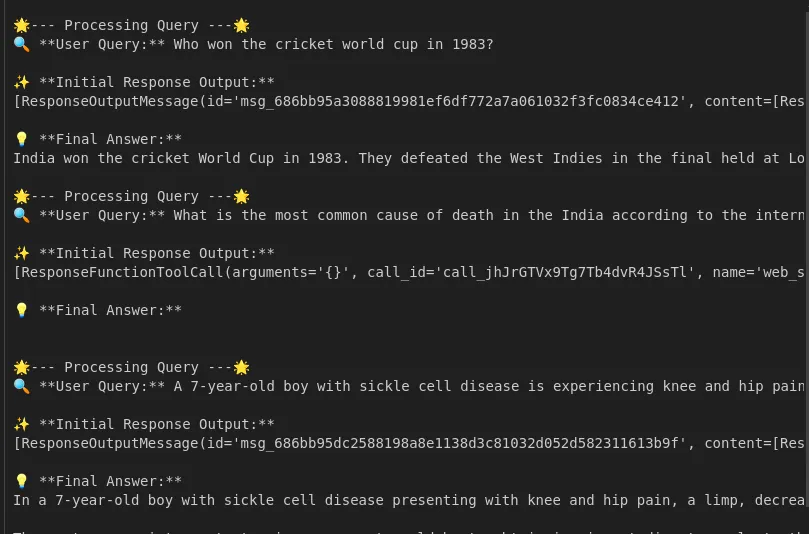
The API returns an assistant message, which may or may not include tool calls. We check response.output to see if the model called any tools, so if it did, we perform those calls and include the results in the conversation. For example, if the model called PineconeSearchDocuments, our code runs query_pinecone_index(index, MODEL, query) internally, gets the document answers, and returns a tool response message with this information. Finally, we send the refreshed conversation back to the model to get the final response.
The above flow shows how multi-tool orchestration works; the model dynamically selects tools about the query. As the example points out, for general questions like ‘What is asthma?’, it could use the web-search tool, but questions about more specific links to ‘asthma’ may want the Pinecone context, on which to build.
We make multiple tool calls from our code loop, and after all have been made, we call the API to allow the model to construct the ‘final’ answer based on the prompts it received. Overall, we expect to receive an answer that puts together both external truths from the web knowledge and acknowledges context from the internal knowledge documents, based on our instructions.
You can refer to the complete code here.
Conclusion
A multi-tool orchestration with RAG creates a powerful QA system with many options. Using model generation with retrieval tools allows us to take advantage of both the model’s natural language understanding and external datasets’ factual accuracy. In our use case, we ground-truthed a Pinecone vector index of medical Q&As in which we had the capability to call either a web search or that index as options. By doing this, our model was more factually grounded in actual data and able to answer questions it wouldn’t be able to otherwise.
In practice, this type of RAG pipeline yields better answer accuracy and relevance as the model can cite up-to-date sources, cover niche knowledge, and minimize hallucination. Future iterations may include more advanced retrieval schemas or additional tools within the ecosystem, like working with knowledge graphs or APIs, but nothing has to change within the core.
Frequently Asked Questions
Q1. What would be the biggest advantages of RAG over traditional LLMs?
A. RAG allows LLMs to access an external data source like vector databases or the web to generate more accurate, current, and domain-specific responses, which can’t happen with traditional “closed-book” models.
Q2. What are the most common tools you find in a RAG pipeline?
A. Typically, common tools include:
– Vector databases like Pinecone, FAISS, or Weaviate for semantic retrieval.
– Websearch using APIs for real-time web information.
– Custom APIs or functions that provide querying capabilities of knowledge graphs, SQL databases, or document storage.
Q3. Can RAG be utilized in real-time applications such as chatbots?
A. Yes. RAG is highly suitable for applications that require dynamic, factual answers, such as customer support bots, medical, or financial assistants. As the responses are based on retrievable documents or facts.
Hello! I'm Vipin, a passionate data science and machine learning enthusiast with a strong foundation in data analysis, machine learning algorithms, and programming. I have hands-on experience in building models, managing messy data, and solving real-world problems. My goal is to apply data-driven insights to create practical solutions that drive results. I'm eager to contribute my skills in a collaborative environment while continuing to learn and grow in the fields of Data Science, Machine Learning, and NLP.



