
Is there something Qwen models can’t do? So far, their text and coding models are topping most of the charts and arenas. That is why Alibaba’s Qwen team got onto the “creative” side. They have just released “Qwen-Image” – a native text rendering image generation model designed to challenge the supremacy of GPT-4.1, DALL-E 2, or Midjourney. The best part? It’s Free, and what’s even better is that it is accessible for everyone! In this blog, we will provide you with all the details about Qwen-Image, including how to access it, its performance, applications, and more.
Let’s check if the Qwen-Image is “Qwen-tastic” or not!
Table of contents
What is Qwen-Image?
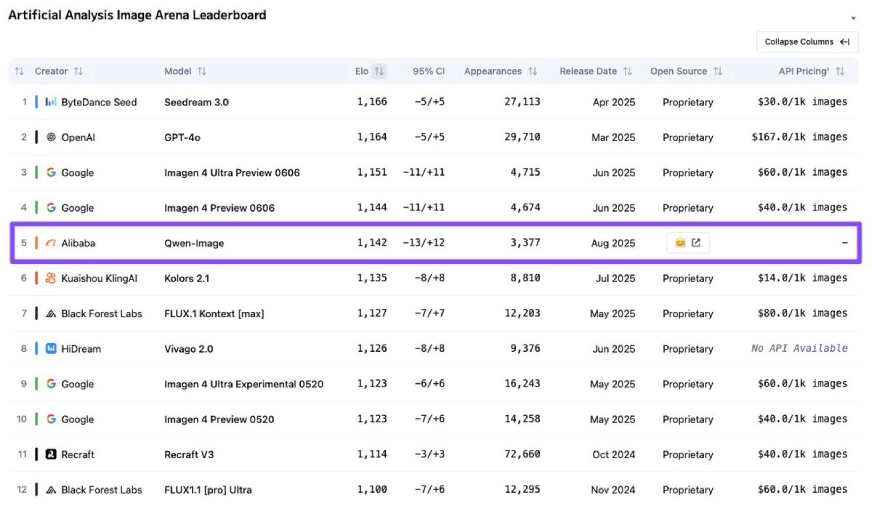
Qwen Image is the latest Image generation model by Alibaba’s Qwen team. It’s a 20 B MMDiT image foundation model, meaning that the model consists of 20 billion parameters and is a multimodal diffusion transformer model. Qwen-Image is an open-weight text-to-image generation model that currently ranks 5th on the Artificial Analysis Image Arena Leaderboard and is the only open-weight model to be present in the top 10 list!
How does the Qwen-Image model work?
The Qwen-Image model follows an approach that was last seen in OpenAI’s GPT-4o. It utilizes an autoregressive transformer architecture for image generation and editing. To do this, the model takes a dual encoding approach:
- The Qwen2.5-VL encodes the semantic meaning of the prompt
- Image generation happens in a latent space using MMDiT, a diffusion model
- The final image is produced from this latent space using a VAE encoder.
You can read the full technical report of the Qwen-Image model here.
Key Features of Qwen-Image
Some of the key highlights that make Qwen-Image stand apart are:
- Enhanced Text Incorporation: The Qwen-Image models are exceptional when it comes to incorporating complex texts, whether in multi-line layouts, paragraphs, or even fine-grained details. It works equally well with both alphabetic languages (such as English) and logographic languages (like Chinese), with the same ease.
- Efficient Image Editing: The model offers superior image editing capabilities. During the editing process, the model preserves both the semantic and visual meaning of the actual images while incorporating the new changes.
- Ease of Use: The model is easy to use and works well even with simple prompts.
These features, along with the excellent performance of this model, have been showcased on various benchmarks- making Qwen-Image a formidable image generation model.
How to access Qwen-Image?
To access the Qwen-Image model through Chat,
- Head to https://chat.qwen.ai/
- Select any of the non-coding models like Qwen-235B-A3B-2507
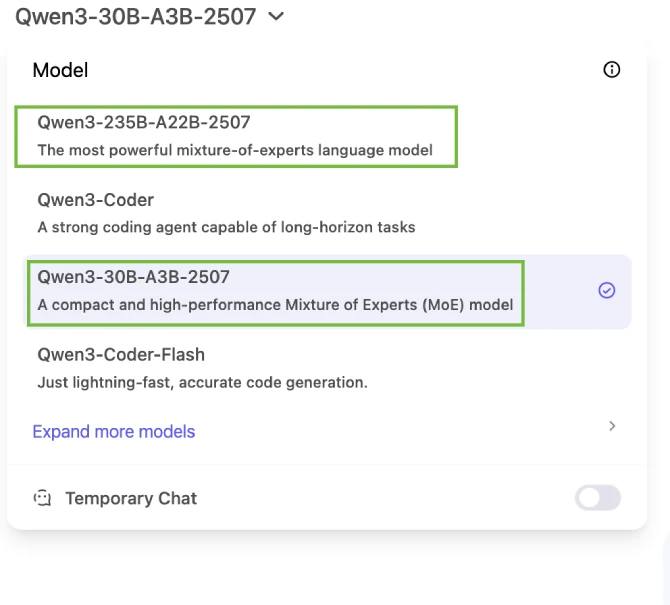
3. Below the text box, in the middle of the screen, select “Image Generation”. Enter your prompt in the text box and get started! You can access the models in other ways, like:
Let’s Try Using Qwen Image
Now that we have covered a lot of details about Qwen-Image, let’s test it for 3 main tasks:
- Generating a text-heavy Image
- Generating an Infographic
- Editing an Image
Let’s start with each of them one by one:
Task: 1: Design a Web Page
Prompt: “Create a visually engaging landing page for a shampoo product. Highlight the shampoo’s unique features (e.g., hydration, repair, or natural ingredients) with a clean and modern design. Include a hero section with the shampoo bottle image, a catchy headline like ‘Transform Your Hair Today,’ and a call-to-action button (‘Shop Now’ or ‘Learn More’). Add sections for benefits, key ingredients, customer testimonials, and a subscription option. Use soft, fresh colors, high-quality visuals, and ensure the layout is mobile-friendly and conversion-focused.”
Output:
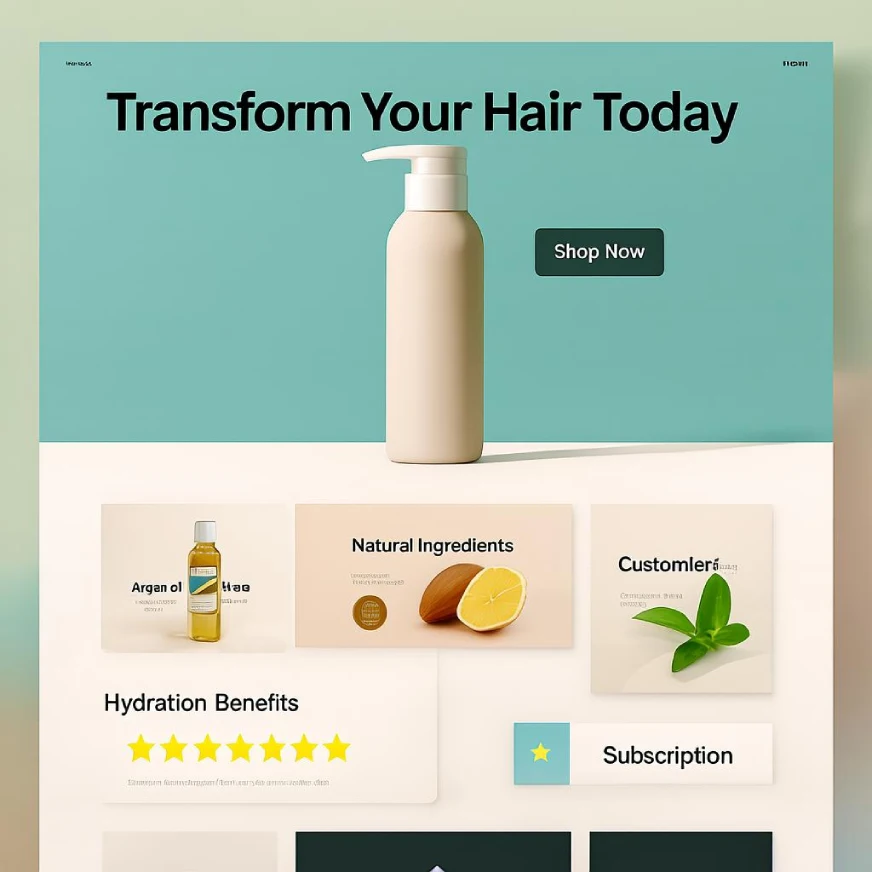
The generated image was good; it had a lot of the text that I had asked to be incorporated. It captured the essence of the prompt well and designed the entire image appropriately. But there were a few misses. Although spellings were correct, at one place a word was incomplete, and some words that I had mentioned were not incorporated. I liked the colour theme that the model chose for this task.
Task 2: Create a Flowchart
Prompt: “ Design a clear, modern infographic that explains the image generation process of a 20B MMDiT foundation model in 3 steps:
- Prompt Encoding: Show Qwen2.5-VL encoding the semantic meaning of the user’s prompt.
- Latent Space Generation: Visualize MMDiT diffusion creating an abstract image in latent space.
- Final Image Creation: Illustrate a VAE decoder transforming the latent representation into the final high-quality image.
Use icons, arrows, and short labels for each step. The flow should be visually logical and easy to follow, with a tech-inspired color palette.”
Output:
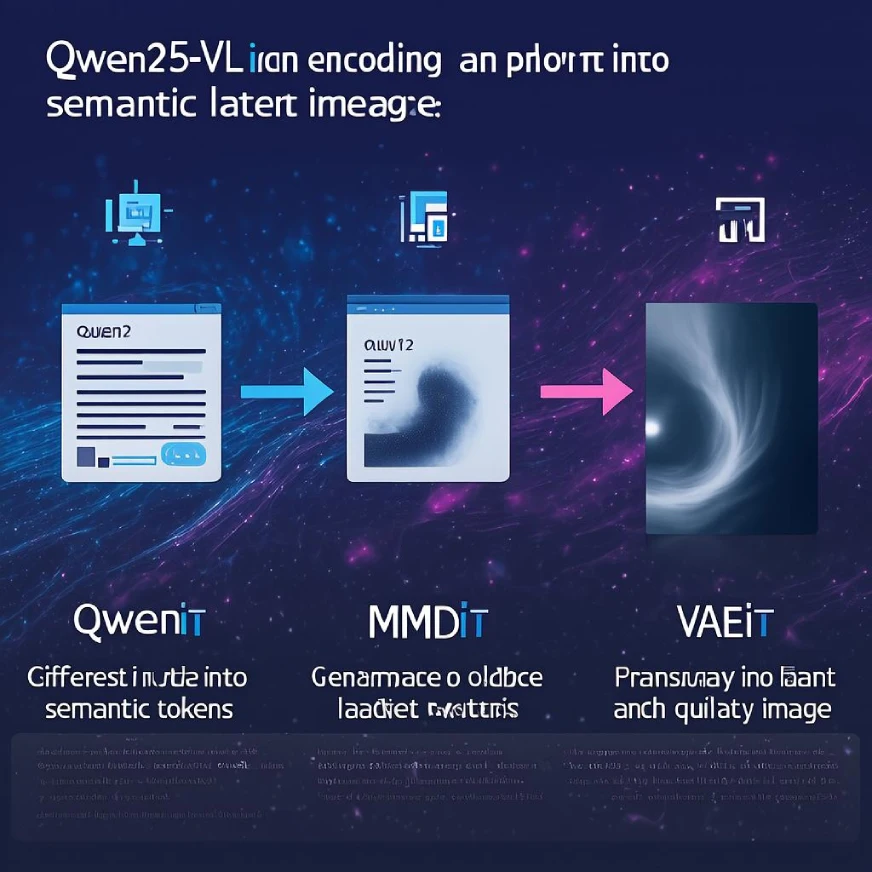
I did not like the output at all. The text was missing in some places and completely vague at other places. The icons and overall image felt a bit disoriented. The flow from step 1 to 2 to 3 was there, but the image is quite unclear.
Task 3: Image Editing
Input image:

Prompt: “Change the night into a sunny morning, replace the man’s clothes with an orange shirt and white shorts, and replace the cat with a small puppy.”
Output:

This result was just perfect. Literally Perfect. All the changes that I had asked for happened in the image. The lighting was suitable, the clothes and the animal were all changed. A minor issue: while the model replaced night with day, it didn’t remove the moon, although it made it look like a round cloud. A very well edited image that took just a few seconds to generate!
My Review Using Qwen-Image
Overall, I really liked the editing capabilities of the model, but the image generation, especially incorporating a large amount of text or designing infographics, is where Qwen-Image would need a lot of improvement going forward – especially if it wants to compete with the likes of OpenAI, Google, or X.
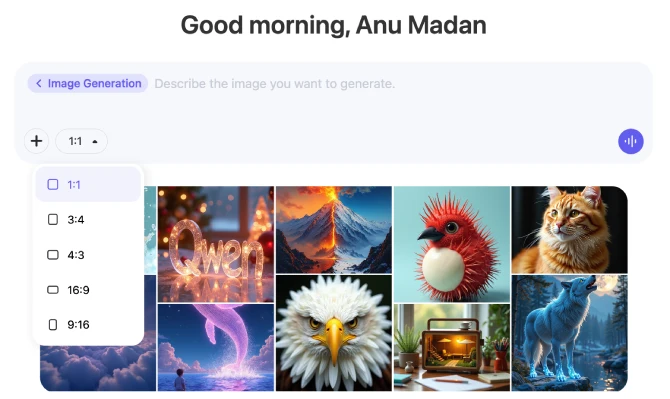
But it has one really cool feature that most of the top models do not. You can actually select the frame size that you wish to work with, right from the text box! If you are a content creator, this really would help you to create the “right-sized” image for each of your social media platforms.
Qwen Image: Performance
Now that we have tested the model, let’s look at the results that the Qwen team has released for the performance of the Qwen-Image model against its counterparts:
For Image Generation & Editing Benchmarks
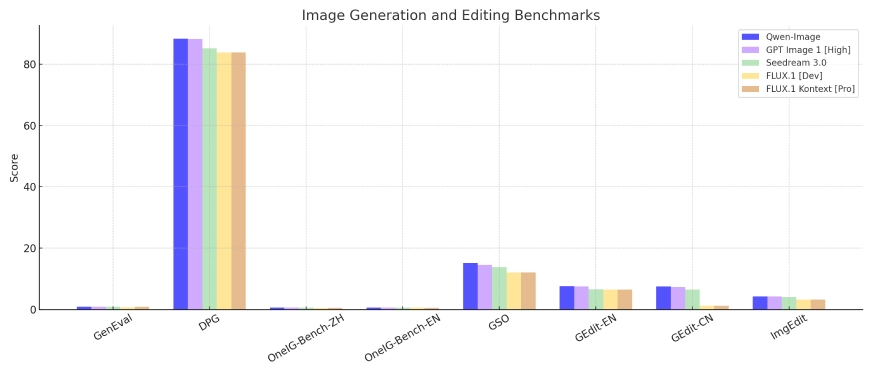
- Qwen-Image model leads or is at par with the best models in almost all the image generation & editing benchmarks.
- GPT-4.1 and Seedream3.0 are close competitors of Qwen-Image, matching its scores on several benchmarks.
- FLUX.1 models are a good competition but lag behind the Qwen-image model
For Text Rendering Benchmarks
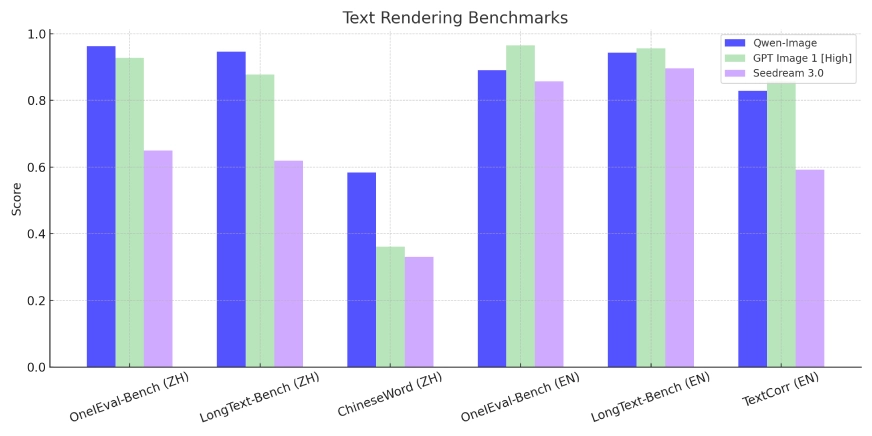
- Qwen-Image leads for text rendering in Chinese and is also quite ahead for English languages
- GPT4.1 – surpasses or matches Qwen-image at various benchmarks.
- Seeddream 3.0 is a close competitor but lags behind Qwen-Image in both Chinese and English benchmarks.
Conclusion
Qwen models are currently ruling the leaderboards for text and coding-based tasks. Qwen-Image holds similar promise but is not quite there yet. The model adheres to prompts but struggles with huge context. But it’s a great gift to the open-source community. It competes with the top-paid models while being completely open-weight. As users and developers use Qwen-Image more and more, we can soon expect the Qwen-Image model to lead the Image Generation Analysis too!
My final thought – try the Qwen-Image Model. It’s good, we are just surrounded by a lot of great models to not realise its potential.
You can also read about Finding the Best AI Image Generation Model.
If you want to read about other FREE image generation models, you can refer to the following blog: Top 7 AI Image Generators to Try in 2025.
Anu Madan is an expert in instructional design, content writing, and B2B marketing, with a talent for transforming complex ideas into impactful narratives. With her focus on Generative AI, she crafts insightful, innovative content that educates, inspires, and drives meaningful engagement.







