Ever thought that you could keep a powerful AI assistant in your pocket? Not just an app but an advanced intelligence, configurable, private, and high-performance AI language model? Meet Gemma 3n. This is not just another tech fad. It is about putting a high-performance language model directly in your hands, on the phone in your phone. Whether you are coming up with blog ideas on the train, translating messages on the go, or just out to witness the future of AI, Gemma 3n will give you a remarkably simple and extremely enjoyable experience. Let’s jump in and see how you can make all the AI magic happen on your mobile device, step by step.
Table of contents
What is Gemma 3n?
Gemma 3n is a member of Google’s Gemma family of open models; it is designed to run well on low-resourced devices, such as smartphones. With roughly 3 billion parameters, Gemma 3n presents a strong combination between capability and efficiency, and is a good option for on-device AI work such as smart assistants, text processing, and more.
Gemma 3n Performance and Benchmark
Gemma 3n, designed for speed and efficiency on low-resource devices, is a recent addition to the family of Google’s open large language models explicitly designed for mobile, tablet and other edge hardware. Here is a brief assessment on real-world performance and benchmarks:
Model Sizes & System Requirements
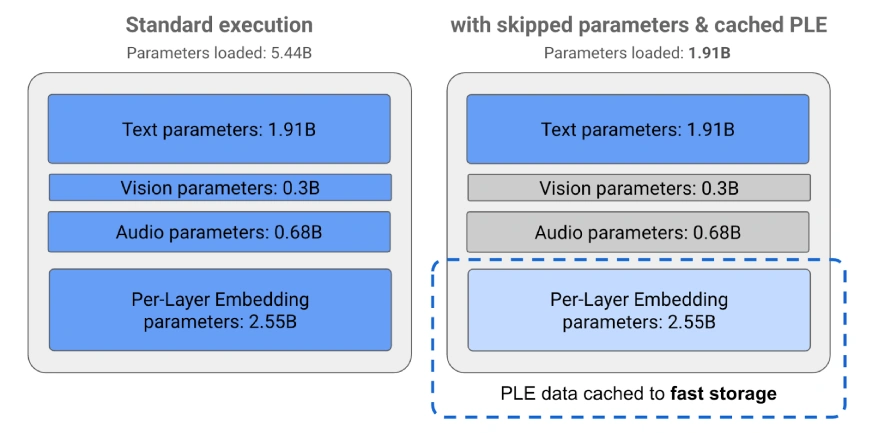
- Model Sizes: E2B (5B parameters, effective memory an effective 2B) and E4B (8B parameters, effective memory an effective 4B).
- RAM Required: E2B runs on only 2GB RAM; E4B needs only 3GB RAM – well within the capabilities of most modern smartphones and tablets.
Speed & Latency
- Response Speed: Up to 1.5x faster than previous on-device models for generating first response, usually throughput is 60 to 70 tokens/second on recent mobile processors.
- Startup & Inference: Time-to-first-token as little as 0.3 seconds allows chat and assistant applications to provide a highly responsive experience.
Benchmark Scores
- LMArena Leaderboard: E4B is the first sub-10B parameter model to surpass a score of 1300+, outperforming similarly sized local models across various tasks.
- MMLU Score: Gemma 3n E4B achieves ~48.8% (represents solid reasoning and general knowledge).
- Intelligence Index: Approximately 28 for E4B, competitive among all local models under the 10B parameter size.
Quality & Efficiency Innovations
- Quantization: Supports both 4-bit and 8-bit quantized versions with minimal quality loss, can run on devices with as little as 2-3GB RAM.
- Multimodal: E4B model can handle text, images, audio, and even short video on-device – includes context window of up to 32K tokens (well above most competitors in its size class).
- Optimizations: Leverages several techniques such as Per-Layer Embeddings (PLE), selective activation of parameters, and uses MatFormer to maximize speed, minimize RAM footprint, and generate good quality output despite having a smaller footprint.
What Are the Benefits of Gemma 3n on Mobile?
- Privacy: Everything runs locally, so your data is kept private.
- Speed: Processing on-device means better response times.
- Internet Not Required: Mobile offers many capabilities even when there is no active internet connection.
- Customization: Combine Gemma 3n with your desired mobile apps or workflows.
Prerequisites
A modern smartphone (Android or iOS), with enough storage and at least 6GB RAM to improve performance. Some basic knowledge of installing and using mobile applications.
Step-by-Step Guide to Run Gemma 3n on Mobile
Step 1: Select the Appropriate Application or Framework
Several apps and frameworks can support running large language models such as Gemma 3n on mobile devices, including:
- LM Studio: A popular application that can run models locally via a simple interface.
- Mlc Chat (MLC LLM): An open-source application that enables local LLM inference on both Android and iOS.
- Ollama Mobile: If it supports your platform.
- Custom Apps: Some apps allow you to load and open models. (e.g., Hugging Face Transformers apps for mobile).
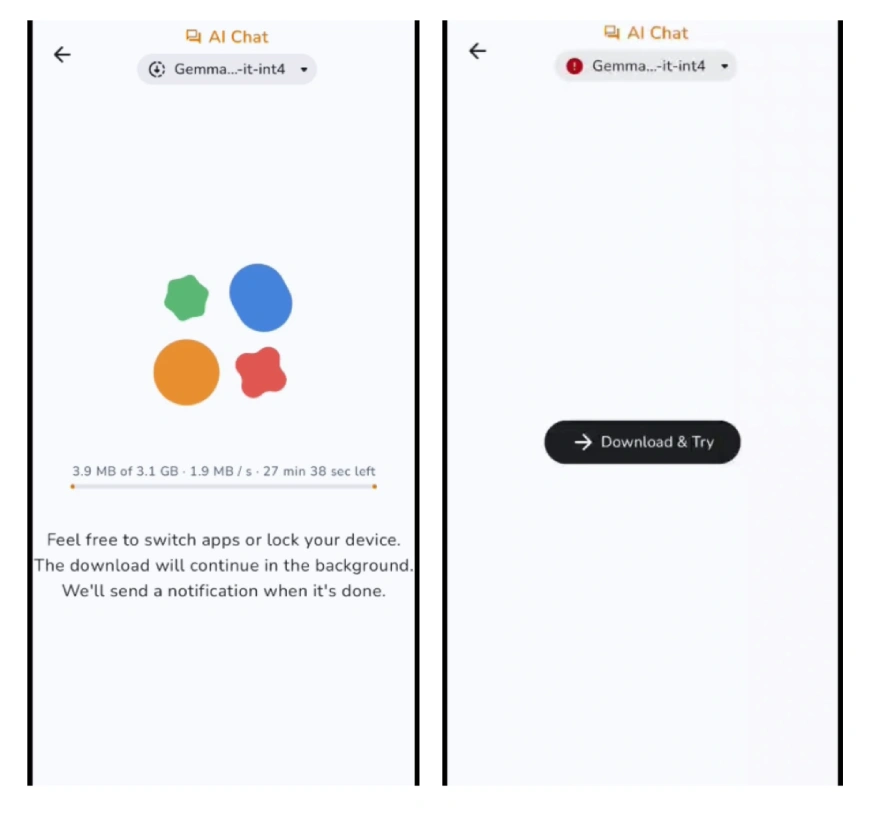
Step 2: Download the Gemma 3n Model
You can find it by searching for “Gemma 3n” in the model repositories like Hugging Face, or you could search on Google and find Google’s AI model releases directly.
Note: Make sure to select the quantized (ex, 4-bit or 8-bit) version for mobile to save space and memory.
Step 3: Importing the Model into Your Mobile App
- Now launch your LLM app (ex., LM Studio, Mlc Chat).
- Click the “Import” or “Add Model” button.
- Then browse to the Gemma 3n model file you downloaded and import it.
Note: The app may walk you through additional optimizations or quantization to ensure mobile function.
Step 4: Setup Model Preferences
Configure options for performance vs accuracy (lower quantization = faster, higher quantization = better output, slower). Create, if desired, prompt templates, styles of conversations, integrations, etc.
Step 5: Now, We Can Start Using Gemma 3n
Use the chat or prompt interface to communicate with the model. Feel free to ask questions, generate text, or use it as a writer/coder assistant according to your preferences.
Suggestions for Getting the Best Results
- Close background programs to recycle system resources.
- Use the most recent version of your app for best performance.
- Adjust settings to find an acceptable balance of performance to quality according to your needs.
Possible Uses
- Draft private emails and messages.
- Translation and summarization in real-time.
- On-device code assistance for developers.
- Brainstorming ideas, drafting stories or blog content while on the go.
Also Read: Build No-Code AI Agents on Your Phone for Free with the Replit Mobile App!
Conclusion
When using Gemma 3n on a mobile device, there is no shortage of potential use cases for advanced artificial intelligence right in your pocket, without compromising privacy and convenience. Whether you are a casual user of AI technologies with a little curiosity, a busy professional looking for productivity boosts, or a developer with an interest in experimentation, Gemma 3n offers every opportunity to explore and personalize technology. With many ways to innovate, you will discover new ways to streamline activities, trigger new insights, and build connections, without an internet connection. So try it out, and see how much AI can assist your everyday life, and always be on the go!
I am a Data Science Trainee at Analytics Vidhya, passionately working on the development of advanced AI solutions such as Generative AI applications, Large Language Models, and cutting-edge AI tools that push the boundaries of technology. My role also involves creating engaging educational content for Analytics Vidhya’s YouTube channels, developing comprehensive courses that cover the full spectrum of machine learning to generative AI, and authoring technical blogs that connect foundational concepts with the latest innovations in AI. Through this, I aim to contribute to building intelligent systems and share knowledge that inspires and empowers the AI community.