
A few weeks ago, OpenAI conducted their third DevDay and announced some exciting things for developers. One of the update was around OpenAI Apps SDK. This new Apps SDK allows users to interact with actual applications right in chat and does not require any additional installations or opening a new tab. Among ChatGPT’s 800 million users, tasks like creating playlists, taking courses, or looking for real estate to buy can now all happen in a single conversation. In this article, I will tell you everything about Apps SDK and how to access it.
Table of contents
What is Apps SDK?
The Apps SDK is an open-source toolkit from OpenAI that is built on the MCP, allowing developers to create conversational apps that run directly inside ChatGPT.
Rather than solely answering questions, ChatGPT can actively engage with third-party apps,retrieving data, generating tasks, and providing interactive features that seamlessly integrate into conversation.
Available in preview, the SDK facilitates the development, testing and deployment of apps in a simple way. It provides an easy, secure and scalable means for distribution of apps inside ChatGPT for developers at startups and at established organizations.
Also Read: OpenAI’s AgentKit and Agent Builder
Features and Advantages of Apps SDK
- MCP Foundation: Facilitates consistent tool calling, real-time data connections, and data rendering in the chat stream determined by JSON schemas.
- Embedded Interfaces: Applications present cards, sliders, media previews, carousels, and other interactive UI elements, no redirects to external content.
- Contextual Discovery: ChatGPT recommends applications based on the dialogue as it takes place. For example, if a user asks about travel options, Expedia will surface naturally.
- Open Source & Portable: Applications that use the SDK can operate on any platform that supports MCP, and that includes support on platforms other than ChatGPT.
- Privacy & Safety Controls: All applications must comply with OpenAI’s rigorous use-case policies and privacy standards that enable you to control permissions to share your data.
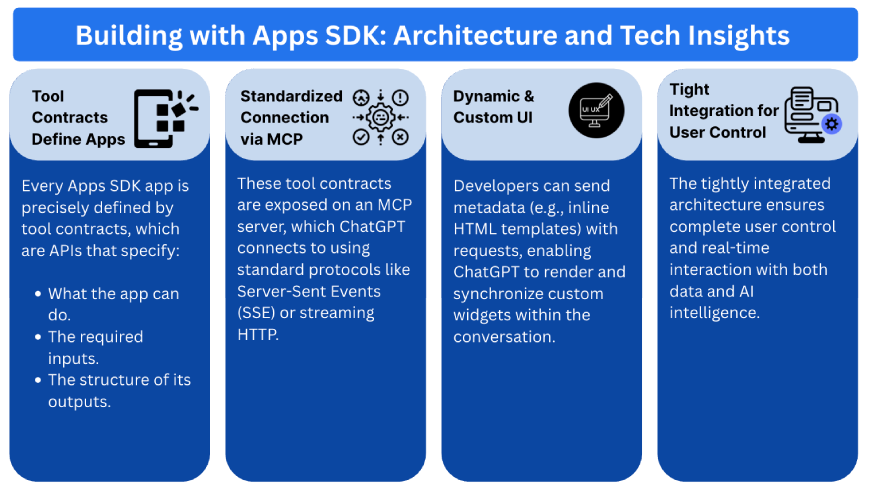
How to Access OpenAI Apps SDK?
To access the SDK:
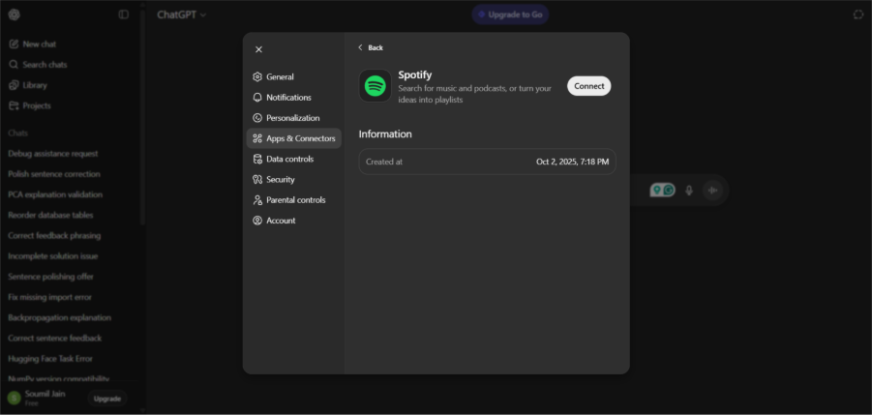
- In ChatGPT, go to Settings → Apps & Connectors → Enable Developer Mode.
- Create a new app, enter your MCP server URL, and define your app logic.
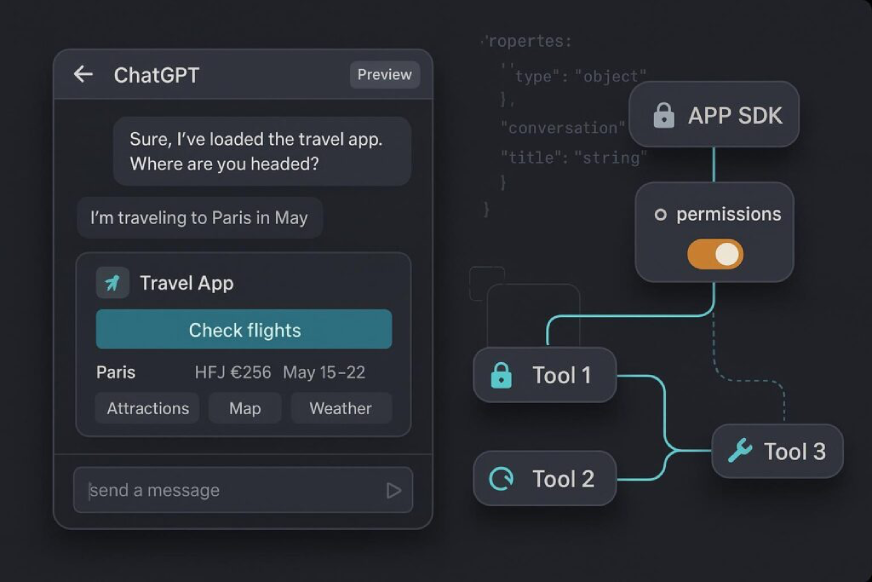
Test your app directly in ChatGPT and view live UI rendering.
Let’s Try ChatGPT Apps SDK
Let’s say you’re organizing a party and need a playlist. The Apps SDK, is making this easy and conversational.
Just say, “Spotify, please make a playlist for my party on Friday.”
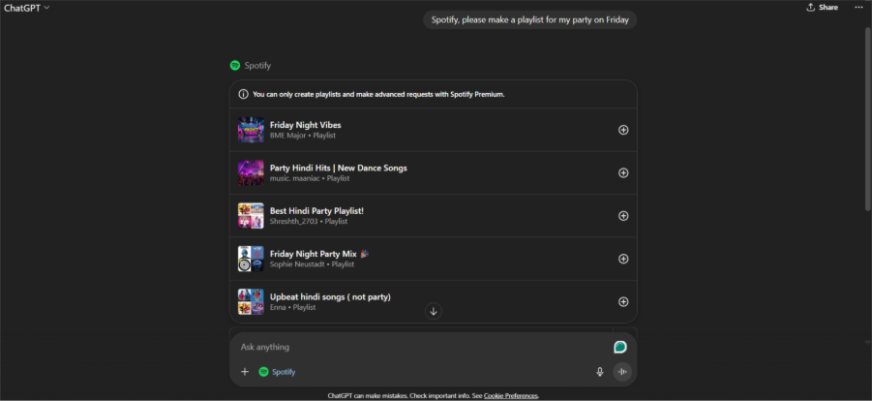
ChatGPT interprets your request and suggests the Spotify app. Upon first use, you’ll securely link your account with full transparency over the permissions being granted.
From there, a simple chat experience guides you: just describe the vibe, genre, or artists you have in mind using natural language. Within seconds, a custom playlist is generated directly in the chat.
You can then listen to it, swap out songs, and share it, all without leaving ChatGPT.
More Use Cases to Explore
The SDK for applications is not specific to entertainment. Its versatility has enabled developers to begin to build all different types of experiences.
- Real Estate Search: Zillow allows your users to search its listings using interactive maps that filter by budget and location using live data, making for a quick and intuitive experience in searching for a house.
- Learning and Education: Imagine taking a course through Coursera, but wanting to ask a question while watching the lecture videos in the chat. The AI can simply pause and explain the intricacies and follow that up with providing exercises at your demand.
- Design and Productivity: Imagine drafting an outline and letting Canva generate a visually appealing slide deck for you to modify, but without changing applications.
Conclusion
OpenAI’s Apps SDK is not just a developer update,it’s the blueprint for the next digital revolution. With its MCP foundation, built-in discovery, it empowers any developer to bring services directly into users’ conversations. Whether you’re creating music, designing visuals, managing tasks, or exploring new learning experiences, your app can now live, breathe, and interact inside ChatGPT. The message for innovators is clear: start building now, because the conversation is the new interface, and ChatGPT is its platform.
I am a Data Science Trainee at Analytics Vidhya, passionately working on the development of advanced AI solutions such as Generative AI applications, Large Language Models, and cutting-edge AI tools that push the boundaries of technology. My role also involves creating engaging educational content for Analytics Vidhya’s YouTube channels, developing comprehensive courses that cover the full spectrum of machine learning to generative AI, and authoring technical blogs that connect foundational concepts with the latest innovations in AI. Through this, I aim to contribute to building intelligent systems and share knowledge that inspires and empowers the AI community.






