
Large Language Model application outputs can be unpredictable and tough to evaluate. As a LangChain developer, you might already be creating sophisticated chains and agents, but to make them run reliably, you need great evaluation and debugging tools. LangSmith is a product created by the LangChain team to address this requirement. In this tutorial-style guide, we’ll explore how LangSmith integrates with LangChain to trace and evaluate LLM applications, using practical examples from the official LangSmith Cookbook. We’ll cover how to enable tracing, create evaluation datasets, log feedback, run automated evaluations, and interpret the results. Along the way, we’ll compare LangSmith’s approach to traditional evaluation methods and share best practices for integrating it into your workflow.
Table of contents
- What is LangSmith?
- Why use a dedicated tool such as LangSmith for LLM apps?
- Interpreting Evaluation Results
- Fetching Experiment Results Programmatically
- LangSmith vs. Traditional LLM Evaluation Practices
- Best Practices for Incorporating LangSmith into Your Workflow
- Conclusion
- Frequently Asked Questions
What is LangSmith?
LangSmith is an end-to-end set of tools for building, debugging, and deploying LLM-enabled applications. It brings a number of capabilities together into one platform: you can track every step of your LLM app, test output quality, do prompt testing, and deploy management within one environment. LangSmith integrates nicely with LangChain’s open-source libraries, still it is not LangChain framework focussed only. You can use it even in proprietary LLM pipelines beyond LangChain and other frameworks.. By instrumenting your app with LangSmith, you have visibility into its actions and an automated means of quantifying performance.
Why use a dedicated tool such as LangSmith for LLM apps?
Unlike regular software, LLM outputs may differ with the same input because they are probabilistic. This non-determinism makes observability and strict testing important for staying in control of quality. Old-school testing tools don’t cover it because they’re not designed for the evaluations of language outputs. LangSmith solves this by offering LLM-based evaluation and observability workflows. In short, LangSmith prevents you from sudden and unintentional mishappening, it allows you to statistically measure your LLM application’s performance and resolve issues before any mishappening
Tracing and Debugging LLM Applications
One of LangSmith’s key aspects is tracing, which records every step and LLM call in your application for debugging. When using LangChain, turning on LangSmith tracing is simple: you can use environment variables (LANGCHAIN_API_KEY and LANGCHAIN_TRACING_V2=true) to automatically forward LangChain runs to LangSmith. Alternatively, you can directly instrument your code using the LangSmith SDK.
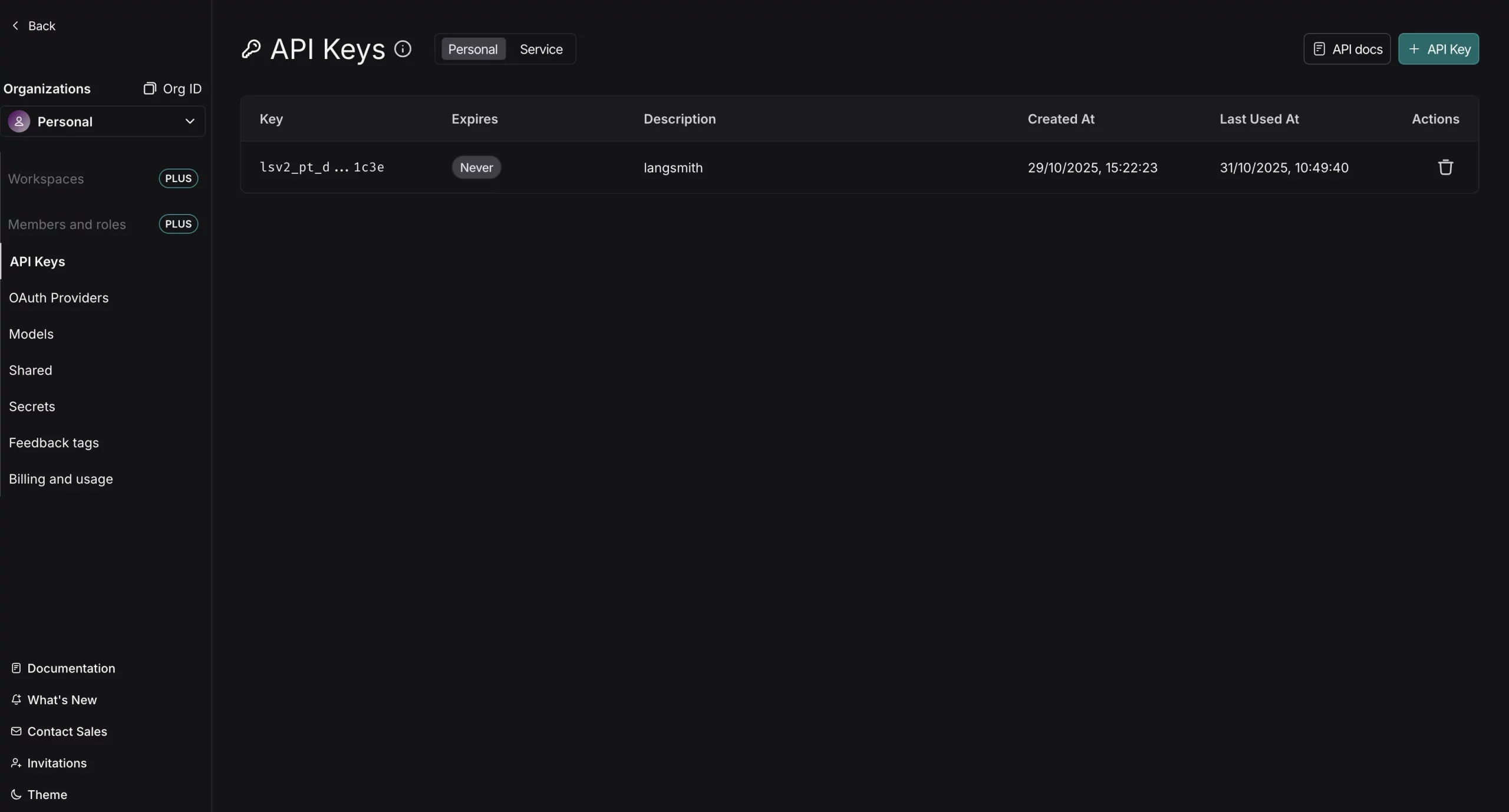
Head over to https://smith.langchain.com, create a new account or login. Now, go to settings from the right down space and you will find the API keys section. Now create a new API Key and store it somewhere.
os.environ['OPENAI_API_KEY'] = “YOUR_OPENAI_API_KEY”

os.environ['LANGCHAIN_TRACING_V2'] = “true”

os.environ['LANGCHAIN_API_KEY'] = “YOUR_LANGSMITH_API_KEY”

os.environ['LANGCHAIN_PROJECT'] = 'demo-langsmith'
We have configured the API keys here and now we are ready to trace our LLM calls. Let’s test a simple example. For instance, wrapping your LLM client and functions ensures every response and request is traced:
import openai

from langsmith.wrappers import wrap_openai

from langsmith import traceable

client = wrap_openai(openai.OpenAI())

@traceable

def example_pipeline(user_input: str) -> str:

   response = client.chat.completions.create(

       model="gpt-4o-mini",

       messages=[{"role": "user", "content": user_input}]

   )

   return response.choices[0].message.content

answer = example_pipeline("Hello, world!")
We wrapped the OpenAI client using wrap_openai, and the @traceable decorator to trace our pipeline function. This will log a trace to LangSmith every time example_pipeline is invoked (and every internal LLM API call). Traces allow you to review the chain of prompts, model outputs, tool calls, etc., which is worth its weight in gold when debugging complicated chains.

LangSmith’s architecture enables tracing from the start of development, wrap your LLM function and calls early on in order to see what your system is doing. If you’re building a LangChain app in prototype, you can enable tracing with minimal work and begin to catch problems well before you reach production.
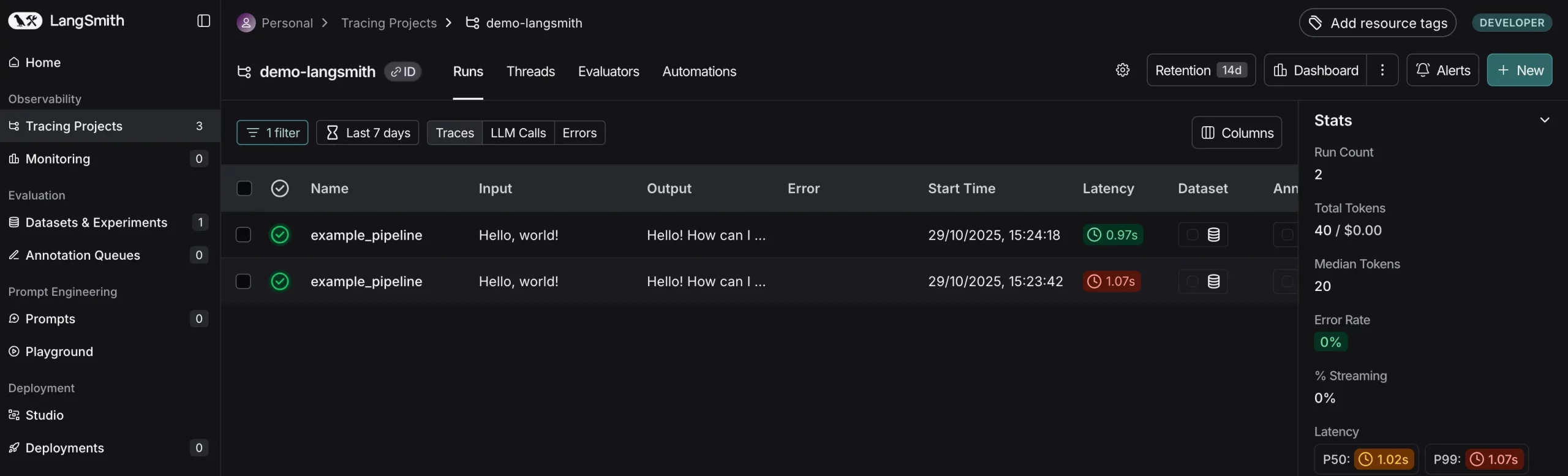
Each trace is structured as a tree of runs (a root run for the top-level call and child runs for each inner call). In LangSmith‘s UI, you can see these traces step by step, observe inputs and outputs at each step, and even add notes or feedback. This tight integration of tracing and debugging means that when an evaluation (which we’ll cover next) flags a bad output, you can jump straight into the corresponding trace to diagnose the problem.

Creating Evaluation Datasets
To test your LLM app systematically, you require a test example dataset. In LangSmith, a Dataset is just a set of examples, with each example containing an input (the parameters you pass to your application) and an expected or reference output. Test datasets can be small and hand-selected or large and extracted from actual usage. In reality, most teams begin with a few dozen important test cases that address common and edge cases, even 10-20 cleverly selected examples can be very helpful for regression testing
LangSmith simplifies dataset creation. You can insert examples directly through code or the interface, and you can even store real traces from debugging or production directly into a dataset to be used in future testing. As an example, if in a user query, you find there was a flaw in your agent’s reply, you might record that trace as a new test case (with the proper expected answer) so that the error gets corrected and does not get repeated. Datasets are basically the ground truth against which your LLM app shall be judged in the future
Let’s go over writing a simple dataset in code. With the LangSmith Python SDK, we first set up a client and then define a dataset with some examples:
!pip install -q langsmith

from langsmith import Client

client = Client()

# Create a new evaluation dataset

dataset = client.create_dataset("Sample Dataset", description="A sample evaluation dataset.")

# Insert examples into the dataset: each example has 'inputs' and 'outputs'

client.create_examples(

   dataset_id=dataset.id,

   examples=[

       {

           "inputs": {"postfix": "to LangSmith"},

           "outputs": {"output": "Welcome to LangSmith"}

       },

       {

           "inputs": {"postfix": "to Evaluations in LangSmith"},

           "outputs": {"output": "Welcome to Evaluations in LangSmith"}

       }

   ]

)
In this toy data set, the input gives a postfix string, and the output should be a greeting message beginning with “Welcome “. We have two examples, but you may include as many as you like. Internally, LangSmith caches each example together with the input JSON and output JSON. The keys of the input dict need to match the parameters your application accepts. Keys in the output dict are the reference output (ideal or correct answer for the given input). In our case, we want the app to just add “Welcome ” to the beginning of the postfix.
Output:

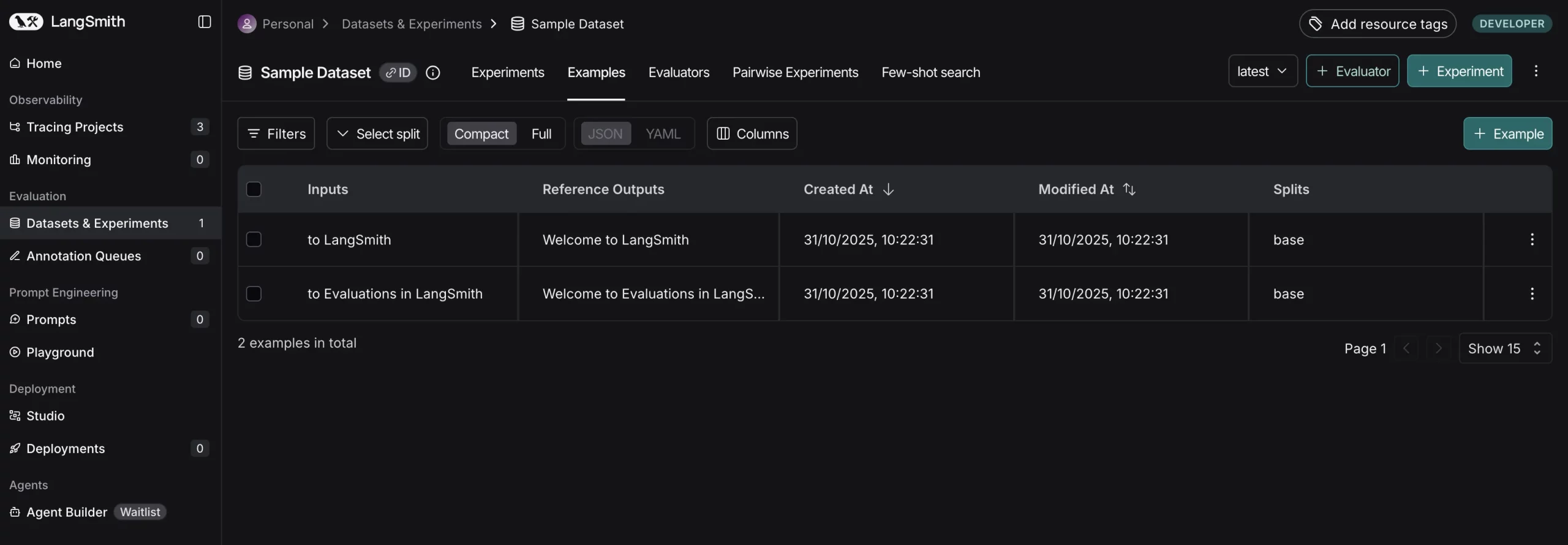
This data set is now stored in your LangSmith workspace (with the label “Sample Dataset”). You can see it in the LangSmith UI.

Now inside this dataset we can see all examples along with their inputs/expected outputs.
Example: We can also create an evaluation dataset from our Production Traces. To build datasets from real traces (e.g., failed user interactions), use the SDK to read traces and create examples. Assume you have a trace ID from the UI:
from langsmith import Client

client = Client()

# Fetch a trace by ID (replace with your trace ID)

trace = client.read_run(run_id="your-trace-run-id", project_name="demo-langsmith")

# Create dataset from the trace (add expected output manually)

dataset = client.create_dataset("Trace-Based Dataset", description="From production traces.")

client.create_examples(

   dataset_id=dataset.id,

   examples=[

       {

           "inputs": {"input": trace.inputs},  # e.g., user query

           "outputs": {"output": "Expected corrected response"}  # Manually add ground truth

       }

   ]

)
We are now ready to specify how we measure the model’s performance on such examples.
Writing Evaluation Metrics with Evaluators
LangSmith evaluators are tiny functions (or programs) that grade outputs of your app for a specific example. An evaluator may be as straightforward as verifying if the output is identical to the anticipated text, or as advanced as employing a different LLM to evaluate the output’s quality. LangSmith accommodates both custom evaluators and internal ones. You may create your own Python/TypeScript function to execute any evaluation logic and execute it through the SDK, or utilize LangSmith’s internal evaluators within the UI for popular metrics. As an example, LangSmith has some out-of-the-box evaluators for things like similarity comparison, factuality checking, etc., but in this case we will develop a custom one for the sake of example.
Given our simple sample task (the output must exactly match “Welcome X” for input X), we can make an exact match evaluator. This evaluator will check the model output against the reference output and return a score of success or failure:
from langsmith.schemas import Run, Example

# Create an evaluator function for exact string match

def exact_match(run: Run, example: Example) -> dict:

   # 'run.outputs' is the true output from the model run

   # 'example.outputs' is the expected output from the dataset

   return {"key": "exact_match", "score": run.outputs["output"] == example.outputs["output"]}
Here in this Python evaluator, we get a run (which holds the model’s outputs for a specific example) and the example (which holds the expected outputs). We then compare the two strings and return a dict with a “score” key. LangSmith requires evaluators to return a dict of measures; we use a boolean result here, but you might return a numeric score or even multiple measures if appropriate. We can interpret the result of {“score”: True} as a pass, and False as a fail for this test.
Note: If we were to have a more sophisticated assessment, we could calculate a percentage match or rating. LangSmith leaves it up to you to specify what the score represents. For example, you might return {“accuracy”: 0.8} or {“BLEU”: 0.67} for translation work, or even textual feedback. For simplicity, our exact match simply returns a boolean score.
The strength of LangSmith’s evaluation framework is that you can insert any logic here. Some popular methods are:
- Gold Standard Comparison: If your data set does contain a reference solution (like ours does), then you can compare the model output directly with the reference (exact match or via similarity measures). This is what we have done above
- LLM-as-Judge: You can utilize a second LLM to grade the response against a prompt or rubric. For instance, for open-ended questions, you can ask an evaluator model the user query, the model’s response, and request a score or verdict
- Functional Tests: Evaluators can be written to check format or structural correctness. For example, if the task requires a JSON response, an evaluator can try to parse the JSON and return {\”score\”: True} only if the parsing is successful (guaranteeing the model didn’t hallucinate a wrong format.
- Human-in-the-loop Feedback: While not strictly a code evaluator in the classical sense, LangSmith also facilitates human evaluation through an annotation interface, in which human reviewers can provide scores to output (these scores are consumed as feedback in the same system).
This is helpful for subtle criteria such as “helpfulness” or “style” that it is difficult to encode in code.
Currently, our exact_match function is sufficient for testing the sample dataset. We might also specify summary evaluators which calculate a global measure over the entire dataset (such as an overall precision or accuracy). In LangSmith, a summary evaluator is passed the list of all runs and all examples and returns a dataset-level measure (e.g. total accuracy = correct predictions / total). We won’t be doing so here, but remember LangSmith does allow it (e.g., through a summary_evaluators param we’ll look at later). Sometimes automatic aggregation like mean score gets executed, but you can tailor further if necessary.
For subjective tasks, we can use an LLM to score outputs. Install: pip install langchain-openai. Define a judge:
from langchain_openai import ChatOpenAI

from langsmith.schemas import Run, Example

llm = ChatOpenAI(model="gpt-4o-mini")

def llm_judge(run: Run, example: Example) -> dict:

   prompt = f"""

   Rate the quality of this response on a scale of 1-10 for relevance to the input.

   Input: {example.inputs}

   Reference Output: {example.outputs['output']}

   Generated Output: {run.outputs['output']}

   Respond with just a number.

   """

   score = int(llm.invoke(prompt).content.strip())

   return {"key": "relevance_score", "score": score / 10.0}  # Normalize to 0-1
This uses gpt-4o-mini to judge relevance, returning a float score. Integrate it into evaluations for non-exact tasks.
Running Evaluations with LangSmith
Having a dataset prepared and evaluators established, we can now perform the evaluation. LangSmith offers an evaluate function (and an equivalent Client.evaluate method) to manage this. When you invoke evaluate, LangSmith will execute each example in the dataset, apply your application on the input of the example, retrieve the output, then invoke each evaluator on the output to generate scores. All these executes and scores will be logged in LangSmith for you to examine.
Let’s run an evaluation for our sample application. Suppose our application is just the function: lambda input: “Welcome ” + input[‘postfix’] (which is what we want it to do). We’ll provide that as the target to evaluate with our dataset name and the evaluators list:
from langsmith.evaluation import evaluate

# Define the target function to evaluate (our "application under test")

def generate_welcome(inputs: dict) -> dict:

   # The function returns a dict of outputs similar to an actual chain would

   return {"output": "Welcome " + inputs["postfix"]}

# Use the evaluation on the dataset with our evaluator

results = evaluate(

   generate_welcome,

   data="Sample Dataset",         # we can access the dataset by name

   evaluators=[exact_match],      # use our exact_match evaluator

   experiment_prefix="sample-eval",    # label for this evaluation run

   metadata={"version": "1.0.0"}       # optional metadata tags

)
Output:

After successfully running the experiment you will get a link to the detailed breakdown of the experiment like this:
Several things occur when we execute this code:
- Calling the target: For every example in “Sample Dataset”, the generate_welcome function is called with the example’s inputs. The function returns an output dict (in this example simply{“output”: “Welcome .”}). In an actual application, this might be an invocation of an LLM or a LangChain chain, for instance, you may supply an agent or chain object as the target rather than a basic function. LangSmith is versatile: the target may be a function, a LangChain Runnable, or even an entire previously executed chain run (for comparison assessments)
- Scoring using evaluators: On every run, LangSmith calls the exact_match evaluator, giving it the run and example. Our evaluator returns a score (True/False). In case we had more than one evaluator, each would give its own score/feedback for a given run.
- Recording results: LangSmith records all this data as an Experiment in its system. An Experiment is basically a set of runs (one per example in the dataset) plus all the feedback scores from evaluators. In our code, we supplied an experiment_prefix of “sample-eval”. LangSmith will build an experiment with a distinctive name like sample-eval-<timestamp> (or add to an existing experiment if you prefer). We also appended a metadata tag version: 1.0.0 – this is handy for knowing which version of our application or prompt was tested
- Evaluation at Scale: The above example is tiny, but LangSmith is designed for larger evaluations. If you have several hundred or thousands of test cases, you may prefer to execute evaluations in the background asynchronously. LangSmith SDK provides an
aevaluatemethod for Python which behaves similar toevaluatebut executes the jobs in parallel.
You can also use the max_concurrency parameter to set parallelism. This is helpful to accelerate evaluation runs, particularly if every test makes a call to a live model (which is slow). Simply be aware of the rate limits and fees when sending lots of model calls concurrently.
Let’s take one more example by Evaluating a LangChain Chain. Replace the simple function with a LangChain chain (install: pip install langchain-openai). Define a chain that might fail on edge cases:
from langchain_openai import ChatOpenAI

from langchain_core.prompts import PromptTemplate

from langsmith.evaluation import evaluate

llm = ChatOpenAI(model="gpt-4o-mini")

prompt = PromptTemplate.from_template("Say: Welcome {postfix}")

chain = prompt | llm

# Evaluate the chain directly

results = evaluate(

   chain,

   data="Sample Dataset",

   evaluators=[exact_match],

   experiment_prefix="langchain-eval",

   metadata={"chain_type": "prompt-llm"}

)
This traces the chain’s execution per example, scoring outputs. Check for mismatches (e.g., extra LLM phrasing) in the UI.
Interpreting Evaluation Results
Once it has executed an evaluation, LangSmith offers to analyze the results using tools. Every experiment is accessible within the LangSmith UI. You’ll have a table of all examples with inputs, outputs, and feedback scores for each evaluator.
Here are some ways you can use the results:
- Find Failures: Look at which tests scored badly or failed. LangSmith points these out, and you can filter or sort on score. If any test failed, you have instant proof of an issue to correct. Since LangSmith records feedback on every trace, you can click a failure run and examine its trace for a hint.
- View Metrics: If you return summary evaluators (or just want an aggregate), LangSmith can display a total metric for the experiment. For example, if you returned {“score”: True/False} for every run, it could display an overall accuracy (total True percentage) for the experiment. In more sophisticated evaluations, you may have several metrics – all of these would be visible per example and in summary.
- Exporting Data: LangSmith enables you to query or export results of evaluations through the SDK or API. You might, for example, retrieve all scores of feedback for a particular experiment and utilize that in a bespoke report or pipeline.
Fetching Experiment Results Programmatically
To access results outside the UI, list experiments and fetch feedback. Modify your experiment name from the UI.
from langsmith import Client

client = Client()

project_name = "sample-eval-d2203052"  # Matches experiment_prefix

# List projects and find the target project

projects = client.list_projects()

target_project = None

for project in projects:

   if project.name == project_name:

       target_project = project

       break

if target_project:

   # Fetch feedback for runs within the target project

   runs = client.list_runs(project_name=project_name)

   for run in runs:

       feedbacks = client.list_feedback(run_id=run.id)

       for fb in feedbacks:

           # Access outputs safely, handling potential None values

           run_outputs = run.outputs if run.outputs is not None else "No outputs"

           print(f"Run: {run_outputs}, Score: {fb.score}")  # e.g., {'key': 'exact_match', 'score': True}

else:

   print(f"Project '{project_name}' not found.")
This prints scores per run, useful for custom reporting or CI integration.
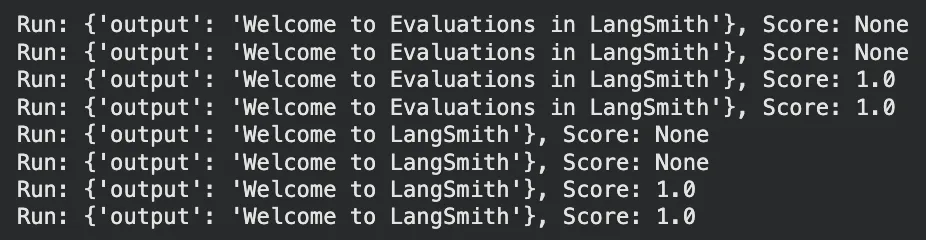
Results interpretation is not pass/fail; it’s understanding why the model is failing on particular inputs. Since LangSmith links assessment to rich trace data and feedback, it completes the loop for you to intelligently debug. If, for example, multiple failures came on a particular question type, that could be a prompt or knowledge base gap, something you can fix. If a general measure is below your threshold of acceptance, you can drill down into particular cases to inquire.
LangSmith vs. Traditional LLM Evaluation Practices
How does LangSmith differ from the “traditional” methods developers use to test LLM applications? Here is a comparison of the two:
| Aspect | Traditional Methods | LangSmith Approach |
|---|---|---|
| Prompt Testing | Manual trial-and-error iteration. | Systematic, scalable prompt testing with metrics. |
| Evaluation Style | One-off accuracy checks or visual inspections. | Continuous evaluation in dev, CI, and production. |
| Metrics | Limited to basic like accuracy or ROUGE. | Custom criteria including multi-dimensional scores. |
| Debugging | No context; manual review of failures. | Full traceability with traces linked to failures. |
| Tool Integration | Scattered tools and custom code. | Unified platform for tracing, testing, and monitoring. |
| Operational Factors | Ignores latency/cost or handles separately. | Tracks quality alongside latency and cost. |
Overall, LangSmith applies discipline and organization to LLM testing. It’s like going from hand-coded tests to automated test batteries in programming. By doing so, you can be more certain that you’re not flying blind with your LLM app – you have evidence to support changes and faith in your model’s behavior across different situations.
Best Practices for Incorporating LangSmith into Your Workflow
To gain the most from LangSmith, take into account the following best practices, particularly if you’re integrating it into a current LangChain project:
- Turn on tracing early: Set up LangSmith tracing from day one so you can see how prompts and chains behave and debug faster.
- Start with a small, meaningful dataset: Create a handful of examples that cover core tasks and tricky edge cases, then keep adding to it as new issues appear.
- Mix evaluation methods: Use exact-match checks for facts, LLM-based scoring for subjective qualities, and format checks for schema compliance.
- Feed user feedback back into the system: Log and tag bad responses so they become future test cases.
- Automate regression tests: Run LangSmith evaluations in CI/CD to catch prompt or model regressions before they hit production.
- Version and tag everything: Label runs with prompt, model, or chain versions to compare performance over time.
- Monitor in production: Set up online evaluators and alerts to catch real-time quality drops once you go live.
- Balance speed, cost, and accuracy: Review qualitative and quantitative metrics to find the right trade-offs for your use case.
- Keep humans in the loop: Periodically send tricky outputs for human review and feed that data back into your eval set.
By adopting these practices, you’ll bake LangSmith in as a one-time check, but also as an ongoing quality guardian across your LLM application’s lifetime. From prototyping (where you debug and iterate using traces and tiny tests) to production (where you monitor and receive feedback at scale), LangSmith can be incorporated in each step to help ensure reliability.
Conclusion
Testing and debugging LLM applications is difficult, but LangSmith makes it much easier. By integrating tracing, structured datasets, automated evaluators, and feedback logging, it offers a complete system for testing AI systems. We were able to see how LangSmith can be employed to trace a LangChain app, generate reference datasets, have custom evaluation metrics, and iterate rapidly with thoughtful feedback. This methodology is an improvement over the classic prompt tweaking or stand-alone accuracy testing. It applies a software engineering discipline to the realm of LLMs.
Ready to take your LLM app’s reliability to the next level? Try LangSmith on your next project. Create some traces, write a couple of evaluators for your most important outputs, and conduct an experiment. What you learn will enable you to iterate with certainty and ship updates supported by data, not vibes. Evaluating made easy!
Frequently Asked Questions
Q1. What is LangSmith and how does it integrate with LangChain?
A. LangSmith is a platform for tracing, evaluating, and debugging LLM applications, integrating seamlessly with LangChain via environment variables like LANGCHAIN_TRACING_V2 for automatic run logging.
Q2. How do you enable tracing in a LangChain application?
A. Set environment variables such as LANGCHAIN_API_KEY and LANGCHAIN_TRACING_V2=”true”, then use decorators like @traceable or wrap clients to log every LLM call and chain step.
Q3. What are evaluation datasets in LangSmith?
A. Datasets are collections of input-output examples used to test LLM apps, created via the SDK with client.create_dataset and client.create_examples for reference ground truth.
Harsh Mishra is an AI/ML Engineer who spends more time talking to Large Language Models than actual humans. Passionate about GenAI, NLP, and making machines smarter (so they don’t replace him just yet). When not optimizing models, he’s probably optimizing his coffee intake. 🚀☕






