
We have entered the time of multi-agent artificial intelligence. However, there is a very important issue: in what way can remote AI agents produce rich and interactive experiences without exposing the system to security risks? Google A2UI (Agent-to-UI) protocol addresses this question in a very smart way, allowing agents to create user interfaces that are completely integrated with the entire platform.
Table of contents
What is Google A2UI?
A2UI is a public protocol that permits AI agents to explicitly create user interfaces through JSON-based communication. Rather than restricting the communication to text only or using the unsafe HTML/JavaScript execution method, the agents can develop advanced user interfaces by mixing and matching from the component catalogs that are already approved.
Key Innovation: Agents communicate their UI needs; applications utilize their native frameworks to render it (React, Flutter, Angular, SwiftUI, etc.)
Problem that A2UI Solves
In the world of multi-agent mesh, agents from various companies are working together remotely. The traditional solutions are:
- Text-only interfaces – Slow and inefficient
- Sandboxed HTML/iframes – Heavy, visually disjointed, security risks
- Direct UI manipulation – Not possible when the agents are running on remote servers
A2UI opens a new possibility to send the UI that is safe like data but expressive like code.
Key Benefits of Google A2UI
Here are some of the key benefits of A2UI –
1. Security-First Architecture
- Employs a declarative data format instead of executable code
- Agents are allowed to take components from trustworthy and already approved catalogues
- No risk of code injection, full control remains with clients
2. LLM-Friendly Design
- Flat component structure with ID references
- Impossible for large language models to generate anything other than incrementally
- Enables progressive rendering and real-time updates
- Agents can stream interfaces item by item
3. Framework-Agnostic Portability
- One JSON payload is valid for web, mobile, and desktop
- Works with any UI framework
- Rendering done locally assures the customer’s brand experience will be the same
- No code specific to any platform is required
4. Seamless Protocol Integration
- Compatible with A2A Protocol (agent-to-agent communication)
- Works together with AG-UI for agent-user interactions
- Ready to connect with existing agent infrastructure
How A2UI Works
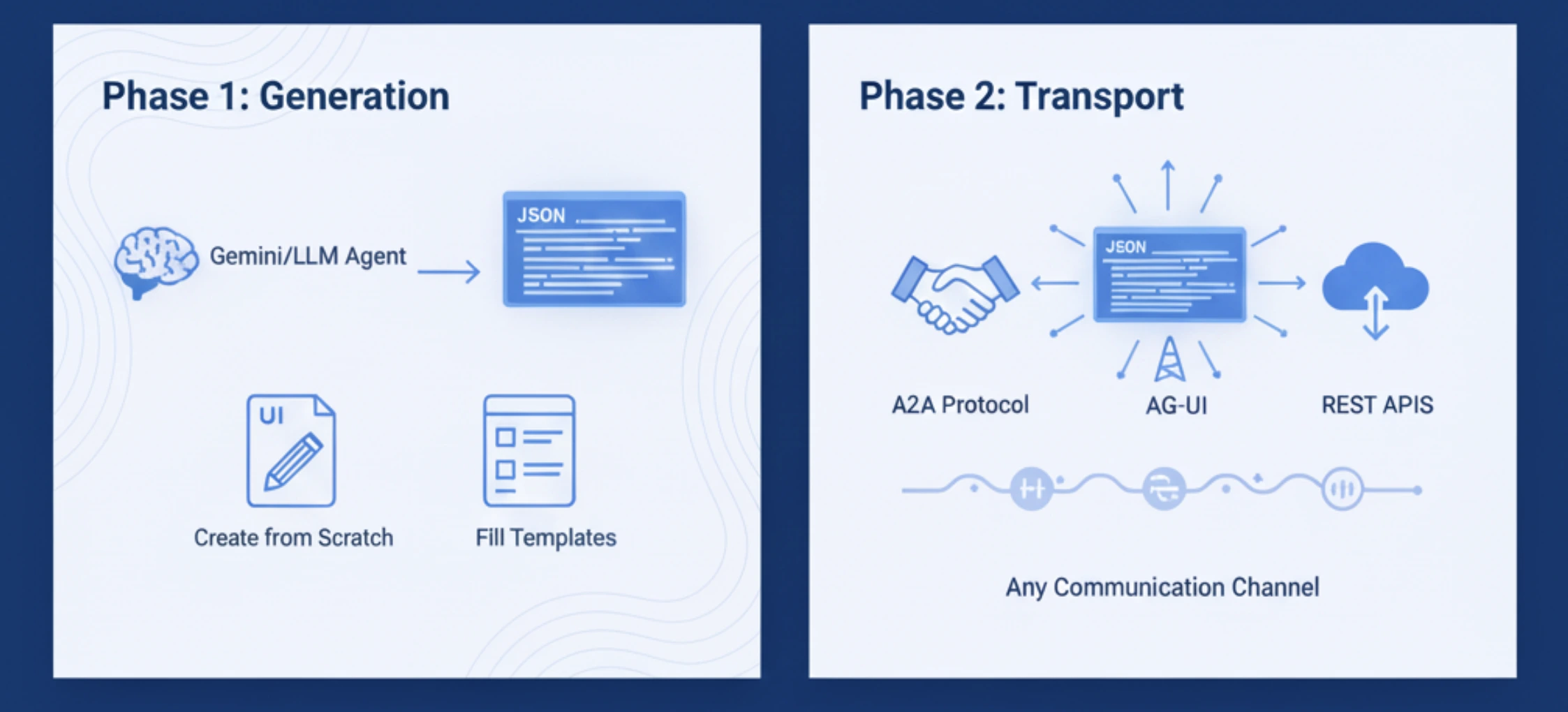
The working of A2UI includes four phases:
1. Phase 1: Generation
- The agent (Gemini or any other LLM) is responsible for the creation of a JSON payload.
- It details the UI elements and their corresponding attributes.
- It can either create UI elements from scratch or fill in the templates.
2. Phase 2: Transport
- The JSON message is dispatched through A2A Protocol, AG-UI, or REST APIs.
- The communication method is not dependent on a specific protocol and can be used with any channel of communication.
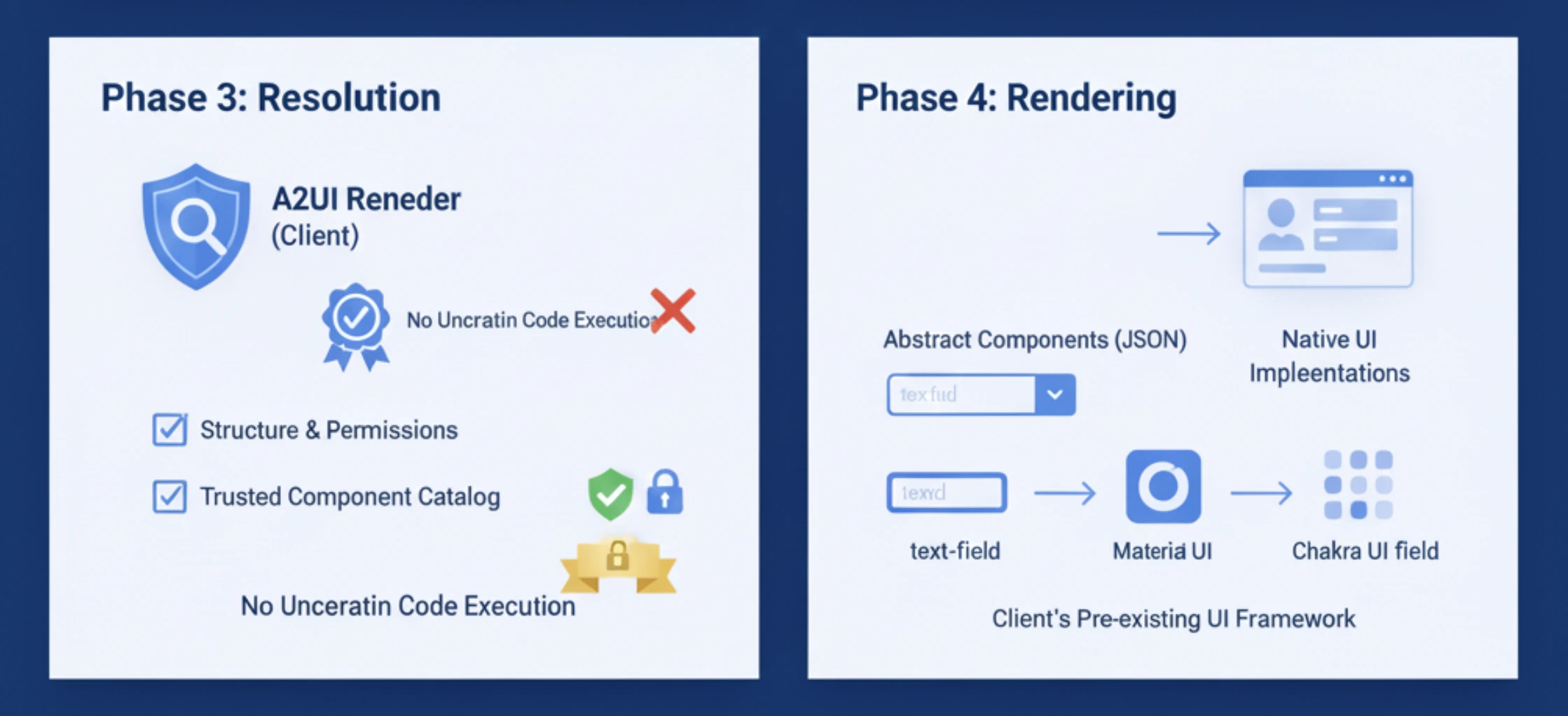
3. Phase 3: Resolution
- The A2UI Renderer of the client interprets the JSON.
- It checks the structure and the permissions of the components.
- It ensures that all components belong to the trusted catalog.
4. Phase 4: Rendering
- It converts the abstract components to their respective native implementations.
- For instance, the text field turns into a Material Design input, a Chakra UI field, and so on.
- It employs the client’s pre-existing UI framework for rendering.
Security Advantage: The client only sees and operates on components that have been pre-approved. There will be no uncertain code execution.
Get Started with A2UI
There are two ways you can access A2UI:
1. Via the direct web interface
You can log in through https://a2ui-composer.ag-ui.com/ and after logging in, you only have to prompt the agent to get the output.
2. Via the repository
You can access A2UI by cloning the repository https://github.com/google/A2UI and then running the quickstart demo. You’ll see Gemini-powered agents generating the interfaces, and you can customise the components for your use case easily.
Hands-On Task 1: Smart Budget Tracker
The Old Way (text-Based):
User: “What was my spending this month?”
Agent: “You have spent $1,234 on food, $567 on eating out…”
User: “Which category is exceeding the budget?”
Agent: “Dining out is $67 over your $500 budget”
User: “Give me a detailed report”
With A2UI:
Prompt:
“I am providing my transaction data below. Use it to generate a Smart Budget Tracker dashboard. The Data:
Dec 1: $200 (Food)
Dec 1: $300 (Clothes)
Dec 2: $500 (Travel)
Budget Limits: Set default limits to $400 for each category.”
Output:
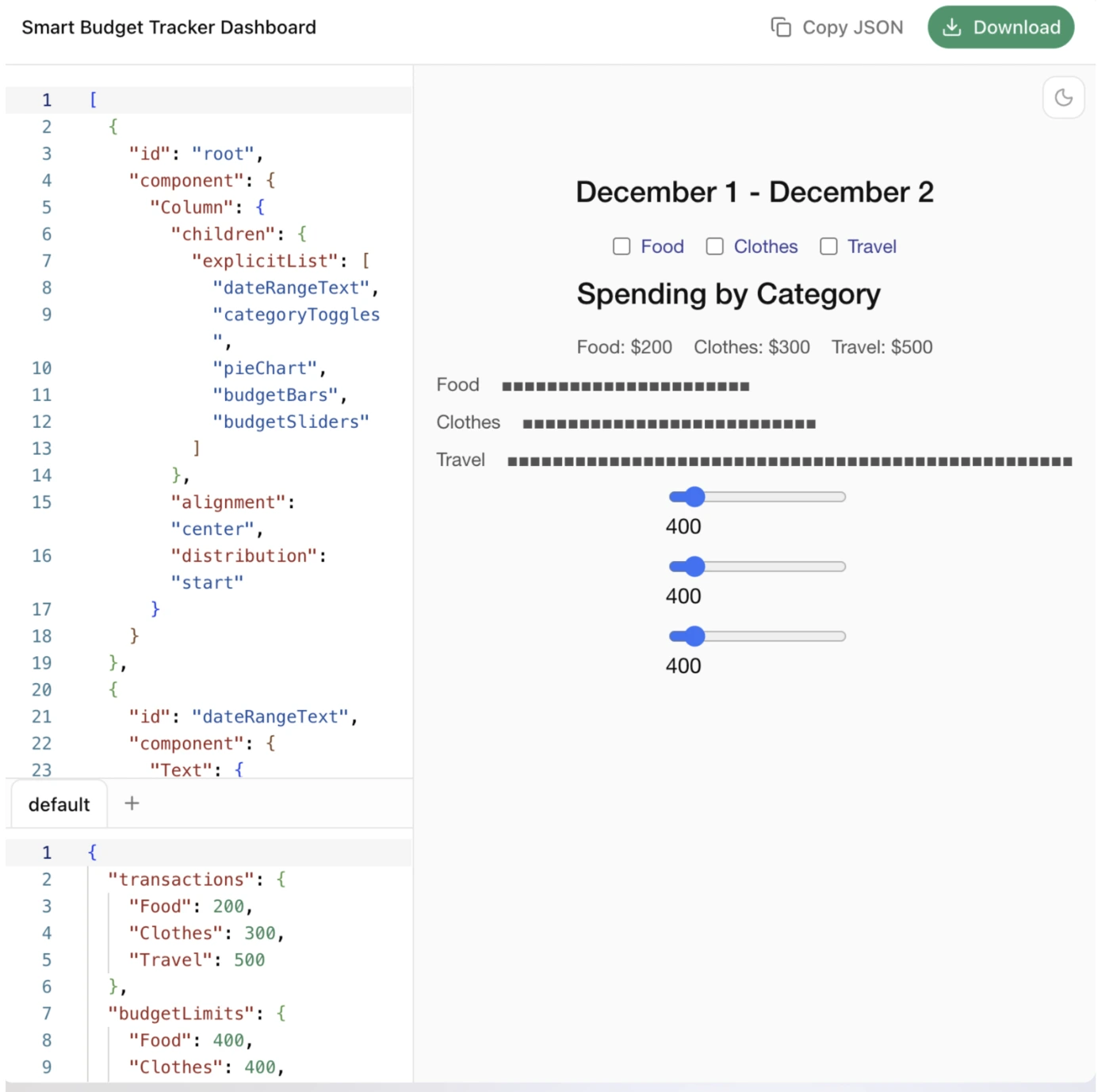
The agent instantly creates a full dashboard with the following components:
- An interactive slider that displays the distribution of expenses per category.
- The user’s editable limits with accompanying inline text fields.
- The date range selector allows comparing different periods.
- The category filters that have toggle switches.
- The trend analysis shows the spending patterns over time.
- The users directly engage with the visual components; thus, no typing is necessary.
Users can adjust budgets with sliders, filter out categories with checkboxes, and get to specifics by a single tap.
Hands-on Task 2: Cab Booking System
The Old Way (Text-Based):
User: “Book a cab”
Agent: “Where are you located?”
User: “I am at 123 Main Street.”
Agent: “Where do you want to go?”
User: “I want to go to 456 Oak Avenue.”
Agent: “When do you need the cab?”
User: “I would like it as soon as possible.”
Agent: “What kind of vehicle would you prefer?”
With A2UI:
Prompt:
“Generate a high-fidelity, single-screen Cab Booking Interface based on the following requirements:
### 1. PRE-BOOKING PHASE (Planning Mode)
– INTERACTIVE MAP: Render a map with a draggable “Pickup” pin (at current location) and a “Destination” pin. Show the calculated route.
– ADDRESS INPUTS: Two text fields (Pickup/Destination) with autocomplete. Default Destination to “456 Oak Avenue”.
– VEHICLE SELECTOR: A horizontal list of options (Economy, Premium, XL) showing:
– Real-time pricing
– ETA (e.g., “3 mins away”)
– High-quality vehicle icons
– PREFERENCES:
- A toggle for “Shortest vs. Fastest” route.
- A list of “Saved Places” (Home, Work, Gym) for one-tap selection.
- A Time Selector defaulting to “Now”.
- COST ESTIMATOR: A dynamic summary showing base fare + taxes.
### 2. TRANSITION LOGIC (The “Booking” Action)
When the user taps “Confirm Booking,” do not clear the screen. Transition the existing UI into “Live Tracking Mode.”
### 3. LIVE TRACKING PHASE (Active Mode)
- MAP UPDATE: Show a moving car icon representing the driver’s live location.
- ARRIVAL CARD: Replace the vehicle selector with a “Driver Information Card” including:
- Driver name, rating, and vehicle plate number.
- A live countdown timer (e.g., “Arriving in 2m 14s”).
- COMMUNICATION: Add two one-tap buttons: [Call Driver] and [Message Driver].
- EMERGENCY: Include a prominent “SOS” button.
### 4. DESIGN STYLE
- Clean, map-centric layout (like Uber/Lyft).
- Use floating action sheets for inputs to maximize map visibility.”
Output:

The agent prepares a booking interface of one screen with:
- A map that is interactive, showing the destinations and pickup points
- Address fields with autocomplete and geolocation support
- Time selector that defaults to immediate booking
- Vehicle options that show live pricing and ETAs
- Places that are saved for frequent destinations
- Route preference toggle (shortest vs. fastest)
- A cost estimator slider that adjusts with parameters
Once confirmed, this same interface will be updated with:
- Live driver tracking location
- Countdown of estimated arrival
- Driver and vehicle information
- Buttons for communication with one tap
Conclusion
Google A2UI indicates a major transformation regarding the interactions of the AI agents. The capability of the agents to produce safe, rich, and native UIs will be the one that puts an end to the barriers that have been preventing the agents from becoming widely adopted. Agents are now going to be able to create applications like budgeting tools, booking systems, project dashboards, or even new categories of applications where A2UI will be enhancing the use of the technology.
Gen AI Intern at Analytics Vidhya
Department of Computer Science, Vellore Institute of Technology, Vellore, India
I am currently working as a Gen AI Intern at Analytics Vidhya, where I contribute to innovative AI-driven solutions that empower businesses to leverage data effectively. As a final-year Computer Science student at Vellore Institute of Technology, I bring a solid foundation in software development, data analytics, and machine learning to my role.
Feel free to connect with me at [email protected]






