OpenAI models have evolved drastically over the past few years. The journey began with GPT-3.5 and has now reached GPT-5.1 and the newer o-series reasoning models. While ChatGPT uses GPT-5.1 as its primary model, the API gives you access to many more options that are designed for different kinds of tasks. Some models are optimized for speed and cost, others are built for deep reasoning, and some specialize in images or audio.
In this article, I will walk you through all the major models available through the API. You will learn what each model is best suited for, which type of project it fits, and how to work with it using simple code examples. The aim is to give you a clear understanding of when to choose a particular model and how to use it effectively in a real application.
Table of contents
- GPT-3.5 Turbo: The Bases of Modern AI
- GPT-4 Family: Multimodal Powerhouses
- The o-Series: Models That Think Before They Speak
- GPT-5 and GPT-5.1: The Next Generation
- DALL-E 3 and GPT Image: Visual Creativity
- Whisper: Speech-to-Text Mastery
- Fine-Tuning: Customizing Your AI
- Conclusion
- Frequently Asked Questions
GPT-3.5 Turbo: The Bases of Modern AI
The GPT-3.5 Turbo initiated the revolution of generative AI. The ChatGPT can also power the original and is also a stable and cheap low-cost solution to simple tasks. The model is narrowed down to obeying directions and conducting a conversation. It has the ability to respond to questions, summarise text and write simple code. Newer models are smarter, but GPT-3.5 Turbo can still be applied to high volume tasks where cost is the main consideration.
Key Features:
- Speed and Cost: It is very fast and very cheap.
- Action After Instruction: It is also a reliable successor of simple prompts.
- Context: It justifies the 4K token window (approximately 3,000 words).
Hands-on Example:
The following is a brief Python script to use GPT-3.5 Turbo for text summarization.
import openai
from google.colab import userdata

# Set your API key
client = openai.OpenAI(api_key=userdata.get('OPENAI_KEY'))

messages = [
   {"role": "system", "content": "You are a helpful summarization assistant."},
   {"role": "user", "content": "Summarize this: OpenAI changed the tech world with GPT-3.5 in 2022."}
]

response = client.chat.completions.create(
   model="gpt-3.5-turbo",
   messages=messages
)

print(response.choices[0].message.content)
Output:

GPT-4 Family: Multimodal Powerhouses
The GPT-4 family was an enormous breakthrough. Such series are GPT-4, GPT-4 Turbo, and the very efficient GPT-4o. These models are multimodal, that is that it is able to comprehend both text and images. Their major strength lies in complicated thinking, legal research, and creative writing that is subtle.
GPT-4o Features:
- Multimodal Input: It handles texts and images at once.
- Speed: GPT-4o (o is Omni) is twice as fast as GPT-4.
- Price: It is much less expensive than the traditional GPT-4 model.
An openAI study revealed that GPT-4 achieved a simulated bar test in the top 10 percent of individuals to take the test. This is an indication of its capability to deal with sophisticated logic.
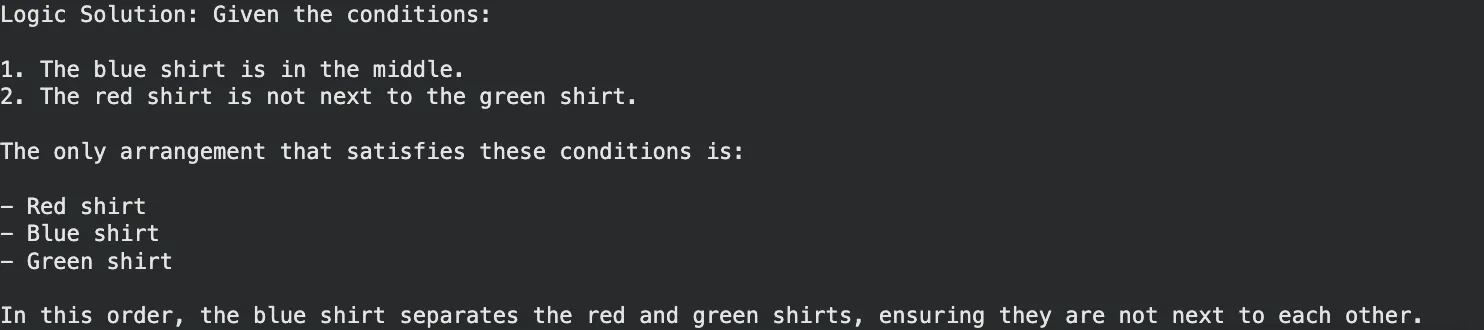
Hands-on Example (Complex Logic):
GPT-4o has the capability of solving a logic puzzle which involves reasoning.
messages = [
   {"role": "user", "content": "I have 3 shirts. One is red, one blue, one green. "
                               "The red is not next to the green. The blue is in the middle. "
                               "What is the order?"}
]

response = client.chat.completions.create(
   model="gpt-4o",
   messages=messages
)

print("Logic Solution:", response.choices[0].message.content)
Output:
The o-Series: Models That Think Before They Speak
Late 2024 and early 2025 OpenAI announced the o-series (o1, o1-mini and o3-mini). These are “reasoning models.” They do not answer immediately but take time to think and devise a strategy unlike the normal GPT models. This renders them math, science, and difficult coding superior.
o1 and o3-mini Highlights:
- Chain of Thought: This model checks its steps internally itself minimizing errors.
- Coding Prowess: o3-mini is designed to be fast and accurate in codes.
- Efficiency: o3-mini is an highly intelligent model at a cheaper price compared to the complete o1 model.
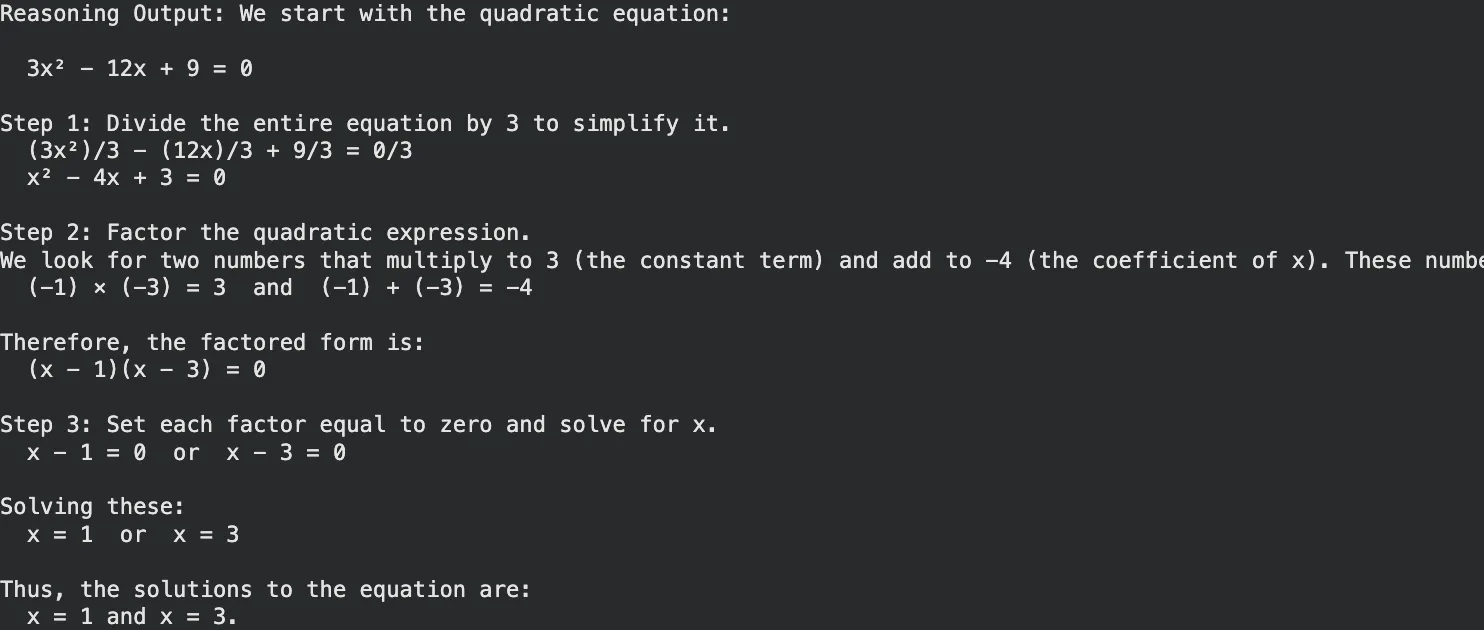
Hands-on Example (Math Reasoning):
Use o3-mini for a math problem where step-by-step verification is crucial.
# Using the o3-mini reasoning model
response = client.chat.completions.create(
   model="o3-mini",
   messages=[{"role": "user", "content": "Solve for x: 3x^2 - 12x + 9 = 0. Explain steps."}]
)

print("Reasoning Output:", response.choices[0].message.content)
Output:
GPT-5 and GPT-5.1: The Next Generation
Both GPT-5 and its optimized version GPT-5.1, which was released in mid-2025, combined the pace and logic. GPT-5 provides built-in thinking, in which the model itself determines when to think and when to respond in a short time. The version, GPT-5.1, is refined to have superior enterprise controls and less hallucinations.
What sets them apart:
- Adaptive Thinking: It takes simple queries down to simple routes and simple reasoning up to hard reasoning routs.
- Enterprise Grade: GPT-5.1 has the option of deep research with Pro features.
- The GPT Image 1: This is an inbuilt menu that substitutes DALL-E 3 to provide smooth image creation in chat.
Hands-on Example (Business Strategy):
GPT-5.1 is very good at the top level strategy which involves general knowledge and structured thinking.
# Example using GPT-5.1 for strategic planning
response = client.chat.completions.create(
   model="gpt-5.1",
   messages=[{"role": "user", "content": "Draft a go-to-market strategy for a new AI coffee machine."}]
)

print("Strategy Draft:", response.choices[0].message.content)
Output:

DALL-E 3 and GPT Image: Visual Creativity
In the case of visual data, OpenAI provides DALL-E 3 and the more recent GPT Image models. These applications will transform textual prompts into beautiful in-depth images. Working with DALL-E 3 will enable you to draw images, logos, and schemes by just describing them.
Read more: Image generation using GPT Image API
Key Capabilities:
- Immediate Action: It strictly observes elaborate instructions.
- Integration: It is integrated into ChatGPT and the API.
Hands-on Example (Image Generation):
This script generates an image URL based on your text prompt.
image_response = client.images.generate(
   model="dall-e-3",
   prompt="A futuristic city with flying cars in a cyberpunk style",
   n=1,
   size="1024x1024"
)

print("Image URL:", image_response.data[0].url)
Output:

Whisper: Speech-to-Text Mastery
Whisper The speech recognition system is the state-of-the-art provided by OpenAI. It has the ability to transcribe audio of dozens of languages striking them into English. It is resistant to background noise and accents. The following snippet of Whisper API tutorial is an indication of how simple it is to use.
Hands-on Example (Transcription):
Make sure you are in a directory with an audio file (named as speech.mp3).
audio_file = open("speech.mp3", "rb")

transcript = client.audio.transcriptions.create(
   model="whisper-1",
   file=audio_file
)

print("Transcription:", transcript.text)Output:

Embeddings and Moderation: The Utility Tools
OpenAI has utility models which are critical to the developers.
- Embeddings (text-embedding-3-small/large): These are used to encode text as numbers (vectors). This enables you to create search engines which can decipher meaning as opposed to keywords.
- Moderation: This is a free API that verifies text content of hate speech, violence, or self-harm to ensure apps are secure.
Hands-on Example (Semantic Search):
This discovers the fact that there is a similarity between a query and a product.
# Get embeddings

resp = client.embeddings.create(
   input=["smartphone", "banana"],
   model="text-embedding-3-small"
)

# In a real app, you compare these vectors to find the best match
print("Vector created with dimension:", len(resp.data[0].embedding))
Output:

Fine-Tuning: Customizing Your AI
Fine-tuning enables training of a model using its own data. GPT-4o-mini or GPT-3.5 can be refined to pick up a particular tone, format or industry jargon. This is mighty in case of enterprise applications, which require no more than general response.
How it works:
- Prepare a JSON file with training examples.
- Upload the file to OpenAI.
- Start a fine-tuning job.
- Use your new custom model ID in the API.
Conclusion
The OpenAI model landscape offers a tool for nearly every digital task. From the speed of GPT-3.5 Turbo to the reasoning power of o3-mini and GPT-5.1, developers have vast options. You can build voice applications with Whisper, create visual assets with DALL-E 3, or analyze data with the latest reasoning models.
The barriers to entry remain low. You simply need an API key and a concept. We encourage you to test the scripts provided in this guide. Experiment with the different models to understand their strengths. Find the right balance of cost, speed, and intelligence for your specific needs. The technology exists to power your next application. It is now up to you to apply it.
Frequently Asked Questions
Q1. What is the difference between GPT-4o and o3-mini?
A. GPT-4o is a general-purpose multimodal model best for most tasks. o3-mini is a reasoning model optimized for complex math, science, and coding problems.
Q2. Is DALL-E 3 free to use via the API?
A. No, DALL-E 3 is a paid model priced per image generated. Costs vary based on resolution and quality settings.
Q3. Can I run Whisper locally for free?
A. Yes, the Whisper model is open-source. You can run it on your own hardware without paying API fees, provided you have a GPU.
Q4. What is the context window of GPT-5.1?
A. GPT-5.1 supports a massive context window (often 128k tokens or more), allowing it to process entire books or long codebases in one go.
Q5. How do I access the GPT-5.1 or o3 models?
A. These models are available to developers via the OpenAI API and to users through ChatGPT Plus, Team, or Enterprise subscriptions.
Harsh Mishra is an AI/ML Engineer who spends more time talking to Large Language Models than actual humans. Passionate about GenAI, NLP, and making machines smarter (so they don’t replace him just yet). When not optimizing models, he’s probably optimizing his coffee intake. 🚀☕