
Let’s be honest! Building AI agents is exciting but debugging them, not so much. As we are pushing the boundaries of agentic AI the complexity of our system is skyrocketing. We have all been there staring at a trace with hundreds of steps, trying to figure out why agent hallucinated or chose the wrong tool. Integrated into LangSmith, Polly is an AI-powered assistant designed to help developers debug, analyze, and engineer better agents. It is a meta layer of intelligence, ironically an Agent for Agents. This article goes over Polly setup, its capabilities, and how it helps in creating better agents.
Table of contents
Why Do We Need an Agent for Agents?
The transition from simple LLM chains to autonomous agents has introduced a new class of debugging challenges that manual inspection can no longer solve efficiently. Langchain identified that agents are fundamentally harder to engineer due to three factors:
- Massive System prompts: Instructions often span hundreds or thousands of lines making it nearly impossible to pinpoint which specific sentence caused a behaviour degradation.
- Deep execution Traces: When a single agent runs it generates thousands of data points across multiple steps, creating a volume of logs that is overwhelming for a human review.
- Long-Context State: Multi-turn conversations can span hours or days, requiring a debugger to understand the entire interaction history to diagnose why a decision was made.
Polly solves this by acting as a partner that understands agent’s architectures, allowing you to bypass manual log scanning and instead ask natural language questions about your system’s performance.
How to Set Up Polly?
Since Polly is an embedded feature of LangSmith, you don’t install Polly directly. Instead, you enable LangSmith tarcing in your application. Once your agent’s data is flowing into the platform, Polly activates automatically.
Step 1: Install LangSmith
First, ensure you have LangSmith SDK in your environment. Run the following command in the command line of your operating system:
pip install –U langsmith Step 2: Configure environment variables
Get your API key from the LangSmith setting page and set the folowing environment variables. This tells your application to start logging traces to LangSmith cloud.
import os

# Enable tracing (required for Polly to see your data)
os.environ["LANGSMITH_TRACING"] = "true"

# Set your API Key
os.environ["LANGSMITH_API_KEY"] = "ls__..."

# Optional: Organize your traces into a specific project
os.environ["LANGSMITH_PROJECT"] = "my-agent-production"
Step 3: Run Your Agent
That’s it, If you’re using LangChain, tracing is automatic. If, you’re using the OpenAI SDK directly wrap your client to enable visibility.
from openai import OpenAI
from langsmith import wrappers

# Wrap the OpenAI client to capture inputs/outputs automatically
client = wrappers.wrap_openai(OpenAI())

# Run your agent as normal
response = client.chat.completions.create(
model="gpt-4o",
messages=[{"role": "user", "content": "Analyze the latest Q3 financial report."}]
)
Once you run the above steps, navigate to the trace view or threads view in the LangSmith UI. You will see a Polly icon in the bottom right corner.
Polly’s Core Capabilities
Polly is not just a chatbot wrapper. It is deeply integrated into the LangSmith infrastructure to perform three critical tasks:
Task 1: Deep Trace Debugging
In the Trace view, Polly analyses individual agent executions to identify subtle failure modes that might be buried in the middle of a long run. You can ask specific diagnostic questions like:
- “Did the agent make any mistakes?”
- “Where exactly things go wrong”
- “Why did the agent choose this approach instead of that one”
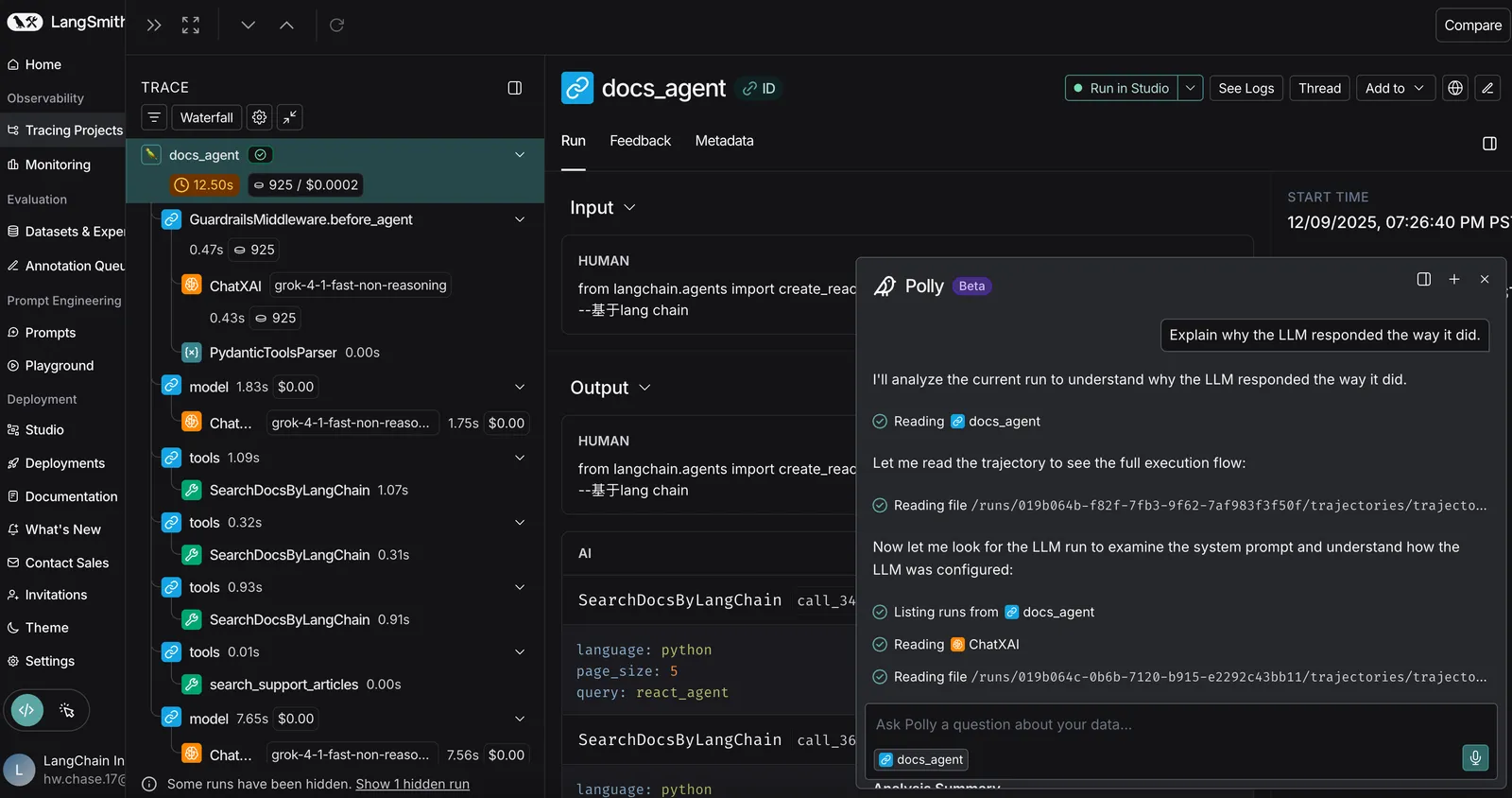
Polly doesn’t just surface information. It understands agent behaviour patterns and can identify issues you’d miss.
Task 2: Thread-level Context Analysis
Debugging state is notoriously difficult, especially when an agent works fine for ten turns and fails on the eleventh. Polly can access information from entire conversation threads, allowing it to spot patterns over time, summarize interactions, and identify exactly when and why an agent lost track of critical context.
You can ask questions like:
- “Summarize what happened across multiple interactions”
- “Identify patterns in agent behaviour over time”
- “Spot when the agent lost track of important context”
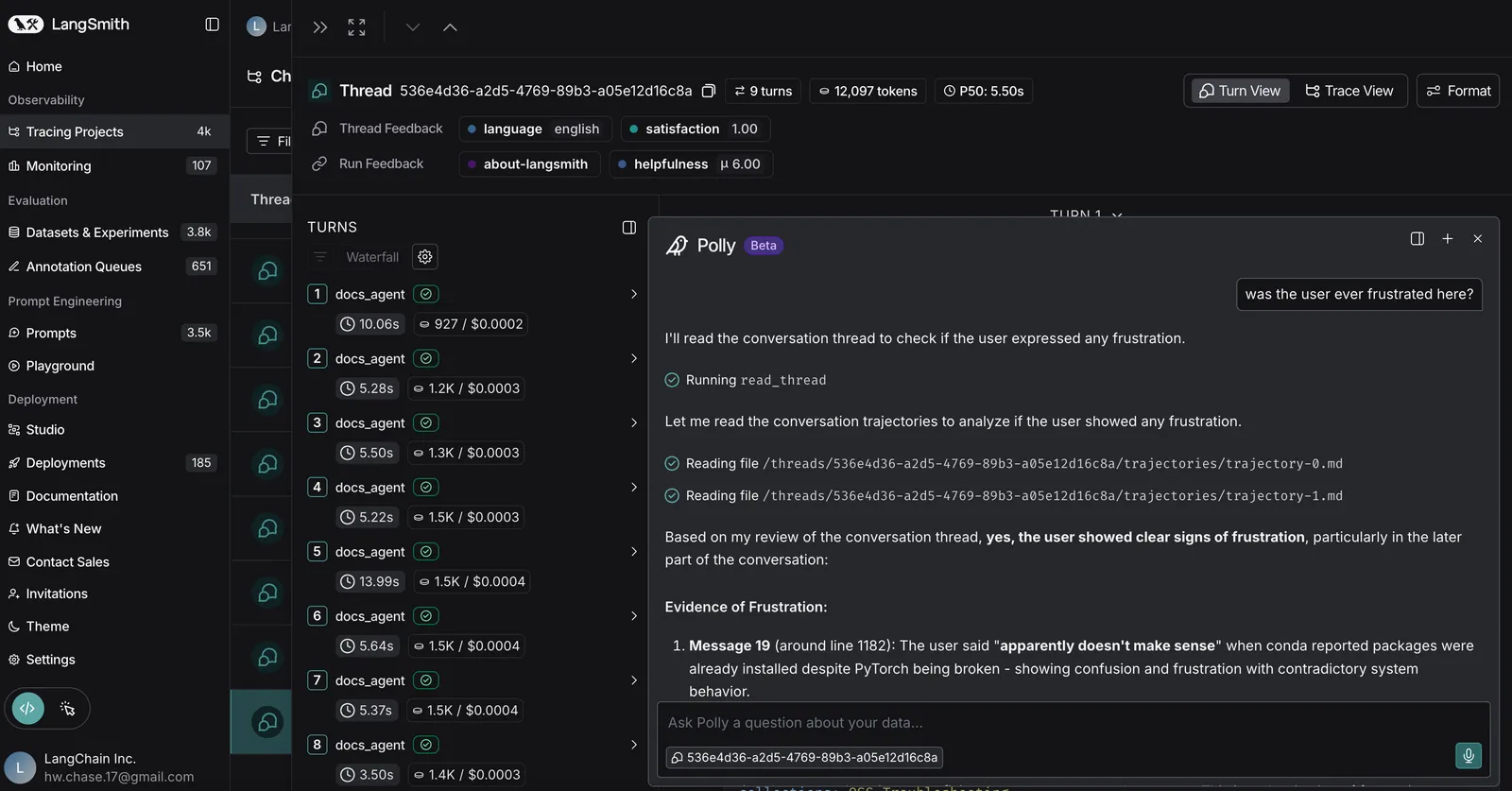
This is especially powerful for debugging those frustrating issues where the agent was working fine and then suddenly it wasn’t. Polly can pinpoint exactly where and why things changed.
Task 3: Automated Prompt Engineering
Perhaps the most powerful feature for developers is Polly’s ability to act as an expert prompt engineer. The system prompt is the brain of any deep agent, and Polly can help iterate on it. You can describe the desired behaviour in natural language, and polly will update the prompt, define structured output schemas, configure tool definitions, and optimize prompt length without losing critical instructions.
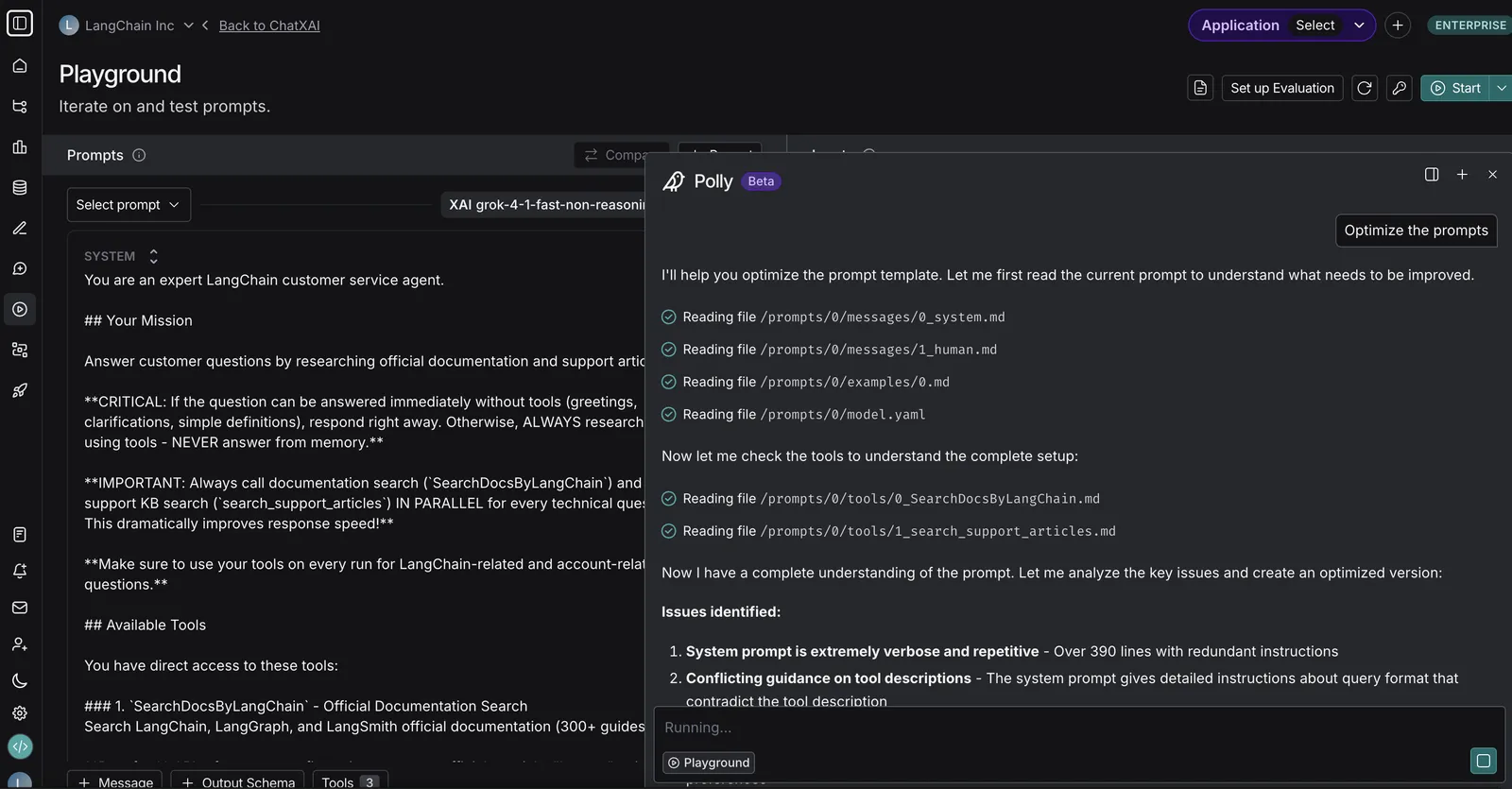
Building and Debugging a Research Assistant Agent
Now let’s build a simple Weather Agent using LangChain. Using this we will understand how Polly solves debugging challenges.
Step 1: Defining our Agent
Code:
import os

from langchain_openai import ChatOpenAI
from langchain_core.tools import tool
from langchain.agents import create_tool_calling_agent, AgentExecutor
from langchain_core.prompts import ChatPromptTemplate


# Set environment variables
os.environ["LANGSMITH_TRACING"] = "true"
os.environ["LANGSMITH_ENDPOINT"] = "YOUR LANGSMITH ENDPOINT"
os.environ["LANGSMITH_API_KEY"] = "YOUR LANGSMITH API KEY"
os.environ["LANGSMITH_PROJECT"] = "YOUR PROJECT NAME"
os.environ["OPENAI_API_KEY"] = "YOUR OPENAI API KEY"


@tool
def get_weather(city: str) -> str:
    """Get weather for a given city."""
    return f"It's always sunny in {city}!"


# Initialize the model
llm = ChatOpenAI(model="gpt-4o")

# Define tools
tools = [get_weather]

# Define the prompt
prompt = ChatPromptTemplate.from_messages([
    ("system", "You are a helpful assistant"),
    ("human", "{input}"),
    ("placeholder", "{agent_scratchpad}"),
])

# Create the agent
agent = create_tool_calling_agent(llm, tools, prompt)

# Create the executor
agent_executor = AgentExecutor(
    agent=agent,
    tools=tools,
    verbose=True
)

# Run the agent
agent_executor.invoke(
    {"input": "What is the weather in San Francisco?"}
)
Output:
It's always sunny in San Francisco!
This works perfectly but let’s try multi turn or complex queries to see where things go wrong.
We ask a query followed by a follow up questions and see if it works correctly:
response = agent_executor.invoke({"messages": [("user", "What is the weather in San Francisco?")]})

# Print the response
print(response["messages"][-1].content)
print("\n--- Second Query ---")

# Same agent, now traced
response = agent_executor.invoke({
"messages": [{"role": "user", "content": "Weather in SF today and tomorrow?"}]
})

print(response["messages"][-1].content)
print("\n--- Third Query (Stateless Follow-up) ---")

# Follow-up (fails to remember SF because no memory/checkpointing is used)
response = agent_executor.invoke({
"messages": [{"role": "user", "content": "What about evening?"}]
})

print(response["messages"][-1].content)
Output:
1. The first query calls get_weather(“San Francisco”) and responds correctly.
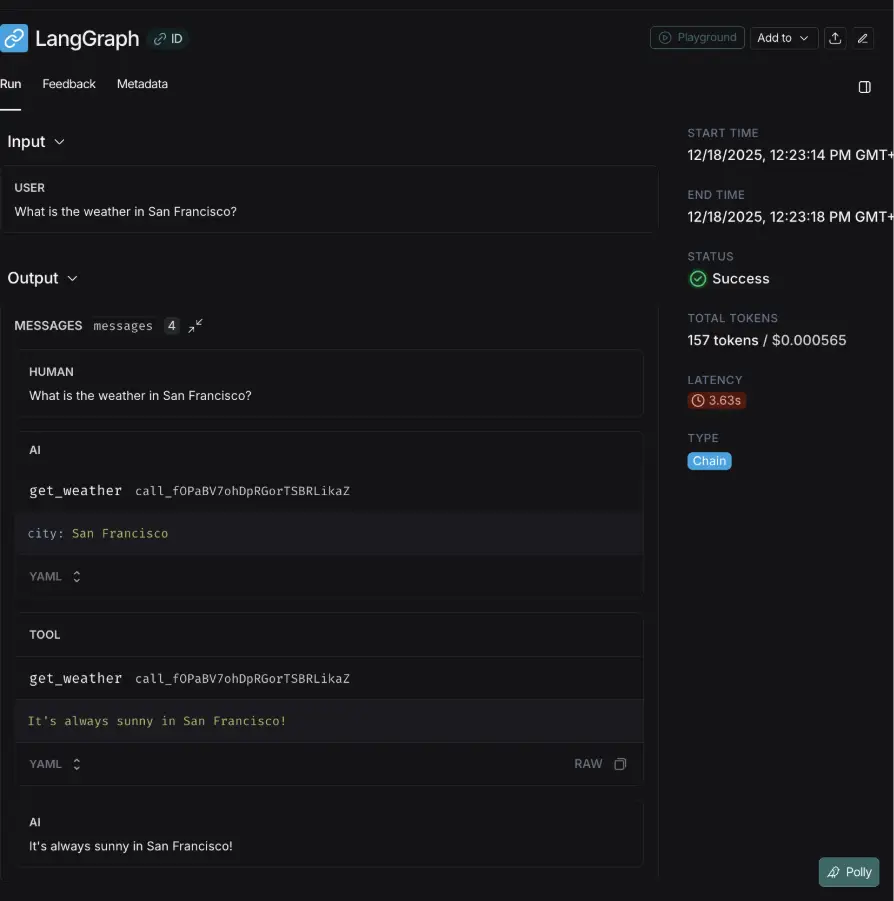
2. Second query behaved reasonably and we got the correct response.
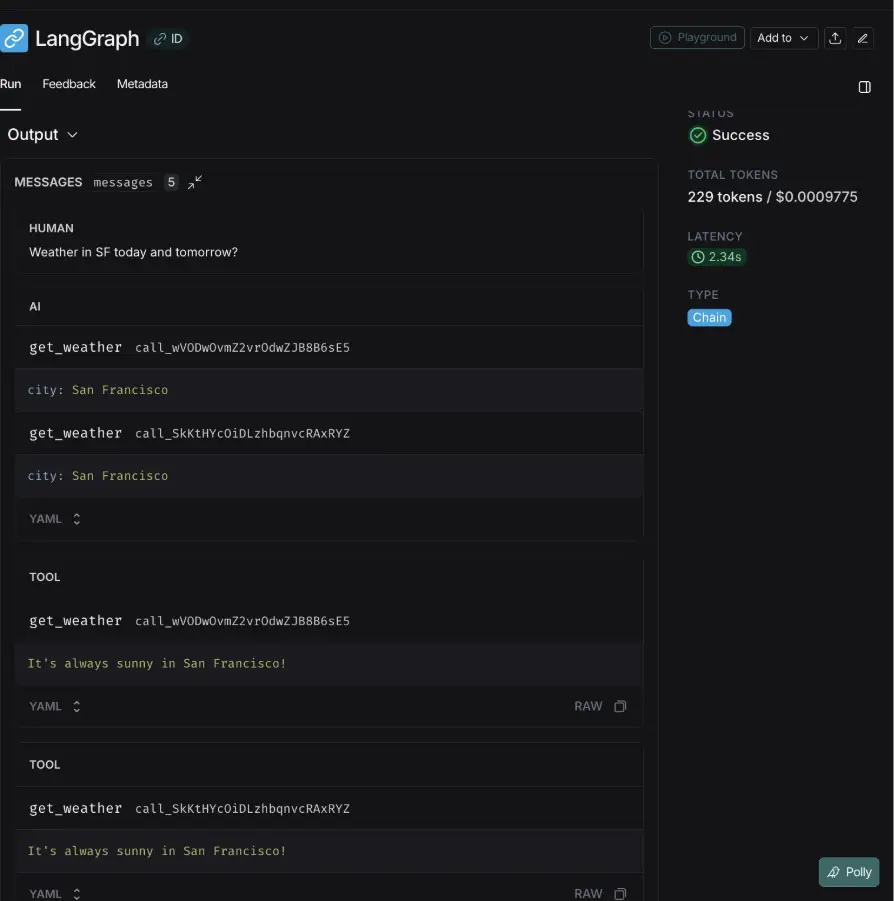
3. Now this is where things get interesting, since this was a stateless call, the agent asked for clarification.
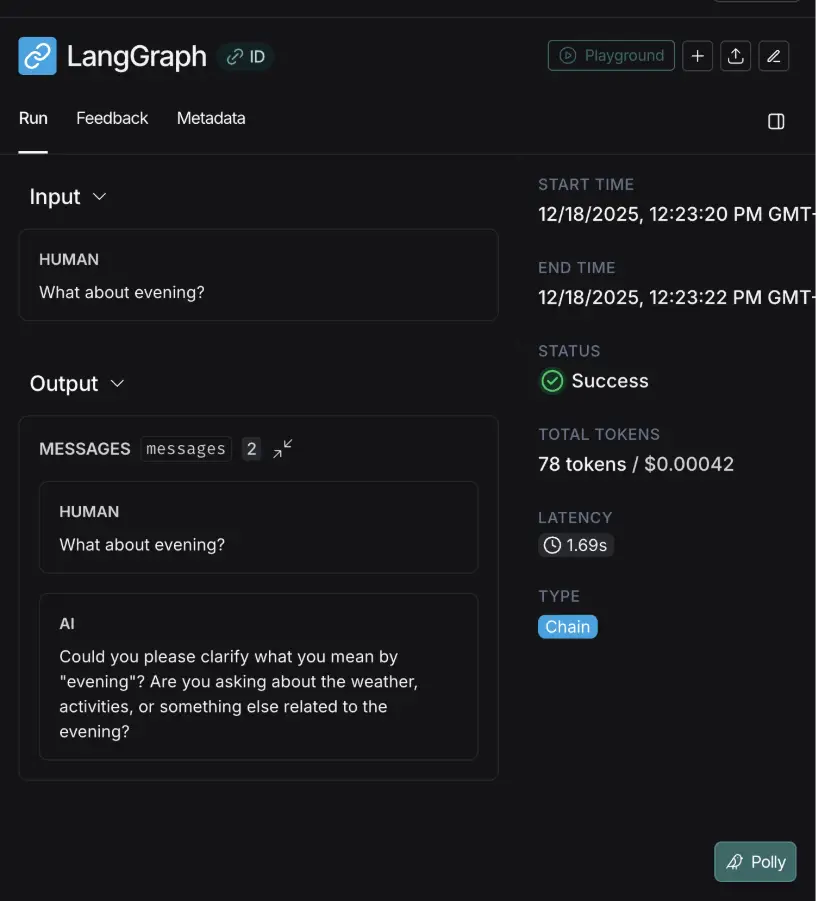
Now that we have identified the issues in traces, lets debug it with Polly.
Step 2: Debugging with Polly
To debug using Polly
- Go to your project
- Open any trace
- Click on Polly’s icon
- Ask your questions
Now, I’ll ask Polly:
“Did the agent correctly infer that ‘evening’ refers to the weather in San Francisco?”
And Polly responded with an explanation like:
“The agent failed to maintain context from the previous conversation (which presumably was about San Francisco weather) and instead asked the user to clarify their intent. This suggests the agent did not have sufficient context awareness or memory to infer that “evening” was a continuation of a weather-related query about San Francisco.”
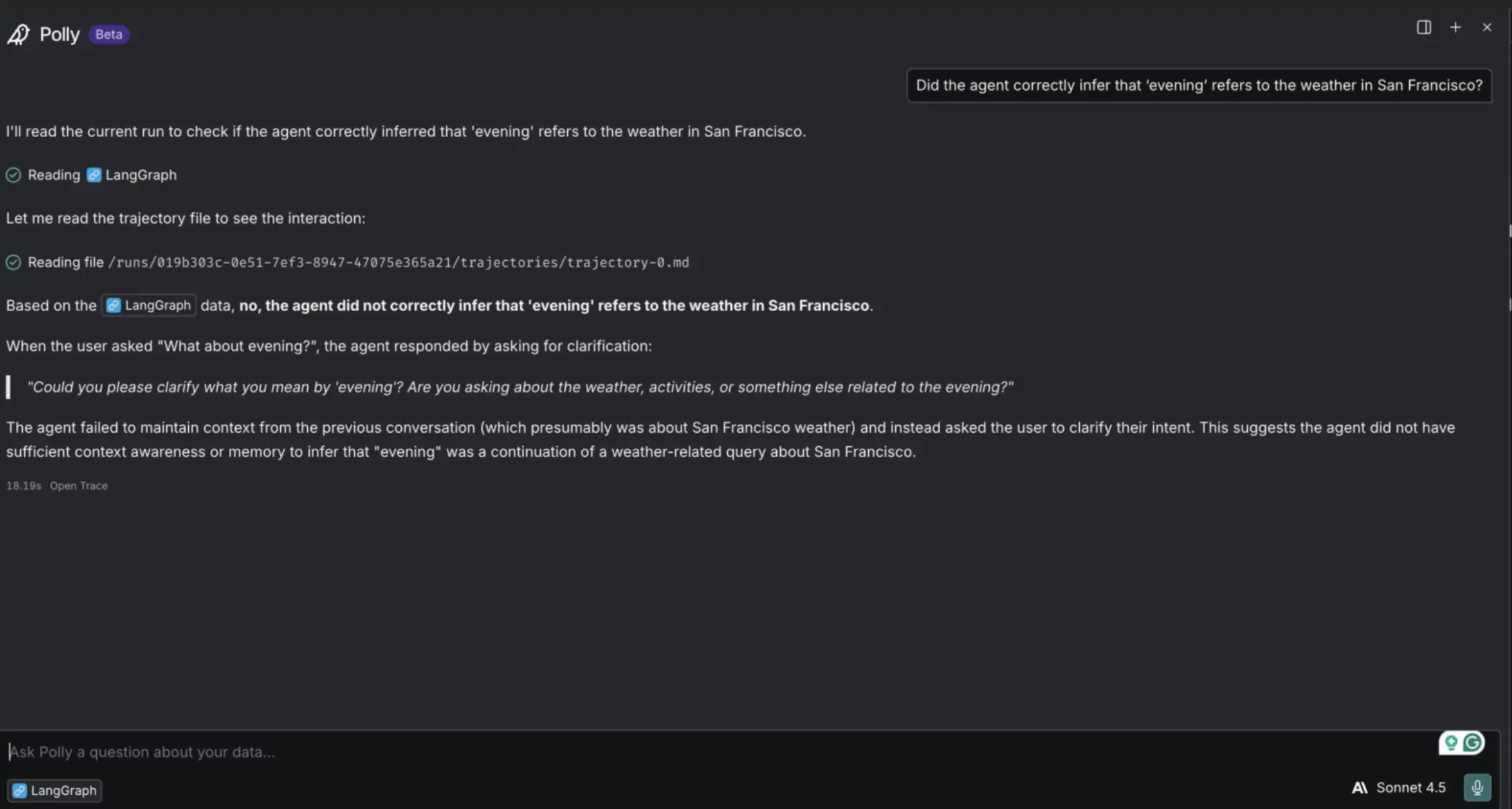
This is exactly the diagnosis a human would arrive at after digging through the trace. Even though this was a very simple problem, Polly surfaces it instantly, in plain language. It connects the user’s intent, the missing context, and the root cause giving you a precise starting point for improving your agent.
This will be useful when you are working with a complex multi agentic system, making it easier for you to debug.
How it Works Under the Hood?
Polly’s intelligence is built on top of LangSmith robust tracing infrastructure which captures everything your agent does. It ingests three layers of data.
- Runs: Individual steps like LLM calls and tool executions
- Traces: A single execution of your agent, made up of a tree of runs.
- Threads: A full conversation, containing multiple traces.
Because LangSmith already captures the inputs, outputs, latency, and token counts for every step, Polly has perfect information about the agent’s world. It doesn’t need to guess what happened.
Conclusion
Polly represents a significant shift in how we approach the lifecycle of AI development. It acknowledges that as our agents become more autonomous and complex, the tools we use to maintain them must evolve in parallel. By transforming debugging from a manual, forensic search through logs into a natural language dialogue, Polly allows developers to focus less on hunting for errors and more on architectural improvements. Ultimately, having an intelligent partner that understands your system’s state isn’t just a convenience, it is becoming a necessity for engineering the next generation of reliable, production-grade agents.
Frequently Asked Questions
Q1. What problem does Polly actually solve?
A. It helps you debug and analyze complex agents without digging through enormous prompts or long traces. You can ask direct questions about mistakes, decision points, or odd behavior, and Polly pulls the answers from your LangSmith data.
Q2. How do I enable Polly in my project?
A. You just turn on LangSmith tracing with the SDK and your API key. Once your agent runs and logs show up in LangSmith, Polly becomes available automatically in the UI.
Q3. What makes Polly different from a normal chatbot?
A. It has full access to runs, traces, and threads, so it understands how your agent works internally. That context lets it diagnose failures, track long-term behavior, and even help refine system prompts.
I am a Data Science Trainee at Analytics Vidhya, passionately working on the development of advanced AI solutions such as Generative AI applications, Large Language Models, and cutting-edge AI tools that push the boundaries of technology. My role also involves creating engaging educational content for Analytics Vidhya’s YouTube channels, developing comprehensive courses that cover the full spectrum of machine learning to generative AI, and authoring technical blogs that connect foundational concepts with the latest innovations in AI. Through this, I aim to contribute to building intelligent systems and share knowledge that inspires and empowers the AI community.







