
The LangChain ecosystem provides an important set of tools with which to construct an application using Large Language Models (LLMs). However, when the names of the companies such as LangChain, LangGraph, LangSmith, and LangFlow are mentioned, it is often difficult to know where to begin. This is a guide that shows an easy way around this confusion. Here, we will examine the purpose of each of the tools and demonstrate their interaction. We shall narrow down to a practical, hands-on case of the development of multi-agent systems using these tools. Throughout the article, you will be taught how to use LangGraph to orchestrate and LangSmith to debug. We are also going to use LangFlow as a prototyping item. Overall, once you go through this article, you will be well informed of how to select the appropriate tools to use in your projects.
Table of contents
- The LangChain Ecosystem at a Glance
- LangChain: The Foundational Framework
- LangGraph: For Complex, Stateful Agents
- LangFlow: The Visual IDE for Prototyping
- LangSmith: Observability and Testing Platform
- LangChain vs LangGraph vs LangSmith vs LangFlow
- Choosing Your Toolkit: A Practical Guide
- Conclusion
- Frequently Asked Questions
The LangChain Ecosystem at a Glance
Let’s start with a quick look at the main tools.
- LangChain: This is the core framework. It provides you with the building blocks of the LLM applications. Consider it a catalogue of parts. It comprises models, prompt templates, and data connector simple interfaces. The entire LangChain ecosystem is based on LangChain.
- LangGraph: This is a complex and stateful agent construction library. Whereas LangChain is good with simple chains, with LangGraph, you can build loops, branches, and multi-step workflows. LangGraph is best when it comes to orchestrating multi-agent systems.
- LangSmith: A monitoring and testing platform for your LLM applications. It allows you to follow the tracing of your chains and agents that are important in troubleshooting. One of the important steps to transition a prototype to a production application is LangSmith to debug a complex workflow.
- LangFlow: A visual Builder and Experimenter of LangChain. LangFlow prototyping has a drag-and-drop interface, so you can write little code to make and try ideas very quickly. It is an excellent learning and team-working experience.
These tools do not compete with each other. They are structured in a manner that they have to be used together. LangChain gives you the parts, LangGraph will put them together into more complex machines, LangSmith will test whether the machines were functioning properly, and LangFlow will give you a sandbox where you can write machines.
Let us explore each of these in detail now.
1. LangChain: The Foundational Framework
The fundamental open-source system is LangChain (read all about it here). It links LLMs to outside data stores and tools. It objectifies elements such as building blocks. This allows you to create linear chains of sequence, known as Chains. Most projects involving the development of LLM have LangChain as their foundation.
Best For:
- An interactive chatbot out of a strict program.
- Machine learning-based augmented retrieval pipelines.
- Liner workflows – the workflows that are followed sequentially.
Core Concept: Chains and LangChain Expression Language (LCEL). LCEL involves the use of the pipe symbol ( ) to connect components to each other. This forms a readable and clear flow of data.
Maturity and Performance: LangChain is the oldest tool of the ecosystem. It has an enormous following and more than 120,000 stars on GitHub. The structure is minimalistic. It has a low overhead of performance. It is already ready to use and deployed in thousands of applications.
Hands-on: Building a Basic Chain
This example shows how to create a simple chain. The chain will produce a joke of professional content about a particular topic.
from langchain_openai import ChatOpenAI
from langchain_core.prompts import ChatPromptTemplate

# 1. Initialize the LLM model. We use GPT-4o here.
model = ChatOpenAI(model="gpt-4o")

# 2. Define a prompt template. The {topic} is a variable.
prompt = ChatPromptTemplate.from_template("Tell me a professional joke about {topic}")

# 3. Create the chain using the pipe operator (|).
# This sends the formatted prompt to the model.
chain = prompt | model

# 4. Run the chain with a specific topic.
response = chain.invoke({"topic": "Data Science"})

print(response.content)
Output:

2. LangGraph: For Complex, Stateful Agents
LangGraph is a continuation of LangChain. It adds loops and state administration (read all about it here). The flows of LangChain are linear (A-B-C). In contrast, loops and branches (A-B-A) are permitted in LangGraph. This is crucial to agentic processes where an AI would need to rectify itself or replicate functions. It is these complexity needs that are put to the test most in the LangChain vs LangGraph decision.
Best For:
- Agents cooperating in Multi-agent systems.
- Agents of autonomous research loop between tasks.
- Processes that involve the recollection of past actions.
Core Concept: The nodes are functions, and the edges are paths in LangGraph. There is a common object of the state that goes through the graph, and information is shared across nodes.
Maturity and Performance: the new standard of enterprise agents is LangGraph. It achieved a stable 1.0 in late 2025. It is developed to sustain, long lasting, tasks that are resistant to crashes of the server. Albeit it contains greater overhead than LangChain, this is an imperative trade-off to create powerful-stateful systems.
Hands-on: A Simple “Self-Correction” Loop
A simple graph is formed in this example. A drafter node and a refiner node make a draft better and better. It represents a simple melodramatic agent.
from typing import TypedDict
from langgraph.graph import StateGraph, START, END

# 1. Define the state object for the graph.
class AgentState(TypedDict):
   input: str
   feedback: str

# 2. Define the graph nodes as Python functions.
def draft_node(state: AgentState):
   print("Drafter node executing...")
   # In a real app, this would call an LLM to generate a draft.
   return {"feedback": "The draft is good, but needs more detail."}

def refine_node(state: AgentState):
   print("Refiner node executing...")
   # This node would use the feedback to improve the draft.
   return {"feedback": "Final version complete."}

# 3. Build the graph.
workflow = StateGraph(AgentState)
workflow.add_node("drafter", draft_node)
workflow.add_node("refiner", refine_node)

# 4. Define the workflow edges.
workflow.add_edge(START, "drafter")
workflow.add_edge("drafter", "refiner")
workflow.add_edge("refiner", END)

# 5. Compile the graph and run it.
app = workflow.compile()
final_state = app.invoke({"input": "Write a blog post"})
print(final_state)
Output:

3. LangFlow: The Visual IDE for Prototyping
LangFlow, a prototyping language, is a drag-and-drop interface to the LangChain ecosystem (read in detail here). It allows you to see the data flow of your LLM app. It is ideal in the case of non-coders or developers who need to build and test ideas fast.
Best For:
- Quick modelling of new application concepts.
- Visualising the ideas of AI.
- Best for non-technical members of the team.
Core Concept: A low-code/no-code canvas where you connect components visually.
Maturity and Performance: The LangFlow prototype is ideal during the design stage. Although deploying flows is possible with Docker, high-traffic applications can usually be provided by exporting the logic into pure Python code. The community interest on this is enormous, which demonstrates its importance for rapid iteration.
Hands-on: Building Visually
You can test your logic without writing a single line of Python.
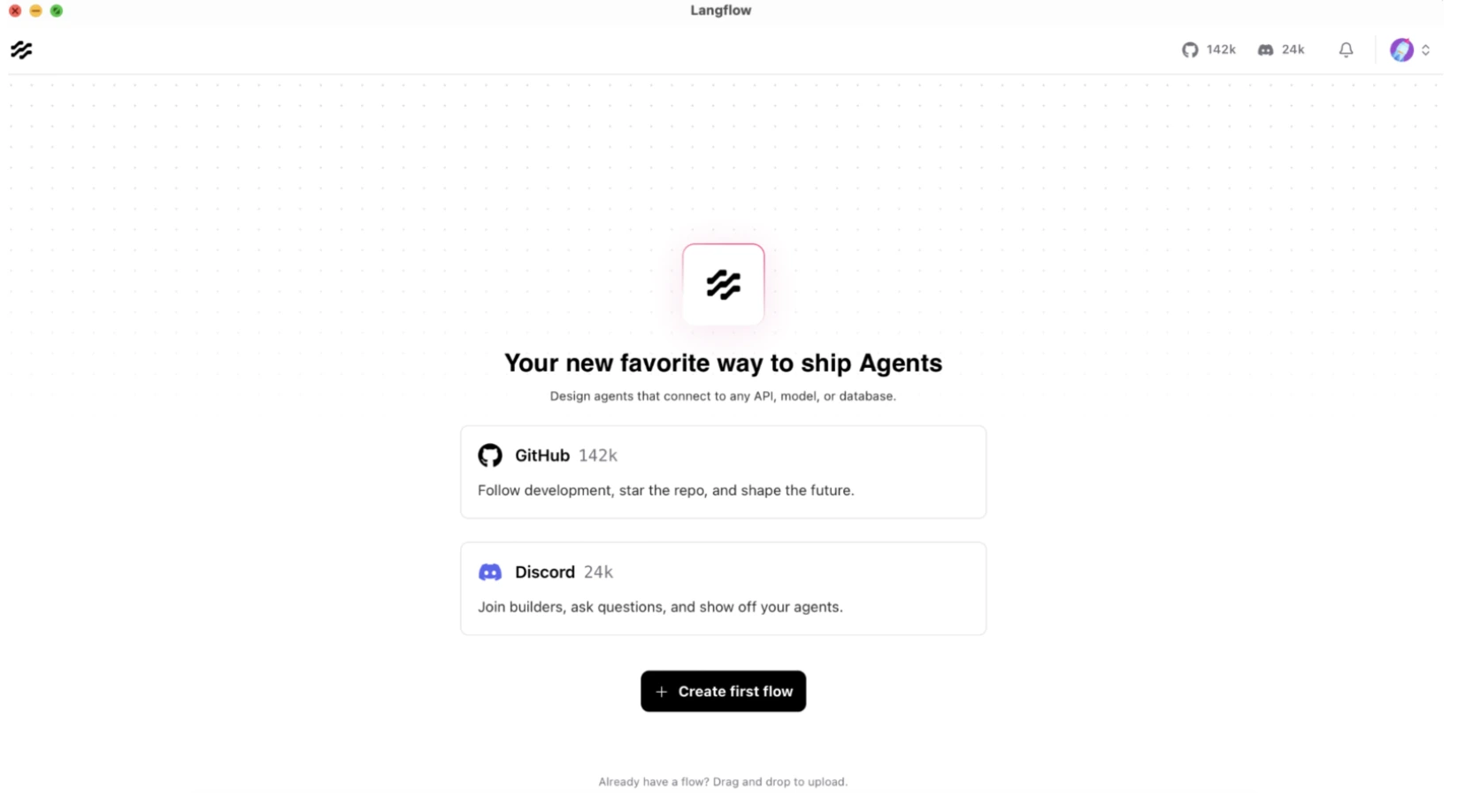
1. Install and Run: Open your browser and head over to https://www.langflow.org/desktop. Provide the details and download the LangFlow application according to your system. We are using Mac here. Open the LangFlow application, and it will look like this:
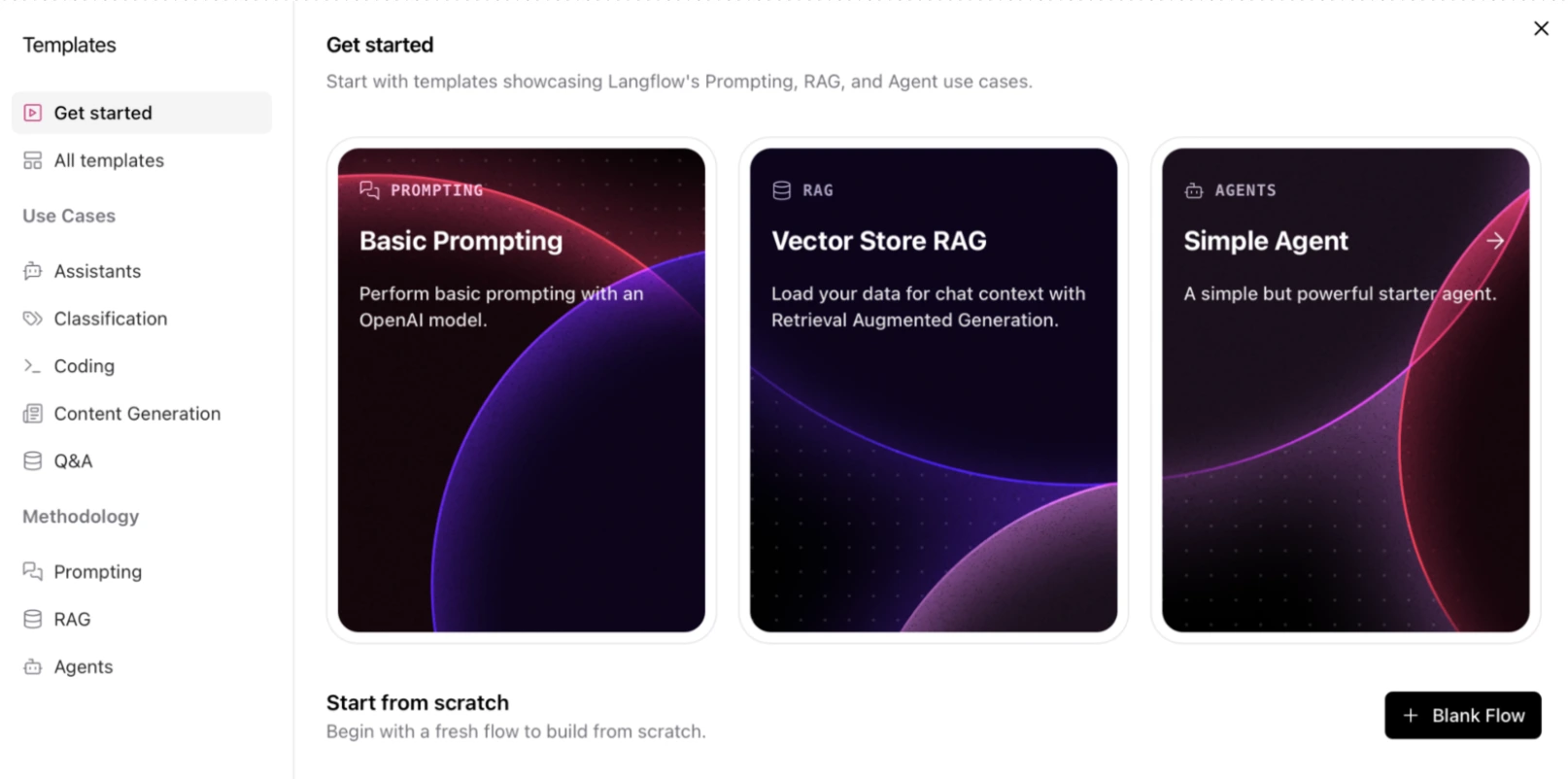
2. Select template: For a simple run, select the “Simple Agen”t option from the template
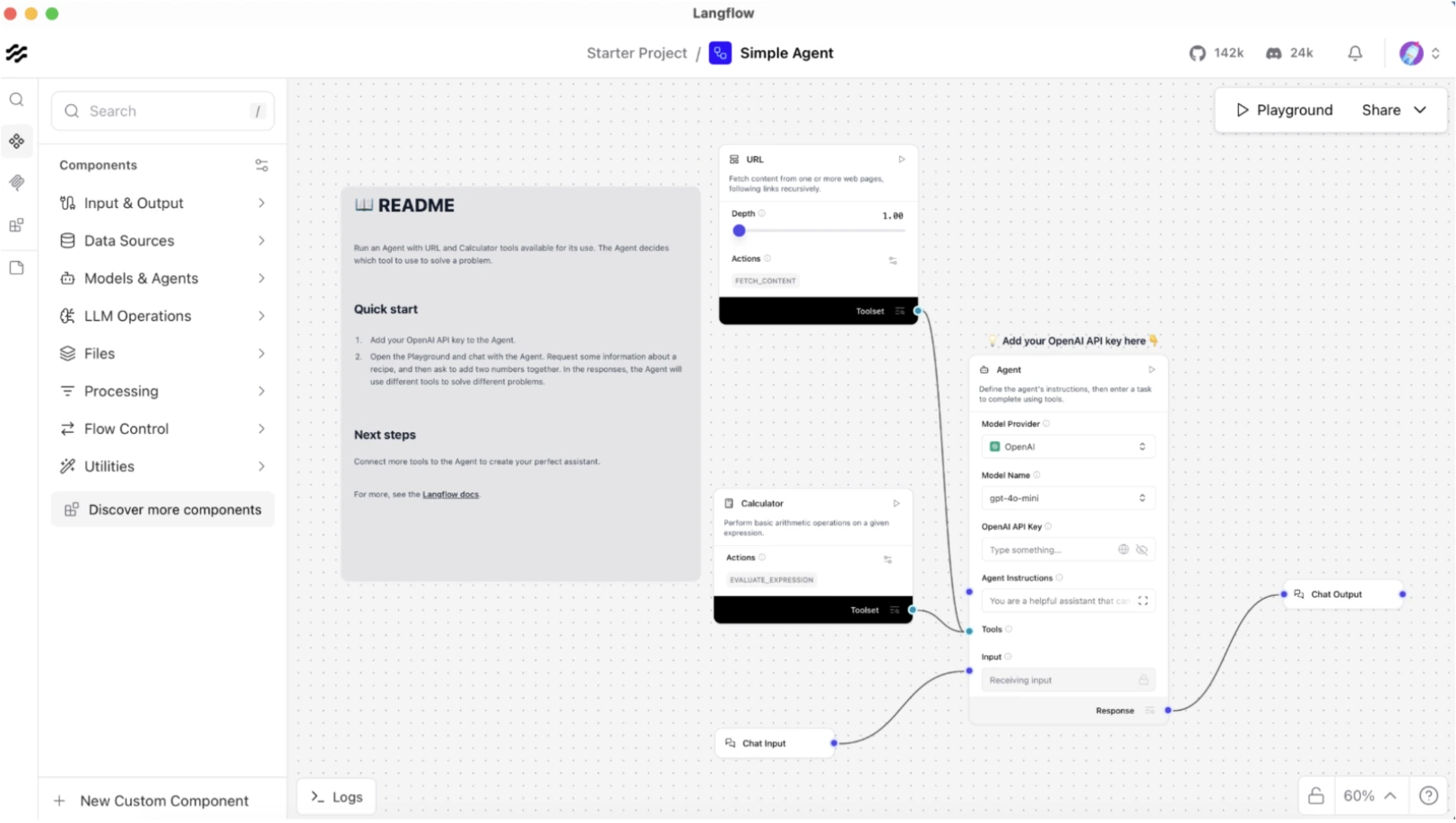
3. The Canvas: On the new canvas, drag an “OpenAI” component and a “Prompt” component from the side menu. As we selected the Simple Agent template, it will look like this with minimal components.
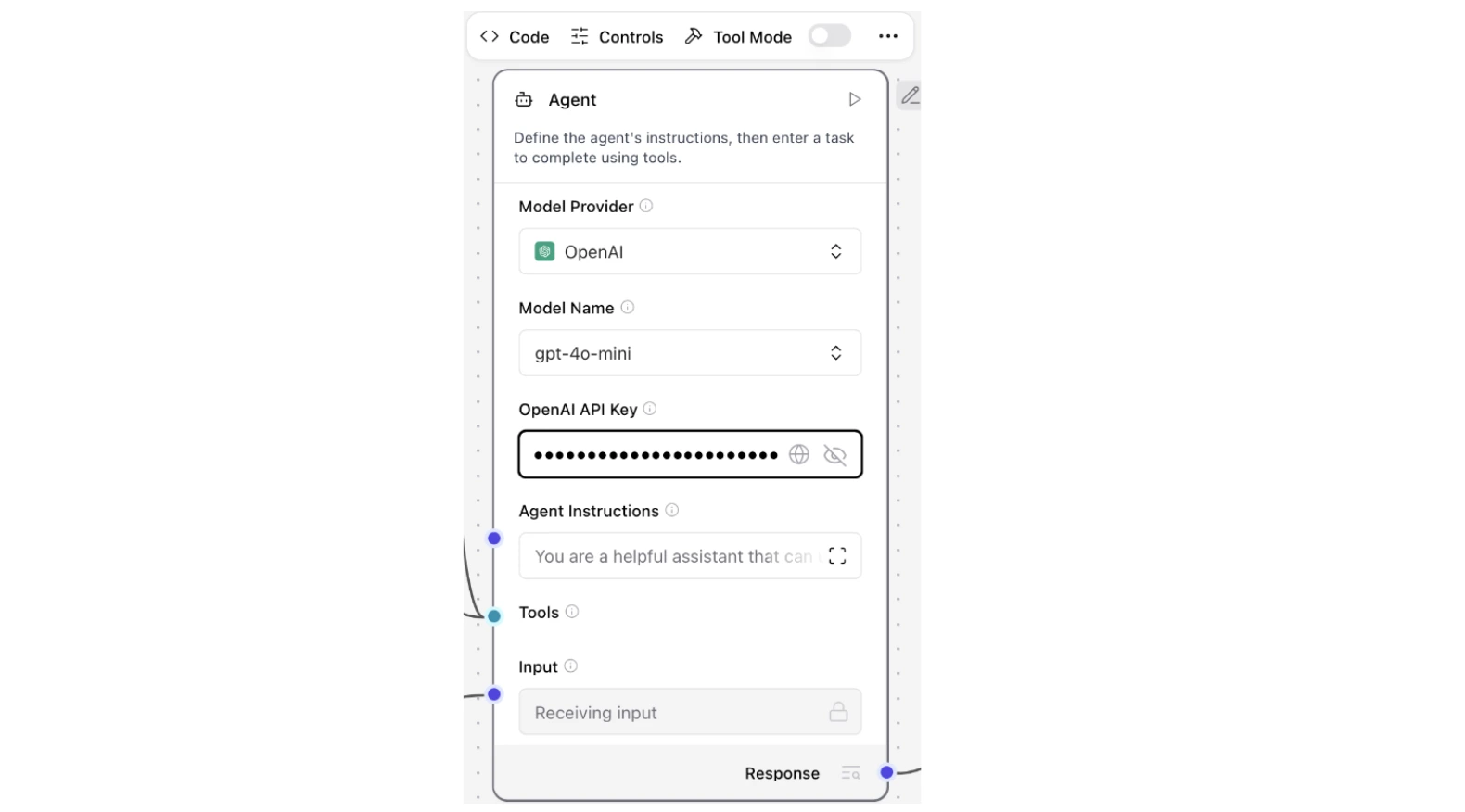
4. The API Connection: Click the OpenAI component and fill the OpenAI API Key in the text field.
5. The Result: Now the simple agent is ready to test. Click on the “Playground” option from the top right to test your agent.
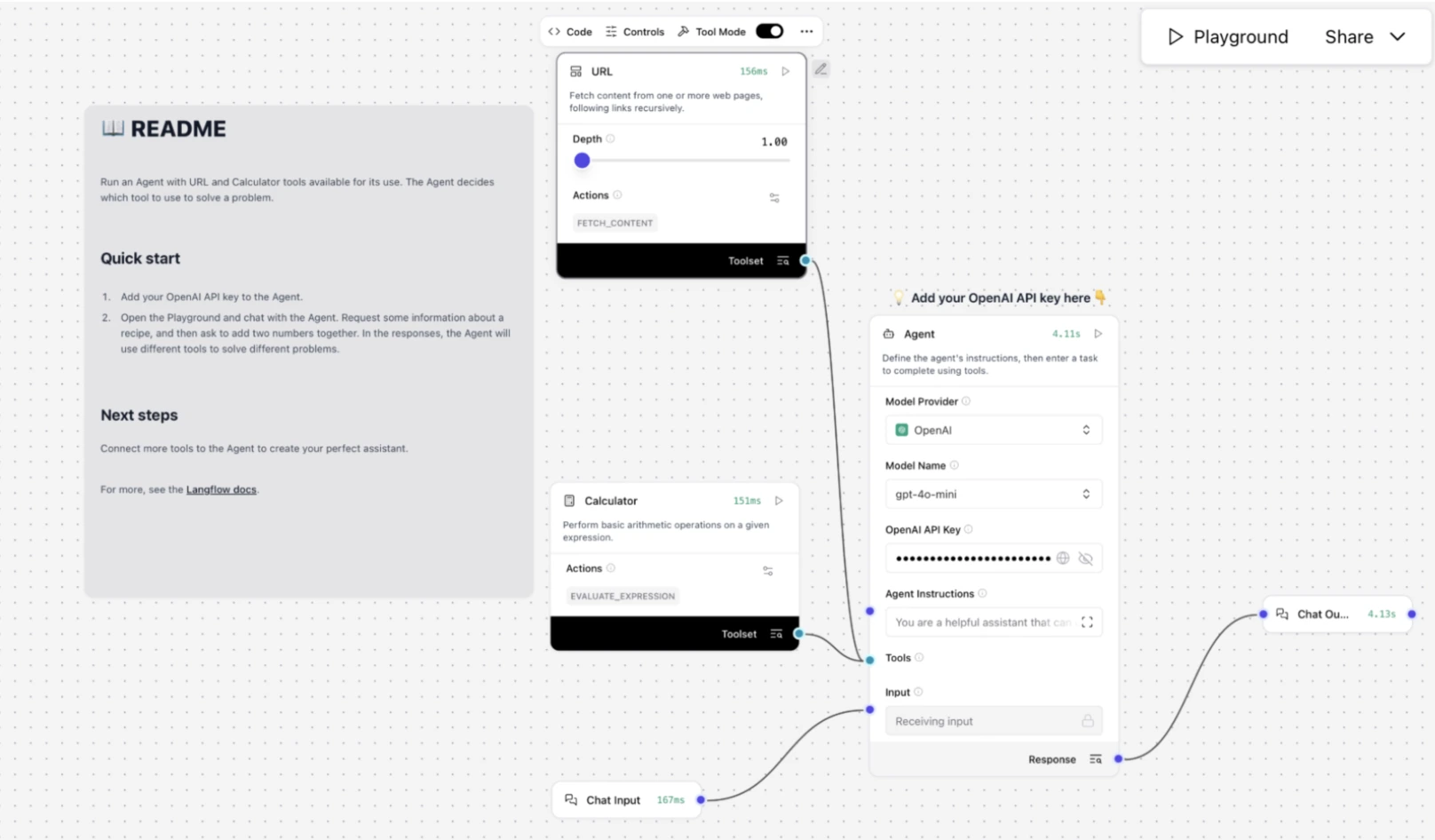
You can see that our simple agent has two built-in tools. First, a Calculator tool, which is used to evaluate the expression. Another is a URL tool used to access content inside the URL.
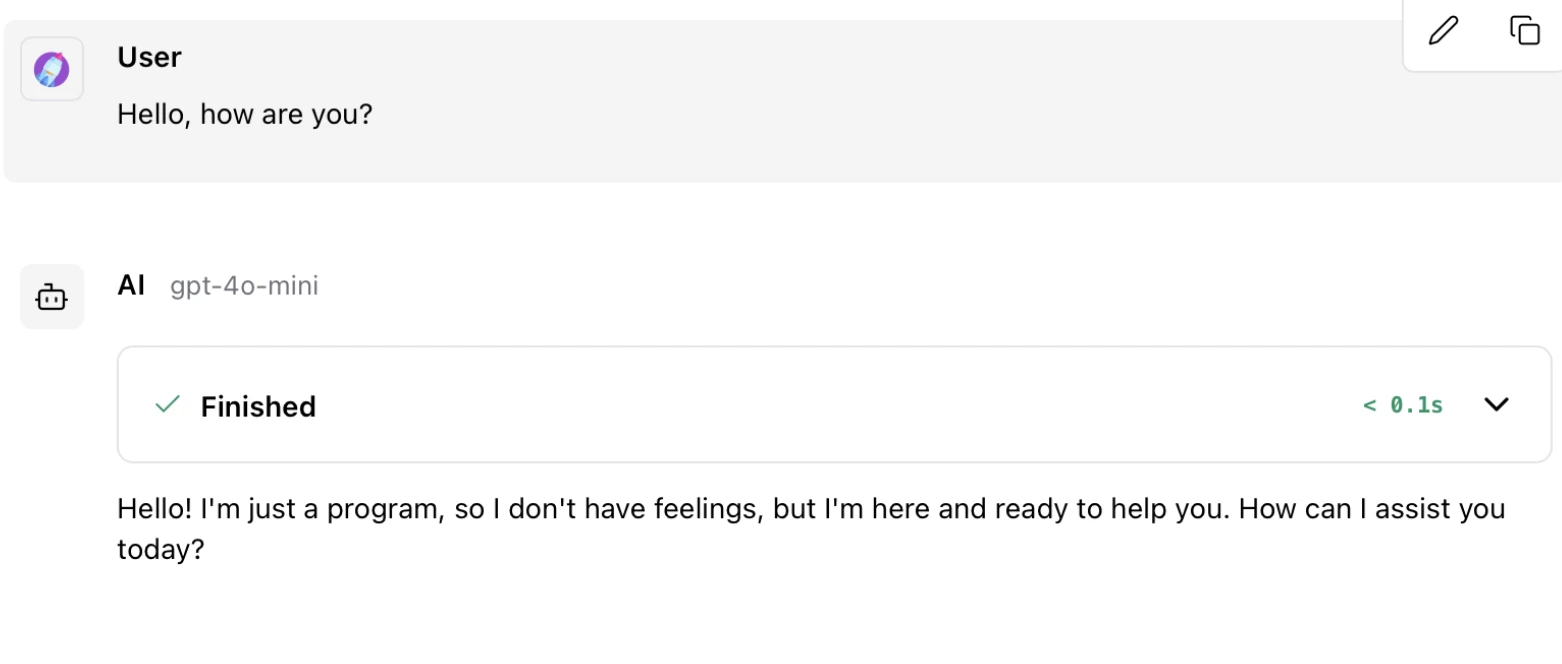
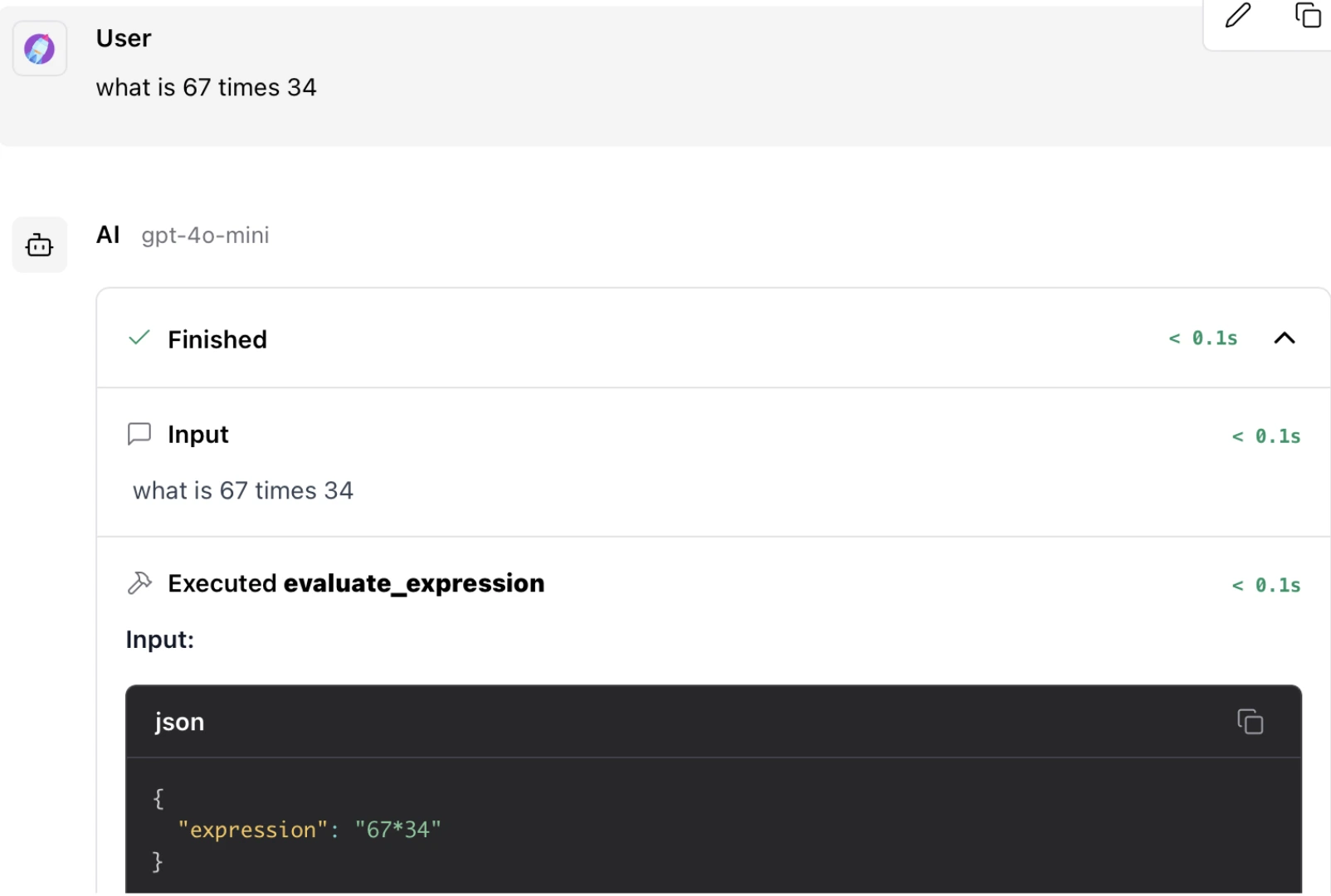
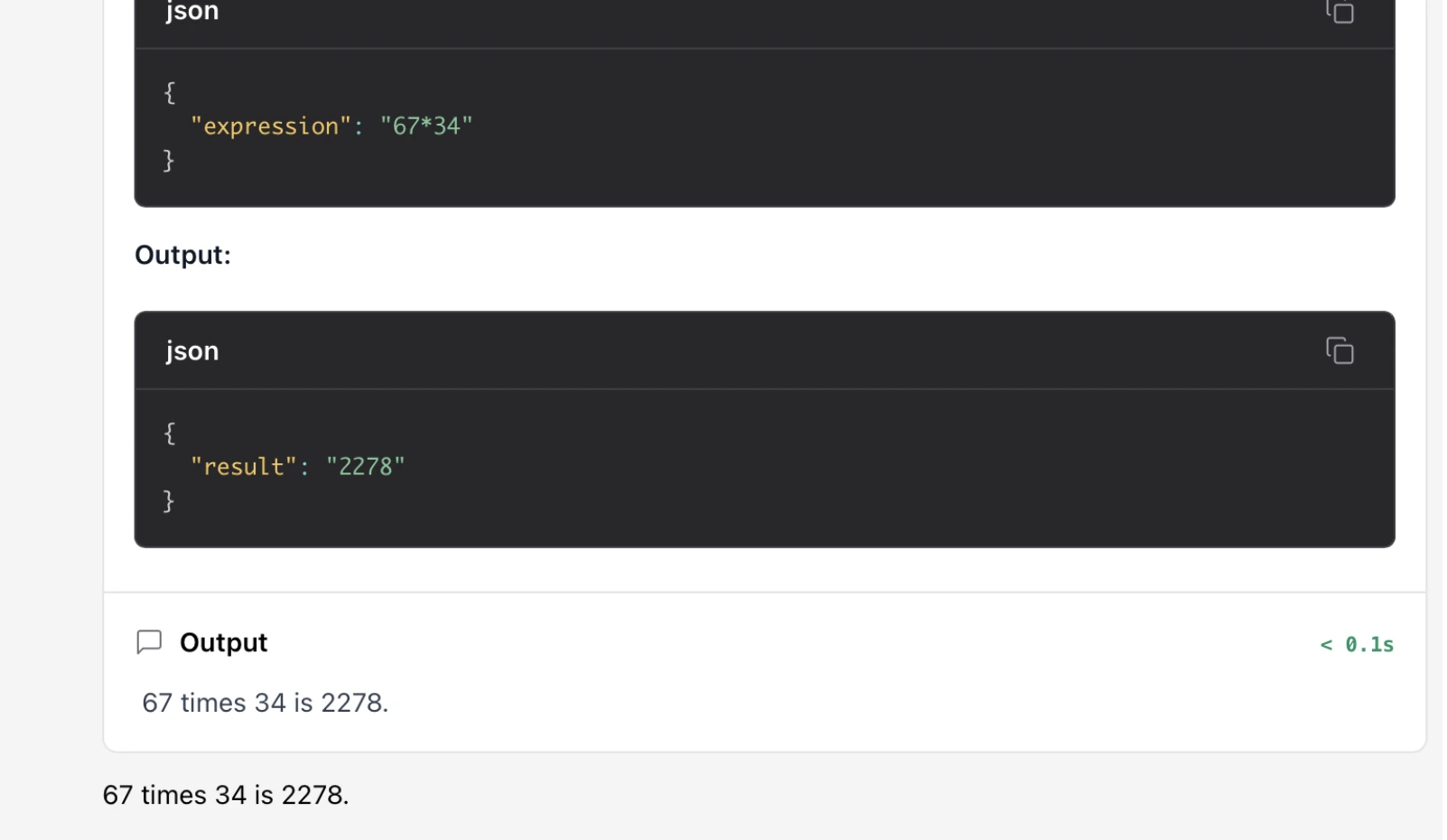
We tested the agent with different queries and got this Output:
Simple Query:
Tool Call Query:
4. LangSmith: Observability and Testing Platform
LangSmith is not a coding framework – it is a platform. Once you have created an app using LangChain or LangGraph, you need LangSmith to monitor it. It reveals to you what happens behind the scenes. It records all tokens, spikes in the latency, and errors. Check out the ultimate LangSmith guide here.
Best For:
- Tracing complicated, multi-step agents.
- Monitoring the API charges and performance.
- A / B testing of various prompts or models.
Core Concept: Tracking and Benchmarking. LangSmith lists traces of each run, giving the inputs and outputs of each run.
Maturity and Performance: The LangSmith to monitor should be used in the manufacturing field. It is an owner-built service of the LangChain crew. LangSmith favours OpenTelemetry to make sure that the monitoring of your app is not a slowdown factor. It is the secret to creating trustworthy and affordable AIs.
Hands-on: Enabling Observability
There is no need to edit your code to work with LangSmith. One just sets some environment variables. They are automatically identified, and logging begins with LangChain and LangGraph.
os.environ['OPENAI_API_KEY'] = “YOUR_OPENAI_API_KEY”
os.environ['LANGCHAIN_TRACING_V2'] = “true”
os.environ['LANGCHAIN_API_KEY'] = “YOUR_LANGSMITH_API_KEY”
os.environ['LANGCHAIN_PROJECT'] = 'demo-langsmith'
Now test the tracing:
import openai
from langsmith.wrappers import wrap_openai
from langsmith import traceable

client = wrap_openai(openai.OpenAI())

@traceable
def example_pipeline(user_input: str) -> str:
   response = client.chat.completions.create(
   	model="gpt-4o-mini",
   	messages=[{"role": "user", "content": user_input}]
   )
   return response.choices[0].message.content

answer = example_pipeline("Hello, world!")
We encased the OpenAI client in wrapopenai and the decorator Tracer in the form of the function @traceable. This will incur a trace on LangSmith each time examplepipeline is called (and each internal LLM API call). Traces help look at the history of prompts, model results, tool invocation, etc. That is worth its weight in gold in debugging complex chains.
Output:
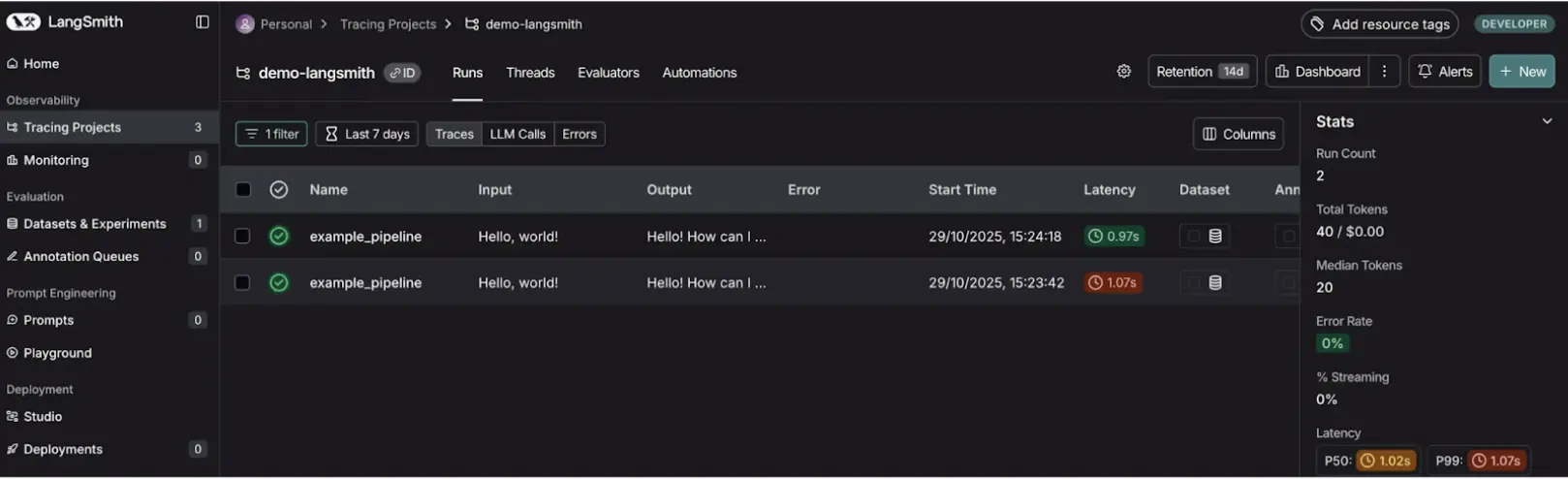
It is now possible to see any trace in your LangSmith dashboard whenever you run your code. There is a graphic “breadcrumb trail of how the LLM found the answer. This seems inestimable in the examination and troubleshooting of agent behaviour.
LangChain vs LangGraph vs LangSmith vs LangFlow
| Feature | LangChain | LangGraph | LangFlow | LangSmith |
|---|---|---|---|---|
| Primary Goal | Building LLM logic and chains | Advanced agent orchestration | Visual prototyping of workflows | Monitoring, testing, and debugging |
| Logic Flow | Linear execution (DAG-based) | Cyclic execution with loops | Visual canvas-based flow | Observability-focused |
| Skill Level | Developer (Python / JavaScript) | Advanced developer | Non-coder / designer-friendly | DevOps / QA / AI engineers |
| State Management | Via memory objects | Native and persistent state | Visual flow-based state | Observes and traces state |
| Cost | Free (open source) | Free (open source) | Free (open source) | Free tier / SaaS |
Choosing Your Toolkit: A Practical Guide
Now that the LangChain ecosystem has become a working demonstration, we shall go back to the question of when to apply each tool.
- When you are developing a simple app with a straightforward flow, start with LangChain. One of our writer agents, e.g., was a plain LangChain chain.
- When managing multi-agent systems, which are complex workflows, use LangGraph to manage them. The researcher had to pass the state to the writer through our research assistant, using LangGraph.
- When your application is more than a prototype, drag in LangSmith to debug it. In the case of our research assistant, LangSmith would be necessary to observe the communication between the two agents.
- LangFlow is something to think about when prototyping your ideas. Before you write one line of code, you could visualise the researcher-writer workflow in LangFlow.
Conclusion
The LangChain ecosystem is a collection of tools that help create complex LLM applications. LangChain provides you with the staple ingredients. LangGraph on orchestration allows you to construct elaborate systems. LangSmith is good to debug; your applications are stable. And LangFlow to prototype assists you in rapid prototyping.
With a knowledge of the strengths of each tool, you are able to create powerful multi-agent systems that address real-life issues. The path between a mere notion and a ready-to-use application is now an understandable and easier task.
Frequently Asked Questions
Q1. When should I choose LangGraph over LangChain?
A. Use LangGraph in cases where loops, conditional branching or state are required to be handled in more than a single step, as found in multi-agent systems.
Q2. Is LangFlow production applicable?
A. Although this may be true, LangFlow is mostly used in prototyping. Regarding high-performance requirements, it would be better to export the flow to Python code and deploy it the conventional way.
Q3. Does LangSmith need to make use of LangChain or LangGraph?
A. No, LangSmith is optional, yet an absolutely recommended tool for debugging and monitoring that should be considered when your application becomes tricky.
Q4. Are all these tools open source?
A. LangChain, LangGraph, and LangFlow are all under the open-source (MIT License) license. LangSmith is a SaaS product of proprietary type, having a free tier.
Q5. What is the key advantage of the LangChain ecosystem?
A. The greatest advantage is that it is a modular and integrated outfit. It offers an entire toolkit to address the full application lifecycle, from the initial idea up to production monitoring.
Harsh Mishra is an AI/ML Engineer who spends more time talking to Large Language Models than actual humans. Passionate about GenAI, NLP, and making machines smarter (so they don’t replace him just yet). When not optimizing models, he’s probably optimizing his coffee intake. 🚀☕







