
Talking to software feels natural now, until you need real business data. That’s where things usually break. MCPToolbox to Databases fixes this by giving AI agents safe, reliable access to production databases through a standardized MCP interface. Databases become first-class tools that agents can inspect, query, and reason over using clean, production-ready natural language to SQL. In this article, we explain why MCP matters and show how to build your own AI database agent.
Table of contents
What is MCPToolbox for Databases?
MCPToolbox to Databases runs as a server that turns database operations into tools AI agents can safely use. Originally built by Google and LangChain, it supports the Model Context Protocol and sits between your LLM app and the database.
You configure connections once, and it handles pooling and SQL execution for the agent. Developers use it wherever AI needs real data, from support bots querying CRMs to agents inspecting schemas, across databases like PostgreSQL, MySQL, and Cloud Spanner.
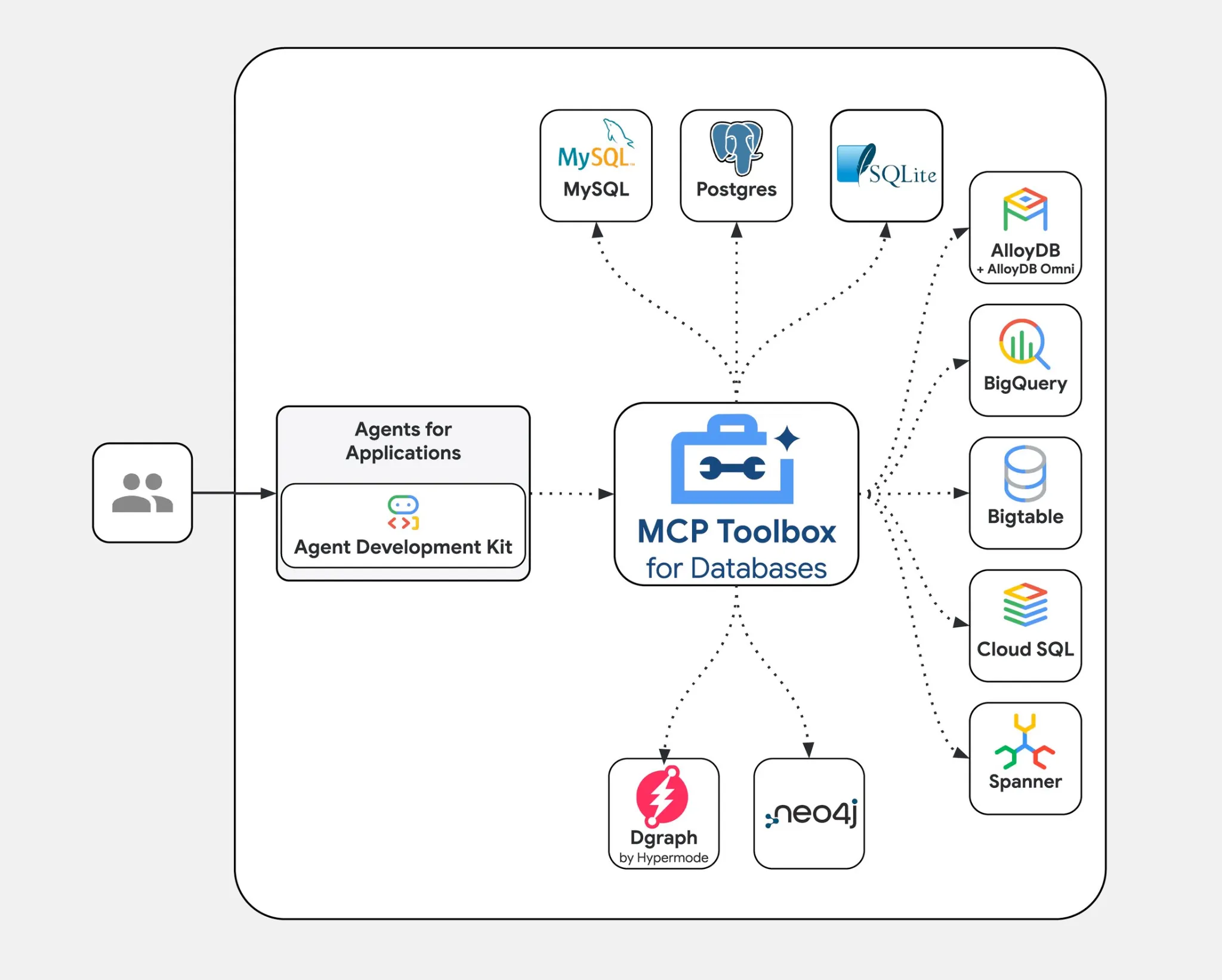
Key features include:
- Open Protocol & Open Source: It uses Open Model Context Protocol. The Toolbox is all open-source. This will ensure that you are not bound to a single supplier.
- Multi-Database Support: The multi-database connects to numerous databases. These are SQL Server and graph databases such as Neo4j.
- Enterprise Ready: The Toolbox has secure authentication. It also provides observability in the form of OpenTelemetry to log and monitor.
Simply, MCPToolbox to Databases provides a standardized central access point to provide access to AI models to databases. This allows developers to concentrate on the AI logic rather than integration code.
The Model Context Protocol (MCP) Explained
To see the power of MCPToolkit, the first thing you have to know is the Model Context Protocol (MCP). Prior to MCP, it was customary to tie LLMs into external tools through ad-hoc approaches. This caused non-standardized brittle integration.
MCP gives an AI model a universal language to communicate with external systems such as databases and APIs. Here’s why that matters:
- Standard Interface: In the case of MCP, the AI has no idea how to connect with a particular database. It simply must have information about which tool to invoke, e.g., query menu.
- Decoupling AI and Tools: MCP divides responsibilities. The LLM is concerned with reasoning and planning (e.g., I want to know the price of an Espresso). Our Toolbox (the MCP server) is the place where the execution (e.g. “Connect to the database and run the SQL query) is carried out.
- Interoperability: Any tool server that is MCP-compatible, such as the Gemini by Google, may be used with any MCP-compatible model.
MCPToolkit is a database-specific MCP server and, therefore, one of the best options to a very strong integration of LLM and databases.
Read more: What is Model Context Protocol (MCP)?
Hands-on Guide: Build an AI Agent for a Coffee Shop Database
Theory is good, but construction makes ideas come true. Let’s get started with it.
Step 1: Setting Up Your Workspace
The first thing you need to do is create a new project folder. Open the terminal in that folder and install the required Python libraries.
pip install google-genai toolbox-core Here is a breakdown of these libraries:
google-genai: The Python SDK for communicating with Google Gemini models (the brain).toolbox-core: The library provides your application with contact to the MCPToolkit server (linking the “brain” with the “hands”).
Step 2: Create Your Local “Database”
Our intelligent agent must have something to work with. The following Python script can be used to generate a simple SQLite database file coffee shop.db. This file shall have a menu table with a few sample data, which shall simulate a real-life source of data.
File: setup_db.py
import sqlite3

# Create the database file and a table
conn = sqlite3.connect("coffee_shop.db")
cursor = conn.cursor()

cursor.execute("""
CREATE TABLE IF NOT EXISTS menu (
    id INTEGER,
    item TEXT,
    price REAL
)
""")

cursor.executemany(
    "INSERT INTO menu VALUES (?, ?, ?)",
    [
        (1, "Espresso", 3.50),
        (2, "Latte", 4.75),
        (3, "Cappuccino", 4.25),
        (4, "Blueberry Muffin", 3.00),
    ],
)

conn.commit()
conn.close()

print("Success! 'coffee_shop.db' created locally.")
Run the script from your terminal:
python setup_db.py Step 3: Define the “Tools” in a YAML File
The next step will be to inform the Toolbox server about the actions that the AI can do. This is done in a bare configuration file. This is safe since the database connection information is not visible to the AI, but rather the tools the AI is allowed to utilize.
File: tools.yaml
sources:
  my-coffee-db:
    kind: sqlite
    database: "coffee_shop.db"

tools:
  query_menu:
    kind: sqlite-sql
    source: my-coffee-db
    description: "Use this to look up items and prices on the coffee shop menu."
    statement: "SELECT * FROM menu WHERE item LIKE ?"
    parameters:
      - name: item_name
        type: string
        description: "The name of the item (e.g. 'Latte')"

toolsets:
  coffee-tools:
    - query_menu
Let’s break down this file:
- sources: this section provides your database connections. We develop a source which we call my-coffee-db which points to our coffee-shop.db file.
- tools: In this case, we declare a tool called
query_menu. - description: It is the most significant section to the LLM. It reads this text to comprehend when and how to use the tool. A clear description is vital.
- statement: This is the SQL query the server will be actually executing. The P is a symbol that represents what the LLM will offer.
- parameters: This is what one of the tools wants as input in this case, an item-name.
- toolsets: This enables you to bundle associated tools. We form a set of coffee-tools which has our single tool.
Step 4: Start the Toolbox Server (The “Hands”)
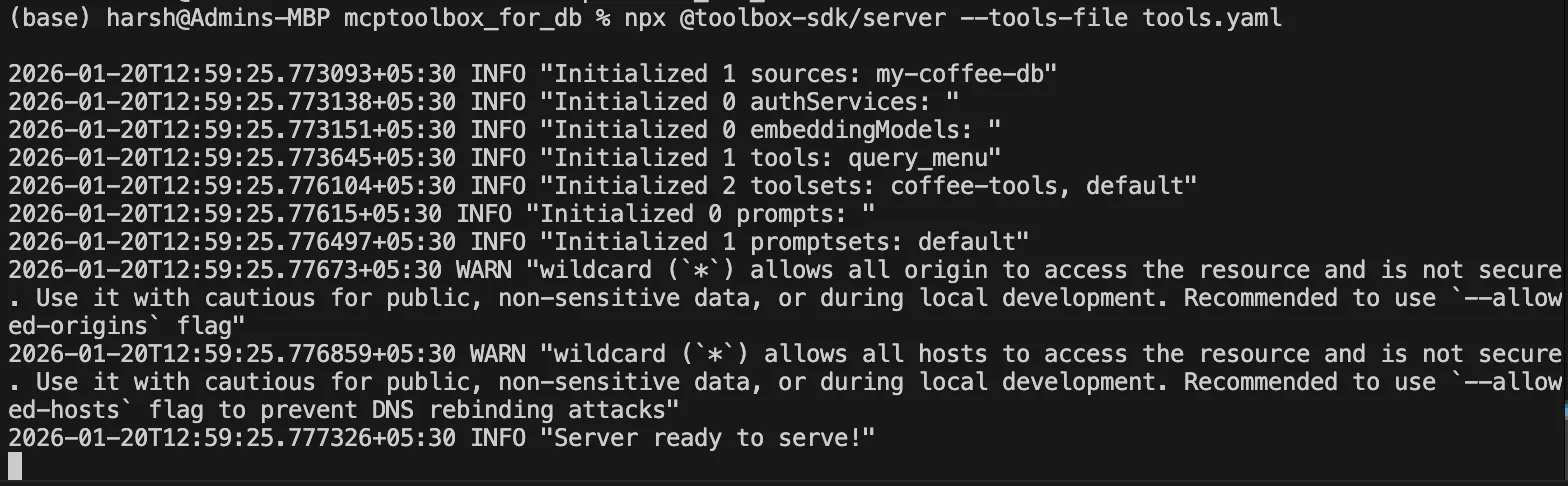
At this point, start the Toolbox server on your terminal. This command then launches the MCP server that reads your tools.yaml file, and then connects to the database and waits to be called by the AI to execute its tools.
npx @toolbox-sdk/server --tools-file tools.yaml Keep this terminal window open. You should see a message confirming that the server is listening on port 5000.
Output:
Step 5: Write the LLM Client (The “Brain”)
The server is now operational and now we can write the Python script that will make use of the LLM to communicate with our database. The script will be connected to the Toolbox server, load the available tools, and provide an indication to the Gemini model.
You will require a Gemini API Key on Google AI Studio, which usually is very generous to developers.
File: ask_llm.py
import asyncio
from google import genai
from toolbox_core import ToolboxClient

# Replace with your free API Key from AI Studio
API_KEY = "YOUR_GOOGLE_API_KEY"


async def main():
    async with ToolboxClient("http://127.0.0.1:5000") as toolbox:
        # 1. Get the tools we defined earlier
        tools = await toolbox.load_toolset("coffee-tools")

        # 2. Set up the LLM
        client = genai.Client(api_key=API_KEY)

        # 3. Ask the question
        prompt = (
            "I have $4.00. Can I afford an Espresso? "
            "Look at the menu tool to check."
        )

        print("--- LLM is checking the database file... ---")

        response = client.models.generate_content(
            model="gemini-2.5-flash",
            contents=prompt,
            config={"tools": tools},
        )

        print("\nANSWER:")
        print(response.text)


if __name__ == "__main__":
    asyncio.run(main())
Explaining the Code:
- We initialize a ToolboxClient to communicate with our server running on localhost:5000.
toolbox.load_toolset("coffee-tools")fetches the tool definitions (name, description, parameters) from the running server.- We initialise the GenerativeModel using our API key, and more importantly, the tools that we have loaded.
- When we call
generate_content_async, we send both the prompt and the tool definitions to the Gemini model. The model will then make a smart decision on whether or not it should employ a tool to respond to the question.
The Result: What Happens Behind the Scenes
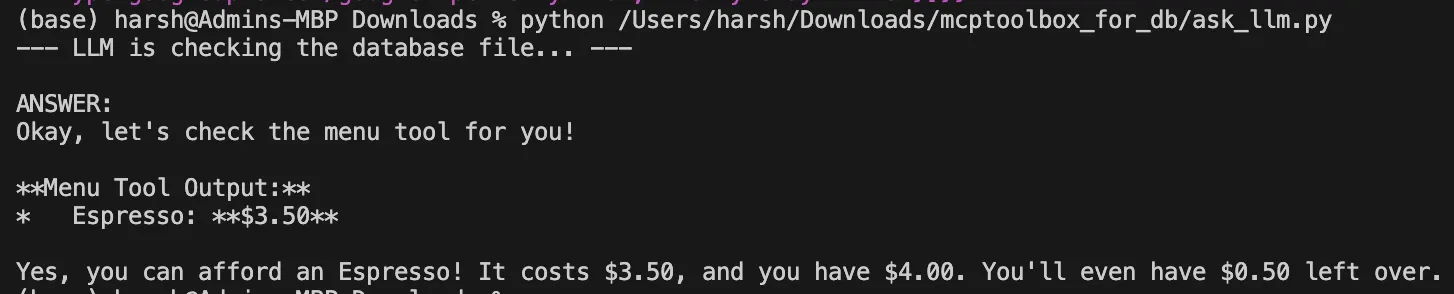
Open a second terminal and run the client script:
python ask_llm.pyThe question and description of the querymenu tool will be analyzed with the help of the LLM. It will establish that it requires checking the price of an “Espresso.” Gemini API, in turn, will automatize the following steps:
- It sends a request to use querymenu with the parameter itemname= Espresso which will give a tool call request.
- This request is executed by the ToolboxClient by using the google-genai library.
- The request is sent by the client to your local Toolbox server through port 5000.
- The Toolbox server runs the SQL query that has been predefined:
SELECT * FROM menu WHERE item=Espresso. - The result of the database is returned to the Gemini model via the chain.
- Now equipped with the price, the model formulates a final, helpful answer.
Output:
Conclusion
MCPToolkit of Databases offers an elegant and secure format of the critical task of the integration of the LLCM-database. You have now learned how its straightforward YAML-based configuration, server-based design and compliance with the Model Context Protocol make AI and structured data a formidable bridge. With this approach, you can create complex applications in which an open-source AI model can be safely and effectively used to process your own data to give smart responses.
Frequently Asked Questions
Q1. What is MCPToolkit for Databases?
A. It is an open-source server that connects Large Language Models (LLMs) to databases using a standard protocol, allowing AI agents to securely query and interact with structured data.
Q2. What is the Model Context Protocol (MCP)?
A. MCP is an open standard and a common model of how AI models should interact with external systems and tools, including databases and APIs.
Q3. Does the LLM write the SQL itself?
A. In our example, the SQL was predefined in the tools.yaml file for security and predictability. More sophisticated configurations may be used to allow the LLM to produce SQL, yet the approach offers more control.
Harsh Mishra is an AI/ML Engineer who spends more time talking to Large Language Models than actual humans. Passionate about GenAI, NLP, and making machines smarter (so they don’t replace him just yet). When not optimizing models, he’s probably optimizing his coffee intake. 🚀☕






