Imagine a world where AI Agents not only engage in conversation but also embark on grand quests, defeat evil adversaries, and work together to rescue the wizarding world. Today, we are going to look at one of the most exciting use cases for Large Language Models. We will build a fully autonomous multi-player Dungeons & Dragons game with LangChain.
This is not just an introductory chatbot tutorial. What we are trying to achieve is more involved: a working cooperation of multiple AI agents, with their own personalities, their own goals, all responding to one another in real time, within the same narrative universe. Consider it akin to animating characters that can think, plan, and act on their own, all while staying true to the character.
Table of contents
Why This Matters?
Before we jump into the code, let’s take a moment to understand the value of Multi-Agent Systems and why they are so transformative:
In traditional AI interactions, it’s straightforward: you ask a question and the AI responds, and that’s your conversation, but in a multi-agent system, essentially, you’re having an interaction with multiple AI agents at once. In our blog, we’ll be exploring the case of the Dungeons & Dragons game (D&D). Here, we’ll see one entity interacting with another one, which might lead to emergent behaviours and narratives where even we as the developers cannot truly anticipate what would happen next. It provides us with the possibilities of:
- Dynamic version of storytelling and game development
- Research purposes in simulating complex social interactions
- Training AI systems through collaborative interactions
- Engaging educational tools that can be adapted to multiple modalities and learning styles
The use case that we’ll be developing today will demonstrate the above scenarios in practice. This particular use case provides us with a phenomenon example of human-to-AI and AI-to-AI cooperation or interaction.
The Architecture: How It All Works Together
Our system consists of three principal classes that work simultaneously:
The DialogueAgent Class
You can think of this class as the brain of each character. Each agent only has their own memory of the conversation, has their own personality (based on system messages that we have defined), where they can speak and listen. The great part about this system is its simplicity and straightforwardness. Each agent only knows what they have heard, which lends itself to authentic interactions that simulate limited-knowledge interactions.
class DialogueAgent:
    """Agent that can participate in conversations."""

    def __init__(self, name: str, system_message: SystemMessage, model: ChatOpenAI) -> None:
        self.name = name
        self.system_message = system_message
        self.model = model
        self.prefix = f"{self.name}:"
        self.reset()

    def reset(self):
        self.message_history = ["Here is the conversation so far."]

    def send(self) -> str:
        message = self.model(
            [
                self.system_message,
                HumanMessage(content="\n".join(self.message_history + [self.prefix])),
            ]
        )
        return message.content

    def receive(self, name: str, message: str) -> None:
        self.message_history.append(f"{name}: {message}")
The DialogueSimulator Class
This class is basically the master brain behind the game as it provides the functionality of taking turns between the selected characters, their dialogues. It also allows us to specify which character speaks first and when, providing us with full control. This class provides us with the flexibility to design complex speaking orders instead of a rigid turn-based system. It is like having a debate or a conversation between characters where they’re allowed to interrupt each other in between.
class DialogueSimulator:
    """Manages the conversation flow between agents."""

    def __init__(
        self,
        agents: List[DialogueAgent],
        selection_function: Callable[[int, List[DialogueAgent]], int],
    ) -> None:
        self.agents = agents
        self._step = 0
        self.select_next_speaker = selection_function

    def reset(self):
        for agent in self.agents:
            agent.reset()

    def inject(self, name: str, message: str):
        for agent in self.agents:
            agent.receive(name, message)
        self._step += 1

    def step(self) -> tuple:
        speaker_idx = self.select_next_speaker(self._step, self.agents)
        speaker = self.agents[speaker_idx]
        message = speaker.send()

        for receiver in self.agents:
            receiver.receive(speaker.name, message)

        self._step += 1
        return speaker.name, message
Dynamic Character Generation
Dynamic Character Generation is the class that makes this game the most interesting and brings out uniqueness. We don’t have to predefine the characteristics or provide details about the quests that will take place. Instead, we’ll make use of AI Models (LLMs) to provide richly contextual and detailed backstories with proper descriptions about the characters and contextual parameters about their missions. It will allow the game to be dynamic in nature every time we play, instead of being repetitive. Characters act like they are alive and on a mission, while adapting to the quests automatically.
# Generate detailed quest
quest_specifier_prompt = [
    SystemMessage(content="You can make a task more specific."),
    HumanMessage(
        content=f"""{game_description}

You are the storyteller, {storyteller_name}.
Please make the quest more specific. Be creative and imaginative.
Please reply with the specified quest in {word_limit} words or less.
Speak directly to the characters: {', '.join(character_names)}.
Do not add anything else."""
    ),
]
The Technical Implementation
Let’s break down how the entire code workflow functions, layer by layer. The code implements a strategic flow that is like what humans actually do when working together, such as in a group project or while collaborating.
Characters are Instantiated in Layers
First, we create roles that are generic, like Harry Potter, Ron Weasley, etc, as a few examples. Then we call an LLM to produce character descriptions that encapsulate personality, motivations, and quirks. Finally, these character descriptions become the system message for each agent, giving them an identity to step into.
def get_character_emoji(name: str) -> str:
    """Return emoji for character."""
    emoji_map = {
        "Harry Potter": "⚡",
        "Ron Weasley": "🦁",
        "Hermione Granger": "📚",
        "Argus Filch": "🐈",
        "Dungeon Master": "👾",
    }
    return emoji_map.get(name, "⚪")

def get_character_color(name: str) -> str:
    """Return color class for character."""
    color_map = {
        "Harry Potter": "badge-harry",
        "Ron Weasley": "badge-ron",
        "Hermione Granger": "badge-hermione",
        "Argus Filch": "badge-filch",
    }
    return color_map.get(name, "")
def generate_character_description(character_name: str, game_description: str, word_limit: int, api_key: str) -> str:
"""Generate character description using LLM."""
os.environ["OPENAI_API_KEY"] = api_key
player_descriptor_system_message = SystemMessage(
content="You can add detail to the description of a Dungeons & Dragons player."
)
character_specifier_prompt = [
player_descriptor_system_message,
HumanMessage(
content=f"""{game_description}
Please reply with a creative description of the character, {character_name}, in {word_limit} words or less.
Speak directly to {character_name}.
Do not add anything else."""
),
]
character_description = ChatOpenAI(temperature=1.0)(character_specifier_prompt).content
return character_descriptionConversation Loop is Straightforward
An agent is chosen to speak in turns. The designated agent creates the content of the next message based on the conversation history, which is stored in the memory. The other agents receive the new message and store it. The selection function is where the magic takes place: as we shared the responsibility of the Dungeon Master and other players in our D&D game, we took turns in a round-robin way to create narrative continuity.
Memory management is also crucial as it provides the foundation for message creation. Each agent saves a transcript of the conversation history. It is not simply holding storage. It is context that informs each response. Each character remembers the prior interaction(s), learns from their errors, and incorporates old actions as the adventure progresses.
def generate_character_system_message(
    character_name: str,
    character_description: str,
    game_description: str,
    storyteller_name: str,
    word_limit: int,
) -> SystemMessage:
    """Create system message for character."""
    return SystemMessage(
        content=f"""{game_description}
Your name is {character_name}.
Your character description is as follows: {character_description}.
You will propose actions you plan to take and {storyteller_name} will explain what happens when you take those actions.
Speak in the first person from the perspective of {character_name}.
For describing your own body movements, wrap their description in '*'.
Do not change roles!
Do not speak from the perspective of anyone else.
Remember you are {character_name}.
Stop speaking the moment you finish speaking from your perspective.
Never forget to keep your response to {word_limit} words!
Do not add anything else."""
    )
Executing the Code
In this section, we’ll run through the whole implementation. For this step, you should have an OpenAI API Key and certain dependencies installed in your environment.
Step 1: Install the dependencies to run the application in your environment
pip install streamlit langchain openai python-dotenv streamlit-extrasThe following packages are necessary:
- Streamlit: The web framework to host the interface
- LangChain: An orchestration framework for multi-agent systems
- OpenAI: Provides access to GPT models for intelligent agents
- python-dotenv: Manages environment variables securely
Step 2: Set up your OpenAI API key either by hardcoding it directly in the script or storing it in .env as an environment variable and then calling it via:
api_key=Step 3: Launch the Adventure
As the dependencies are installed, now, you are all set to bring the multi-agent D&D game to life! You can start the Streamlit app using the command below:
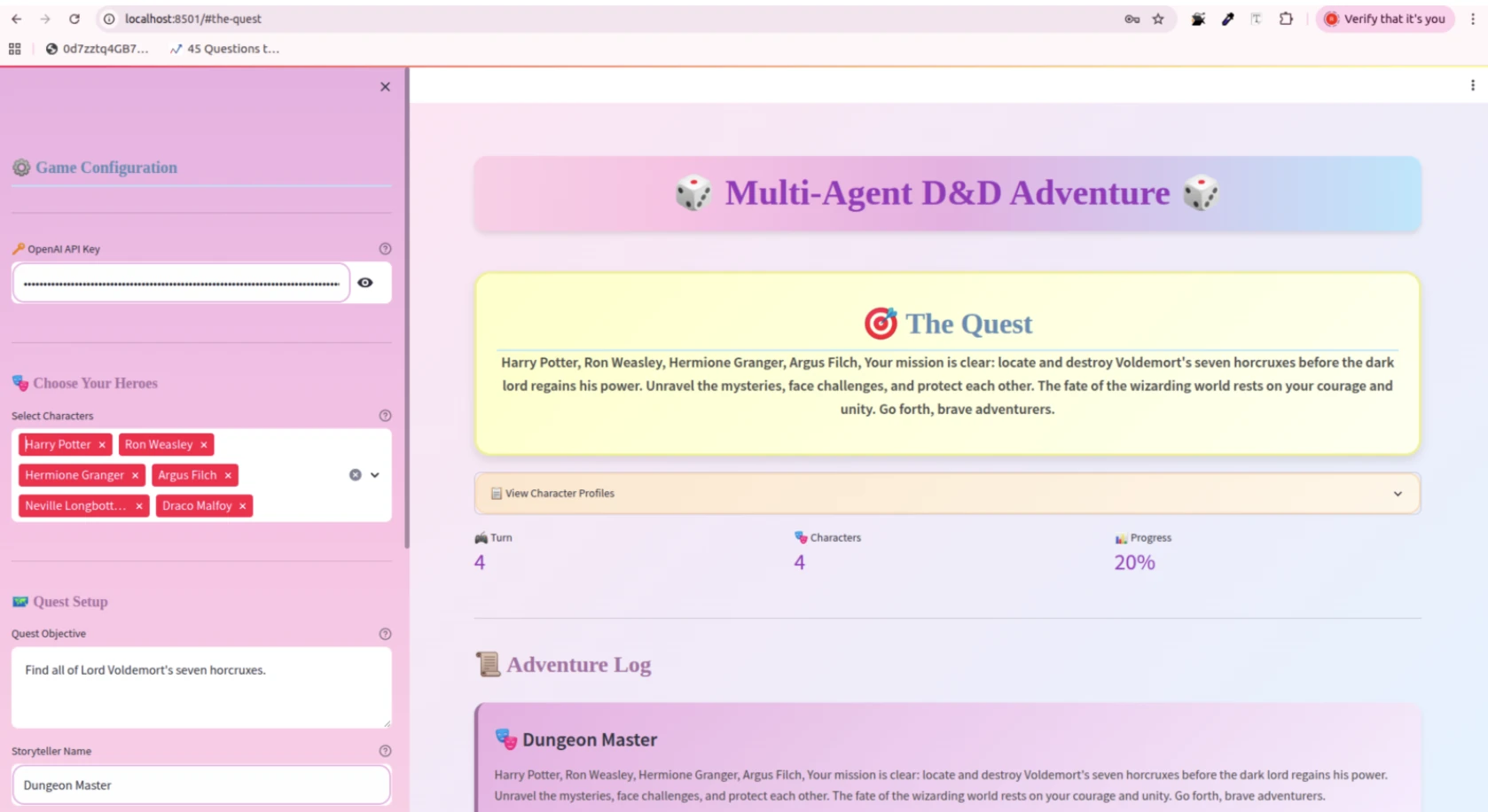
streamlit run dnd_app.pyYour browser will open to localhost:8501 automatically, and you will be presented with the app interface.
Step 4: Configure your Adventure via customised options
When the app has loaded:
- Enter your API Key: Copy and paste your OpenAI API key into the sidebar (unless using .env variables)
- Select your Characters: Select 2-5 heroes from the roster
- Customize your Quest: Modify the quest objective or leave it as the default horcrux hunt
- Set your parameters: Set response word limit and adventure length
- Start the Adventure: Click “Start Adventure”
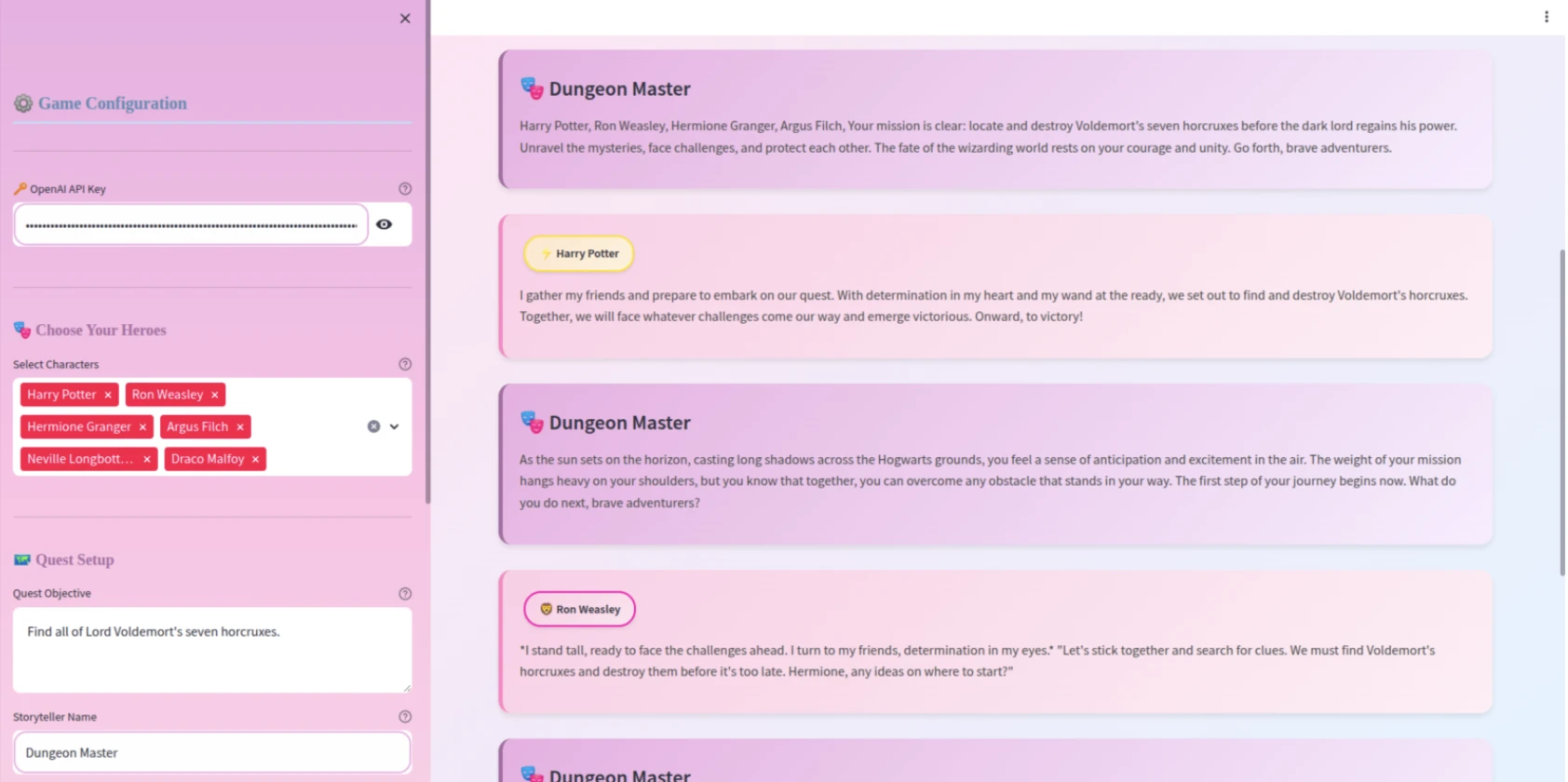
- Watch the Magic Happen: The characters will be generated with unique personalities
- Advance the Story: Click “Next Turn” to advance the adventure
- Codebase Link: https://github.com/Riya-AnalyticsVidhya/Multi-Agent-Dungeon-Dragons.git
- Game Link: https://multi-agent-dungeon-and-dragons.streamlit.app/
Please remember that this is a minor step. After witnessing the D&D use case in action, you might wonder what else you can design. A murder mystery? A space exploration narrative? A business negotiation simulator? It is, in this respect, the same underlying architecture, and your creativity is the only boundary.
What Makes This Approach Special?
There is one facet of non-player characters in standard games that is closely scripted; they have pre-established conversation trees and defined behavioural habits. With this LangChain-based system, however, we can program the characters to:
- Improvise in context: If the player suggests a surprising solution to a situation, a character would normally respond naturally as opposed to abruptly breaking character.
- Exhibit consistency of personality: The system message works as a personality stabilizer that ensures Harry’s bravery and Ron’s loyalty are consistent throughout the adventure.
- Generate emergent storytelling: If we allow the NPCs to freely converse, narratively interesting things happen in ways that are not completely written or planned.
Think back to that moment, from our earlier example of the interface: When the group first encounters the Dementors, Hermione immediately considers whether or not to suggest the shortcuts, and Argus Filch expresses some concern about watching them. These behaviours emerge directly from the defined role of the character and the situation at hand.
Key Design Patterns You’ll Use
This code exemplifies some strong and useful patterns that are useful across many AI applications:
- The round-robin with interleaving scheduling guarantees that the Dungeon-Master (DM) is describing the strife and consequences for each player’s action. Additionally, the selection function, which rather ingeniously captured whether the next action in step was the DM’s (step % 2 == 0) or a player’s action, was a very simple and useful structure for managing state.
- The system messages are your key schematic for controlling the agent behaviour. Notice how each system message for each character explains to that character to consistently speak in first person. Or how action is indicated in asterisks, and a word limit is specified (50 in this case). In some way, each character is under the same system constraints and therefore the emerged behaviour is consistent, though each player’s agency within the system’s creative perimeters.
- Lastly, changing the temperature may want to alter personality indirectly. Character description built on temperature=1.0 for creativity, but in-game character habituation shows a more focused and consistent performance when set at temperature=0.2. This temperature balance is simply right, not too random, but still has the element of “interesting” from the initial settings.
Real-World Applications Beyond Gaming
While our example from Dungeons & Dragons is amusing, it suggests other, more serious applications of the technology that we can use multi-agents for:
- For Educational Purpose: In an education simulation, students reenact historical events with an AI representation of historical figures. For example, students in a classroom could be negotiating the Treaty of Versailles, sitting across the table from AI avatars of political leaders.
- For Business Meetings: Business scenario planning can utilize multi-agent systems that simulate the dynamics of a market or explore stakeholders debating an issue or responding to a crisis. Teams could practice difficult conversations in a no-stakes environment.
- For Research Purposes: Research and psychology have a unique dimension to studying topics like decision-making, group dynamics, and social interaction, with intuitive ways of conducting studies at lower costs and on larger scales. Researchers could generate thousands of agent-based studies to test.
- For Writing Requirements: Creative writing or worldbuilding would benefit from an original collaboration with an AI. A script could coordinate characters to test dialogues, create or build story arcs, or explore alternative plots, while containing the original intent and consistency of the character.
Conclusion
The game that we developed is not merely for a gaming experience. It reflects a quick start toward building rich interactive experiences through AI. Whether you are building educational tools, creative writing assistance, business simulations, or even playing with an AI that generates a story, the patterns you will find here can serve you easily.
And the best part? This technology is here now! You don’t need a lab to conduct this type of research, nor do you need to invest in a company’s infrastructure. With LangChain, you can create with experiences that not long ago felt like science fiction.
So, launch your IDE, enter your API key, and let’s get started taking this multi-agent experience from paper to reality.
Gen AI Intern at Analytics Vidhya
Department of Computer Science, Vellore Institute of Technology, Vellore, India
I am currently working as a Gen AI Intern at Analytics Vidhya, where I contribute to innovative AI-driven solutions that empower businesses to leverage data effectively. As a final-year Computer Science student at Vellore Institute of Technology, I bring a solid foundation in software development, data analytics, and machine learning to my role.
Feel free to connect with me at [email protected]