AI agents are changing how we use technology. Powered by large language models, they can answer questions, complete tasks, and connect with data or APIs. But they still make mistakes, especially with complex, multi-step work, and fixing that manually takes time and effort.
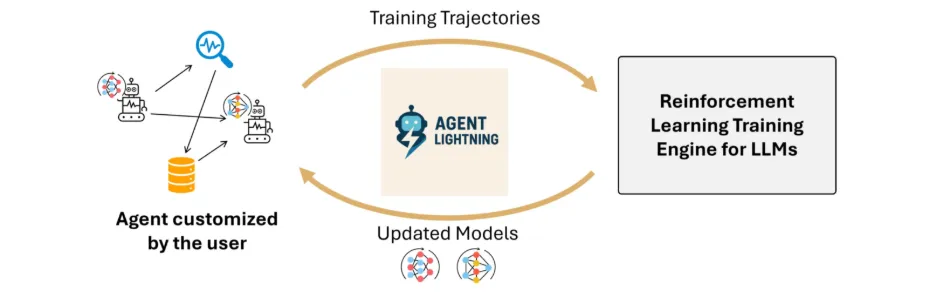
Microsoft’s new Agent Lightning framework makes this easier. It separates how an agent runs from how it learns, so it can improve through its own real-world interactions. You can take any existing chat or automation setup and apply reinforcement learning, helping your agent get smarter just by doing its job.
Table of contents
- What is Microsoft Agent Lightning?
- Why Agent Lightning Matters?
- How Agent Lightning Works?
- Step-by-Step Guide: Training an Agent Using Microsoft Agent Lightning
- Agent Architecture
- Building the LangGraph Agent
- Bridging LangGraph and Agent-Lightning
- Reward Signal and Evaluation
- Configuring VERL for Reinforcement Learning
- Orchestrating Training with Trainer
- Debugging the Agent with trainer.dev()
- Running the Full Example
- Debugging Without VERL
- Evaluation Results
- When and Where to Use Agent Lightning
- Conclusion
- Frequently Asked Questions
What is Microsoft Agent Lightning?
Agent Lightning is an open-source framework developed by Microsoft. It is used to train and improve AI agents through reinforcement learning (RL). The strength of agent lightning is that it can be wrapped around any agents that are already developed using any framework (such as LangChain, OpenAI Agents SDK, AutoGen, CrewAI, LangGraph, or custom Python) with practically zero code changes.
To be more technical, it enables reinforcement-learning training of the LLM’s hosted within agents, without changing the agent’s core logic. The basic idea is to think of the agent’s execution as a Markov Decision Process. Which states “At every step the agent is in a state, takes an action (LLM output), and receives some reward when those actions result in successful task completion.”
The framework consists of a Python SDK and a training server. Simply wrap the logic of your agent into a LitAgent class or similar interface, define how to score its output (the reward), and you are ready to train. Agent Lightning does the work of collecting those experiences, stimulates the agent into your hierarchical RL algorithm (LightningRL) for credit assignment, and updates the model or prompt template of your agent. After training you now have an agent that has improved its performance.
Why Agent Lightning Matters?
Conventional agent frameworks (such as LangChain, LangGraph, CrewAI or AutoGen) allow for the creation of AI agents that can reason in a step-by-step manner or utilize tools, but they do not have a training component. Those agents simply run the model on static model parameters or prompts, meaning they cannot learn from their encounters. Real-world challenges have some degree of complexity, requiring some level of adaptability. Agent Lightning addresses this, bringing learning into the agent pipeline.
Agent Lightning addresses this expected gap by implementing an automated optimizing pipeline for agents. It does this by the power of reinforcement learning to update the agents policy based on feedback signals. Simply, your agents will now learn from your agent’s success and failure potentially yielding more reliable and dependable results.
How Agent Lightning Works?
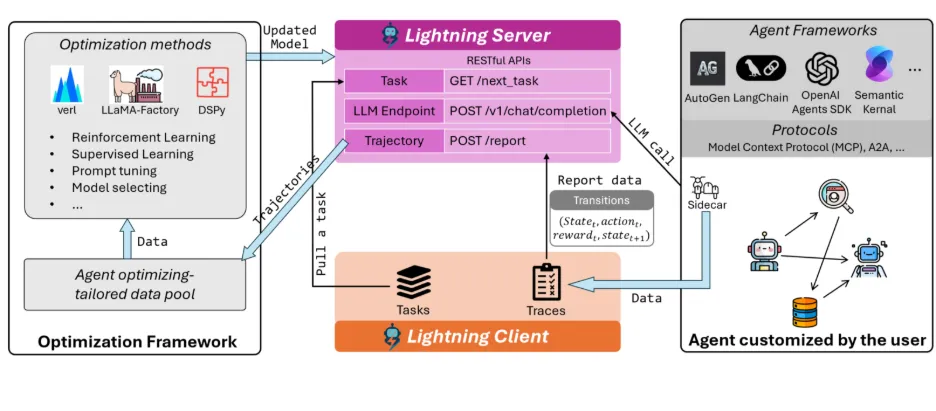
Within the server-client, Agent Lightning utilizes an RL algorithm, which is designed to generate tasks and tuning proposals; this includes either the new prompts or model weights. Now tasks are executed by a Runner, which collects the agent’s actions and final rewards and returns that data to the Algorithm. This feedback loop allows the agent to further fine-tune its prompts or weights over time, utilizing a feature called ‘Automatic Intermediate Rewarding’ that allows for smaller, instantaneous rewards for successful intermediate actions to accelerate the learning process.
Agent Lightning essentially treats agent operation as a cycle: The state is its current context; the action is its next move, and the reward is the indicator of task success. By designing state-action-reward transitions, Agent Lightning can ultimately facilitate training for any kind of agent.
Agent Lightning uses an Agent Disaggregation design; this separate learning from execution. The Server is responsible for updating and optimization, and the Client is responsible for utilizing real tasks and reporting results. The division of tasks allows the agent to fulfill its task efficiently, while also improving performance via RL.
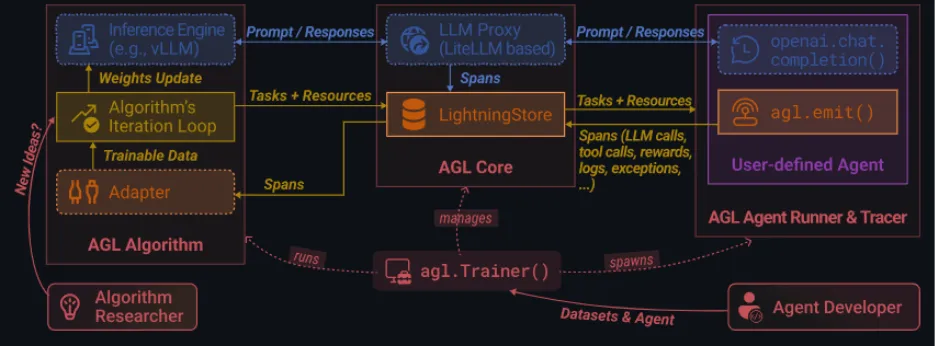
Note: Agent Lightning uses LightningRL. It is a hierarchical RL system that breaks down complex multi-step agent behavior’s for training. LightningRL can also support multiple agents, complex tool usage, and delayed feedback.
Step-by-Step Guide: Training an Agent Using Microsoft Agent Lightning
In this section, we’ll cover a walkthrough of training a SQL agent with Agent-lightning and demonstrates the integration of the primary components of the system: a LangGraph-based SQL agent, the VERL RL framework, and the Trainer for controlling training and debugging.
The command-line example (examples/spider/train_sql_agent.py) provides a complete runnable example, but this document is about understanding the architecture and workflow so developers can feel comfortable freezing in their use case.
Agent Architecture
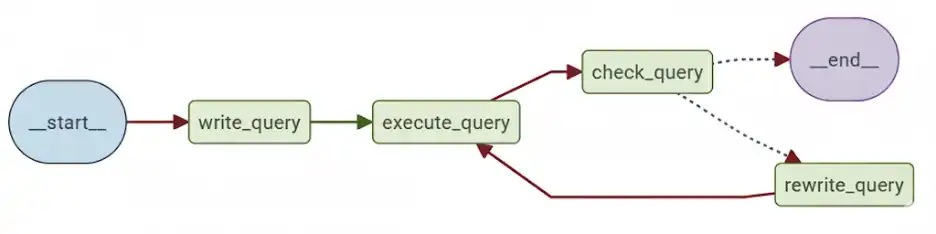
Agent-Lightning works seamlessly with frameworks like AutoGen, CrewAI, LangGraph, OpenAI Agents SDK, and other custom Python logic. In this example, the LangGraph defines a cyclic workflow that models how a data analyst iteratively writes and fixes SQL queries:
There are four stages of function:
- write_query: Takes the user’s question, generates an initial SQL query from the text question.
- execute_query: Executes the generated query in the target database.
- check_query: Uses a validation prompt (CHECK_QUERY_PROMPT) to validate the result.
- rewrite_query: If there are problems, rewrite the query.
The loop continues until either the query validates or a max iteration count (max_turns) is reached. Reinforcement learning optimizes the write_query and rewrite_query stages.
Building the LangGraph Agent
For keeping the code modular and maintainable, define your LangGraph logic with a builder function separately, as shown:
from langgraph import StateGraph

def build_langgraph_sql_agent(

    database_path: str,

    openai_base_url: str,

    model: str,

    sampling_parameters: dict,

    max_turns: int,

    truncate_length: int

):

    # Step 1: Define the LangGraph workflow

    builder = StateGraph()

    # Step 2: Add agent nodes for each step

    builder.add_node("write_query")

    builder.add_node("execute_query")

    builder.add_node("check_query")

    builder.add_node("rewrite_query")

    # Step 3: Connect the workflow edges

    builder.add_edge("__start__", "write_query")

    builder.add_edge("write_query", "execute_query")

    builder.add_edge("execute_query", "check_query")

    builder.add_edge("check_query", "rewrite_query")

    builder.add_edge("rewrite_query", "__end__")

    # Step 4: Compile the graph

    return builder.compile().graph()
Doing so will separate your LangGraph logic from potential future updates to Agent-Lightning, thus promoting readability and maintainability.
Bridging LangGraph and Agent-Lightning
The LitSQLAgent class serves as a conduit between LangGraph and Agent-Lightning. It extends agl.LitAgent, so the Runner can manage shared resources (like LLMs) for each rollout.
import agentlightning as agl

class LitSQLAgent(agl.LitAgent[dict]):

    def __init__(self, max_turns: int, truncate_length: int):

        super().__init__()

        self.max_turns = max_turns

        self.truncate_length = truncate_length

    def rollout(self, task: dict, resources: agl.NamedResources, rollout: agl.Rollout) -> float:

        # Step 1: Load shared LLM resource

        llm: agl.LLM = resources["main_llm"]

        # Step 2: Build LangGraph agent dynamically

        agent = build_langgraph_sql_agent(

            database_path="sqlite:///" + task["db_id"],

            openai_base_url=llm.get_base_url(rollout.rollout_id, rollout.attempt.attempt_id),

            model=llm.model,

            sampling_parameters=llm.sampling_parameters,

            max_turns=self.max_turns,

            truncate_length=self.truncate_length,

        )

        # Step 3: Invoke agent

        result = agent.invoke({"question": task["question"]}, {

            "callbacks": [self.tracer.get_langchain_handler()],

            "recursion_limit": 100,

        })

        # Step 4: Evaluate query to generate reward

        reward = evaluate_query(

            result["query"], task["ground_truth"], task["db_path"], raise_on_error=False

        )

return rewardNote: The “main_llm” resource key is a cooperative convention that exists between the agent and VERL, to provide access to the correct endpoint for every rollout, in the context of the service.
Reward Signal and Evaluation
The evaluate_query function will define your reward mechanism for RL training. Each task on the Spider dataset contains a natural language question, a database schema, and a ground-truth SQL query. The reward mechanism compares the SQL query that the model produced against the reference SQL query:
def evaluate_query(predicted_query, ground_truth_query, db_path, raise_on_error=False):

    result_pred = run_sql(predicted_query, db_path)

    result_true = run_sql(ground_truth_query, db_path)

return 1.0 if result_pred == result_true else 0.0Note: The agent must never see ground-truth queries during training, otherwise this will leak information.
Configuring VERL for Reinforcement Learning
VERL is the agent’s RL backend. The configuration is defined just like a Python dictionary would be, where you input the algorithm, models, rollout parameters, and training options. Here is a simple configuration:
verl_config = {

    "algorithm": {"adv_estimator": "grpo", "use_kl_in_reward": False},

    "data": {

        "train_batch_size": 32,

        "max_prompt_length": 4096,

        "max_response_length": 2048,

    },

    "actor_rollout_ref": {

        "rollout": {"name": "vllm", "n": 4, "multi_turn": {"format": "hermes"}},

        "actor": {"ppo_mini_batch_size": 32, "optim": {"lr": 1e-6}},

        "model": {"path": "Qwen/Qwen2.5-Coder-1.5B-Instruct"},

    },

    "trainer": {

        "n_gpus_per_node": 1,

        "val_before_train": True,

        "test_freq": 32,

        "save_freq": 64,

        "total_epochs": 2,

    },

}
This is analogous to the command you could have run in the CLI:
python3 -m verl.trainer.main_ppo \

  algorithm.adv_estimator=grpo \

  data.train_batch_size=32 \

  actor_rollout_ref.model.path=Qwen/Qwen2.5-Coder-1.5B-Instruct
Orchestrating Training with Trainer
The Trainer is the high-level coordinator who connects every part agent, RL algorithm, dataset, and distributed runners.
import pandas as pd

import agentlightning as agl

# Step 1: Initialize agent and algorithm

agent = LitSQLAgent(max_turns=3, truncate_length=1024)

algorithm = agl.VERL(verl_config)

# Step 2: Initialize Trainer

trainer = agl.Trainer(

    n_runners=10,

    algorithm=algorithm,

    adapter={"agent_match": "write|rewrite"}  # Optimize both query stages

)

# Step 3: Load dataset

train_data = pd.read_parquet("data/train_spider.parquet").to_dict("records")

val_data = pd.read_parquet("data/test_dev_500.parquet").to_dict("records")

# Step 4: Train

trainer.fit(agent, train_dataset=train_data, val_dataset=val_data)
This is what is happening behind the sences:
- VERL launches an OpenAI-compatible proxy, so work can be distributed without implementing OpenAI’s request.
- The Trainer creates 10 runners to execute concurrently.
- Each runner calls the
rolloutmethod, collects traces and sends rewards back to update the policy.
Debugging the Agent with trainer.dev()
Before starting full RL training, it is recommended to dry-run the full pipeline in order to check connections and traces.
trainer = agl.Trainer(

    n_workers=1,

    initial_resources={

        "main_llm": agl.LLM(

            endpoint=os.environ["OPENAI_API_BASE"],

            model="gpt-4.1-nano",

            sampling_parameters={"temperature": 0.7},

        )

    },

)

# Load a small subset for dry-run

import pandas as pd

dev_data = pd.read_parquet("data/test_dev_500.parquet").to_dict("records")[:10]

# Run dry-run mode

trainer.dev(agent, dev_dataset=dev_data)
This confirms the entire LangGraph control flow, database connections, and logic of the reward before you move to training on long GPU hours.
Running the Full Example
To set up the environment, install dependencies (i.e; using pip install -r requirements.txt), and run the full training script:
# Step 1: Install dependencies

pip install "agentlightning[verl]" langchain pandas gdown

# Step 2: Download Spider dataset

cd examples/spider

gdown --fuzzy https://drive.google.com/file/d/1oi9J1jZP9TyM35L85CL3qeGWl2jqlnL6/view

unzip -q spider-data.zip -d data && rm spider-data.zip

# Step 3: Launch training

python train_sql_agent.py qwen   # Qwen-2.5-Coder-1.5B

# or

python train_sql_agent.py llama  # LLaMA 3.2 1B
If you are using models hosted on hugging face, be sure to export your token:
export HF_TOKEN="your_huggingface_token" Debugging Without VERL
If you want to validate the agent logic without reinforcement learning, you can use the built-in debug helper:
export OPENAI_API_BASE="https://api.openai.com/v1"

export OPENAI_API_KEY="your_api_key_here"

cd examples/spider

python sql_agent.py
This will allow you to run the SQL agent with your current LLM endpoint to confirm the query was executed and the control flow worked as you expect.
Evaluation Results
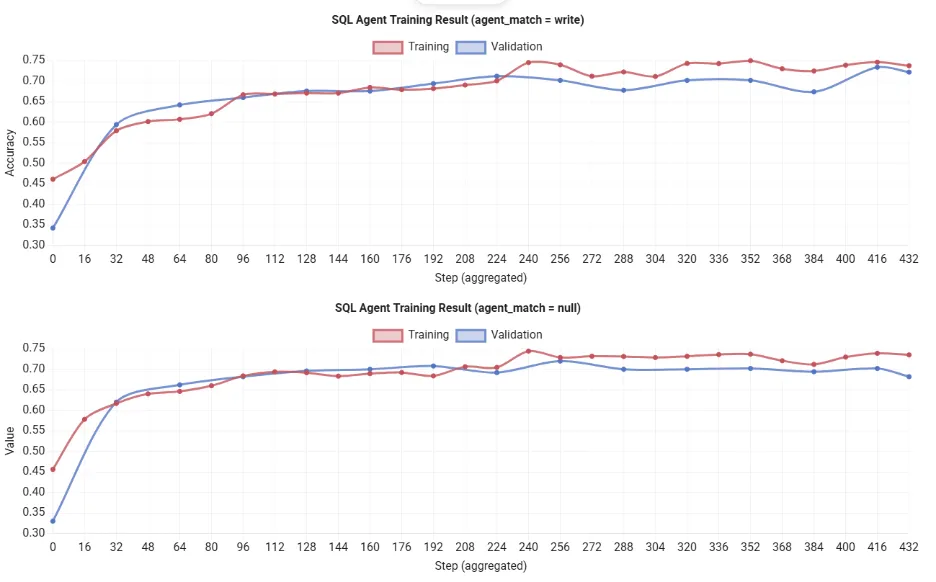
Note: Running python train_sql_agent.py qwen on a single 80 GB GPU usually finishes after ~12 hours. You’ll see the rewards of training increase consistently, indicating that the agent is improving its SQL generation process over time. Therefore, due to the resource constraints, I’ve used the results shown over the official documentation.
When and Where to Use Agent Lightning
In practical situations, let’s say you have an LLM-based agent that plays an important role in an application (customer support chatbot, automated coding assistant, etc.) and you intend to why you would refine it, Agent Lightning is a strong candidate. The framework has already been shown to work in other tasks, such as SQL query generation. In those and other similar situations, Agent Lightning took an agent that already existed and further optimized them through RL or prompt optimization, resulting in more accurate answers.
- If you want an AI agent to learn through trial-and-error, you should use Agent Lightning. It is designed for multi-step logical situations with clear signals that determine success or failure.
- For instance, Agent Lightning can improve a bot that generates database queries by using the observed feedback from execution to learn. The learning model is also useful for chatbots, virtual assistants, game-playing agents, and general-purpose agents utilizing tools or APIs.
- The Agent Lightning framework is agent-agnostic. It runs as needed on a standard PC or server, so you train models on your own laptop or on the cloud when necessary.
Conclusion
Microsoft Agent Lightning is an impressive new mechanism for improving the smartness of AI agents. Rather than thinking of an agent as a fixed object or piece of code, Agent Lightning enables a training loop so your agent can learn from experience. By decoupling training from execution, it can optimize any agent workflow without any code changes.
What this means is, you can easily enhance an agent workflow, whether it is a custom agent, a LangChain bot, CrewAI, LangGraph, AutoGen or a more specific OpenAI SDK agent, by toggling reinforcement learning Mechanism with Agent Lightning. In practice, you are enabling your agent(s) to get smarter from their own data.
Frequently Asked Questions
Q1. What is Microsoft Agent Lightning?
A. It’s an open-source framework from Microsoft that trains AI agents using reinforcement learning without altering their core logic or workflows.
Q2. How does Agent Lightning improve AI agents?
A. It lets agents learn from real task feedback using reinforcement learning, continuously refining prompts or model weights for better performance.
Q3. Can Agent Lightning work with existing agent frameworks?
A. Yes, it integrates easily with LangChain, AutoGen, CrewAI, LangGraph, and custom Python agents with minimal code changes.
Hello! I'm Vipin, a passionate data science and machine learning enthusiast with a strong foundation in data analysis, machine learning algorithms, and programming. I have hands-on experience in building models, managing messy data, and solving real-world problems. My goal is to apply data-driven insights to create practical solutions that drive results. I'm eager to contribute my skills in a collaborative environment while continuing to learn and grow in the fields of Data Science, Machine Learning, and NLP.