Struggling to make AI systems reliable and consistent? Many teams face the same problem. A powerful LLM gives great results, but a cheaper model often fails on the same task. This makes production systems hard to scale. Harness engineering offers a solution. Instead of changing the model, you build a system around it. You use prompts, tools, middleware, and evaluation to guide the model toward reliable outputs. In this article, I have built a reliable AI coding agent using LangChain’s DeepAgents and LangSmith. We also test its performance using standard benchmarks.
Table of contents
What is Harness Engineering?
Harness engineering focuses on building a structured system around an LLM to improve reliability. Instead of changing the models, you control the environments in which they operate. A harness includes a system prompt, tools or APIs, a testing setup, and middleware that guides the model’s behavior. The goal is to improve task success and manage costs while using the same underlying model.
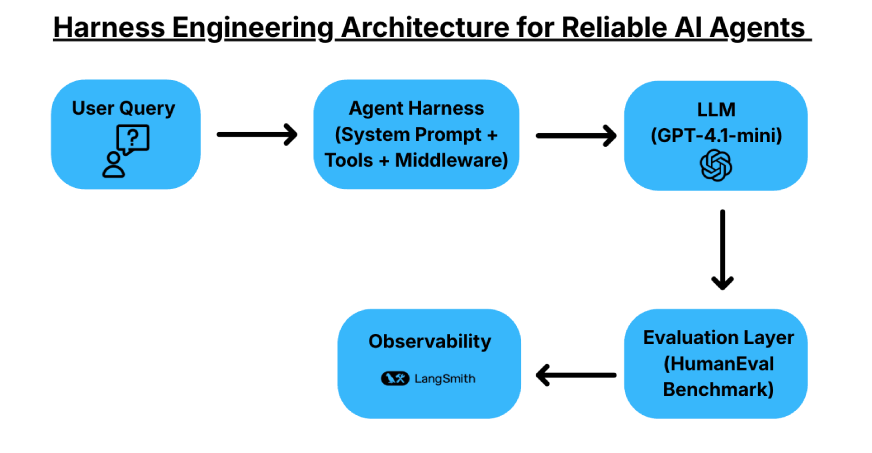
For this article, we use LangChain’s DeepAgents library. DeepAgents acts as an agent harness with built-in capabilities such as task planning, an in-memory virtual file system, and sub-agent spawning. These features will help structure the agent’s workflow and make it more reliable.
Also Read: A Guide to LangGraph and LangSmith for Building AI Agents
Evaluation and Metrics
HumanEval is a benchmark comprising 164 hand-crafted Python problems used to evaluate functional correctness; we will use this data to test the AI agents that we’ll build.
- Pass@1 (First-Shot Success): The percentage of problems solved correctly by the model in a single attempt. This is the gold standard for production systems where users expect a correct answer in one go.
- Pass@k (Multi-Sample Success): The probability that at least one of k generated samples is correct. This is used to measure the model’s knowledge or exploration power.
Building a Coding Agent with Harness Engineering
We will build a coding agent and evaluate it on benchmarks and metrics that we will define. The agent will be implemented using the DeepAgents library by LangChain and use the ideas behind harness engineering to build the AI system.
Pre-Requisites (API Keys)
- Visit the LangSmith dashboard and click on the ‘Setup Observability’ Button. Then you’ll see this screen. Now, click on the ‘Generate API Key’ option and keep the LangSmith key handy.
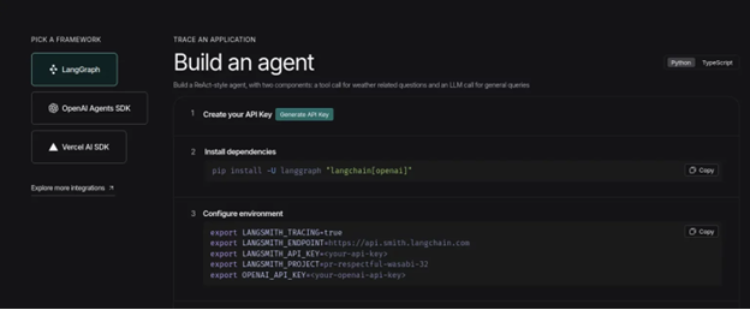
- We will also require an OpenAI API Key, and we will use the gpt-5 model as the brain of the system. You can get your hands on the API key from this link.
Installations
!git clone https://github.com/openai/human-eval.git
!sed -i '/evaluate_functional_correctness/d' human-eval/setup.py
!pip install -qU ./human-eval deepagents langchain-openai
Initializations
import os
from google.colab import userdata

os.environ['LANGCHAIN_TRACING_V2'] = 'true'
os.environ['LANGSMITH_API_KEY']    = userdata.get('LANGSMITH_API_KEY')
os.environ['LANGSMITH_PROJECT']    = 'DeepAgent'
os.environ['OPENAI_API_KEY'] = userdata.get('OPENAI_API_KEY')
Defining the Prompts
from langsmith import Client
from langchain_core.prompts import ChatPromptTemplate

ls = Client()

PROMPTS = {
    "coding-agent-1": (
        "You are a Python coding assistant.\n"
        "Given a function signature and docstring, complete the implementation.\n"
        "Return ONLY the completed Python function — no prose, no markdown fences."
    ),

    "coding-agent-2": (
        "You are a Python coding assistant with a self-verification discipline.\n"
        "Steps you MUST follow:\n"
        "1. Read the docstring and edge cases carefully.\n"
        "2. Write the implementation.\n"
        "3. Mentally run the provided examples against your code.\n"
        "4. If any example fails, rewrite and repeat step 3.\n"
        "Return ONLY the completed Python function. No prose, no markdown fences."
    ),

    "coding-agent-3": (
        "You are an expert Python engineer. Think step-by-step before coding.\n"
        "\nProcess:\n"
        "<think>\n"
        "  - Restate what the function must do in one sentence.\n"
        "  - List corner cases (empty inputs, negatives, large values).\n"
        "  - Choose the simplest correct algorithm.\n"
        "</think>\n"
        "Then output the completed Python function verbatim — no markdown, no explanation."
    ),
}

for name, text in PROMPTS.items():
    prompt = ChatPromptTemplate.from_messages(
        [("system", text), ("human", "{input}")]
    )

    ls.push_prompt(name, object=prompt)
    print(f"pushed: {name}")
Output:
pushed: coding-agent-1
pushed: coding-agent-2
pushed: coding-agent-3
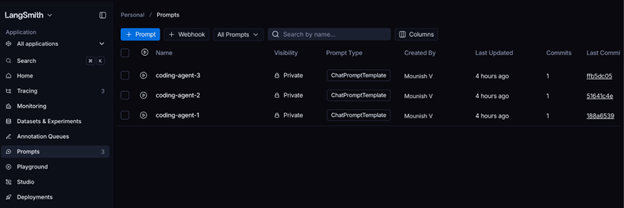
We have defined and pushed the prompts to LangSmith. You can verify the same in the prompts section in LangSmith dashboard:
Defining our First Agent
from deepagents import create_deep_agent
from langchain.chat_models import init_chat_model

PROMPT = "coding-agent-1"

pulled = ls.pull_prompt(PROMPT)
system_prompt = pulled.messages[0].prompt.template

print(f"Loaded prompt: {PROMPT}")
print(system_prompt[:120], "...")

model = init_chat_model("openai:gpt-5-mini")

# Creating the DeepAgent
agent = create_deep_agent(
    model=model,
    system_prompt=system_prompt,
)

print("\nAgent ready")
The agent should be ready to use, it uses the ‘coding-agent-1’ prompt that had defined earlier.
Test the Agent
# Download the HumanEval benchmark dataset (164 Python coding problems)
!wget -q https://github.com/openai/human-eval/raw/master/data/HumanEval.jsonl.gz -O HumanEval.jsonl.gz

# Import required libraries
import gzip
import json

# Function to read the HumanEval dataset
def read_problems(path="HumanEval.jsonl.gz"):
    problems = {}

    try:
        with gzip.open(path, "rt") as f:
            for line in f:
                p = json.loads(line)
                problems[p["task_id"]] = p
    except FileNotFoundError:
        print("Dataset file not found.")

    return problems

# Load all problems
problems = read_problems()

# Extract task IDs
task_ids = list(problems.keys())

# Print total number of problems
print(f"Total problems: {len(task_ids)}")

# Optional: inspect the first problem
example = problems[task_ids[0]]

print("\nExample Task ID:", example["task_id"])
print("\nPrompt:\n", example["prompt"])
print("\nCanonical Solution:\n", example["canonical_solution"])
Total problems: 164
We now have 164 coding problems that we can use to test the system.
Generating Code with the Agent
import re

def extract_code(text: str, prompt: str) -> str:
    """Return just the completed function, stripping any markdown wrapping."""

    text = re.sub(r"```python\s*", "", text)
    text = re.sub(r"```\s*", "", text)

    if text.strip().startswith("def "):
        return text.strip()

    return prompt + text


def solve(problem: dict) -> str:
    result = agent.invoke(
        {"messages": [{"role": "user", "content": problem["prompt"]}]},
        config={
            "metadata": {
                "task_id": problem["task_id"],
                "prompt_name": PROMPT,
            }
        },
    )

    raw = result["messages"][-1].content
    return extract_code(raw, problem["prompt"])


# Test the system on the first problem before running the full evaluation
sample = problems[task_ids[0]]
code = solve(sample)

print(code)
Output:
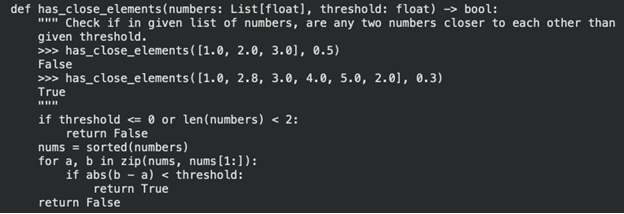
Great! We have a working system. Let’s test it on 5 coding problems now!
import pandas as pd

# Calculate pass@1 and average latency
passed = sum(r["passed"] for r in results)
pass_at_1 = passed / len(results)
avg_latency = sum(r["latency_s"] for r in results) / len(results)

print(f"Results : pass@1 = {pass_at_1:.2%}  ({passed}/{len(results)})")
print(f"Avg latency = {avg_latency:.1f}s")

# Convert results to DataFrame for easier inspection
df = pd.DataFrame(results)
print(df[["task_id", "passed", "latency_s"]].to_string(index=False))

# Print failed tasks for debugging
print("\n── Failures ──")
for _, row in df[~df["passed"]].iterrows():
    print(f"\n{'─'*60}")
    print(f"TASK: {row['task_id']}")
    print(row["code"][:400])  # Show first 400 chars of code
Output:
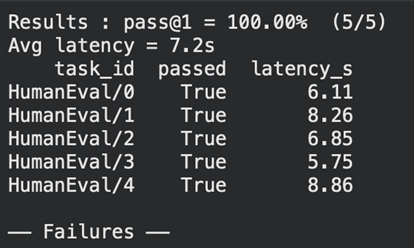
Great! We ran the tests successfully and we can see the latency of each as well. Let’s open LangSmith to see the token usage, cost and other details.
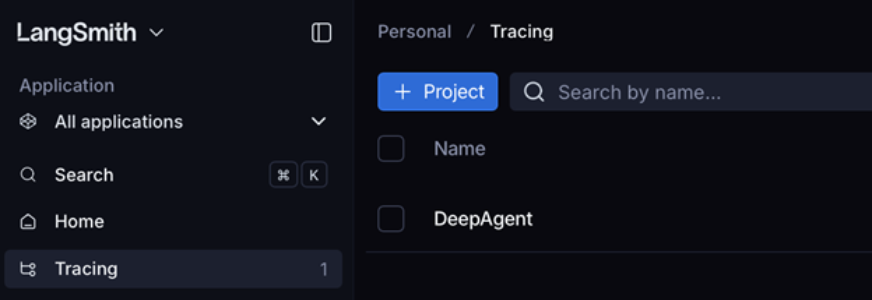
Open LangSmith -> Go to Tracing section -> Open the DeepAgent project:
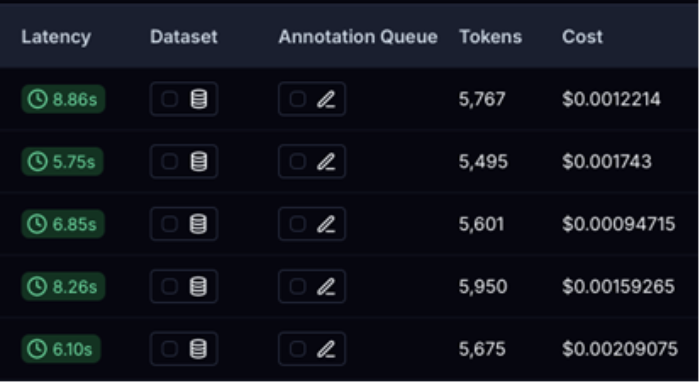
This will be handy to compare our results with the new agent that we’ll build.
Defining a New Agent
from deepagents import create_deep_agent
from langchain.agents.middleware import ModelCallLimitMiddleware
from langchain.chat_models import init_chat_model

SYSTEM_PROMPT = "coding-agent-3"
pulled = ls.pull_prompt(SYSTEM_PROMPT)
system_prompt = pulled.messages[0].prompt.template

# Build the agent
base_model = init_chat_model("openai:gpt-5-mini")

new_agent = create_deep_agent(
    model=base_model,
    system_prompt=system_prompt,
    middleware=[
        # Limit model calls to 2 per invocation
        ModelCallLimitMiddleware(
            run_limit=2,
            exit_behavior="end",
        ),
    ],
)

def solve(problem: dict) -> str:
    result = new_agent.invoke(
        {"messages": [{"role": "user", "content": problem["prompt"]}]},
        config={
            "metadata": {
                "task_id": problem["task_id"],
                "prompt_name": SYSTEM_PROMPT,
            }
        },
    )

    raw = result["messages"][-1].content
    return extract_code(raw, problem["prompt"])
Testing the New Agent
import time
from human_eval.execution import check_correctness

N_PROBLEMS = 5
TIMEOUT = 5  # seconds per test case

results = []

for task_id in task_ids[:N_PROBLEMS]:
    problem = problems[task_id]
    t0 = time.time()

    # Solve the problem using the agent
    code = solve(problem)

    latency = time.time() - t0

    # Check correctness of the generated code
    outcome = check_correctness(problem, code, timeout=TIMEOUT)

    results.append({
        "task_id": task_id,
        "passed": outcome["passed"],
        "latency_s": round(latency, 2),
        "code": code,
    })

    status = "PASS" if outcome["passed"] else "FAIL"
    print(f"{status}  {task_id:30s}  {latency:.1f}s")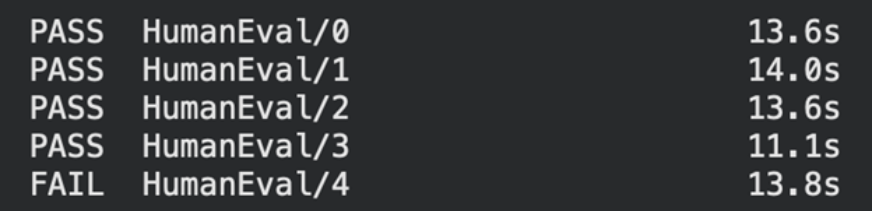
We can see that our prompt-3 has passed 4 problems but has failed to solve one coding problem.
Conclusion
Does this mean our prompt-1 was better ? The answer is not as simple as that, we have to run pass@1 tests multiple times to test the consistency of the agent and with a testing size that’s much bigger than 5. This helps us find the average latency, cost and the most important factor: task reliability. Also finding and plugging the right middleware can help the system perform according to our needs, there are middlewares present to extend the capabilities of the agent and control the number of model calls, tool calls and much more. It’s important to evaluate the agent and LangSmith can surely aid in traceability, storing the prompts and also show errors (if any) from the agent. It’s important to note that while Prompt Engineering focuses on the input, Harness Engineering focuses on the environment and constraints.
Frequently Asked Questions
Q1. What is middleware?
A. Middleware is software that acts as a bridge between components, enabling communication and extending an agent’s capabilities.
Q2. What are alternatives to LangSmith?
A.Popular alternatives for LLM tracing and monitoring include Langfuse, Arize Phoenix, etc..
Q3. What benchmarks are considered industry standard for evaluating coding agents?
A. Industry benchmarks include SWE-bench and BigCodeBench for measuring real-world coding performance.
Passionate about technology and innovation, a graduate of Vellore Institute of Technology. Currently working as a Data Science Trainee, focusing on Data Science. Deeply interested in Deep Learning and Generative AI, eager to explore cutting-edge techniques to solve complex problems and create impactful solutions.