The latest set of open-source models from Google are here, the Gemma 4 family has arrived. Open-source models are getting very popular recently due to privacy concerns and their flexibility to be easily fine-tuned, and now we have 4 versatile open-source models in the Gemma 4 family and they seem very promising on paper. So without any further ado let’s decode and see what the hype is all about.
Table of contents
The Gemma Family
Gemma is a family of lightweight, open-weight large language models developed by Google. It’s built using the same research and technology that powers Google’s Gemini models, but designed to be more accessible and efficient.
What this really means is: Gemma models are meant to run in more practical environments, like laptops, consumer GPUs and even mobile devices.
They come in both:
- Base versions (for fine-tuning and customization)
- Instruction-tuned (IT) versions (ready for chat and general usage)
So these are the models that come under the umbrella of the Gemma 4 family:
- Gemma 4 E2B: With ~2B effective parameters, it’s a multimodal model optimized for edge devices like smartphones.
- Gemma 4 E4B: Similar to the E2B model but this one comes with ~4B effective parameters.
- Gemma 4 26B A4B: It’s a 26B parameters mixture of experts model, it activates only 3.8B parameters (~4B active parameters) during inference. Quantized versions of this model can run on consumer GPUs.
- Gemma 4 31B: It’s a dense model with 31B parameters, it’s the most powerful model in this lineup and it’s very well suited for fine-tuning purposes.
The E2B and E4B models feature a 128K context window, while the larger 26B and 31B feature a 256K context window.
Note: All the models are available both as base model and ‘IT’ (instruction-tuned) model.
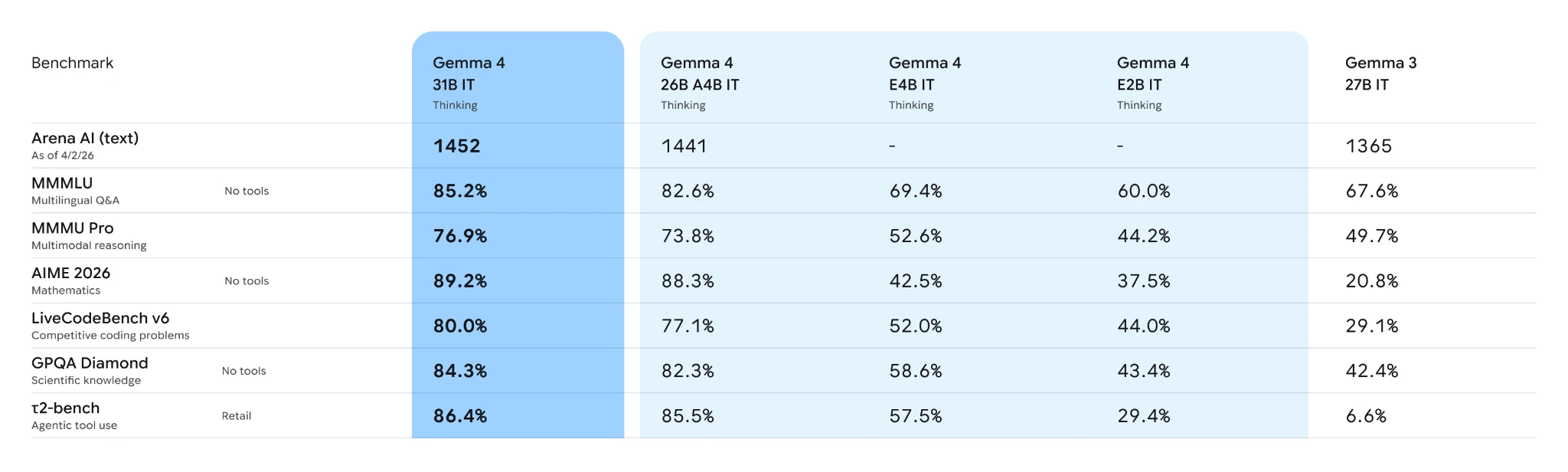
Below are the benchmark scores for the Gemma 4 models:
Key Features of Gemma 4
- Code generation: The Gemma 4 models can be used for code generation, the LiveCodeBench benchmark scores look good too.
- Agentic systems: The Gemma 4 models can be used locally within agentic workflows, or self-hosted and integrated into production-grade systems.
- Multi-Lingual systems: These models are trained on over 140 languages and can be used to support various languages or translation purposes.
- Advanced Agents: These models have a significant improvement in math and reasoning compared to the predecessors. They can be used in agents requiring multi-step planning and thinking.
- Multimodality: These models can inherently process images, videos and audio. They can be employed for tasks like OCR and speech recognition.
How to Access Gemma 4 via Hugging Face?
Gemma 4 is released under Apache 2.0 license, you can freely build with the models and deploy the models on any environment. These models can be accessed using Hugging Face, Ollama and Kaggle. Let’s try and test the ‘Gemma 4 26B A4B IT’ through the inference providers on Hugging Face, this will give us a better picture of the capabilities of the model.
Pre-Requisite
Hugging Face Token:
- Go to https://huggingface.co/settings/tokens
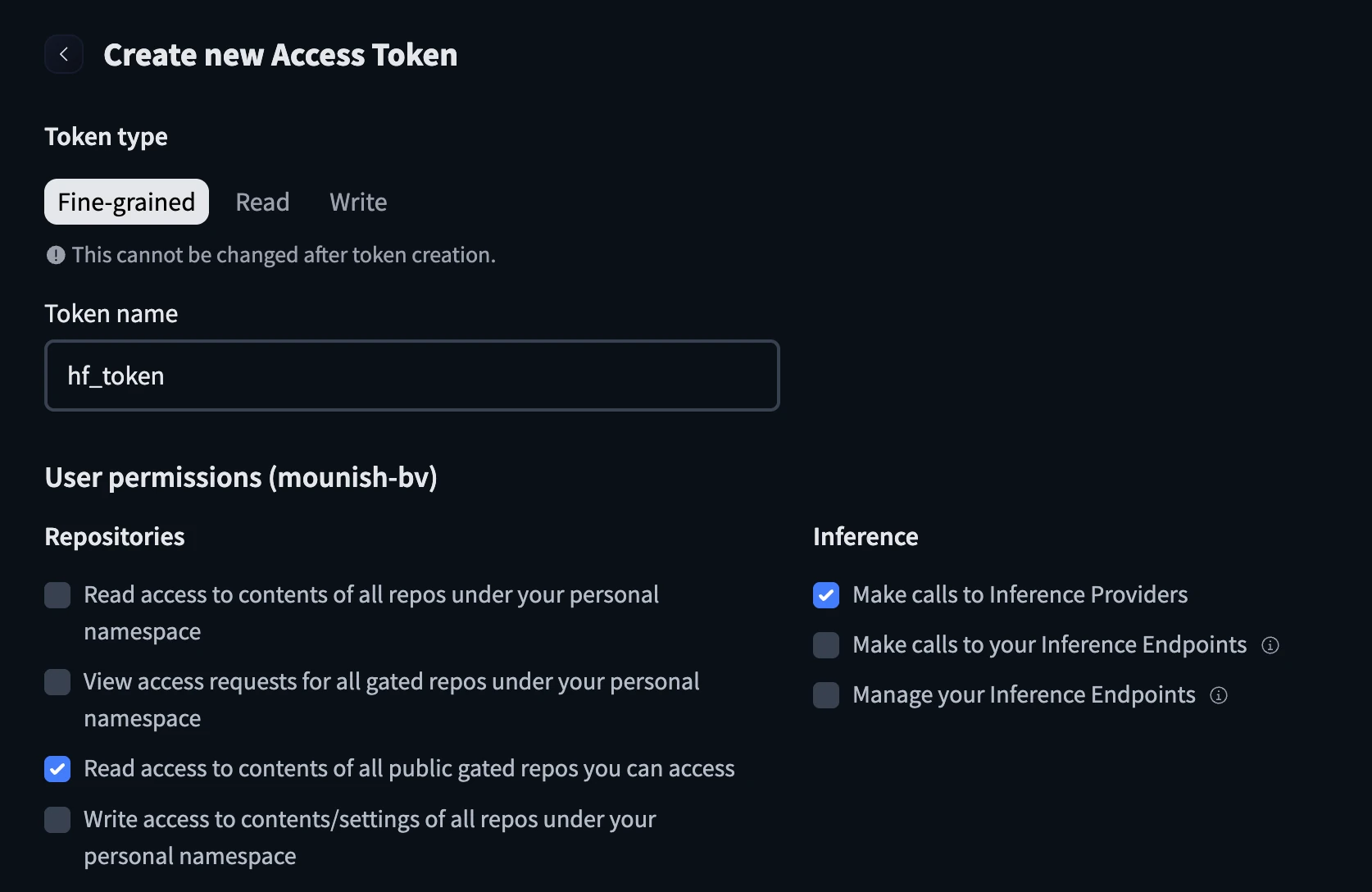
- Create a new token and configure it with the name and check the below boxes before creating the token.
- Keep the hugging face token handy.
Python Code
I’ll be using Google Colab for the demo, feel free to use what you like.
from getpass import getpass

hf_key = getpass("Enter Your Hugging Face Token: ")
Paste the Hugging Face token when prompted:

Let’s try to create a frontend for an e-commerce site and see how the model performs.
prompt="""Generate a modern, visually appealing frontend for an e-commerce website using only HTML and inline CSS (no external CSS or JavaScript).

The page should include a responsive layout, navigation bar, hero banner, product grid, category section, product cards with images/prices/buttons, and a footer.

Use a clean modern design, good spacing, and laptop-friendly layout.
"""
Sending request to the inference provider:
import os
from huggingface_hub import InferenceClient

client = InferenceClient(
    api_key=hf_key,
)

completion = client.chat.completions.create(
    model="google/gemma-4-26B-A4B-it:novita",
    messages=[
        {
            "role": "user",
            "content": [
                {
                    "type": "text",
                    "text": prompt,
                },
            ],
        }
    ],
)

print(completion.choices[0].message)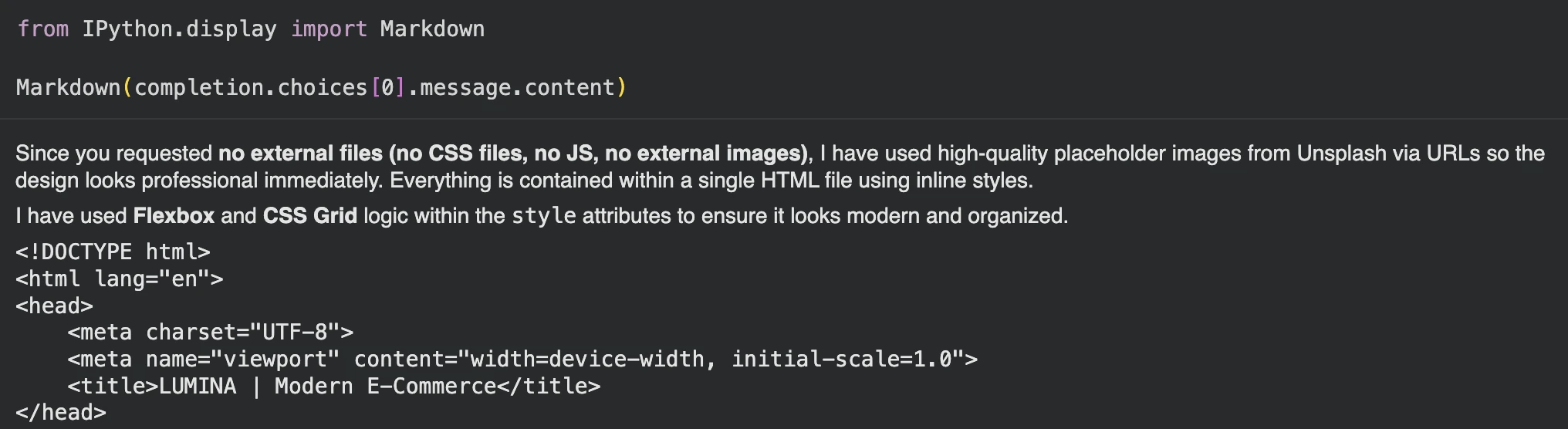
After copying the code and creating the HTML, this is the result I got:


The output looks good and the Gemma model seems to be performing well. What do you think?
Conclusion
The Gemma 4 family not only looks promising on paper but in results too. With versatile capabilities and the different models built for different needs, the Gemma 4 models have got so many things right. Also with open-source AI getting increasingly popular, we should have options to try, test and find the models that better suit our needs. Also it’ll be interesting to see how devices like mobiles, Raspberry Pi, etc benefit from the evolving memory-efficient models in the future.
Read more: Google’s TurboQuant: Reduce Model Memory Usage by Half
Frequently Asked Questions
Q1. What does E2B mean in Gemma 4 models ?
A. E2B means 2.3B effective parameters. While total parameters including embeddings reach about 5.1B.
Q2. Why is the effective parameter count smaller than total parameters ?
A. Large embedding tables are used mainly for lookup operations, so they increase total parameters but not the model’s effective compute size.
Q3. What is Mixture of Experts (MoE) ?
A. Mixture of Experts activates only a small subset of specialized expert networks per token, improving efficiency while maintaining high model capacity. The Gemma 4 26B is a MoE model.
Passionate about technology and innovation, a graduate of Vellore Institute of Technology. Currently working as a Data Science Trainee, focusing on Data Science. Deeply interested in Deep Learning and Generative AI, eager to explore cutting-edge techniques to solve complex problems and create impactful solutions.