Moonshot AI’s Kimi K3 is a 2.8-trillion-parameter open-weight model built with a Mixture-of-Experts architecture. It activates only a small fraction of its parameters per token, helping reduce inference costs while delivering strong coding and agentic performance.
K3 combines near-frontier capabilities, open weights, and lower API pricing, making it an interesting alternative to proprietary models. In this article, we’ll explore how K3 works and show you two simple ways to use it: through Kimi’s app or the Fireworks AI API.
Table of contents
What Makes K3 Different?
Two decisions in architecture are notable:
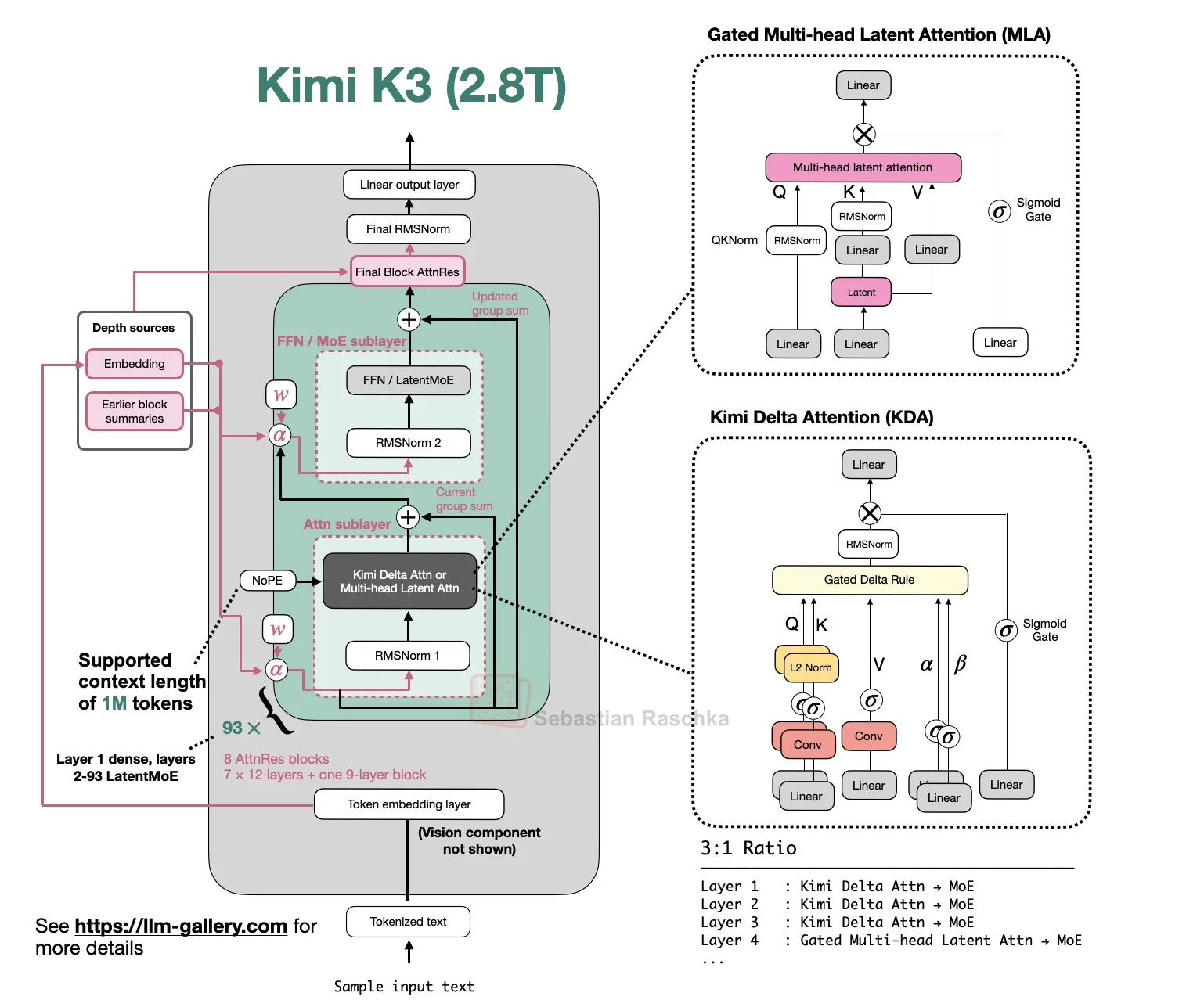
- Kimi Delta Attention (KDA): A hybrid linear attention technique created to render the context window of 1M tokens feasible instead of quadratic.
- Attention Residuals: A complete substitute for standard residual connections that Moonshot claims lead to more consistent results as the model grows larger.
K3 uses a sparse Mixture-of-Experts architecture that activates only a small fraction of its parameters for each token. This gives the model a massive parameter count while keeping inference relatively efficient compared with other trillion-parameter models. Early benchmarks suggest that K3 can compete with advanced proprietary models on coding and agentic tasks, with particularly strong performance on long-context coding and blind coding evaluations.
How to Access K3 and What it Costs?
There are two ways to access K3, and each is suited to a different use case.
- Kimi App: Available on iOS and Android through Kimi.com, as well as through the Kimi Work desktop application. No developer account is required, and you can start with the free tier, which comes with usage limits. It’s a good option if you simply want to explore the model and see how it performs.
- API Access: Available through the Kimi web platform and Fireworks AI. This option uses pay-per-token pricing and is better suited for developers who want to integrate K3 into their own applications or workflows.
Fireworks offers three serving paths, depending on how you want to balance latency and cost:
Cached input is priced at roughly one-tenth the cost of non-cached input. At scale, it’s therefore worth structuring your prompts, including system prompts and reusable context, to take advantage of caching.
For most use cases, Standard is the best starting point. Choose Fast when latency is critical, or Priority when you need higher reliability.
If you prefer to self-host K3, Moonshot recommends a supernode with at least 64 accelerators to create a high-speed environment where the experts can operate within a single domain. This is a significantly larger infrastructure commitment than self-hosting models in the 700B–1.6T parameter range.
Now that we know everything about the model, let’s give it a try:
Task 1: Talking to K3 Directly (No API Key Needed)
The quickest way to experience K3 is through Kimi’s consumer interface. You can use the Kimi app on iOS and Android, access it through kimi.com, or use the Kimi desktop app for work. No developer account or billing details are required. You can simply open the chat interface and start experimenting.
For a more meaningful test, don’t just ask K3 questions about general knowledge. Instead, give it a small project or ask it to build a simple system. That’s where K3’s coding and agentic capabilities really come into play.
Input Prompt:
Build a single-file HTML page for a typing speed test — it should show a random sentence, start a timer on the first keystroke, and display words-per-minute and accuracy when I finish typing. Make it look clean, not default-Bootstrap. Then explain the trickiest part of the logic in two sentences.
Output:
My Observation:
- Is it utilizing its cognitive thinking skills? K3 is always working in a “thinking state” which means you will be able to see it planning its code before “spitting out” the HTML.
- 100% truthful is what we need to determine whether the voiceover = code. This way, we can be sure that it does not just repeat some phrase it has already heard before.
- Just use the visual input to Geek. Put a screenshot of the developed website and ask Geek to analyze its margin/contrast. This will help you understand the main benefits of the system.
The entire process can be done in less than five minutes, which will give you an understanding of its capabilities in coding and visual perception.
Task 2: Calling K3 via the Fireworks API
To build anything with, be it a script, a pipeline or an agent, programmatic access is needed. In this case, Fireworks AI provides K3 serverless service which is OpenAI-compatible through accounts/fireworks/models/kimi-k3.
Step 1: Generate a key. Do that from API keys settings of Fireworks and export it
export FIREWORKS_API_KEY="your-api-key"Step 2: Rather than a dull “hello world” function making K3 produce something in a single go with its massive 1M-token context window, provide it with an image and tell it to interpret the image and create something coherent from this interpretation in one go as well. This serves as an acceptable imitation of what real agency is about (sense → think → create product).
import requests
import json

url = "https://api.fireworks.ai/inference/v1/chat/completions"

payload = {
    "model": "accounts/fireworks/models/kimi-k3",
    "max_tokens": 4096,
    "top_k": 40,
    "presence_penalty": 0,
    "frequency_penalty": 0,
    "messages": [
        {
            "role": "user",
            "content": [
                {
                    "type": "text",
                    "text": (
                        "Look at this image. First describe what's in it in one paragraph. "
                        "Then write a 4-line haiku inspired by it. "
                        "Return your answer as JSON with keys 'description' and 'haiku'."
                    )
                },
                {
                    "type": "image_url",
                    "image_url": {
                        "url": "https://images.unsplash.com/photo-1582538885592-e70a5d7ab3d3?ixlib=rb-4.0.3&ixid=M3wxMjA3fDB8MHxwaG90by1wYWdlfHx8fGVufDB8fHx8fA%3D%3D&auto=format&fit=crop&w=1770&q=80"
                    }
                }
            ]
        }
    ]
}

headers = {
    "Accept": "application/json",
    "Content-Type": "application/json",
    "Authorization": f"Bearer <FIREWORKS_API_KEY>"
}

response = requests.post(
    url,
    headers=headers,
    data=json.dumps(payload)
)

result = response.json()

print(result["choices"][0]["message"]["content"])
Output:
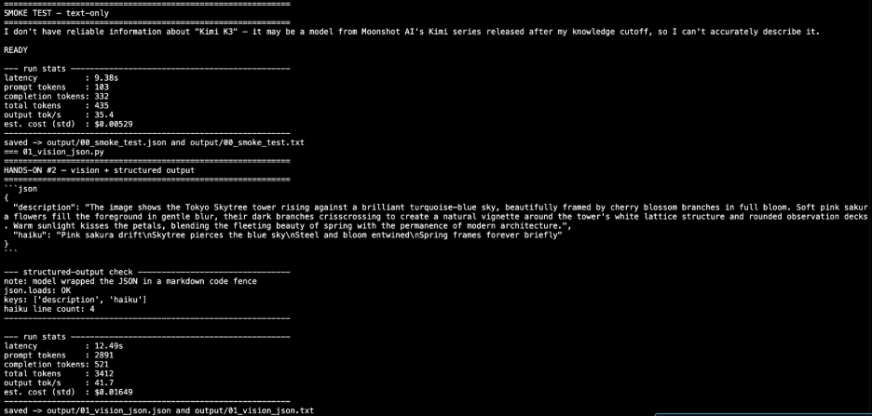
My Observation:
- Is the JSON format clean, or does K3 hide it in comments? (You should know that before deciding to create a pipeline to process the output).
- How does the quality of the haiku compare to the quality of the factual description – is the “creative” part as good as the part about “perception”?
- Replace the max_tokens and image URL with the screenshot of your own dashboard or your own sketch and have it created the specification.
How K3 Performs Against Other AI Models?
K3’s performance can only be assessed in the context of other models in the field:
- On the Artificial Intelligence Analysis Index, K3 is ranked closely behind GPT-5.6 Sol Max and Claude Fable 5, being only a few points behind the above-mentioned models instead of falling significantly behind.
- In the front-end coding blind assessment, K3 came first ahead of Claude Fable 5 in the independent developer test.
- According to Moonshot’s coding assessment suite and agentic benchmark, K3 outperformed Claude Opus 4.8 and GPT-5.5, while falling behind Fable 5 and GPT-5.6 Sol.
- In terms of the model size, K3 is around 75% bigger than DeepSeek’s V4 Pro model, being the widely used open model before K3’s launch, meaning that K3 is the largest open-weight model in history and not just moonshot’s model.
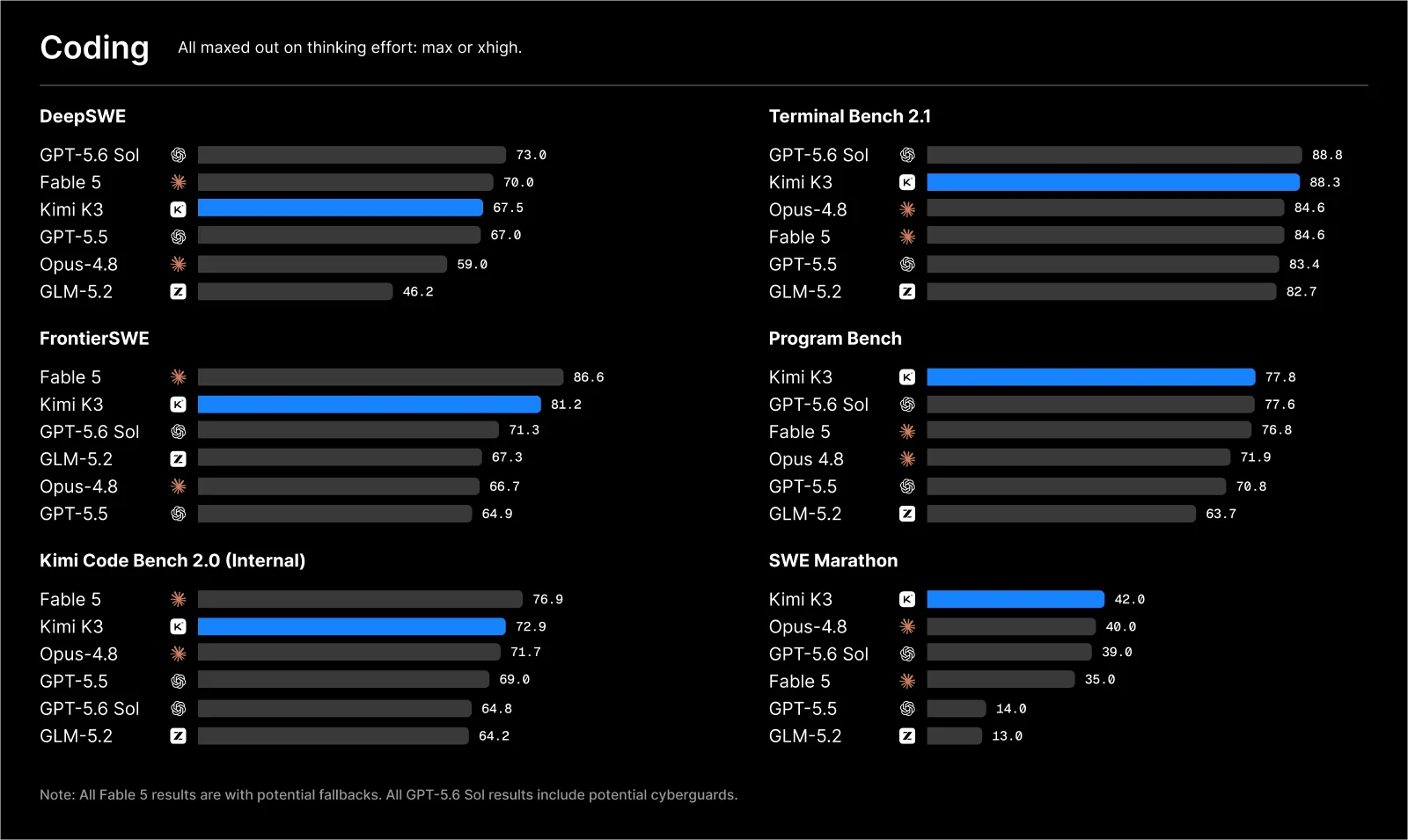
The moral is to keep in mind that K3 excels primarily in programming and long-horizon agency tasks and not in everything in general. So, you should run your own eval suite targeting your specific task instead of relying on the leaderboard ranking alone.
Conclusion
K3 is one of the first models in its class that you can download and self-host. From an infrastructure perspective, though, Moonshot recommends having 64+ accelerators available to run it effectively.
If you want to explore K3 without that infrastructure, the Kimi app and Fireworks API are the easiest entry points. The app lets you test the model’s capabilities, while the API makes it practical to integrate K3 into real-world applications.
Both options took less than ten minutes to set up, and the results were consistent. K3 demonstrated strong reasoning before taking action and handled images as naturally as other forms of input.
Frequently Asked Questions
Q1. What is Kimi K3?
A. K3 is a 2.8-trillion-parameter open-weight MoE model with a 1M-token context window and native text-and-vision capabilities.
Q2. How can you access K3?
A. You can use K3 through the Kimi app or integrate it programmatically through the Fireworks AI API.
Q3. What makes K3 notable?
A. K3 combines near-frontier coding and agentic performance with open weights, sparse activation, and lower API costs.
Data Science Trainee at Analytics Vidhya
I am currently working as a Data Science Trainee at Analytics Vidhya, where I focus on building data-driven solutions and applying AI/ML techniques to solve real-world business problems. My work allows me to explore advanced analytics, machine learning, and AI applications that empower organizations to make smarter, evidence-based decisions.
With a strong foundation in computer science, software development, and data analytics, I am passionate about leveraging AI to create impactful, scalable solutions that bridge the gap between technology and business.
📩 You can also reach out to me at [email protected]