If you follow trends in the AI world, chances are you have already come across Jev, a new AI model by TypeSafe AI. It is trending on X, and once you understand the reason behind it, you will want to try it out for yourself.
TypeSafe AI came out of two years in stealth on September 15, 2026, backed by $40 million in seed funding. Founder Diogo Almeida spent years at OpenAI, where he helped build the research behind ChatGPT. In the company’s own words, models have been superhuman at chat for years, so why has all the automation not caught up? That question is what led Almeida to build TypeSafe: AI infrastructure meant not for conversation, but for decisions inside software.
In this article, we will explain what Jev is, why it matters, and how it is different from ChatGPT, Claude, and other LLMs you already use.
Table of contents
What is Jev?
Jev is not a chatbot. It cannot write emails, poems, or code. In fact, it cannot generate text at all. According to TypeSafe, that is the point.
Models like ChatGPT, Claude, and Gemini generate responses one token at a time. This makes them flexible and conversational, but also slower and inherently open-ended. Jev takes a different approach. It analyzes a situation once and returns a fixed, predefined answer with a confidence score. Instead of generating a response, it makes a judgment.
Because Jev does not generate text sequentially, it can process its output in parallel. This makes it faster, more predictable, and potentially cheaper to run.
The video is taken from the official documentation. You can fidn more details here.
How it works?
A regular LLM writes one token at a time, and each new token depends on the one before it. This chain is what makes these models slower when used inside software, and it is unavoidable as long as the output is a sentence.
Jev skips this entirely. It reads the situation once, then answers every question you asked in a single pass, all at the same time.
Let’s take an example of a customer support ticket that needs to be routed and prioritized. A traditional system might rely on keyword rules or manual review. With Jev, a developer can evaluate multiple aspects of the ticket at once, such as which team should handle it and whether it is urgent:
from typesafe_sdk import Choice, Noul, TypeSafeClient

response = TypeSafeClient().system_one(
    state=ticket,
    questions={
        "department": Choice(
            instructions="Which team should handle this ticket?",
            criteria={
                "billing": "Payment issues",
                "technical": "Bugs or integrations",
            },
        ),
        "is_urgent": Noul(
            instructions="Is this ticket time-sensitive?"
        ),
    },
)

response.answers["department"].choice   # "technical"
response.answers["is_urgent"].noul      # 1.0
Jev analyzes the ticket once and returns both results together. There is no need to process each question separately or wait for one response before evaluating the next.
This one call also shows the three types of questions Jev can handle:
- Choice: Selects one option from a predefined set, such as the appropriate support department
- Score: Assigns a value to something based on a defined scale
- Noul: Returns a probability between 0 and 1 for a yes/no question, such as whether a ticket is urgent
These question types can be combined freely in a single request, with results returned simultaneously rather than generated one after another.
One consequence of this is worth pausing on. Adding more questions to a single call barely changes how long it takes to get an answer. Asking Jev one question or thirteen questions takes roughly the same amount of time. TypeSafe’s own cookbook reports that batching thirteen questions into one request came out 12.2 times cheaper and 10 times faster than asking them one at a time, with no change in the answers.
Jev in Action: Examples
Jev has launched with limited access, and since we do not have hands-on access yet, we are showing examples from X to see how it performs across different tasks.
Example 1: Scoring Leads and Outreach at Scale
One builder, Roman, tested Jev on 700 high-intent leads paired with personalized outreach messages. In 40 seconds and for about $0.09 total, Jev predicted how each message would perform, attached a confidence score, and flagged mismatches between leads and messages. The same builder noted Jev can also score leads, read buying signals, match prospects to the best-fit message, and identify which campaigns are likely to perform based on the data.
Example 2: Reading 464,720 Research Papers
One researcher, DevaiahShrithan, ran every arXiv AI abstract from 1993 to 2026 through Jev, asking five questions of each: does it claim state of the art, did it release code, is it written in LLM style, what type of paper is it, and how hyped is the language. The output is a chart of how AI research writing has changed over three decades, built from 2.3 million individual judgments.
Example 3: Triaging 3 Million Session Replay Events
Another builder, Tarasshyn, pointed Jev at 3 million session-replay events. In 40 seconds and for $2.17, it reviewed 3,247 sessions, caught 132 rage clicks, 116 dead clicks and 95 JavaScript errors, then opened 213 draft fix pull requests. The interesting part is the last step: the judgments were good enough to act on automatically, not just to display on a dashboard.
Jev Evals
TypeSafe backed the launch with some striking numbers. Input costs $0.042 per million tokens, and output is free since there is nothing generated to bill for. At that price, a bot playing Doom and making ten decisions a second runs about $7 an hour.
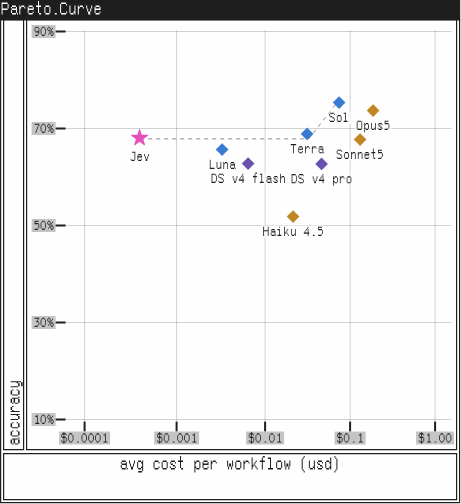
TypeSafe was upfront that every one of these figures comes from its own evals, using its own workflows and reference answers, with no independent verification yet. That transparency did not stop critics from calling Jev little more than a well-packaged classifier, a category of tool that has existed for years.
What that critique misses is that classification was never the real claim. Calibration was. A calibrated model’s confidence scores mean something specific: the answers it scores at 0.8 are right about 80% of the time. That is what lets code act automatically on high-confidence answers and escalate the rest, which is the difference between a demo and something production-ready.
The most convincing result, though, was not one of the flashy demos. TypeSafe’s re-ranking cookbook takes 40 legal queries, builds a 30-passage shortlist for each using ordinary keyword search, then asks Jev a single question per query-passage pair. That one extra step more than tripled top-1 accuracy.
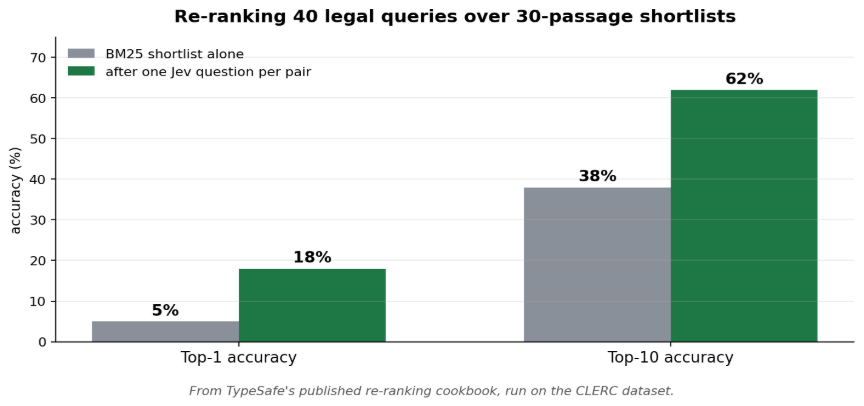
Like everything else here, the number is TypeSafe’s own. But the underlying pattern still holds: at this price and speed, calling a model ten times a second stops being reckless.
Hallucinations, RLCD, and Where Jev Breaks
TypeSafe’s “no hallucinations” claim needs a caveat. Jev cannot return a value outside the set you defined, so it can never hand your code something unparseable. But it can still give you the wrong answer from inside that set. Type safety and correctness are different guarantees, and only the first is absolute.
That honesty extends to how Jev was trained. Most models use RLHF, which quietly rewards confident-sounding answers, or RLVR, trained on outputs a program can verify. TypeSafe built a third method, RLCD, aimed specifically at honest probabilities. Notably, Jev’s founder co-invented RLHF at OpenAI, then built a method designed around its own blind spot.
TypeSafe is also unusually upfront about where Jev fails, listing nine failure modes in its docs. A few worth knowing: it struggles with arithmetic and dates (keep those in code), and with large, noisy input (filter first).
Conclusion
On paper, Jev’s pitch is compelling: faster, cheaper, and designed for decision-making rather than conversation. However, the figures discussed in this article, including pricing, accuracy, and speed, are based on TypeSafe’s own evaluations and workflows. They have not yet been independently verified, and real-world performance can differ from controlled benchmarks.
The more important question is how well Jev fits into real-world development workflows. OpenAI and Anthropic have spent years building mature APIs, integrations, and developer tooling. Jev is a newer approach that still needs to prove how easily it can fit into existing systems and production environments.
For now, the benchmarks are best viewed as an indication of Jev’s potential rather than a definitive measure of production performance. We’ll have a clearer picture once we’ve tested it ourselves.
Stay tuned for our hands-on article, where we put Jev’s claims to the test.
Frequently Asked Questions
Q1. Is Jev a replacement for ChatGPT or Claude?
A. No. It cannot write, converse, or reason open-endedly. Most early builds run it alongside an LLM, letting Jev handle routing and verification while the chat model does anything that needs generating.
Q2. Can it really not hallucinate?
A. It cannot return a value outside your schema or a malformed response. It can still return the wrong value from inside it. Two different guarantees, and only the first is absolute.
Q3. What does it cost?
A. $0.042 per million input tokens, output free.
Q4. Can I fine-tune it on my data?
A. No. The same weights serve everyone, and TypeSafe says it is not trained on customer requests. You adapt it through the request instead: your material in the state, your rules in the instructions and criteria.
Hi , I am Sree Vamsi a passionate Data Science enthusiast currently working at Analytics Vidhya. My journey into data science began with a curiosity for uncovering insights from complex data and has evolved into building end-to-end Generative AI applications, RAG pipelines, agentic AI workflows, and multi-agent systems that solve real-world business problems.