Large Language Models (LLMs) like Anthropic’s Claude have unlocked massive context windows (up to 200k tokens in Claude 4) that let them consider entire documents or codebases in a single go. However, effectively providing relevant context to these models remains a challenge. Traditionally, developers have resorted to complex prompt engineering or retrieval pipelines to feed external information into an LLM’s prompt. Anthropic’s Model Context Protocol (MCP) is a new open standard that simplifies and standardizes this process.
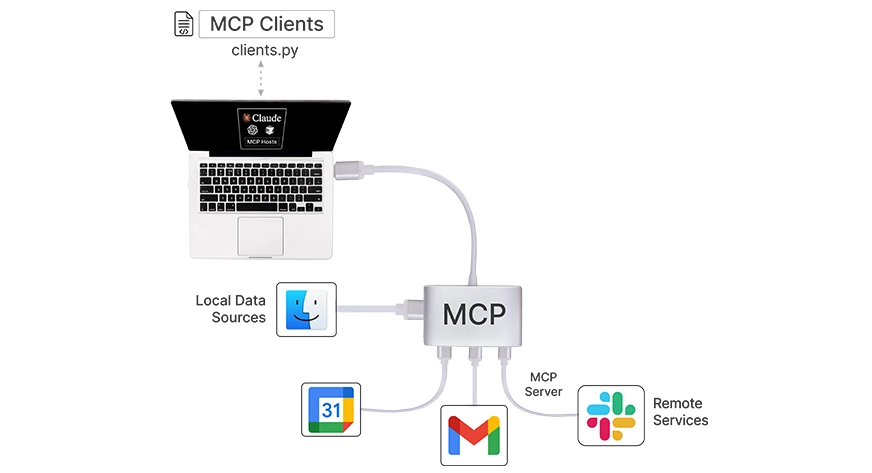
Think of MCP as the “USB-C for AI applications” – a universal connector that lets your LLM seamlessly access external data, tools, and systems. In this article, we’ll explain what MCP is, why it’s important for long-context LLMs, how it compares to traditional prompt engineering, and walk through building a simple MCP-compatible context server in Python. We’ll also discuss practical use cases (like retrieval-augmented generation (RAG) and agent tools) and provide code examples, diagrams, and references to begin with MCP and Claude.
Table of contents
What is MCP and Why Does It Matter?
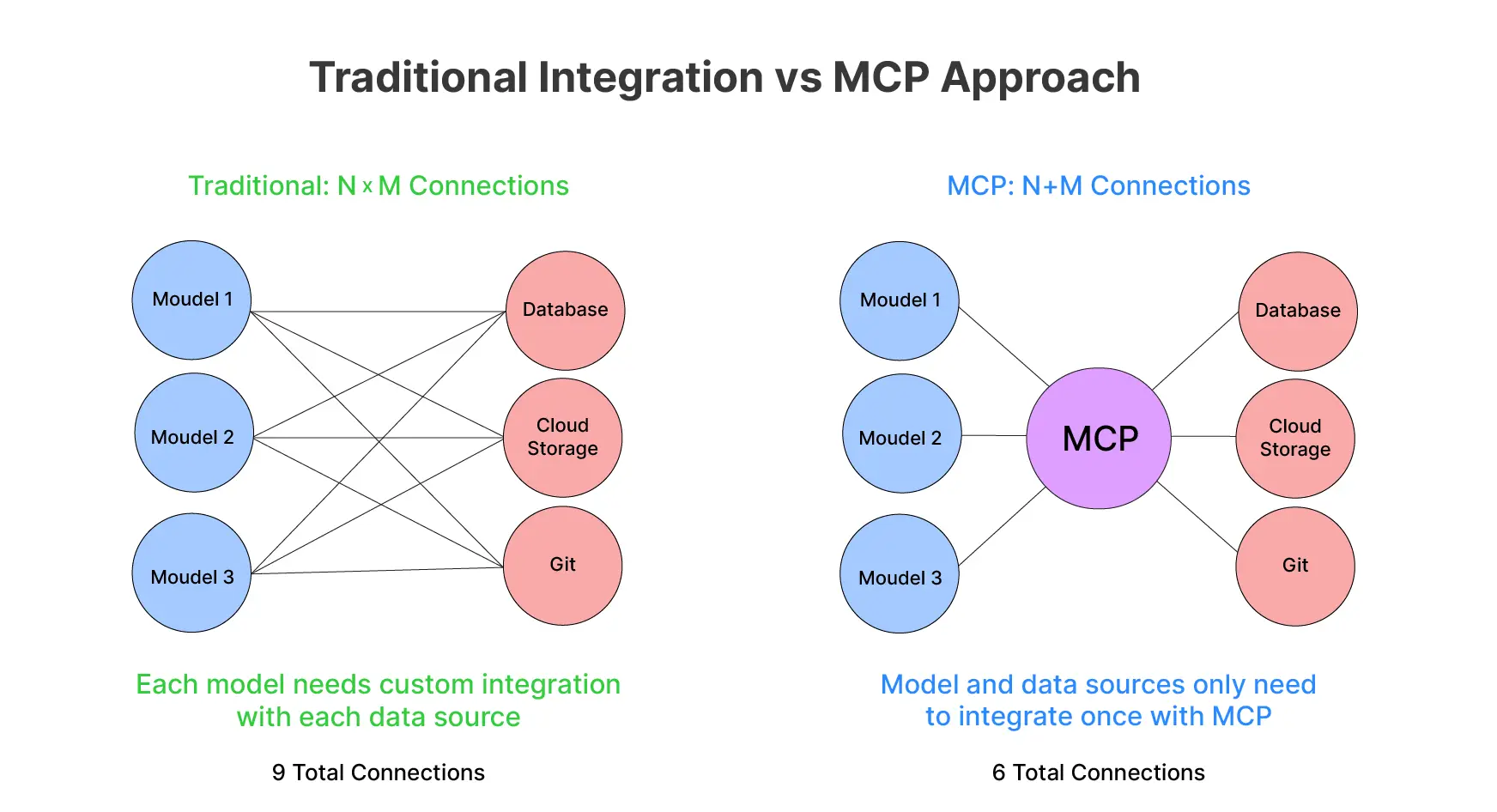
Model Context Protocol is an open protocol that Anthropic released in late 2024. It is meant to standardize how AI applications provide context to LLMs. In essence, MCP defines a common client–server architecture for connecting AI assistants to the places where your data lives. This helps with both local files, databases, cloud services, as well as business applications. Before MCP, integrating an LLM with each new data source or API meant writing a custom connector or prompt logic for each specific case. This led to a combinatorial explosion of integrations: M AI applications times N data sources could require M×N bespoke implementations. MCP tackles this by providing a universal interface. With this, any compliant AI client can talk to any compliant data/service server. This reduces the problem to M + N integration points.
Why is MCP especially important for long-context LLMs? Models like Claude 4 can ingest hundreds of pages of text. Though deciding what information to put into that huge context window is non-trivial. Simply stuffing all potentially relevant data into the prompt is inefficient and sometimes impossible. Model Context Protocol enables a smarter approach. The LLM or its host application can dynamically retrieve just-in-time context from external sources as needed. This is done instead of front-loading everything. This means you can leverage the full breadth of a 200k-token window with relevant data fetched on the fly. For example, pulling in only the sections of a knowledge base that relate to the user’s query. MCP provides a structured, real-time way to maintain and augment the model’s context with external knowledge.
In short, as AI assistants grow in context length, MCP ensures they are not “trapped behind information silos.” Instead, these can access up-to-date facts, files, and tools to ground their responses.
MCP vs. Traditional Prompt Engineering
Before MCP, developers often used RA) pipelines or manual prompt engineering to inject external information into an LLM’s prompt. For example, a RAG system might vector-search a document database for relevant text. It may then insert those snippets into the prompt as context. Alternatively, one might craft a monolithic prompt containing instructions, examples, and appended data. These approaches work, but they are ad hoc and lack standardization.
Each application ends up reinventing how to fetch and format context for the model, and integrating new data sources means writing new glue code or prompts.
MCP Primitives
Model Context Protocol fundamentally changes this by introducing structured context management. Instead of treating all external info as just more prompt text, MCP breaks down interactions into three standardized components (or “primitives”):
- Resources – think of these as read-only context units (data sources) provided to the model. A resource might be a file’s contents, a database record, or an API response that the model can read. Resources are application-controlled. The host or developer decides what data to expose and how. Importantly, reading a resource has no side effects – it’s analogous to a GET request that just fetches data. Resources supply the content that can be injected into the model’s context when needed (e.g., retrieved documents in a Q&A scenario).
- Tools – these are actions or functions the LLM can invoke to perform operations, such as running a computation or calling an external API. Tools are model-controlled. This means the AI decides if and when to use them (similar to function calling in other frameworks). For example, a tool could be “send_email(recipient, body)” or “query_database(SQL)”. Using a tool may have side effects (sending data, modifying state), and the result of a tool call can be fed back into the conversation.
- Prompts – these are reusable prompt templates or instructions that you can invoke as needed. They are user-controlled or predefined by developers. Prompts might include templates for common tasks or guided workflows (e.g., a template for code review or a Q&A format). Essentially, they provide a way to consistently inject certain instructions or context phrasing without hardcoding it into every prompt.
Different from Traditional Prompt Engineering
This structured approach contrasts with traditional prompt engineering. In that, all context (instructions, data, tool hints) may lump into one big prompt. With MCP, context is modular. An AI assistant can discover what resources and tools are available and then flexibly combine them. So, MCP turns an unstructured prompt into a two-way conversation between the LLM and your data/tools. The model isn’t blindly handed a block of text. Instead, it can actively request data or actions via a standard protocol.
Moreover, MCP makes integrations consistent and scalable. As the USB analogy suggests, an MCP-compliant server for (say) Google Drive or Slack can plug into any MCP-aware client (Claude, an IDE plugin, etc.). Developers don’t have to write new prompt logic for each app-tool combo. This standardization also facilitates community sharing: you can leverage pre-built MCP connectors instead of reinventing them. Anthropic has open-sourced many MCP servers for common systems. These include file systems, GitHub, Slack, databases, etc., which you can reuse or learn from. In summary, MCP offers a unified and modular way to supply context and capabilities to LLMs.
MCP Architecture and Data Flow
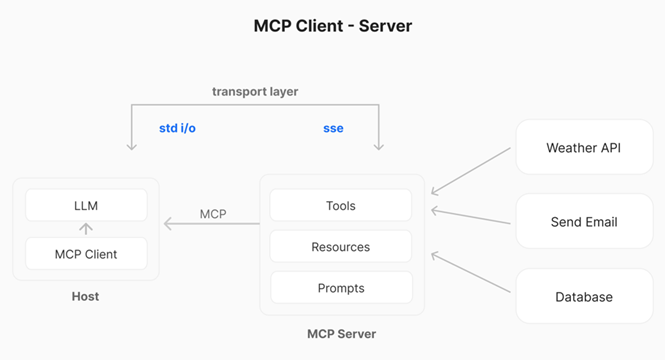
At a high level, Model Context Protocol follows a client–server architecture within an AI application. Let’s break down the key components and how they interact:
Host
The host is the main AI application or interface that the end-user interacts with. This can be a chatbot UI (e.g., Claude’s chat app or a custom web app). Or it can be an IDE extension, or any “AI assistant” environment. The host contains or invokes the LLM itself. For instance, Claude Desktop is a host – it’s an app where Claude (the LLM) converses with the user.
MCP Client
The MCP client is a component (often a library) running within the host application. It manages the connection to one or more MCP servers. You can think of the client as an adapter or middleman. It speaks the MCP protocol, handling messaging, requests, and responses. Each MCP client typically handles one server connection. So, if the host connects to multiple data sources, it will instantiate multiple clients). In practice, the client is responsible for discovering server capabilities. It sends the LLM’s requests to the server and relays responses back.
MCP Server
The server is an external (or local) program that wraps a specific data source or functionality behind the MCP standard. The server “exposes” a set of Tools, Resources, and Prompts according to the MCP spec. For example, a server might expose your file system (allowing the LLM to read files as resources). Or a CRM database, or a third-party API like weather or Slack. The server handles incoming requests (like “read this resource” or “execute this tool”). It then returns results in a format the client and LLM can understand.
These components communicate via a defined transport layer. MCP supports multiple transports. For local servers, a simple STDIO pipe can be used. Client and server on the same machine communicate via standard input/output streams. For remote servers, MCP uses HTTP with Server-Sent Events (SSE) to maintain a persistent connection. MCP libraries abstract away the transport details, but it’s useful to know that local integrations are possible without any network. And that remote integrations work over web protocols.
Data flow in MCP
Once everything is set up, the interaction follows a sequence whenever the user engages with the AI assistant:
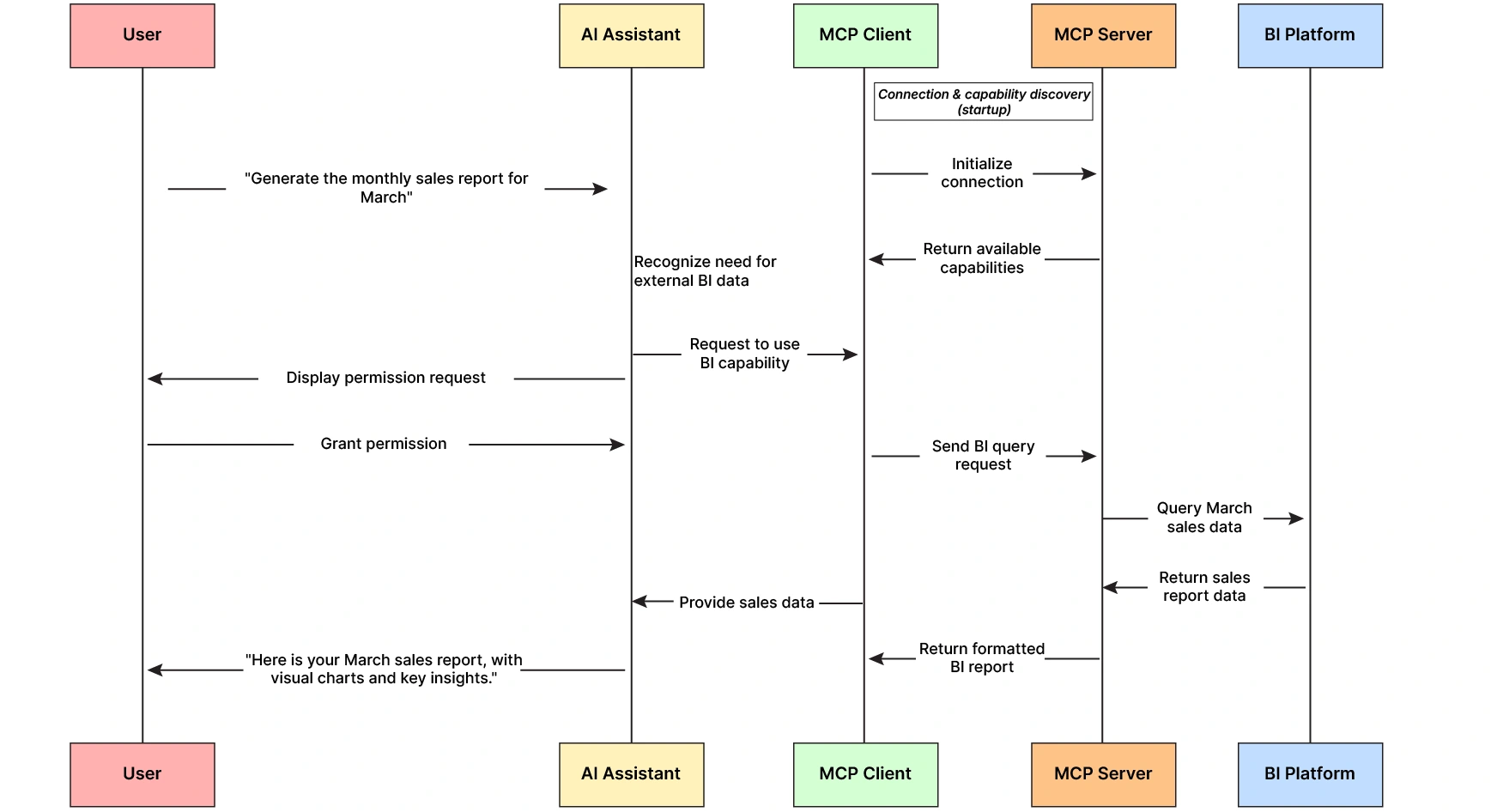
- Initialization & Handshake – When the host application starts or when a new server is added, the MCP client establishes a connection to the server. They perform a handshake to verify protocol versions and exchange basic info. This ensures both sides speak the same MCP version and understand each other’s messages.
- Capability Discovery – After connecting, the client asks the server what it can do. The server responds with a list of available tools, resources, and prompt templates (including descriptions, parameter schemas, etc.). For example, a server might report: “I have a resource ‘file://{path}’ for reading files, a tool ‘get_weather(lat, lan)’ for fetching weather, and a prompt template ‘summarize(text).” The host can use this to present options to the user or inform the LLM about available functions.
- Context Provisioning – The host can proactively fetch some resources or choose prompt templates to augment the model’s context at the start of a conversation. For instance, an IDE could use an MCP server to load the user’s current file as a resource and include its content in Claude’s context automatically. Or the host might apply a prompt template (like a specific system instruction) before the LLM starts generating. At this stage, the host essentially injects initial context from MCP resources/prompts into the LLM’s input.
- LLM Invocation & Tool Use – The user’s query, along with any initial context, is given to the LLM. As the LLM processes the query, it can decide to invoke one of the available MCP Tools if needed. For example, if the user asks “What are the open issues in repo X?”, the model might determine it needs to call a get_github_issues(repo) tool provided by a GitHub MCP server. When the model “decides” to use a tool, the host’s MCP client receives that function call request (this is analogous to function-calling in other LLM APIs). The client then sends the invocation to the MCP server responsible.
- External Action Execution – The MCP server receives the tool invocation, acts by interfacing with the external system (e.g., calling GitHub’s API), and then returns the result. In our example, it might return a list of issue titles.
- Response Integration – The MCP client receives the result and passes it back to the host/LLM. Typically, the result is incorporated into the LLM’s context as if the model had “seen” it. Continuing the example, the list of issue titles can end the conversation (often as a system or assistant message containing the tool’s output). The LLM now has the data it fetched and can use it to formulate a final answer.
- Final Answer Generation – With relevant external data in context, the LLM generates its answer to the user. From the user’s perspective, the assistant answered using real-time knowledge or actions, but thanks to MCP, the process was standardized and secure.
Crucially, Model Context Protocol enforces security and user control throughout this flow. No tool or resource is used without explicit permission. For instance, Claude’s implementation of MCP in Claude Desktop requires the user to approve each server and can prompt before certain sensitive operations. Most MCP servers run locally or within the user’s infrastructure by default, keeping data private unless you explicitly allow a remote connection. All of this ensures that giving an LLM access to, say, your file system or database via MCP doesn’t turn into a free-for-all; you maintain control over what it can see or do.
Building a Simple MCP Context Server in Python (Step-by-Step)
One of the great things about Model Context Protocol being an open standard is that you can implement servers in many languages. Anthropic and the community provide SDKs in Python, TypeScript, Java, Kotlin, C#, and more. Here, we’ll focus on Python and build a simple MCP-compatible server to illustrate how to define and use context units (resources) and tools. We assume you have Python 3.9+ available.
Note: This tutorial uses in-memory data structures to simulate real-world behavior. The example requires no external dataset.
Step 1: Setup and Installation
First, you’ll need an MCP library. You can install Anthropic’s official Python SDK (mcp library) via pip. There’s also a high-level helper library called FastMCP that makes building servers easier (it’s a popular community SDK). For this guide, let’s use fastmcp for brevity. You can install it with:
pip install fastmcp(Alternatively, you could use the official SDK similarly. The concepts remain the same.)
Step 2: Define an MCP Server and Context Units
An MCP server is essentially a program that declares some tools/resources and waits for client requests. Let’s create a simple server that provides two capabilities to illustrate MCP’s context-building:
- A Resource that provides the content of an “article” by ID – simulating a knowledge base lookup. This will act as a context unit (some text data) the model can retrieve.
- A Tool that adds two numbers – a trivial example of a function the model can call (just to show tool usage).
from fastmcp import FastMCP

# Initialize the MCP server with a name
mcp = FastMCP("DemoServer")

# Example data source for our resource
ARTICLES = {
"1": "Anthropic's Claude is an AI assistant with a 100K token context window and advanced reasoning abilities.",
"2": "MCP (Model Context Protocol) is a standard to connect AI models with external tools and data in a unified way.",
}

# Define a Resource (context unit) that provides an article's text by ID @mcp.resource("article://{article_id}")
def get_article(article_id: str) -> str:
    """Retrieve the content of an article by ID."""
    return ARTICLES.get(article_id, "Article not found.")

# Define a Tool (function) that the model can call @mcp.tool()
def add(a: int, b: int) -> int:
    """Add two numbers and return the result."""
    return a + b

# (Optional) Define a Prompt template for demonstration @mcp.prompt()
def how_to_use() -> str:
    """A prompt template that instructs the assistant on using this server."""
    return "You have access to a DemoServer with an 'article' resource and an 'add' tool."

if name=="main":
# Run the server using standard I/O transport (suitable for local client connection)
    mcp.run(transport="stdio")
Let’s break down what’s happening here:
- We create a FastMCP server instance with the name “DemoServer”. The clients use the name to refer to this server.
- We define a dictionary ARTICLES to simulate a small knowledge base. In real scenarios, database queries or API calls can replace this, but for now, it’s just in-memory data.
- The @mcp.resource(“article://{article_id}”) decorator exposes the get_article function as a Resource. The string “article://{article_id}” is a URI template indicating how this resource is accessed. MCP clients will see that this server offers a resource with the schema article://… and can request, for example, article:// 1. When called, get_article returns a string (the article text). This text is the context unit that would be delivered to the LLM. Notice there are no side effects – it’s a read-only retrieval of data.
- The @mcp_tool decorator exposes an add a Tool. It takes two integers and returns their sum. It’s a trivial example just to illustrate a tool; a real tool might act like hitting an external API or modifying something. The important part is that the model’s choice invokes the tools and these can have side effects.
- We also showed an @mcp_prompt() for completeness. This defines a Prompt template that can provide preset instructions. In this case, how_to_use returns a fixed instruction string. Prompt units can help guide the model (for instance, with usage examples or formatting), but they are optional. The user might select them before the model runs.
- Finally, mcprun(transport=”stdio”) starts the server and waits for a client connection, communicating over standard I/O. If we wanted to run this as a standalone HTTP server, we could use a different transport (like HTTP with SSE), but stdio is perfect for a local context server that, say, Claude Desktop can launch on your machine.
Step 3: Running the Server and Connecting a Client
To test our Model Context Protocol server, we need an MCP client (for example, Claude). One simple way is to use Claude’s desktop application, which supports local MCP servers out of the box. In Claude’s settings, you could add a configuration pointing to our demo_server.py. It would look something like this in Claude’s config file (pseudo-code for illustration):
JSON
{
"mcpServers":
  { "DemoServer":
   {
    "command": "python",
    "args": ["/path/to/demo_server.py"]
	}
   }
}
This tells Claude Desktop to launch our Python server when it starts (using the given command and script path). Once running, Claude will perform the handshake and discovery. Our server will advertise that it has an article://{id} resource, an add tool, and a prompt template.
If you’re using the Anthropic API instead of Claude’s UI, Anthropic provides an MCP connector in its API. Here you can specify an MCP server to use during a conversation. Essentially, you would configure the API request to include the server (or its capabilities). This helps Claude know it can call those tools or fetch those resources.
Step 4: Using the Context Units and Tools
Now, with the server connected, how does it get used in a conversation? Let’s walk through two scenarios:
Using the Resource (Retrieval)
Suppose the user asks Claude, “What is Anthropic’s MCP in simple terms?” Because we have an article resource that might contain the answer, Claude (or the host application logic) can fetch that context. One approach is that the host might proactively call (since article 2 in our data is about MCP) and provide its content to Claude as context. Alternatively, if Claude is set up to reason about available resources, it might internally ask for article://2 after analyzing the question.
In either case, the DemoServer will receive a read request for article://2, and return: “MCP (Model Context Protocol) is a standard to connect AI models with external tools and data in a unified way.” The Claude model then sees text as additional context and can use it to formulate a concise answer for the user. Essentially, the article resource served as a context unit – a piece of knowledge injected into the prompt at runtime rather than being part of Claude’s fixed training data or a manually crafted prompt.
Using the Tool (Function Call)
Now, imagine the user asks: “What’s 2 + 5? Also, explain MCP.” Claude could certainly do (2+5) on its own, but since we gave it an add tool, it might decide to use it. During generation, the model issues a function call: add(2, 5). The MCP client intercepts this and routes it to our server. The add function executes (returning 7), and the result is sent back. Claude then gets the result (perhaps as something like: Tool returned: 7 in the context) and can proceed to answer the question.
This is a trivial math example, but it demonstrates how the LLM can leverage external tools through MCP. In more realistic scenarios, tools could be things like search_documents(query) or send_email(to, content) – i.e., agent-like capabilities. MCP allows those to be cleanly integrated and safely sandboxed (the tool runs in our server code, not inside the model, so we have full control over what it can do).
Step 5: Testing and Iterating
When developing your own MCP server, it’s important to test that the LLM can use it as expected. Anthropic provides an MCP Inspector tool for debugging servers, and you can always use logs to see the request/response flow. For example, running our demo_server.py directly will likely wait for input (since it expects an MCP client). Instead, you could write a small script using the MCP library’s client functionalities to simulate a client request. But if you have Claude Desktop, here is a simple test – connect the server. Then in Claude’s chat, ask something that triggers your resource or tool. Check Claude’s conversation or the logs to verify that it fetched the data.
Tip: When Claude Desktop connects to your server, you can click on the “Tools” or “Resources” panel to see if your get_article and add functionalities are listed. If not, double-check your configuration and that the server started correctly. For troubleshooting, Anthropic’s docs suggest enabling verbose logs in Claude. You can even use Chrome DevTools in the desktop app to inspect the MCP messages. This level of detail can help ensure your context server works smoothly.
Practical Use Cases of MCP
Now that we’ve seen how Model Context Protocol works in principle, let’s discuss some practical applications relevant to developers:
Retrieval-Augmented Generation (RAG) with MCP
One of the most obvious use cases for MCP is improving LLM responses with external knowledge – i.e., RAG. Instead of using a separate retrieval pipeline and manually stuffing the result into the prompt, you can create an MCP server that interfaces with your knowledge repository. For example, you could build a “Docs Server” that connects to your company’s Confluence or a vector database of documents. This server might expose a search tool (e.g., search_docs(query) –> list[doc_id]) and a resource (e.g., doc://{doc_id} to get the content).
When a user asks something, Claude can call search_docs via MCP to find relevant documents (perhaps using embeddings under the hood), then call the doc://… resource to retrieve the full text of those top documents. Those texts get fed into Claude’s context, and Claude can answer with direct quotes or up-to-date info from the docs. All of this happens through the standardized protocol. This means if you later switch to a different LLM that supports MCP, or use a different client interface, your docs server still works the same.

In fact, many early adopters have done exactly this: hooking up knowledge bases and data stores. Anthropic’s release mentioned organizations like Block and startups like Source graph and Replit working with MCP to let AI agents retrieve code context, documentation, and more from their existing systems. The benefit is clear: enhanced context awareness for the model leads to much more accurate and relevant answers. Instead of an assistant that only knows up to its training cut-off (and hallucinates recent info), you get an assistant that can. For example, pull the latest product specs from your database or the user’s personal data (with permission) to give a tailor-made answer. In short, MCP supercharges long-context models. It ensures they always have the right context on hand, not just a lot of contexts.
Agent Actions and Tool Use
Beyond static data retrieval, Model Context Protocol is also built to support agentic behavior, where an LLM can perform actions in the outside world. With MCP Tools, you can give the model the ability to do things like: send messages, create GitHub issues, run code, or control IoT devices (the possibilities are endless, constrained only by what tools you expose). The key is that MCP provides a safe, structured framework for this. Each tool has a defined interface and requires user opt-in. This mitigates the risks of letting an AI run arbitrary operations because, as a developer, you explicitly define what’s allowed.
Consider a coding assistant integrated into your IDE. Using MCP, it might connect to a Git server and a testing framework. The assistant could have a tool run_tests() and another git_commit(message). When you ask it to implement a feature, it could write code (within the IDE), then decide to call run_tests() via MCP to execute the test suite, get the results, and if all is good, call git_commit() to commit the changes. MCP connectors facilitate all these steps (for the test runner and Git). The IDE (host) mediates the process, ensuring you approve it. This isn’t hypothetical – developers are actively working on such agent integrations. For instance, the team behind Zed (a code editor) and other IDE plugins has been working with MCP to allow AI assistants to better understand and navigate coding tasks.
Another example: a customer support chatbot could have tools to reset a user’s password or retrieve their order status (via MCP servers connected to internal APIs). The AI might seamlessly handle a support request end-to-end: looking up the order (read resource), and initiating a refund (tool action), all while logging the actions. MCP’s standardized logging and security model helps here – e.g., it could require explicit confirmation before executing something like a refund, and all events go through a unified pipeline for monitoring.
The agent paradigm becomes far more robust with Model Context Protocol because any AI agent framework can leverage the same set of tools. Notably, even OpenAI has announced plans to support MCP, indicating it might become a cross-platform standard for plugin-like functionality. This means an investment in building an MCP server for your tool or service could let multiple AI platforms (Claude, potentially ChatGPT, etc.) use it. The LLM tooling ecosystem thus converges towards a common ground, benefiting developers with more reuse and users with more powerful AI assistants.
Multi-Modal and Complex Workflows
Model Context Protocol isn’t limited to text-based data. Resources can be binary or other formats too (they have MIME types). You could serve images or audio files as base64 strings or data streams via a resource, and have the LLM analyze them if it has that capability, or pass them to a different model. For example, an MCP server could expose a user’s image collection – the model might retrieve a photo by filename as a resource, then use another tool to hand it off to an image captioning service, and then use that caption in the conversation.
Additionally, MCP has a concept of Prompts (as we briefly added in code), which allows for more complex multi-step workflows. A prompt template could guide the model through using certain tools in a specific sequence. For instance, a “Document Q&A” prompt might instruct the model: “First, search the docs for relevant info using the search_docs tool. Then use the doc:// resource to read the top result.
Finally, answer the question citing that info.” This prompt could be one of the templates the server offers, and a user might explicitly invoke it for a task (or the host auto-selects it based on context). While not strictly necessary, prompt units provide another lever to ensure the model uses the available tools and context effectively.
Best Practices, Benefits, and Next Steps
Developing with Model Context Protocol does introduce a bit of an initial learning curve (as any new framework does). Though it pays off with significant benefits:
- Standardized Integrations – You write your connector once, and it can work with any MCP- MCP-compatible AI. This reduces duplicate effort and makes your context/tools easily shareable. For example, instead of separate code to integrate Slack with each of your AI apps, you can have one Slack MCP server and use it everywhere.
- Enhanced Context and Accuracy – By bringing real-time, structured context into the LLM’s world, you get far more accurate and current outputs. No more hallucinating an answer that’s in your database – the model can just query the database via MCP and get the truth.
- Modularity and Maintainability – MCP encourages a clear separation of concerns. Your “context logic” lives in MCP servers. You can independently develop and test this, even with unit tests for each tool/resource. Your core application logic remains clean. This modular design makes it easier to update one part without breaking everything. It’s analogous to how microservices modularize backend systems.
- Security and Control – Because of MCP’s local-first design and explicit permission model , you have tight control over what the AI can access. You can run all servers on-premises, keeping sensitive data in-house. Each tool call can be logged and may even require user confirmation. This is vital for enterprise adoption, where data governance is a concern.
- Future-Proofing – As the AI ecosystem evolves, having an open protocol means you are not locked into one vendor’s proprietary plugin system. Anthropic has open-sourced the MCP spec and provided detailed documentation, and a community is growing around it. It’s not hard to imagine MCP (or something very much like it) becoming the de facto way AI agents’ interface with the world. Getting on board now could put you ahead of the curve.
In terms of next steps, here are some suggestions for MCP:
- Check Out Official Resources – Read the official MCP specification and documentation to get a deeper understanding of all message types and features (for example, advanced topics like the sampling mechanism, where a server can ask the model to complete text, which we didn’t cover here). The spec is well-written and covers the protocol in depth.
- Explore SDKs and Examples – The MCP GitHub organization has SDKs and a repository of example servers. For instance, you can find reference implementations for common integrations (filesystem, Git, Slack, database connectors, etc.) and community-contributed servers for many other services. These are great for learning by example or even using out-of-the-box.
- Try Claude with MCP – If you have access to Claude (either the desktop app or via API with Claude 4 or Claude-instant), try enabling an MCP server and see how it enhances your workflow. Anthropic’s QuickStart guide can help you set up your first server. Claude 4 (especially Claude Code and Claude for Work) was designed with these integrations in mind. So, it’s a good sandbox to experiment in.
- Build and Share – Consider building a small MCP server for a tool or data source you care about – maybe a Jira connector, a Spotify playlist reader, or a Gmail email summarizer. It doesn’t have to be complex. Even the act of wrapping a simple API into MCP can be enlightening. And because MCP is open, you can share your creation with others. Who knows, your MCP integration might fill a need for many developers out there.
Conclusion
Anthropic’s Model Context Protocol represents a significant step forward in making LLMs context-aware and action-capable in a standardized, developer-friendly way. By separating context provision and tool use into a formal protocol, MCP frees us from brittle prompt hacks and one-off integrations. Instead, we get a plug-and-play ecosystem where AI models can fluidly connect to the same wealth of data and services our regular software can. In the era of ever-longer context windows, Model Context Protocol is the plumbing that delivers the right information to fill those windows effectively.
For developers, this is an exciting space to dive into. We’ve only scratched the surface with a simple demo, but you can imagine the possibilities when you combine multiple MCP servers – your AI assistant could simultaneously pull knowledge from a documentation wiki, interact with your calendar, and control IoT devices, all in one conversation. And because it’s all standardized, you spend less time wrangling prompts and more time building cool features.
We encourage you to experiment with MCP and Claude: try out the example servers, build your own, and integrate them into your AI projects. As an open standard backed by a major AI lab and growing community, MCP might become a cornerstone of how we build AI applications, much like how USB became ubiquitous for device connectivity. By getting involved early, you can help shape this ecosystem and ensure your applications are on the cutting edge of context-aware AI.
References & Further Reading: For more information, see Anthropic’s official announcement and docs on MCP, the MCP spec and developer guide on the Model Context Protocol site, and community articles that explore MCP in depth (e.g., by Phil Schmid and Humanloop). Happy hacking with MCP, and may your AI apps never run out of context!
Naresh Dulam is a senior AI and data engineering leader, IEEE Senior Member, and international speaker with 16+ years of experience across Fortune 500 companies. He actively contributes to open standards, AI platforms, and publishes thought leadership on emerging technologies.