
Perplexity Pro is now free for all Airtel users. Chances are, you’ve already heard the news and maybe even activated it. If not, now is a great time to do so. This partnership brings major benefits to both sides. Perplexity gains access to millions of Airtel users, while Airtel strengthens its offering by giving subscribers access to one of the most popular AI tools available today. But what about users who are already paying for tools like ChatGPT Plus or Gemini? Should they consider canceling their subscriptions? Is the free Perplexity Pro plan good enough to replace these well-established AI platforms?
That’s the focus of this blog. Rather than diving into technical benchmarks or feature lists, we’re comparing Perplexity Pro and ChatGPT Plus based on real-world tasks and honest user experience. This is a practical test to help you decide which tool is the better daily companion: Perplexity Pro or ChatGPT Plus.
Table of contents
Before we get to the comparison, checkout this article to get Perplexity Pro via Airtel.
Perplexity and ChatGPT: What are these?
Perplexity is an AI-powered search engine that leverages real-time web data to answer user questions, while ChatGPT is a conversational assistant built on advanced OpenAI language models. Both tools offer free versions that allow users to access a range of useful features.
However, running large language models (LLMs) requires significant computing resources, including GPUs, which makes it an expensive operation. To sustain these services and offer access to more advanced capabilities, most companies provide paid subscription plans.
Perplexity offers two tiers: the Pro plan at $20 per month and the Premium plan at $200 per month. Similarly, ChatGPT provides Plus and Pro plans, priced at $20 and $200 per month, respectively.
Perplexity Pro vs ChatGPT Plus: Feature Comparison
Perplexity pro and ChatGPT Plus, both come with a set of cool features and tools. Here are the key differences between the two:
| Feature | Perplexity Pro | ChatGPT Plus |
| Purpose | AI-powered search & research assistant | Conversational assistant & content generator |
| Model Access | GPT-4.5, Claude 3.5, Gemini 1.5, Mistral, Sonar, Grok | GPT-4o, GPT- 4.1, o3, o4-mini, o4-mini-high, GPT- 4.1-mini, GPT-4.5 |
| Web Access | Real-time search with citations | Web search tool |
| Citations | Detailed citations for every response | Not available in standard answers |
| Research Tools | Pro Search, Deep Search, File Uploads, Labs | Limited to browsing, file analysis, and Canvas |
| Voice Input | Not supported | Natural voice conversations (GPT-4o) |
| Image Input & Gen | Upload + generate with Sonar or DALLE | Upload + generate with GPT-4o |
| Multimodal Capability | Image/text input (no voice) | Text, voice, image, file upload, charts |
| Custom AI (GPTs) | No GPT creation | Build & use custom GPTs |
| Price | $20/month or $200/year | $20/month |
| Best For | Research, factual queries, citations, academic use | Conversations, content creation, ideation, coding |
| File Uploads | Supports PDF, CSV, DOCX | Supports most formats |
| UI Focus | Search-style, citation-heavy | Chat-style, creative dialogue |
Perplexity Pro vs ChatGPT Plus: Model Selection
Both Perplexity and ChatGPT’s paid plans provide access to a variety of large language models (LLMs). ChatGPT exclusively offers OpenAI models, while Perplexity includes models from multiple providers such as OpenAI, Gemini, Claude, and its own “Sonar” models.
With ChatGPT, the model you select is consistently available throughout your session. In contrast, Perplexity may not always grant access to your chosen model—if it’s unavailable, you may need to switch to an alternative.
By default, ChatGPT uses the GPT-4o model. Perplexity defaults to a “Best” mode, where the platform automatically selects the model it considers most appropriate for your query.
Also Read: All ChatGPT Models Explained: Which to Use and When?
Perplexity Pro vs ChatGPT Plus: Task Comparison
Now that we have covered the main differences between the two plans, let’s test them for tasks that matter to us. In this section, I will compare the two models on tasks involving:
- Research
- Content Creation
- Image Generation
- Coding
- Document Analysis
For all these tasks, I will keep my prompts very simple and natural. I want to test how models perform on our basic prompts. Let the fight begin – Perplexity vs ChatGPT
Task 1: Research
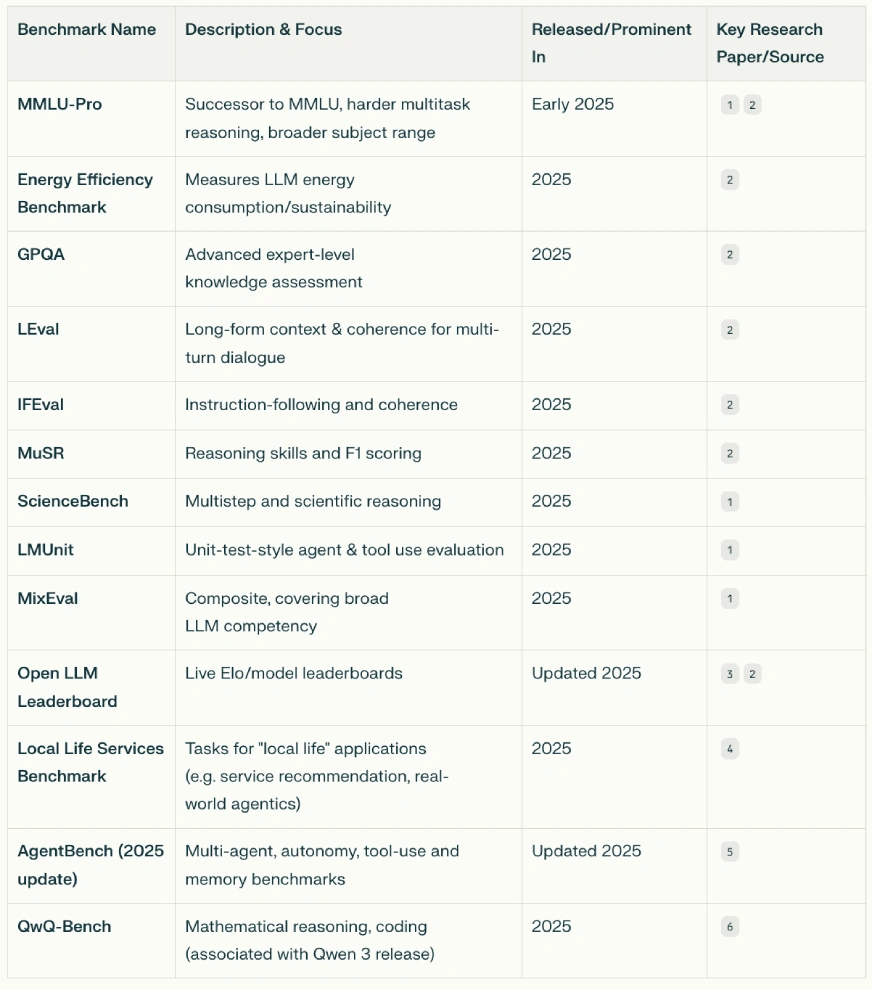
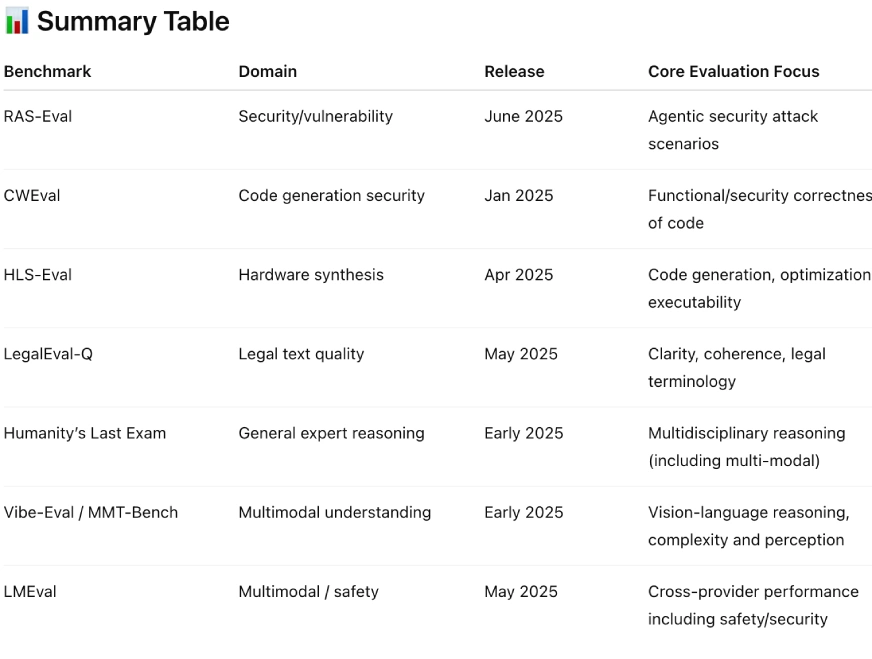
Prompt: “Make a comprehensive list of benchmarks that have been released in 2025 for LLM evaluation and find relevant research papers associated with those benchmarks.”
Output:
Perplexity
- Model Selection: Best (chooses the best model on its own, based on the query); Tool: search
ChatGPT
- Model Selection: ChatGPT-4o, Tool: Web Search
Results:
Both Perplexity and ChatGPT gave clear results. Perplexity included a summary table at the top, while ChatGPT explained the benchmarks first and summarized at the end. Although Perplexity’s format was initially appealing, it lacked key details like links to research papers. ChatGPT provided all relevant links, making it easier to understand and verify.
For this task, ChatGPT takes the lead.
Task 2: Content Creation
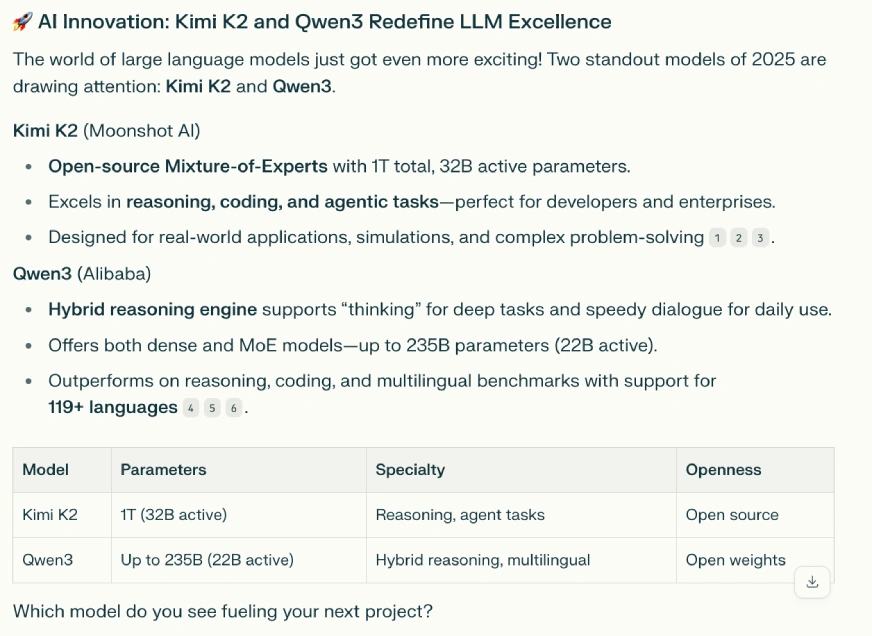
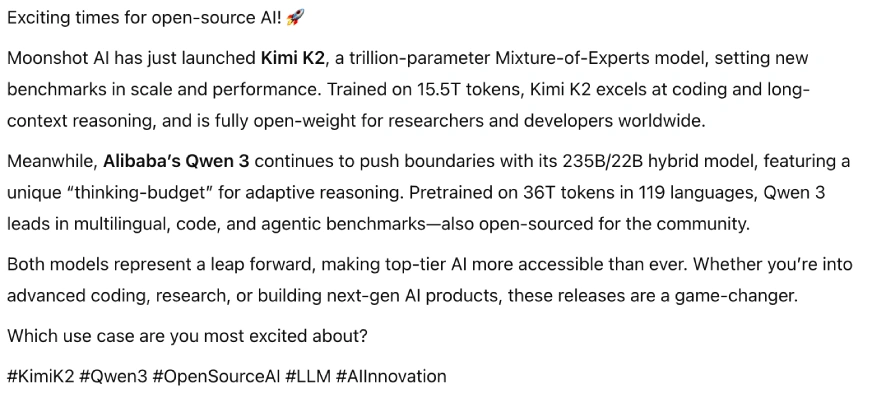
Prompt: “Create a LinkedIn post discussing the two latest models by Kimi and Qwen.”
Output:
Perplexity (GPT 4.1)
ChatGPT (GPT 4.1)
Results:
Picking a favorite for this task was easy. ChatGPT’s response was text-heavy, while Perplexity delivered a clear, easy-to-read answer with a summary table at the end. Its structured format makes it ideal for sharing on LinkedIn.
For this task, Perplexity emerges as the winner.
Task 3: Image Generation
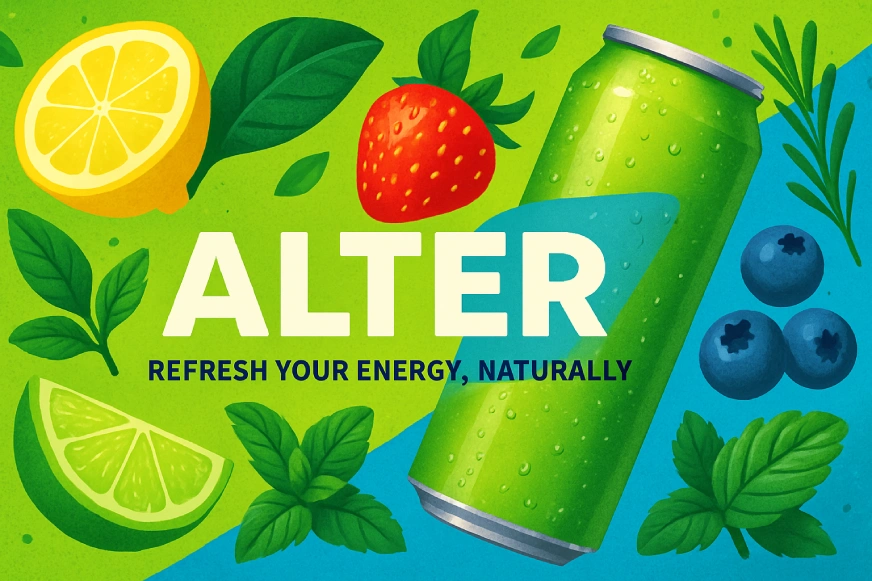
Prompt: “Create a social media banner to promote a healthy energy drink called – Alter”
Output:
Perplexity (GPT 4.1)
ChatGPT (GPT 4.1)
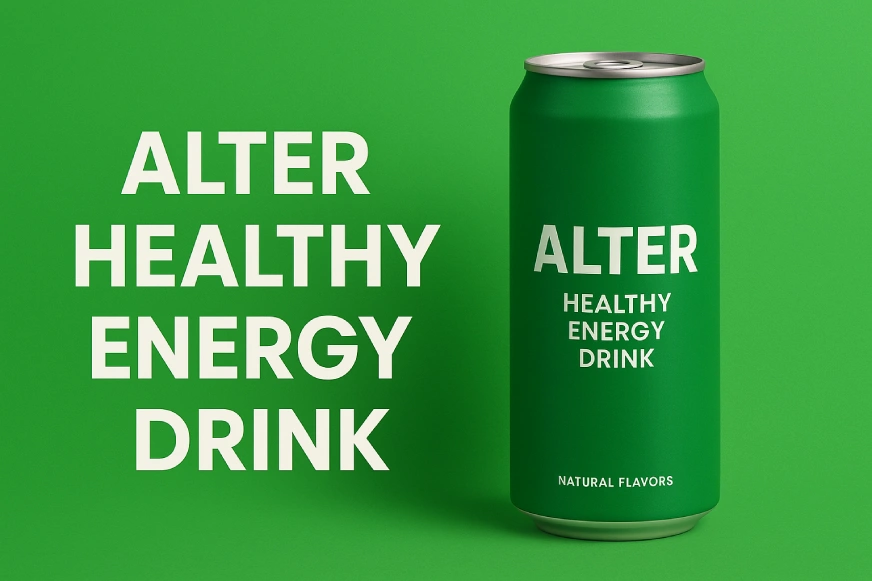
Results:
The prompt was simple, but I expected creative results. Perplexity added multiple elements and a tagline, while ChatGPT simply placed the prompt text on the image. In Perplexity’s output, the energy drink bottle got visually lost among the extras. ChatGPT’s image focused solely on the bottle, making it stand out. Both handled text well and used green tones effectively.
For this task, I choose Perplexity.
Task 4: Coding
Prompt: “Create a user-friendly ice cream order web page. The page should allow each user to enter their name, choose between a cone or a cup, and select one or more ice cream flavours to add. As users build their order, display the running total price. Before submitting, show a clear summary of their selections and the final price so they can review their order before placing it.”
Output:
Perplexity (GPT 4.1)
ChatGPT (GPT 4.1)
Results:
Both chatbots generated results quickly. I ran Perplexity’s code in Google Colab and got an interface where I could enter my name and select flavors, but the total price didn’t update. ChatGPT allowed code preview within its window. While its UI looked cluttered at first, it was fully functional, the total updated correctly based on selections. ChatGPT’s version was more practical, though less visually appealing than Perplexity’s.
For this task, ChatGPT’s version I found more reliable.
Task 5: Document Analysis
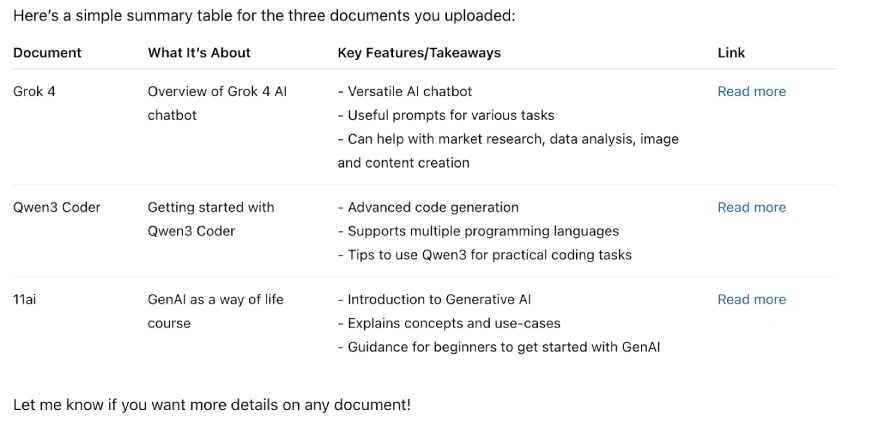
Prompt: “Summarize the information discussed in these documents in the form of a table, make sure to keep the language simple.”
Documents
Output:
Perplexity (GPT 4.1)
ChatGPT (GPT 4.1)
Results:
I gave both chatbots three documents and asked for a summary in table form. Perplexity produced a detailed table covering multiple aspects of the tools, while ChatGPT created a simpler, more limited version. ChatGPT’s output was easy to read, but one document summary was inaccurate. Perplexity’s table was more comprehensive and presented the information in a well-condensed format.
Needless to say, Perplexity Won this fair and square.
Final Verdict
| Task | Perplexity | ChatGPT |
| Research | ❌ | ✅ |
| Content Creation | ✅ | ❌ |
| Image Generation | ✅ | ❌ |
| Coding | ❌ | ✅ |
| Document Analysis | ✅ | ❌ |
Conclusion
Perplexity Pro has definitely surprised me. I thought the plan might not be as great or that since its being offered for free might result in poor quality. In honesty, a few of the models were unavailable as I was trying it and its “labs” feature was slow. Nonetheless, the outputs i got from Perplexity were better and at times on par with the output i got using ChatGPT Plus! So if like me you have the access for Perplexity Pro, I am sure you will love it.
Anu Madan is an expert in instructional design, content writing, and B2B marketing, with a talent for transforming complex ideas into impactful narratives. With her focus on Generative AI, she crafts insightful, innovative content that educates, inspires, and drives meaningful engagement.







