I haven’t been too active in using AI to generate images. Mostly because none of the AI tools to date are able to deliver the level of quality I seek in my images. And so, the onus of generating images for my blogs mostly falls on my teammate and an exceptional graphic designer Armaan. Though for this particular blog, I gave Armaan a break. All thanks to Google’s new “Nano-Banana” aka Gemini 2.5 Flash Image.
That is what the latest image generation model from the house of Gemini is called. More than an image generation, the Gemini 2.5 Flash Image or nano-banana comes as an image editing model. Why? The update now allows you to blend multiple images into a single image. At least that’s what it claims to do, as mentioned in a Google blog introducing the new Gemini image-gen model.
If it does what it says and does it well, I personally know a dozen AI enthusiasts who will be beyond excited to give it a try. In case you are one such aficionado of AI image generation, here is all you need to know about the new Gemini 2.5 Flash Image, along with a hands-on experiment I tried on it.
In a nutshell, Gemini 2.5 Flash Image is a new image generation and editing model by Google. It comes as an update to the much hailed Gemini 2.0 Flash Image image generation model, making it faster and better, with added image-editing features.
For context, the new Gemini 2.5 Flash Image can blend multiple images into one, maintain character consistency, and make targeted transformations in an image. As Google puts it, the model uses Gemini’s “world knowledge to generate and edit images.”
Let us explore these features in a bit more detail.
Gemini 2.5 Flash Image Features
Maintain character consistency
Just about anyone who has used AI to generate images will relate to this. Individual image prompts usually serve you well. But as soon as you want a particular element shown as it is across a set of images, almost all known AI models falter.
Google claims to have worked on that, with the new Gemini 2.5 Flash Image. Here is what it says for the nano-banana’s capability in this regard:
“You can now place the same character into different environments, showcase a single product from multiple angles in new settings, or generate consistent brand assets, all while preserving the subject.”
Has it nailed it? Find out shortly in my hands-on experiment with the model.
Prompt based image editing
This is much like “photoshopping” a particular element in/ out of an image, but through simple prompts. Gemini 2.5 Flash Image can “blur the background of an image, remove a stain in a t-shirt, remove an entire person from a photo,” and much more, as Google claims.
The precise local edits with natural language prompts make it a powerful AI model, provided it does it well. Don’t you worry. We shall it try it out in our hands-on soon enough.
Multi-image fusion
This seems to be the new hot-new update for the Gemini 2.5 Flash Image. The nano-banana can “understand and merge multiple input images” as per Google, which basically means you can fuse images with a single prompt now. Put a person who missed the event in a group photo, place an object into a scene, or any other use you can think of. All with a simple prompt.
Hands-on loading. Stay tuned!
Native world knowledge
As I pointed out in my article – Why AI Lacks Common Sense, AI models lack a deep, semantic understanding of the real world. Just about all of the aesthetic-images they produce are a result of their training data. Google claims to have bypassed this, as the new nano-banana model “benefits from Gemini’s world knowledge.”
Without sharing any further information on how this was made possible, Google says that this ability unlocks new use-cases for the Gemini 2.5 Flash Image model. No worries, we will test it out for all its worth soon.
But before that, here is how you can access the new Gemini Flash 2.5 Image
Gemini Flash 2.5 Image Accessibility
The new Google nano-banana or the Gemini Flash 2.5 Image is available right now via the Gemini app or website for individual users.
For Individual Users
You can simply download the app on your phone, or visit gemini.google.com and access the model by selecting 2.5 Flash at the top and clicking on “Create Images” under the Tools section.
For Developers
Developers can access the same through Gemini API and Google AI Studio, while enterprise clients can access the tool through Vertex AI.
For access through API, follow these steps:
1. Install Required Libraries
Install the latest version of the Google Generative AI SDK using pip, and ensure you have PIL (Pillow) installed for image processing:
pip install google-generativeai pillow
This command will import all required libraries at the start of your script for smooth execution.
2. Authenticate Your API Access
Set up authentication by exporting your API key (if required) as an environment variable or authenticating via cloud identity providers, so the genai SDK can access Google’s Generative AI endpoints:
import os
os.environ["GOOGLE_API_KEY"] = ""
Make sure that your API account is active and has sufficient quota for requests.
3. Configure and Call the Model
Initialize the client, set the model to “gemini-2.5-flash-image-preview”, and pass a relevant prompt using the SDK’s content generation method:
from google import genai
client = genai.Client()
prompt = "Create a picture of a nano banana dish in a fancy restaurant with a Gemini theme"
response = client.models.generate_content(
model="gemini-2.5-flash-image-preview",
contents=[prompt],
)
4. Parse and Save the Generated Image
Iterate through the response to check for text and image outputs, then save the generated image using PIL:
from PIL import Image
from io import BytesIO
for part in response.candidates.content.parts:
if part.text is not None:
print(part.text)
elif part.inline_data is not None:
image = Image.open(BytesIO(part.inline_data.data))
image.save("generated_image.png")
For access through Google AI Studio, simply use the “build mode” on Google AI Studio here. Once on the platform, you can simply input a prompt to design the kind of image generation/ editing app based on Gemini 2.5 Flash Image you want. Think face-swap or clothe-swap.
Gemini Flash 2.5 Image Hands-on
Since AI image generation using prompts is pretty straightforward, I decided to try the new Gemini Flash 2.5 Image across its USPs, other than, of course, basic image generation. Check out the results for yourself:
1. Generating new images
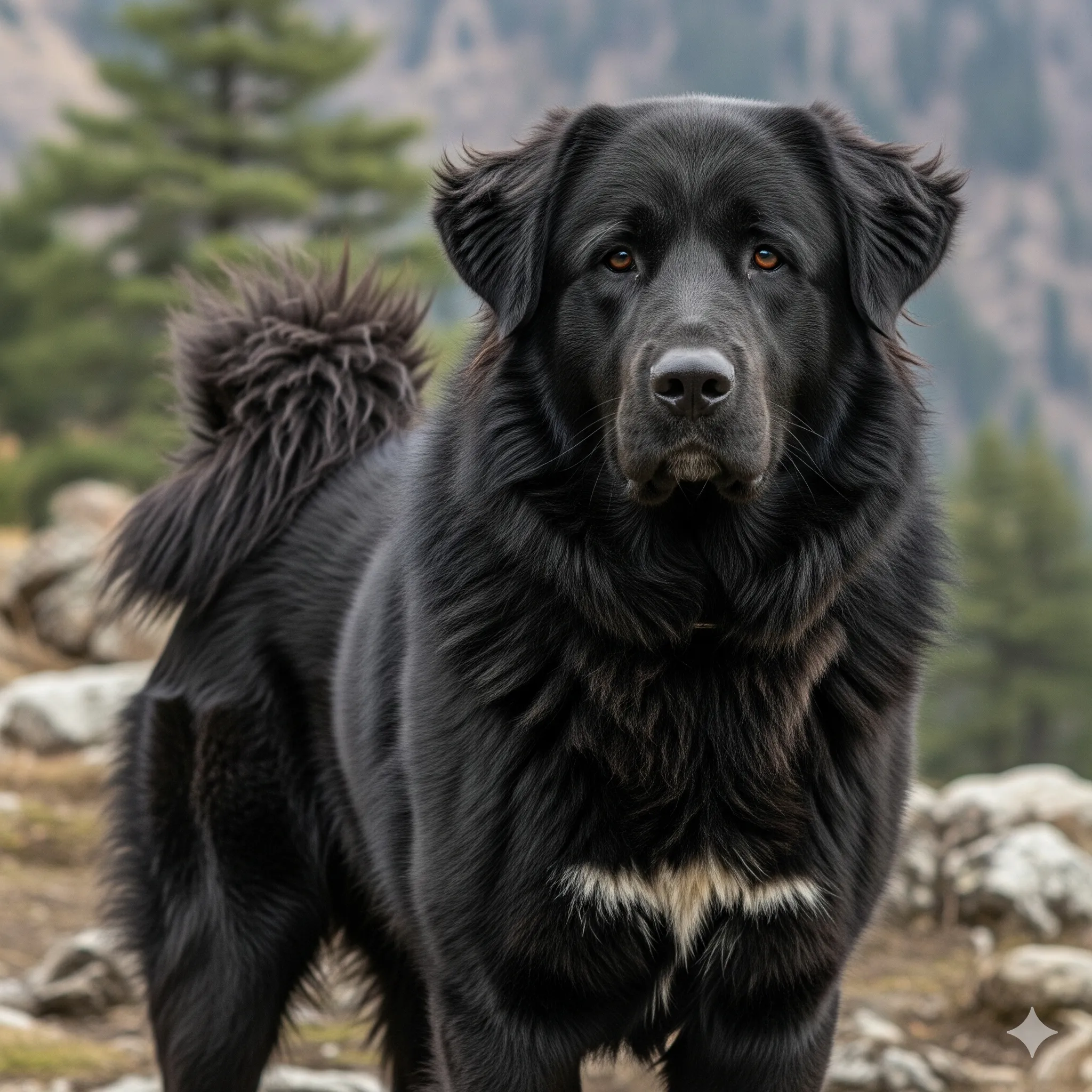
Here are two images I generated using Gemini 2.5 Pro Flash. One of a 25-year old boy from the hills of Himachal Pradesh, and another of a Gaddi dog. Here are the prompts:
Prompt 1: give me a portrait image of an indian boy, around the age of 25, hailing from Himachal Pradesh. The boy has dense, black hair and light green eyes, and is wearing a super cool solid White shirt
Prompt 2: give me a portrait image of a pahadi gaddi dog, black in colour with a thick fur and a bigger size as compared to a regular street dog
Output:
While the results clearly seem AI-generated, I would give 10/10 to nano-banana for the results. This is simply because of the super high quality of images, accurate depictions of the prompt, and the fact that I never mentioned in the prompt to make the images too realistic.
2. Merging Images
For consistency, I played around with these two images for the rest of tests. So I asked the model to merge the two images of the boy and the dog in a scenic background. Here is the prompt:
Prompt: show the boy and the dog playing in a huge open field against the backdrop of a river flowing in a valley and snow-capped mountains on the other side of the river
Output:
It took some time for the AI model to find its way to the right output. With the initial results having a bit off proportions, there was a to and fro of prompts and results before I found what I was looking for. But once I did, boy was I impressed! Everything down to the last detail was as accurate as I had mentioned and as aesthetic as I could’ve asked for.
3. Image Editing
After image generation and merger, comes the editing part. To test those out, I first asked Gemini Flash 2.5 Image to add a small hut in the picturesque scene. Here is the prompt:
Prompt: in this image, show a small shed near the river at a distance
Output:
Flawless execution in the first try. It seems evident that Google has worked massively on the nano-banana, especially in the areas where it highlights it to excel.
4. Maintaining Character Consistency
Onto the toughest part for most AI models. Honestly, I was quite sceptical about this one USP. So naturally, I was also most excited to try it out. I asked the model to change the entire setting in the picture to that of a beach. Here is the prompt:
Prompt: show the boy and the dog running as they are in a beach instead of the current setting. the boy is now wearing shorts and a vest, and has a tattoo across his left-arm
Output:
Nothing short of impressive, Gemini 2.5 Flash Image managed to do a pretty decent job. Though it took repeated attempts to arrive at an aesthetic result, the new image model was able to replicate the details of the boy and the dog with almost complete accuracy. If you look closely, the slight difference that you will notice will be that in the boy’s hairstyle. Rest everything looks almost exactly similar to me as in the previous setting. I even tried the “tattoo on one-arm” idea to see how Gemini executes it. All I can say is Kudos to the model for a job well done!
5. Building Gemini 2.5 Flash Image Powered App
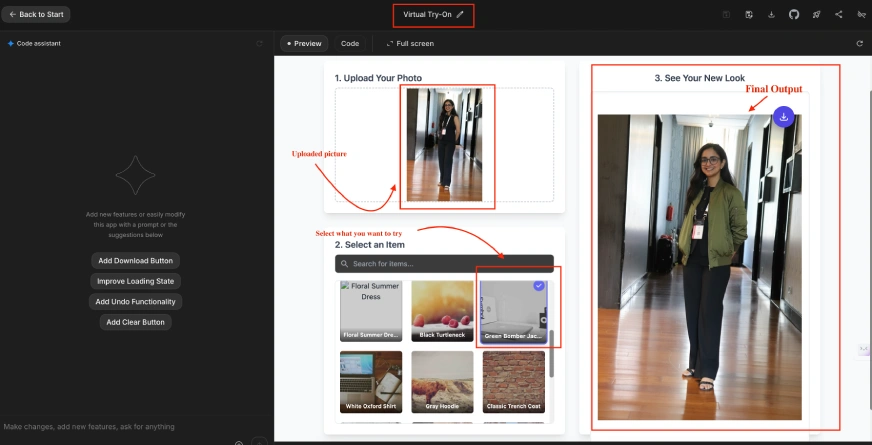
To test Gemini 2.5 Flash Image on an app for repeated image generation and editing, we used the following prompt on Google AI Studio’s “build mode”
Prompt: Create a Try on App, where users can upload their pictures and try various clothes to see how they look in them.
With a single series of image-generation and editing on the new Gemini 2.5 Flash Image, the updates and the enhanced capabilities are pretty much evident to me. What I am especially thrilled about is the new image merging ability of the model. I can foresee n-number of scenarios where that can be helpful for me personally. As for most other content creators out there, image editing and character consistency on the new Gemini 2.5 Flash Image will prove to be a game-changer.
We frequently try our hands on such new AI models to test the limits of their capabilities. So, make sure to stay tuned to this space to be updated with the latest in the world of AI.
Technical content strategist and communicator with a decade of experience in content creation and distribution across national media, Government of India, and private platforms












I am ready to genarate images