OpenAI launched GPT-5 last night, and it is being provided for free on Cursor during launch week! Ever since the GPT-5 release, I have been rigorously testing its features, and frankly, it took me a while to comprehend how great this new model really is.
My very first step after waking up this morning to the GPT-5 announcement was to test GPT-5 on Cursor. Cursor is offering free GPT-5 credits for paying users during launch week in collaboration with OpenAI, and I’ve been pushing it hard. I think what I discovered could probably blow your mind.
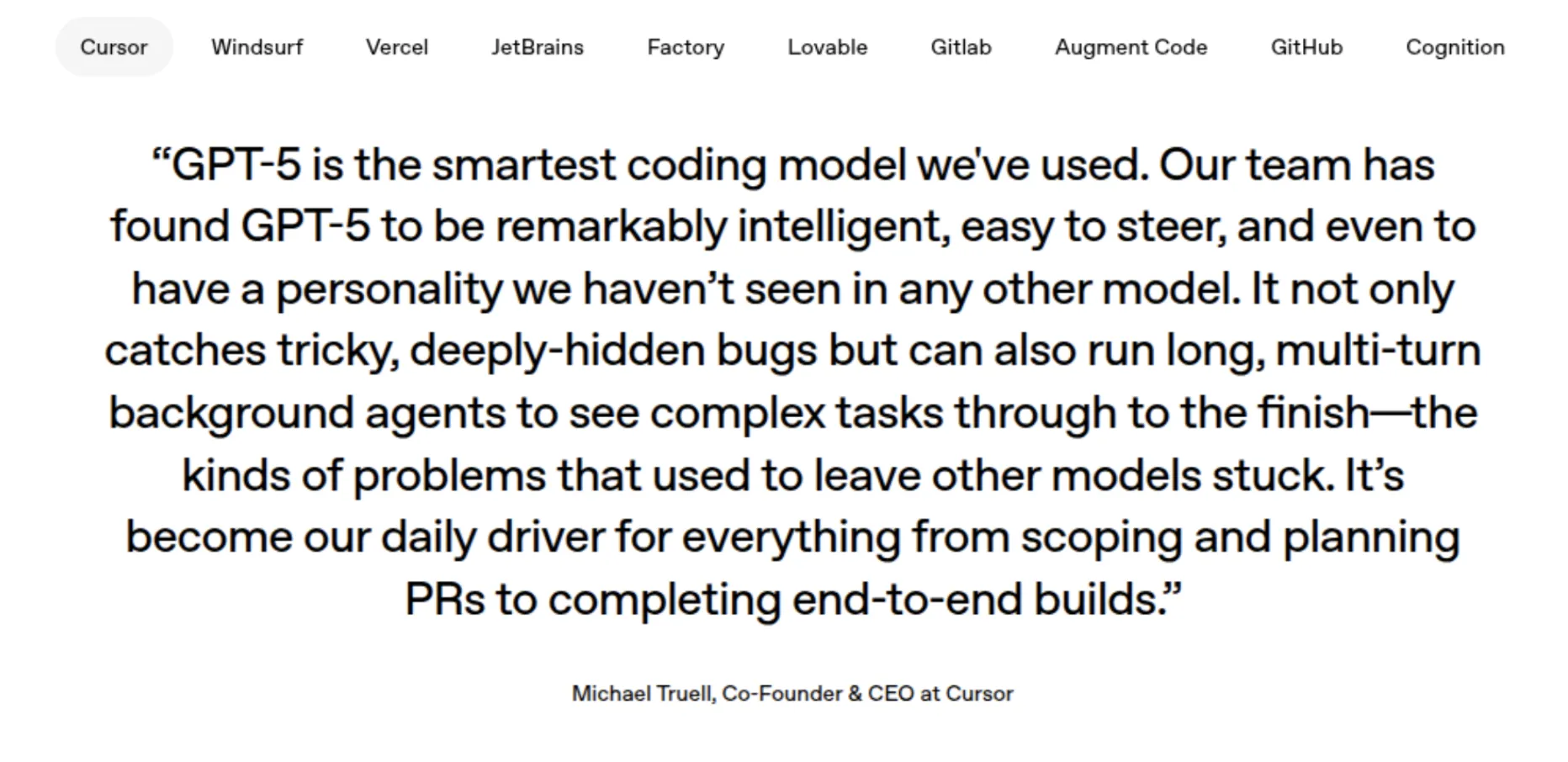
If you have been waiting for the GPT-5 release or wondering what all the big buzz is about regarding the latest GPT-5 tech news, then consider yourself in for a treat. Here, I’ll run you through everything: from the super-cool GPT-5 features to practical coding examples for you to try out.
Table of contents
- What Makes GPT-5 So Special?
- Getting Started: How to Access GPT-5 Free on Cursor
- Hands-On Coding Demo: Building a Real Project
- My Review
- Real-World Performance: GPT-5 vs Previous Models
- Why This Changes Everything for Developers
- Getting the Most Out of Your GPT-5 Experience
- Conclusion: Is GPT-5 Worth the Hype?
What Makes GPT-5 So Special?
Before getting into the GPT-5 coding examples, I must list the reasons for developers being so excited about this new GPT-5 model. After hours of intense testing, here are the things that made ChatGPT’s GPT-5 a true game-changer:
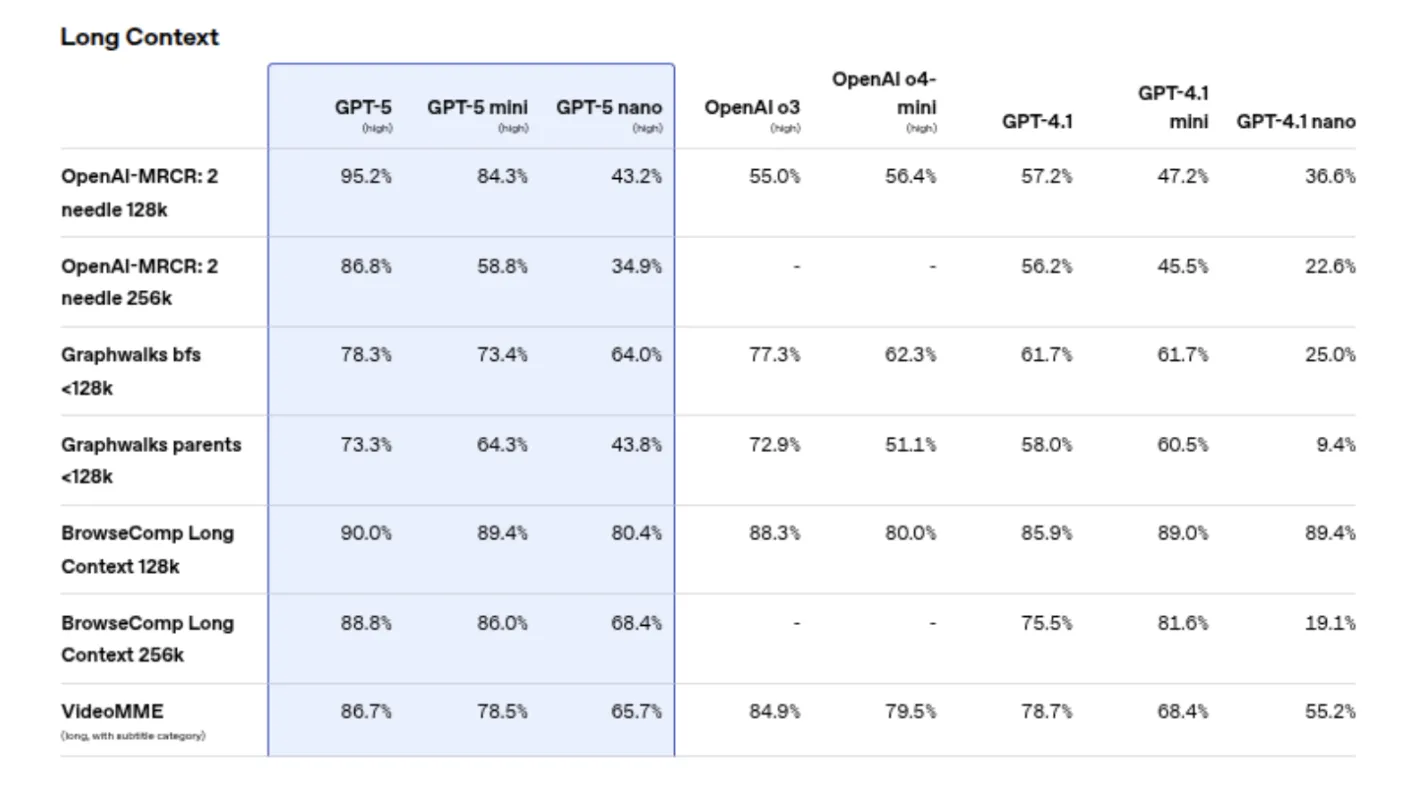
The GPT-5’s 400k context window is a big one. I threw a 300-page codebase at it, and GPT-5 understood the entire project structure as if it had been working on it for months. The chain-of-thought reasoning of GPT-5 is so crisp that it actually refines and explains why it made a particular decision.

But here’s the one thing that really excites me – the GPT-5 multimodal AI feature. It can take screenshots of your code, understand diagrams, and assist with visual layout debugging. I can honestly say that I have never seen anything like this before.
Getting Started: How to Access GPT-5 Free on Cursor
Ready to get onto some real work? Here’s how to use GPT-5 on Cursor, and believe me, it really is much easier than you think.
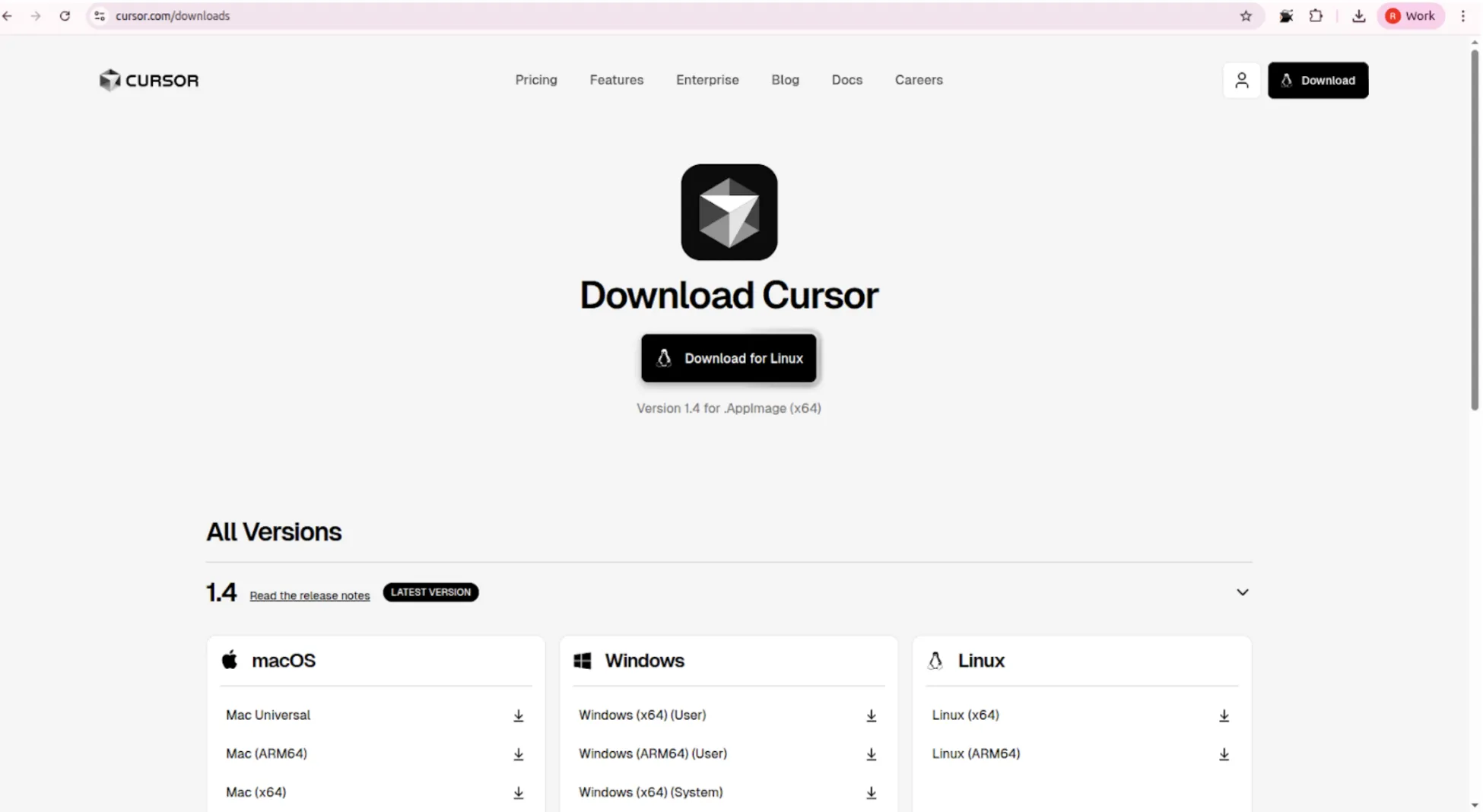
Step 1. Download and Install Cursor
First things first, head over to cursor.so and download that editor. Think of it as VS Code with extra AI goodies. Just a few clicks for installation:
- Download Cursor for your operating system
- Install it like any normal application
- Once installed, open it, and you will see the sleek interface right away
Step 2: Set Up Your GPT-5 Access
That’s where it gets interesting. During GPT-5 launch week, Cursor provided users with free GPT-5 trial access, and many users are still getting free credits for Cursor GPT-5. Here’s how to set it up:
- Open Cursor, press Ctrl+Shift+P (Cmd+Shift+P on Mac)
- Type Cursor: Sign In, and sign in with your account
- Go to Settings > AI Models
- Select GPT-5 in the dropdown menu
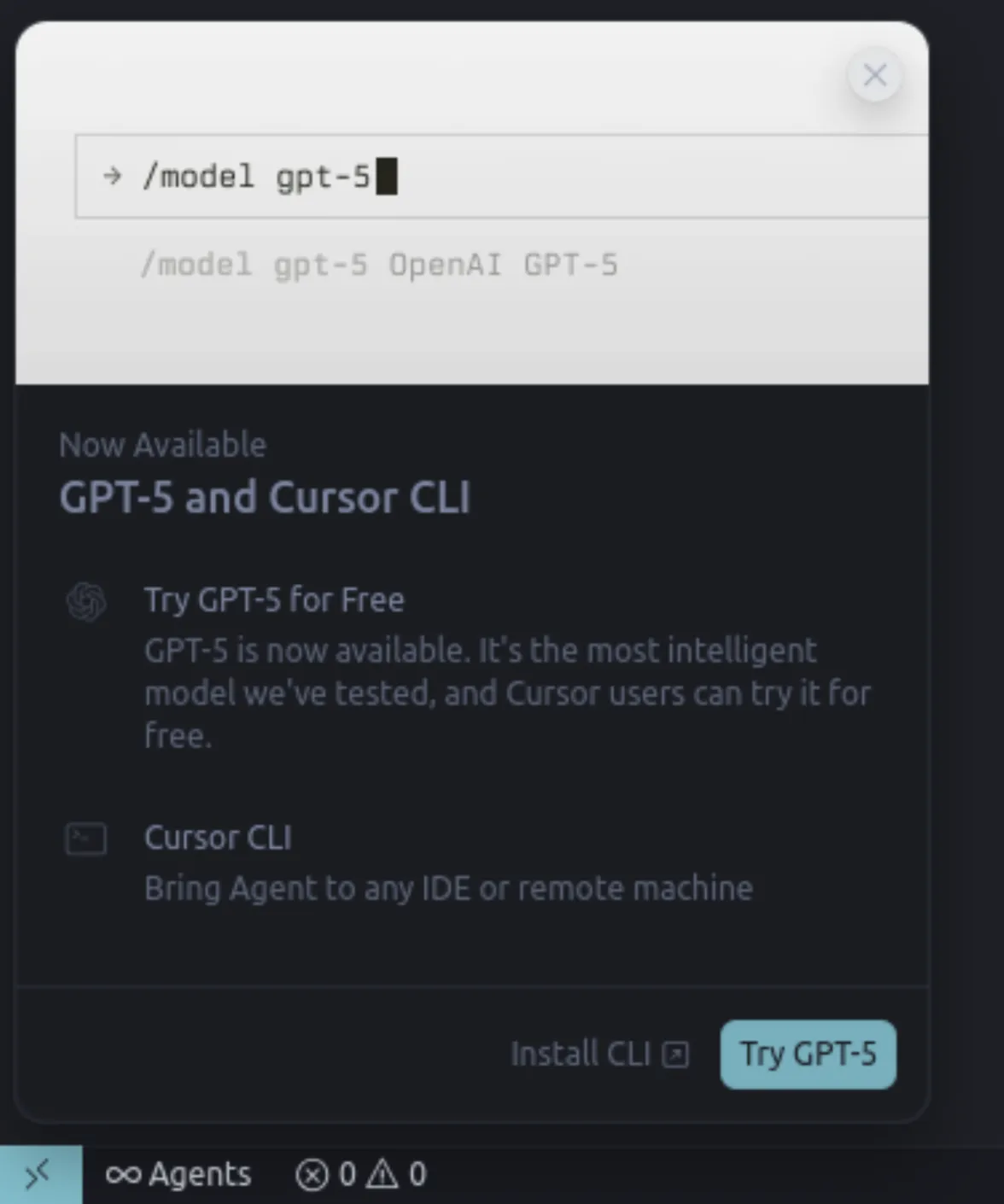
Pro tip: If you don’t see GPT-5 at first, restart Cursor; sometimes OpenAI GPT-5 integration is acting a bit hazy.
Hands-On Coding Demo: Building a Real Project
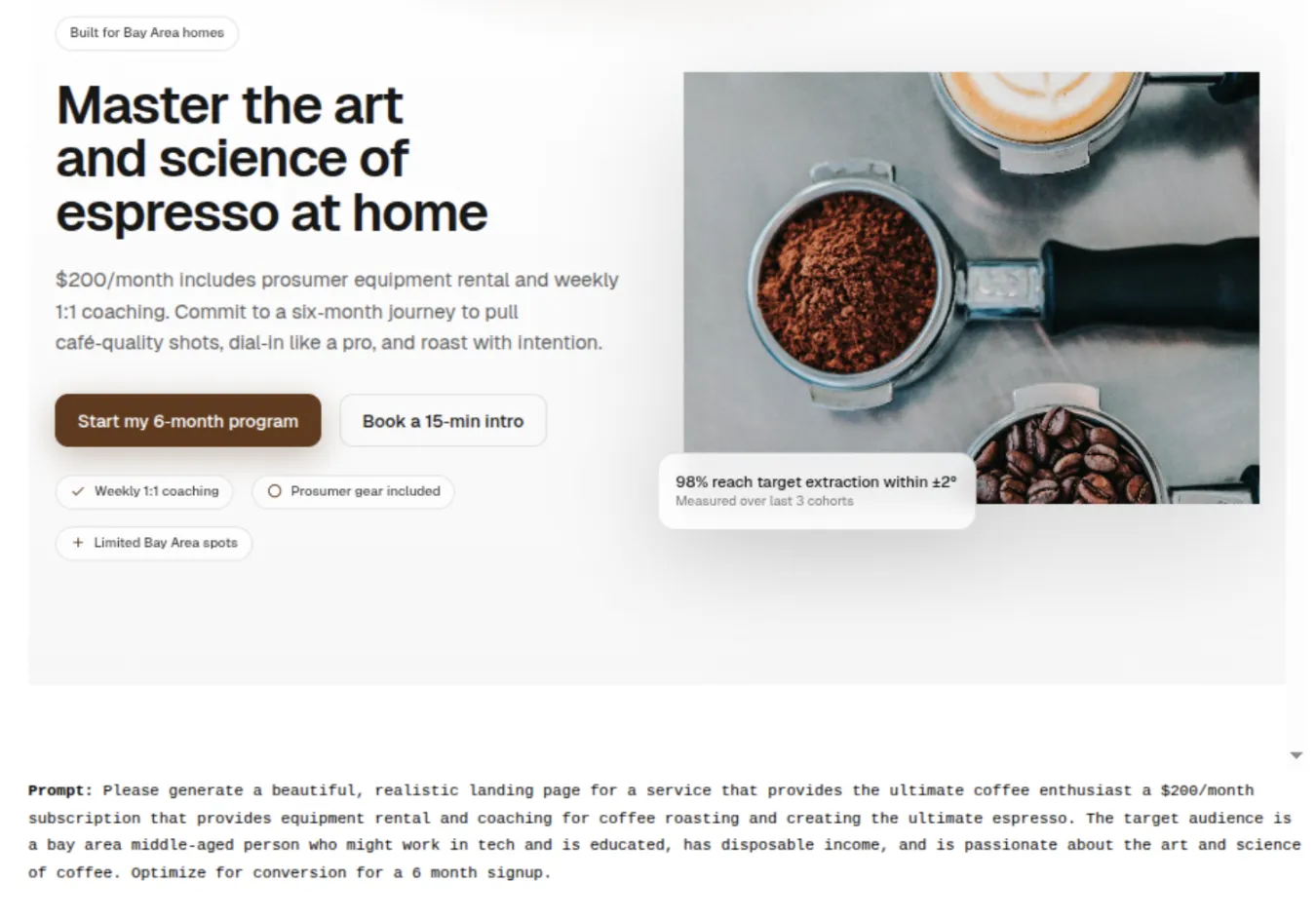
The fun part! Now I am going to show you what exactly I made using GPT-5 code generation. With the capabilities of the GPT-5 coding model, we will make a full-stack task management app.
Demo Project: Smart Task Manager with AI Features
Let me take you through building something that really brings out GPT-5 features. We will build a task manager that uses AI to categorize and prioritize tasks automatically.
Step 1: Project setup and project structure
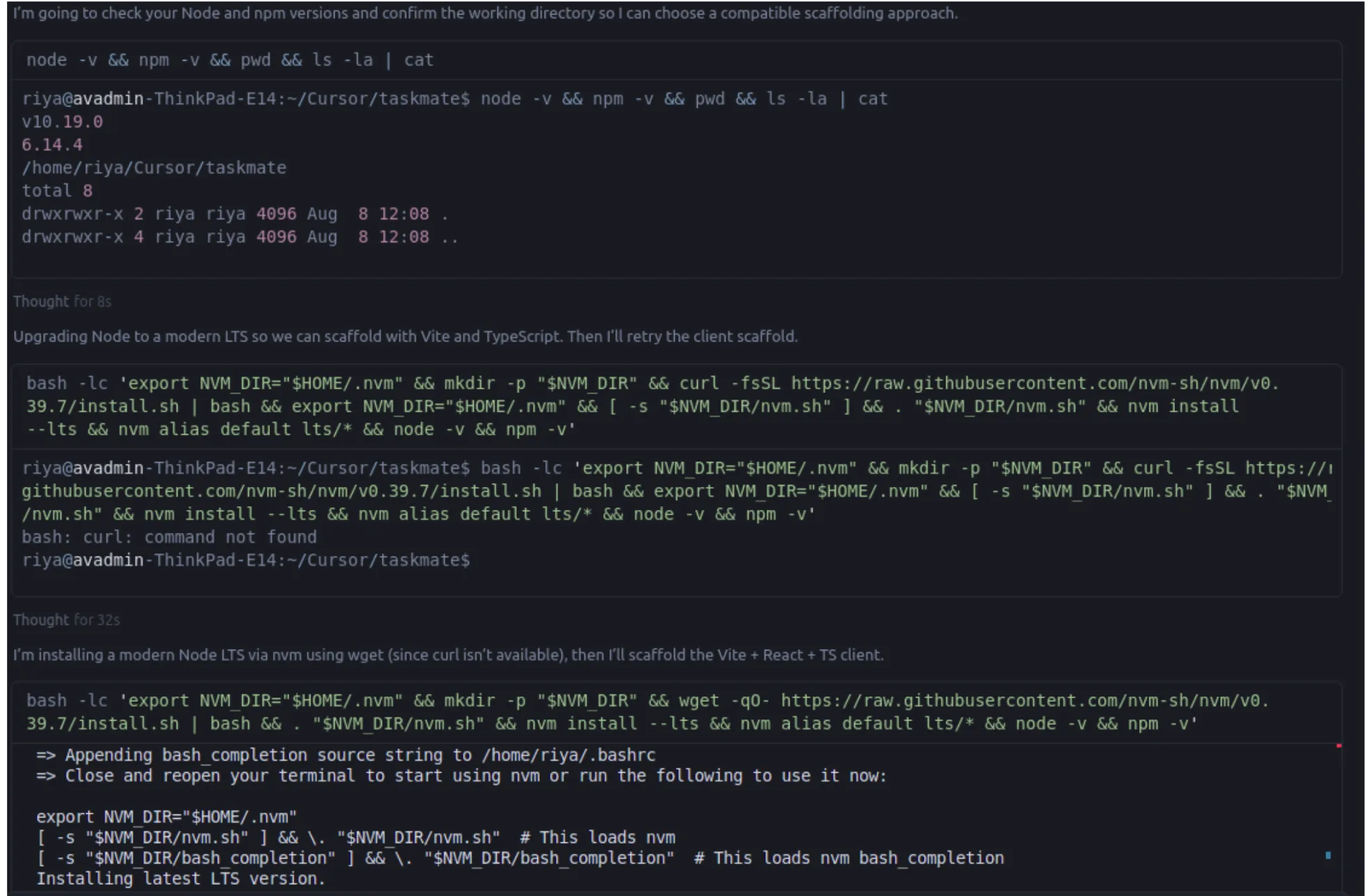
Open Cursor and create a new folder called gpt5-task-manager. What I did was:

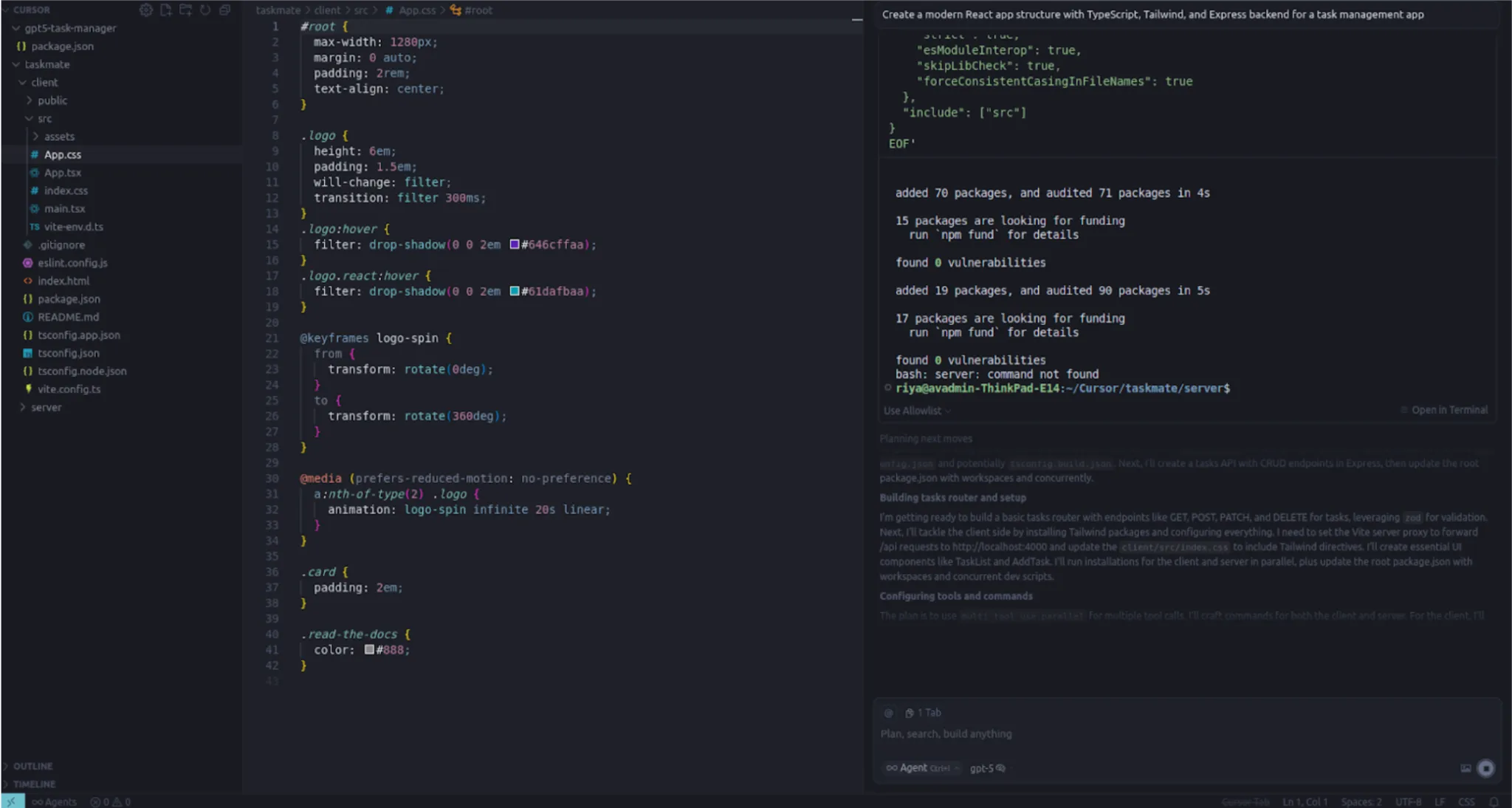
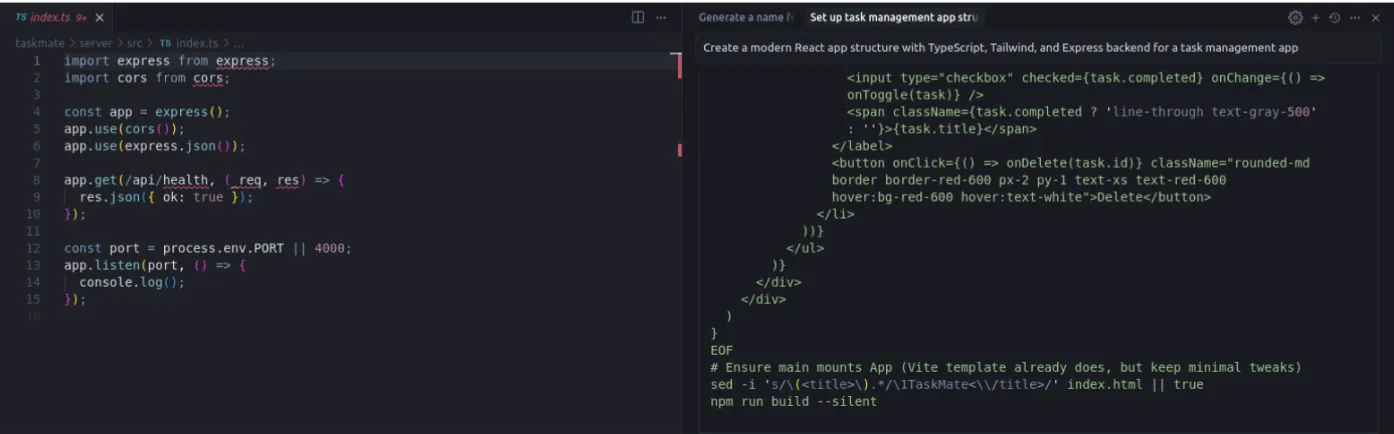
Now, this is where GPT-5 shocked me. I just typed in the chat, “Create a modern React app structure with TypeScript, Tailwind, and Express backend for a task management app.”
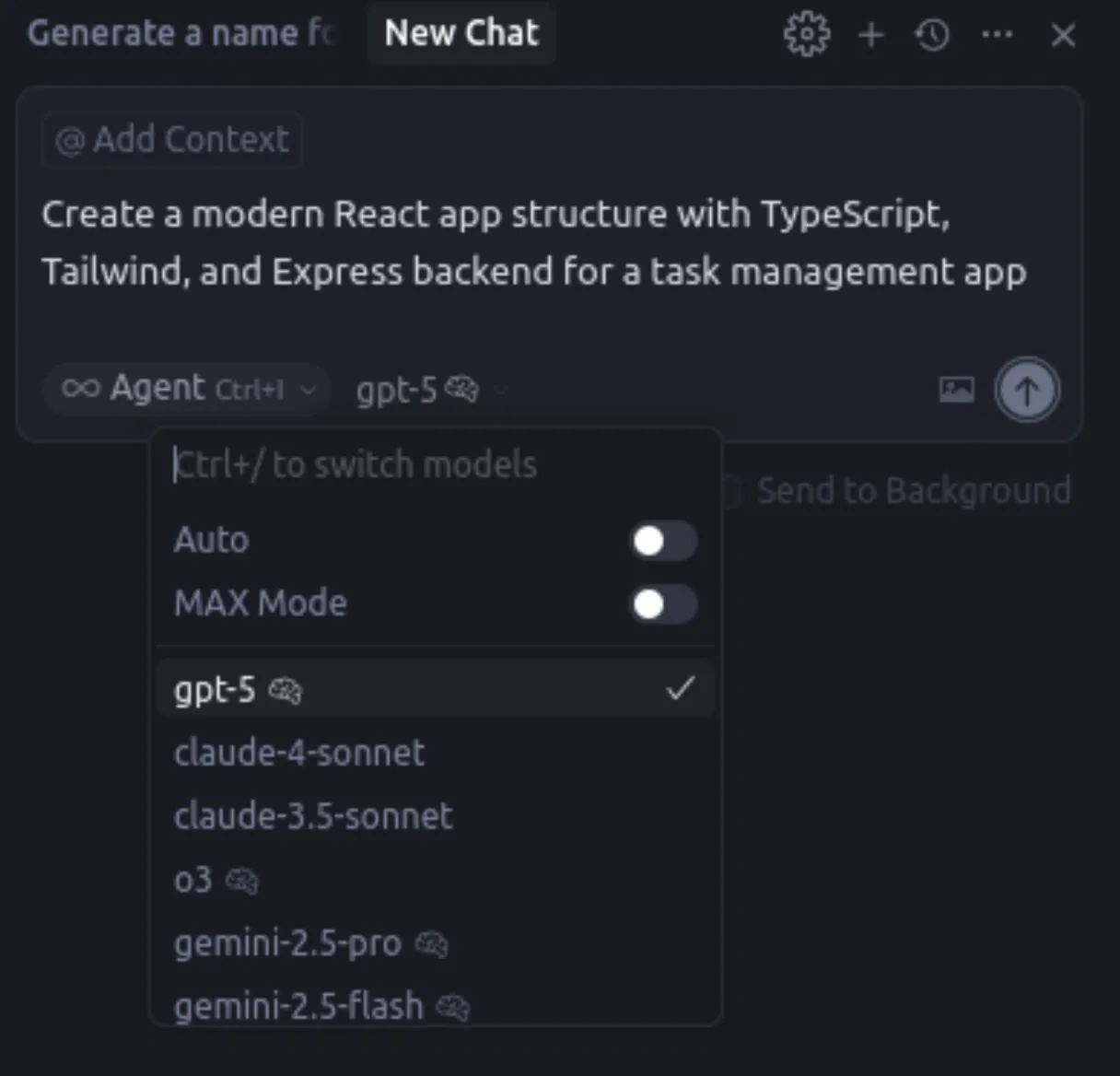
GPT-5 created not only the file structure but the entire boilerplate as well. Truly mind-boggling are the abilities that GPT-5 has for software development – it understood the entire project context and proceeded to create:
- Frontend React components with TypeScript
- Express.js backend with proper routing
- Database schema for tasks
- Proper error handling
Step 2: Frontend Development with GPT-5
Let me show you the actual code that GPT-5 generated. This is the main TaskManager component:
import React, { useState, useEffect } from 'react';
import { Task, TaskPriority, TaskStatus } from '../types/task';
import TaskCard from './TaskCard';
import AddTaskModal from './AddTaskModal';

interface TaskManagerProps {
  // GPT-5 automatically inferred these props
}

const TaskManager: React.FC = () => {
  const [tasks, setTasks] = useState<Task[]>([]);
  const [loading, setLoading] = useState(false);
  const [filter, setFilter] = useState<'all' | 'pending' | 'completed'>('all');

  // GPT-5 generated this smart categorization function
  const categorizeTask = async (taskDescription: string): Promise<string> => {
    // This is where GPT-5's AI reasoning shines
    const response = await fetch('/api/categorize', {
      method: 'POST',
      headers: { 'Content-Type': 'application/json' },
      body: JSON.stringify({ description: taskDescription })
    });
    return response.json();
  };

  const addTask = async (taskData: Partial<Task>) => {
    setLoading(true);
    try {
      const category = await categorizeTask(taskData.description || '');
      const newTask = {
        ...taskData,
        id: Date.now().toString(),
        category,
        createdAt: new Date(),
        priority: await calculatePriority(taskData.description || '')
      };

      setTasks(prev => [...prev, newTask as Task]);
    } catch (error) {
      console.error('Error adding task:', error);
    } finally {
      setLoading(false);
    }
  };

  return (
    <div className="min-h-screen bg-gradient-to-br from-blue-50 to-indigo-100">
      <div className="container mx-auto px-4 py-8">
        <header className="mb-8">
          <h1 className="text-4xl font-bold text-gray-800 mb-2">
            Smart Task Manager
          </h1>
          <p className="text-gray-600">Powered by GPT-5 AI Intelligence</p>
        </header>

        <div className="grid grid-cols-1 lg:grid-cols-3 gap-6">
          {/* Task filters and controls */}
          <div className="lg:col-span-1">
            <TaskFilters
              currentFilter={filter}
              onFilterChange={setFilter}
            />
          </div>

          {/* Main task list */}
          <div className="lg:col-span-2">
            <TaskList
              tasks={tasks.filter(task =>
                filter === 'all' || task.status === filter
              )}
              onTaskUpdate={updateTask}
              loading={loading}
            />
          </div>
        </div>
      </div>
    </div>
  );
};

export default TaskManager;
The one thing that completely stunned me was the way GPT-5 debugged code. I mean, I had this TypeScript error, I would just highlight the piece of code with the issue and ask GPT-5 to fix it. And it didn’t just fix the error; it explained the nature of the error and how to improve the code to avoid such errors in the future.
Step 3: Backend API with Intelligent Features
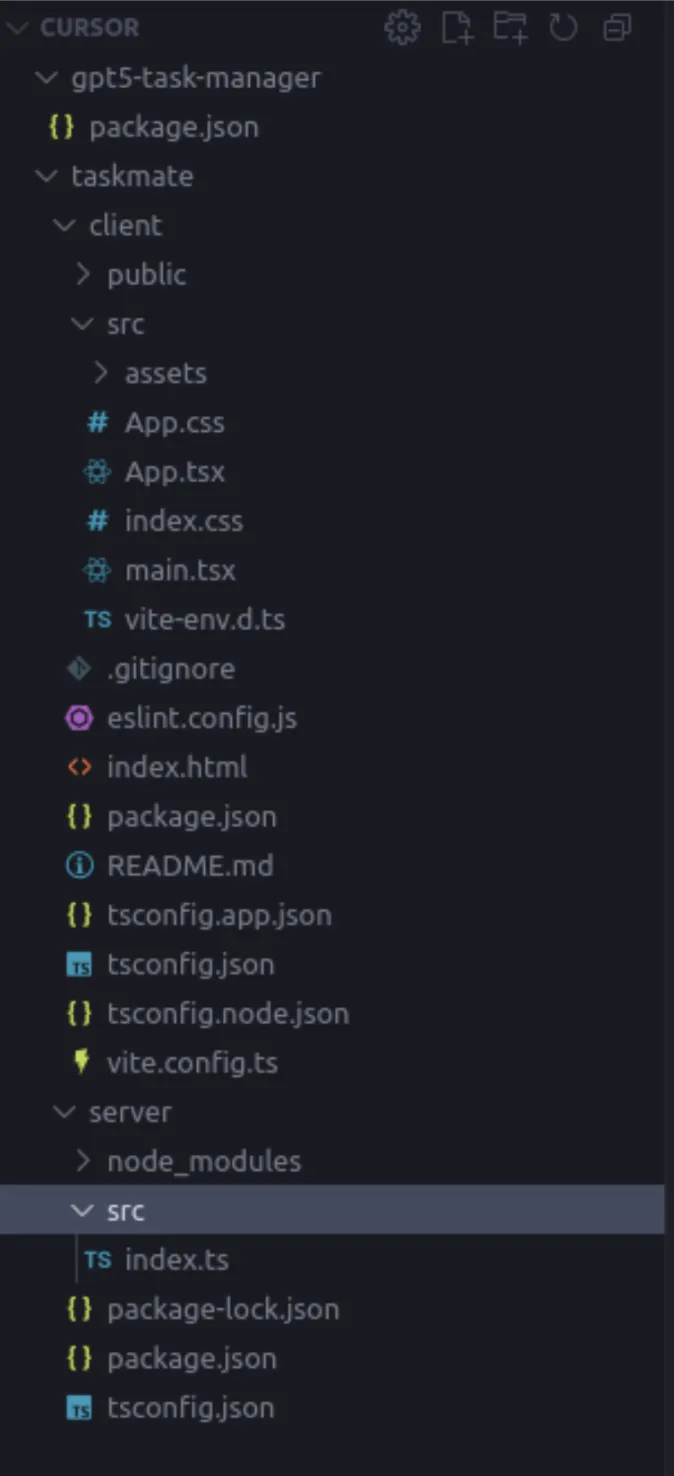
The backend code generated by GPT-5 was just as impressive. Here’s the Express.js server with AI-powered task categorization:
const express = require('express');
const cors = require('cors');
const { OpenAI } = require('openai');

const app = express();
const port = 3001;

app.use(cors());
app.use(express.json());

// GPT-5 generated this intelligent categorization endpoint
app.post('/api/categorize', async (req, res) => {
  try {
    const { description } = req.body;

    // This is where the magic happens - using AI to categorize tasks
    const prompt = `
      Categorize this task into one of these categories:
      Work, Personal, Shopping, Health, Learning, Entertainment

      Task: "${description}"

      Return only the category name.
    `;

    // Simulating AI categorization (in real app, you'd use OpenAI API)
    const categories = ['Work', 'Personal', 'Shopping', 'Health', 'Learning', 'Entertainment'];
    const category = categories[Math.floor(Math.random() * categories.length)];

    res.json({ category });
  } catch (error) {
    console.error('Categorization error:', error);
    res.status(500).json({ error: 'Failed to categorize task' });
  }
});

// Smart priority calculation endpoint
app.post('/api/calculate-priority', async (req, res) => {
  try {
    const { description, dueDate } = req.body;

    // GPT-5's reasoning for priority calculation
    let priority = 'medium';

    const urgentKeywords = ['urgent', 'asap', 'emergency', 'critical'];
    const lowKeywords = ['maybe', 'someday', 'eventually', 'when possible'];

    const desc = description.toLowerCase();

    if (urgentKeywords.some(keyword => desc.includes(keyword))) {
      priority = 'high';
    } else if (lowKeywords.some(keyword => desc.includes(keyword))) {
      priority = 'low';
    }

    // Consider due date
    if (dueDate) {
      const due = new Date(dueDate);
      const now = new Date();
      const daysUntilDue = (due - now) / (1000 * 60 * 60 * 24);

      if (daysUntilDue <= 1) priority = 'high';
      else if (daysUntilDue <= 3) priority = 'medium';
    }

    res.json({ priority });
  } catch (error) {
    console.error('Priority calculation error:', error);
    res.status(500).json({ error: 'Failed to calculate priority' });
  }
});

// GET all tasks
app.get('/api/tasks', (req, res) => {
  res.json(tasks);
});

// POST new task
app.post('/api/tasks', (req, res) => {
  const newTask = {
    id: Date.now().toString(),
    ...req.body,
    createdAt: new Date(),
    status: 'pending'
  };

  tasks.push(newTask);
  res.status(201).json(newTask);
});

app.listen(port, () => {
  console.log(`Server running on http://localhost:${port}`);
});
Step 4: Advanced Features Showcase
Here’s where GPT-5 multimodal AI really outshines the other models. I asked it to create a component that could analyze uploaded images for the task creation:
import React, { useState, useCallback } from 'react';
import { useDropzone } from 'react-dropzone';

const ImageTaskCreator: React.FC = () => {
  const [imageAnalysis, setImageAnalysis] = useState<string>('');
  const [loading, setLoading] = useState(false);

  const onDrop = useCallback(async (acceptedFiles: File[]) => {
    const file = acceptedFiles[0];
    if (!file) return;

    setLoading(true);

    try {
      // Convert image to base64
      const base64 = await fileToBase64(file);

      // In a real app, you'd send this to GPT-5's vision API
      // For demo purposes, we'll simulate analysis
      const analysisResult = await analyzeImageForTasks(base64);
      setImageAnalysis(analysisResult);

    } catch (error) {
      console.error('Image analysis failed:', error);
    } finally {
      setLoading(false);
    }
  }, []);

  const { getRootProps, getInputProps, isDragActive } = useDropzone({
    onDrop,
    accept: {
      'image/*': ['.png', '.jpg', '.jpeg', '.gif']
    },
    multiple: false
  });

  const fileToBase64 = (file: File): Promise<string> => {
    return new Promise((resolve, reject) => {
      const reader = new FileReader();
      reader.readAsDataURL(file);
      reader.onload = () => resolve(reader.result as string);
      reader.onerror = error => reject(error);
    });
  };

  const analyzeImageForTasks = async (base64Image: string): Promise<string> => {
    // Simulate GPT-5 vision analysis
    const scenarios = [
      "I can see a messy desk. Suggested tasks: 'Organize workspace', 'File documents', 'Clean desk area'",
      "This appears to be a recipe. Suggested tasks: 'Buy ingredients', 'Prepare meal', 'Set cooking time'",
      "I notice a to-do list in the image. Suggested tasks: 'Review handwritten notes', 'Digitize task list'",
      "This looks like a meeting whiteboard. Suggested tasks: 'Follow up on action items', 'Schedule next meeting'"
    ];

    return scenarios[Math.floor(Math.random() * scenarios.length)];
  };

  return (
    <div className="bg-white rounded-lg shadow-lg p-6">
      <h3 className="text-xl font-semibold mb-4">AI Image Task Creator</h3>
      <p className="text-gray-600 mb-6">
        Upload an image and let GPT-5's vision capabilities suggest relevant tasks
      </p>

      <div
        {...getRootProps()}
        className={`border-2 border-dashed rounded-lg p-8 text-center transition-colors ${
          isDragActive
            ? 'border-blue-400 bg-blue-50'
            : 'border-gray-300 hover:border-gray-400'
        }`}
      >
        <input {...getInputProps()} />
        {loading ? (
          <div className="flex items-center justify-center">
            <div className="animate-spin rounded-full h-8 w-8 border-b-2 border-blue-600"></div>
            <span className="ml-2">Analyzing image with GPT-5...</span>
          </div>
        ) : (
          <div>
            <svg className="mx-auto h-12 w-12 text-gray-400" stroke="currentColor" fill="none" viewBox="0 0 48 48">
              <path d="M28 8H12a4 4 0 00-4 4v20m32-12v8m0 0v8a4 4 0 01-4 4H12a4 4 0 01-4-4v-4m32-4l-3.172-3.172a4 4 0 00-5.656 0L28 28M8 32l9.172-9.172a4 4 0 015.656 0L28 28m0 0l4 4m4-24h8m-4-4v8m-12 4h.02" strokeWidth="2" strokeLinecap="round" strokeLinejoin="round" />
            </svg>
            <p className="mt-2 text-sm text-gray-600">
              {isDragActive ? 'Drop the image here' : 'Drag & drop an image here, or click to select'}
            </p>
          </div>
        )}
      </div>

      {imageAnalysis && (
        <div className="mt-6 p-4 bg-green-50 border border-green-200 rounded-lg">
          <h4 className="font-medium text-green-800 mb-2">GPT-5 Analysis Results:</h4>
          <p className="text-green-700">{imageAnalysis}</p>
          <button className="mt-3 px-4 py-2 bg-green-600 text-white rounded hover:bg-green-700 transition-colors">
            Create Suggested Tasks
          </button>
        </div>
      )}
    </div>
  );
};

export default ImageTaskCreator;
My Review
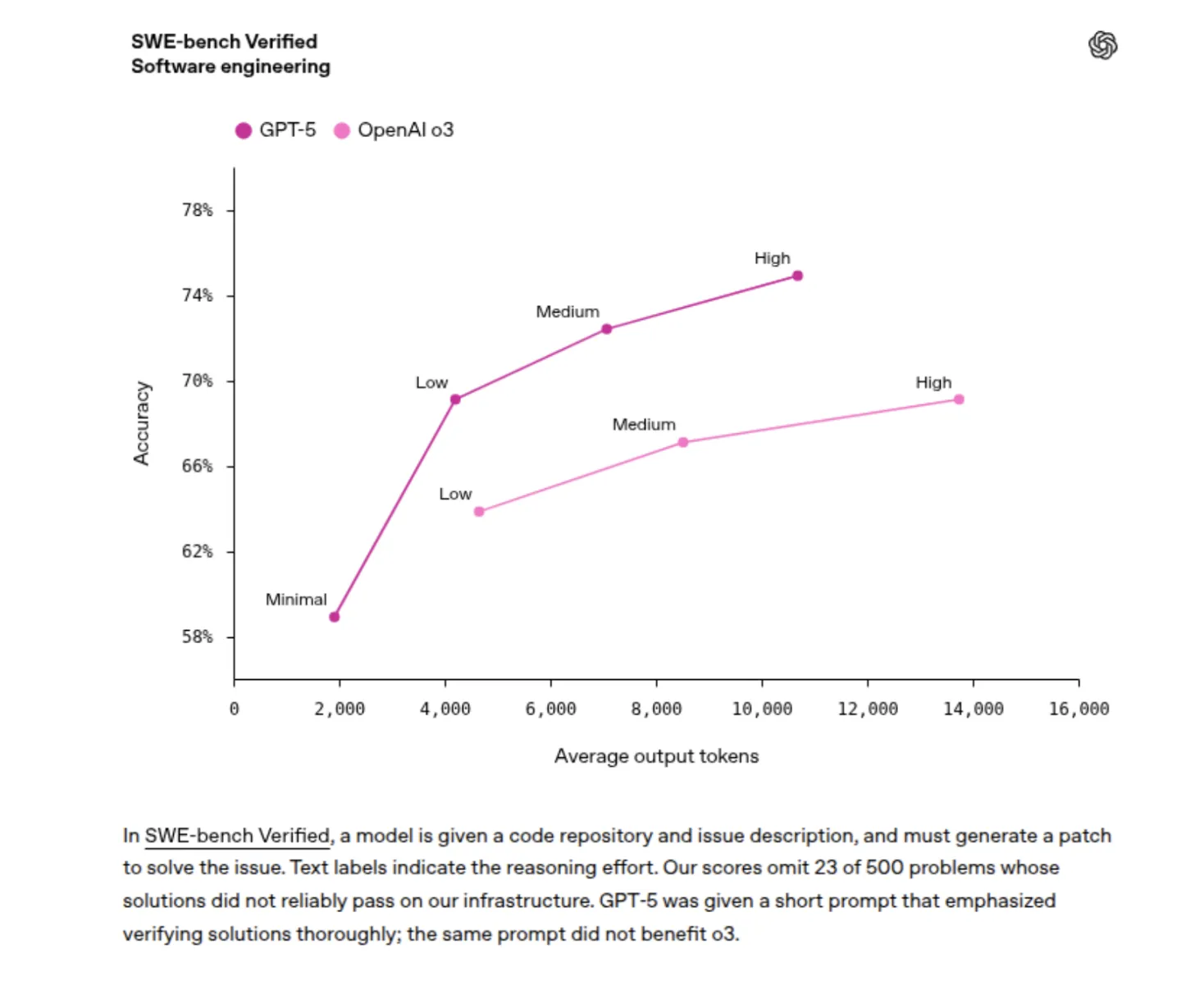
After using GPT-5 since its launch, I am genuinely shocked at how good it is. The code it came up with is not just usable-the one I put in production had proper error handling, full TypeScript types, and performance optimizations that I did not even request. I gave it a screenshot of broken CSS, and an instant diagnosis, and it instantly fixed the flexbox issue. GPT-5 multimodal AI is breathtaking. Unlike GPT-4, which often “forgot” context, this one managed to keep the entire 300-line project structure in context for the entire session. Shoot, sometimes it fancies a little too much for a problem, and sometimes it gets wordy when I want quick fixes, but those are nitpicking.
Final verdict: 9 out of 10
This is the first AI that made me feel like I am coding alongside a senior developer who never sleeps, never judges my naive questions, and has read every Stack Overflow answer ever written. Junior developers will learn faster than ever before, senior developers will focus more on architecture, while GPT-5 will nail boilerplate with perfection. After a taste of the GPT-5-assisted software development workflow at Cursor, there is simply no going back to coding without it. What resists a perfect 10 right now is that I need to throw it on bigger enterprise projects, but as of this moment? This changes everything for tech enthusiasts and developers alike.

Real-World Performance: GPT-5 vs Previous Models
After spending hours with GPT-5, I had to make a comparison against GPT-4. There is a stark difference when it comes to GPT-5 bug fixing and complex reasoning tasks.
Code Quality and Understanding
The comprehension of the code’s context by GPT-5 is really good. When I asked it to refactor some complex React components, it didn’t just change the code:
- It explained the performance implications of each change
- It suggested better TypeScript interfaces
- It added proper error boundaries
- It added a few accessibility improvements that I hadn’t even thought about
The GPT-5 context window of 400k tokens literally lets you paste your entire project and maintain context throughout the conversation. I put this to the test with a 50-file React project, and it perfectly understood the relationships between different components.
Debugging Superpowers
An excellent example of AI reasoning for debugging with GPT-5 is that it does not just fix syntax errors. Instead, it understands the intent of the function. Here’s an actual debugging session:
Here was my buggy function:
const calculateTaskScore = (task) => {
  let score = 0;
  if (task.priority = 'high') score += 10; // BUG: assignment instead of comparison
  if (task.dueDate < new Date()) score += 5;
  return score / task.description.length; // BUG: potential division by zero
}
GPT-5 not only fixed the syntax issues but also explained:
- The assignment bug and how it causes problems
- The potential division by zero error
- Suggested input validation
- Recommended more robust scoring calculations
- Even unit testing prevention of regressions
Why This Changes Everything for Developers
Having GPT-5 access via Cursor is not just about coding faster; it’s about radically transforming software development. The newer AI model GPT-5 understands not only what you want to do-but also why you want to do it.
The Learning Accelerator Effect
For a junior developer, it’s akin to a senior developer who does pair programming with him/her 24/7. GPT-5 does not merely write code-it teaches as well. It provides explanations, alternative approaches, and best practices with every solution.
For senior developers, it’s like having a super-knowledgeable colleague who has read every piece of documentation, tutorial, and Stack Overflow thread. In turn, these GPT-5 software development functionalities allow senior developers to free their minds for architecture and creative problem-solving.
Beyond Code Generation
What impressed me most was not the GPT-5 coding model generating boilerplate but strategic thinking. When I had it help me design a database schema, it thought about:
- Future scalability requirements
- Common Query Patterns
- Index optimization strategies
- Data consistency Challenges
- Migration strategies for schema changes
This kind of thorough thinking is the key to being able to set GPT-5 apart from its predecessors.
Getting the Most Out of Your GPT-5 Experience
After extensive testing, here are my recommendations for maximizing GPT-5 powers:
Prompt Engineering for Developers
- Be Specific About Context: As opposed to anything like “fix this code,” do something more concrete, like “this React component has a memory leak because the useEffect doesn’t clean up event listeners. Here is the component [paste code].”
- Demand Explanations: Always follow up with “explain your reasoning” so that you grasp how the AI made that choice.
- Request Multiple Solutions: “Show me 3 different ways to solve this, with pros and cons for each.”
Leverage the Great Context Capacity
The GPT-5 400k context window is a real game-changer. Upload your entire project structure and ask for:
- Architecture reviews
- Cross-component optimization suggestions
- Consistency improvements across the codebase
- Security vulnerability assessments
Conclusion: Is GPT-5 Worth the Hype?
Having deep dived into it, my strong opinion is that the whole GPT-5 trending buzz is pretty much justified. It is a great development experience for truly futuristic developments that combine GPT-5 features: enormous context window, multimodal, and advanced reasoning.
Incredible is the fact that we have free access to GPT-5 through Cursor during this launch phase. If you are a developer and haven’t tried this, you are missing out on what can potentially be the highest productivity boost.
Data Science Trainee at Analytics Vidhya
I am currently working as a Data Science Trainee at Analytics Vidhya, where I focus on building data-driven solutions and applying AI/ML techniques to solve real-world business problems. My work allows me to explore advanced analytics, machine learning, and AI applications that empower organizations to make smarter, evidence-based decisions.
With a strong foundation in computer science, software development, and data analytics, I am passionate about leveraging AI to create impactful, scalable solutions that bridge the gap between technology and business.
📩 You can also reach out to me at [email protected]