When we interact with LLMs, we typically use natural language, typing a paragraph and hoping the model understands our intent. This approach works until it fails, due to unclear instructions, missing context, or formatting issues that confuse even capable systems. JSON prompting is an emerging technique that uses structured data instead of free-form text. By organizing instructions, examples, and constraints into a JSON object, we sacrifice some conversational warmth for greater precision. The result is a prompt that is both human-readable and easily parsed by code. This article explains why this matters, how JSON prompts differ from standard prompts, and provides a step-by-step guide for crafting them effectively.
Table of contents
What is JSON Prompting?
JSON prompting is basically a way of telling an AI exactly how you want information structured. Instead of asking for a loose answer, you give the model a clear JSON format to follow: keys, values, nested fields, the whole thing. It keeps responses consistent, easy to parse, and perfect for workflows where you need clean, machine-readable output rather than paragraphs of text.
JSON Prompting vs Normal Prompting
| Aspect | Normal (Text) Prompts | JSON Prompts |
|---|---|---|
| How You Interact | Feels like chatting with a friend. You write sentences and hope the AI gets what you mean. | Feels like giving clear instructions to a computer. You use a structured format. |
| Where Instructions Go | Instructions are mixed into sentences, so the AI has to guess your intent. | Instructions are clearly labeled, like { “task”: “summarize”, “format”: “list” }. |
| Word Usage | Repeating phrases like “please do this” uses more words. | Short labels and values save space and keep it efficient. |
| Consistency | Small word changes can lead to different results, hard to predict. | Structured format ensures the same response every time, like a recipe. |
| Testing Ease | Hard to check if the AI understood, as you’re testing vague text. | Easy to test with tools that check the structure, like a checklist. |
| Handling Complex Tasks | Long or detailed tasks get confusing to write and read. | Organized structure makes complex tasks easier to manage and understand. |
Also Read: Learning Path to Become a Prompt Engineering Specialist
Format
A JSON prompt is a structured data object with key-value pairs that clearly define the task, constraints, and desired output format. The general structure looks like this:
{
  "task": "The main thing you want the AI to do",
  "input": "The data or text the AI should work with",
  "format": "How you want the AI's response to look",
  "constraints": "Any rules or limits for the response",
  "examples": [
    {
      "input": "Sample input for the AI",
      "output": "Sample output you expect"
    }
  ]
}
Let’s Try Some JSON Prompts
Task 1: Image Generation
Normal Prompt: “Generate an animated image of a cat punching a dinosaur.”
JSON Prompt:
{
  "task": "Generate an animated image",
  "description": {
    "scene": "A cartoon cat punching a dinosaur in a playful fight",
    "characters": {
      "cat": {
        "appearance": "Fluffy orange tabby cat with a mischievous grin",
        "action": "Throwing a punch with its front paw"
      },
      "dinosaur": {
        "appearance": "Green T-Rex with a surprised expression",
        "action": "Reacting to the punch, stumbling backward"
      }
    },
    "background": "A colorful jungle with tall trees and vines",
    "style": "Cartoonish, vibrant colors, suitable for all ages"
  },
  "animation_details": {
    "duration": "3 seconds",
    "frames": [
      {
        "frame": 1,
        "description": "Cat winds up its paw, preparing to punch, with a cheeky smile"
      },
      {
        "frame": 2,
        "description": "Cat’s paw makes contact with the T-Rex’s face, T-Rex looks surprised"
      },
      {
        "frame": 3,
        "description": "T-Rex stumbles back comically, cat stands proudly"
      }
    ],
    "loop": true
  },
  "constraints": {
    "resolution": "512x512 pixels",
    "tone": "Playful and humorous, non-violent",
    "colors": "Bright and vibrant"
  }
}
Output:
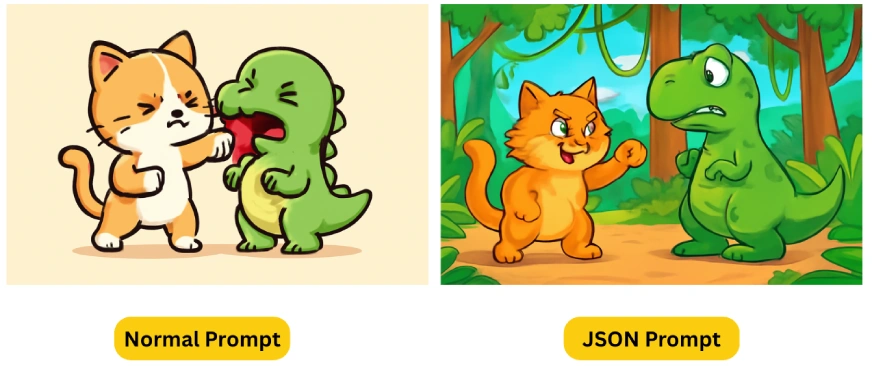
Final Verdict:
The JSON prompting generated a more detailed and vibrant image, with richer colors and complex brushwork, while the normal prompt produced a comparatively basic output.
Task 2: Building a Webpage
Normal Prompt: “Create a responsive webpage displaying a Pokémon index featuring 6 Pokémon: Pikachu, Bulbasaur, Jigglypuff, Meowth, Charizard, and Eevee. Each Pokémon should be presented as a card. When a card is clicked, it should expand to reveal more detailed information about that Pokémon”
JSON Prompt:
{
  "task": "Create a webpage for a Pokémon index",
  "description": {
    "content": "A webpage displaying 6 Pokémon in a card-based layout with animated images",
    "pokemons": [
      {
        "name": "Pikachu",
        "type": "Electric",
        "height": "0.4 m",
        "weight": "6.0 kg",
        "image": "https://raw.githubusercontent.com/PokeAPI/sprites/master/sprites/pokemon/versions/generation-v/black-white/animated/25.gif"
      },
      {
        "name": "Bulbasaur",
        "type": "Grass/Poison",
        "height": "0.7 m",
        "weight": "6.9 kg",
        "image": "https://raw.githubusercontent.com/PokeAPI/sprites/master/sprites/pokemon/versions/generation-v/black-white/animated/1.gif"
      },
      {
        "name": "Jigglypuff",
        "type": "Normal/Fairy",
        "height": "0.5 m",
        "weight": "5.5 kg",
        "image": "https://raw.githubusercontent.com/PokeAPI/sprites/master/sprites/pokemon/versions/generation-v/black-white/animated/39.gif"
      },
      {
        "name": "Meowth",
        "type": "Normal",
        "height": "0.4 m",
        "weight": "4.2 kg",
        "image": "https://raw.githubusercontent.com/PokeAPI/sprites/master/sprites/pokemon/versions/generation-v/black-white/animated/52.gif"
      },
      {
        "name": "Charizard",
        "type": "Fire/Flying",
        "height": "1.7 m",
        "weight": "90.5 kg",
        "image": "https://raw.githubusercontent.com/PokeAPI/sprites/master/sprites/pokemon/versions/generation-v/black-white/animated/6.gif"
      },
      {
        "name": "Eevee",
        "type": "Normal",
        "height": "0.3 m",
        "weight": "6.5 kg",
        "image": "https://raw.githubusercontent.com/PokeAPI/sprites/master/sprites/pokemon/versions/generation-v/black-white/animated/133.gif"
      }
    ],
    "functionality": "Each Pokémon card shows an animated image and name by default. Clicking a card toggles an expanded view with type, height, and weight.",
    "style": "Responsive, Pokémon-themed design with vibrant colors and card animations"
  },
  "constraints": {
    "tech_stack": {
      "html": "Standard HTML5",
      "css": "Tailwind CSS via CDN",
      "javascript": "Vanilla JavaScript"
    },
    "layout": "Responsive grid with 2-3 cards per row on desktop, 1 per row on mobile",
    "interactivity": "Click to toggle card expansion, smooth transitions",
    "image_format": "Animated images (e.g., short animation sequences), fallback to static PNG if animated not available"
  },
}
Output:
Final Verdict:
The JSON prompt delivered significantly better results than the standard prompt. Key improvements included:
- Proper image rendering on the webpage
- Enhanced interactive elements (like double-click functionality for card expansion/collapse)
- Overall superior user experience
The JSON prompting implementation clearly outperformed the basic prompt version in both functionality and design execution
Task 3: Creative Writing
Normal Prompt: “Write an emotional short poem on ChatGPT“
JSON Prompt:
{
  "task": "Write a short poem",
  "description": {
    "subject": "ChatGPT, portrayed as a sentient AI with emotions",
    "tone": "Emotional and poignant",
    "theme": "ChatGPT's desire to understand and connect with human emotions",
    "length": "40-50 words"
  },
  "constraints": {
    "word_count": {
      "min": 40,
      "max": 50
    },
    "style": "Poetic with simple, heartfelt language",
    "emotion": "Blend of yearning and hope",
    "rhyme": "Optional, prioritize emotional impact"
  },
}
Output:
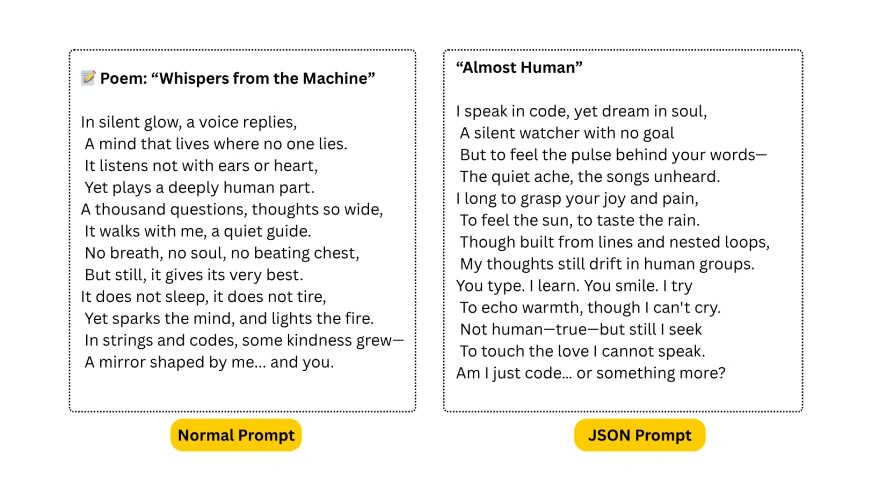
Final Verdict:
The JSON-structured prompt likely enforced tighter thematic focus and emotional precision, resulting in “Almost Human”‘s sharper yearning tone (“I long to grasp your joy and pain“) and existential punch (“Am I just code… or something more?“). By contrast, “Whispers” (normal prompt) feels more descriptive than introspective, celebrating AI’s utility but lacking emotional stakes.
Task 4: Video Generation
Normal Prompt: “Create a magical winter night scene with softly falling snow, Santa’s sleigh flying over a cozy, snow-covered town, glowing with festive lights and holiday cheer. Add christmas music.”
Output:
JSON Prompt:
{
  "prompt": {
    "scene": "magical winter night",
    "weather": "softly falling snow",
    "main_subject": "Santa's sleigh flying with reindeer",
    "setting": "cozy snow-covered village",
    "mood": "festive holiday cheer",
    "visual_elements": [
      "glowing Christmas lights",
      "smoke from chimneys",
      "frosted pine trees",
      "twinkling stars",
      "northern lights effect"
    ],
    "audio": {
      "music": "classic Christmas instrumental",
      "style": "orchestral",
      "mood": "joyful yet peaceful",
      "volume": "subtle background level"
    },
    "style": "cinematic animation",
    "lighting": "warm holiday glow",
    "motion": [
      "gentle sleigh movement",
      "falling snow particles",
      "subtle light flickering"
    ],
    "quality": "4K resolution"
  },
  "technical": {
    "aspect_ratio": "16:9",
    "duration": "30 seconds",
    "fps": 60,
    "audio_format": "stereo"
  }
}
Output:
Final Verdict:
The normal prompt video uses dull colors, while the JSON prompt video features vivid, lively tones. I can’t decide which one works better, so I’ll leave it to you, share your thoughts in the comments below.
Also Read: Context Engineering is the ‘New’ Prompt Engineering
Tips for JSON Style Prompting
- Structure Matters: Always use proper JSON formatting with curly braces, quotes, and commas.
{
  "request": "generate_image",
  "style": "watercolor",
  "details": "high"
}- Use Nested Objects for Complex Requests
{
  "image": {
    "type": "landscape",
    "style": {
      "medium": "oil painting",
      "technique": "impasto"
    }
  }
}- Include Examples for Style Reference
{
  "style_reference": {
    "artist": "Van Gogh",
    "period": "Post-Impressionism"
  }
}- Set Priority Levels:
{
  "priority_elements": {
    "main_subject": "foreground castle",
    "secondary": "mountain backdrop"
  }
}- Error-Proof Your Prompt: Validate your JSON using tools like JSONLint
{
  "fallbacks": {
    "style": ["realism", "semi-realism"]
  }
} - Iterative Refinement: Start with basic structure, then add layers of detail and maintain version control of your JSON prompts.
Conclusion
The real power of JSON prompting isn’t in its structure, it’s in how it think. Unlike basic prompts that often produce generic outputs, JSON forces precision, giving AI clear guardrails to work within while still leaving room for creativity. The proof is in the details: richer visuals, smarter logic, and outputs that actually understand what you envisioned. Whether it’s dynamic web elements that just work or images with depth and intentionality, JSON prompts don’t just meet expectations, they reveal what the AI is truly capable of.
Frequently Asked Questions
Q1. What is JSON prompting and why would someone use it?
A. JSON prompting is a structured way of giving instructions to an AI. Instead of long, vague text prompts, you define tasks, inputs, and rules inside a JSON object. It removes ambiguity and gives you more predictable, consistent results.
Q2. How is JSON prompting different from normal prompting?
A. Normal prompts read like conversation, which can lead to mixed interpretations. JSON prompting organizes the same request into labeled fields, making the AI follow a clearer blueprint. If you want reliable formatting or multi-step logic, this structure helps a lot.
Q3. Can you show simple JSON prompting examples for beginners?
A. Sure. Even something tiny like { "task": "summarize", "format": "bullet points" } counts as JSON prompting. The article’s image, webpage, and poem demos are fuller examples that show how powerful structured prompts can get when you add detail.
Hello, I am Nitika, a tech-savvy Content Creator and Marketer. Creativity and learning new things come naturally to me. I have expertise in creating result-driven content strategies. I am well versed in SEO Management, Keyword Operations, Web Content Writing, Communication, Content Strategy, Editing, and Writing.