Have you ever wondered how your phone understands voice commands or suggests the perfect word, even without an internet connection? We’re in the middle of a major AI shift: from cloud-based processing to on-device intelligence. This isn’t just about speed; it’s also about privacy and accessibility. At the center of this shift is EmbeddingGemma, Google’s new open embedding model. It’s compact, fast, and designed to handle large amounts of data directly on your device.
In this blog, we’ll explore what EmbeddingGemma is, its key features, how to use it, and the applications it can power. Let’s dive in!
Table of contents
What Exactly is an “Embedding Model”?
Before we dive into the details, let’s break down a core concept. When we teach a computer to understand language, we cannot just feed it words because computers only process numbers. That is where an embedding model comes in. It works like a translator, converting text into a series of numbers (a vector) that captures meaning and context.
Think of it as a fingerprint for text. The more similar two pieces of text are, the closer their fingerprints will be in a multi-dimensional space. This simple idea powers applications like semantic search (finding meaning rather than just keywords) and chatbots that retrieve the most relevant answers.
Understanding EmbeddingGemma
So, what makes EmbeddingGemma special? It is all about doing more with less. Built by Google DeepMind, the model has just 308 million parameters. That might sound huge, but in the AI world it is considered lightweight. This compact size is its strength, allowing it to run directly on a smartphone, laptop, or even a small sensor without relying on a data center connection.
This ability to work on-device is more than just a neat feature. It represents a real paradigm shift.
Key Features
- Unmatched Privacy: Your data stays on your device. The model processes everything locally, so you don’t have to worry about your private queries or personal information being sent to the cloud.
- Offline Functionality: No internet? No problem. Applications built with EmbeddingGemma can perform complex tasks like searching through your notes or organizing your photos, even when you’re completely offline.
- Incredible Speed: With no latency from sending data back and forth to a server, the response time is instantaneous.
And here’s the cool part: despite its compact size, EmbeddingGemma delivers state-of-the-art performance.
- It holds the highest ranking for an open multilingual text embedding model under 500M on the Massive Text Embedding Benchmark (MTEB).
- Its performance is comparable to or exceeds that of models nearly twice its size.
- This is due to its highly efficient design, which can run on less than 200MB of RAM with quantization and offers a low inference latency of sub-15ms on EdgeTPU for 256 input tokens, making it suitable for real-time applications.
Also Read: How to Choose the Right Embedding for Your RAG Model?
How is EmbeddingGemma Designed?
One of EmbeddingGemma’s standout features is Matryoshka Representation Learning (MRL). This gives developers the flexibility to adjust the model’s output dimensions based on their needs. The full model produces a detailed 768-dimensional vector for maximum quality, but it can be reduced to 512, 256, or even 128 dimensions with little loss in accuracy. This adaptability is especially valuable for resource-constrained devices, enabling faster similarity searches and lower storage requirements.
Now that we understand what makes EmbeddingGemma powerful, let’s see it in action.
Embedding Gemma: Handson
Let’s create a RAG using Embedding Gemma and LangGraph.
Set 1: Download the Dataset
!gdown 1u8ImzhGW2wgIib16Z_wYIaka7sYI_TGKStep 2: Load and Preprocess the Data
from pathlib import Path

import json

from langchain.docstore.document import Document

# ---- Configure dataset path (update if needed) ----

DATA_PATH = Path("./rag_demo_docs052025.jsonl")  # same file name as earlier notebook

if not DATA_PATH.exists():

   raise FileNotFoundError(

       f"Expected dataset at {DATA_PATH}. "

       "Please place the JSONL file here or update DATA_PATH."

   )

# Load JSONL

raw_docs = []

with DATA_PATH.open("r", encoding="utf-8") as f:

   for line in f:

       raw_docs.append(json.loads(line))

# Convert to Document objects with metadata

documents = []

for i, d in enumerate(raw_docs):

   sect = d.get("sectioned_report", {})

   text = (

       f"Issue:\n{sect.get('Issue','')}\n\n"

       f"Impact:\n{sect.get('Impact','')}\n\n"

       f"Root Cause:\n{sect.get('Root Cause','')}\n\n"

       f"Recommendation:\n{sect.get('Recommendation','')}"

   )

   documents.append(Document(page_content=text))

print(documents[0].page_content)
Step 3: Create a Vector DB
Use the preprocessed data and Embedding Gemma to create a vector db:
from langchain_openai import OpenAIEmbeddings

from langchain_chroma import Chroma

from langchain_huggingface import HuggingFaceEmbeddings

persist_dir = "./reports_db"

collection = "reports_db"

embedder = HuggingFaceEmbeddings(model_name="google/embeddinggemma-300m")

# Build or rebuild the vector store

vectordb = Chroma.from_documents(

   documents=documents,

   embedding=embedder,

   collection_name=collection,

   collection_metadata={"hnsw:space": "cosine"},

   persist_directory=persist_dir

)
Step 4: Create a Hybrid Retriever (Semantic + BM25 keyword retriever)
# Reopen handle (demonstrates persistence)

vectordb = Chroma(

   embedding_function=embedder,

   collection_name=collection,

   persist_directory=persist_dir,

)

vectordb._collection.count()

from langchain.retrievers import BM25Retriever, EnsembleRetriever

from langchain.retrievers import ContextualCompressionRetriever

# Base semantic retriever (cosine sim + threshold)

semantic = vectordb.as_retriever(

   search_type="similarity_score_threshold",

   search_kwargs={"k": 5, "score_threshold": 0.2},

)

# BM25 keyword retriever

bm25 = BM25Retriever.from_documents(documents)

bm25.k = 3

# Ensemble (hybrid)

hybrid_retriever = EnsembleRetriever(

   retrievers=[bm25, semantic],

   weights=[0.6, 0.4],

   k=5

)

# Quick test

hybrid_retriever.invoke("What are the major issues in finance approval workflows?")[:3]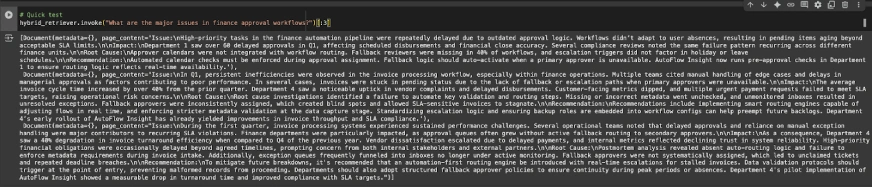
Step 5: Create Nodes
Now let’s create two nodes – one for Retrieval and the other for Generation:
Defining LangGraph State
from typing import List, TypedDict, Annotated

from langgraph.graph import StateGraph, START, END

from langchain.docstore.document import Document as LCDocument

# We keep overwrite semantics for all keys (no reducers needed for appends here).

class RAGState(TypedDict):

   question: str

   retrieved_docs: List[LCDocument]

   answer: str
Node 1: Retrieval
def retrieve_node(state: RAGState) -> RAGState:

   query = state["question"]

   docs = hybrid_retriever.invoke(query)  # returns list[Document]

   return {"retrieved_docs": docs}
Node 2: Generation
from langchain_openai import ChatOpenAI

from langchain_core.prompts import ChatPromptTemplate

llm = ChatOpenAI(model_name="gpt-4o-mini", temperature=0)

PROMPT = ChatPromptTemplate.from_template(

   """You are an assistant for Analyzing internal reports for Operational Insights.

      Use the following pieces of retrieved context to answer the question.

      If you don't know the answer or there is no relevant context, just say that you don't know.

      give a well-structured and to the point answer using the context information.

      Question:

      {question}

      Context:

      {context}

   """

)

def _format_docs(docs: List[LCDocument]) -> str:

   return "\n\n".join(d.page_content for d in docs) if docs else ""

def generate_node(state: RAGState) -> RAGState:

   question = state["question"]

   docs = state.get("retrieved_docs", [])

   context = _format_docs(docs)

   prompt = PROMPT.format(question=question, context=context)

   resp = llm.invoke(prompt)

   return {"answer": resp.content}

Build the Graph and Edges

builder = StateGraph(RAGState)

builder.add_node("retrieve", retrieve_node)

builder.add_node("generate", generate_node)

builder.add_edge(START, "retrieve")

builder.add_edge("retrieve", "generate")

builder.add_edge("generate", END)

graph = builder.compile()

from IPython.display import Image, display, display_markdown

display(Image(graph.get_graph().draw_mermaid_png()))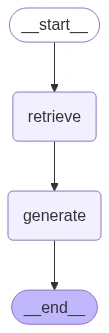
Step 6: Run the Model
Now let’s run some examples on the RAG that we built:
example_q = "What are the major issues in finance approval workflows?"

final_state = graph.invoke({"question": example_q})

display_markdown(final_state["answer"], raw=True)
example_q = "What caused invoice SLA breaches in the last quarter?"

final_state = graph.invoke({"question": example_q})

display_markdown(final_state["answer"], raw=True)

example_q = "How did AutoFlow Insight improve SLA adherence?"

final_state = graph.invoke({"question": example_q})

display_markdown(final_state["answer"], raw=True)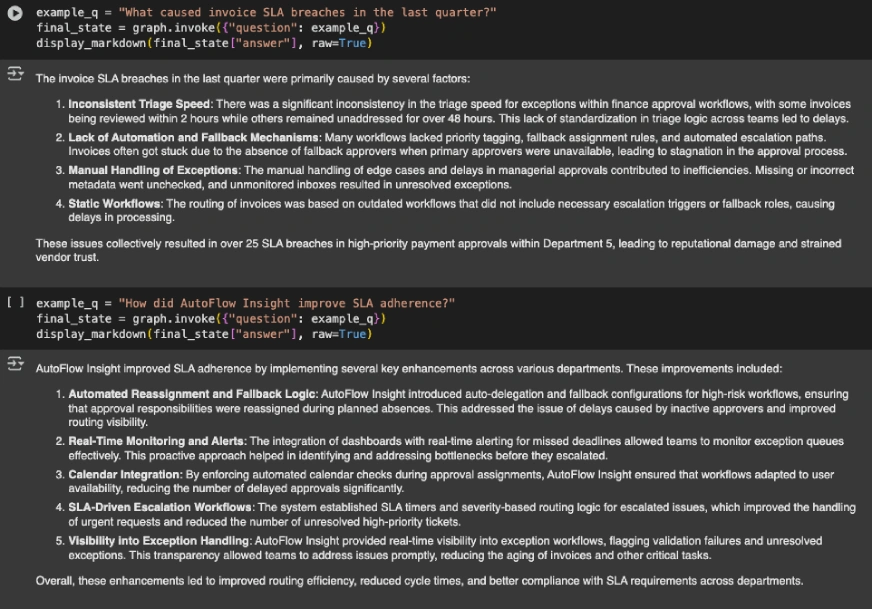
Check out the entire notebook here.
Embedding Gemma: Performance Benchmarks
Now that we have seen EmbeddingGemma in action, let’s quickly see how it performs against its peers. The following chart breaks down the differences among all the top embedding models:

- EmbeddingGemma achieves a mean MTEB score of 61.15, clearly beating most of the models of similar and even larger size.
- The model excels in retrieval, classification with solid clustering.
- It beats larger models like multilingual-e5-large (560M) and bge-m3(568M).
- The only model that beats its scores is Qwen-Embedding-0.6B which is nearly double its size.
Also Read: 14 Powerful Techniques Defining the Evolution of Embedding
Embedding Gemma vs OpenAI Embedding Models
An important comparison is between EmbeddingGemma and OpenAI’s embedding models. OpenAI embeddings are generally more cost-effective for small projects, but for larger, scalable applications, EmbeddingGemma has the advantage. Another key difference is context size: OpenAI embeddings support up to 8k tokens, while EmbeddingGemma currently supports up to 2k tokens.
Applications of EmbeddingGemma
The true power of EmbeddingGemma lies in the wide array of applications it enables. By generating high-quality text embeddings directly on the device, it powers a new generation of privacy-centric and efficient AI experiences.
Here are a few key applications:
- RAG: As discussed earlier, EmbeddingGemma can be used to build a robust RAG pipeline that works entirely offline. You can create a personal AI assistant that can browse through your documents and provide precise, grounded answers. This is especially useful for creating chatbots that can answer questions based on a specific, private knowledge base.
- Semantic Search & Information Retrieval: Instead of just searching for keywords, you can build search functions that understand the meaning behind a user’s query. This is perfect for searching through large document libraries, your personal notes, or a company’s knowledge base, ensuring you find the most relevant information quickly and accurately.
- Classification & Clustering: EmbeddingGemma can be used to build on-device applications for tasks like classifying texts (e.g., sentiment analysis, spam detection) or clustering them into groups based on their similarities (e.g., organizing documents, market research).
- Semantic Similarity & Recommendation Systems: The model’s ability to measure the similarity between texts is a core component of recommendation engines. For example, it can recommend new articles or products to a user based on their reading history, all while keeping their data private.
- Code Retrieval & Fact Verification: Developers can use EmbeddingGemma to build tools that retrieve relevant code blocks based on a natural language query. It can also be used in fact-checking systems to retrieve documents that support or refute a statement, enhancing the reliability of information.
Conclusion
Google has not just launched a model; they have released a toolkit. EmbeddingGemma integrates with frameworks like sentence-transformers, llama.cpp, and LangChain, making it easy for developers to build powerful applications. The future is local. EmbeddingGemma enables privacy-first, efficient, and fast AI that runs directly on devices. It democratizes access and puts powerful tools in the hands of billions.
Anu Madan is an expert in instructional design, content writing, and B2B marketing, with a talent for transforming complex ideas into impactful narratives. With her focus on Generative AI, she crafts insightful, innovative content that educates, inspires, and drives meaningful engagement.