
Have you ever wondered if your chatbot could think rather than just reply based on pre-trained texts? That is, reasoning through information like a human mind would. You could ask your chatbot about a YouTube video it finds the video and return a structured summary or even an analysis of the video’s important moments. This is exactly what we’ll be doing using Kimi K2 Thinking and Hugging Face API
With Kimi K2’s reasoning capabilities and the Hugging Face API, you can create an agent that understands your queries. In this article, we will go through setting up the environment to get Kimi K2 connected through Streamlit, together with a transcript from a YouTube video, and making sure our chatbot leverages open reasoning models.
Table of contents
Understanding Kimi K2 Thinking
Kimi K2 Thinking, the latest open-source reasoning model from Moonshot AI, is designed to function as a true reasoning agent rather than just a text predictor. It can break down complex problems into logical steps, use tools like calculators mid-process, and combine results into a final answer. Built on a massive 1-trillion-parameter Mixture-of-Experts architecture with a 256k-token context window, it can manage hundreds of reasoning steps and extensive dialogue seamlessly, making it one of the most powerful thinking models available today.
Read more: Kimi K2 Thinking
Here are the key features of Kimi K2 Thinking:
- Advanced reasoning and tool use: Kimi K2 can reason through complex, multi-step problems while dynamically using tools like search or code execution.
- Exceptional long-term coherence: It maintains context over 200–300 conversation turns, keeping discussions consistent and on-topic.
- Massive context window: With 256K tokens, it handles huge inputs like full video transcripts and long conversations.
- Top-tier performance: It rivals or beats leading models (including GPT-5 and Claude) on reasoning, coding, and agentic benchmarks.
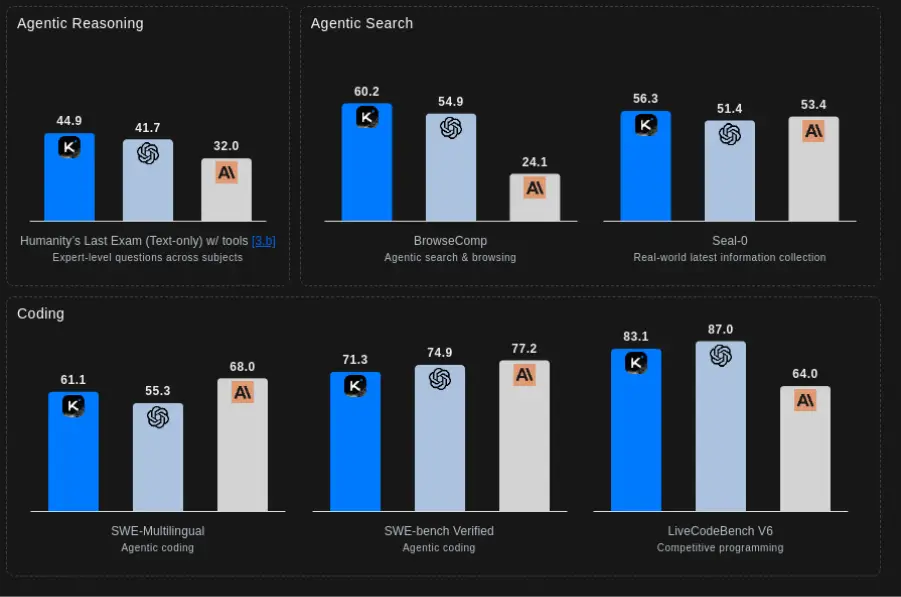
In short, Kimi K2 Thinking is an open reasoning model, far different from a chatbot. It is an AI built for reasoning procedurally and for tool use. So, it is ideal for powering a smarter chatbot.
Read more: Top 6 Reasoning Models of 2025
Setting Up the Development Environment
To get started, you’ll have to set up your own Python virtual environment and all required packages installed. For instance, create and activate a virtual environment using python -m venv .venv; source .venv/bin/activate. Now you can install the core libraries.
- Python & Virtual env: Use Python 3.10+ and a virtual environment (venv is an example).
python -m venv chatbot_env

source chatbot_env/bin/activate # for Linux/macOS

chatbot_env\Scripts\activate # for Windows
2. Install Libraries: To install the necessary libraries run the command below:
pip install streamlit youtube-transcript-api langchain-text-splitters langchain-community faiss-cpu langchain-huggingface sentence-transformers python-dotenv This will install Streamlit, the YouTube transcript API, LangChain‘s text splitting utilities, FAISS for vector search, and the Hugging Face integration for LangChain, as well as other dependencies. (It will install packages, for example text-generation, transformers, etc. as necessary). These packages will allow you to retrieve and process transcripts.
3. Environment Variables: Make .env with at least HUGGINGFACEHUB_API_TOKEN=<your-token>. For this follow the below steps:
- First go to Hugging Face and Sign up or create an account if you don’t have any.
- Now visit to your profile on the top right corner and click on the Access Token.
- After this create a new
HF_TOKENand copy it and visit back to the VScode and create a .env file and put theHF_TOKENover there. The reference below describes configuring environment variables, which are provided as an example.
HUGGINGFACEHUB_API_TOKEN=your_token_here Integrating Kimi K2 Thinking with the YouTube Chatbot
This chatbot is designed to allow users to ask questions about any YouTube video and receive intelligent, context-aware answers. Instead of watching a 45 minute documentary or 2 hour lecture, a user can query the system directly by asking for example, “What does the speaker say about inflation?” or “Explain the steps of the algorithm described at 12 minutes.”
Now, let’s break down each part of the system:
- The system fetches the YouTube transcript,
- It separates it into meaningful chunks.
- The chunks are converted to vector embeddings for retrieval.
- When a user queries the system, it retrieves the most relevant sections.
- The sections are passed to Kimi K2 Thinking receive reasoning step by step and produces answers that are contextual.
Each layer of the overall experience is valuable for taking an unstructured transcript and distilling it into an intelligent conversation. Below we provide a clear and pragmatic breakdown of the experience.
1. Data Ingestion: Fetching the YouTube Transcript
The entire process starts with getting the transcript of the YouTube video. Instead of downloading video files or running heavy processing, our chatbot uses the lightweight youtube-transcript-api.
from youtube_transcript_api import YouTubeTranscriptApi, TranscriptsDisabled, NoTranscriptFound, VideoUnavailable

def fetch_youtube_transcript(video_id):
    try:
        you_tube_api = YouTubeTranscriptApi()
        youtube_transcript = you_tube_api.fetch(video_id, languages=['en'])
        transcript_data = youtube_transcript.to_raw_data()
        transcript = " ".join(chunk['text'] for chunk in transcript_data)
        return transcript

    except TranscriptsDisabled:
        return "Transcripts are disabled for this video."
    except NoTranscriptFound:
        return "No English transcript found for this video."
    except VideoUnavailable:
        return "Video is unavailable."
    except Exception as e:
        return f"An error occurred: {str(e)}"
This module retrieves the actual captions (subtitles) you see on YouTube, efficiently, reliably, and in plain text.
2. Text Splitting: Chunking the Transcript
YouTube transcripts can be incredibly large contentsing sometimes hundreds, and often, thousands of characters. Since language models and embedding models work best over smaller chunks, we have to chunk transcripts into size manageable tokens.
This system uses LangChain’s RecursiveCharacterTextSplitter to create chunks using an intelligent algorithm that breaks text apart while keeping natural breaks (sentences, paragraphs, etc.) intact.
from langchain_text_splitters import RecursiveCharacterTextSplitter
from a_data_ingestion import fetch_youtube_transcript

def split_text(text, chunk_size=1000, chunk_overlap=200):
    text_splitter = RecursiveCharacterTextSplitter(
        chunk_size=chunk_size,
        chunk_overlap=chunk_overlap
    )
    chunks = text_splitter.create_documents([text])
    return chunks
Why is this important?
- Prevents spilling over the model token limit.
- Keeps context with overlapping/reference chunks.
- Creates semantically meaningful pieces for an accurate retrieval process.
- Chunking allows us to make sure no important details get lost.
3. Embeddings and Vector Search
Once we have clean chunks, we will create vector embeddings math representations, that capture semantic meaning. Once vector embeddings are created, we can do similarity search, which allows a chatbot to retrieve relevant chunks from the transcript when a user asks a question.
from langchain_huggingface import HuggingFaceEmbeddings
from langchain_community.vectorstores import FAISS
from dotenv import load_dotenv

load_dotenv()

def vector_embeddings(chunks):
    embeddings = HuggingFaceEmbeddings(
        model_name="sentence-transformers/all-mpnet-base-v2",
        model_kwargs={"device": "cpu"},
        encode_kwargs={"normalize_embeddings": True}
    )

    vector_store = FAISS.from_documents(
        documents=chunks,
        embedding=embeddings
    )

    return vector_store
Key features:
- Leverages a fast and lightweight MiniLM embedding model.
- Utilizes FAISS for extremely fast similarity search.
- Keeps track of the top-3 most relevant transcript chunks for each query.
This greatly enhances accuracy since Kimi K2 will receive only the most relevant pieces rather than the entire transcript.
4. Integrating the Kimi K2 Thinking Model
Once relevant chunks are identified, the system submits them to Kimi K2 via the Hugging Face Endpoint. This is where the chatbot becomes truly intelligent and is able to perform multi-step reasoning, summarisation and answer questions based on previous context.
Breaking the parameters down:
repo_id: Routes the request to the official Kimi K2 model.max_new_tokens: Controls the length of the response.do_sample=False: This gives deterministic and factual responses.repetition_penalty: This prevents Kimi K2 from giving the same answer twice.
5. Building the Streamlit Interface and Handling User Queries
To run this part the user must enter a YouTube video ID in the sidebar, can preview the video, then ask questions in real-time. Once a valid video ID is entered, the automated backend gets the transcript for the user automatically. When the user asks a question, the bot searches the transcript for the most relevant pieces, enriches the prompt, and sends it to Kimi K2 Thinking for reasoning. The user gets an immediate response, and the Streamlit framework retains conversation history, in a chat-like, smooth, informative, and seamless manner.
Running and Testing the Chatbot
To test locally, open the streamlit interface. In a terminal in your project folder (with your virtual environment active) run:
streamlit run streamlit_app.py This will launch a local server and open your browser window to the application. (If you prefer you can run python -m streamlit run streamlit_app.py). The interface will have a sidebar where you can type in a YouTube Video ID where the ID is the part after v= in the URL of the video. For example, you could use U8J32Z3qV8s for the sample lecture ID. After entering the ID, the app will fetch the transcript and then create the RAG Pipeline (splitting text, embeddings, etc.) behind the scenes.
What’s happening in back end:
- Retrieves relevant transcript chunks
- Augments the prompt with
augment_fn() - Kimi K2 Thinking reasons over the context provided
- Creates an answer to display in the chat
- Retains session history for memory effect
You can view the full code at this Github Repository.
Conclusion
Building an advanced chatbot today means combining powerful reasoning models with accessible APIs. In this tutorial, we used Kimi K2 Thinking, alongside the Hugging Face API to create a YouTube chatbot that summarises videos. Kimi K2’s step-by-step reasoning and tool-use abilities allowed the bot to understand video transcripts on a deeper level. Open models like Kimi K2 Thinking show that the future of AI is open, capable, and already within reach.
Frequently Asked Questions
Q1. What makes Kimi K2 Thinking different from traditional chatbot models?
A. Kimi K2 Thinking uses chain-of-thought reasoning, allowing it to work through problems step-by-step instead of guessing quick answers, giving chatbots deeper understanding and more accurate responses.
Q2. How does the Hugging Face API enhance this chatbot?
A. It provides easy integration for model access, embeddings, and vector storage, making advanced reasoning models like Kimi K2 usable without complex backend setup.
Q3. Why focus on open-source models like Kimi K2?
A. Open-source models encourage transparency, innovation, and accessibility—offering GPT-level reasoning power without subscription barriers.
Hello! I'm Vipin, a passionate data science and machine learning enthusiast with a strong foundation in data analysis, machine learning algorithms, and programming. I have hands-on experience in building models, managing messy data, and solving real-world problems. My goal is to apply data-driven insights to create practical solutions that drive results. I'm eager to contribute my skills in a collaborative environment while continuing to learn and grow in the fields of Data Science, Machine Learning, and NLP.







