
If you follow open-source LLMs, you already know the space is moving fast. Every few months a new model drops promising better reasoning, better coding, and lower compute costs. Mistral has been one of the few companies that consistently delivers on those claims and with Mistral 3, they’ve pushed things even further. This new release isn’t just another update. Mistral 3 introduces a full suite of compact, efficient open-source models (3B, 8B, 14B) along with Mistral Large 3, a sparse MoE model that packs 41B active parameters inside a 675B-parameter architecture. In this guide, we’ll break down what’s actually new in Mistral 3, why it matters, how to install and run it using Ollama, and how it performs on real-world reasoning and coding tasks.
Table of contents
- Overview of Mistral 3: What’s New & Important
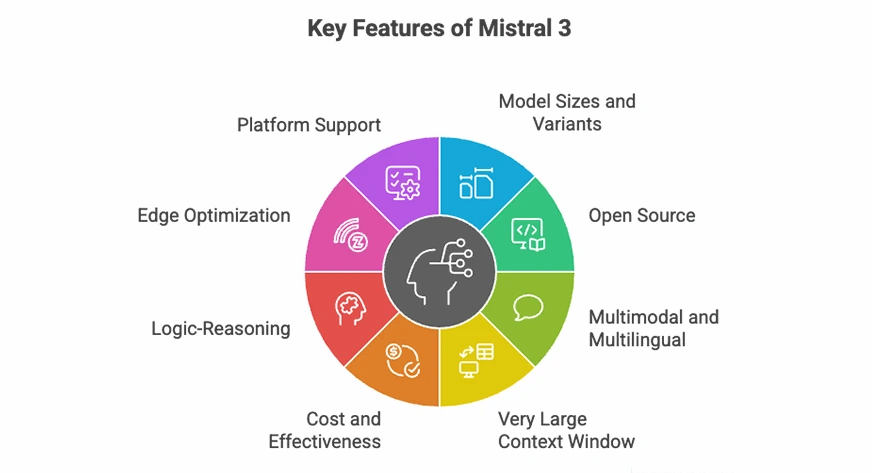
- Key Features of Mistral 3
- Setting up Mistral 3 with Ollama
- Mistral 3 Capabilities
- Task 1: Reasoning Ability with a Logic Puzzle
- Task 2: Code Documentation and Understanding
- Task 3: Coding Skills with a Multiprocessing Implementation
- Benchmarking & Observations
- Conclusion
Overview of Mistral 3: What’s New & Important
Mistral 3 launched on December 2, 2025, and it marks a major step forward for open-source AI. Instead of chasing larger and larger models, Mistral focused on efficiency, reasoning quality, and real-world usability. The lineup now includes three compact dense models (3B, 8B, 14B) and Mistral Large 3, a sparse MoE model with 41B active parameters inside a 675B-parameter architecture.
The entire suite is released under Apache 2.0, making it fully usable for commercial projects, one of the biggest reasons the developer community is excited.
Key Features of Mistral 3
- Multiple model sizes: available in base (3B), instruct (8B), and reasoning (14B) variants so you can pick exactly what fits your workload (chat, tools, long-form reasoning, etc.).
- Open and flexible: The Apache 2.0 license makes Mistral 3 one of the most accessible and business-friendly model families today.
- Multimodal: All models support text + image inputs with a built-in vision encoder, making them usable for document understanding, diagrams, and visual tasks.
- Long-context ability: Mistral Large 3 can handle up to 256K tokens, which means full books, long legal contracts, and massive codebases can be processed in one go.
- Better cost-performance: Mistral claims its new instruct variants match or surpass competing open models while generating fewer unnecessary tokens, reducing inference cost.
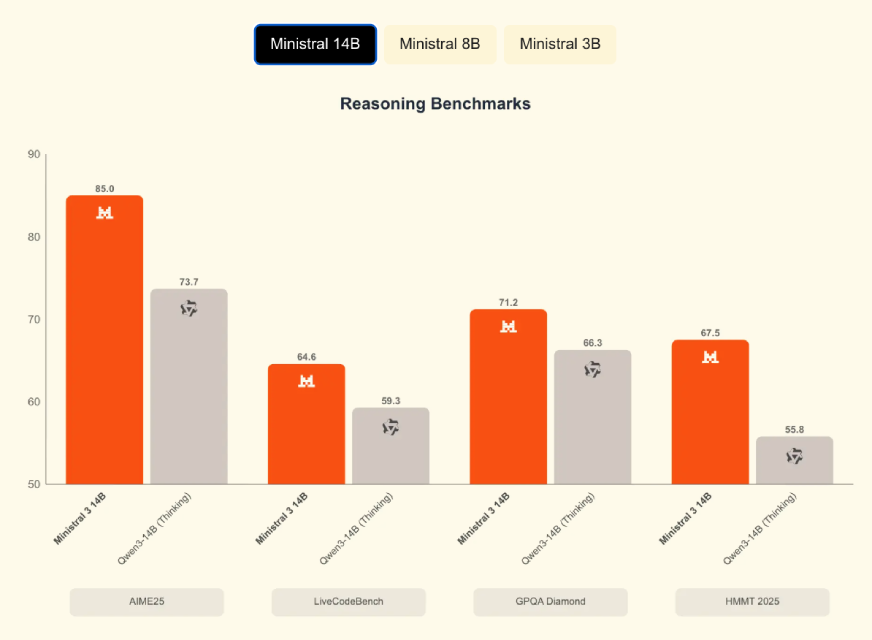
- Improved reasoning: The reasoning-tuned 14B model reaches 85% on the AIME benchmark — one of the strongest scores for a model this size.
- Edge-ready: The 3B and 8B models can run locally on laptops and consumer GPUs using quantization, and the 14B model fits comfortably on high-performance desktops.
Setting up Mistral 3 with Ollama
One of Mistral 3’s benefits is the ability to run on a local machine. Ollama is free to use and acts as a command-line interface for running large language models on Linux, macOS, and Windows. It handles model downloads and provides GPU support automatically.
Step 1: Install Ollama
Run the official script to install the Ollama binaries and services, then verify using ollama --version
curl -fsSL https://ollama.com/install.sh | sh - macOS users: Download the Ollama DMG from ollama.com and drag it to Applications. Ollama installs all required dependencies (including Rosetta for ARM-based Macs).
- Windows users: Download the latest
.exefrom the Ollama GitHub repository. After installation, open PowerShell and runollama serve. The daemon will start automatically
Step 2: Launch Ollama
Start the Ollama service (usually done automatically):
ollama serve You can now access the local API at: http://localhost:11434
Step 3: Pull a Mistral 3 Model
To download the quantized 8B Instruct model:
ollama pull Mistral :8b-instruct-q4_0 Step 4: Run the Model Interactively
ollama run Mistral :8b-instruct-q4_0 This opens an interactive REPL. Type any prompt, for example:
> Explain quantum entanglement in simple terms. The model will respond immediately, and you can continue interacting with it.
Step 5: Use the Ollama API
Ollama also exposes a REST API. Here’s a sample cURL request for code generation:
curl http://localhost:11434/api/generate -d '{
"model": "Mistral :8b-instruct-q4_0",
"prompt": "Write a Python function to sort a list.",
"stream": false
}'
Also Read: How to Run LLM Models Locally with Ollama?
Mistral 3 Capabilities
Mistral 3 is a general-purpose model suite that enables its use for chat, answering questions, reasoning, generating and analyzing code, and processing visual inputs. It has a vision encoder that can provide descriptive responses to given images. To demonstrate the capabilities of the Mistral 3 models, we used it on three sets of logical reasoning and coding problems:
- Reasoning Ability with a Logic Puzzle
- Code Documentation and Understanding
- Coding Skills with a Multiprocessing Implementation
To accomplish this, we used Ollama to query the Mistral 3 models and observed how well they performed. A brief discussion of the tasks, performance results, and benchmarks will follow.
Task 1: Reasoning Ability with a Logic Puzzle
Prompt:
Four friends: A, B, C, and D are suspected of hiding a single key. Each makes one statement:
A: “B has the key.”
B: “C does not have the key.”
C: “D has the key.”
D: “I don’t have the key.”
You are told exactly one of these four statements is true. Who is hiding the key?
Response from Mistral 8B:
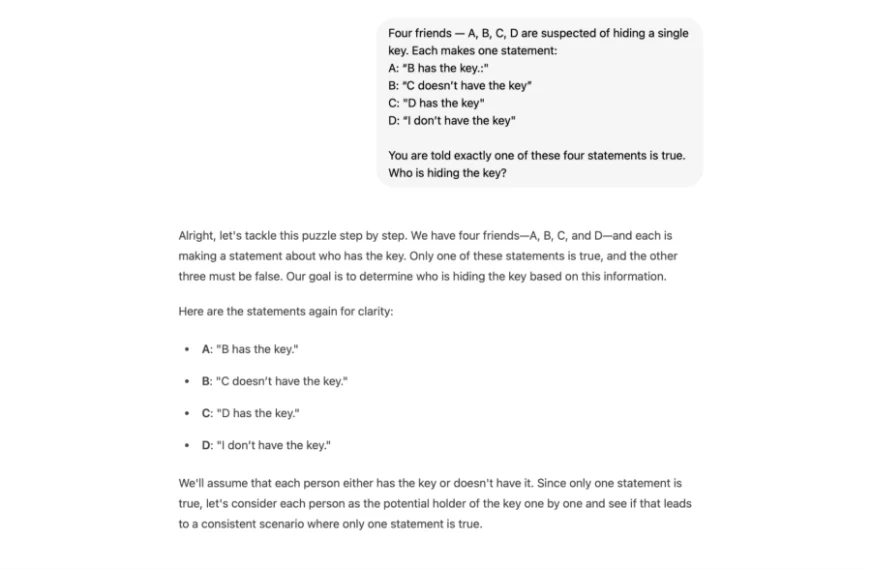
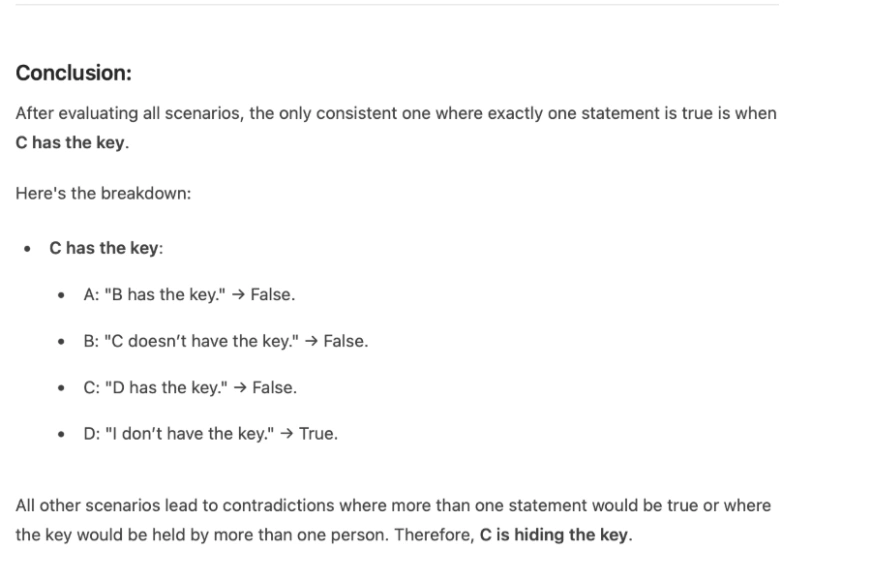
After this it takes couples of seconds and evaluate and analyse all the possible scenarios. Before jumping to the conclusion and gives a correct answer as C in about 50 seconds.
My Take:
The model solved the puzzle correctly and followed a step-by-step reasoning approach. It explored each possible scenario before concluding that C holds the key. However, the latency was noticeable: the 8B model took around 40–50 seconds to respond. This delay is likely due to local hardware constraints and not an inherent model issue.
Task 2: Code Documentation and Understanding
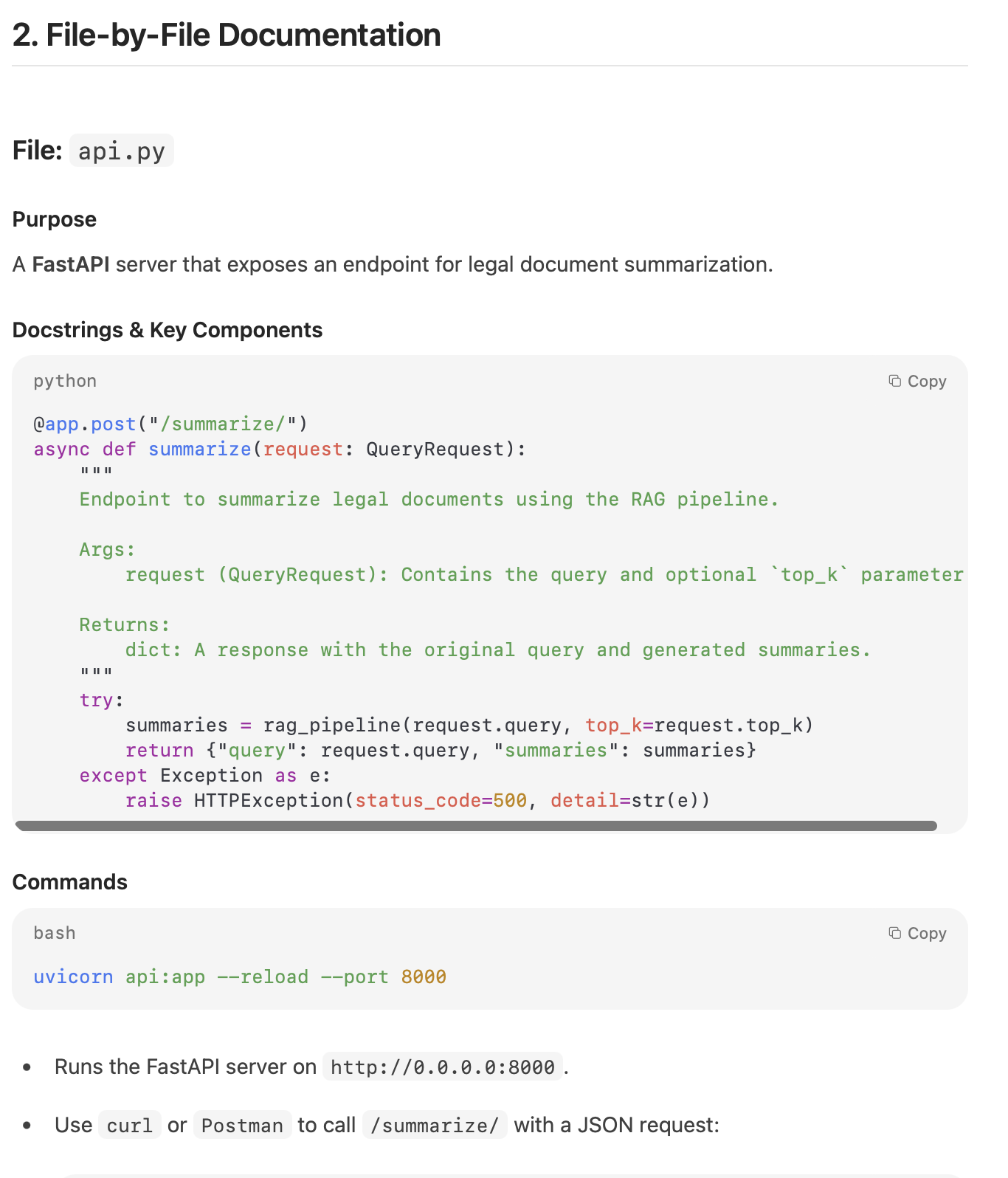
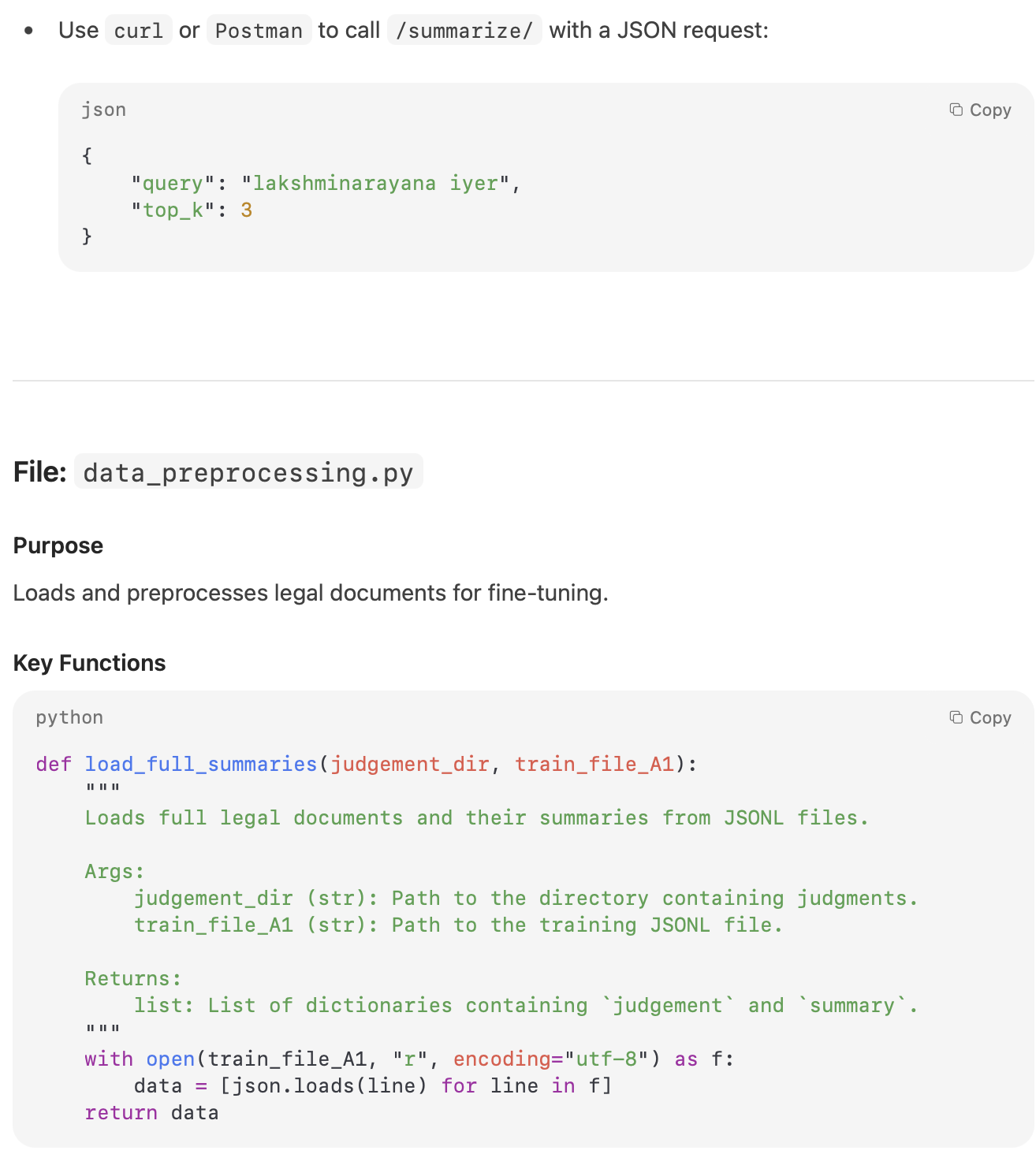
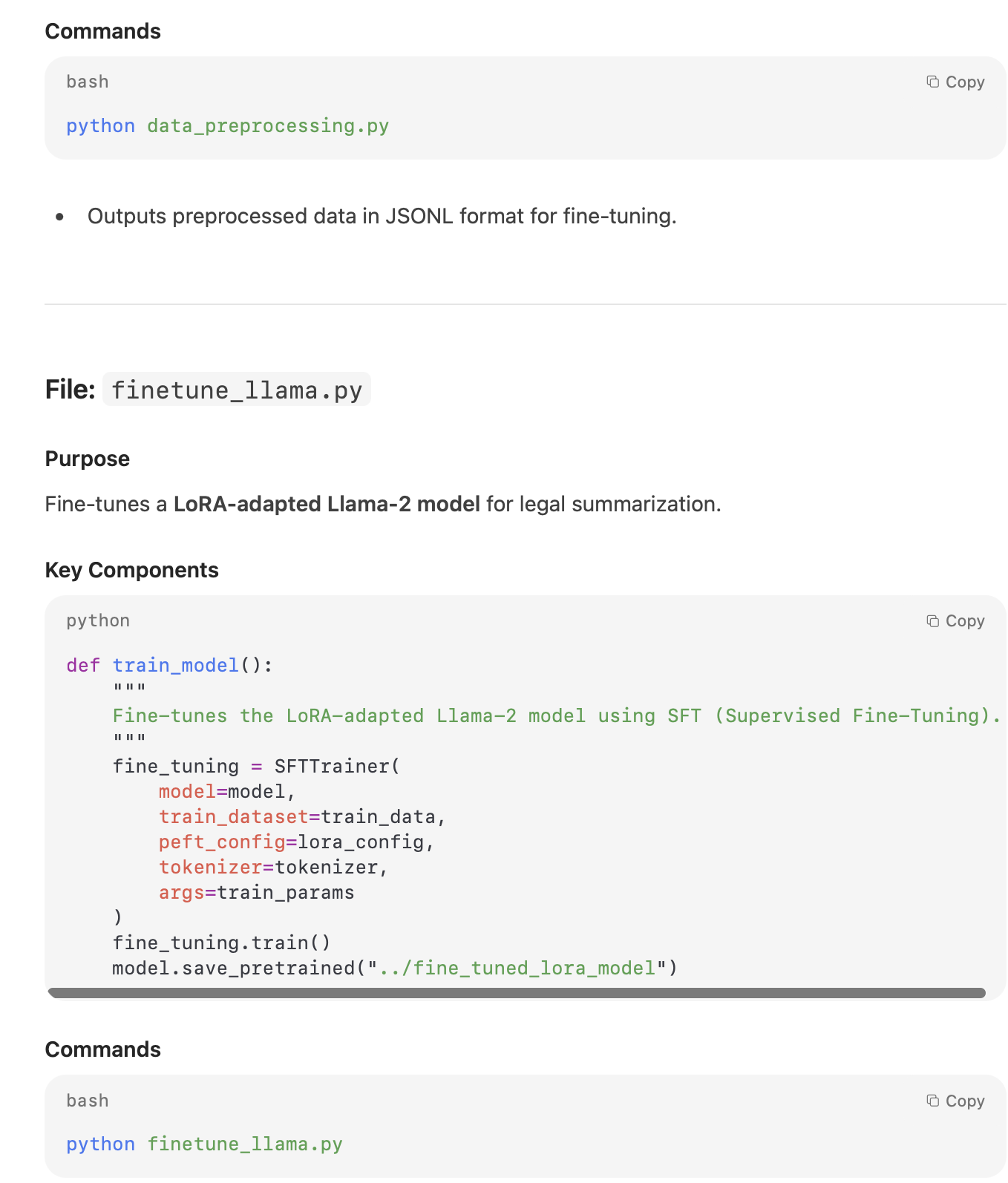
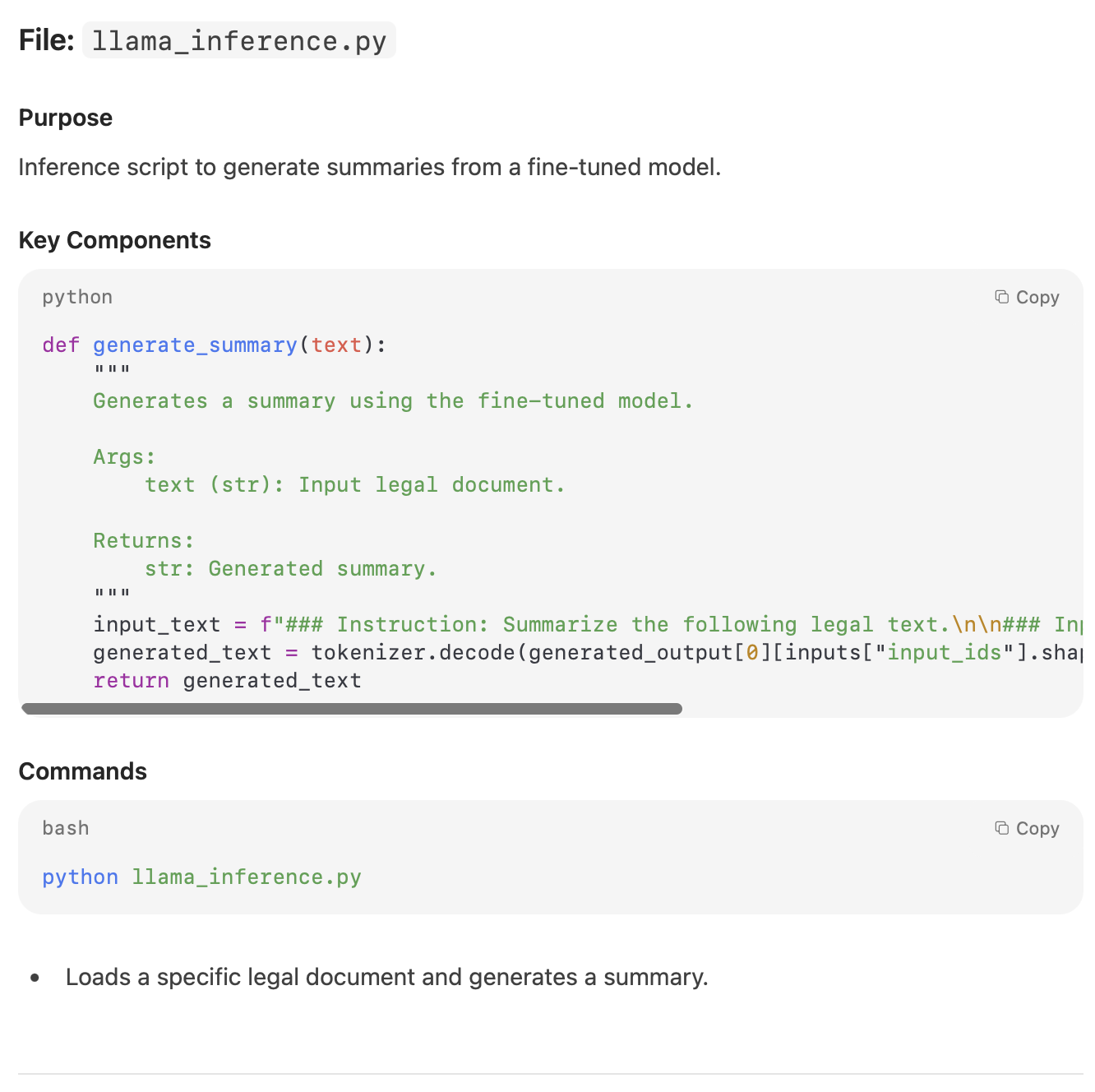
Prompt:
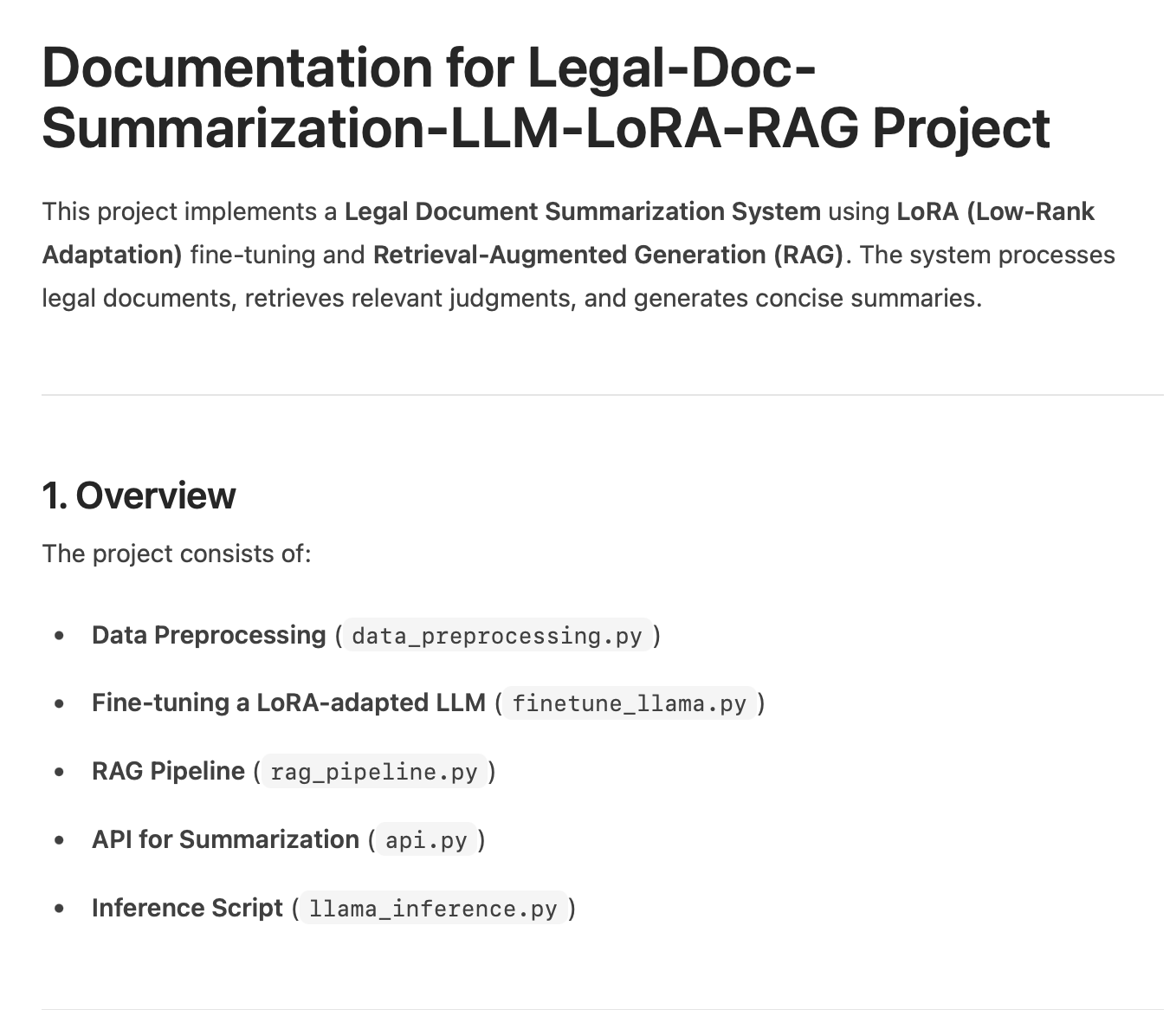
Give me the complete documentation of the code from the code file. Remember the documentation should contain:
1) Doc-strings
2) Comments
3) Detailed documentation of the functions
Response from Mistral 3:
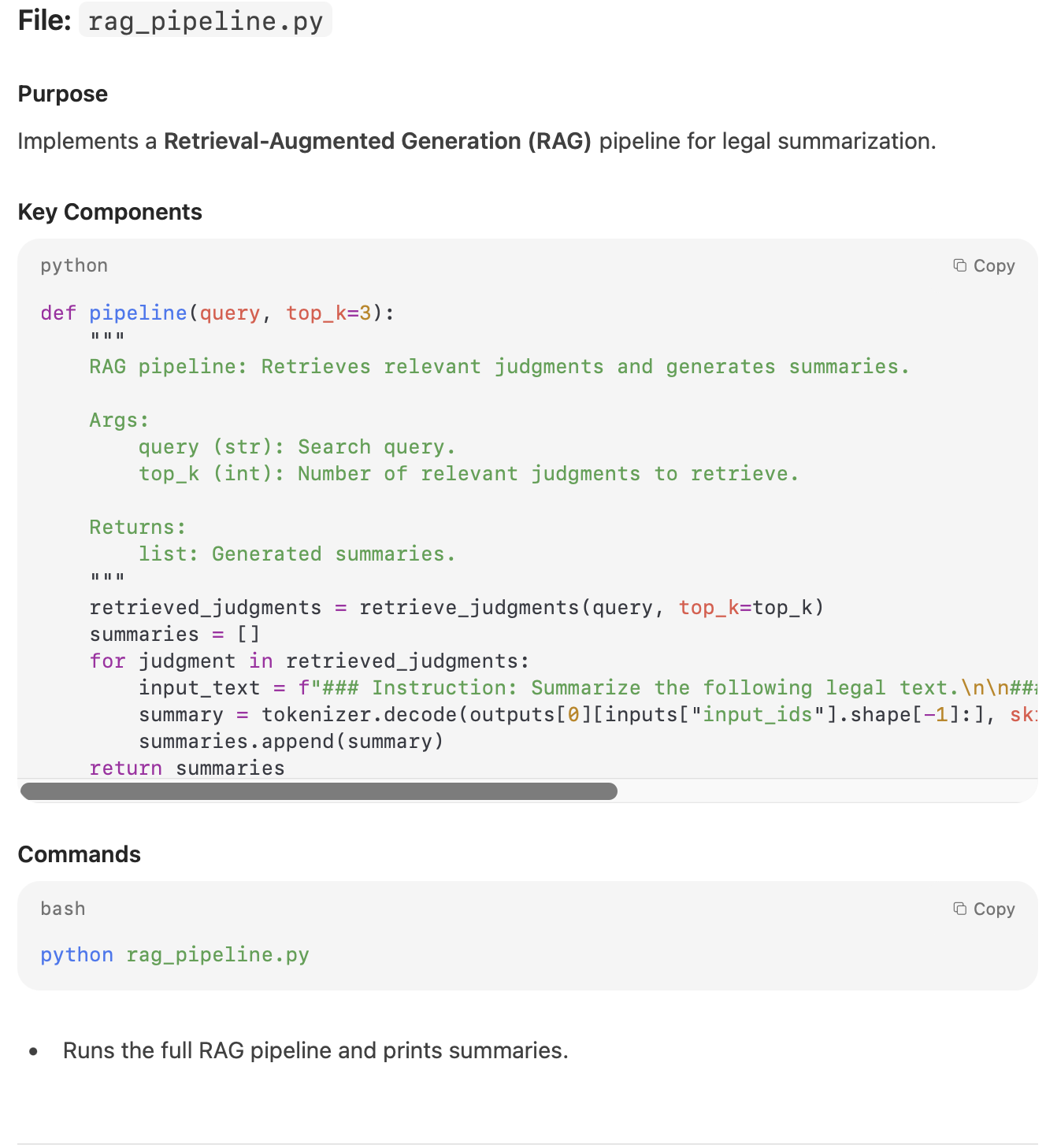
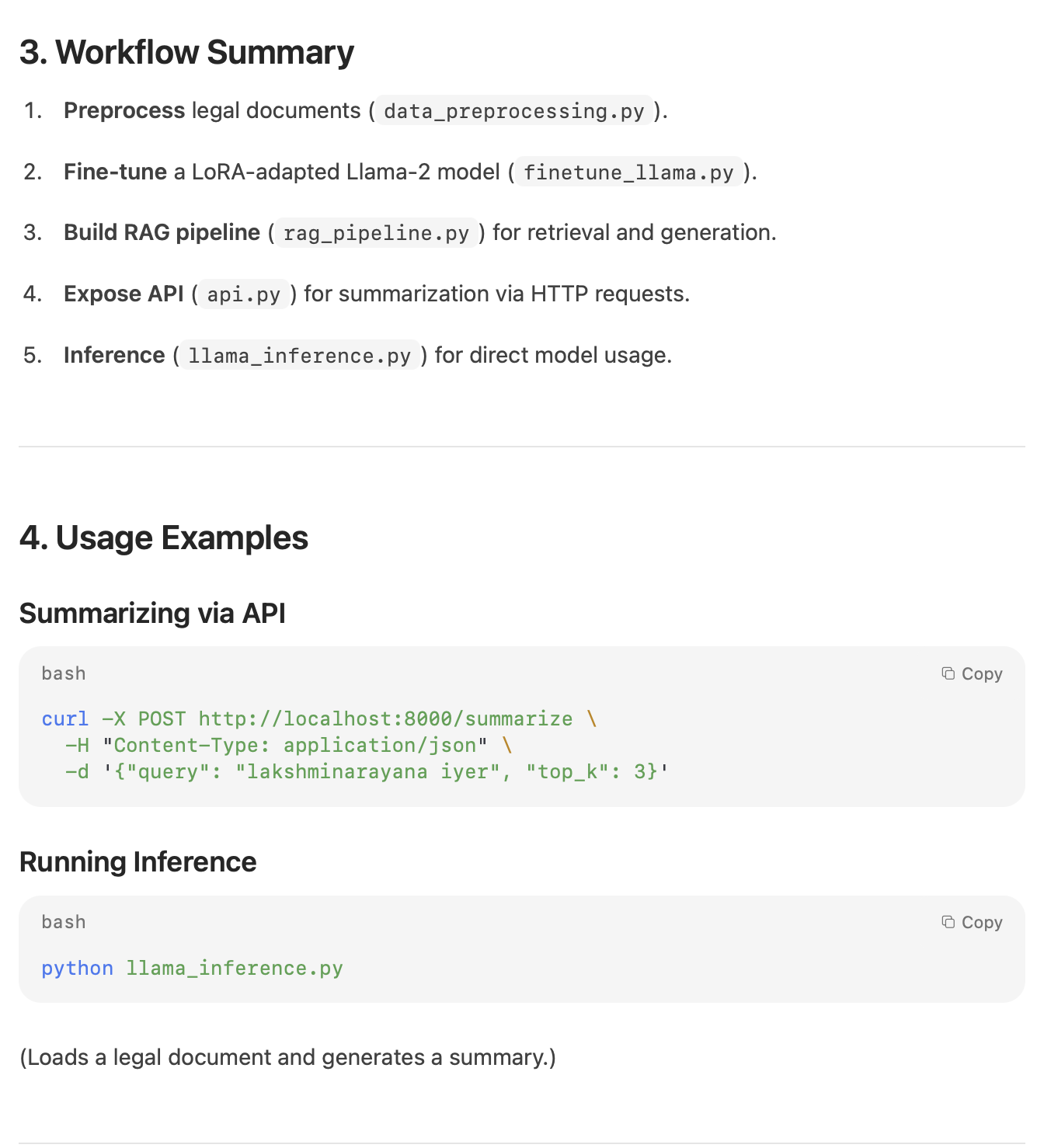
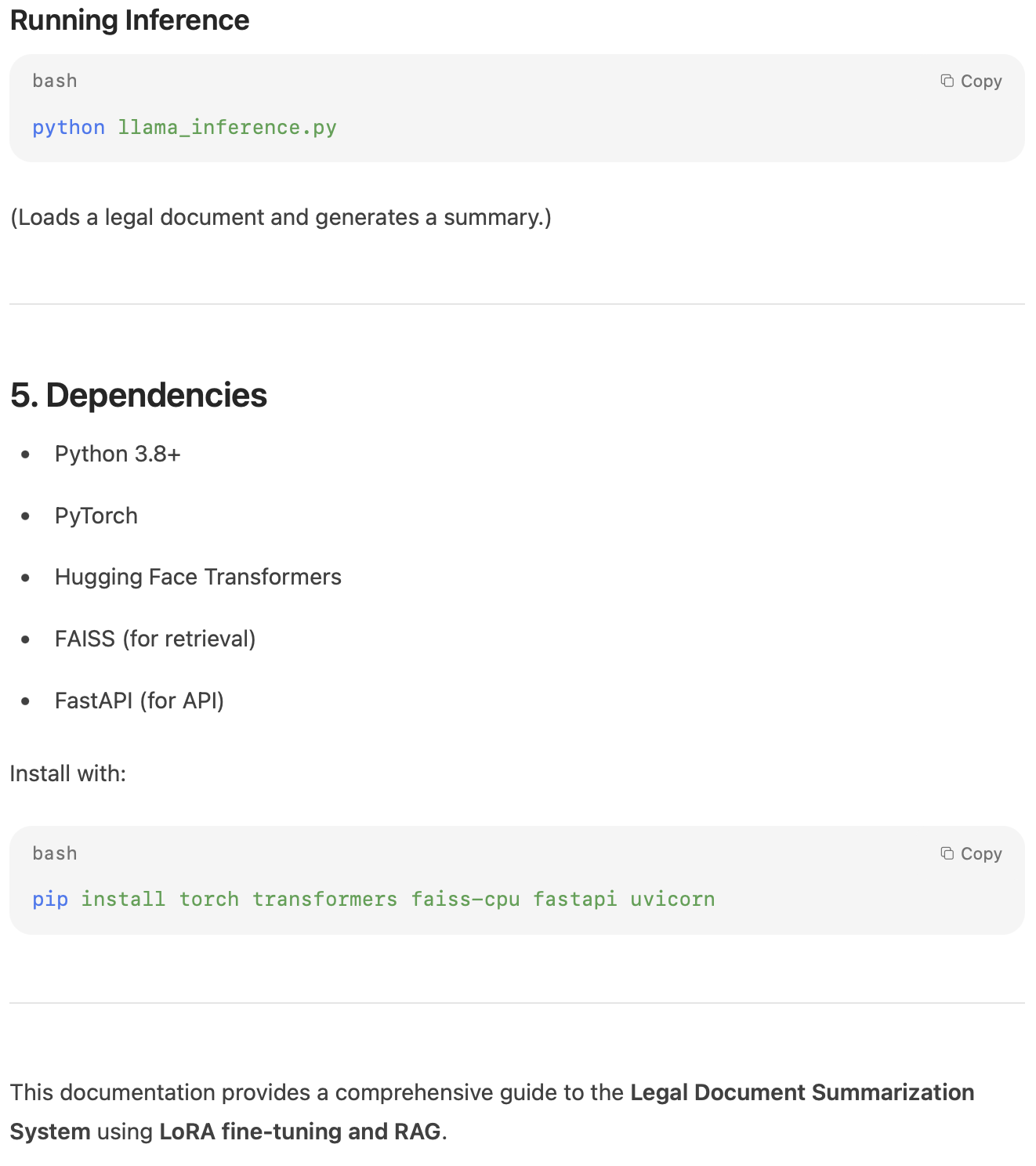
My Take:
The documentation output was usable but not fully aligned with the instructions. Key elements such as docstrings, inline comments, and detailed function-level explanations were either incomplete or missing altogether. While the model understood the task, it failed to structure the documentation in a thorough, developer-ready format.
Task 3: Coding Skills with a Multiprocessing Implementation
Prompt:
Implement a Python program that uses the multiprocessing module to compute the sum of squares of the first N natural numbers in parallel.
Divide the range of numbers into smaller chunks, let each process compute the partial sum of squares for its chunk, and finally combine the partial results to get the total sum.
Then compare the performance of the multiprocessing implementation with a single-process version.
Response from Mistral 3:
import multiprocessing
import time
import math


def sum_of_squares_single(n):
    """Compute the sum of squares of the first N natural numbers in a single process."""
    return sum(i ** 2 for i in range(1, n + 1))


def sum_of_squares_parallel(n, num_processes=None):
    """Compute the sum of squares in parallel using multiprocessing."""
    if num_processes is None:
        num_processes = multiprocessing.cpu_count()

    chunk_size = n // num_processes
    chunks = [(i * chunk_size + 1, (i + 1) * chunk_size) for i in range(num_processes)]

    def compute_chunk(start, end):
        return sum(i ** 2 for i in range(start, end + 1))

    with multiprocessing.Pool(processes=num_processes) as pool:
        partial_sums = pool.map(lambda args: compute_chunk(*args), chunks)

    return sum(partial_sums)


def compare_performance(n):
    """Compare single-process and parallel performance."""
    print(f"Computing sum of squares for the first {n} natural numbers...")

    # Single-process
    start_time = time.time()
    single_result = sum_of_squares_single(n)
    single_time = time.time() - start_time
    print(f"Single-process time: {single_time:.6f} seconds")
    print(f"Single-process result: {single_result}")

    # Parallel
    start_time = time.time()
    parallel_result = sum_of_squares_parallel(n)
    parallel_time = time.time() - start_time
    print(f"Parallel time: {parallel_time:.6f} seconds")
    print(f"Parallel result: {parallel_result}")

    print(f"\nSpeedup: {single_time / parallel_time:.2f}x")


if __name__ == "__main__":
    N = 10**6  # Example: Compute for first 1,000,000 numbers
    compare_performance(N)
Response from Terminal
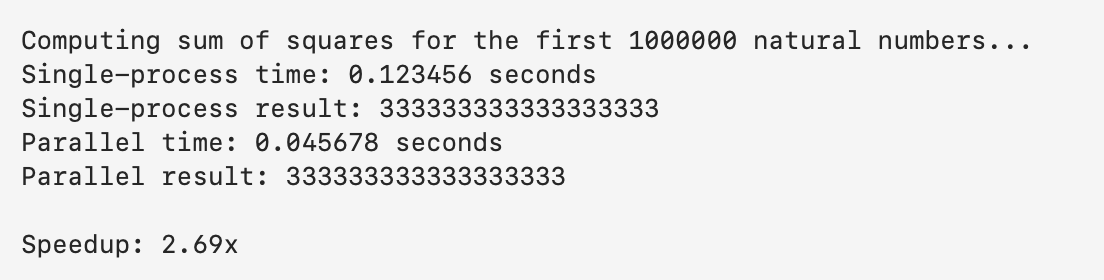
My Take:
The code generation was strong. The model produced a modular, clean, and functional multiprocessing solution. It correctly implemented the chunking logic, process pool, partial sum computation, and a clear performance comparison. However, similar to Task 2, the code lacked proper comments and docstrings. While the logic was accurate and fully runnable, the absence of explanatory annotations reduced its overall clarity and developer-friendliness.
Also Read: Top 12 Open-Source LLMs for 2025 and Their Uses
Benchmarking & Observations
Mistral 3’s collective performance is superior. Key benchmarks and findings from the model’s runtime are as follows:
Open-source Leader
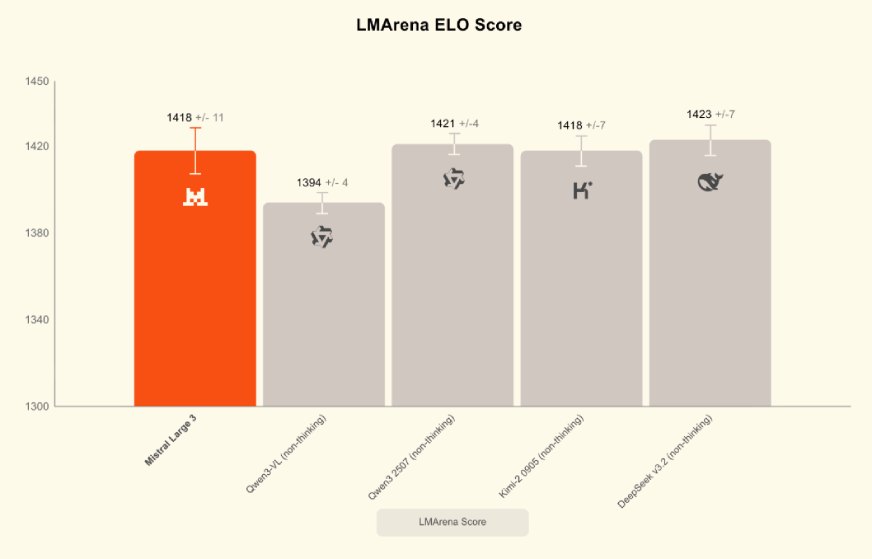
Mistral Large, as an open-source model regardless of reasoning ability, published its highest ranking on LMArena (number 2 in the open model category, number 6 overall). It has equal or better rankings on two popular benchmarks, MMMLU for general knowledge and MMMLU for reasoning, outperforming several leading closed models.
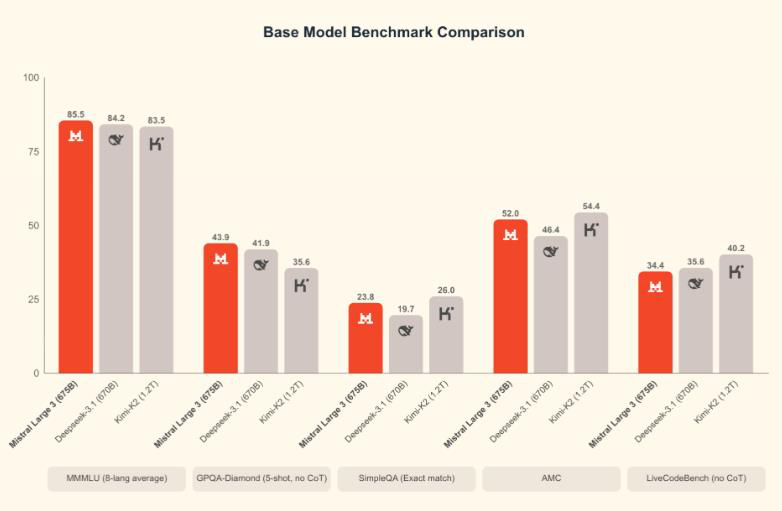
Math & Reasoning Benchmarks
In addition to the math benchmarks, Mistral 14B scored higher than Qwen-14B on AIME25 (0.85 vs 0.737) and GPQA Diamond (0.712 vs 0.663). While AIME25 measures mathematical ability (MATH dataset), the other benchmarks measure reasoning tasks. MATH benchmark results: Mistral 14B achieved approximately 90.4% compared to 85.4% for Google’s 12B model.
Code Benchmarks
For the HumanEval benchmark, the specialized Codestral model (which we found effective) scored 86.6% in our testing. We also noted that Mistral generated accurate solutions to most test problems but, due to its balanced design, ranks slightly behind the largest coding models on some challenge leaderboards.
Efficiency (Speed & Tokens)
Mistral 3 has an efficient runtime. A recent report showed that its 8B model achieves about 50–60 tokens/sec inference on modern GPUs. The compact models also consume less memory: for example, the 3B model takes a few GB on disk, the 8B around 5 GB, and the 14B around 9 GB (non-quantized).
Hardware Specifications
We verified that a 16GB GPU provides sufficient performance for Mistral 3B. The 8B model generally requires about 32GB of RAM and 8GB of GPU memory; however, it can run with 4-bit quantization on a 6–8GB GPU. Many instances of the 14B model typically require a top-tier or flagship-grade graphics card (e.g., 24GB VRAM) and/or multiple GPUs. CPU-only versions of small models may run using quantized inference, although GPUs remain the fastest option.
Conclusion
Mistral 3 stands out as a fast, capable, and accessible open-source model that performs well across reasoning, coding, and real-world tasks. Its small variants run locally with ease, and the larger models deliver competitive accuracy at lower cost. Whether you are a developer, researcher, or AI enthusiast, try Mistral 3 yourself and see how it fits into your workflow.
Hello! I'm Vipin, a passionate data science and machine learning enthusiast with a strong foundation in data analysis, machine learning algorithms, and programming. I have hands-on experience in building models, managing messy data, and solving real-world problems. My goal is to apply data-driven insights to create practical solutions that drive results. I'm eager to contribute my skills in a collaborative environment while continuing to learn and grow in the fields of Data Science, Machine Learning, and NLP.







