
We interact with LLMs every day.
We write prompts, paste documents, continue long conversations, and expect the model to remember what we said earlier. When it does, we move on. When it doesn’t, we repeat ourselves or assume something went wrong.
What most people rarely think about is that every response is constrained by something called the context window. It quietly decides how much of your prompt the model can see, how long a conversation stays coherent, and why older information suddenly drops out.
Every large language model has a context window, yet most users never learn what it is or why it matters. Still, it plays a critical role in whether a model can handle short chats, long documents, or complex multi step tasks.
In this article, we will explore how the context window works, how it differs across modern LLMs, and why understanding it changes the way you prompt, choose, and use language models.
Table of contents
What is Context Window?
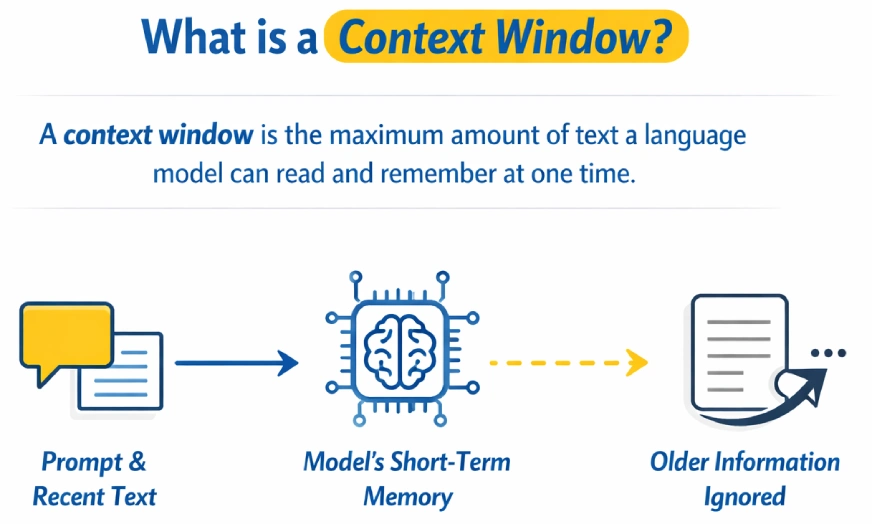
A context window is the maximum amount of text a language model can read and remember at one time while generating a response. It acts as the model’s short-term memory, including the prompt and recent conversation. Once the limit is exceeded, older information is ignored or forgotten.
Why Does Context Window Size Matter?
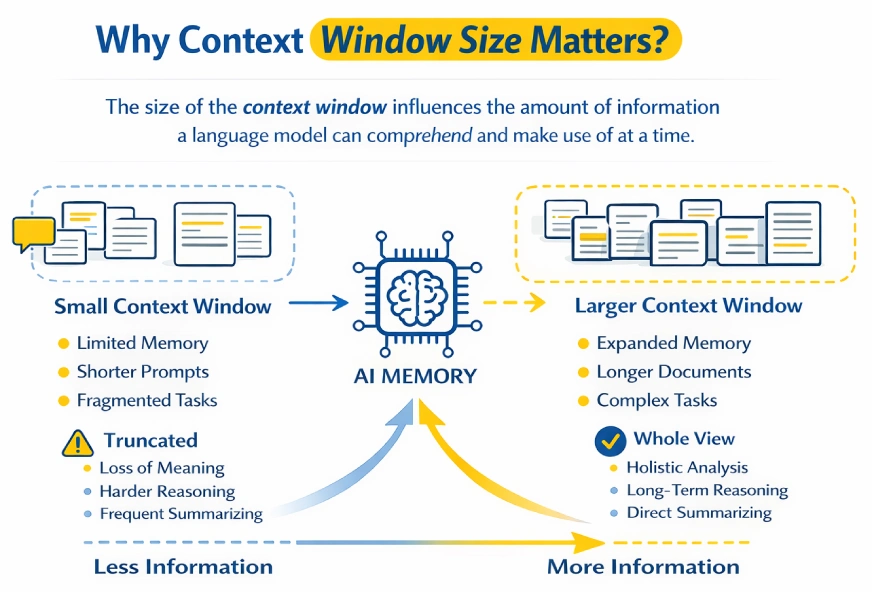
The context window determines how much information a language model can process and reason over at a time.
Smaller context windows force prompts or documents to be truncated, often breaking continuity and losing important details. Larger context windows allow the model to hold more information simultaneously, making it easier to reason over long conversations, documents, or codebases.
Think of the context window as the model’s working memory. Anything outside the current prompt is effectively forgotten. Larger windows help preserve multi-step reasoning and long dialogues, while smaller windows cause earlier information to fade quickly.
Tasks like analyzing long reports or summarizing large documents in one pass become possible with larger context windows. However, they come with trade-offs: higher computational cost, slower responses, and potential noise if irrelevant information is included.
The key is balance. Provide enough context to ground the task, but keep inputs focused and relevant.
Also Read: Prompt Engineering Guide 2026
Context Window Sizes in Different LLMs
Context window sizes vary widely across large language models and have expanded rapidly with newer generations. Early models were limited to only a few thousand tokens, restricting them to short prompts and small documents.
Modern models support much larger context windows, enabling long-form reasoning, document-level analysis, and extended multi-turn conversations within a single interaction. This increase has significantly improved a model’s ability to maintain coherence across complex tasks.
The table below summarizes the commonly reported context window sizes for popular model families from OpenAI, Anthropic, Google, and Meta.
Examples of Context Window Sizes
| Model | Organization | Context Window Size | Notes |
|---|---|---|---|
| GPT-3 | OpenAI | ~2,048 tokens | Early generation; very limited context |
| GPT-3.5 | OpenAI | ~4,096 tokens | Standard early ChatGPT limit |
| GPT-4 (baseline) | OpenAI | Up to ~32,768 tokens | Larger context than GPT-3.5 |
| GPT-4o | OpenAI | 128,000 tokens | Widely used long-context model |
| GPT-4.1 | OpenAI | ~1,000,000+ tokens | Massive extended-context support |
| GPT-5.1 | OpenAI | ~128K–196K tokens | Next-gen flagship with improved reasoning |
| Claude 3.5 / 3.7 Sonnet | Anthropic | 200,000 tokens | Strong balance of speed and long context |
| Claude 4.5 Sonnet | Anthropic | ~200,000 tokens | Improved reasoning with large window |
| Claude 4.5 Opus | Anthropic | ~200,000 tokens | Highest-end Claude model |
| Gemini 3 / Gemini 3 Pro | Google DeepMind | ~1,000,000 tokens | Industry-leading context length |
| Kimi K2 | Moonshot AI | ~256,000 tokens | Large context, strong long-form reasoning |
| LLaMA 3.1 | Meta | ~128,000 tokens | Extended context for open-source models |
Benefits and Trade-offs of Larger Context Windows
Benefits
- Supports far longer input, whether full documents or long conversations or large codebases.
- Enhances the connectivity of multi-step reasoning and lengthy conversations.
- Makes it possible to perform complicated tasks such as analyzing long reports or whole books at once.
- Eliminates the necessity of chunking, summarizing or external retrieval systems.
- Helps base responses on given reference text, which has the capacity to decrease hallucinations.
Trade-offs
- Raises the cost, latency, and API usage costs.
- Turns out to be inefficient when a wide context is applied when it is not required.
- The value of offers decreases when the timid contains irrelevant or noisy information.
- Can cause confusion or inconsistency where there are conflicting details contained in long inputs.
- May have attention problems in very long prompts e.g. information not picked out along the middle.
Practically, the larger context windows are potent and more effective when they are combined with concentrated, high-quality input instead of default maximum length.
Also Read: What is Model Collapse? Examples, Causes and Fixes
How Context Window Impacts Key Use Cases?
Given that the context window constrains the amount of information that a model can view at a given time, it highly influences what the model is capable of accomplishing without additional tools or workarounds.
Coding and Code Analysis
- The context windows are small, which confines the model to a single file or a handful of functions at once.
- The model is unaware of the bigger codebase unless it is specified.
- Big context windows enable two or more files or repositories to be viewed.
- Allows whole-system tasks such as refactoring modules, locating cross-file bugs, and creating documentation.
- Eliminates manual chunking or the repetition of swapping code snippets.
- Still needs selectivity of very large projects so as to avoid noise and wastage of context.
Summarization of Long Texts
- Minimal windows make documents be divided and summarized in fragments.
- Small summaries tend to lose global structure and significant relationships.
- Big context windows enable a one pass summary of whole documents.
- Generates fewer incomprehensible and untrue summaries of reports, books, or transcripts.
- Essentially handy in legal, financial, academic and in meeting transcripts.
- The trade-offs are to pay more and process slowly with large inputs.
Long Document Analysis and Q&A
- Small size windows need retrieval systems or manual section selection.
- Massive windows give the opportunity to query complete documents or open more than one document.
- Also allows cross-referencing of information that is in remote locations.
- Applicable to contracts, research papers, policies and knowledge bases.
- Eases pipelines by avoiding the use of search and chunking logic.
- Despite the inability to be accurate under ambiguous guidance and unrelated input choices, accuracy can still improve.
Extended Conversation Memory
- Chatbots have small window sizes, which lead to forgetting previous sections of a long conversation.
- As the context fades away, the user is required to repeat or restate information.
- Conversation history is longer and lasts longer in large context windows.
- Facilitates less robotic, more natural and personal communications.
- Good to use in support chats, writing collaboration and protracted brainstorming.
- Greater memory is accompanied with greater use of tokens as well as cost when using long chats.
Also Read: How Does LLM Memory Work?
Conclusion
The context window defines how much information a language model can process at once and acts as its short-term memory. Models with larger context windows handle long conversations, large documents, and complex code more effectively, while smaller windows struggle as inputs grow.
However, bigger context windows also increase cost and latency and don’t help if the input includes unnecessary information. The right context size depends on the task: small windows work well for quick or simple tasks, while larger ones are better for deep analysis and extended reasoning.
Next time you write a prompt, include only the context the model actually needs. More context is powerful, but focused context is what works best.
Frequently Asked Questions
Q1. What happens when a prompt exceeds the context window limit?
A. When the context window is exceeded, the model starts ignoring older parts of the input. This can cause it to forget earlier instructions, lose track of the conversation, or produce inconsistent responses.
Q2. Does a larger context window always mean better answers?
A. No. While larger context windows allow the model to process more information, they do not automatically improve output quality. If the input contains irrelevant or noisy information, performance can actually degrade.
Q3. How can I tell if my task needs a large context window?
A. If your task involves long documents, extended conversations, multi-file codebases, or complex multi-step reasoning, a larger context window is helpful. For short questions, simple prompts, or quick tasks, smaller windows are usually sufficient.
Q4. Are large context windows more expensive to use?
A. Yes. Larger context windows increase token usage, which leads to higher costs and slower response times. This is why using the maximum available context by default is often inefficient.
Q5. How can I use context windows more effectively in prompts?
Hi, I am Janvi, a passionate data science enthusiast currently working at Analytics Vidhya. My journey into the world of data began with a deep curiosity about how we can extract meaningful insights from complex datasets.







