
Suppose you want to locate a particular piece of information in a library that is the size of a city. This is a predicament that businesses have to deal with on a daily basis regarding their electronic data. They contain giant quantities of logs, documents, and user actions. Locating what is important is like trying to find a needle in a digital haystack. That is where Elasticsearch fits in. Think of it as a potent magnet that can find the necessary information in a mountain of data in a second.
Elasticsearch is a search and analytics engine that is fast and scalable. It is built to process contemporary data requirements at a phenomenal pace. We are going to discuss its potent capabilities in this guide. We will begin with its conventional power in full-text search, which searches data using precise keywords. Then we will enter the realm of AI and its sophisticated vector search, which knows the meaning of your queries.
To make these ideas a reality, we are going to go through the construction of a modern RAG app to develop smarter AI assistants. We will also build a full ETL pipeline to understand how raw data turns into useful information. By the end, you will understand how Elasticsearch works and why developers and data analysts rely on it today.
So, let us start with the very basics.
Table of contents
- What is Elasticsearch?
- Elasticsearch Key Features
- Full-Text vs. Vector Search
- Building a Simple RAG Application using Elasticsearch
- Elasticsearch in RAG Application
- What is Hybrid Search
- Elasticsearch vs. Dedicated Vector Databases
- ETL Pipeline with the Elastic Stack
- A Simple Python ETL Pipeline Using Elasticsearch, Logstash, and Kibana
- How Logstash Would Fit Into This Pipeline
- How Kibana Fits In
- Summary of the Complete Workflow
- Conclusion
- Frequently Asked Questions
What is Elasticsearch?
Elasticsearch works like a highly organized digital library. Instead of books, it stores data as flexible JSON documents. It is based on a robust open source platform named Apache Lucene. This serves as the faster engine, making every search extremely fast. This design enables it to manage simple log files in addition to complicated and structured information with ease.
It is applied in numerous ways by people. It can drive the search box in an online store, real-time server logs to understand what is wrong with it, or it can develop interactive dashboards that represent business performance.
Elasticsearch Key Features
Let’s look at its key features.
- Full-text search: It is the standard keyword search, but made very intelligent. Elasticsearch divides the text into single words or tokens and indexes them on a special map. This is similar to the index put at the back of a book that allows it to locate documents with your keywords in near real-time. It also allows such advanced features as relevance ranking to present the best results first.
- Real-time analytics: Elasticsearch is not only good at searching for information. It can make you know of it as it arrives. Elasticsearch lets you run complex calculations like sums, averages, and histograms directly inside search queries. This makes it ideal for building live dashboards that track website traffic or monitor application performance in real time.
- Distributed and scalable: It is constructed to scale. Elasticsearch does not use a single, giant server but distributes data and workloads among a group of servers. Consider it to be a puzzle where every person works on a part of the puzzle. This enables it to scale to petabytes of data with milliseconds response times.
- Vector search: The feature introduces the power of AI to your data. Elasticsearch performs semantic and contextual searches by understanding the meaning of search terms, rather than relying only on keyword matching. It is the technology of the contemporary modern semantic search and recommendation engines, and it is a key to creating a successful RAG application.
All these characteristics combine to ensure that Elasticsearch is a single solution to almost any data problem. It is one trusted system to store, search, and analyze all your information.
Full-Text vs. Vector Search
To get a real feel of Elasticsearch, it is important to have knowledge of the two major search features of the product. They both have their purpose, and the possibility to intertwine them is the key to the power of the platform.
Full-Text Search: The Power of Keywords
Think of a database of recipes that you are searching through. In the example of typing in the search query of a garlic bread recipe, full-text search will scan the index of documents that contain those same words. It is exact, word-for-word, and it is exceptionally effective in locating particular information. It is good when you have the terms that you are searching for.
Here is a simple example. First, you add a document to Elasticsearch:
{
  "title": "Easy Garlic Bread",
  "ingredients": "Bread, garlic, butter, parsley"
}
Then, you run a full-text search query:
{
  "query": {
    "match": { "ingredients": "garlic butter" }
  }
}
This query is rapidly sent by the recipe, as the words “garlic” and “butter” are there in the ingredients field. This is the best search technique in logs, legal documents, or any other text in which keywords are significant.
For example, in system logs, developers often search for exact error codes or function names. In legal documents, specific clauses or terminology like “force majeure” or “statutory obligation” are essential. Similarly, in medical records, terms like “hypertension” or “type 2 diabetes” carry significant weight and must be matched exactly. These contexts rely heavily on the presence of well-defined language, making keyword search techniques ideal for extracting relevant information quickly and accurately.
Vector Search: The Art of Meaning
Now, suppose that you look up the same recipe database but put in savory side for pasta. A keyword search might fail. This is where the power of vector search is seen. It knows what you mean by your query. It understands that garlic bread is a savory side dish, usually served with pasta.
The concept of vector search is that text is transformed into a numerical form known as an embedding. This is the semantic meaning of the text, which is captured by this vector. Your query is also transformed into a vector. Elasticsearch then identifies the documents with vectors nearest to that of your query.
You begin with a mapping that contains these vectors:
{
  "mappings": {
    "properties": {
      "description": { "type": "text" },
      "description_vector": { "type": "dense_vector", "dims": 384 }
    }
  }
}
Then, you can perform a k-Nearest Neighbor (kNN) search to find the most relevant results by meaning:

{
  "knn": {
    "field": "description_vector",
    "query_vector": [0.12, -0.45, 0.89, ...],
    "k": 5
  }
}
The true strength of Elasticsearch is that it can do hybrid searches, balancing the search accuracy of full-text search with the context-awareness of vector search.
Building a Simple RAG Application using Elasticsearch
Large language models (LLMs) are powerful, but they have a clear limitation: they only know what they were trained on and can sometimes hallucinate. Retrieval-Augmented Generation (RAG) addresses this problem by grounding responses in external, up-to-date data. A RAG application will supply the LLM with up-to-date and relevant information from a credible source prior to the creation of an answer. It is as though the AI gets an open-book test.
The best book on the subject to pass this exam is Elasticsearch due to its quick and precise search. A RAG application operates in the following way:
- User Query: A user asks a question, like “How do I reset my password?”
- Retrieve Context: Elasticsearch searches its document index for information related to password resets. This may be a full-text search of keywords or an attempt to search using semantic meaning as a vector.
- Augment Prompt: Elasticsearch finds the most relevant documents and combines them with the initial query into a prompt with more details for the LLM.
- Generate Answer: The user is presented with the prompt and asked: “Answer the question posed by the user with the help of the given documents only. This bases the model on factual data in responding.
This workflow ensures the answers are accurate, current, and trustworthy.
Elasticsearch in RAG Application
Now, let us explore a simplified Python example showing the retrieval step of a RAG application.
1. First, create a free Elastic Cloud deployment.
Go to https://cloud.elastic.co
Start a free trial.
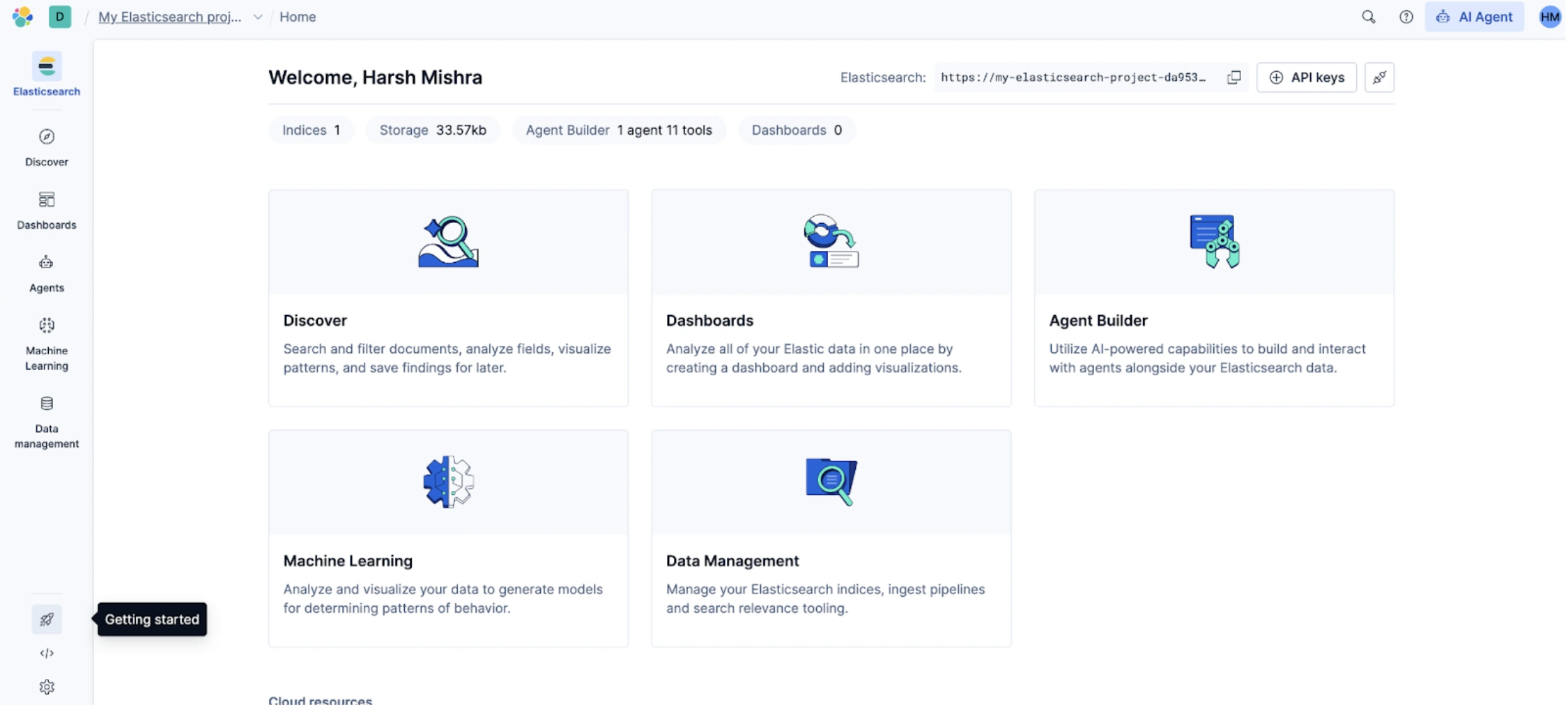
Now copy the ENDPOINT and API KEY from the top right corner.
2. Now, let’s start with installing the Elastic Search library
!pip install elasticsearch3. Connect to Elasticsearch
from elasticsearch import Elasticsearch, helpers
client = Elasticsearch(
“https://my-elasticsearch-project-da953b.es.us-central1.gcp.elastic.cloud:443”,
api_key=”YOUR_API_KEY”
)
This connects the notebook to an Elastic Serverless project. The URL points to your cloud deployment. The API key allows authorized access.
4. Now, create an Index
# -----------------------------
# Define the index name and create index (if it doesn't exist)
# -----------------------------
index_name = "national-parks"
if not client.indices.exists(index=index_name):
 create_response = client.indices.create(index=index_name)
 print("Index created:", create_response)
else:
 print(f"Index '{index_name}' already exists.")
Output:

An index is like a database table. This block checks whether the index already exists. If not, it creates one. This gives you a place to store documents.
5. Now add a semantic_text field
# -----------------------------
# Add or update mappings for the index
# -----------------------------
mappings = {
   "properties": {
       "text": {
           "type": "semantic_text"
       }
   }
}
mapping_response = client.indices.put_mapping(
   index=index_name,
   body=mappings
)
print("Mappings updated:", mapping_response)
Output:

The mapping tells Elasticsearch how to analyze each field. The semantic_text type activates Elasticsearch’s built-in machine learning model. When you later insert text into this field, Elasticsearch produces vector embeddings automatically and stores them for semantic search. You do not need to use your own embedding model.
6. Let’s add documents to the database
# -----------------------------
# Sample documents to ingest
# -----------------------------
docs = [
   {
       "text": "Yellowstone National Park is one of the largest national parks in the United States. It ranges from the Wyoming to Montana and Idaho, and contains an area of 2,219,791 acres across three different states. Its most famous for hosting the geyser Old Faithful and is centered on the Yellowstone Caldera, the largest super volcano on the American continent. Yellowstone is host to hundreds of species of animal, many of which are endangered or threatened. Most notably, it contains free-ranging herds of bison and elk, alongside bears, cougars and wolves. The national park receives over 4.5 million visitors annually and is a UNESCO World Heritage Site."
   },
   {
       "text": "Yosemite National Park is a United States National Park, covering over 750,000 acres of land in California. A UNESCO World Heritage Site, the park is best known for its granite cliffs, waterfalls and giant sequoia trees. Yosemite hosts over four million visitors in most years, with a peak of five million visitors in 2016. The park is home to a diverse range of wildlife, including mule deer, black bears, and the endangered Sierra Nevada bighorn sheep. The park has 1,200 square miles of wilderness, and is a popular destination for rock climbers, with over 3,000 feet of vertical granite to climb. Its most famous and cliff is the El Capitan, a 3,000 feet monolith along its tallest face."
   },
   {
       "text": "Rocky Mountain National Park is one of the most popular national parks in the United States. It receives over 4.5 million visitors annually, and is known for its mountainous terrain, including Longs Peak, which is the highest peak in the park. The park is home to a variety of wildlife, including elk, mule deer, moose, and bighorn sheep. The park is also home to a variety of ecosystems, including montane, subalpine, and alpine tundra. The park is a popular destination for hiking, camping, and wildlife viewing, and is a UNESCO World Heritage Site."
   }
]
These documents are plain text. Each document describes a national park. Elasticsearch will convert each text entry into a semantic embedding internally.
7. Now bulk ingest the created docs
# -----------------------------
# Bulk ingest documents
# -----------------------------
ingestion_timeout=300 # Allow time for semantic ML model to load
bulk_response = helpers.bulk(
   client.options(request_timeout=ingestion_timeout),
   docs,
   index=index_name,
   refresh="wait_for" # Wait until indexed documents are visible for search before returning the response
)
print(bulk_response)
Output:
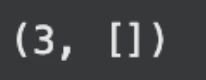
Bulk indexing is faster than sending documents one at a time. The timeout is increased to give Elasticsearch time to load the built-in model on first use. The refresh option makes sure the documents are searchable before the function returns.
8. Now, let’s run a semantic search and test it
# -----------------------------
# Define semantic search query
# -----------------------------
retriever_object = {
   "standard": {
       "query": {
           "semantic": {
               "field": "text",
               "query": "Sierra Nevada"
           }
       }
   }
}
search_response = client.search(
   index=index_name,
   retriever=retriever_object,
)
display(search_response['hits']['hits'])
Output:
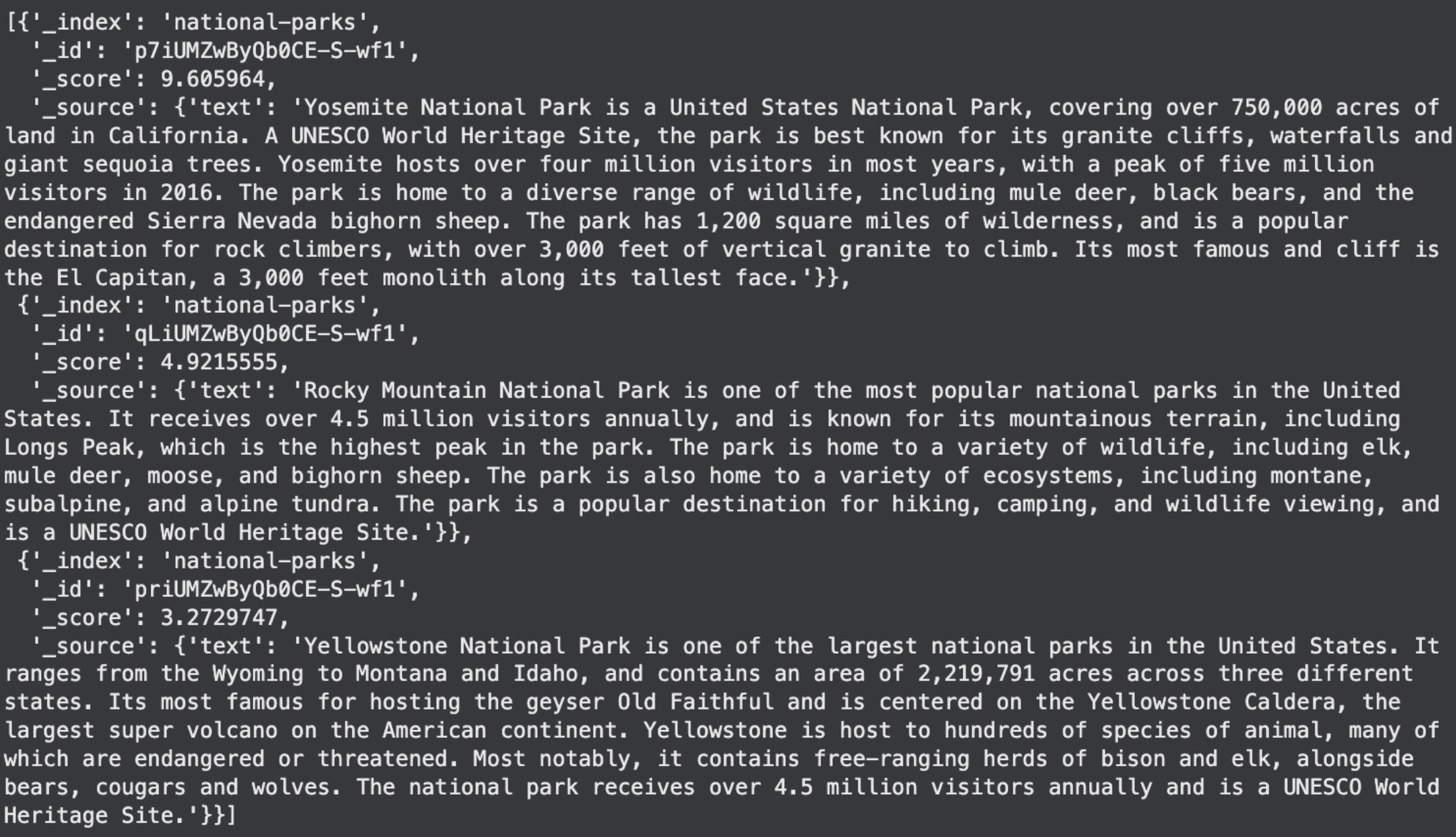
This is the retrieval step in a RAG pipeline. The query “Sierra Nevada” is not a keyword search. Elasticsearch creates an embedding for the query and compares it to the stored document embeddings. It then returns the document that is semantically closest. In this case, the Yosemite document mentions the Sierra Nevada region, so it becomes the top match.
From here, the retrieved text becomes the context for your language model. The model reads the retrieved document along with the user’s question and produces a grounded, factual answer.
Now let’s talk about Hybrid search in Elasticsearch.
What is Hybrid Search
A hybrid search combines two retrieval methods:
- Lexical search (classic full-text search): Matches the exact query terms in documents using algorithms like BM25. It is precise and explainable.
- Semantic search (vector/embedding search): Retrieves documents based on meaning and context instead of exact words. It finds conceptually related content even if the exact terms do not appear.
Hybrid search blends these, so you get both exact matches and meaning-driven matches in one result set. This helps in applications where users use descriptive language, synonyms, or natural language questions, but also expect exact hits when terms are present.
How Hybrid Search Works
In Elasticsearch, a hybrid search query usually includes:
- A lexical part using a standard full-text query (match or query clause).
- A semantic part using the semantic retriever (if using semantic_text) or a knn vector search.
- A fusion strategy, such as Reciprocal Rank Fusion (RRF), that merges the two result lists into a single ranked list.
Reciprocal Rank Fusion (RRF)
RRF ranks documents based on their positions in each individual result list rather than raw scores. Documents that appear near the top of either lexical or semantic results get better overall ranking, helping balance exact matches with semantic relevance.
What Hybrid Search Improves
When you search with only one method:
- Lexical only: You might miss contextually relevant documents if the query words differ from the document wording.
- Semantic only: You might miss exact keyword matches that should be prioritized for precision.
Hybrid search balances both, giving richer and more accurate results overall.
Let’s see how to use it.
Make sure your index stores semantic text and supports full-text search. If you already use the semantic_text type, then lexical search will run over traditional indexed text fields.
mappings = {
    "properties": {
        "text": {"type": "semantic_text"}
    }
}
This works because in hybrid search, Elasticsearch automatically uses text for both semantic and lexical queries.
Run a Hybrid Search
Add both a full-text match query and a semantic search under a retriever. For Elastic Serverless, you use the retriever API to combine results:
hybrid_retriever = {
    "rrf": {
        "retrievers": [
            {
                "standard": {
                    "query": {
                        "match": {
                            "text": "Sierra Nevada"
                        }
                    }
                }
            },
            {
                "standard": {
                    "query": {
                        "semantic": {
                            "field": "text",
                            "query": "Sierra Nevada"
                        }
                    }
                }
            }
        ],
        "rank_constant": 15
    }
}
search_response = client.search(
    index=index_name,
    retriever=hybrid_retriever
)
print(search_response["hits"]["hits"])
Here’s what this does:
- The first standard block runs a full-text match on the text field for typical keyword matching.
- The second block runs a semantic match on the same field to interpret meaning and context.
- The rrf retriever fuses both sets of results using Reciprocal Rank Fusion, balancing lexical and semantic scores.
Output:
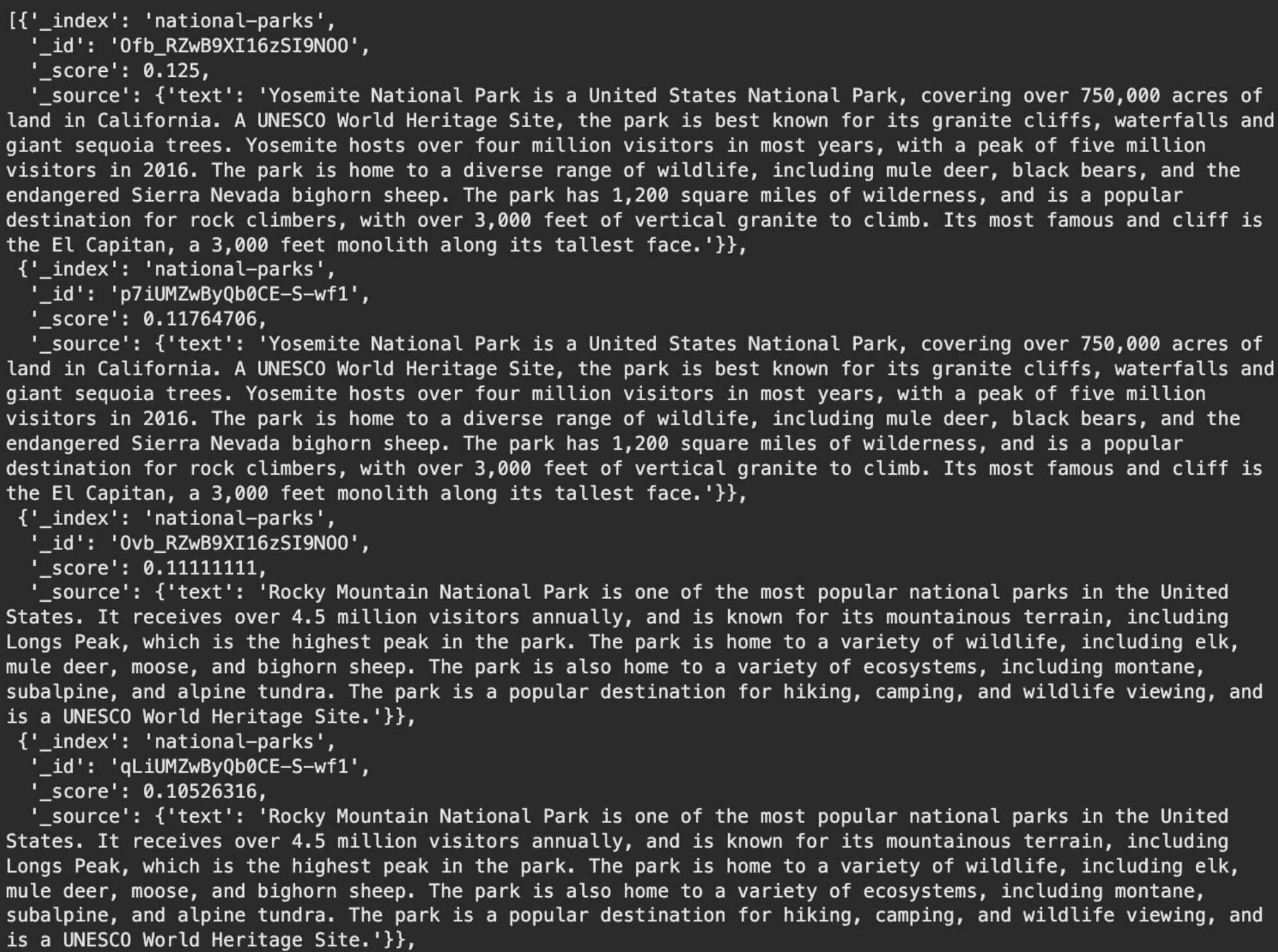
Hybrid search returned documents that Elasticsearch ranked as most relevant to the query “Sierra Nevada.” The Yosemite National Park documents appear first because they mention the Sierra Nevada bighorn sheep, making them both semantically and lexically relevant. Rocky Mountain documents appear afterward since they are less related but still partially similar in meaning.
Elasticsearch vs. Dedicated Vector Databases
There are numerous specialized vector databases that have been developed with the development of AI. The question that comes up then is when to consider using Elasticsearch or a dedicated vector database? Imagine the dilemma of a multi-purpose tool versus a power saw of a very specific nature.
- Elasticsearch is a multi-purpose multi-tool. It is the ideal selection in the event that your application requires more than merely searching by vectors. In case you need robust keyword filtering, log analysis, security, and interactive dashboards, Elasticsearch provides the entire integrated package. When dealing with a single system, it is sometimes easier and less expensive to manage than trying to use many specialized tools.
- The specialized power saw is known as a vector database. These tools are designed with a single objective, which is conducting the search for similarity of vectors at extreme velocities and vast scales. A specialized vector database could provide the lowest possible latency in case your core application is a real-time recommendation engine to millions of users.
| Feature / Capability | Elasticsearch | Dedicated Vector Database |
|---|---|---|
| Primary Strength | Full-text search, filtering, analytics, logging | High-speed vector similarity search |
| Vector Search Support | Yes (dense vectors, HNSW graph indexing) | Yes (often optimized with GPU support, ANN algorithms) |
| Hybrid Search (keyword + vector) | Built-in (combine match and knn queries) | Limited or manual in some platforms |
| Real-time Dashboards | Kibana integration | Usually not built-in |
| Security & Access Controls | Integrated (roles, index-level security) | Varies by platform |
| Scalability | Horizontally scalable, best for mixed workloads | Designed for scaling pure vector workloads |
| Deployment Complexity | One system for all functions | May require separate pipeline or integration layer |
| Best for | Apps combining logs, analytics, text + vector search | Apps focused purely on real-time vector search |
One industry comparison states that Elasticsearch is optimized toward text search and analytics, whereas vector databases are scaled towards ultrafast search by vector similarity. Elasticsearch is the more sensible and more powerful choice in most projects that require a combination of the search types.
ETL Pipeline with the Elastic Stack
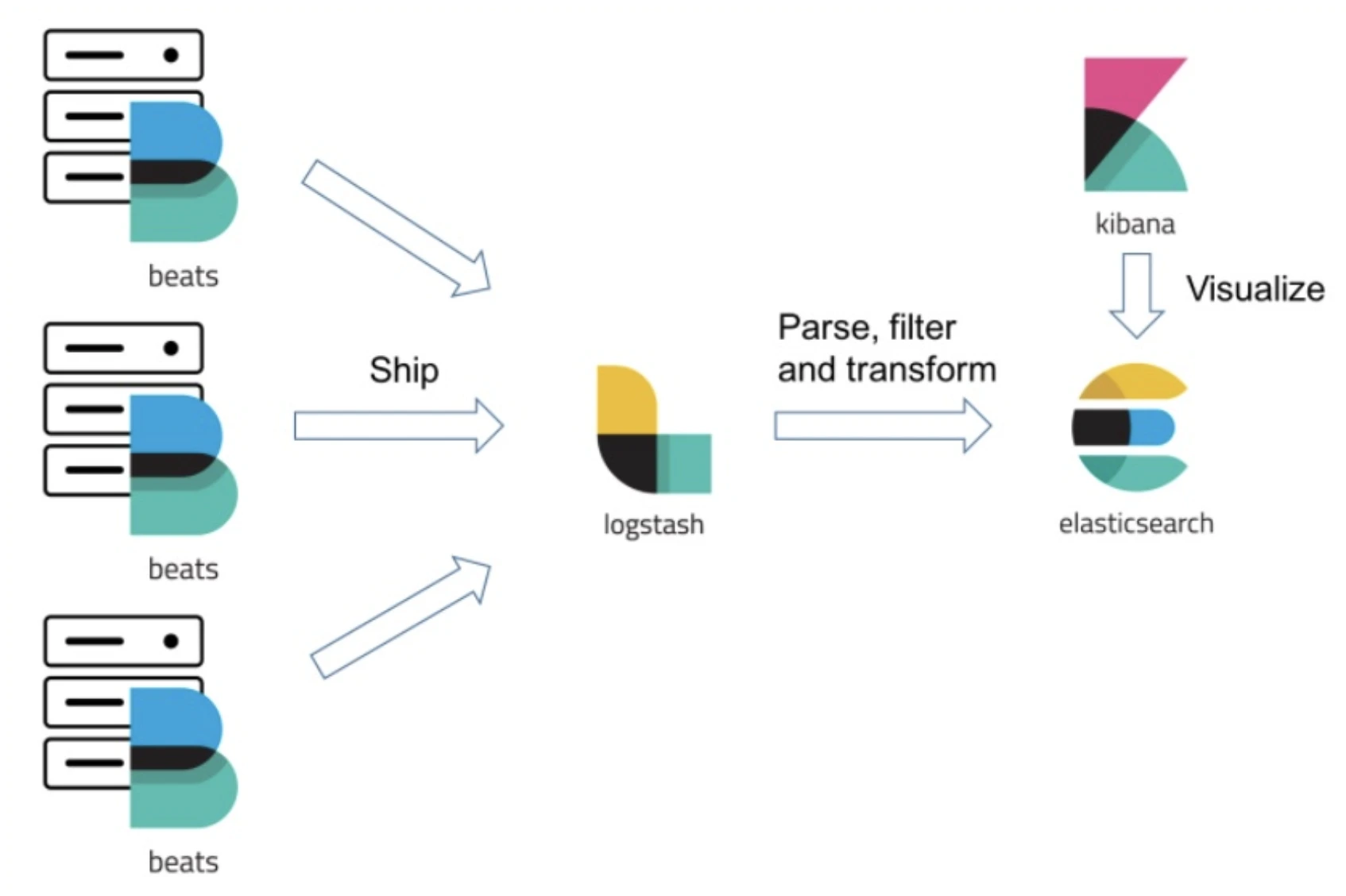
Raw data is usually sloppy and disordered. It has to be cleaned, processed, and loaded into a system such as Elasticsearch before it can be analyzed. This is referred to as an ETL (Extract, Transform, Load). The Elastic Stack is an easy-to-build one.
The key players in this ETL pipeline are:
- Logstash (The Factory Worker): It extracts data from various sources like files, databases, or message queues. It then transforms the data by parsing it into structured fields, enriching it with additional information, and cleaning it up.
- Elasticsearch (The Warehouse): This is where the transformed, structured data is loaded and indexed. Once inside, it is ready for high-speed search and analysis.
- Kibana (The Showroom): This is the visualization layer. Kibana connects to Elasticsearch and allows you to explore your data, create charts and graphs, and build interactive dashboards with just a few clicks.
A Simple Python ETL Pipeline Using Elasticsearch, Logstash, and Kibana
In this hands-on example, we will focus on the same Python ETL pipeline as before, but now we will show how it fits into the full Elasticsearch, Logstash, and Kibana workflow. We will extract raw product data, transform it in Python, and load it into Elasticsearch using the official API.
This example uses your Elastic Serverless connection.
from elasticsearch import Elasticsearch, helpers
client = Elasticsearch(
"https://my-elasticsearch-project-da953b.es.us-central1.gcp.elastic.cloud:443",
api_key="YOUR_API_KEY"
)
This connects your Python code to your Elastic deployment.
Step 1: Extract the raw data
We start with unprocessed data. The product names are inconsistent, and the prices are stored as text.
raw_data = [
{"product_id": "A-001", "name": "Laptop, Pro Model", "price": "$1299.99"},
{"product_id": "B-002", "name": "Wireless Mouse", "price": "$25.50"},
{"product_id": "C-003", "name": "Mechanical Keyboard - RGB", "price": "$110.00"}
]
In a real setup, this data might come from a CSV file, a database, or a log file.
Logstash is often used at this stage to pull data from those sources, but here we simulate the extract step directly in Python.
Step 2: Transform the data
This function cleans product names and converts price strings into proper numbers.
def transform_product_data(record):
clean_name = record["name"].split(',')[0].split(' - ')[0]
price_float = float(record["price"].replace('$', ''))
return {
"product_id": record["product_id"],
"name": clean_name,
"price": price_float
}
This kind of transformation could also be done inside Logstash using filter plugins like grok, mutate, and dissect.
Here we do it in Python to keep the example simple and runnable.
Step 3: Load the data into Elasticsearch
We now send the cleaned data to Elasticsearch. This creates an index and loads the transformed documents.
from elasticsearch.helpers import bulk
etl_index_name = "products"
if client.indices.exists(index=etl_index_name):
client.indices.delete(index=etl_index_name)
client.indices.create(index=etl_index_name)
actions = [
{
"_index": etl_index_name,
"_id": record["product_id"],
"_source": transform_product_data(record)
}
for record in raw_data
]
success, failed = bulk(client, actions)
print(f"Successfully indexed {success} documents.")
Output:
Successfully indexed 3 documents.
This completes the load step.
You now have a product index stored in Elasticsearch.
How Logstash Would Fit Into This Pipeline
Even though we used Python for the transformation, it is helpful to understand how Logstash could replace the Python ETL pipeline.
Logstash would handle:
- Extracting data from files, databases, or message queues
- Transforming data using grok patterns, mutate filters, and time parsing
- Loading data directly into Elasticsearch
A typical Logstash configuration for this data might look like this:
input {
  file {
    path => "/path/to/products.csv"
    start_position => "beginning"
  }
}
filter {
  csv {
    columns => ["product_id", "name", "price"]
  }
  mutate {
    gsub => ["price", "\\$", ""]
    convert => {
      "price" => "float"
    }
  }
  mutate {
    split => ["name", ","]
    add_field => {"clean_name" => "%{name[0]}"}
    remove_field => ["name"]
  }
}
output {
  elasticsearch {
    hosts => ["your-elastic-endpoint:443"]
    api_key => "YOUR_API_KEY"
    index => "products"
  }
}
Logstash would run continuously and feed data into the same products index that Python uses.
How Kibana Fits In
Once Elasticsearch has the clean product data, you can do the following in Kibana:
- Create an index pattern for products
- Search for specific products
- Build a bar chart of average prices
- Make a table of all cleaned product names
- Set up dashboards for product monitoring
Kibana reads directly from Elasticsearch, so it does not require any configuration in your Python code.
Summary of the Complete Workflow
- The Python script extracted and transformed the data.
- The Elasticsearch API loaded the cleaned data into the products index.
- Logstash could have been used as an alternative ETL tool for automated ingestion.
- Kibana can now visualize the data through dashboards and charts.
Conclusion
We started our journey with a huge, digital haystack to seek what we want, and came across a strong magnet. Elasticsearch is that magnet. It has been much more than just a mere search box. It is an end-to-end platform that artfully combines the old-fashioned way of searching with keywords and the smart and context-aware world of AI.
We could observe its two strengths: the ability to search through the text and extract specific information, as well as the ability to search by meaning and the power of a vector search. We understood how all these features are combined in order to create the intelligent and trusted RAG application, which assures the factual and useful answers given by AI assistants. Another tool that we have built is a stable ETL pipeline, which enables us to convert raw data into clean and actionable data using the Elastic Stack.
So, it is easy to see how Elasticsearch is a scalable, universal, and critical data solution to contemporary problems. It is the basis of creating your first search with or without a complex AI system because it gives you the foundation to transform data into discovery.
Frequently Asked Questions
What is Elasticsearch primarily used for?
Elasticsearch is primarily applied in quick searching and information analytics. It drives website search engines, application monitoring and business intelligence dashboard.
Is Elasticsearch free to use?
Yes, the core Elasticsearch software is open-source and free. Elastic, the company behind it, offers paid subscriptions for advanced features and official support.
How is Elasticsearch different from a traditional database?
Elasticsearch is geared towards search and analysis of text-based data that is large in scale. The conventional databases are usually constructed to store and control structured, transactional data.
Do I need to be a programmer to use Elasticsearch?
The developers can communicate with it through an API, whereas programs such as Kibana are a graphical interface. This enables a person to search, explore data, and analyze data without coding.
What is the ELK Stack?
ELK Stack (or Elastic Stack) is comprised of Elastic, Logstash, and Kibana. They collaborate and come up with a holistic solution to data ingestion, storage, analysis, and visualization.
Harsh Mishra is an AI/ML Engineer who spends more time talking to Large Language Models than actual humans. Passionate about GenAI, NLP, and making machines smarter (so they don’t replace him just yet). When not optimizing models, he’s probably optimizing his coffee intake. 🚀☕







