
AI coding assistants have quickly moved from optional tools to a core part of modern software development. Adoption is accelerating fast. Around 84% of developers now use or plan to use AI tools, and over half use them daily. The market has already reached about $8.5 billion in 2026 and is growing rapidly. These tools are not just helping developers write code faster. They are changing how software is built, tested, and maintained. Developers now spend less time on repetitive tasks and more time on solving real problems. This guide covers the 10 most-used AI coding assistants of 2026.
Table of contents
Why AI Coding Assistants Matter in 2026?
The impact is measurable. Developers save about 3.6 hours every week, which adds up to nearly 187 hours a year. Teams using AI merge around 60% more pull requests. Nearly 78% of Fortune 500 companies already use AI in production. Even more striking, about 22% of enterprise code is now written by AI. These tools can understand full codebases, handle multi file changes, generate tests, and fix bugs. This is not just a productivity boost. It is a shift in how developers work, where the focus moves from writing code to guiding intelligent systems.
Top 10 AI Coding Assistants
Picking the right coding assistant is not easy today. With so many options available, it can be confusing to choose the one that fits your needs. That’s why I’ve listed 10 AI coding assistants along with their key features below:
1. Claude Code (Anthropic)
The fastest-growing coding agent of 2026; from 4% to 63% developer adoption in 9 months.
- Remote Control: Connect to a live Claude Code session from any browser or mobile device, enabling truly asynchronous development.
- Parallel Agents: Execute large development tasks using multiple coordinated Claude agents simultaneously.
- Scheduled Tasks: Automate recurring workflows without manual prompts; Claude works while you sleep.
- Auto Memory: Persistent project knowledge that improves across sessions, retaining codebase conventions and debugging approaches.
- Claude Code Channels: Message Claude Code directly from Discord or Telegram, receiving notifications when tasks complete.
- Plugin Ecosystem: Standardized skill packs and MCP integrations connecting Claude to any external tool or data source.
- Claude Skills: Skills are reusable instruction packs written in markdown. They teach Claude Code domain specific workflows. You can use them for tasks like docx creation, PDF handling, and front end design.
- VS Code Extension: Inline diffs, @-mentions, plan review, and conversation history natively in the editor.
- Agent Teams: Coordinate multiple Claude instances in parallel for large-scale tasks.
- Works across Terminal CLI, VS Code, JetBrains, browser app, and mobile.
Free Resources to Learn Claude Code
- Official Docs: https://code.claude.com/docs
- Claude Code Overview: https://www.anthropic.com/claude-code
- Analytics Vidhya’s FREE course: Building Apps and Agents with Claude Code
- Code 10X Faster with Claude Code
2. GitHub Copilot (Microsoft / GitHub)
The market leader with ~37% market share and 20 million+ total users; now a full agentic development environment.
- Copilot CLI: A terminal-native coding agent with full agentic capabilities – plans complex tasks, edits files, runs tests, iterates until done. Available for all subscribers.
- Multi-Model Picker: Choose from Claude Opus 4.6, Claude Sonnet 4.6, GPT-5.3-Codex, Gemini 3 Pro, and others within the same session, switching mid-session with /model.
- Copilot Memory: Now on by default for Pro and Pro+ users – cross-agent memory that learns and improves across coding, CLI, and code review workflows.
- Agentic GitHub Workflows: Background delegation – prefix any prompt with & to delegate to the cloud agent, freeing your terminal.
- Custom Agents: Create specialized agents via .agent.md files with their own tools and MCP servers.
- Agent Skills: Markdown-based skill files that load automatically and work across Copilot coding agent, CLI, and VS Code.
- Enterprise AI Controls: Audit logs, session tracking, centralized policies, and fine-grained access controls.
- Colorized Code Completions: Syntax highlighting in completions for faster visual parsing (VS Code/Visual Studio).
Free Resources to Learn GitHub Copilot
- GitHub Copilot Documentation: https://docs.github.com/en/copilot
- What’s New with Copilot: https://github.com/features/copilot/whats-new
- Getting Started with GitHub Copilot Workspace
3. Cursor (Anysphere)
The hottest AI-first IDE; used across half of the Fortune 500, with 1M+ daily active users and $2.3 billion raised at a $29.3 billion valuation.
- Codebase-Wide Context: Unlike assistants that only see the open file, Cursor scans your entire project for accurate, context-aware suggestions.
- Agent Mode: Provide natural language instructions and Cursor plans, executes complex multi-file changes, creates pull requests, and responds to feedback autonomously.
- Tab Completion (Copilot++): Predicts multi-line edits, entire functions, and the next logical change;mnot just the next character.
- Composer Mode: Control large-scale changes across multiple files with structured AI-generated diffs.
- Mission Control: A grid view of all open agent tasks with live progress tracking.
- Mobile Agent: Start tasks from Slack, issue trackers, or mobile, then finish in the IDE.
- Cursor Rules: Reusable, scoped instructions that customize how models behave across your team.
- Multi-Model Support: Access OpenAI, Anthropic Claude, Gemini, and xAI models within the same editor.
Free Resources to Learn Cursor
- Cursor Official Site: https://cursor.com
- Cursor Documentation: https://docs.cursor.com
- Free Course on Vibe Coding with Cursor
4. Gemini Code Assist (Google)
Google’s enterprise-grade AI coding assistant; free for individuals, deeply integrated with the Google Cloud ecosystem.
- Powered by Gemini 3.1 Pro: The latest and most capable Gemini model, optimized for code understanding and generation.
- Code Citations: Provides citations for suggested code, helping developers verify suggestions and understand provenance.
- Full SDLC Coverage: Supports code completion, chat, generation, automated code reviews, and documentation generation.
- Google Cloud Deep Integration: Native in Cloud Shell, Cloud Workstations, Firebase Studio, and Android Studio.
- IDE Plugins: Available for VS Code, JetBrains IDEs, and more via plugin.
- Context-Aware Reviews: Automated code review suggestions for cleaner, more maintainable code.
- 70+ Language Support: Broad programming language coverage across all major languages and frameworks.
- Enterprise Admin Controls: Policy management, RBAC, audit logging, and dedicated cloud instances with strict data isolation.
Free Resources to Learn Gemini Code Assist
- Gemini Code Assist Docs: https://cloud.google.com/gemini/docs/codeassist/overview
- Google Cloud AI Developer Tools: https://cloud.google.com/products/ai-developer-tools
- Gemini CLI: Free & Open Source Coding Agent by Google
5. Amazon Q Developer (AWS)
The go-to AI coding assistant for AWS-native teams; Gartner Magic Quadrant Leader for two consecutive years.
- Deep AWS Ecosystem Integration: Contextual intelligence for 200+ AWS services, generating deployment-ready IaC for CloudFormation, AWS CDK, and Terraform.
- Lambda Console Access: Directly generate, debug, and deploy Lambda functions from the console.
- Autonomous Agents: Implement features, transform code, and modernize legacy applications (.NET porting, Java upgrades) with minimal human intervention.
- CodeCatalyst Native: Deep integration with AWS’s developer platform for unified CI/CD, code review, and project management.
- Security Scanning: Built-in vulnerability detection and remediation suggestions during code authoring.
- Multi-Language Support: Covers Python, Java, JavaScript, TypeScript, C#, Go, Rust, and more.
- Enterprise Compliance: SOC 2, HIPAA, and GDPR compliance; data residency options for regulated industries.
Free Resources to Learn Amazon Q Developer
- Amazon Q Developer Docs: https://docs.aws.amazon.com/amazonq/latest/qdeveloper-ug/what-is.html
- AWS AI Coding Tools Overview: https://aws.amazon.com/q/developer/
6. Windsurf
The best free AI coding tool – unlimited autocomplete, 70+ languages, and agentic capabilities at zero cost for individuals.
- Windsurf IDE: A standalone AI-first code editor (similar to Cursor) with agentic capabilities and zero data retention guarantees.
- Cascade Panel: Central in-editor AI panel for chat, code generation, and multi-file edits with deep repository context.
- Codeium Extension: Available for VS Code, JetBrains, Vim, Neovim, and CLI tools – works in your existing editor.
- Zero Data Retention: Code is never stored, making it attractive for privacy-conscious developers.
- Self-Hosted Enterprise: On-premise deployment within your own cloud infrastructure for maximum data control.
- RBAC and SAML SSO: Enterprise-grade access controls and single sign-on.
Free Resources to Learn Windsurf
- Windsurf Documentation: https://docs.codeium.com
- Free course on Vibe Coding with Windsurf
- Windsurf Editor: Coding with AI-Powered Intelligence
7. Tabnine
The enterprise security champion; the only major AI coding tool with true air-gapped, on-premise deployment.
- True Air-Gapped Deployment: The only major AI coding tool that can run entirely within your infrastructure with zero external data transmission.
- Private Codebase Models: Fine-tune AI models exclusively on your organization’s codebase for personalized, domain-specific suggestions.
- Multi-Repository Context: Unlimited connections to codebases across GitHub, GitLab, Bitbucket, and Perforce.
- Switchable LLMs: Use Tabnine’s proprietary models or connect to third-party models of your choice.
- Compliance Stack: SOC 2, GDPR, and HIPAA certifications; full audit trail for all AI interactions.
- IDE Coverage: VS Code, JetBrains (IntelliJ, PyCharm, WebStorm, etc.), Neovim, and more.
- Admin Controls: Role-based permissions, usage analytics, and centralized policy enforcement.
Free Resources to Learn Tabnine
- Tabnine Documentation: https://docs.tabnine.com
- Tabnine Enterprise Overview: https://www.tabnine.com/enterprise
8. OpenAI Codex
A re-emerged, agent-first coding tool with deterministic multi-step execution and native JetBrains integration.
- JetBrains Native Integration: Available directly in the AI chat of JetBrains IDEs (IntelliJ IDEA, PyCharm, WebStorm, etc.) as a first-class agent.
- Multi-Step Determinism: Codex understands repo structure, makes coordinated changes across files, runs tests, and iterates without drifting – praised for ‘follow-through’ on complex tasks.
- Autonomy Slider: Configure from simple Q&A to full network access and autonomous command execution based on your trust level.
- Reasoning Budget Control: Switch between supported OpenAI models and adjust reasoning effort directly in the AI chat.
- Repository-Aware: Points at real repositories, understands structure, and executes multi-step workflows as a standalone agent.
- CLI and Workflow Orientation: Best experienced as something you ‘aim at a task and let work’ rather than a permanent editor companion.
- BYOK Support: Bring your own OpenAI API key for flexible organizational management.
Free Resources to Learn OpenAI Codex
- OpenAI Codex Documentation: https://platform.openai.com/docs/guides/code
- Codex in JetBrains IDEs (JetBrains Blog): https://blog.jetbrains.com/ai/2026/01/codex-in-jetbrains-ides/
- OpenAI’s GPT-5.3 Codex
- Building an Image Captioning App using OpenAI Codex
9. Replit
The browser-based platform that takes you from idea to deployed app without leaving your browser – ideal for rapid prototyping, education, and beginners.
- Replit Agent 3: Fully autonomous development environment built for real-time collaboration and AI-driven automation.
- Figma / Lovable Import: Import designs from Figma or Lovable directly into Replit AI, which generates production-ready front- and back-end code.
- Microsoft Azure Integration: Connect seamlessly to Azure for production deployments without leaving the browser.
- Zero Setup: Start coding instantly without installing anything – every language, framework, and runtime available immediately.
- Ghostwriter AI: Integrated AI that provides code suggestions, explains errors, generates entire functions, and answers questions in context.
- Real-Time Collaboration: Multiple developers can code together in the same browser environment simultaneously.
- Built-In Hosting: Deploy apps with one click; Replit manages the server, domain, and SSL.
- Effort-Based Pricing: Innovative pricing model tied to computational resources used rather than seats.
Free Resources to Learn Replit
- Replit Documentation: https://docs.replit.com
- Free course on Vibe Coding with Replit
- Replit for Beginners: https://replit.com/learn
10. JetBrains AI Assistant
The AI assistant for developers that live in JetBrains IDEs – deeply integrated into IntelliJ, PyCharm, WebStorm, and the entire JetBrains ecosystem.
- Context-Aware Code Generation: Understands your project structure, dependencies, and coding style to generate relevant, accurate suggestions.
- Advanced Code Completion: Goes beyond simple autocomplete – suggests entire methods and classes with full context awareness.
- Automated Test Creation: Generates unit tests automatically based on your implementation code.
- AI Chat: Conversational interface for asking questions about your code, generating documentation, or explaining complex logic.
- OpenAI Codex Integration: Natively integrated into the JetBrains AI chat – use Codex as an agent directly from IntelliJ, PyCharm, or WebStorm.
- Multi-Model Access: Access Claude, OpenAI models, and Google Gemini within the same AI chat interface.
- Junie Agent: An autonomous coding agent that can handle multi-step tasks across the JetBrains ecosystem.
- Code Review Assistance: AI-powered suggestions during PR review, highlighting potential issues and improvements.
Free Resources to Learn JetBrains
- JetBrains AI Assistant: https://www.jetbrains.com/ai-assistant/
- JetBrains AI Documentation: https://www.jetbrains.com/help/idea/ai-assistant.html
Cost of AI Coding Assistants
| Tool | Free | Individual Paid | Team / Enterprise |
|---|---|---|---|
| Claude Code | – | $20–$200/mo | $150/user (Premium) |
| GitHub Copilot | 2,000 completions | $10–$39/mo | $19–$39/user |
| Cursor | Limited | $20–$200/mo | $40/user |
| Gemini Code Assist | Available | – | $19/user+ |
| Amazon Q Developer | 50 agent requests/month | $19/user/mo | Same Pro tier |
| Windsurf / Codeium | 25 credits/month | $15/mo | $30/user |
| Tabnine | Basic only | $9/mo | $39/user (air-gapped) |
| OpenAI Codex | – | Bundled with ChatGPT ($20–$200) | $30/user/mo |
| Replit | Limited | $20/mo | $100/mo (Pro Teams) |
| JetBrains AI | Trial only | $10/mo | Custom |
Also Read: Codex CLI vs Gemini CLI vs Claude Code
How to Choose your AI Coding Assistant?
With many strong options available, the right tool depends on your context. Use this quick framework:
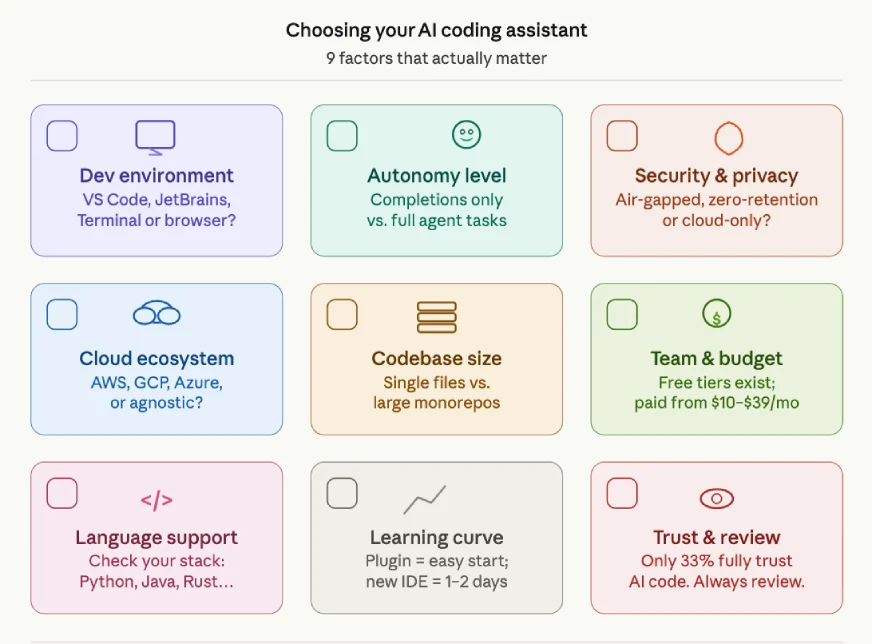
- Development Environment: Choose tools that fit your existing setup (VS Code, JetBrains, terminal, or AI-first IDEs like Cursor).
- Autonomy Level: Pick between inline assistants for quick help or agentic tools for end-to-end tasks.
- Security & Privacy: Use on-prem or zero-retention tools if your code cannot leave your system.
- Cloud Alignment: Match tools with your ecosystem (AWS, Google Cloud, GitHub).
- Codebase Complexity: Use repo-aware tools for large, complex projects.
- Team Size & Budget: Free tiers work for individuals; paid tools scale better for teams.
- Language Support: Ensure the tool supports your primary languages and frameworks.
- Ease of Adoption: Tools that fit your workflow are easier to adopt quickly.
- Trust & Review: Always pair AI tools with strong code review and testing practices.
Conclusion
The AI coding assistant market in 2026 isn’t about one winner but a mix of tools used together. GitHub Copilot leads in adoption, Cursor stands out as an AI-first IDE, and Claude Code is redefining AI as a true collaborator. Tools like Tabnine, Gemini Code Assist, Amazon Q Developer, and Replit serve specific needs like privacy, cloud integration, or ease of use. Developers using these tools are more productive, and the key is not whether to adopt them, but how to use them well. The best setup combines inline coding help, agentic tools for complex tasks, and strong review practices, letting developers focus on higher-level decisions.
Which AI coding tools are you using? Let me know in the comments below.
Hello, I am Nitika, a tech-savvy Content Creator and Marketer. Creativity and learning new things come naturally to me. I have expertise in creating result-driven content strategies. I am well versed in SEO Management, Keyword Operations, Web Content Writing, Communication, Content Strategy, Editing, and Writing.







