
Design has traditionally required multiple roles working in sequence: a strategist to define the problem, a designer to shape the solution, and a developer to build it. This means coordinating timelines, aligning opinions, and going through rounds of iteration before anything tangible is created.
Claude Design removes much of this friction by turning ideas directly into working outputs. What once took weeks can now happen in minutes. In this article, we break down how Claude design works and walk through real examples from idea to a final prototype.
Table of contents
What is Claude Design?
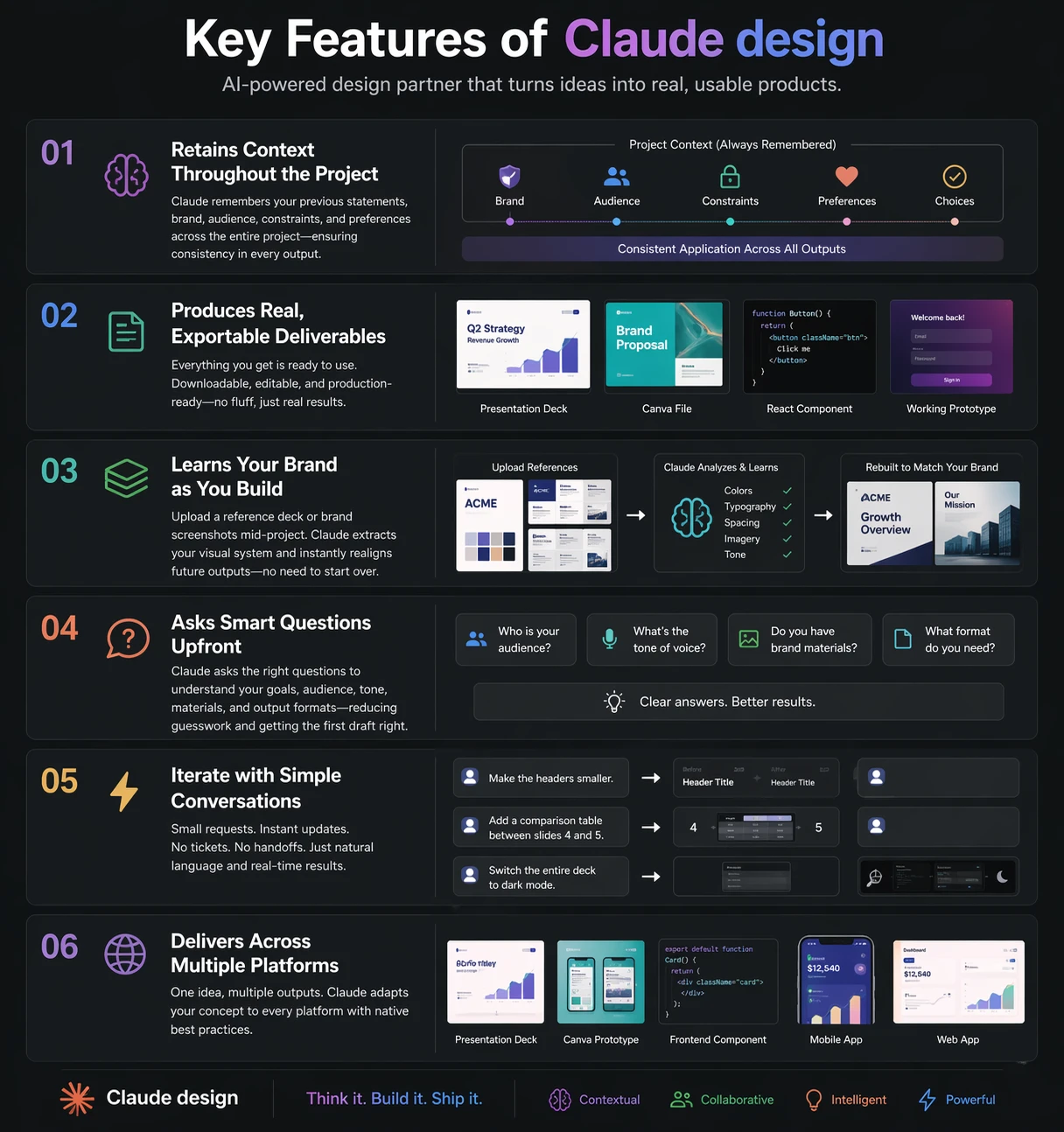
Claude Design lets Anthropic’s system produce real visual and functional outputs, not just descriptions. Most AI tools act like consultants, offering suggestions. Claude actually builds. It can generate animated presentation exports, send UI designs to Canva, and even create full React apps with authentication and payments.
The key difference is how it thinks: Claude approaches design like a senior designer, evaluating multiple factors in a single pass. Its capabilities are structured across three core layers:
- Visual design: The system creates design elements which include layout components and color systems and typeface design and space distribution and component design elements.
- Content design: The system creates a narrative structure which includes copywriting and information hierarchy design.
- Functional design: The system uses operational code to create interactive prototypes which connect to back-end systems.
Most tools exist only on one operational layer. Claude operates concurrently through all three operational layers.
How It Works?
The procedure is straightforward, and the next steps will help you understand how things work.
- Start by explaining the idea in plain language. Even a short sentence works, though a bit more context helps. Claude can take minimal input and still produce something useful.
- It will then ask a few quick clarifying questions around audience, tone, format, and constraints. This takes a couple of minutes but saves hours of back-and-forth later.
- Next, Claude creates a rough plan before building anything. It thinks through structure first, so the output isn’t random or scattered.
- From there, it generates the full output in one go. That could mean writing content, designing layouts, or even building a working prototype.
- You can iterate as much as needed. Just give feedback in plain language and it will adjust across the entire output, including brand changes.
- Finally, the work is exported in whatever format you need, whether that’s a presentation, code, design file, or something more interactive.
Getting Started with Claude design
A user can access the claude design via following steps:
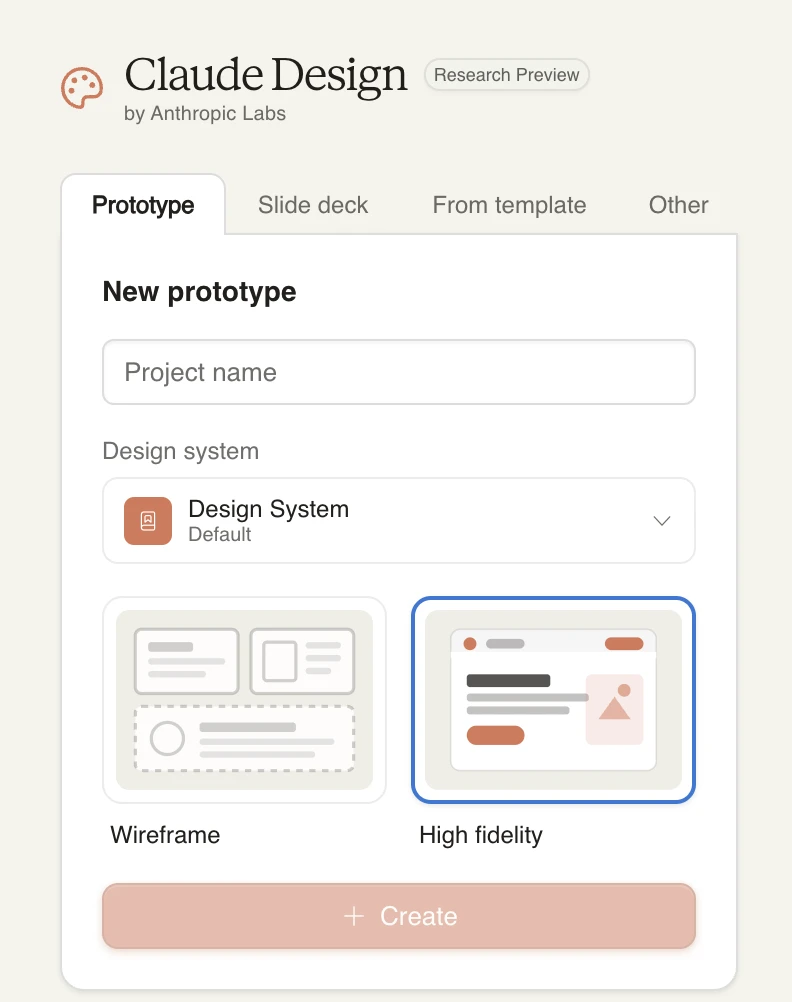
- Visit https://claude.ai/design to access the platform, the models are same as in claude chat, with a different interface.
- After that, you can choose whether you want to create a Prototype, slide deck, Animated design using existing Template design.
- Once selected, give your Project a name and choose a default design and then you can get started with your prompt.
Hands-On 1: “Explain Our Product” → Branded Animated Deck
This isn’t a rigid step-by-step process. It’s a continuous flow, from defining the goal, shaping the output, prompting Claude, to the final result.
The sections below break down the key pieces so you know what to look for.
1. Define the objective
You’re building a Cowork course that explains how Plugins work within an enterprise workflow automation setup.
2. Identify the gap
Existing docs are too complex, and teams don’t clearly understand what Plugins are or how they differ from MCP Connectors and Skills.
3. Design the output
A 25-minute Teaching Deck that explains concepts, usage, marketplace access, permissions, and security.
4. Generate with Claude
Prompt Claude to create a ~15-slide deck in dark mode, developer style, with speaker notes.
5. Refine the structure
Ensure the deck includes key sections like primitives, marketplace guides, installation flow, lifecycle, and sandbox security.
6. Polish consistency
Check layout, spacing, monospace font, and overall clarity across slides.
7. Apply branding
Align the deck with existing brand styles (colors, fonts, logos) using prior examples.
Watch the full workflow
The video below walks through this entire process in one continuous flow: from prompt to refined deck.
Final output
The following video shows the completed prototype and what the final result looks like.
Hands-On 2: App Idea → Layout Prototype → Live in Canva
This isn’t a strict sequence of steps. It’s a guided build—moving from idea → structure → design → refinement, with Claude helping at each stage.
The breakdown below gives you a clear mental model before you watch it in action.
1. Define the idea
An app for Gen Z users to journal emotions and mental health using mood tracking, voice input, and AI-generated weekly summaries.
2. Identify the audience
Young adults (around 22) who want to manage their mental health but haven’t found existing therapy apps helpful.
3. Set the goal
Create a complete, editable prototype that can be exported and refined in tools like Canva.
4. Generate the initial prototype
Prompt Claude to create core screens: onboarding, home, journal entry, mood check-in, and weekly summary.
5. Map the user experience
Define how users think and feel across each stage—first-time onboarding vs returning usage.
6. Build core screens
Develop ~6 key screens with clear layout, spacing, and structure.
7. Add functional details
Include elements like mood tracking (mood ring), voice journaling, and written reflections.
8. Document design decisions
Create a log explaining layout choices, typography, color, and overall usability.
9. Prepare for export
Structure screens so they can be easily exported as editable frames into Canva.
Watch the full workflow
The video below shows this entire process in one continuous build: from idea to working prototype.
Final Output
The following video shows the completed prototype and what the final result looks like.
Pros and Cons of Claude Design
With all that this tools offers, here’s a table summarizing its strengths and weaknesses:
| Advantages | Disadvantages |
| Speed of design – Go from idea to prototype in hours instead of days of back-and-forth. | Needs human judgment – First drafts can miss context; final review by a designer is still necessary. |
| Cross-discipline thinking – Handles visual, content, and functional design together instead of in silos. | Limited creative intuition – Strong on structure, weaker on unique brand feel or creative instincts. |
| No expert required to start – Anyone can create a solid first version that designers can refine later. | Iteration still needed – Complex interactions and edge cases often require multiple refinement cycles. |
| Brand consistency at scale – Learns brand assets once and applies them across the entire project. | Code not production-ready – Generated code may need optimization before real-world deployment. |
| Reduced friction in edits – Changes happen instantly through simple instructions instead of long feedback loops. | Context limitations at scale – Can lose track of earlier decisions in large, complex projects. |
| Handles complexity without handoffs – Can build full-stack flows and multi-screen systems in one go. | No user validation – Doesn’t assess whether the product actually meets real user needs. |
Conclusion
Designers, developers, and strategists aren’t replaced by Claude Design. It removes the slow parts: starting from scratch, building initial wireframes, and waiting days for mockups. The routine bottlenecks disappear, letting teams move from idea to tangible output much faster.
What remains is the work that actually matters: deciding if a product solves a real problem, if a brand feels authentic, and if the experience lands emotionally. Claude helps you test and show ideas early, so instead of pitching concepts, you walk into meetings with working prototypes.
Frequently Asked Questions
Q1. What is Claude Design and how does it work?
A. Claude Design creates full design outputs (UI, content, and code) by reasoning through projects end-to-end instead of just giving suggestions.
Q2. Can Claude Design replace designers and developers?
A. No. Claude speeds up design and prototyping, but human judgment is still needed for creativity, validation, and final production decisions.
Q3. What can you build using Claude Design?
A. You can create presentations, UI prototypes, React apps, and Canva designs from a simple idea with iterative feedback.
Data Science Trainee at Analytics Vidhya
I am currently working as a Data Science Trainee at Analytics Vidhya, where I focus on building data-driven solutions and applying AI/ML techniques to solve real-world business problems. My work allows me to explore advanced analytics, machine learning, and AI applications that empower organizations to make smarter, evidence-based decisions.
With a strong foundation in computer science, software development, and data analytics, I am passionate about leveraging AI to create impactful, scalable solutions that bridge the gap between technology and business.
📩 You can also reach out to me at [email protected]





