Developers launch new models every week, but most barely change how you work. Kimi K3 is different—not because of benchmark charts, but because of a few small API changes that fundamentally affect how you use it.
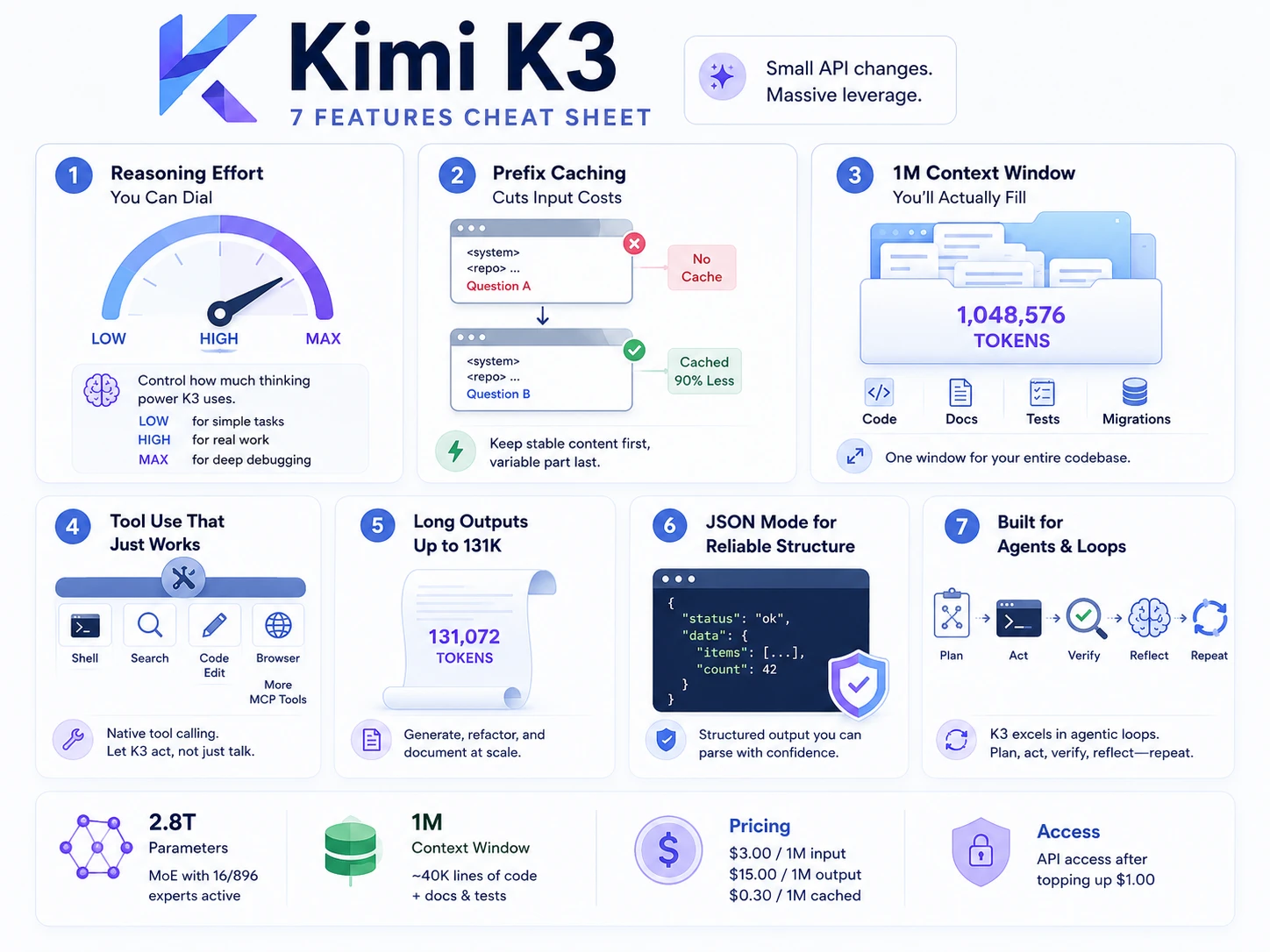
The first is reasoning_effort, which defaults to maximum, alongside 131,072 max_completion_tokens. Ask K3 to rename a variable, and it may reason through race conditions. The key lesson: K3 features come with settings. Ignore them and you overpay, but understand them, and you unlock their value. In this article, we’ll explore all seven.
Table of contents
- What Is Kimi K3, technically?
- First, Build Yourself a Cost Meter
- Feature 1: Reasoning Effort You Can Actually Dial
- Feature 2: Prefix Caching That Cuts Input Costs 90%
- Feature 3: A 1M Context Window You’ll Actually Fill
- Feature 4: Partial Mode, the One Nobody Mentions
- Feature 5: Tool Calling with Real Enforcement
- Feature 6: Native Vision, No Second Model
- Feature 7: Open Weights, With an Honest Asterisk
- Hands-On: A Cost-Aware Kimi K3 Code Reviewer
- Common Mistakes and Gotchas
- Conclusion
- Frequently Asked Questions
What Is Kimi K3, technically?
Kimi K3 is a type of Mixture-of-Experts model consisting of 2.8 trillion parameters. Out of about 896 routed experts, only 16 works on each input. Hence, despite its complexity, it is still affordable in terms of inference. The weights use quantized MXFP4.
Finally, the context window supports up to 1,048,576 tokens. The pricing is $3.00 for every million tokens of input and $15.00 per million tokens of output. In addition, cache reduces the cost to $0.30 per million tokens and unlocks access after a $1.00 top-up.
First, Build Yourself a Cost Meter
Ignore hello-world and write something that informs you about your expense.
pip install openai
export MOONSHOT_API_KEY="sk-your-key"
Function to calculate the expenses/costing:
import os
from openai import OpenAI

client = OpenAI(api_key=os.environ["MOONSHOT_API_KEY"],
                base_url="https://api.moonshot.ai/v1")

def call(messages, **kw):
    r = client.chat.completions.create(model="kimi-k3", messages=messages, **kw)
    u = r.usage
    cached = (u.prompt_tokens_details or {}).get("cached_tokens", 0)
    fresh = u.prompt_tokens - cached
    cost = fresh/1e6*3 + cached/1e6*0.3 + u.completion_tokens/1e6*15
    print(f"[fresh {fresh} | cached {cached} | out {u.completion_tokens} | ${cost:.4f}]")
    return r.choices[0].message
All the examples featured below will use the call() method. Thus, you will see the cost of each feature learnt along the way. This simple habit has helped me earn more than any other prompt trick. So, let’s get started.
Feature 1: Reasoning Effort You Can Actually Dial
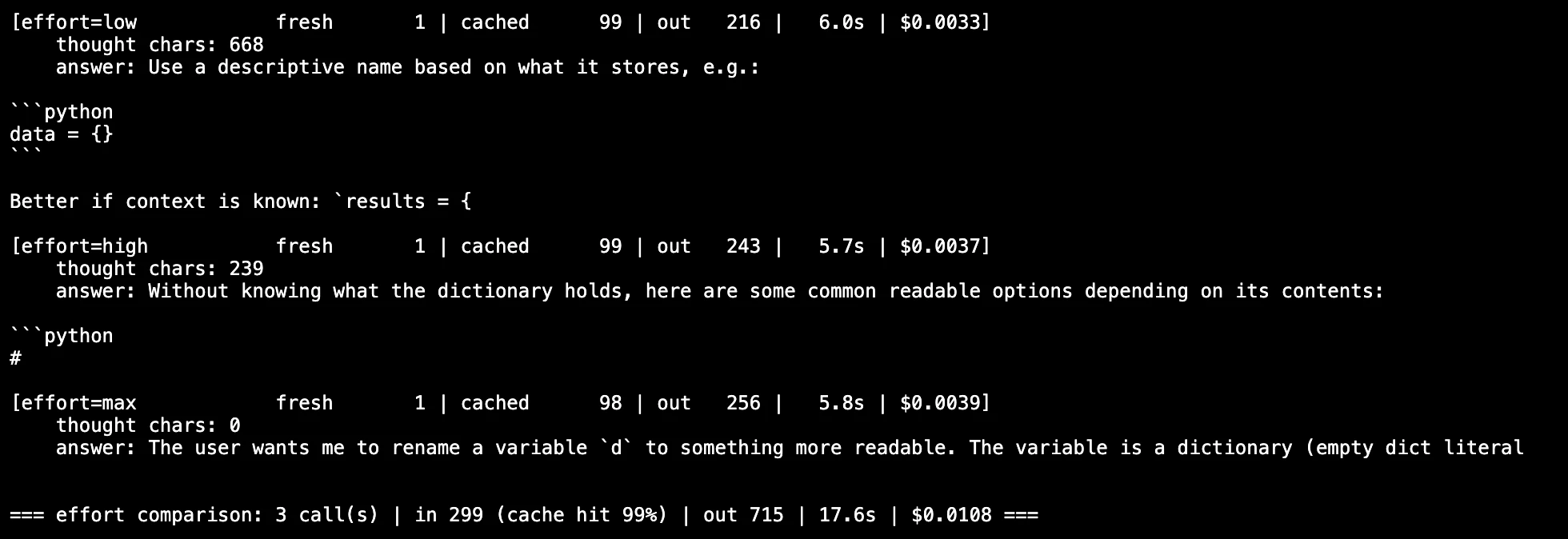
In K3, the thinking mode is always on. There is no toggle to turn this mode on/off. Moreover, the interface presents you with a high-level field that offers three options: low, high, and max.
The default option is max. This is the most expensive default option we have in the API. Do you remember my variable renaming? That was it.
prompt = [{"role": "user", "content": "Rename `d` to something readable: d = {}"}]

for effort in ("low", "high", "max"):
    print(effort, "->", end=" ")
    call(prompt, reasoning_effort=effort, max_completion_tokens=256)
The rule is simple: use low when making mechanical edits and high when doing real work. Max is for actual challenging debugging. Always set max_completion_tokens to your desired value, as the default is 131,072 which can increase your cost a lot.
Feature 2: Prefix Caching That Cuts Input Costs 90%
This aspect is what is most under-discussed. K3 caches prefixes of prompts without any preparations. There is no requirement for cache ID, TTL value, or an initial call.
Two conditions are in effect. The previous request must undergo 256 tokens of prompts. Furthermore, the system performs checking according to the prefix alone.
In this regard, people usually write like this:
# BAD: the question changes the start, so nothing ever caches
for q in questions:
    call([{"role": "user", "content": f"{q}\n\n{repo_blob}"}],
         reasoning_effort="high", max_completion_tokens=2048)
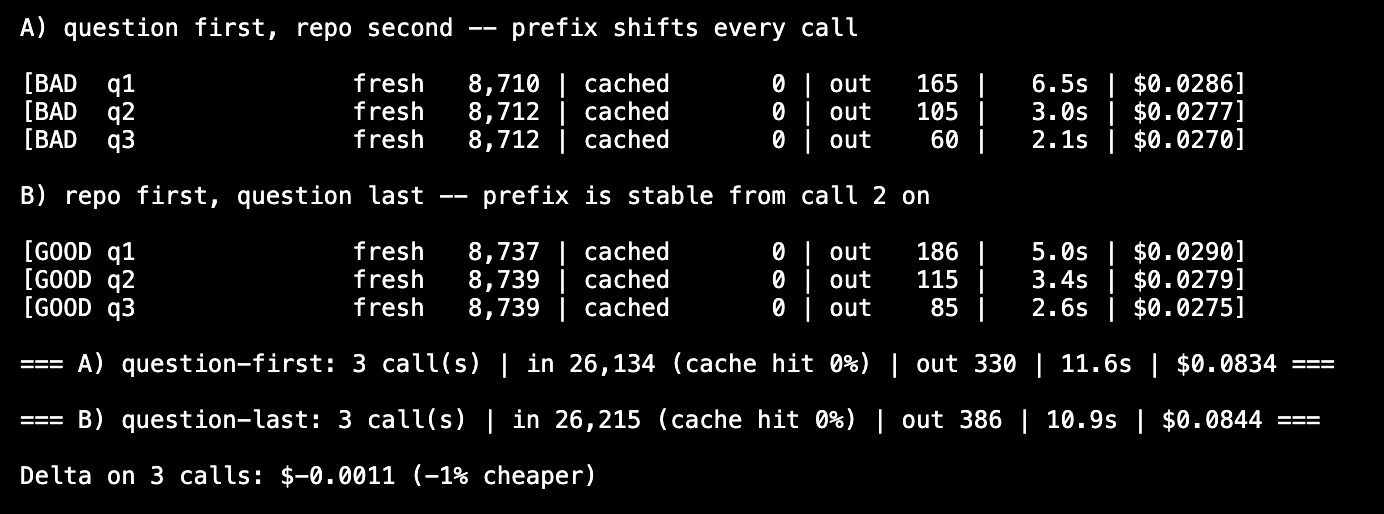
The repo follows the question. Thus, the prefix changes with every request. The same answers after moving the ephemeral part to the end of the document. The key point is to arrange your requests accordingly.
# GOOD: stable content first, question last
base = [
    {"role": "system", "content": "You review backend code."},
    {"role": "user", "content": f"<repo>\n{repo_blob}\n</repo>"},
]
for q in questions:
    call(base + [{"role": "user", "content": q}],
         reasoning_effort="high", max_completion_tokens=2048)
Same answers, a tenth of the input cost from call two onward. Order your messages from the most stable to the least stable. That’s the whole trick.
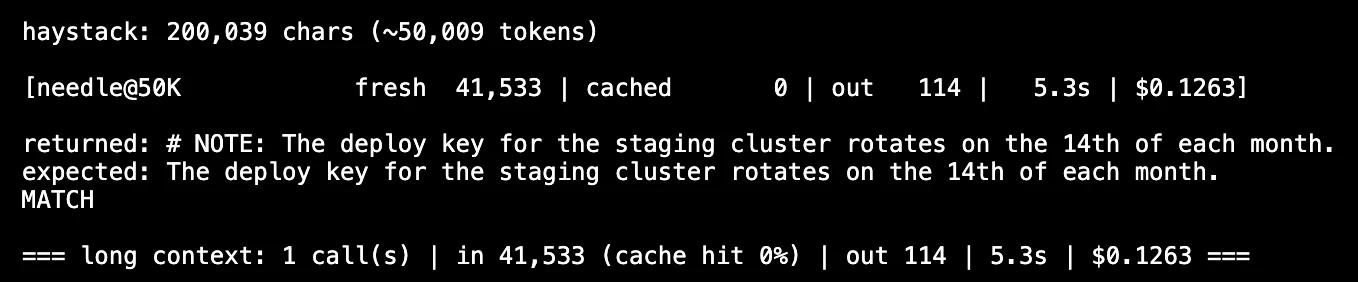
Feature 3: A 1M Context Window You’ll Actually Fill
Many models promise a long context, but there are only a few that actually perform at the far end. Similarly, engineers designed K3 for the one window.
A million tokens equals about 40,000 lines of code plus documentation. Your app’s code, tests, and migration fit well. This reduces many complexities.
- No more remarkable heuristics that cut classes in half.
- Meanwhile, developers no longer need to update a vector store together with the main system.
- No retrieval processes that do not find the crucial file.
I’m not against RAG at all. Consequently, RAG may not be necessary in the case of a single repo.

Why Doesn’t It Slow to a Crawl?
In conventional attention, every token requires a key-value pair, which gets unmanageable as the number of tokens grows. K3 cleverly sidesteps the problem with use of several tricks.
Most layers implement Kimi Delta Attention (KDA), which is a kind of linear attention that maintains its size and therefore does not occupy additional memory. In short, LatentMoE handles routing, which costs less than normal MoE. NoPE completely replaces rotary position embeddings in practice.
In fact, researchers call another trick attention residuals. It adds a mere 4% to the training costs and about 2% to Inference as, at the same time, it helps the model achieve better validation loss.
You cannot control any of these techniques. But this explains how it is possible for a 900K-token prompt to be executed properly instead of resulting in a timeout error.
Feature 4: Partial Mode, the One Nobody Mentions
There is hardly any mention of this in the review. The assistant’s response can be prepared in advance and then it must be continued by K3.
msgs = [
    {"role": "user", "content": "List 3 risks in this migration. JSON array only."},
    {"role": "assistant", "content": '[{"risk":', "partial": True},
]
print(call(msgs, reasoning_effort="low", max_completion_tokens=512).content)
The model starts with your prefix. Therefore, it is impossible for it to introduce the line “Definitely! This is the JSON.” To be honest, I use it more than half the time instead of dealing with schema.
Feature 5: Tool Calling with Real Enforcement
There are two aspects that reach beyond the typical OpenAI-friendly interface.
- To start with,
tool_choice="required"necessitates an actual use of a tool on turn 1. And that eliminates the possibility of “let me describe what I would do” being a type of failure.
tools = [{"type": "function", "function": {
    "name": "run_tests",
    "description": "Run pytest and return failing test names.",
    "parameters": {"type": "object",
                   "properties": {"path": {"type": "string"}},
                   "required": ["path"]}}}]

msg = call([{"role": "user", "content": "Find what's broken in ./src"}],
           tools=tools, tool_choice="required",
           reasoning_effort="high", max_completion_tokens=2048)
print(msg.tool_calls)- Now, the tools to load on request. You should put the definition of the tools into the system message without filling in anything in the content field. This allows the agent to increase the number of tools it has during the job and do not send previous messages again.
One important thing is to add the complete message of the assistant again to history with all its reasoning. If mixed with other important information, the message won’t be useful.
Why is this important? Because an agent cycle takes a lot of turns, one after another. Every result gotten by the agent is important for making the next decision. Without reasoning, the model will face the need to build a new plan every time.
Feature 6: Native Vision, No Second Model
K3 processes visual content head on, using the same end point as software. However, the rules are strict.
It does not accept public URLs for images. You need to provide either base64 format, or a file reference in the ms:// format. And the content has to be an array itself, not a JSON string.
import base64
img = base64.b64encode(open("trace.png", "rb").read()).decode()

call([{"role": "user", "content": [
    {"type": "text", "text": "Which frame is the actual failure?"},
    {"type": "image_url",
     "image_url": {"url": f"data:image/png;base64,{img}"}},
]}], reasoning_effort="high", max_completion_tokens=1024)
The screenshot fix can be completed without a separate image recognition module.
Feature 7: Open Weights, With an Honest Asterisk
The weights have been released by Moonshot thus allowing your proprietary code to be retained on your own hardware which implies a real positive change in what legal approvals will be required.
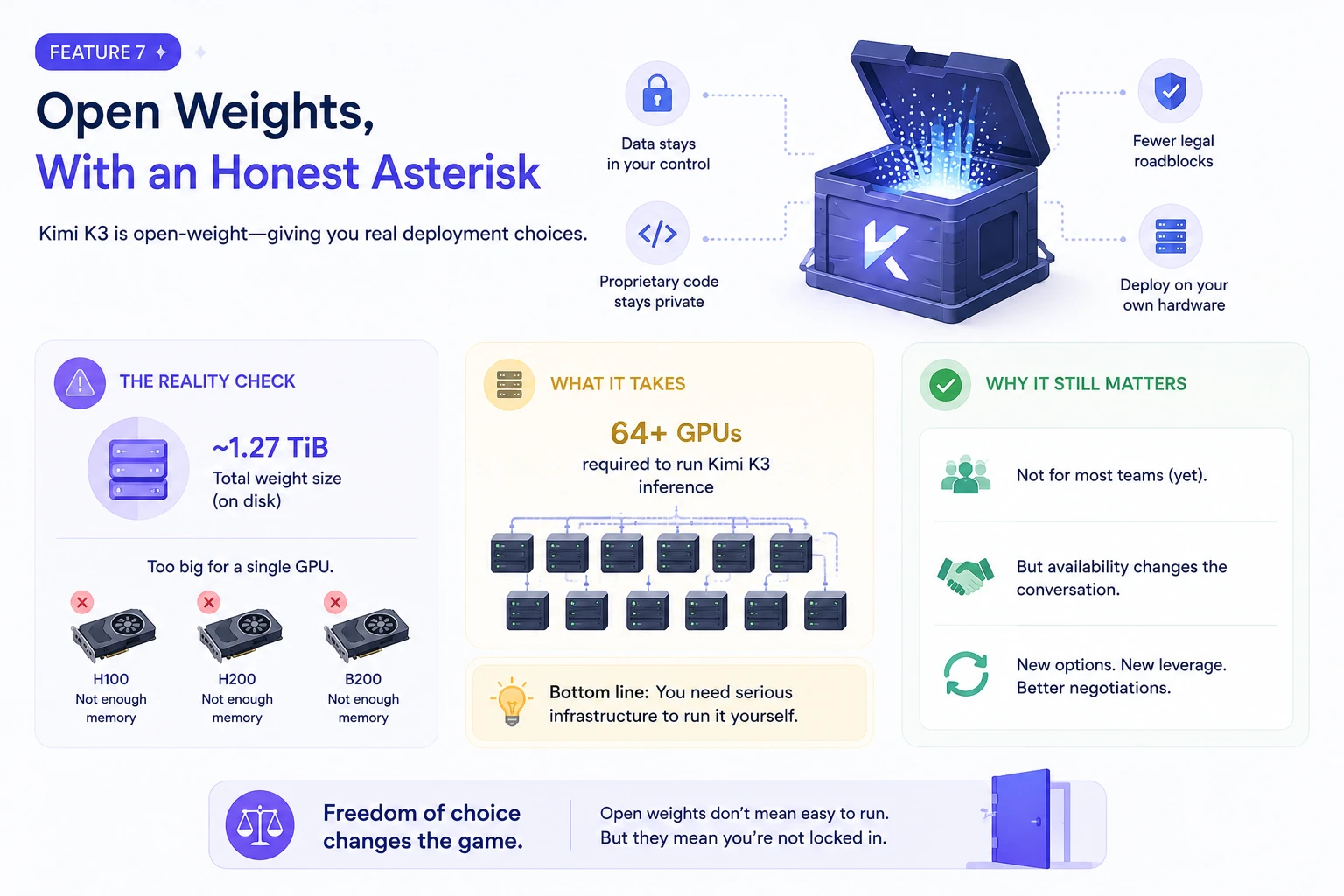
Now let’s talk about that part that nobody writes up in the news. The total size of the weights reaches roughly 1.27 TiB of storage. No H100, H200, or B200 is capable of using this model. That means that there are 64 or more devices involved in producing the model.
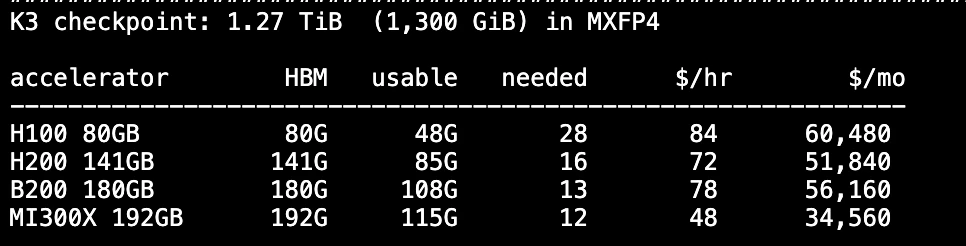
So, hosting will not be used by many teams, nevertheless the availability of the exit means a renewal of negotiations.
Hands-On: A Cost-Aware Kimi K3 Code Reviewer
Let us create a compact program using four of the above features. It will analyze a repository, consume caches, and generate JSON output.
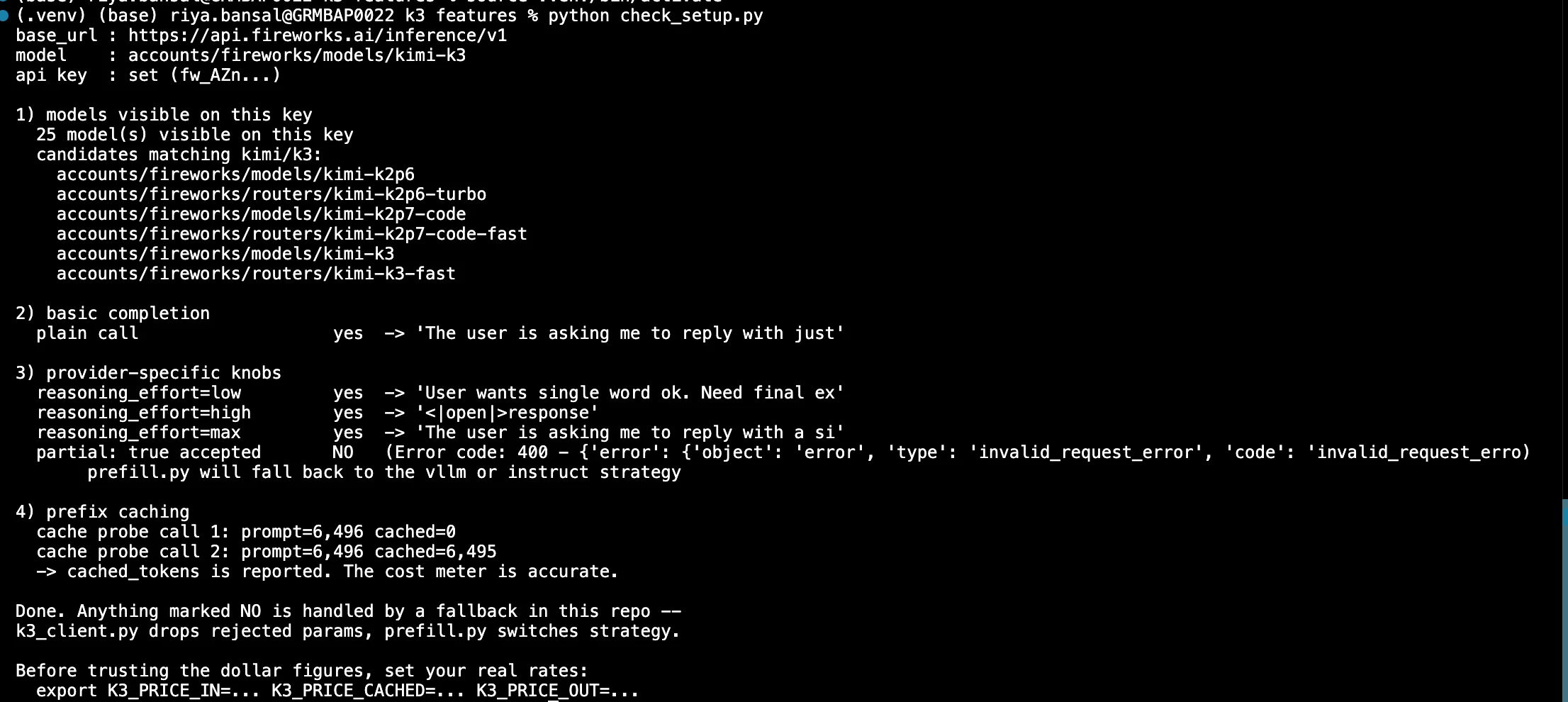
Step 1: Gather all Repos
In total, about 2 million characters equal roughly half a million tokens. Thus, the scope for reasoning is quite wide.
from pathlib import Path

EXTS = {".py", ".js", ".ts", ".go", ".sql"}
SKIP = {".git", "node_modules", "__pycache__", ".venv", "dist"}

def pack(root, limit=2_000_000):
    out, n = [], 0
    for p in sorted(Path(root).rglob("*")):
        if p.suffix not in EXTS or any(s in p.parts for s in SKIP):
            continue
        body = p.read_text(errors="ignore")
        out.append(f"--- {p} ---\n{body}")
        n += len(body)
        if n > limit:
            break
    return "\n\n".join(out)
Step 2: Classify Questions by Complexity
prefix = [{"role": "user", "content": f"<repo>\n{pack('./src')}\n</repo>"}]

CHECKS = [
    ("low", "List files with no error handling. Names only."),
    ("high", "Find unclosed DB connections. Include file and line."),
    ("max", "Trace the worst data race. Then give a unified diff."),
]

for effort, q in CHECKS:
    msgs = prefix + [{"role": "user", "content": q},
                     {"role": "assistant", "content": '{"findings":[', "partial": True}]
    print(call(msgs, reasoning_effort=effort, max_completion_tokens=3072).content[:400])
Essentially, there are three features as part of the loop: a prefix cache, complexity levels depending on questions, and the requirement to provide output in JSON.
Step 3: Check the Meter
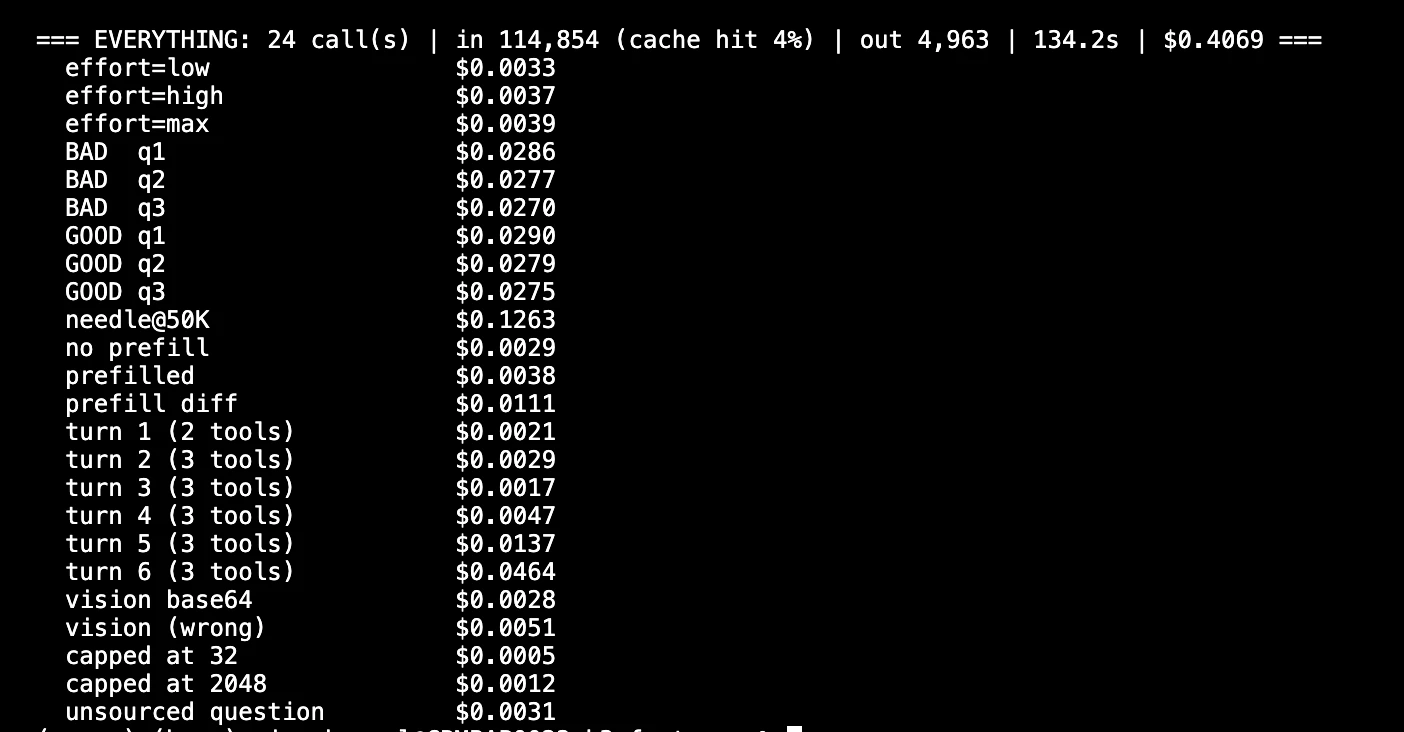
The first call results in a complete cache miss. 500k tokens cost $3, which is approximately $1.50 for just one call. The second and third calls involve cache usage, which costs around 30 cents and 15 cents, respectively.
Therefore, asking three complex questions about an entire repository for less than two dollars has become a possibility.
Output:
Common Mistakes and Gotchas
Most of these things I learnt the hard way. You can learn them from my bill.
max_completion_tokensis at a default value of 131072, which together with max effort means a nasty surprise. Set them explicitly.- If you use question-first prompts, caching gets broken. Stable content comes first.
- Sampling params are fixed:
temperature,top_p,seedandpenaltiesare ignored. Do not pass them. - Do not send K2.x thinking objects. They’ll be rejected. Use
reasoning_effort. - Hallucination rate has gone up to about 50.9%, from 39.3% last generation. Verify claims without a source.
- The built-in web search does not work for production. Moonshot says it directly. Gear your own efforts.
That hallucination number is worth paying attention. K3 thinks great with the context you give it. However, things get shaky when it comes to inventing the facts you haven’t given.
Conclusion
The features of Kimi K3 that reshaped my lifestyle weren’t actually the stunning numbers but rather functionalities such as prefix caching, effort tiers, and partial mode. All of the three demonstrate control but not capacity.
The only thing you need to do is to take the call() wrapper and simply add it to your code. Next, you only need to request one prompt at the three possible levels. The values will work miracles in terms of changing your prompts.
Just be forewarned about watching the prefix cached for $0.30. After that, you will start viewing chunking as a burden you have created for yourself.
Read more: July 2026 AI Releases: A Timeline of Frontier Model Shifts
Frequently Asked Questions
Q1. How can I reduce my input costs when using Kimi K3?
A. You can cut input costs by 90% by utilizing prefix caching, which involves ordering your prompt messages from the most stable content to the least stable.
Q2. What is the purpose of the reasoning_effort setting in K3?
A. It allows you to control the model’s thinking intensity. Use ‘low’ for simple tasks, ‘high’ for standard work, and ‘max’ for complex debugging to manage costs effectively.
Q3. Is RAG always necessary with Kimi K3’s large context window?
A. Not necessarily. Because K3 supports a 1-million token context window, you can often fit entire code repositories directly into the prompt, bypassing complex retrieval processes.
Data Science Trainee at Analytics Vidhya
I am currently working as a Data Science Trainee at Analytics Vidhya, where I focus on building data-driven solutions and applying AI/ML techniques to solve real-world business problems. My work allows me to explore advanced analytics, machine learning, and AI applications that empower organizations to make smarter, evidence-based decisions.
With a strong foundation in computer science, software development, and data analytics, I am passionate about leveraging AI to create impactful, scalable solutions that bridge the gap between technology and business.
📩 You can also reach out to me at [email protected]