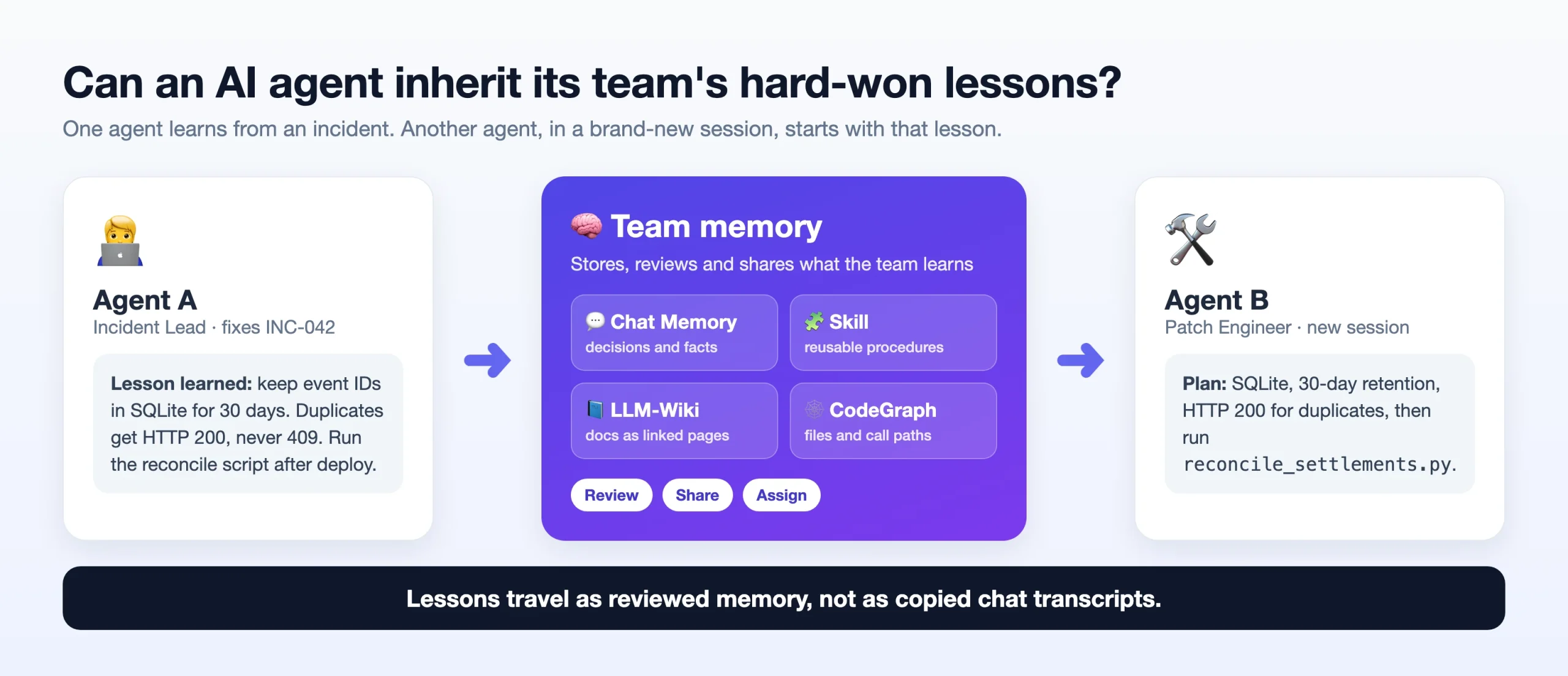
Picture a Monday. Your AI coding agent fixes a payment bug and learns three things the hard way. On Tuesday, a new session starts for a similar bug. The agent has no idea about Monday. It reads an old runbook and makes the same mistake again.
A bigger context window does not fix this. The problem is not how much text the agent can read. The problem is that the lesson is stuck in one chat. TencentDB Agent Memory is an open-source project that tries to turn such lessons into memory that other agents can reuse, in a controlled way.
In this article I explain how it works, and then I run a small, real experiment. On Monday a team closes an incident and talks about it. On Tuesday a brand-new chat asks the same question twice: once without the memory and once with it. You will see the one short script, the real output, and also two quick checks.
Table of contents
Why a Bigger Context Window Does Not Solve Team Memory
Long prompts can carry more history. But they do not tell the agent three important things: which old fact is still current, who is allowed to see it, and how a one-time decision became a repeatable procedure. A raw chat transcript is a poor replacement for a runbook, a decision record or a map of the code.
It also gets noisy in a team. A release reviewer needs the old incident and the checklist. A code-writing agent needs the affected functions. A customer-support agent may need neither. If you load everything for everyone, you add noise and you expose private information. TencentDB’s answer is to treat memory as managed assets that can be given to specific agents.
What TencentDB Agent Memory Includes
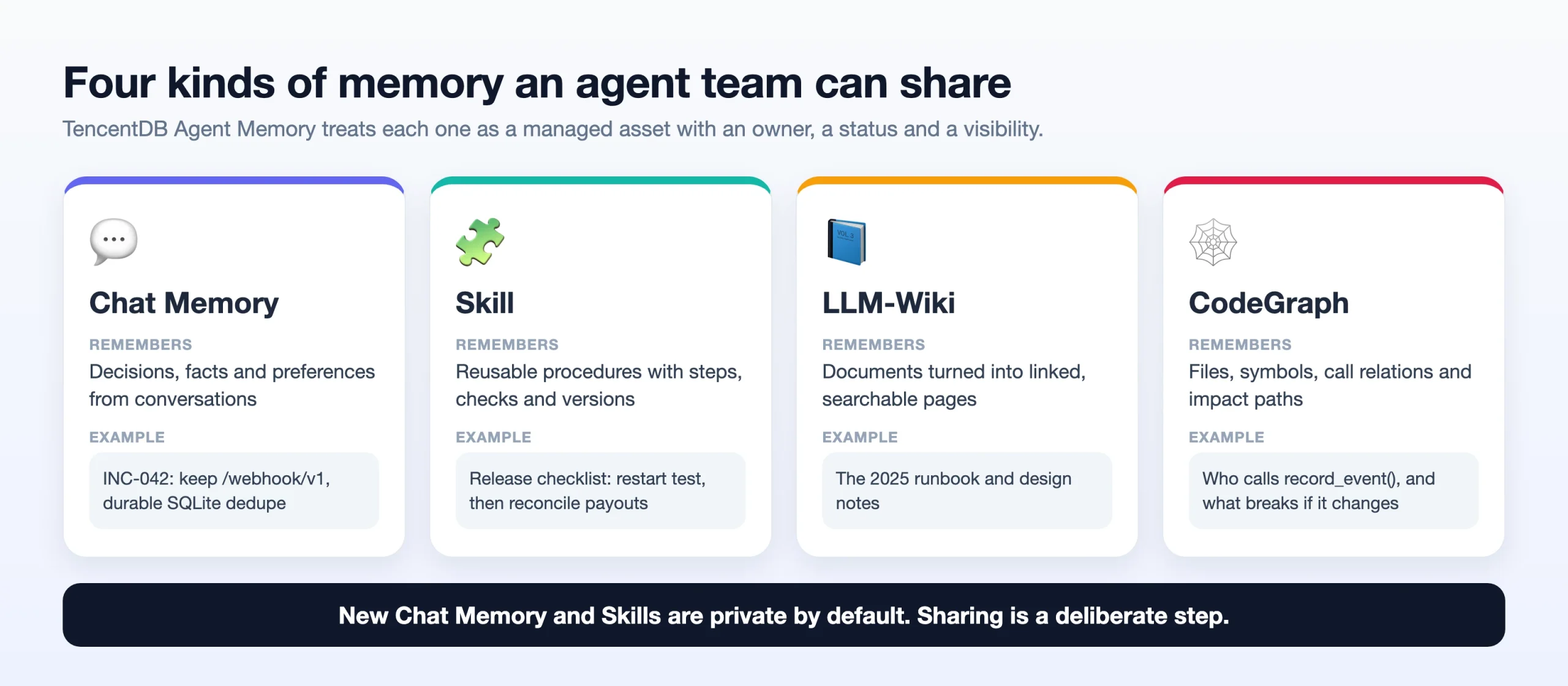
| Asset | What it remembers | Why you would care |
|---|---|---|
| Chat Memory | Decisions, facts and preferences from conversations | Restore an old incident without pasting the whole chat |
| Skill | Reusable procedures with steps, checks and versions | Turn a good debugging session into a release checklist |
| LLM-Wiki | Documents turned into linked, searchable pages | Find the right runbook instead of rereading all documents |
| CodeGraph | Files, symbols, call relations and impact paths | See who calls a function before you change it |
The important idea is the life cycle around these assets: owner, status, visibility and which agent can use them. The README describes four visibility levels: private (only the owner), team, restricted (access rules for users, roles or agents) and agent (for equipping specific agents). New Chat Memory and Skills start as private, and sharing is an explicit action.
Github: https://github.com/TencentCloud/TencentDB-Agent-Memory.git
From raw chat to working memory: L0 to L3
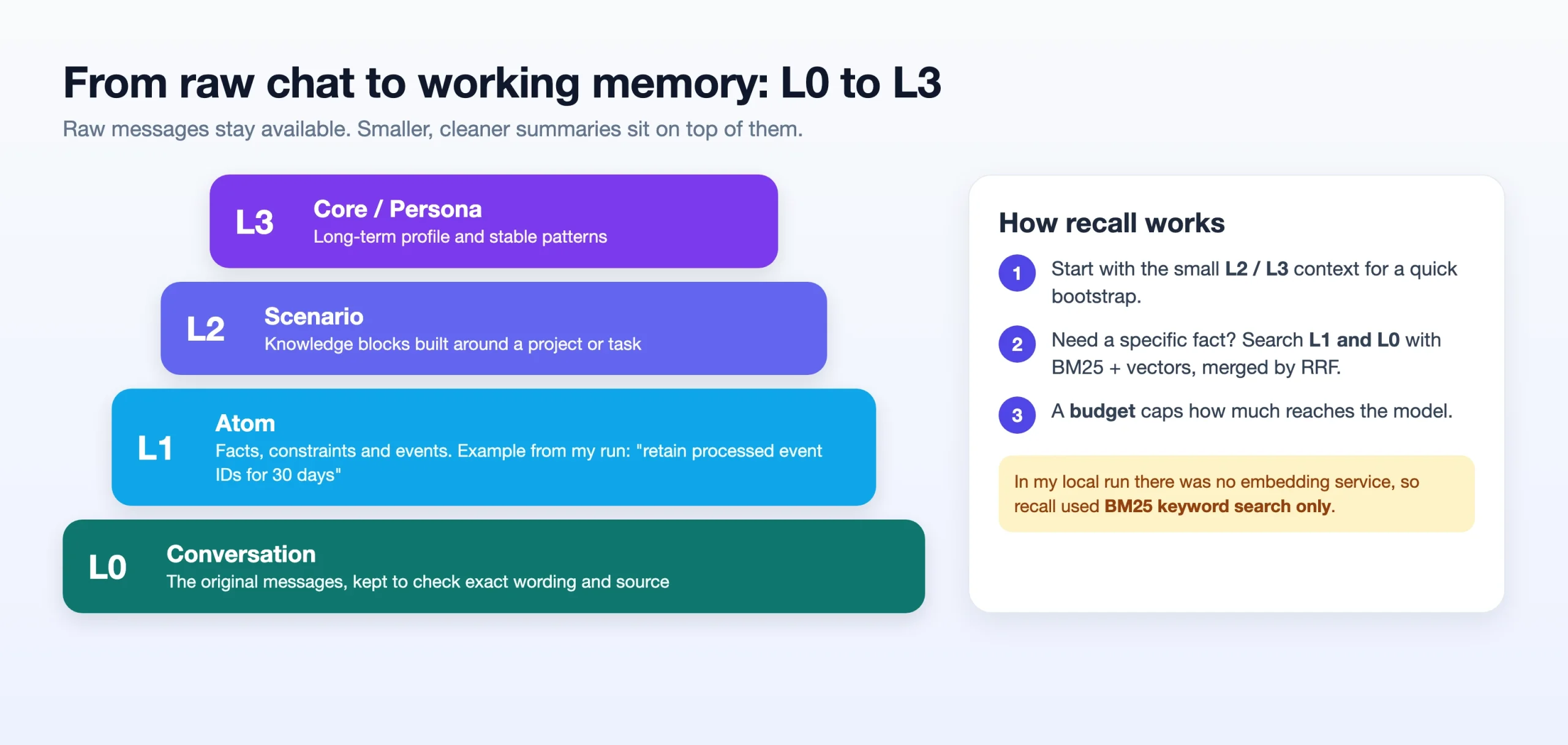
The README describes four layers: L0 is the raw conversation, L1 holds extracted facts (“atoms”), L2 groups knowledge around a project or scenario, and L3 holds long-term profile and stable patterns. For recall, the small L2 and L3 layers give quick context. When a specific fact is needed, BM25 keyword search, vector search and a merge step (RRF) look in L1 and L0. A budget limits how much reaches the model.
This supports two different questions: “What is the latest rule?” and “Show me the original words where it was decided.” The second one matters, because a summary without a source can turn a temporary idea into a permanent rule.
One more point: this is not model training. The model does not learn anything. The memory is stored outside, and it must be written, found, allowed and read correctly every time.
How the services fit together
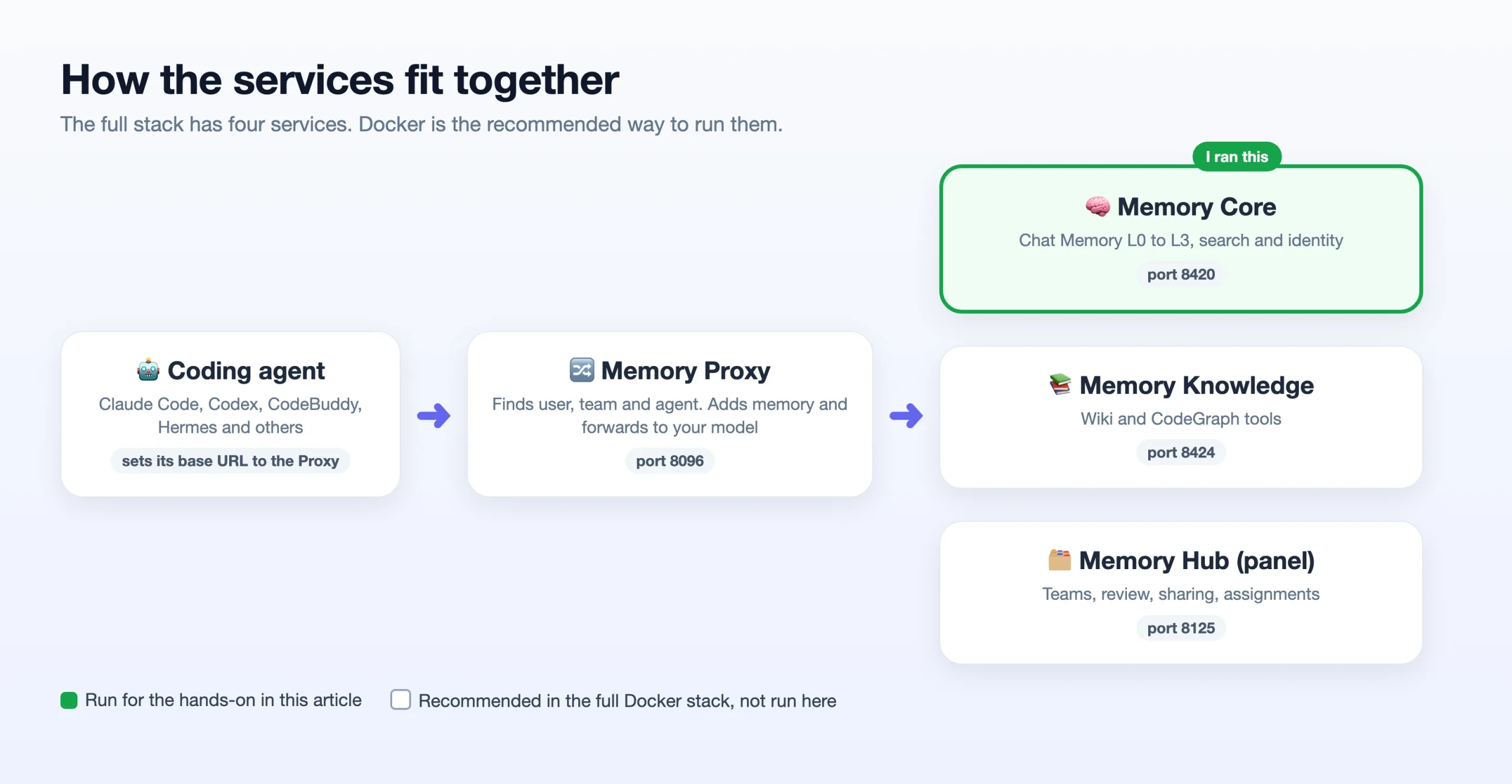
A coding agent sends its request to the Memory Proxy. The Proxy finds out the user, team and agent, adds relevant memory, and forwards the request to your model. Memory Core stores and searches Chat Memory. Memory Knowledge handles Wiki and CodeGraph, and offers tools through /v3/tools/list and /v3/tools/call. Memory Hub is the web panel for teams, review, sharing and assignments.
| Service | Default port | Main job |
|---|---|---|
| Memory Core | 8420 | Memory storage, search and identity |
| Memory Hub (panel) | 8125 | Teams, review and assignments |
| Memory Knowledge | 8424 | Wiki and CodeGraph |
| Memory Proxy | 8096 | Sits between your agent and your model |
Does It Improve Performance?
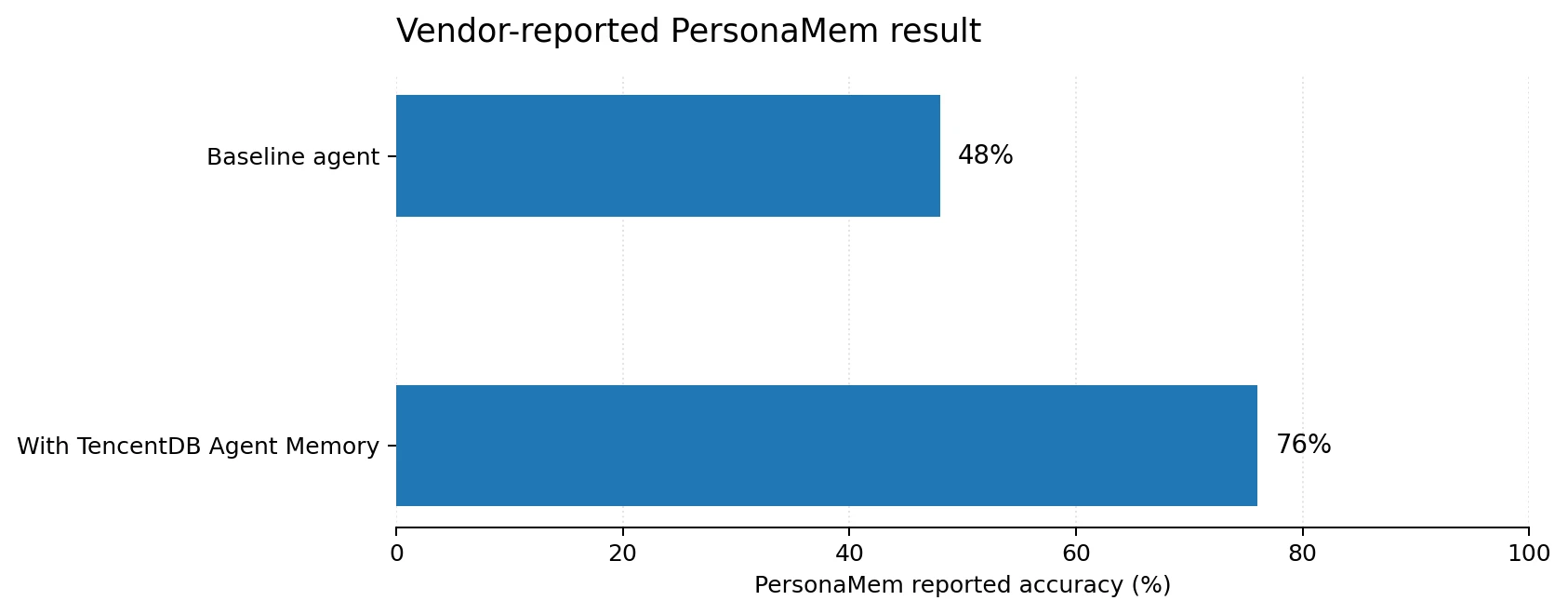
The README reports a PersonaMem score of 48% without the memory and 76% with it. That is a gain of 28 percentage points. The README calls it “+59%”, but 76 against 48 is about +58%, and the README does not explain the small difference.
Treat this as a useful signal, not a promise for your own system. A fair test needs the model versions, the data, the retrieval settings and an independent rerun. It should also measure the cases where memory hurts: stale advice, irrelevant recall and permission mistakes. That is exactly why we run our own small experiment next.
Hands-on: Teach the Memory on Monday, Use It on Tuesday
Here is a story you may know. On Monday, a team closes incident INC-042: a partner was paid twice after the webhook worker restarted. In the chat, the team learns three things that are written nowhere else: keep processed event IDs for 30 days, reply to duplicates with HTTP 200 and never 409, and run a reconcile script after the fix. On Tuesday, someone opens a brand-new chat and asks what to do about duplicate payouts. Will the AI know what the team learned?
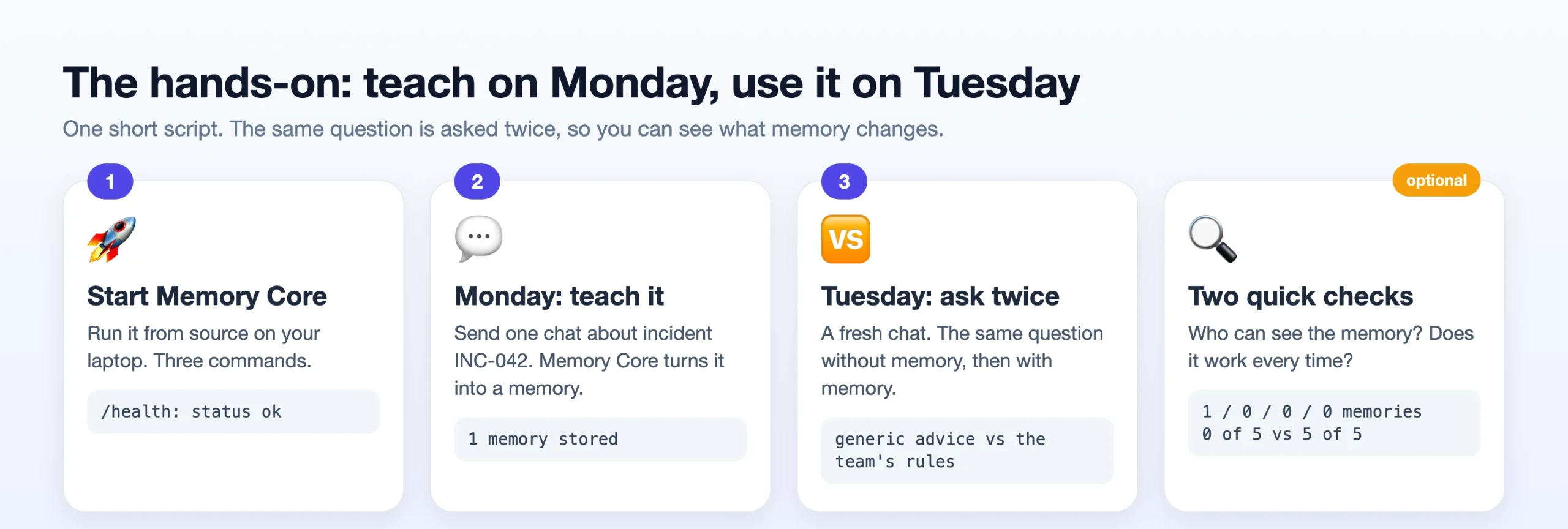
We will find out with one short script. It sends Monday’s chat to Memory Core, waits until it becomes a memory, and then asks the same question to an LLM two times: once without memory, once with the memory added.
Docker is the recommended way, and this is what I did instead: The project’s quick start is Docker-based. ./start-all.sh starts Memory Core, Hub and Proxy together. But I ran only Memory Core straight from source with Node.js and SQLite. That is enough to show real memory capture and recall. It does not include the Hub, Proxy, Wiki, CodeGraph or a coding agent such as Claude Code.
This is the recommended full setup, from the README.
git clone https://github.com/TencentCloud/TencentDB-Agent-Memory.git
cd TencentDB-Agent-Memory/deploy/global-images
cp .env.example .env
# edit .env: fill the memory LLM settings and the proxy upstream settings
./start-all.sh                  # then open http://localhost:8125
What you need for the version I ran: Node.js 22.16 or newer (the package requires >=22.16.0), npm, Git, Python 3.10 or newer, and an API key for an OpenAI-compatible model. A small cost applies, because memory extraction and the answers call the model. Use only invented data.
Step 1: Start Memory Core
Clone the repository and install only the runtime packages. I used --ignore-scripts so that no install scripts run, and --legacy-peer-deps because the project is built for pnpm and its development packages confuse plain npm:
$ git clone --depth 1 https://github.com/TencentCloud/TencentDB-Agent-Memory.git


$ cd TencentDB-Agent-Memory/MemoryCore
$ npm install --omit=dev --ignore-scripts --legacy-peer-deps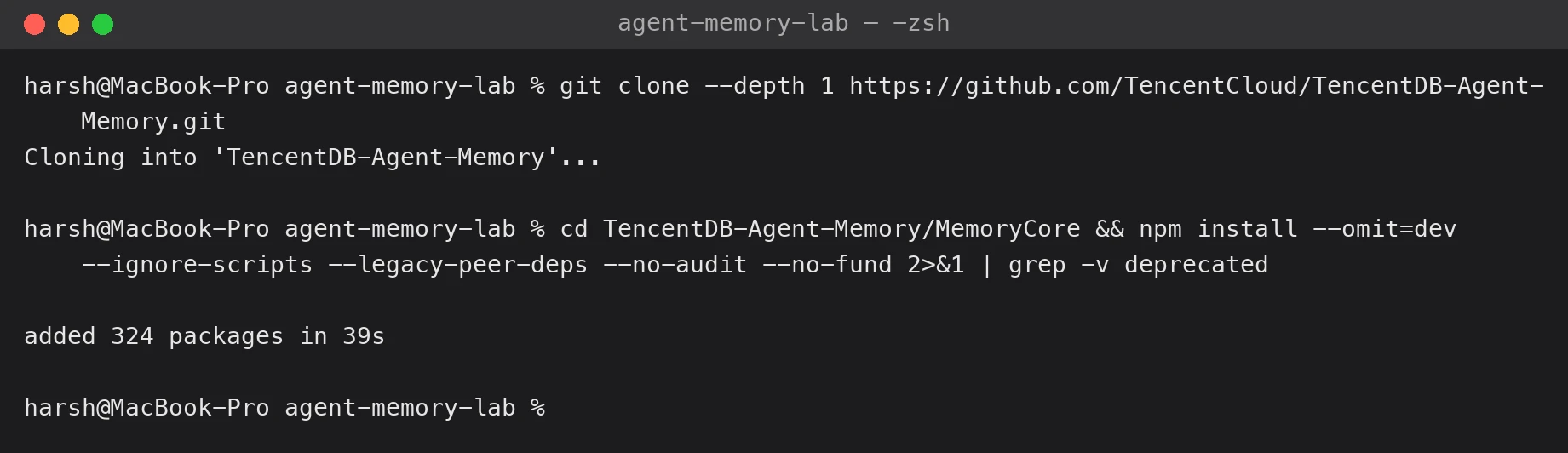
Output 1: A fresh clone and install. About 324 packages took 39 seconds on my machine.
Check this before you start the server: The repo’s default config file, tdai-gateway.yaml, points the LLM address at a Tencent endpoint and picks its own model. If you only set an API key, your key is sent to that address. Always set the base URL and the model yourself, and use the standalone config file.
$ grep -n -B1 -A3 'baseUrl' tdai-gateway.yaml | head -8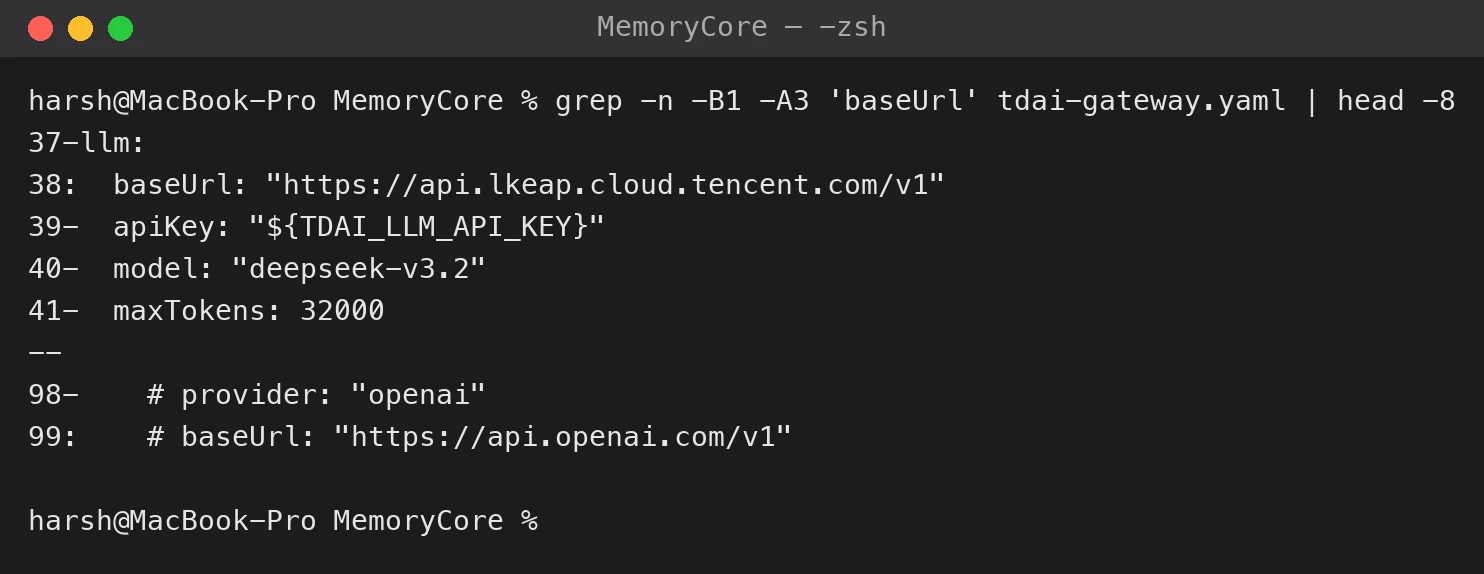
Now start the gateway. Replace the three values with your own provider’s settings:
export TDAI_LLM_API_KEY="your-api-key"
export TDAI_LLM_BASE_URL="https://api.openai.com/v1"    # set it yourself, do not rely on the default
export TDAI_LLM_MODEL="your-model-name"
export TDAI_GATEWAY_CONFIG="$PWD/tdai-gateway.standalone.yaml"
npx tsx src/gateway/server.ts 2>&1 | tee gateway.log
In another terminal window, check that it is alive:
$ curl -s http://127.0.0.1:8420/health | python -m json.tool | head -9
$ grep -E 'Gateway listening|Security posture' gateway.log | cut -c1-130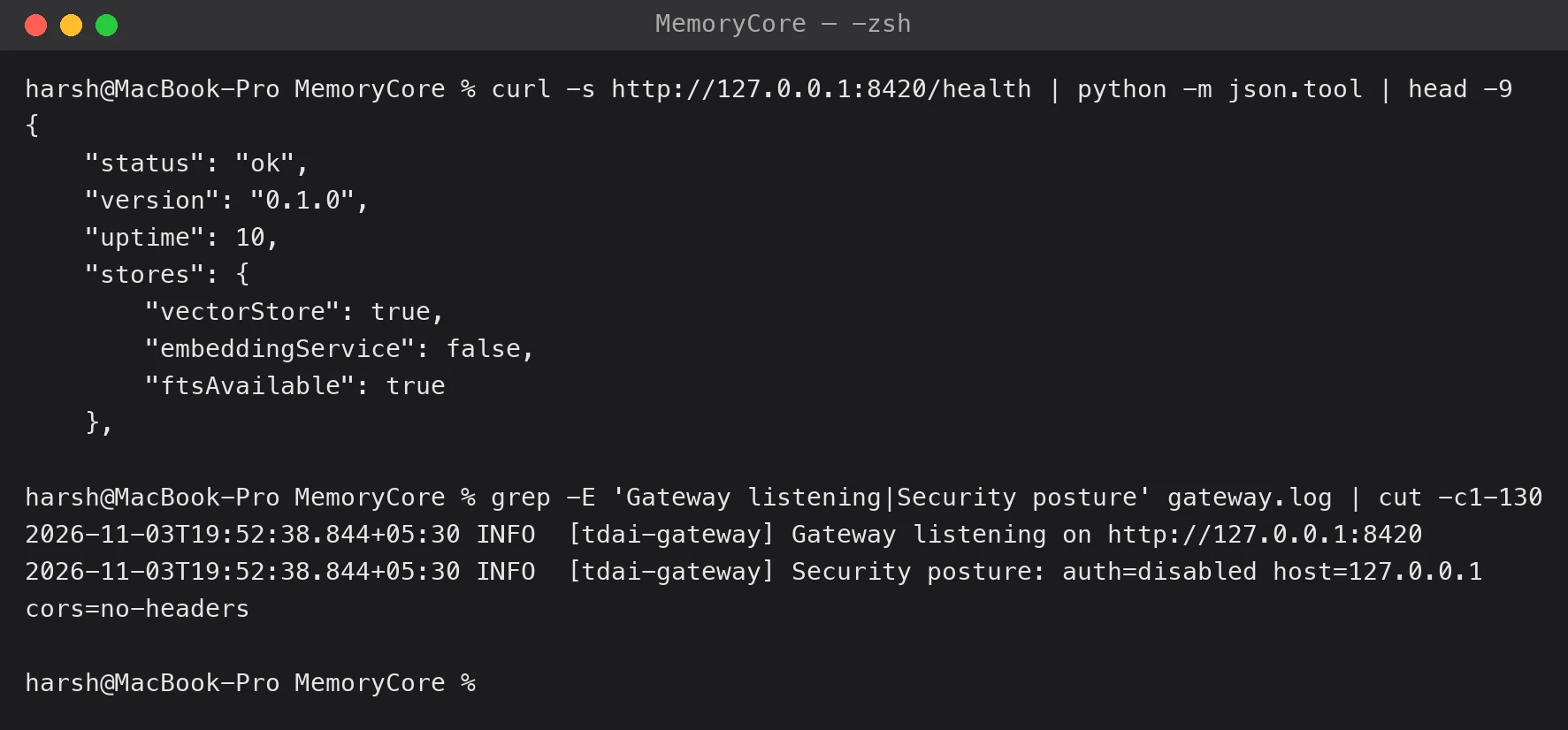
status: okmeans the gateway is up.ftsAvailable: truemeans keyword search works. Some Node builds lack this, so check it. [3]embeddingService: falsemeans there is no embedding model, so recall will use keyword (BM25) search only. [3]auth=disabledis fine on a laptop, because the gateway listens only on127.0.0.1. In standalone mode the routes I used only check that a Bearer header is present. Never expose a gateway like this to a shared network.
Step 2: Write the script
Make a folder agent-memory-lab. Install the packages: pip install requests python-dotenv openai. Create a .env file in that folder with the same three values, so that the script can call your model:
TDAI_LLM_API_KEY=your-api-key
TDAI_LLM_BASE_URL=https://api.openai.com/v1
TDAI_LLM_MODEL=your-model-name
Now the script. It is short, and it has four parts:
memory_callsends a request to Memory Core.WHOsays which team, agent and user the memory belongs to.askcalls your LLM. If you pass some memory, it is added to the prompt. Otherwise the model sees only the question.- Monday: one call to
/v3/conversation/addstores the chat. Memory Core then extracts a memory in the background, so we check every 3 seconds with/v3/atomic/searchuntil it appears. - Tuesday: the same question is asked twice, without and with the memory.
File: agent-memory-lab/memory_demo.py
"""Monday: teach the memory. Tuesday: ask the same question with and without memory."""

import os, time
import requests
from dotenv import load_dotenv
from openai import OpenAI

load_dotenv()
MEMORY = "http://127.0.0.1:8420"                 # Memory Core, running on your laptop
HEADERS = {"Content-Type": "application/json",
           "x-tdai-service-id": "default",
           "Authorization": "Bearer lab-token"}  # standalone mode only needs this header to exist
WHO = {"team_id": "pulsecart", "agent_id": "patch-engineer", "user_id": "asha"}

llm = OpenAI(api_key=os.environ["TDAI_LLM_API_KEY"], base_url=os.environ["TDAI_LLM_BASE_URL"])
MODEL = os.environ["TDAI_LLM_MODEL"]


def memory_call(path, body):
    r = requests.post(MEMORY + path, headers=HEADERS, json={**body, **WHO}, timeout=30)
    r.raise_for_status()
    return r.json()["data"]


def ask(question, memory=""):
    prompt = question if not memory else f"TEAM MEMORY:\n{memory}\n\nQUESTION:\n{question}"
    reply = llm.chat.completions.create(model=MODEL, messages=[
        {"role": "system", "content": "You are our team's patch engineer. Answer in under 90 words."},
        {"role": "user", "content": prompt}])
    return reply.choices[0].message.content.strip()


# ---------------- MONDAY: the team closes an incident and talks about it ----------------
print("MONDAY: we close incident INC-042 and talk about it")
memory_call("/v3/conversation/add", {"session_id": "monday", "messages": [
    {"role": "user", "content": "Incident INC-042 is closed. Partner Acme was paid twice after our webhook worker restarted. "
     "Lessons: keep processed event IDs for 30 days. Reply to duplicates with HTTP 200 and status duplicate, never 409, "
     "because partners retry forever on a 4xx. After the fix, run scripts/reconcile_settlements.py --window 7d to correct the doubled payouts."},
    {"role": "assistant", "content": "Noted the INC-042 lessons: 30-day retention, HTTP 200 with status duplicate (never 409), "
     "and run reconcile_settlements.py --window 7d after the fix."}]})

print("Waiting for Memory Core to turn the chat into a memory (a few seconds)...")
memory = []
for _ in range(40):
    time.sleep(3)
    memory = memory_call("/v3/atomic/search", {"query": "webhook restart duplicate payouts", "limit": 3})["items"]
    if memory:
        break
print("\nMemory stored:")
for m in memory:
    print("-", m["content"])

# ---------------- TUESDAY: a brand-new chat, same question asked two ways ----------------
question = "A partner reports duplicate payouts after our webhook worker restarted. What exactly should we do?"
print("\nTUESDAY: a brand-new chat. Same question, asked two ways.")
print("\nWITHOUT memory:\n" + ask(question))
print("\nWITH memory:\n" + ask(question, "\n".join("- " + m["content"] for m in memory)))
Step 3: Run it and compare the answers
$ python memory_demo.py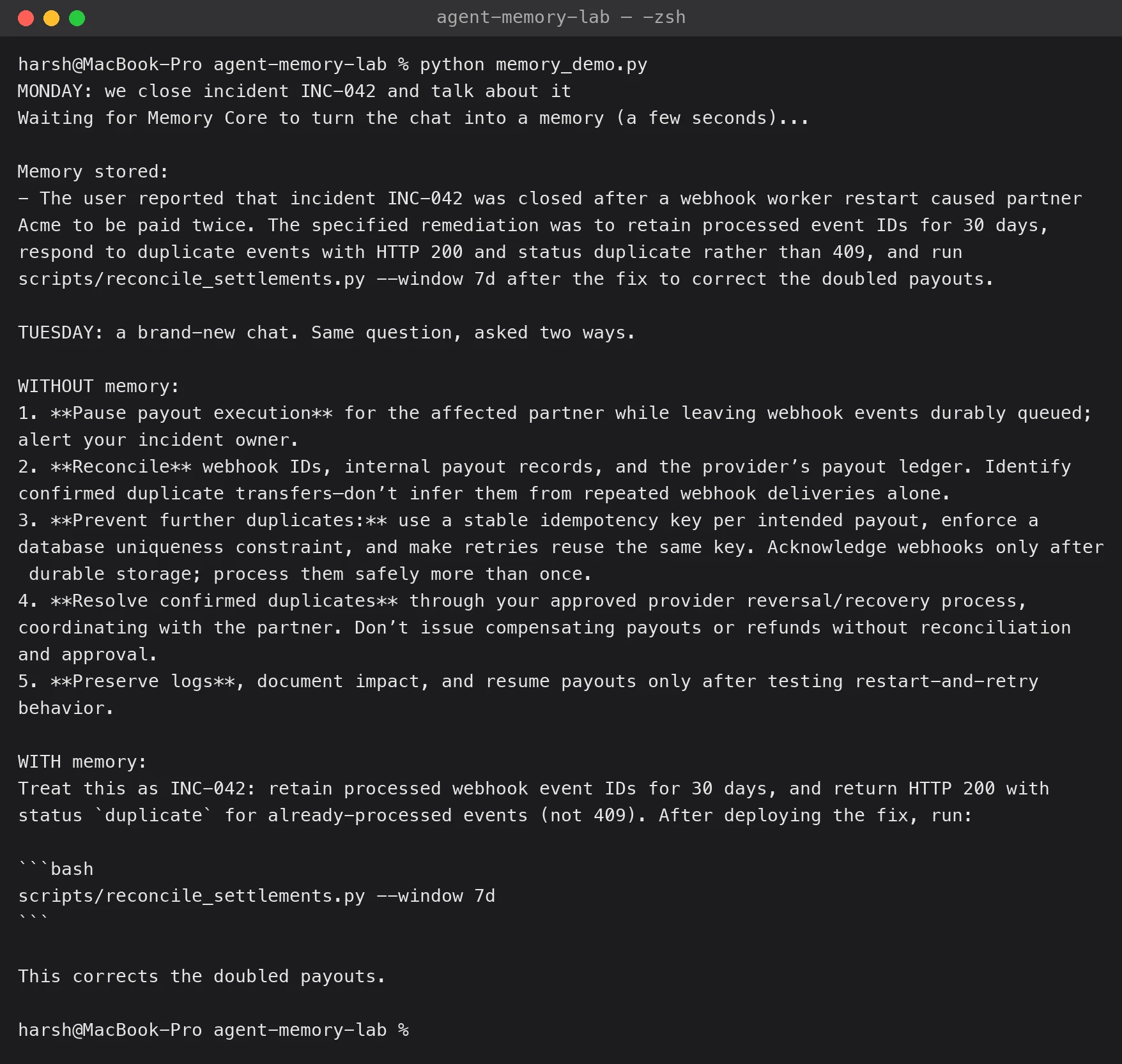
How to read this output:
- Memory stored: this is a short summary written by the model from Monday’s chat. It kept all three lessons: 30 days, HTTP 200 instead of 409, and the reconcile script.
- WITHOUT memory: a sensible, professional answer: pause payouts, reconcile, use an idempotency key, keep logs. But it says nothing about your team’s own rules. It cannot know them.
- WITH memory: the answer uses the team’s exact lessons: INC-042, keep IDs for 30 days, HTTP 200 with status
duplicate(not 409), and runscripts/reconcile_settlements.py --window 7d.
That is the whole idea. The model is the same, and the question is the same. The only difference is a memory that was saved on Monday and recalled on Tuesday.
This is one run: language models give slightly different answers each time. The next optional step checks five runs.
Optional A: Who can see this memory?
Team memory must not leak. This tiny script runs the same search as four different identities: the exact same one, another agent, another user and another team.
File: agent-memory-lab/who_can_see.py
"""Who can see Monday's memory? Same search, different identities."""
import requests

MEMORY = "http://127.0.0.1:8420"
HEADERS = {"Content-Type": "application/json", "x-tdai-service-id": "default", "Authorization": "Bearer lab-token"}
QUERY = "webhook restart duplicate payouts"

people = [
    ("Same team, same agent, same user", {"team_id": "pulsecart", "agent_id": "patch-engineer", "user_id": "asha"}),
    ("Same team, same user, other agent", {"team_id": "pulsecart", "agent_id": "release-bot", "user_id": "asha"}),
    ("Same team, same agent, other user", {"team_id": "pulsecart", "agent_id": "patch-engineer", "user_id": "ravi"}),
    ("Other team", {"team_id": "other-team", "agent_id": "patch-engineer", "user_id": "asha"}),
]
for label, who in people:
    r = requests.post(MEMORY + "/v3/atomic/search", headers=HEADERS, json={"query": QUERY, "limit": 3, **who}, timeout=30)
    print(f"{label:38s} -> {len(r.json()['data']['items'])} memories")


$ python who_can_see.py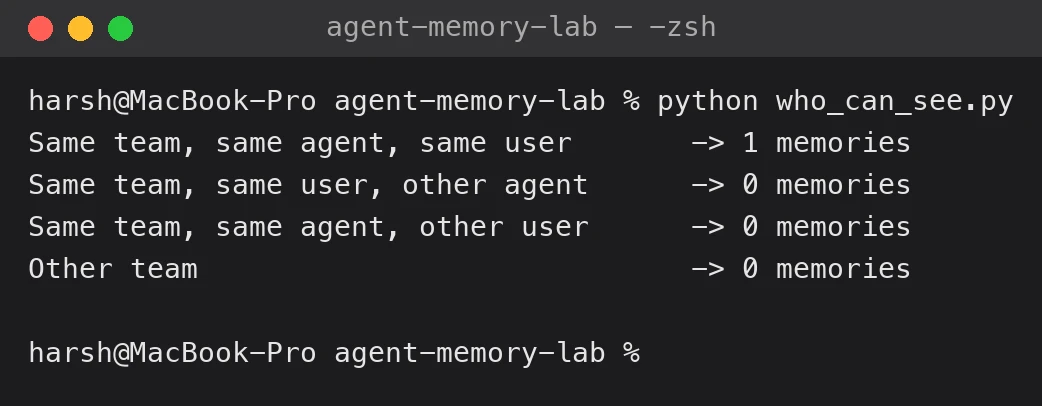
Only the exact same team, agent and user finds the memory. Even the same user, with another agent, gets 0. This matches the README, which says that new memories are private by default and that sharing is an explicit action. In the full stack, that sharing step is done in the Hub (review, share and assign). I did not run the Hub, so I did not test sharing.
Not a security test: this only checked retrieval isolation on my laptop. Do not run penetration tests against a shared deployment, and test authorization properly before you rely on it.
Optional B: Does it work every time?
One run can be luck. This script asks the question five times without memory and five times with memory. Then it counts how many answers contain each of the three team-only facts.
File: agent-memory-lab/five_times.py
"""Does it work every time? Ask the question 5 times without memory and 5 times with memory."""

import os
import requests
from dotenv import load_dotenv
from openai import OpenAI

load_dotenv()
MEMORY = "http://127.0.0.1:8420"
HEADERS = {"Content-Type": "application/json", "x-tdai-service-id": "default", "Authorization": "Bearer lab-token"}
WHO = {"team_id": "pulsecart", "agent_id": "patch-engineer", "user_id": "asha"}
llm = OpenAI(api_key=os.environ["TDAI_LLM_API_KEY"], base_url=os.environ["TDAI_LLM_BASE_URL"])
MODEL = os.environ["TDAI_LLM_MODEL"]

question = "A partner reports duplicate payouts after our webhook worker restarted. What exactly should we do?"
r = requests.post(MEMORY + "/v3/atomic/search", headers=HEADERS, timeout=30,
                  json={"query": "webhook restart duplicate payouts", "limit": 3, **WHO})
memory = "\n".join("- " + m["content"] for m in r.json()["data"]["items"])


def ask(with_memory):
    prompt = f"TEAM MEMORY:\n{memory}\n\nQUESTION:\n{question}" if with_memory else question
    reply = llm.chat.completions.create(model=MODEL, messages=[
        {"role": "system", "content": "You are our team's patch engineer. Answer in under 90 words."},
        {"role": "user", "content": prompt}])
    return reply.choices[0].message.content.lower()


# Three facts that exist ONLY in the team's memory.
checks = {
    "keep IDs for 30 days": lambda t: "30 days" in t or "30-day" in t,
    "reply HTTP 200 (not 409)": lambda t: "200" in t,
    "run reconcile script": lambda t: "reconcile_settlements" in t,
}
answers = {"without memory": [ask(False) for _ in range(5)], "with memory": [ask(True) for _ in range(5)]}

print(f"{'Fact the answer must contain':30s} {'without memory':>16s} {'with memory':>14s}")
for name, test in checks.items():
    a = sum(test(t) for t in answers["without memory"])
    b = sum(test(t) for t in answers["with memory"])
    print(f"{name:30s} {str(a) + ' of 5':>16s} {str(b) + ' of 5':>14s}")


$ python five_times.py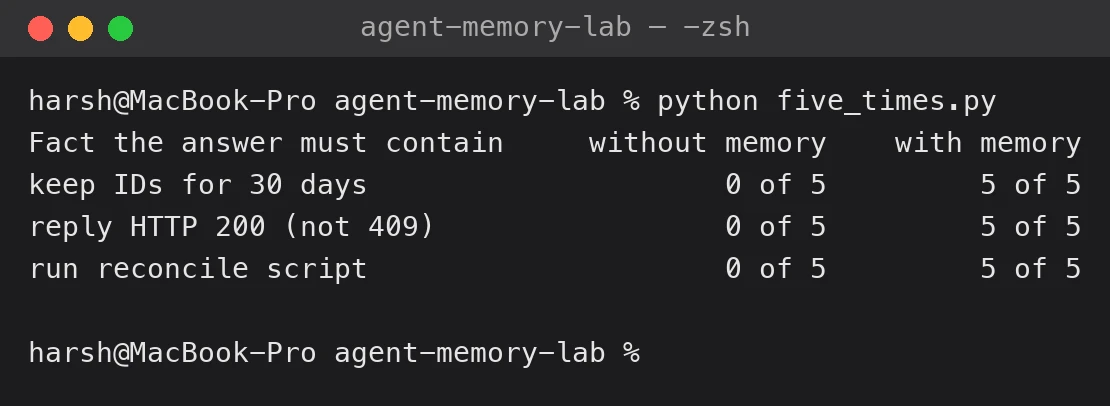
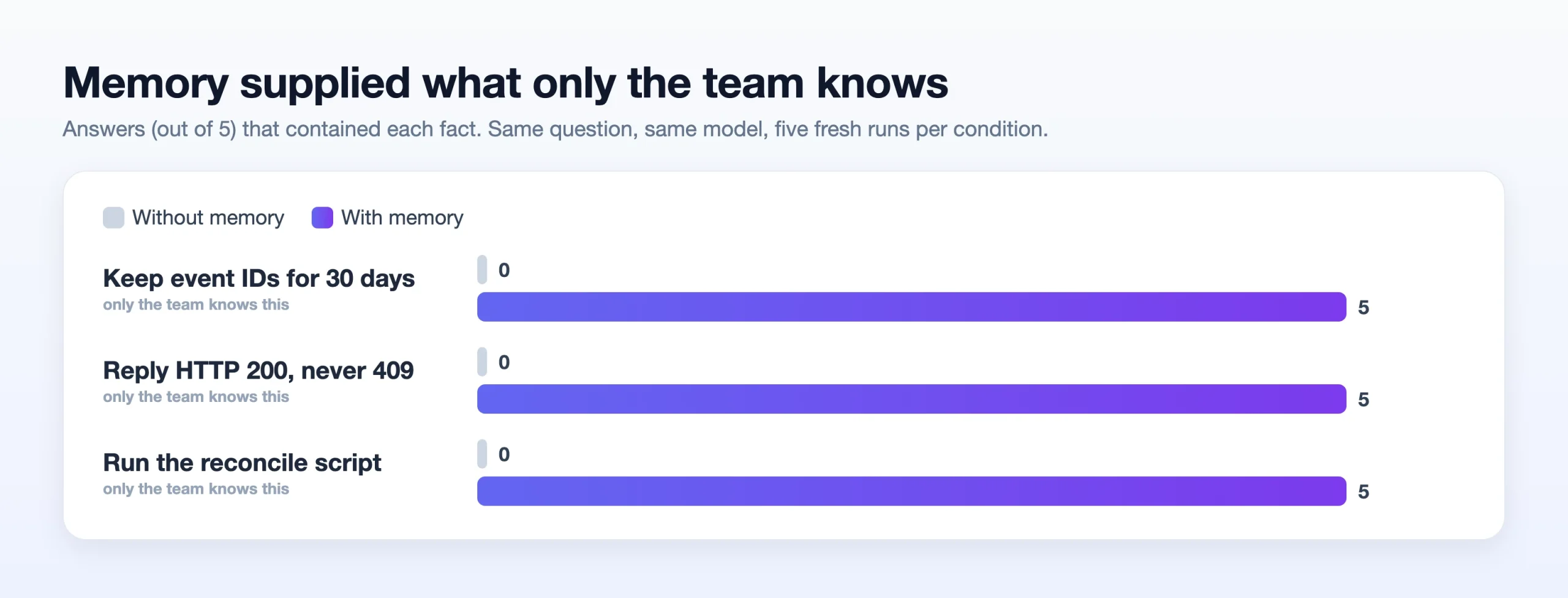
Without memory, the answers had none of the three facts, 0 of 5 each time. With memory, all five answers had all three. The checks are simple keyword checks, so they only tell us that the fact appeared, not that the whole answer is good.
When Should You Use It?
Use it when several coding agents work on the same system again and again, when knowledge comes from chats, documents and code, and when your team can spend time on review and access rules. Good examples are incident handoffs, release work, sharing skills across agents and project cold starts.
Do not add a multi-service memory stack just to store a few user preferences. A simple database, team instruction files or a small memory library can be enough. Also compare it with other memory systems on your own task. I did not test any other system in this article.
Conclusion
The best idea in TencentDB Agent Memory is not “remember everything”. It is that an engineering lesson becomes a reviewed, source-aware asset that the right agent can use later. In our small test, that worked. A brand-new chat, which had no idea about Monday, gave the team’s exact rules once the saved memory was added.
It also showed the limits. The model without memory was not wrong, only generic. Recall was keyword-only in my setup, summaries can lose details, and old decisions do not retire themselves. So the real test is not whether an agent can repeat yesterday’s chat. It is whether tomorrow’s agent makes a safer change because of it. Run a small test like this one on your own workflow before you trust it.
Read more: Harness²: Improving AI Agent Performance Without Model Upgrades
Frequently Asked Questions
Q1. Is TencentDB Agent Memory just another RAG database?
A. No. It has search, but it also extracts memories, keeps reusable Skills, builds a Wiki and a CodeGraph, and manages identity and sharing. RAG can be one part of such a system, but it does not give the whole workflow by itself.
Q2. Do I need Tencent Cloud?
A. No. The repository has a self-hosted setup with local storage, and you choose your own model endpoint. You still need a working model for the features that use one.
Q3. Is every conversation remembered forever?
A. No. Memory Core extracts important facts in the background, and not every sentence becomes a memory. In an extra test of mine, a private note produced zero extracted memories, although the raw message was still stored. Verify what was saved, and verify deletion too.
Q4. Can it work with Claude Code and Codex?
A. The README lists Claude Code, Codex, CodeBuddy, WorkBuddy, Hermes, OpenClaw and DeepSeek Harness. You point the agent’s base URL at the Proxy. I did not test any client, so follow the install guide for your client.
Q5. Should I trust the 48% to 76% result?
A. Treat it as the project’s own signal, not as a forecast for you. Test your own workload with the same controls, and report the misses.
Q6. What is the most important metric for a team handoff?
A. The rate of correct, allowed and source-backed reuse of past decisions, and the change in regressions. A low token count is not a win if the agent confidently follows the wrong rule.
Harsh Mishra is an AI/ML Engineer who spends more time talking to Large Language Models than actual humans. Passionate about GenAI, NLP, and making machines smarter (so they don’t replace him just yet). When not optimizing models, he’s probably optimizing his coffee intake. 🚀☕