
In the current era of AI, all the technical engineers would be familiar with LLMs. These LLMs have made it easier for us to complete tasks by assigning them to take on certain repetitive tasks. As AI engineers, this has undoubtedly increased our output.
However, each time we use LLMs, we use a significant number of tokens. These tokens act as a ticket for us to communicate with these models. Extra tokens are used as reasoning tokens when using a reasoning model. Sadly, the tokens that are being used are also very expensive, which leads to the user hitting the rate limit or a subscription paywall.
In order to lower our token usage and, thus, lower overall costs, we will be exploring a new notation that has just emerged called the Token-Orientated Object Notation, or TOON.
Table of contents
What’s JSON?
JavaScript Object Notation, or JSON, is a lightweight data-interchange format that is simple for computers to parse and produce as well as for humans to read and write. It is perfect for exchanging structured data between systems, such as between a client and a server in web applications, because it represents data as key-value pairs, arrays, and nested structures. Nearly all programming languages can accept JSON natively because it is text-based and independent of language. A JSON formatted data looks similar to this:
{
  "name": "Hamzah",
  "age": 22,
  "skills": ["Gen AI", "CV", "NLP"],
  "work": {
    "organization": "Analytics Vidhya",
    "role": "Data Scientist"
  }
}
Read more: JSON Prompting
What is TOON?
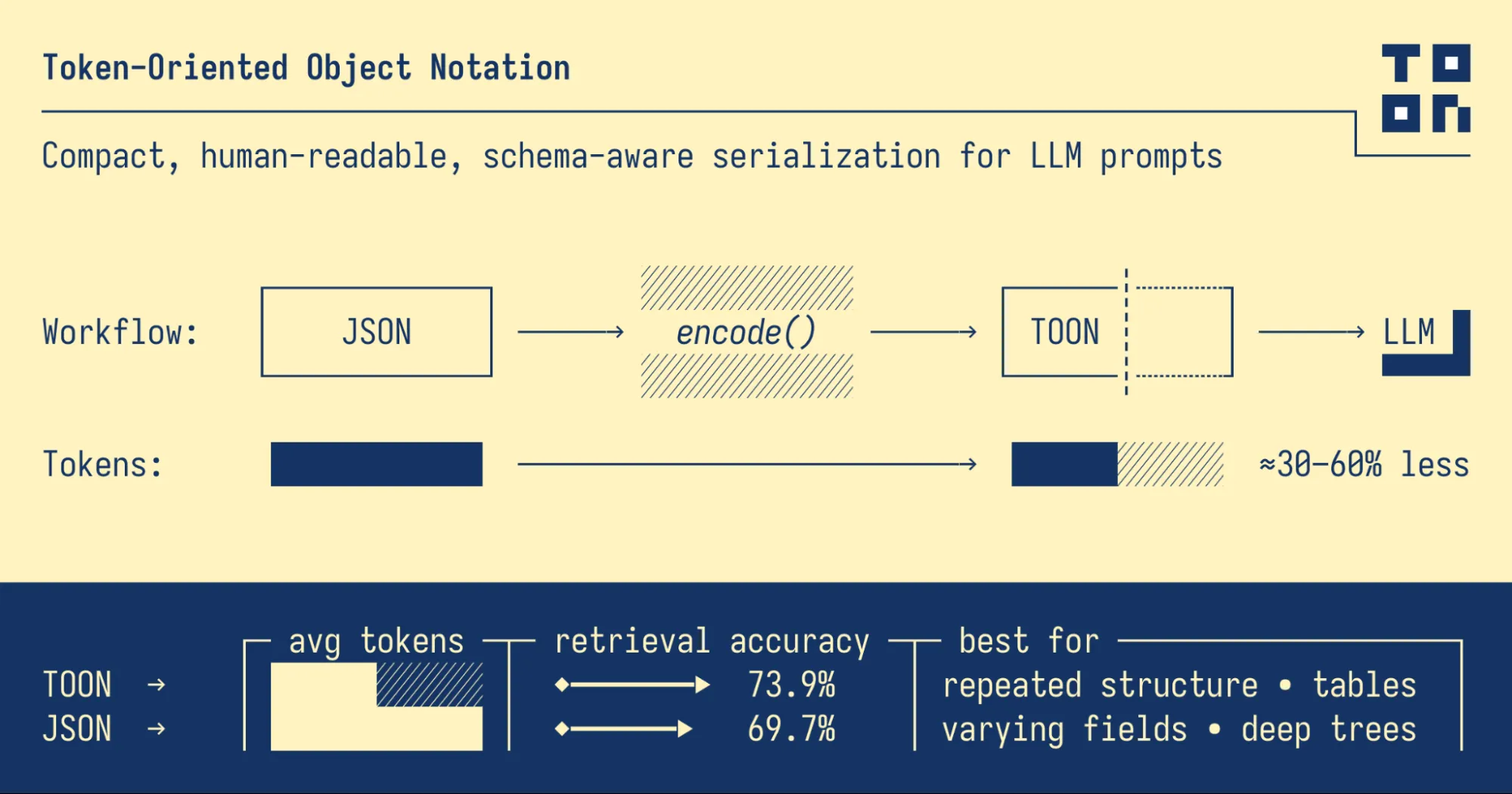
Token-Oriented Object Notation (TOON) is a compact, human-readable serialization format designed to efficiently pass structured data to Large Language Models (LLMs) while using significantly fewer tokens. It serves as a lossless, drop-in replacement for JSON, optimized specifically for LLM input.
For datasets with uniform arrays of objects, where every item has the same structure (such as rows in a table), TOON works especially well. It creates a structured and token-efficient format by fusing the tabular compactness of CSV with the indentation-based readability of YAML. JSON may still be a better representation for deeply nested or irregular data, even though TOON excels at managing tabular or reliably structured data.
In essence, TOON offers the compactness of CSV with the structure-awareness of JSON, helping LLMs parse and reason about data more reliably. Think of it as a translation layer: you can use JSON programmatically, then convert it to TOON for efficient LLM input.
For example:
JSON (token-heavy):
{
  "users": [
    {
      "id": 1,
      "name": "Alice",
      "role": "admin"
    },
    {
      "id": 2,
      "name": "Bob",
      "role": "user"
    }
  ]
}
TOON (token-efficient):
users[2]{id,name,role}:1,Alice,admin2,Bob,user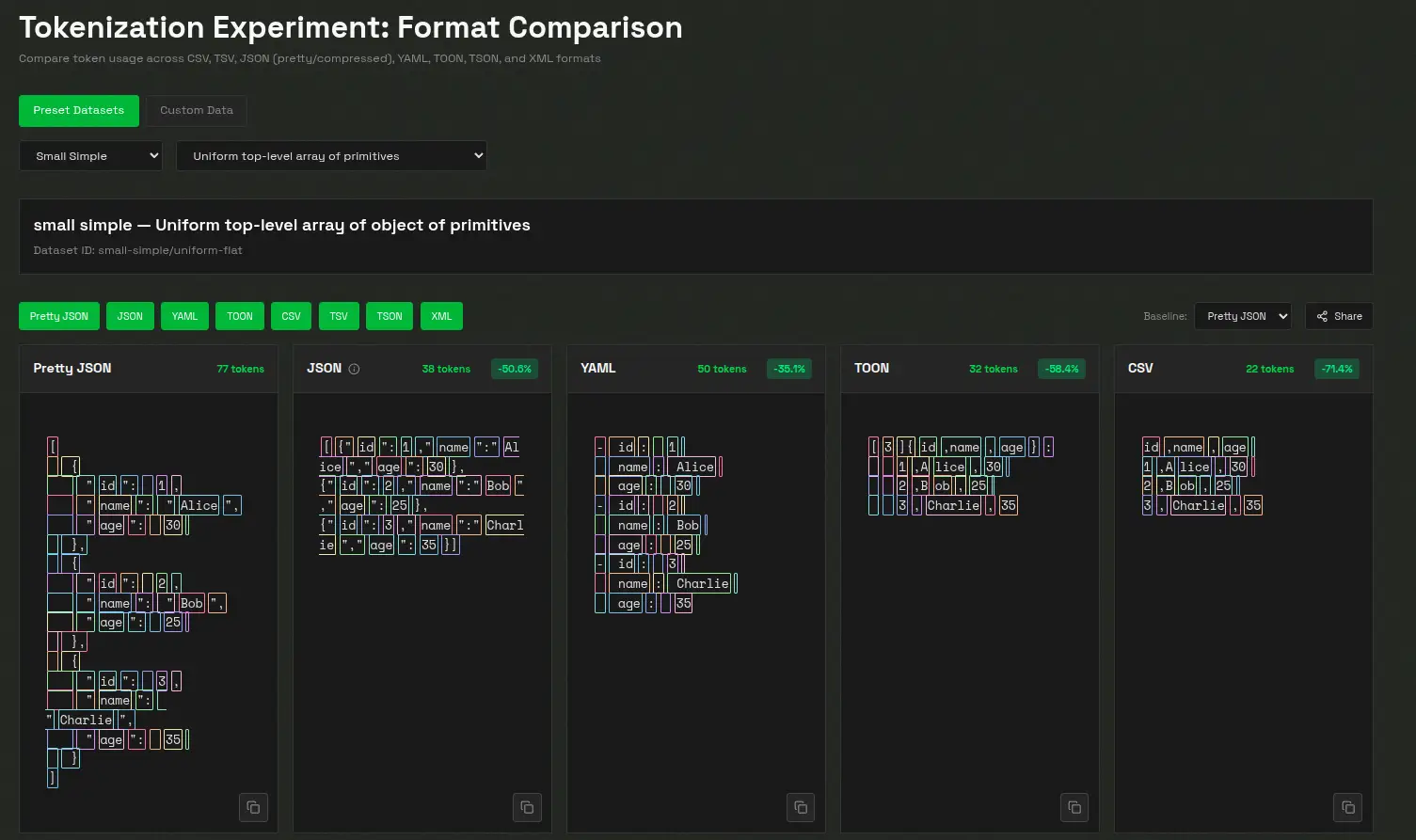
Key Features
- Token-efficient: Achieves 30–60% fewer tokens than formatted JSON for large, uniform datasets, significantly reducing LLM input costs.
- LLM-friendly guardrails: Explicit field names and declared array lengths make it easier for models to validate structure and maintain consistency.
- Minimal syntax: Eliminates redundant punctuation such as braces, brackets, and most quotation marks, keeping the format lightweight and readable.
- Indentation-based structure: Similar to YAML, TOON uses indentation instead of nested braces to represent hierarchy, enhancing clarity.
- Tabular arrays: Defines keys once, then streams rows of data efficiently, ideal for datasets with a consistent schema.
- Optional key folding: Allows nested single-key wrappers to be collapsed into dotted paths (e.g., data.metadata.items), reducing indentation and token count further.
Running TOON
A wide range of TOON implementations currently exist across multiple programming languages, supported by both official and community-driven efforts. Many mature versions are already available, while five implementations are still under active development, indicating ongoing growth and ecosystem expansion. The implementations currently in development are: .NET (toon_format), Dart (toon), Go (gotoon), Python (toon_format), and Rust (toon_format).
You can follow the installation of TOON from here. But for now I will be implementing TOON with the help of toon-python package.
Let’s run some basic code to see the main function of toon-python:
Installation
Let’s first get started with the installation
!pip install git+https://github.com/toon-format/toon-python.git -qThe TOON API is centered around two primary functions: encode and decode.encode() converts any JSON-serializable value into compact TOON format, handling nested objects, arrays, dates, and BigInts automatically while offering optional controls like indentation and key folding.decode() reverses this process, reading TOON text and reconstructing the original JavaScript values, with strict validation available to catch malformed or inconsistent structures.
TOON also supports customizable delimiters such as commas, tabs, and pipes. These affect how array rows and tabular data are separated, allowing users to optimize for readability or token efficiency. Tabs in particular can further reduce token usage since they tokenize cheaply and minimize quoting.
You can check this out here.
Code Implementation
So, let’s check out some code implementations.
I’ve included a link to my github repository where I’ve used TOON in a straightforward chatbot after the conclusion part if you want to see how you can incorporate TOON into your code.
The main import function for Python implementation would be from toon_format.
1. estimate_savings + compare_formats + count_tokens
This block takes a Python dictionary, converts it to both JSON and TOON, and calculates how many tokens each format would use. It then prints the percentage of token savings and shows a side-by-side comparison, and finally counts the tokens for a TOON string directly.
from toon_format import estimate_savings, compare_formats, count_tokens

# Measure savings
data = {
    "users": [
        {
            "id": 1,
            "name": "Alice"
        },
        {
            "id": 2,
            "name": "Bob"
        }
    ]
}

result = estimate_savings(data)
print(f"Saves {result['savings_percent']:.1f}% tokens")  # Saves 42.3% tokens

# Visual comparison
print(compare_formats(data))

# Count tokens directly
toon_str = encode(data)
tokens = count_tokens(toon_str)  # Uses tiktoken (gpt5/gpt5-mini)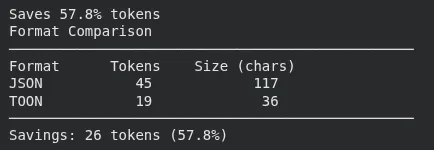
2. estimate_savings on user_data
This section measures how many tokens the user’s data would produce in JSON vs TOON. It prints the token counts for both formats and the percentage savings achieved by switching to TOON.
from toon_format import estimate_savings

# Your actual data structure
user_data = {
    "users": [
        {"id": 1, "name": "Alice", "email": "[email protected]", "active": True},
        {"id": 2, "name": "Bob", "email": "[email protected]", "active": True},
        {"id": 3, "name": "Charlie", "email": "[email protected]", "active": False}
    ]
}

# Compare formats
result = estimate_savings(user_data)

print(f"JSON: {result['json_tokens']} tokens")
print(f"TOON: {result['toon_tokens']} tokens")
print(f"Savings: {result['savings_percent']:.1f}%")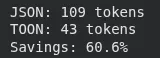
3. Estimating money saved using TOON
This block runs token savings on a larger dataset (100 items), then applies GPT-5 pricing to calculate how much each request costs in JSON versus TOON. It prints the cost difference per request and the projected savings over 10,000 requests.
from toon_format import estimate_savings

# Your typical prompt data
prompt_data = {
    "context": [
        {"role": "system", "content": "You are a helpful assistant"},
        {"role": "user", "content": "Analyze this data"}
    ],
    "data": [
        {"id": i, "value": f"Item {i}", "score": i * 10}
        for i in range(1, 101)  # 100 items
    ]
}

result = estimate_savings(prompt_data["data"])

# GPT-5 pricing (example: $0.01 per 1K tokens)
cost_per_1k = 0.01

json_cost = (result['json_tokens'] / 1000) * cost_per_1k
toon_cost = (result['toon_tokens'] / 1000) * cost_per_1k

print(f"JSON cost per request: ${json_cost:.4f}")
print(f"TOON cost per request: ${toon_cost:.4f}")
print(f"Savings per request: ${json_cost - toon_cost:.4f}")
print(f"Savings per 10,000 requests: ${(json_cost - toon_cost) * 10000:.2f}")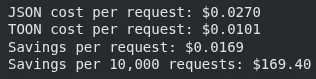
When not to use TOON?
While TOON performs exceptionally well for uniform arrays of objects, there are scenarios where other data formats are more efficient or practical:
- Deeply nested or non-uniform structures: When data has many nested levels or inconsistent fields (tabular eligibility ≈ 0%), compact JSON may actually use fewer tokens. This is common with complex configuration files or hierarchical metadata.
- Semi-uniform arrays (~40–60% tabular eligibility): Token savings become less significant as structural consistency decreases. If your existing data pipelines are already built around JSON, sticking with it may be more convenient.
- Pure tabular data: For flat datasets, CSV remains the most compact format. TOON introduces a small overhead (~5–10%) to include structural elements like field headers and array declarations, which improve LLM reliability but slightly increase size.
- Latency-critical applications: In setups where end-to-end response time is the top priority, benchmark TOON and JSON before deciding. Some deployments, especially with local or quantized models (e.g., Ollama)—may process compact JSON faster despite TOON’s token savings. Always compare TTFT (Time To First Token), tokens per second, and total processing time for both formats.
Conclusion
By providing an organised, compact, and extremely token-efficient substitute for conventional formats like JSON, TOON marks a significant change in the way we prepare data for LLMs. Reducing token usage immediately results in cheaper operating expenses, particularly for users that pay per token through API credits, as more developers depend on LLMs for automation, analysis, and application workflows. TOON also increases extraction accuracy, lowers ambiguity, and boosts model reliability across a variety of datasets by making data more predictable and simpler for models to digest.
Formats like TOON have the potential to completely change how LLMs handle structured data in the future. Efficient representations will become ever more important in managing cost, delay, and performance as AI systems advance to handle larger, more complicated contexts. Developers will be able to create richer apps, scale their workloads more effectively, and provide faster, more accurate results using tools that lower token usage without compromising structure. TOON is not just a new data format. It’s a step towards a time where everyone can deal with LLMs more intelligently, affordably, and effectively.
Frequently Asked Questions
Q1. What is TOON and why was it created?
A. TOON cuts token usage by sending structured data to LLMs in a compact, clear format.
Q2. How does TOON differ from JSON?
A. It removes most punctuation, uses indentation, and defines fields once, which lowers token count while keeping structure readable.
Q3. When is TOON most effective?
A. It shines with uniform arrays of objects, especially tabular data where every row shares the same schema.
Data Scientist @ Analytics Vidhya | CSE AI and ML @ VIT Chennai
Passionate about AI and machine learning, I'm eager to dive into roles as an AI/ML Engineer or Data Scientist where I can make a real impact. With a knack for quick learning and a love for teamwork, I'm excited to bring innovative solutions and cutting-edge advancements to the table. My curiosity drives me to explore AI across various fields and take the initiative to delve into data engineering, ensuring I stay ahead and deliver impactful projects.






