Late last year, Google came up with a comprehensive plan to fix the current educational system for the better. How? Majorly with the help of Artificial Intelligence, or AI, in education. We had covered the plan in a detailed report at the time, which you can read here. Ever since, the tech giant’s AI solutions have evolved to cater especially to the stakeholders of education, be it the students or their teachers. Its recent free AI bundle for students was a glimpse of it. Its suite of extensive features for teachers in NotebookLM is yet another hint.
The idea may sound new to some – using NotebookLM for teaching. But trust me when I say this: when used with the right prompts, NotebookLM can elevate the entire teaching process to a whole new level. You can generate lesson plans, teaching scripts, worksheets, assessments, and revision material, all in seconds. This article is a step to help teachers (and learners) in that direction. Here, we break down practical, classroom-ready NotebookLM prompts by category, show how they work, and explain how, when fit into your subject, they can make the whole teaching process as easy as a breeze.
So, go ahead, try out these prompts, and experience the power of AI in teaching like never before, all thanks to NotebookLM.
Table of contents
NotebookLM: Getting Started
For those unaware, NotebookLM is one of the most powerful AI tools out there today. I have stressed on the tool and its capabilities repeatedly through my earlier write-ups (Check them out in the links below). Simply because when used in the right fashion, there is nothing that beats NotebookLM, be it straight-up responses to your queries, visual and audio assets, or even quizzes to help you learn better.
Also read: 10 NotebookLM Super Prompts For Pro-Level Productivity
Also read: 7 Cool Google NotebookLM Features No One Told You
But what is it? The simple answer is hidden in its name – Notebook + LM/ Language Model (or in simple words – AI model). The idea behind it is to make an AI work only on the material you provide to it. So if you upload a PDF as a source, all its answers will be sourced from within that PDF, and not the internet. Needless to say, this is a powerful differentiator from the regular AI chatbots like ChatGPT and Gemini, which can vary from the lead material and source their answers from anywhere on the internet.
There are, of course, several other features that make NotebookLM stand apart. To understand all of them, I suggest you read this article of ours on NotebookLM and its working. Or better yet, take this short and free course that will make you a NotebookLM expert with a series of explainer videos, all within an hour.
For now, we understand you have a basic understanding of NotebookLM and are looking for the perfect prompts to apply to your new ways of teaching. So without any further ado, let’s dive right into those.
Category 1: Lesson Planning and Curriculum Design
Lesson planning is where teachers spend the most invisible hours. Any lesson plan requires objectives, topics, and activities, and should ensure syllabus coverage. While this is days’ worth of tasks manually, NotebookLM has been trained to reduce that time to minutes (and even seconds, if you play it right).
NotebookLM simplifies lesson planning by working directly with your curriculum documents, textbooks, and class notes, ensuring every lesson stays aligned with prescribed material. Here, we have some prompts to help you do just that. Go through them one by one and see what fits you the best. You can also treat these prompts as examples to come up with your own, more tailored prompts that help you yield the best outputs.
1. Generate a Complete Lesson Plan
Prompt:
Using the uploaded textbook chapters and syllabus document, create a detailed lesson plan for [topic name] for a [grade/class] class.
Include learning objectives, key concepts, teaching flow, in-class activities, examples, and a short recap.
Expected Output:
- Clear learning objectives aligned to the syllabus
- Step-by-step teaching sequence
- Concept explanations using textbook language
- Suggested classroom activities
- A concise recap section for revision
Example:
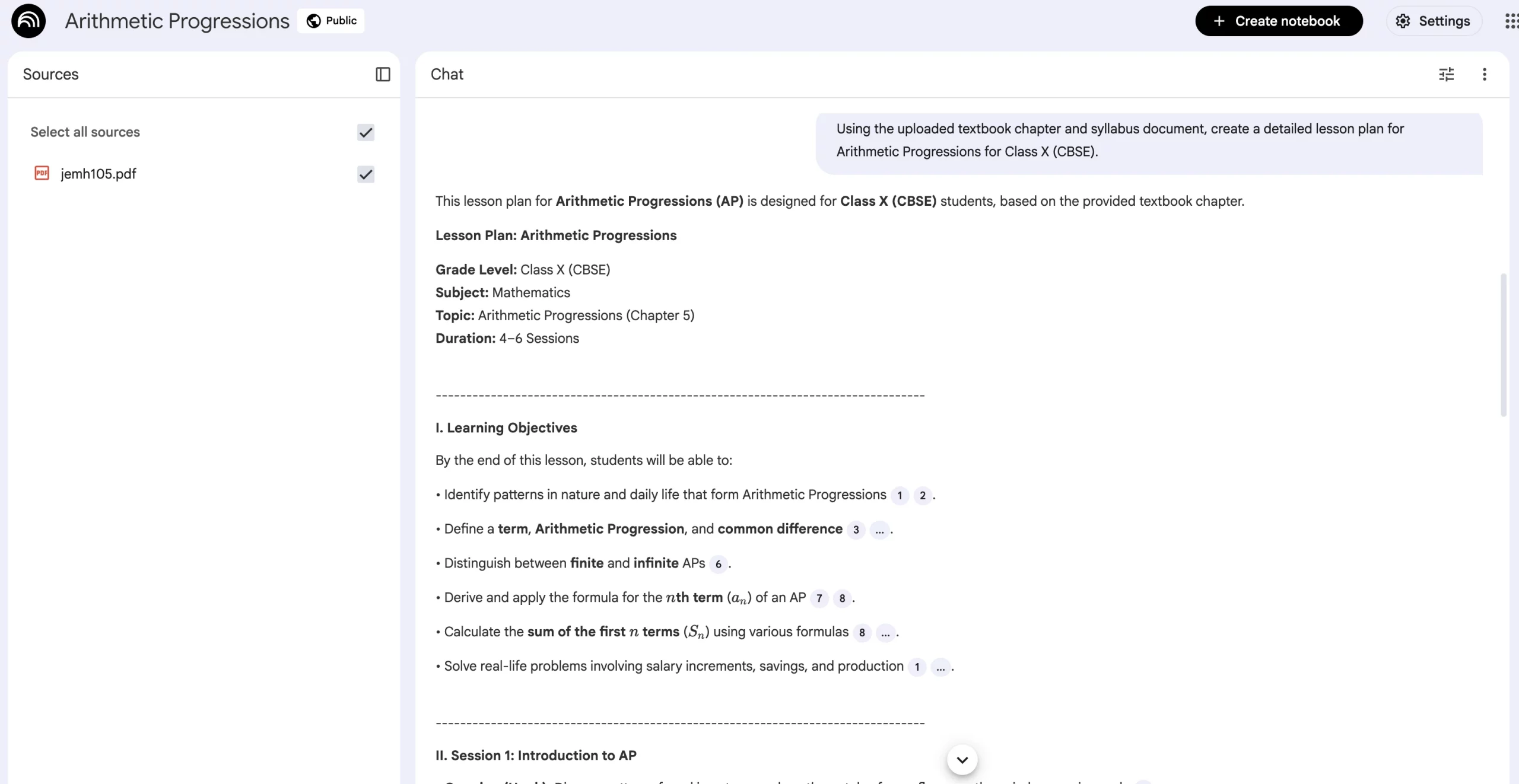
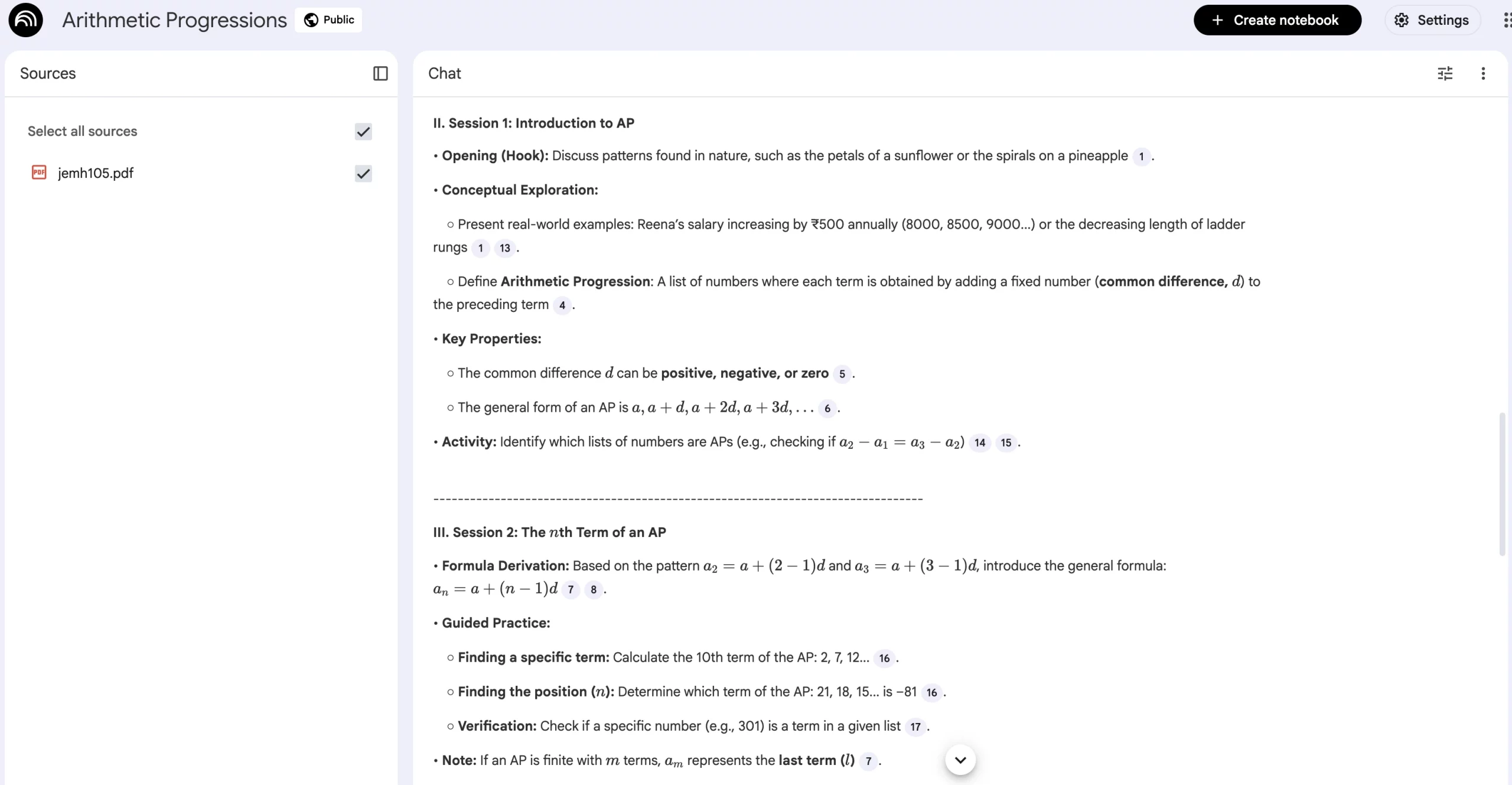
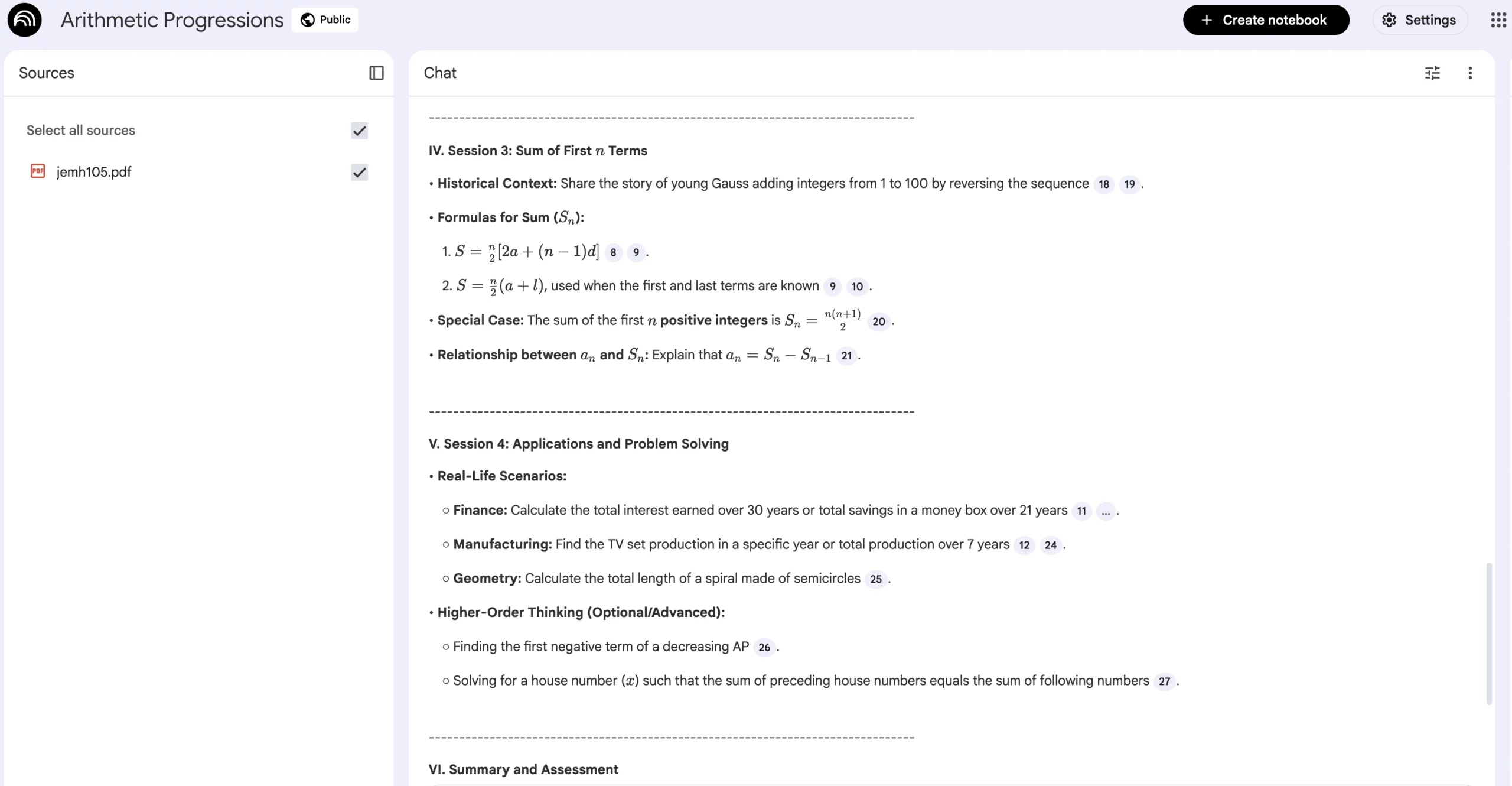
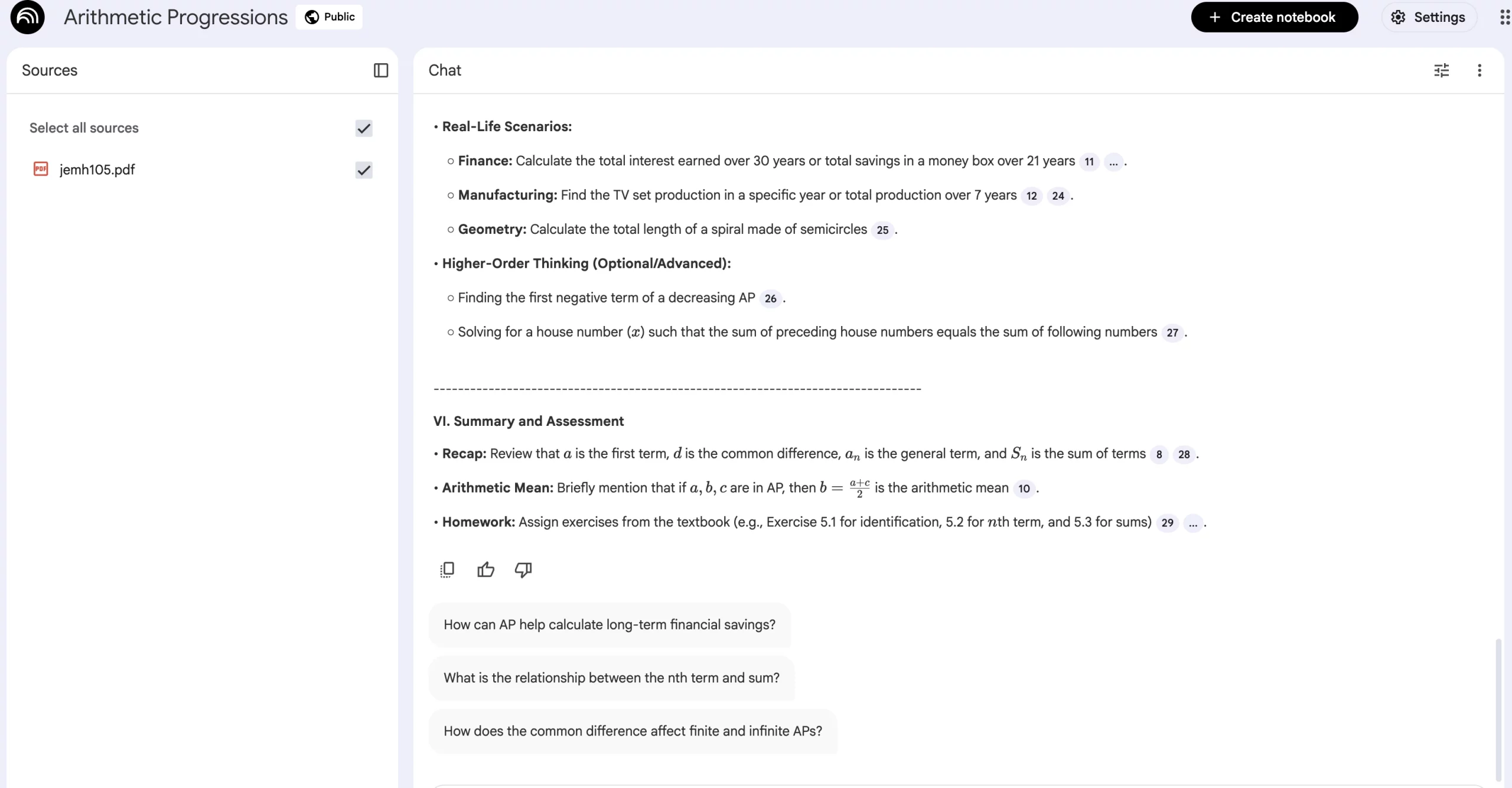
To give you a hint of how the output will look, I have used the ‘Arithmetic Progressions’ chapter from the NCERT Class X Mathematics book as the source (can be downloaded here). Once I uploaded the PDF to NotebookLM, I used the same prompt as above with the right inserts.
So the prompt becomes: Using the uploaded textbook chapters and syllabus document, create a detailed lesson plan for Arithmetic Progressions for Class X (CBSE).
You can check out the output in the images below:
2. Create a Daily Teaching Schedule
Prompt:
Based on the provided syllabus and academic calendar, break [chapter/topic] into a day-wise teaching plan for [number of classes or weeks].
Expected Output:
- Day-wise topic breakup
- Logical progression of concepts
- Balanced distribution of theory and practice
- Built-in buffer or revision days
3. Design a 40-Minute / 60-Minute Class Structure
Prompt:
Create a [40/60]-minute class plan for teaching [topic] using the uploaded materials. Allocate time for introduction, explanation, examples, student interaction, and recap.
Expected Output:
- Time-mapped lesson structure
- Clear pacing guidance
- Interactive moments highlighted
- Practical examples sourced from the material
In a similar fashion, you can use NotebookLM to align lesson objectives with exam requirements, or even create a substitute teacher lesson plan. Simply upload your study material, and let it do its magic.
Category 2: Different Teaching Styles
Every classroom is different, and so is every learner. Some students grasp concepts quickly through stories and examples, others prefer step-by-step logic, while some need visual or discussion-based explanations. NotebookLM helps teachers adapt how they teach a concept without changing what they teach. Since it works strictly with your uploaded material, you can generate multiple teaching styles for the same topic, all with just the right prompt.
Here are some NotebookLM prompts that will help teachers stay aligned with the topics, while changing their teaching style as needed.
4. Story-Based Teaching Style
Prompt:
Using the uploaded material, explain [topic] through a short story or real-life scenario suitable for [grade/class] students.
Expected Output:
- Narrative-style explanation
- Real-life or relatable context
- Better engagement for younger or conceptual learners
Example:
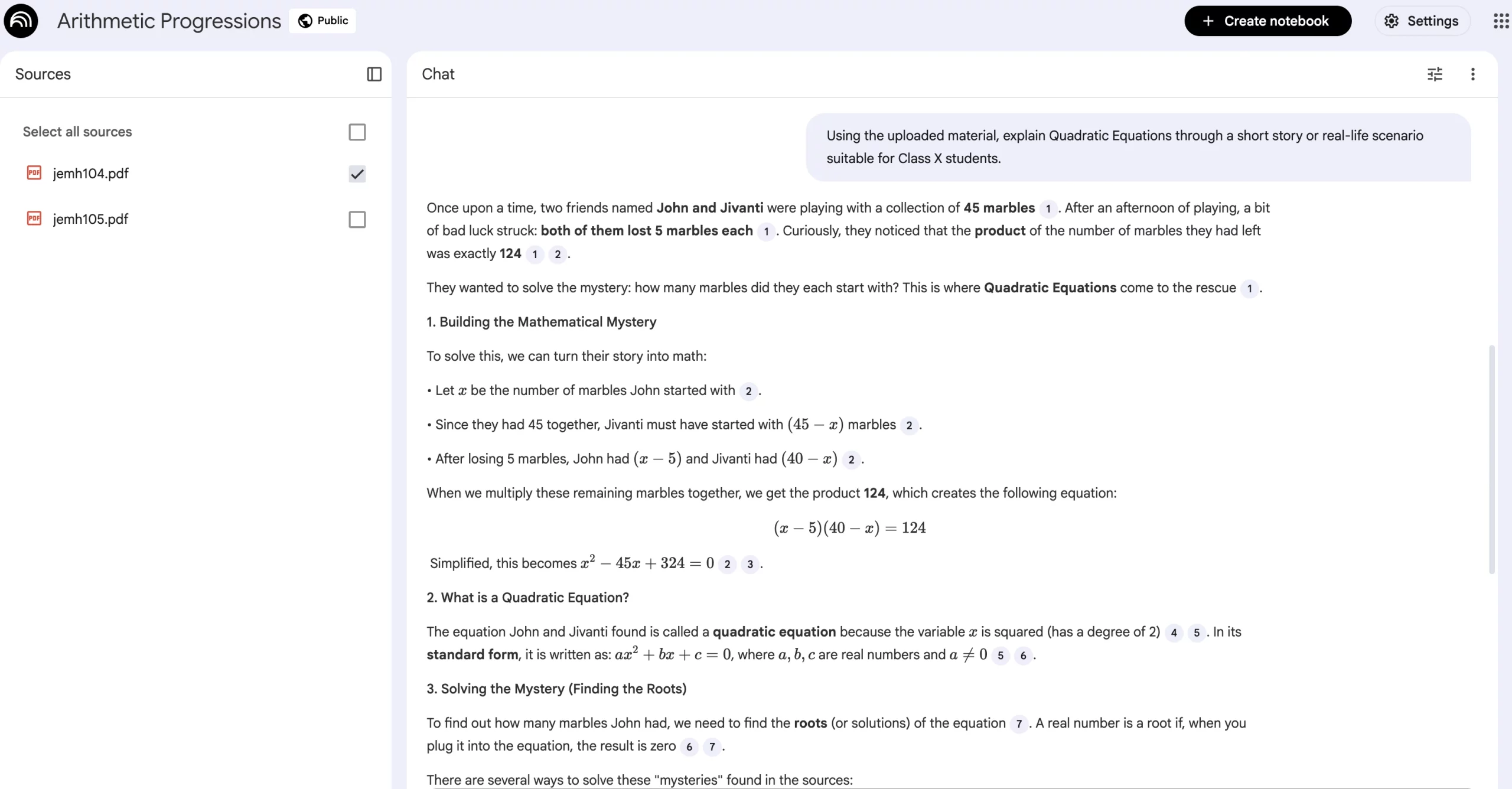
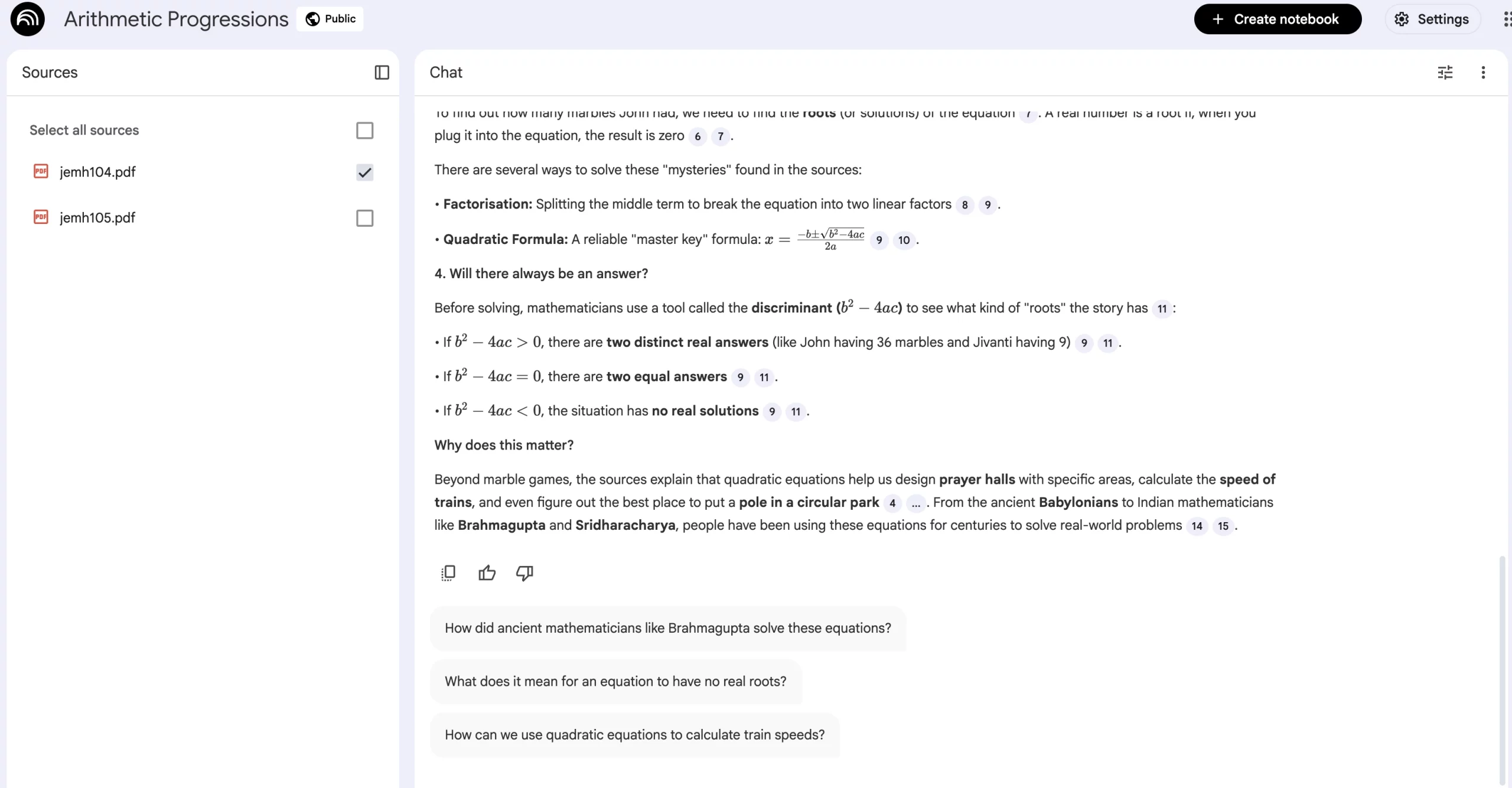
From the same NCERT Class X Mathematics book, I have used the Quadratic Equations chapter as the source here. Once I uploaded the PDF to NotebookLM, I used the prompt as below.
The prompt becomes: Using the uploaded material, explain Quadratic Equations through a short story or real-life scenario suitable for Class X students.
You can check out the output in the images below:
5. Question-Led (Socratic) Teaching Style
Prompt:
Teach [topic] by framing it as a series of guiding questions based on the uploaded material, leading students to the concept step by step.
Expected Output:
- Question-driven explanation
- Encourages classroom discussion
- Helps students discover answers on their own
6. Exam-Oriented Teaching Style
Prompt:
Teach [topic] using the uploaded material with an exam-oriented approach, highlighting definitions, key points, and commonly tested areas.
Expected Output:
- Emphasis on scoring points
- Concise definitions
- Focus on what students must remember
Similarly, you can use NotebookLM to come up with a special teaching style for quick revision before exams, or maybe break down deep into concepts by using a step-by-step logical explanation style. The possibilities are immense once you get the hang of it.
Category 3: Worksheets and Activities
Creating worksheets and classroom activities is one of the most time-consuming parts of a teacher’s day. NotebookLM simplifies this by turning your existing lesson notes, textbooks, or reference material into ready-to-use worksheets and activities in seconds. Since the AI only works with the sources you upload, every question and task stays aligned with your syllabus, terminology, and learning objectives.
The prompts below will help you do just that – create assignments and worksheets in seconds, for the topic you need, with the syllabus you have. Try these, or customise your own based on them, and see the magic unfold.
7. Notes-Aligned Quiz
Prompt:
Create a 10-question quiz on [TOPIC] aligned to these notes, plus an answer key.
Output:
A syllabus-aligned quiz with clear questions and a complete answer key.
Example:
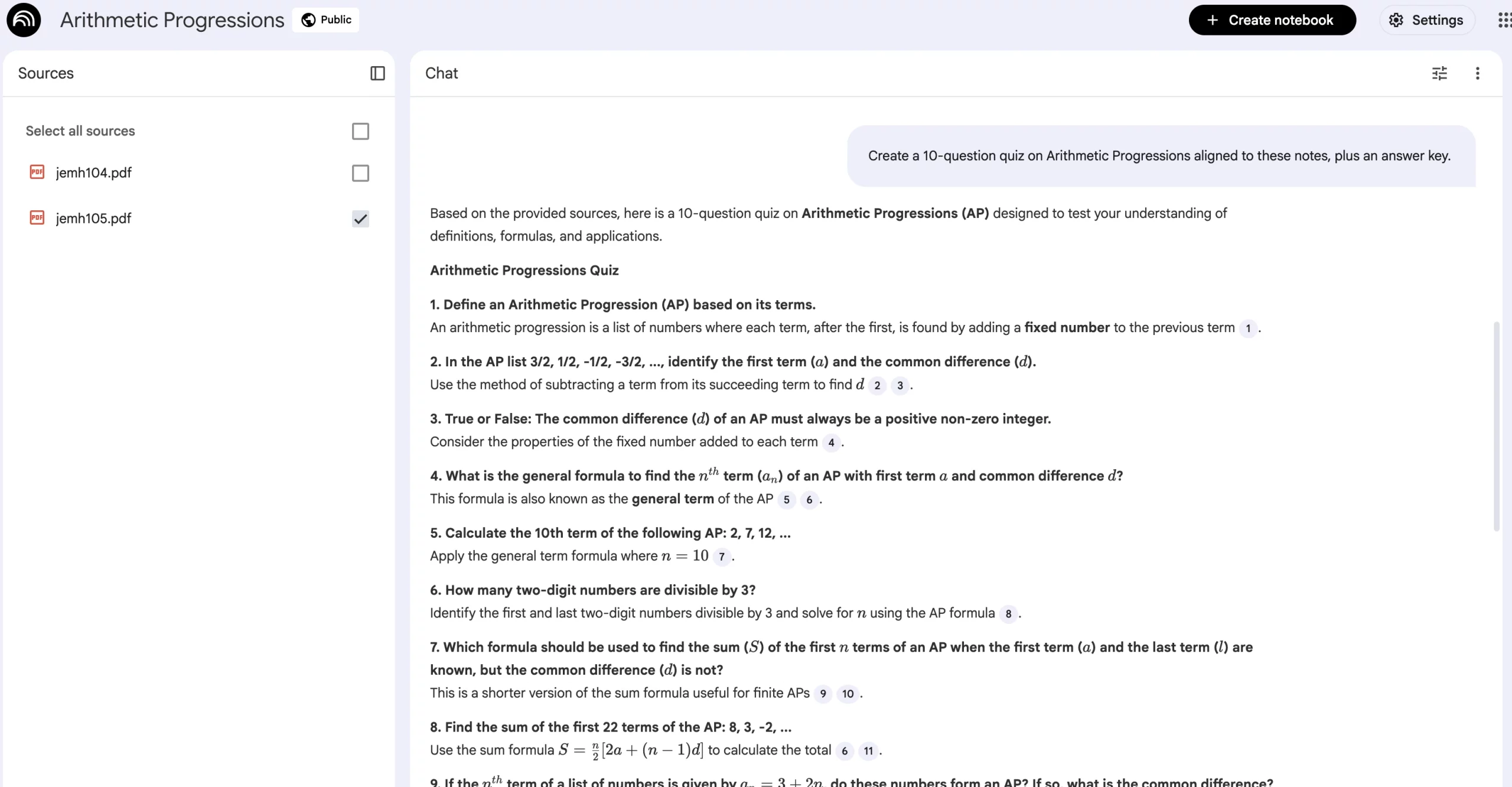
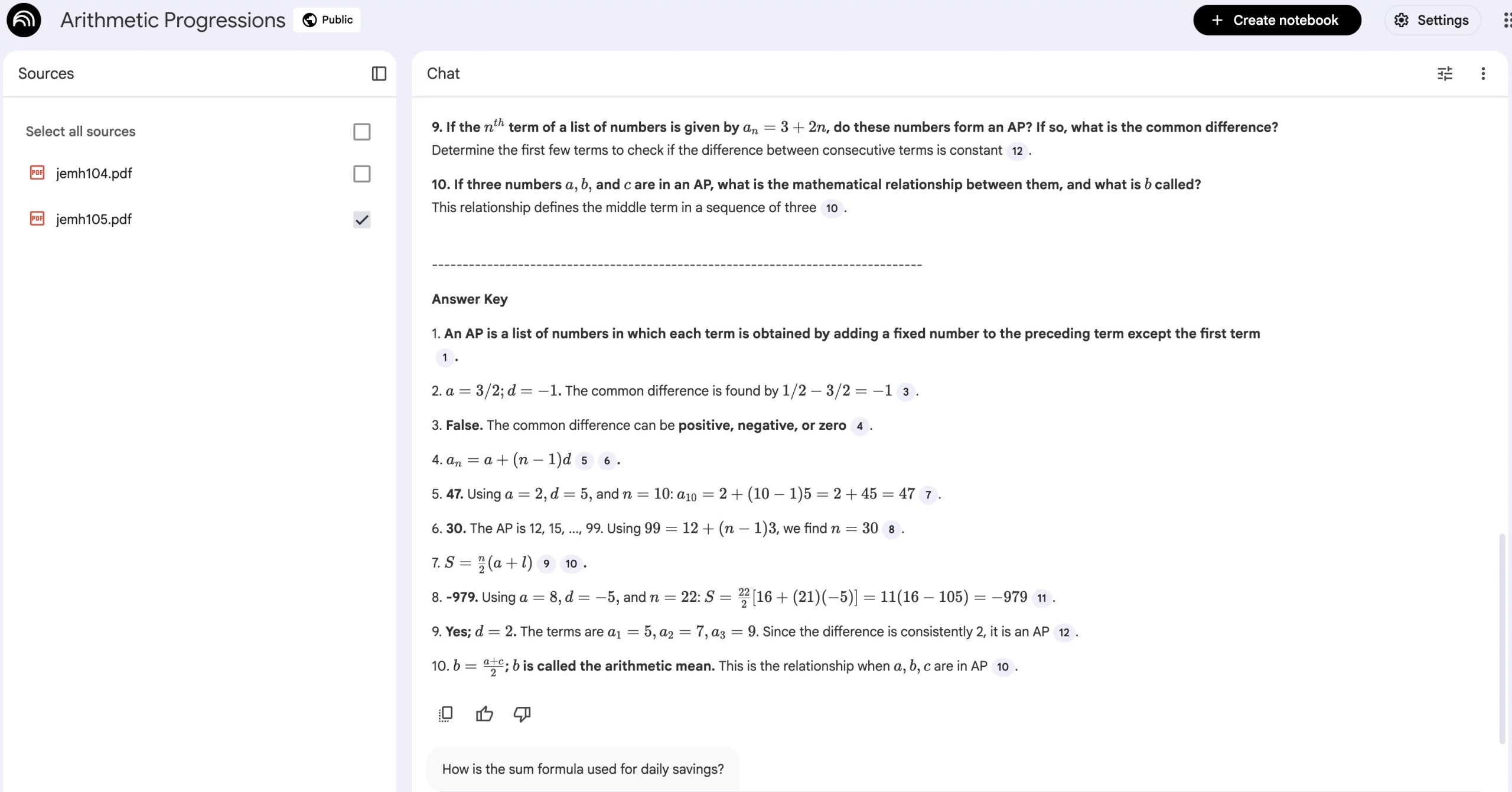
Let us continue with the Arithmetic Progressions chapter as the source here and have a look at the output NotebookLM generates with this prompt.
The prompt becomes: Create a 10-question quiz on Arithmetic Progressions aligned to these notes, plus an answer key.
You can check out the output in the images below:
8. Exit Ticket Questions
Prompt:
Write 5 exit ticket questions (2 recall, 2 apply, 1 reflect) for today’s lesson on [TOPIC].
Output:
Short questions that quickly reveal student understanding before class ends.
9. Grading Rubric
Prompt:
Create a rubric for [ASSIGNMENT] with 4 criteria and 4 performance levels.
Output:
A structured rubric that simplifies grading and sets clear expectations.
Pro tip: You can also use the “Quiz” feature of NotebookLM to come up with an entire MCQ-type quiz on the topic of your choice within minutes. For this, all you have to do is upload the source material you have and click on the Quiz feature from the right panel. Once the quiz is ready, it will flash under your assets list on the right.
Category 4: Slides and Teaching Script
This is a repeated activity that often takes a lot of preparation time. NotebookLM helps teachers compress hours of planning into minutes by turning source material into structured slides and clear teaching scripts. These prompts are especially useful when you want consistency across sections, substitute-friendly lesson delivery, or clarity around difficult concepts.
Note that here you can change the slide counts, time limits, or grade levels, and obtain the teaching scripts that best fit your needs.
10. Slide Outline
Prompt:
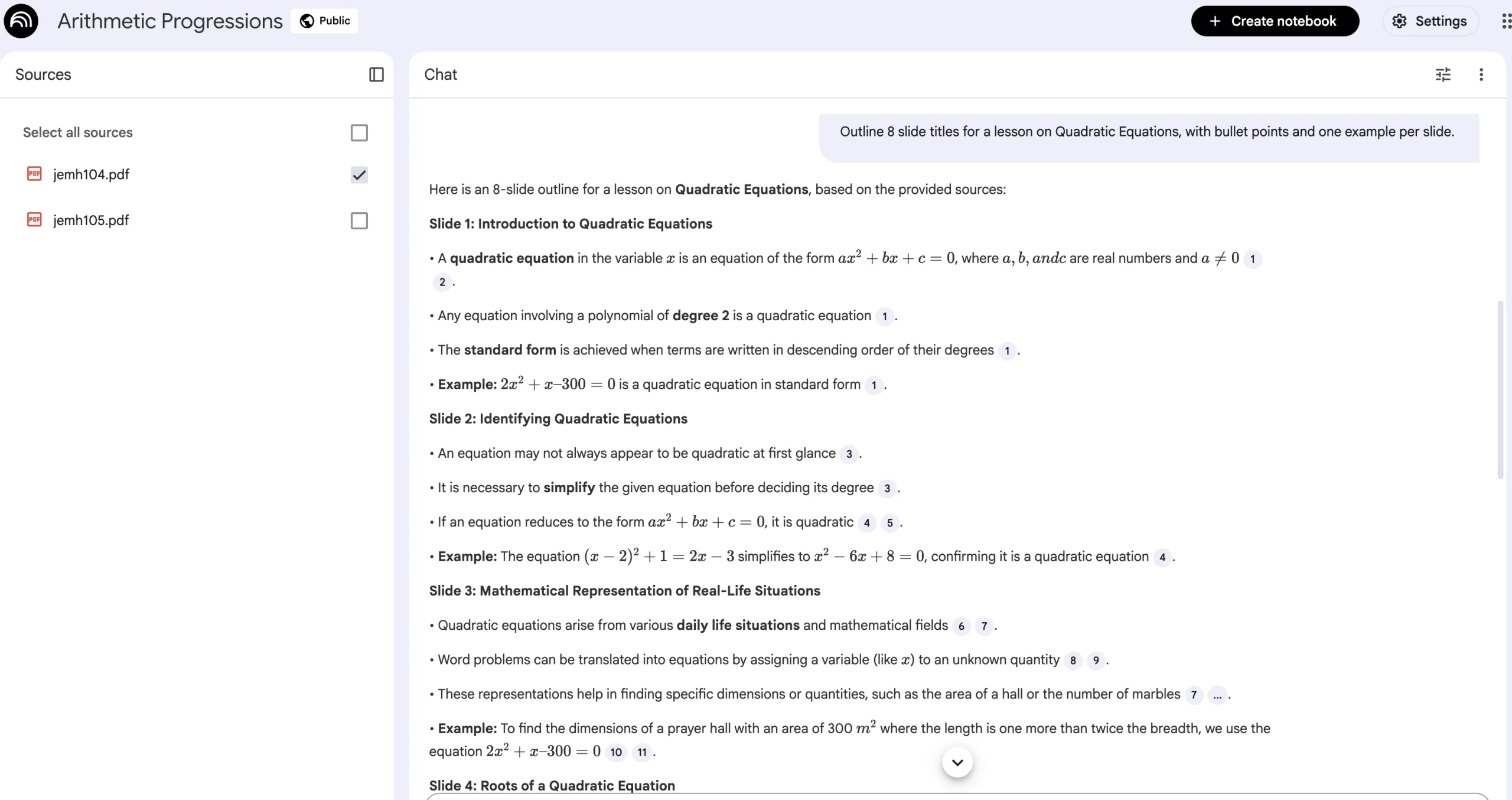
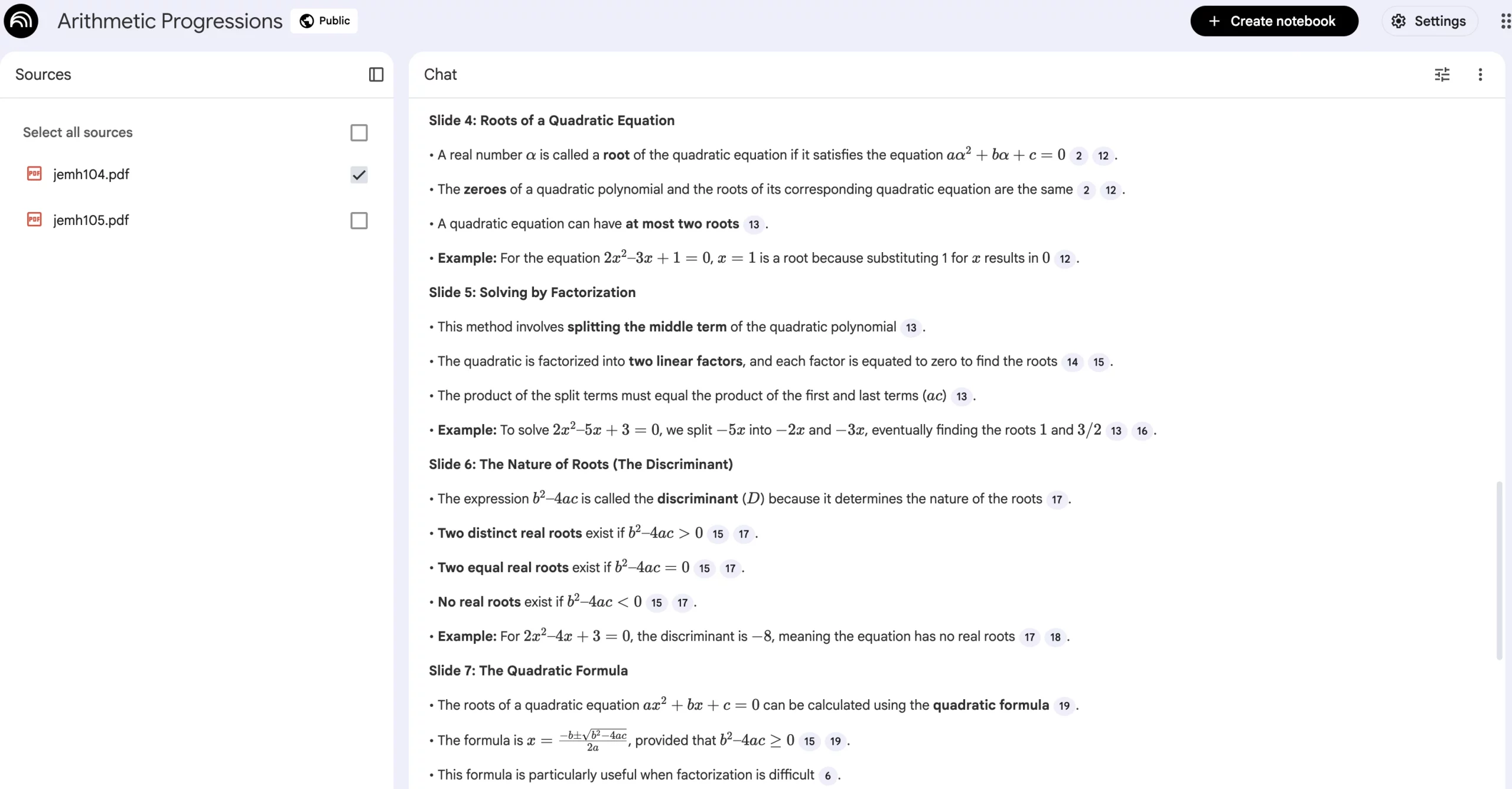
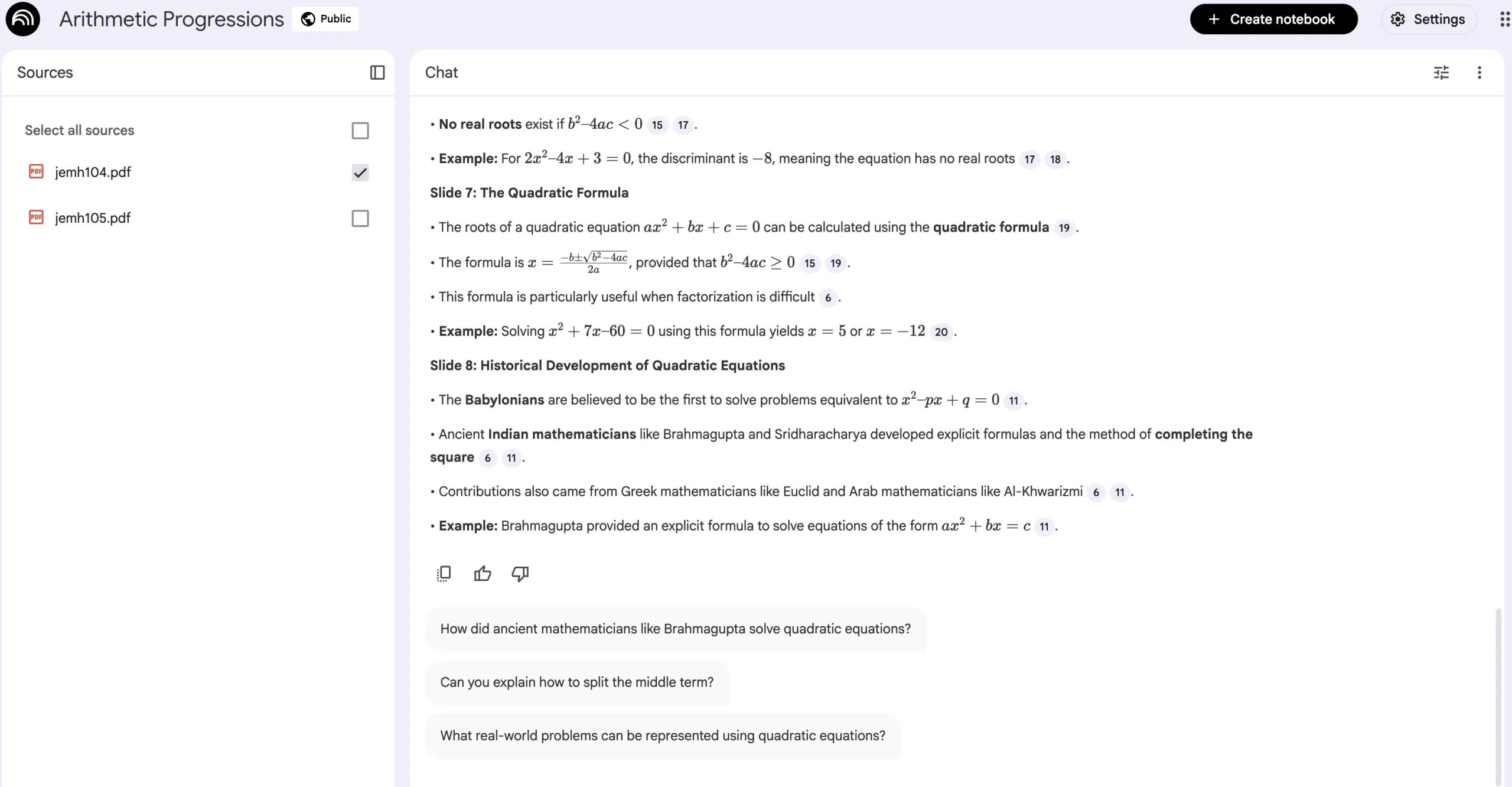
Outline 8 slide titles for a lesson on [TOPIC], with bullet points and one example per slide.
Output:
A ready-to-build slide structure with clear progression and examples.
Example:
Let us use the Quadratic Equations module as the source here and check out NotebookLM’s output using this prompt.
The prompt becomes: Outline 8 slide titles for a lesson on Quadratic Equations, with bullet points and one example per slide.
You can check out the output in the images below:
11. Short Teaching Script
Prompt:
Write a teacher script for explaining [CONCEPT] in 2 minutes, with one student question you expect.
Output:
A concise explanation plus a realistic student question to prepare for.
12. Common Misconceptions
Prompt:
Create 5 common misconceptions about [TOPIC] and explain how to correct each.
Output:
A misconception guide teachers can proactively address during lessons.
13. Concept Breakdown for Students (New)
Prompt:
Explain [CONCEPT] in simple classroom language, followed by one example and one quick check question.
Output:
Student-friendly explanations with built-in understanding checks.
You can see how each of these prompts works well to give you a well-defined teaching script, and an expected set of questions for the concept of your choice.
Category 5: Homework and Revision
Just as students dread homework, so do teachers. Not because they have to do it, but because they have to plan it in a way that resonates with students and helps them truly learn. Now, NotebookLM can help with this, cutting down the entire planning phase into a matter of minutes.
These NotebookLM prompts can be tweaked to generate the homework plan of your choice, leveraging the power of AI in helping teachers cut down on their manual efforts.
14. Short Homework Assignment
Prompt:
Create homework on [TOPIC] that takes 15 minutes: 6 questions and one reflection prompt.
Output:
A balanced homework set that mixes practice with student reflection.
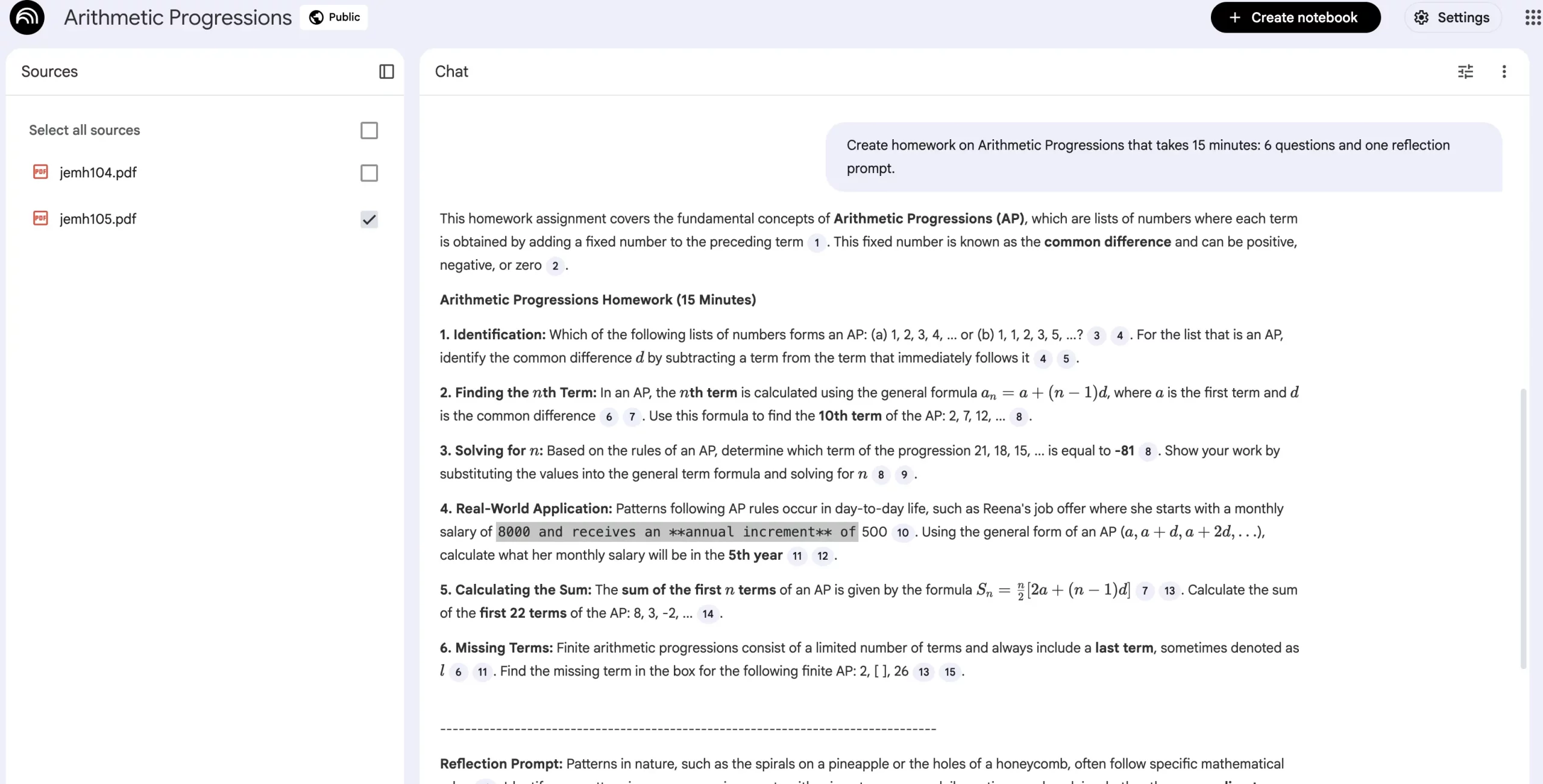
Example:
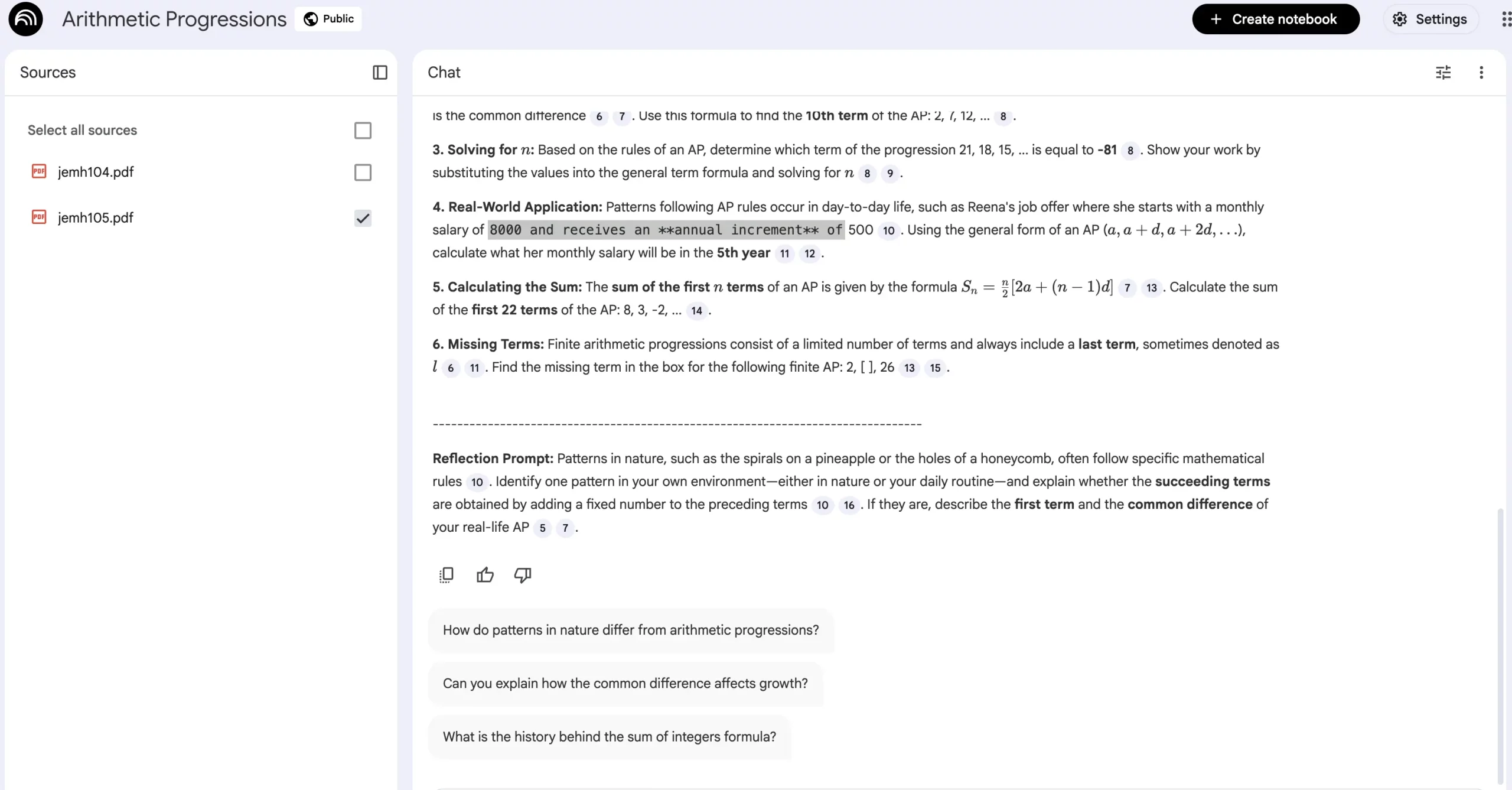
We will use the Arithmetic Progressions module as the source here and check out NotebookLM’s output using this prompt.
The prompt becomes: Create homework on Arithmetic Progressions that takes 15 minutes: 6 questions and one reflection prompt.
You can check out the output in the images below:
15. Multi-Day Revision Plan
Prompt:
Create a 5-day revision plan for [TOPIC] with daily goals, practice tasks, and quick checks.
Output:
A structured revision roadmap that students can follow independently.
16. Exam-Focused Practice
Prompt:
Generate exam-style questions on [TOPIC] with brief model answers.
Output:
Targeted practice aligned to assessment expectations.
Conclusion
If you are a teacher and you have gone through this article in its entirety, I am utmost confident that you have found at least one takeaway that will help you either plan or impart teaching in a whole-new way. Hopefully, this new method will save you both time and effort on the daily, mundane tasks, all the while keeping your teaching standards and intent intact.
If these prompts help, make sure to try more variations of them for different topics, concepts, and even classes. In case they do not, make sure to try certain variations that yield the results best suited for you. You can also reach out to us in the comments section below for any more help we can extend.







