
Agentic browsing is quickly becoming mainstream.
People don’t just want AI agents to research products anymore. They want agents to actually buy things for them: compare options, place orders, handle payments, and complete the entire transaction.
That’s where things started to break.
Today’s commerce stack is fragmented. Every merchant, platform, and payment provider uses proprietary integrations. So even if an agent is smart enough to make decisions, it struggles to act at scale because it has no common way to talk to these systems.
This is exactly the gap Google’s Universal Commerce Protocol (UCP) is designed to fix.
UCP creates a standardized, secure way for AI agents, merchants, platforms, and payment providers to communicate. Instead of building custom integrations for every store or service, agents can interact with commerce systems through a shared protocol, making agent-driven purchasing finally practical, interoperable, and scalable.
Table of contents
- What Is the Universal Commerce Protocol (UCP)?
- The Core Idea Behind UCP
- Why UCP Matters?
- Why Google Introduced UCP?
- How Universal Commerce Protocol (UCP) Works?
- Step 1: Set up the business server and add sample products to your store
- Step2: Prepare your business server to accept requests from agents
- Step 3: Discover business capabilities with your agent
- Step 4: Invoke a checkout capability with your agent
- Step 5: Apply discounts to the checkout request with your agent
- Key Components of the Universal Commerce Protocol
- Benefits for the Commerce Ecosystem
- Conclusion
What Is the Universal Commerce Protocol (UCP)?
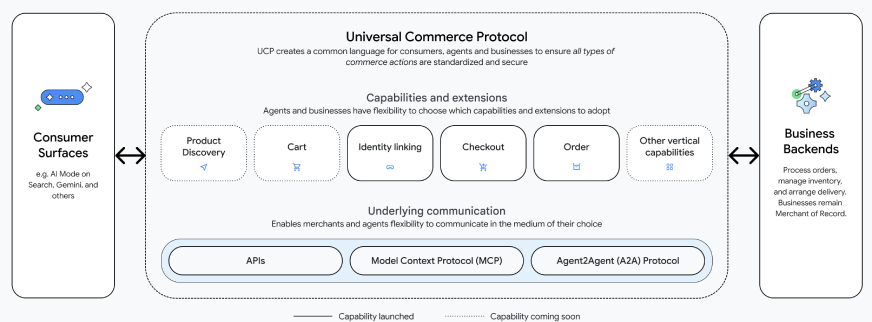
The Universal Commerce Protocol is an open commerce standard that connects digital agents with commerce systems. It provides a common framework for discovering products, managing carts, executing payments, and handling post-purchase tasks. UCP does not replace existing e-commerce platforms or payment systems. Instead, it acts as a shared language that allows AI agents, applications, merchants, and payment providers to interact smoothly.
The Core Idea Behind UCP
UCP is a solution primarily to an integration challenge. In the past, each AI assistant or platform had to rely on unique integrations with every merchant or commerce system. This method was not scalable.
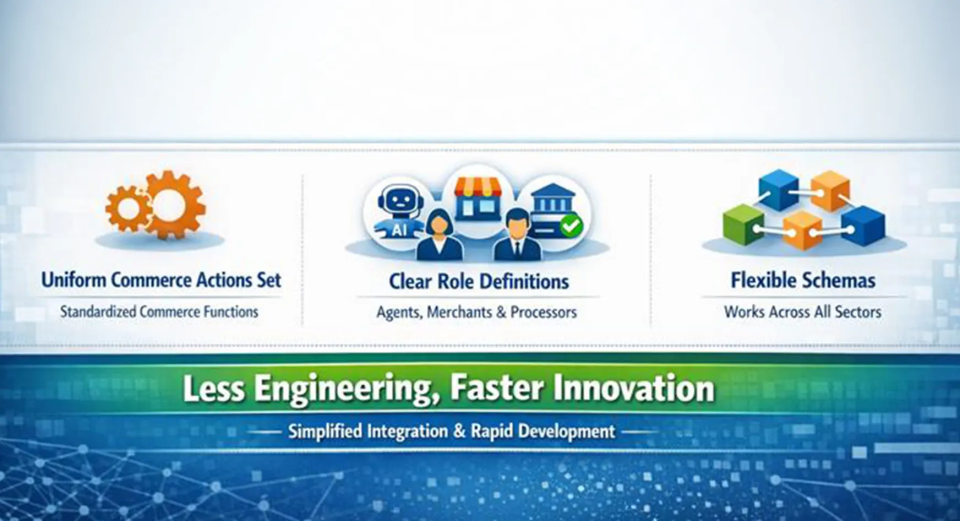
- A uniform commerce actions set
- Unambiguous role definitions for agents, merchants, and payment processors
- Flexible schemas applicable across sectors
- This method of working reduces the need for engineering dramatically and at the same time allows quicker innovation
Why UCP Matters?
Today’s e-commerce ecosystem is highly fragmented. Each shopping channel such as websites, mobile apps, and third party platforms requires custom integrations with every merchant. As a result, a retailer selling across multiple channels must manage many complex integrations. This challenge grows as AI shopping agents become a common way for people to shop.
UCP solves this by introducing a single standard protocol that covers the entire shopping journey, from product discovery to checkout and order management. This simplifies integrations and allows the ecosystem to unlock several important benefits.
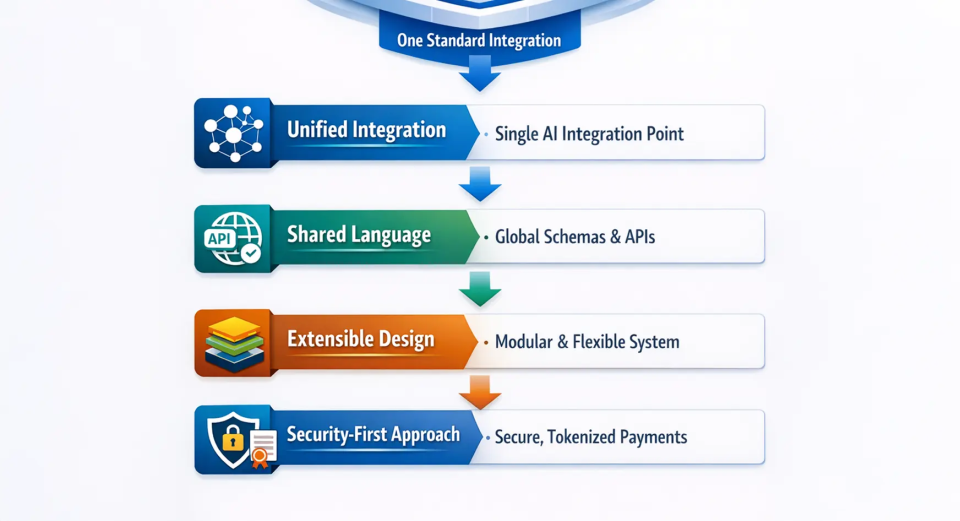
- Unified integration: Reduces complex N×N commerce integrations to a single integration point for AI agents and interfaces.
- Shared language: Defines common schemas and APIs so all commerce systems can communicate consistently end to end.
- Extensible, modular design: Uses modular components that can evolve without breaking existing integrations.
- Security-first approach: Ensures secure, tokenized payments with verified user consent for every transaction.
For customers, this means smoother interactions and fewer abandoned carts. Buyers can move quickly from browsing or chatting to completing a purchase, often without re-entering details. As Google explains, UCP is designed so consumers can confidently pay using Google Pay, with payment and shipping information already saved in Google Wallet.
Also Read: Top 10 Agentic AI Chrome Extensions
Why Google Introduced UCP?
The trade has slowly but surely migrated into the realm of chat and robots. Today the users demand AI systems to act instead of merely informing. Google rolled out UCP to spearhead this change while still keeping the doors open and the ecosystem stable. Agentic commerce is the term used for AI systems that are capable of independently doing commercial work. Such agents are able to:
- Look for and evaluate products
- Adjust the selection according to the user’s taste
- Execute purchases in a safe manner
- Handle returns, give refunds, and offer support
How Universal Commerce Protocol (UCP) Works?
UCP works by breaking the commerce journey into a clear sequence of actions that AI agents can follow. Each step represents a specific interaction, from discovering a product to completing the transaction and handling what comes next. Together, these steps define how an agent moves through a purchase in a controlled and predictable way. Let’s break this down and look at each step individually:
Step 1: Set up the business server and add sample products to your store
In order to make it easier for businesses to get up and running, Google has set up a sample repository. The repository contains a Python server that is ready to be used for hosting Business APIs, along with a UCP SDK that provides sample product data and reference implementations. These components work together to help the user visualize and understand how a UCP-compliant business server can be configured and tested.
Configuring the business server:
mkdir sdk
git clone https://github.com/Universal-Commerce-Protocol/python-sdk.git sdk/python
pushd sdk/python
uv sync
popd
git clone https://github.com/Universal-Commerce-Protocol/samples.git
cd samples/rest/python/server
uv sync
Using a flower shop as an example, Google plays the role of the business for demonstration purposes. In addition, we provide a simple product database based on SQLite that contains the catalog data for the demo environment which is the same as the sample data. This configuration allows the developers to use realistic product information for testing UCP workflows without the need for a complete production database.
Step2: Prepare your business server to accept requests from agents
Next, start the business server that hosts the Business APIs on port 8182 and connects to the demo product database. The server runs in the background so client applications and AI agents can connect without interruption. Run the command below to launch the business server:
uv run server.py \
--products_db_path=/tmp/ucp_test/products.db \
--transactions_db_path=/tmp/ucp_test/transactions.db \
--port=8182 &
SERVER_PID=$!
Step 3: Discover business capabilities with your agent
Businesses expose a JSON manifest at /.well-known/ucp that lists their available services and capabilities. This allows AI agents to discover features, endpoints, and payment configurations dynamically, without relying on hard-coded integrations.
Now run the following command to let your agent discover the business services and capabilities:
export SERVER_URL=http://localhost:8182
export RESPONSE=$(curl -s -X GET $SERVER_URL/.well-known/ucp)
echo $RESPONSE
Response:
{
"ucp": {
"version": "2026-01-11",
"services": { "dev.ucp.shopping": { "version": "2026-01-11", "spec": "https://ucp.dev/specs/shopping", "rest": { "schema": "https://ucp.dev/services/shopping/openapi.json", "endpoint": "http://localhost:8182/" } } },
"capabilities": [
{ "name": "dev.ucp.shopping.checkout", "version": "2026-01-11", "spec": "https://ucp.dev/specs/shopping/checkout", "schema": "https://ucp.dev/schemas/shopping/checkout.json" },
{ "name": "dev.ucp.shopping.discount", "version": "2026-01-11", "spec": "https://ucp.dev/specs/shopping/discount", "schema": "https://ucp.dev/schemas/shopping/discount.json", "extends": "dev.ucp.shopping.checkout" },
{ "name": "dev.ucp.shopping.fulfillment", "version": "2026-01-11", "spec": "https://ucp.dev/specs/shopping/fulfillment", "schema": "https://ucp.dev/schemas/shopping/fulfillment.json", "extends": "dev.ucp.shopping.checkout" }
]
},
"payment": {
"handlers": [
{ "id": "shop_pay", "name": "com.shopify.shop_pay", "version": "2026-01-11", "spec": "https://shopify.dev/ucp/handlers/shop_pay", "config_schema": "https://shopify.dev/ucp/handlers/shop_pay/config.json", "instrument_schemas": [ "https://shopify.dev/ucp/handlers/shop_pay/instrument.json" ], "config": { "shop_id": "d124d01c-3386-4c58-bc58-671b705e19ff" } },
{ "id": "google_pay", "name": "google.pay", "version": "2026-01-11", "spec": "https://example.com/spec", "config_schema": "https://example.com/schema", "instrument_schemas": [ "https://ucp.dev/schemas/shopping/types/gpay_card_payment_instrument.json"
], "config": { "api_version": 2, "api_version_minor": 0, "merchant_info": { "merchant_name": "Flower Shop", "merchant_id": "TEST", "merchant_origin": "localhost" }, "allowed_payment_methods": [ { "type": "CARD", "parameters": { "allowedAuthMethods": [ "PAN_ONLY", "CRYPTOGRAM_3DS" ], "allowedCardNetworks": [ "VISA", "MASTERCARD" ] }, "tokenization_specification": [ { "type": "PAYMENT_GATEWAY", "parameters": [ { "gateway": "example", "gatewayMerchantId": "exampleGatewayMerchantId" } ] } ] } ] } },
{ "id": "mock_payment_handler", "name": "dev.ucp.mock_payment", "version": "2026-01-11", "spec": "https://ucp.dev/specs/mock", "config_schema": "https://ucp.dev/schemas/mock.json", "instrument_schemas": [ "https://ucp.dev/schemas/shopping/types/card_payment_instrument.json" ], "config": { "supported_tokens": [ "success_token", "fail_token" ] } }
]
}
}
Step 4: Invoke a checkout capability with your agent
Run this command for your agent to create a checkout session with the sample products:
export RESPONSE=$(curl -s -X POST "$SERVER_URL/checkout-sessions" -H 'Content-Type: application/json' -H 'UCP-Agent: profile="https://agent.example/profile"' -H 'request-signature: test' -H 'idempotency-key: 0b50cc6b-19b2-42cd-afee-6a98e71eea87' -H 'request-id: 6d08ae4b-e7ea-44f4-846f-d7381919d4f2' -d '{"line_items":[{"item":{"id":"bouquet_roses","title":"Red Rose"},"quantity":1}],"buyer":{"full_name":"John Doe","email":"[email protected]"},"currency":"USD","payment":{"instruments":[],"handlers":[{"id":"shop_pay","name":"com.shopify.shop_pay","version":"2026-01-11","spec":"https://shopify.dev/ucp/handlers/shop_pay","config_schema":"https://shopify.dev/ucp/handlers/shop_pay/config.json","instrument_schemas":["https://shopify.dev/ucp/handlers/shop_pay/instrument.json"],"config":{"shop_id":"d124d01c-3386-4c58-bc58-671b705e19ff"}},{"id":"google_pay","name":"google.pay","version":"2026-01-11","spec":"https://example.com/spec","config_schema":"https://example.com/schema","instrument_schemas":["https://ucp.dev/schemas/shopping/types/gpay_card_payment_instrument.json"],"config":{"api_version":2,"api_version_minor":0,"merchant_info":{"merchant_name":"Flower Shop","merchant_id":"TEST","merchant_origin":"localhost"},"allowed_payment_methods":[{"type":"CARD","parameters":{"allowedAuthMethods":["PAN_ONLY","CRYPTOGRAM_3DS"],"allowedCardNetworks":["VISA","MASTERCARD"]},"tokenization_specification":[{"type":"PAYMENT_GATEWAY","parameters":[{"gateway":"example","gatewayMerchantId":"exampleGatewayMerchantId"}]}]}]}},{"id":"mock_payment_handler","name":"dev.ucp.mock_payment","version":"2026-01-11","spec":"https://ucp.dev/specs/mock","config_schema":"https://ucp.dev/schemas/mock.json","instrument_schemas":["https://ucp.dev/schemas/shopping/types/card_payment_instrument.json"],"config":{"supported_tokens":["success_token","fail_token"]}}]}}') && echo $RESPONSE As soon as the checkout session is created, your agent will gain access to a checkout id issued by the server that can further be used for making updates to the checkout session:
RESPONSE:
{
"ucp": { "version": "2026-01-11", "capabilities": [ { "name": "dev.ucp.shopping.checkout", "version": "2026-01-11" } ] },
"id": "cb9c0fc5-3e81-427c-ae54-83578294daf3",
"line_items": [ {
"id": "2e86d63a-a6b8-4b4d-8f41-559f4c6991ea",
"item": { "id": "bouquet_roses", "title": "Bouquet of Red Roses", "price": 3500 },
"quantity": 1,
"totals": [ { "type": "subtotal", "amount": 3500 }, { "type": "total", "amount": 3500 } ]
} ],
"buyer": { "full_name": "John Doe", "email": "[email protected]" },
"status": "ready_for_complete",
"currency": "USD",
"totals": [ { "type": "subtotal", "amount": 3500 }, { "type": "total", "amount": 3500 } ],
"links": [],
"payment": { "handlers": [], "instruments": [] },
"discounts": {}
}
Step 5: Apply discounts to the checkout request with your agent
Run this command to enable your agent to apply discounts to the checkout session, using the checkout id from the previous step:
export CHECKOUT_ID=$(echo $RESPONSE | jq -r '.id') && export LINE_ITEM_1_ID=$(echo $RESPONSE | jq -r '.line_items[0].id') && export RESPONSE=$(curl -s -X PUT "$SERVER_URL/checkout-sessions/$CHECKOUT_ID" -H 'Content-Type: application/json' -H 'UCP-Agent: profile="https://agent.example/profile"' -H 'request-signature: test' -H 'idempotency-key: b9ecd4b3-0d23-4842-8535-0d55e76e2bad' -H 'request-id: 28e70993-e328-4071-91de-91644dc75221' -d "{\"id\":\"$CHECKOUT_ID\",\"line_items\":[{\"id\":\"$LINE_ITEM_1_ID\",\"item\":{\"id\":\"bouquet_roses\",\"title\":\"Red Rose\"},\"quantity\":1}],\"currency\":\"USD\",\"payment\":{\"instruments\":[],\"handlers\":[]},\"discounts\":{\"codes\":[\"10OFF\"]}}") && echo $RESPONSE | jq Your agent will receive the following response with the discount applied:
RESPONSE:
{
"ucp": { "version": "2026-01-11", "capabilities": [ { "name": "dev.ucp.shopping.checkout", "version": "2026-01-11" } ] },
"id": "cb9c0fc5-3e81-427c-ae54-83578294daf3",
"line_items": [ {
"id": "2e86d63a-a6b8-4b4d-8f41-559f4c6991ea",
"item": { "id": "bouquet_roses", "title": "Bouquet of Red Roses", "price": 3500 },
"quantity": 1,
"totals": [ { "type": "subtotal", "amount": 3500 }, { "type": "total", "amount": 3500 } ] } ],
"buyer": { "full_name": "John Doe", "email": "[email protected]" },
"status": "ready_for_complete",
"currency": "USD",
"totals": [ { "type": "subtotal", "amount": 3500 }, { "type": "discount", "amount": 350 }, { "type": "total", "amount": 3150 } ],
"links": [],
"payment": { "handlers": [], "instruments": [] },
"discounts": {
"codes": [ "10OFF" ],
"applied": [ { "code": "10OFF", "title": "10% Off", "amount": 350, "automatic": false, "allocations": [ { "path": "subtotal", "amount": 350 } ] } ]
}
}
Key Components of the Universal Commerce Protocol
A UCP server, which is often the merchant backend, reveals one or more services. Every service corresponds to specific capabilities that can be distinguished among the functional areas such as product discovery or checkout. Common examples include ucp.shopping.catalog, ucp.shopping.checkout, and ucp.shopping.orders. Merchants opt for the capabilities they require, whereas the AI agents will communicate with the merchants as per the enabled capabilities.
Capabilities an Core Service
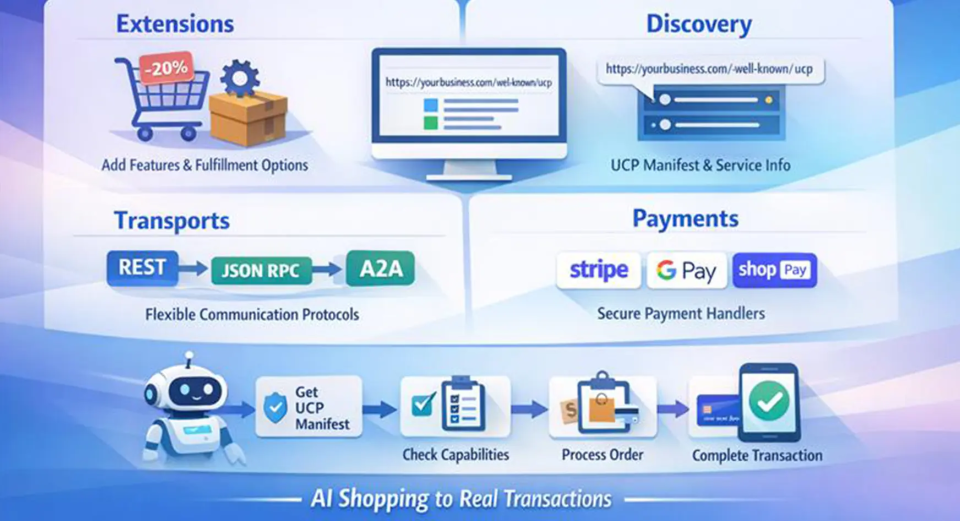
Extensions: Capabilities also permit the use of extensions to provide specialized functions. Extensions give merchants the option to add features like coupon discounts or sophisticated fulfillment methods without having to change the primary schemas.
Discovery
Each UCP enabled business provides a manifest at https://<business-domain>/.well-known/ucp. This provides a list of the services available, capabilities that are supported, API endpoints, possible versions, extensions, and details about the payment handlers.
Transports
UCP is not restricted to a specific transport. The same capability payloads can move over REST, JSON RPC, or agent native protocols like Model Context Protocol (MCP) and Agent2Agent (A2A) or even non-native ones.
Payments
UCP is integrated with various payment providers through its pluggable payment handlers which include Stripe, Google Pay, and Shop Pay. The payment tokens are encrypted and routed during checkout.
Together, these factors empower UCP to convert AI shopping dialogues into actual transactions. The normal transaction is as follows:
- The agent gets the merchant’s UCP manifest
- It determines the relevant capabilities (for instance, checkout)
- It calls those APIs along with the shopper’s order details and chooses a payment handler
- UCP takes care of everything else (counting any discounts or fulfillment options that were discussed)
Benefits for the Commerce Ecosystem
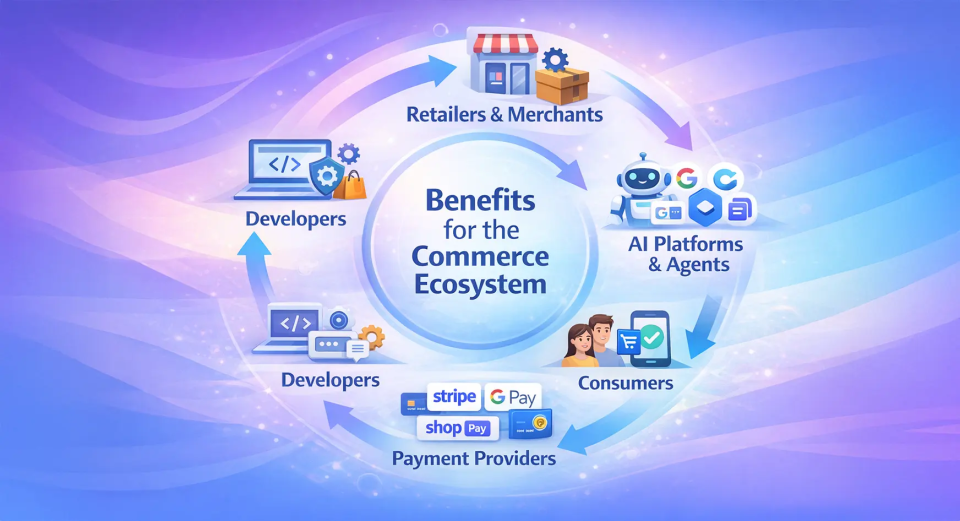
- Retailers and Merchants: UCP lets merchants sell across AI-driven shopping surfaces without losing control over branding, data, or checkout. They remain the Merchant of Record while reaching users through Google Search AI Mode, chatbots, and voice assistants using a single integration.
- AI Platforms and Agents: AI platforms like Google AI Mode, Gemini, and Microsoft Copilot can offer commerce features without building custom integrations for each retailer. A unified API speeds up merchant onboarding and enables scalable agent-driven commerce.
- Developers: UCP is open source and developer friendly, with clear documentation, SDKs, and reference implementations. Developers can build using familiar tools like REST and JSON and adopt only the capabilities they need.
- Payment Providers: Payment providers can integrate once and work across many merchants using UCP’s modular, tokenized payment flow. This removes the need for platform-specific integrations.
- Consumers: UCP enables users to browse and buy directly through AI assistants without switching between apps or websites, creating a faster and more seamless shopping experience.
Conclusion
The Universal Commerce Protocol could reshape digital commerce in the AI era. It brings AI agents, merchants, and payments together under one standard while preserving merchant control and enabling seamless shopping across chat, search, and voice. As AI assistants influence more purchase decisions, UCP aims to keep commerce open, secure, and scalable.
What’s your take on agent-driven shopping? Share your thoughts in the comments below.
Hello! I'm Vipin, a passionate data science and machine learning enthusiast with a strong foundation in data analysis, machine learning algorithms, and programming. I have hands-on experience in building models, managing messy data, and solving real-world problems. My goal is to apply data-driven insights to create practical solutions that drive results. I'm eager to contribute my skills in a collaborative environment while continuing to learn and grow in the fields of Data Science, Machine Learning, and NLP.



